Sponsored

Tazer (Programmer) for the JL

Status
Not open for further replies.

Bearman95

Well-Known Member
First Name
Chuck
Joined
Aug 7, 2018
Threads
6
Messages
306
Reaction score
256
Location
Ft. Worth
Vehicle(s)
2018 JL Rubicon
I’m running the original taser with 11.3 software that came with it. I’ve had it for for five months and no problems. I’m not interested in updating before anyone says anything about that. The only reason I got it was correct to correct my Tire size. I originally thought I would disable the start stop with it but it’s so easy to just push the button I don’t even keep it plugged in. Oh I also use it to lower the sensor on the tire pressure to 25 pounds.
Sponsored

 

Rhinebeck01

Well-Known Member
Joined
May 9, 2018
Threads
169
Messages
12,679
Reaction score
19,169
Location
Ormond Beach, Florida
Vehicle(s)
'18 JL Rubi, '26 Cybertruck, '01 Harley FatBoy
Occupation
Retired at 55 ..
@Bearman95
@Everyone

With the new firmware version that Joe will be releasing fairly soon for the Tazer JL, the Tazer JL will be handling ESS disable differently.

By the way, I am mentioning this more for the benefit of other's, as I know you do not want to be bothered or whatever. To each his own....

Content edited do to error in the post that was pointed out by Joe, in the next post in this thread.
.
 
Last edited:

joe@zauto

Well-Known Member
First Name
Joe
Joined
Apr 13, 2018
Threads
3
Messages
209
Reaction score
565
Location
Commack, NY
Vehicle(s)
2018 wrangler rubicon unlimited
@Bearman95
@Everyone

With the new firmware version that Joe will be releasing fairly soon for the Tazer JL, the Tazer JL will be handling ESS disable differently. With the new version firmware, you will have ESS disable with the Tazer JL married but no need to keep the Tazer JL plugged into the OBDll port.

With that said, if, (and I know you don't want to) you were to update to the new firmware version, you would no longer have to push that ESS button on the dash.

By the way, I am mentioning this more for the benefit of other's, as I know you do not want to be bothered or whatever. To each his own....

.
Sorry not sure if I made it unclear but you will still need it plugged in. Doesn’t need to be married and no need to enter any menu - it’ll just remember last ESS state, but it’s still a live feature and therefore needs to be plugged in to work.
 

melendez69

Well-Known Member
First Name
Marc
Joined
Jun 22, 2018
Threads
32
Messages
3,446
Reaction score
6,624
Location
Waxhaw NC
Vehicle(s)
2018 3.6 JLR / 2013 991 911 / 2013 E92 M3
Occupation
...huh?
Vehicle Showcase
1
@Bearman95
@Everyone

With the new firmware version that Joe will be releasing fairly soon for the Tazer JL, the Tazer JL will be handling ESS disable differently.

By the way, I am mentioning this more for the benefit of other's, as I know you do not want to be bothered or whatever. To each his own....

Content edited do to error in the post that was pointed out by Joe, in the next post in this thread.
.
You can never have too much information... I'm appreciative of it all..
 

Sponsored

jvanloon

Well-Known Member
First Name
Jeromy
Joined
Jul 10, 2018
Threads
2
Messages
116
Reaction score
100
Location
Los Angeles
Vehicle(s)
2018 JLUR, 2022 JLURXR on Order
Quick question for everyone regarding the Tazer JL. I have the mini to be specific. If you change your tire size through the tool and exit out and then reboot. If you go back into the Perf screen to tire size does it show the new value you just set or does it always revert to showing the original value? The reason I ask is that I've seemingly set my new tire size to 34.46 several times but when I go back in and look it always reverts to the original value (which I believe was 33.250 for a Rubicon). thanks in advance.
 

jvanloon

Well-Known Member
First Name
Jeromy
Joined
Jul 10, 2018
Threads
2
Messages
116
Reaction score
100
Location
Los Angeles
Vehicle(s)
2018 JLUR, 2022 JLURXR on Order
Left arrow and cruise center button so it actually saves the value.
Thanks Joe. Yes, I believe that's what I've been doing. After that it brings up the reboot screen and goes into that reboot process. Subsequently even if I go through a full reboot after that and then go into look at your size the value is back at original. That doesn't sound normal based on your response? Should I call into support?
 

joe@zauto

Well-Known Member
First Name
Joe
Joined
Apr 13, 2018
Threads
3
Messages
209
Reaction score
565
Location
Commack, NY
Vehicle(s)
2018 wrangler rubicon unlimited
Sounds like you’re pressing the RES button instead of the center button if you’re getting the quick reboot. If dine right it should say “tire size set”
 

jvanloon

Well-Known Member
First Name
Jeromy
Joined
Jul 10, 2018
Threads
2
Messages
116
Reaction score
100
Location
Los Angeles
Vehicle(s)
2018 JLUR, 2022 JLURXR on Order
Thanks Joe. I'll try again and use the center button to confirm.
 

Sponsored

WranglerMan

Well-Known Member
First Name
Will
Joined
May 8, 2018
Threads
104
Messages
3,560
Reaction score
2,885
Location
Greenfield Indiana
Vehicle(s)
2018 Wrangler JLU Sahara
Occupation
Retired
Vehicle Showcase
1
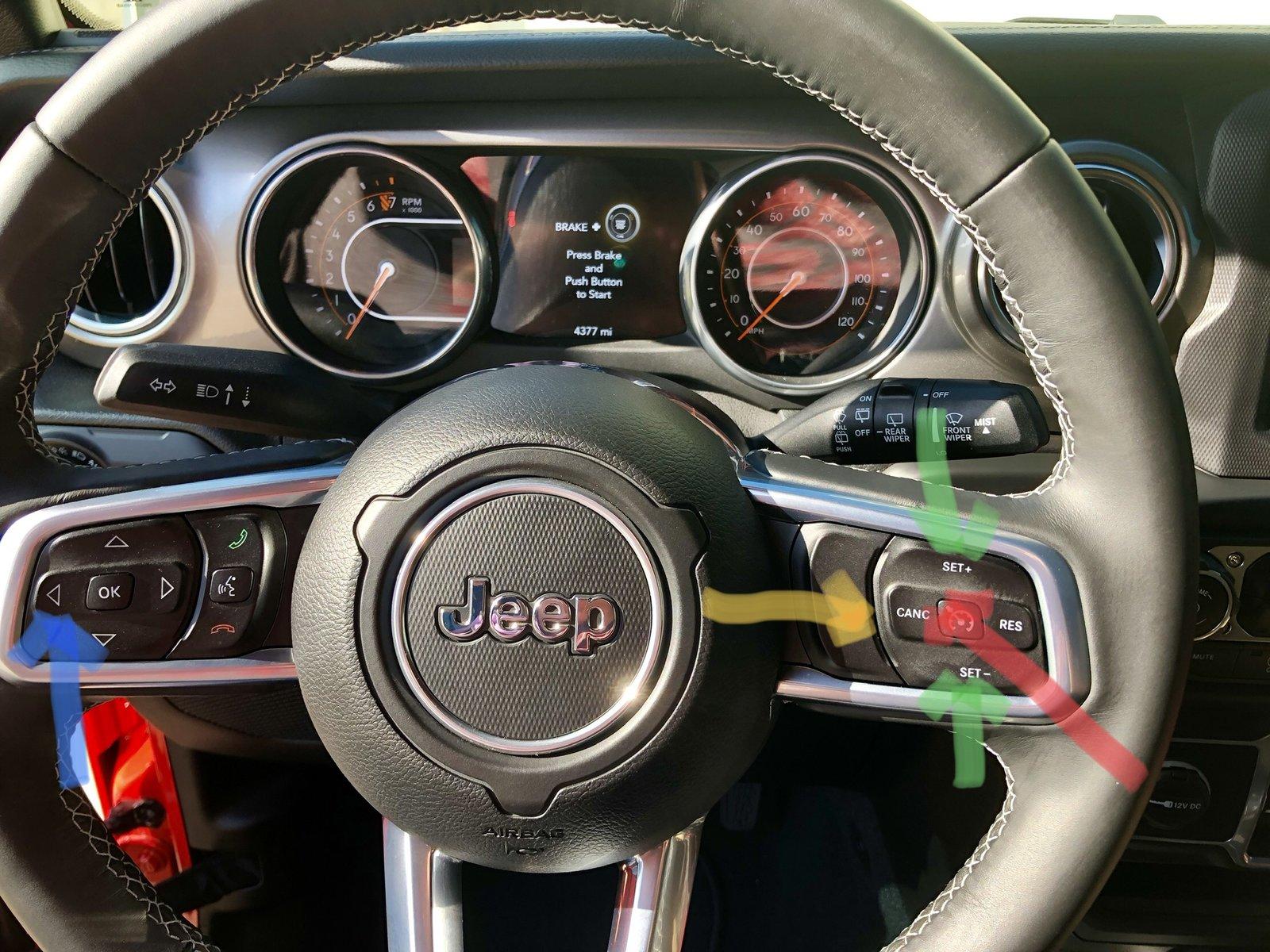
Jeep Wrangler JL Tazer (Programmer) for the JL 8BBABC6E-F2CE-4E9E-8512-B014C0214F81


Pardon my crappy arrow pointing with my fat fingers but here’s some info

Blue and Yellow at same time to access Tazer menu from audio screen
Blue and red to select that choice once you get to the sub screen
Blue and green to go up/down with choices with the section
Blue and red to select and accept


I am pretty sure that’s the way it is but I’m not in my JL to confirm, and I always do a full reboot and then go back in and check to make sure my selection was accepted.
 

jvanloon

Well-Known Member
First Name
Jeromy
Joined
Jul 10, 2018
Threads
2
Messages
116
Reaction score
100
Location
Los Angeles
Vehicle(s)
2018 JLUR, 2022 JLURXR on Order
Joe and WranglerMan, thanks for your quick responses. I was obviously misreading the instructions and using Left - Res to exit out thinking that would save. I was able to make it save using Left - Center!

Thanks Again
 

Rhinebeck01

Well-Known Member
Joined
May 9, 2018
Threads
169
Messages
12,679
Reaction score
19,169
Location
Ormond Beach, Florida
Vehicle(s)
'18 JL Rubi, '26 Cybertruck, '01 Harley FatBoy
Occupation
Retired at 55 ..
@jvanloon

There is a little bit of a learning curve. If other stuff/? comes up, do come here and ask .

DO, use a smart phone with a GPS app to verify that your speedo MPH, is now correct.

Do not take for granted it is correct, until you verify. Check at say 40, 50, 60 and 70 mph.

If your speedo is not correct then use the Tazer JL Mini, to re-program until it is correct.

.
 

jvanloon

Well-Known Member
First Name
Jeromy
Joined
Jul 10, 2018
Threads
2
Messages
116
Reaction score
100
Location
Los Angeles
Vehicle(s)
2018 JLUR, 2022 JLURXR on Order
Thanks Rhinebeck01, I've validated at 20, 30 and 40 so far with Waze. Those were all off on prior attempts but are all spot on after this last round. I'm planning to check higher speeds tomorrow.
 

twisty

Well-Known Member
First Name
bob
Joined
Jul 22, 2018
Threads
9
Messages
1,083
Reaction score
815
Location
Fountain Hills, Arizona
Vehicle(s)
2018 JL Rubicon White
ready to purchase but looking on the website it shows a mini that APPEARS to do the same thing as the two piece unit. Is this something new where you dont need the OBD port?
Sponsored

 
Status
Not open for further replies.


Top