Sponsored

Solution Found for JL Center Console USB Car Play Issues

OP
OP
jromanmd

jromanmd

Well-Known Member
First Name
Jon
Joined
Oct 16, 2022
Threads
26
Messages
458
Reaction score
606
Location
Annapolis
Website
www.instagram.com
Vehicle(s)
2023 Jeep Wrangler Rubicon
Man that's too bad. 95% of the people that tried this is working. I wonder if device / OS version has anything to do with it - which it shouldn't.

I am using the IP13 Pro. Did you try the 90 degree adapter? Again, no idea why, but when I was testing, it cut in and out when I was not using that adapter.

Crazy times we live in!
Sponsored
 

LatteSipper

Well-Known Member
Joined
Jan 5, 2021
Threads
6
Messages
180
Reaction score
296
Location
Massachusetts
Vehicle(s)
22 JT Mojave, '23 Highlander, '21 JLU Sahara 6MT (sold)
I searched the forums for “iPhone 13” and found this thread. I recently replaced an iPhone 8, which I’ve had the entire duration of my 2021 JLU ownership and never dropped the connection, with an iPhone 13. Today first time using Car Play with the iPhone 13, the connection dropped 6 times in the course of my hour long drive. I plug in to the center console, and the only change was swapping the phone, cable was the same.

For whatever reason, it is definitely device dependent, though I’m not convinced there isn’t some issue with the center console port as mentioned elsewhere. The Jeep’s Car Play has always had an issue with occasional static, no different with the new phone, but always problem free on my wife’s Highlander.

I’ll give the suggestions here a try, including the 90-degree adapter as I prefer to have the phone out of sight in the console.
 
OP
OP
jromanmd

jromanmd

Well-Known Member
First Name
Jon
Joined
Oct 16, 2022
Threads
26
Messages
458
Reaction score
606
Location
Annapolis
Website
www.instagram.com
Vehicle(s)
2023 Jeep Wrangler Rubicon
@LatteSipper Sounds good - my IP13 works like a charm. Not one dropout. Ever! LMK if you need any help.
 

2mnycars

Well-Known Member
First Name
Dave
Joined
Sep 15, 2019
Threads
13
Messages
632
Reaction score
369
Location
Canada
Vehicle(s)
JLUR
USB Power

Did a search; found this thread. Check post 4...this problem isn't easily solved. The console USB is controlled by the operating system.

https://www.jlwranglerforums.com/forum/threads/interior-usb-port.113211/#post-2352143

When I complained to the dealer they said that there was a new and changed operating system. Did they reflash? Frankly I don't know. Phone cut out after the service as it had before.

I bought a new Anker cable as recommended somewhere on this forum. My phone works. Console USB and WAZE works fine when cable is connected. However, my better half's new iPhone cuts out immediately. My goal was to see if a better than Apple cord would solve the problem with less energy loss.
 
OP
OP
jromanmd

jromanmd

Well-Known Member
First Name
Jon
Joined
Oct 16, 2022
Threads
26
Messages
458
Reaction score
606
Location
Annapolis
Website
www.instagram.com
Vehicle(s)
2023 Jeep Wrangler Rubicon
@2mnycars the setup I highlighted at the beginning of this thread seems to work for a lot of people.
 

Sponsored

2mnycars

Well-Known Member
First Name
Dave
Joined
Sep 15, 2019
Threads
13
Messages
632
Reaction score
369
Location
Canada
Vehicle(s)
JLUR
@2mnycars the setup I highlighted at the beginning of this thread seems to work for a lot of people.
Yup. Except.
The cable isn't sold in Canada.
I can buy it from the US. Cost of cable plus $30.00 US for shipping! And guvmint duty cost when I receive it. I contacted the supplier and they say it's worth it. Paying $50 US plus duty isn't worth it for me. They're not interested in selling to Canadians.

I did buy the adapter.
And I bought an anker cable I thought was equivalent. $30 CDN. My better half's iPhone doesn't work at all connected in the console. Mine does, but it's not worth the hassle. There's something wrong with the Jeep cabling.

DaveL
 
Last edited:

Brainke

Member
First Name
Brad
Joined
Jun 3, 2018
Threads
2
Messages
24
Reaction score
7
Location
Philadelphia
Vehicle(s)
Wrangler JL 2door Hydro Blue-Pearl
This fix works brilliantly! Thank you for this post.
Ordered everything from amazon!

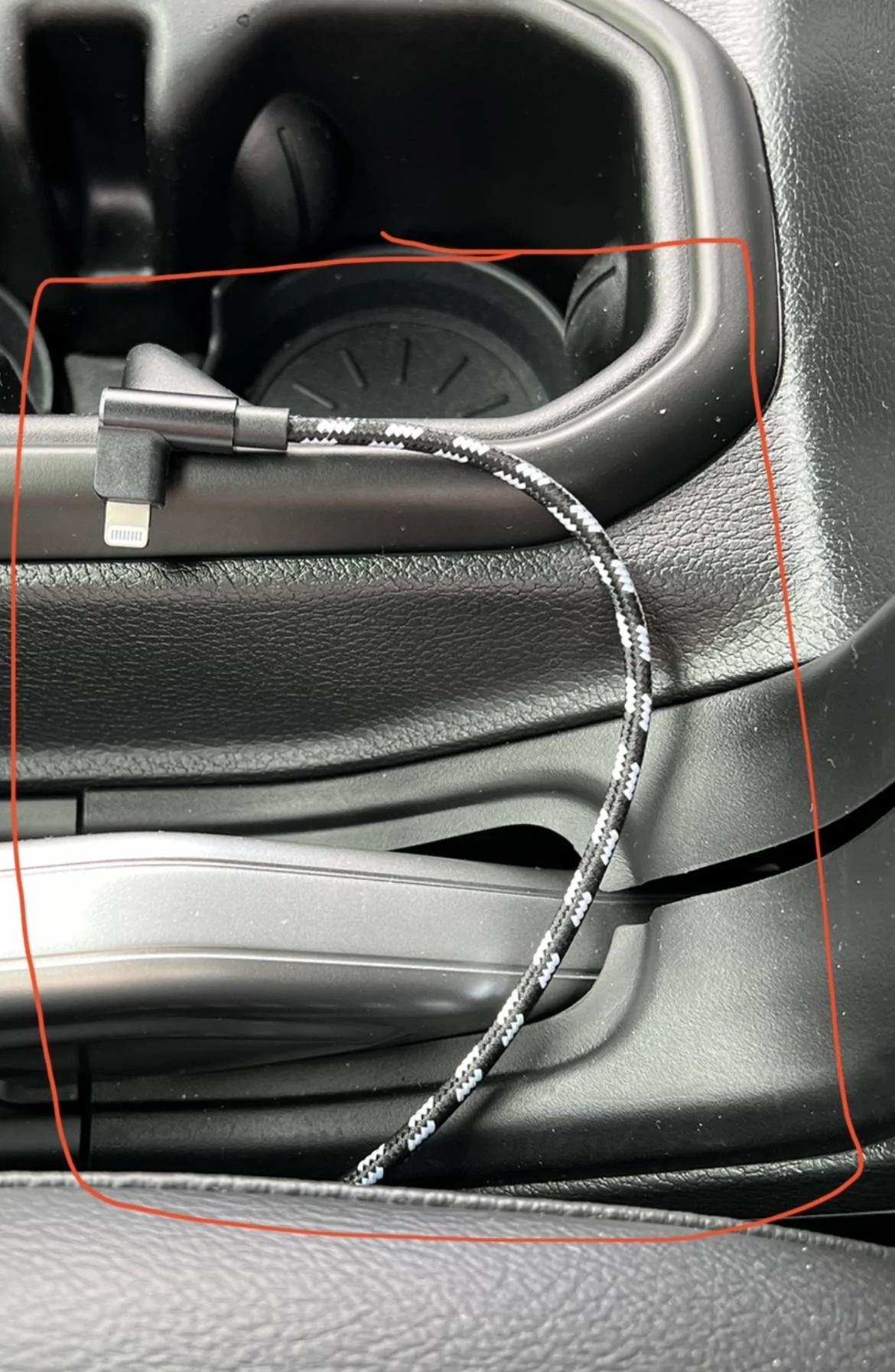
So, after trying a lot of suggestions here and a few of my own, I found a solution. Unfortunately it is NOT wireless, but it works very well.

As a slight recap if someone new to the issue is reading this, a lot of JL's are plagued with intermittent CarPlay back when plugged in via the USB in the Center Console. For reference, I am driving a 2023 JLU Rubicon, and using a iP13 Pro.

I tried wireless first, and was able to get it to work with no issues with the Carlinkit 4.0 Adapter, however I returned it because after extensive testing, it would never turn off. Some speculated that it would after 60 minutes, but mine never did. Although it is not much on the battery, I do not want things draining power. But it did work with no reboots, never dropped out - worked flawlessly.

The other solution which is what I ended up going with was trying different USB-C to Lighting cables and adapters. I do not know why the solution I will outline below works, but it does. I tried Apple Branded Cables, generic ones, certified ones, etc.. and all had issues with either dropping the CP connection or not working at all.

I bought a Agoz Apple MFI Certified Lightning to USB C Cable with a 90° Right Angle connection on both ends and used a USB-C to USB -A Adapter in the Port. I tried this on short trips, a long trip and daily driving. After 2 weeks of testing, I have had no issues at all with reliability.

This has been driving me nuts and hopefully helps out those that are like me and hate having cables dangle out of the front dash media connect hub.

2023-01-02_12-47-52.jpg


2023-01-02_12-48-25.jpg
 

LatteSipper

Well-Known Member
Joined
Jan 5, 2021
Threads
6
Messages
180
Reaction score
296
Location
Massachusetts
Vehicle(s)
22 JT Mojave, '23 Highlander, '21 JLU Sahara 6MT (sold)
Tried @jromanmd's fix for awhile and that didn't work on my '21 JLU with iPhone 13 (I posted previously my iPhone 8 had no issues for 2 years). Phone would disconnect and require unplug/re-plug.

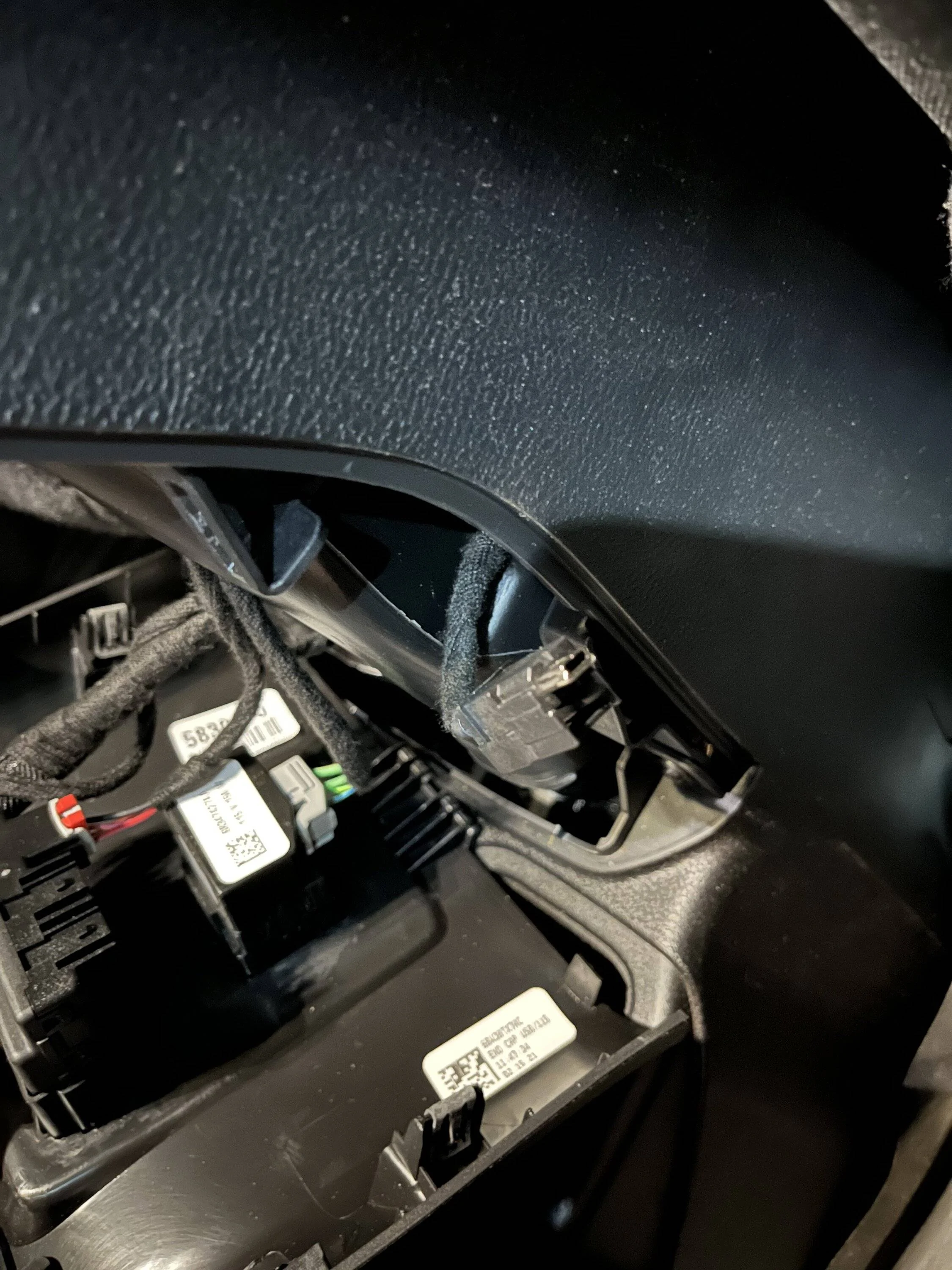
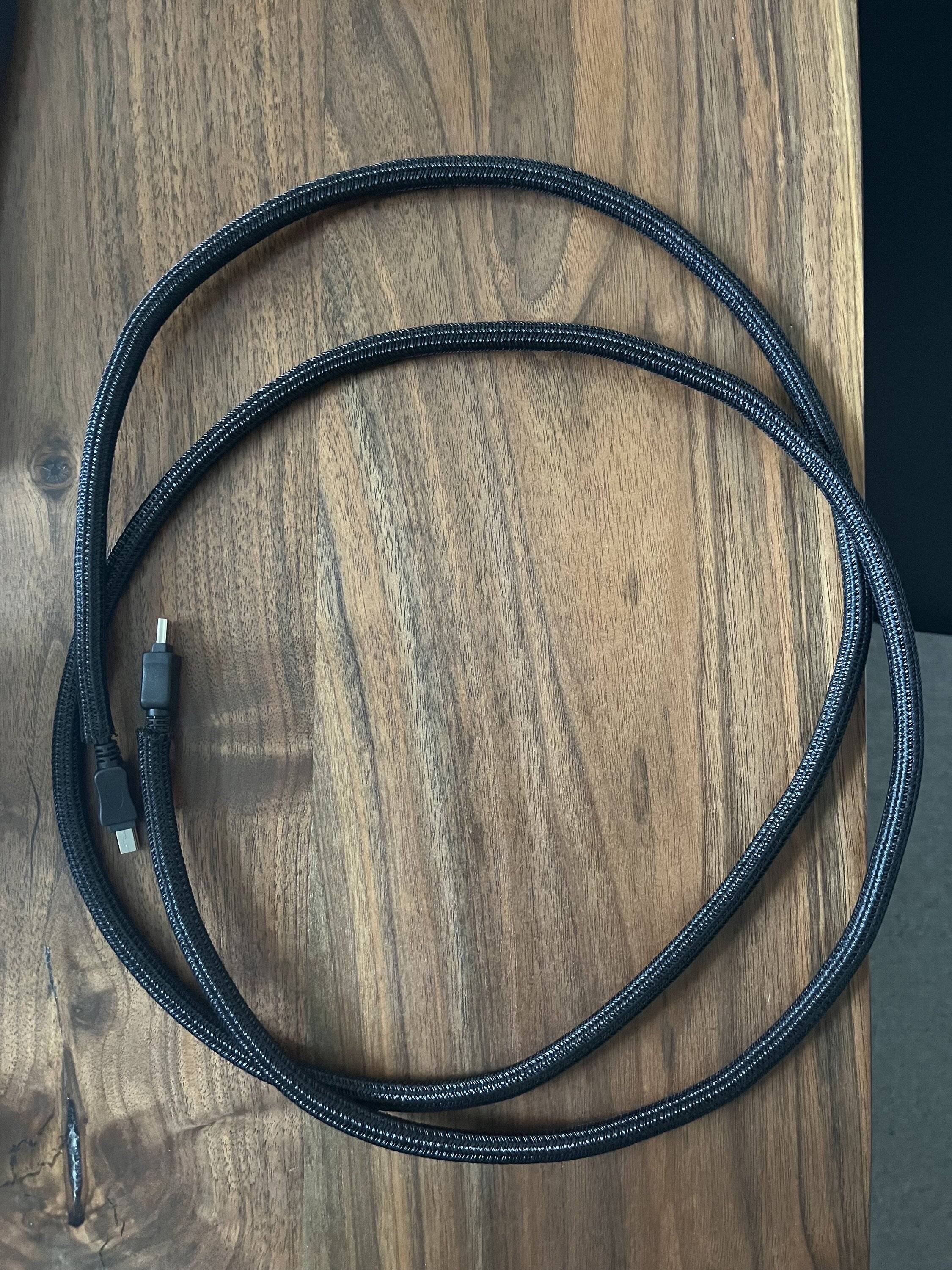
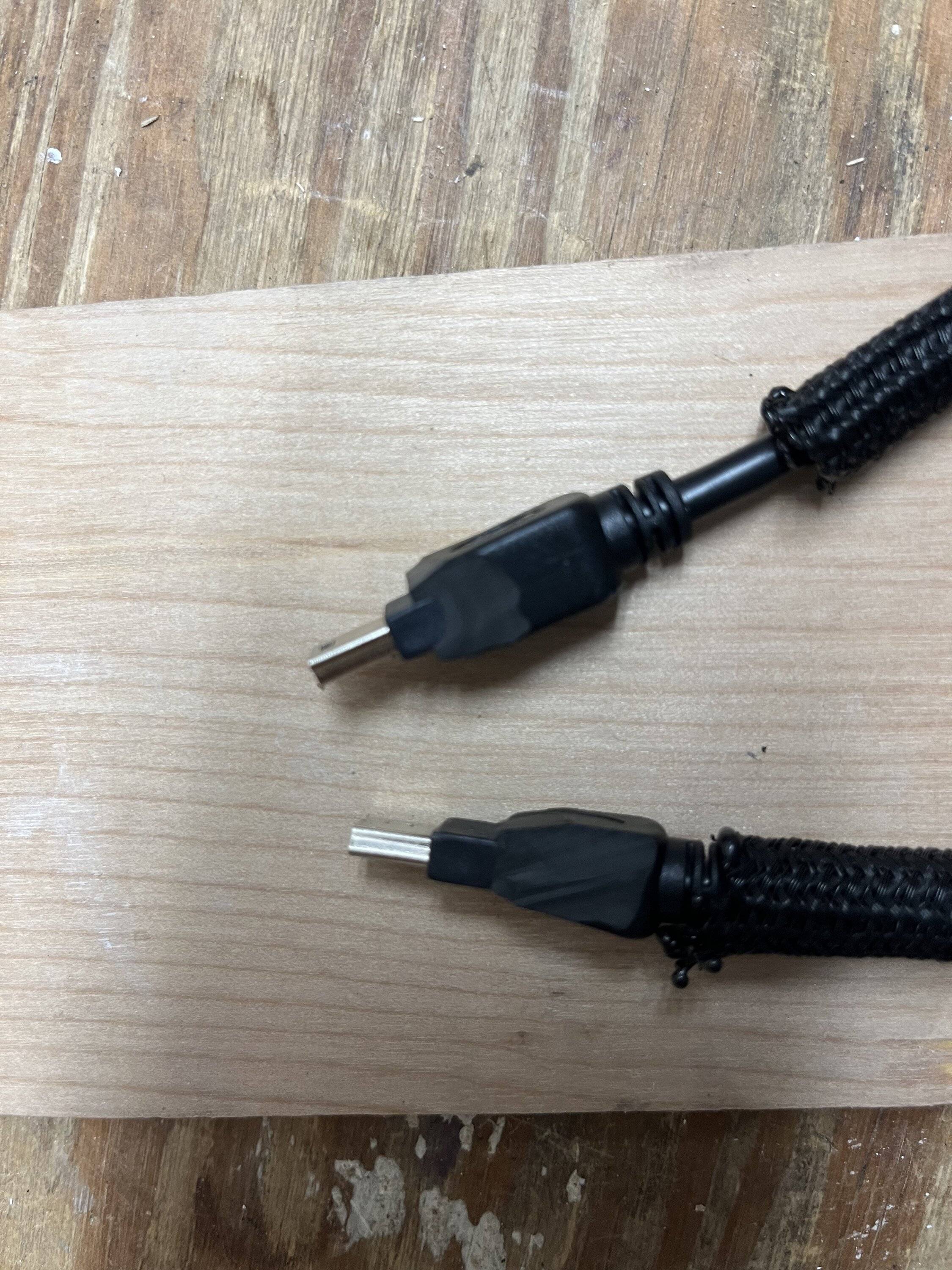
So, I bought a 6' USB-mini to USB-mini (male ends) and some 1/4" nylon cable wrap, and ran a new cable from the dash media hub to the center console USB port, along the center console (alongside cabling I ran for the Alpine PSS-23WRA system). I trimmed the cable connector ends to fit into the Jeep's USB ports.

There is still the occasional disconnect, but the phone will re-connect without needing to unplug and re-plug. It's not a perfect solution, but for me it works, using CarPlay for navigation via 7" display. I'm using a thickly insulated USB-A to Thunderbolt cable, received as part of an overpriced USB cable travel pack with my wife's Toyota; it drops out less than the Apple cable.

Jeep Wrangler JL Solution Found for JL Center Console USB Car Play Issues IMG_0179


Jeep Wrangler JL Solution Found for JL Center Console USB Car Play Issues IMG_0192


Jeep Wrangler JL Solution Found for JL Center Console USB Car Play Issues IMG_0194


Jeep Wrangler JL Solution Found for JL Center Console USB Car Play Issues IMG_0196
 

2mnycars

Well-Known Member
First Name
Dave
Joined
Sep 15, 2019
Threads
13
Messages
632
Reaction score
369
Location
Canada
Vehicle(s)
JLUR
Thanks for your suggestion. The OP has helped as well. I think that Jeep has solved this problem for other. '24 JL's have wireless apple carplay.
I've tried changing cables. Works on one phone, not on another.
This issue reminds me of the wandering (steering) problem on my '19 JLU. It was dangerous. Told several times that "It was a Jeep thing" by the dealer.
Along the way I wondered.
* Is it bad parts?
* Is it bad assembly?
* Is it bad service?
* Is it all of the above?

I know--that @JeepCares helped me a lot. They referred me to FCA Jeep Canada Customer Cares. The dealer had refused to change the steering gear...that's a long rant and won't go there. Changing the steering box in the TSB improved steering enough it was better. Well. 80 % better.

For now the iPhone SE is plugged in to the dash USB port; it's not in the console. That's a pain in a tender spot every time I need to return to get my phone.
 

Rcoleman35

Member
First Name
Ryan
Joined
May 6, 2023
Threads
0
Messages
17
Reaction score
26
Location
St. Louis, MO
Vehicle(s)
23 High Tide Hydro Blue
just bought both items from the OP suggestion. My new '23 High Tide has been driving me bonkers with the Carplay constantly cutting out. fingers crossed!
 

Sponsored

JohnD196

New Member
First Name
John
Joined
Jul 25, 2023
Threads
0
Messages
2
Reaction score
2
Location
Long Island
Vehicle(s)
2023 Gladiator Mojave
So, after trying a lot of suggestions here and a few of my own, I found a solution. Unfortunately it is NOT wireless, but it works very well.

As a slight recap if someone new to the issue is reading this, a lot of JL's are plagued with intermittent CarPlay back when plugged in via the USB in the Center Console. For reference, I am driving a 2023 JLU Rubicon, and using a iP13 Pro.

I tried wireless first, and was able to get it to work with no issues with the Carlinkit 4.0 Adapter, however I returned it because after extensive testing, it would never turn off. Some speculated that it would after 60 minutes, but mine never did. Although it is not much on the battery, I do not want things draining power. But it did work with no reboots, never dropped out - worked flawlessly.

The other solution which is what I ended up going with was trying different USB-C to Lighting cables and adapters. I do not know why the solution I will outline below works, but it does. I tried Apple Branded Cables, generic ones, certified ones, etc.. and all had issues with either dropping the CP connection or not working at all.

I bought a Agoz Apple MFI Certified Lightning to USB C Cable with a 90° Right Angle connection on both ends and used a USB-C to USB -A Adapter in the Port. I tried this on short trips, a long trip and daily driving. After 2 weeks of testing, I have had no issues at all with reliability.

This has been driving me nuts and hopefully helps out those that are like me and hate having cables dangle out of the front dash media connect hub.

2023-01-02_12-47-52.jpg


2023-01-02_12-48-25.jpg
 

JohnD196

New Member
First Name
John
Joined
Jul 25, 2023
Threads
0
Messages
2
Reaction score
2
Location
Long Island
Vehicle(s)
2023 Gladiator Mojave
Thank you for your post, I went ahead and tried your solution and i could not get the same cable right away and used another cable, which did not work and carplay cut out. The cable you recommended arrived and have been using for over a week so far and not cut out once. Thank you again!
 
OP
OP
jromanmd

jromanmd

Well-Known Member
First Name
Jon
Joined
Oct 16, 2022
Threads
26
Messages
458
Reaction score
606
Location
Annapolis
Website
www.instagram.com
Vehicle(s)
2023 Jeep Wrangler Rubicon
@JohnD196 Thats great! And you’re welcome. I’m always happy to pay it forward. So many people here have helped me with troubleshooting in the past.
 

EAWrangler

New Member
Joined
Jul 27, 2023
Threads
0
Messages
4
Reaction score
0
Location
NY
Vehicle(s)
2023 Wrangler 4Xe Rubicon 20th Anniversary
Hi just signed up! Thank you for this thread experiencing the same. I see the link to the cable but is there a link to the " USB-C to USB -A Adapter" you purchased?
 

Heiwa

Member
First Name
Vangie
Joined
Apr 8, 2023
Threads
1
Messages
5
Reaction score
2
Location
San Diego
Vehicle(s)
2023 Wrangler Willys JL
Thank you for sharing the specific cable/ adapter that you’ve ID’d! I’ve been trying all manner of cables to resolve the cutting out…. ???????????? that this will work in my 2023 JL Willys!!!!
Sponsored


Top