Sponsored

Solution Found for JL Center Console USB Car Play Issues

wrang_stang

Well-Known Member
Joined
Jan 21, 2023
Threads
2
Messages
279
Reaction score
291
Location
TX
Vehicle(s)
24
I truly believe this is a software issue. If the phone "connects" via the hardware (even a new physical cable you have installed" that eliminates the hardware side.

It never worked for me starting the day I took delivery. Once I added the adapter and new cable, its worked. And its still working just as it did the day I connected everything.

Honestly, I do not think Jeep really cares. Its not an inconvenience for them, its not a safety issue so why would they care? Sad, yes.
I don’t think this points to a software issue. Especially if you adding new hardware was the fix.

I think for some of us the combination of port and cable are so bad that the additional adapters don’t help. Next step I suppose would be to replace the port in addition to or instead of the cable.
Sponsored
 

Slikrik98

Member
Joined
Feb 17, 2024
Threads
2
Messages
11
Reaction score
7
Location
Westport, CT
Vehicle(s)
2022 Wrangler 392
As an iPhone 15 and 2021 Wrangler owner this thread was a bit of a roller coaster. I, too, am having the intermittent connectivity issues with the USB-A port in my center console. Both iPhone and Android suffer the same fate. But it seems like there's no sure fix for non-lightning (ie USB-C) based phones.

So I'm wondering: has anyone ever tried to take their JL in for service to fix the issue properly? I just scheduled service for the same but unfortunately the earliest they could get me in was was August 5th. Curious if Jeep techs actually have a playbook for how to properly fix this issue?
 
OP
OP
jromanmd

jromanmd

Well-Known Member
First Name
Jon
Joined
Oct 16, 2022
Threads
26
Messages
458
Reaction score
606
Location
Annapolis
Website
www.instagram.com
Vehicle(s)
2023 Jeep Wrangler Rubicon
As an iPhone 15 and 2021 Wrangler owner this thread was a bit of a roller coaster. I, too, am having the intermittent connectivity issues with the USB-A port in my center console. Both iPhone and Android suffer the same fate. But it seems like there's no sure fix for non-lightning (ie USB-C) based phones.

So I'm wondering: has anyone ever tried to take their JL in for service to fix the issue properly? I just scheduled service for the same but unfortunately the earliest they could get me in was was August 5th. Curious if Jeep techs actually have a playbook for how to properly fix this issue?
Yeah. Search the forums. They never find a problem and half of the time if the USB outlet works, then they say its working. Not worth the hassle IMO.
 

wrang_stang

Well-Known Member
Joined
Jan 21, 2023
Threads
2
Messages
279
Reaction score
291
Location
TX
Vehicle(s)
24
But it seems like there's no sure fix for non-lightning (ie USB-C) based phones.

So I'm wondering: has anyone ever tried to take their JL in for service to fix the issue properly?
Are you saying the issue is fixed for USB C phones like the iPhone 15 pro?

And I can confirm I’ve taken it to the dealer twice (as part of other issues), one time there was a code and they replaced the USB hub/port, another time they did a software reset, none of them fixed it.
 

Sponsored

wrang_stang

Well-Known Member
Joined
Jan 21, 2023
Threads
2
Messages
279
Reaction score
291
Location
TX
Vehicle(s)
24
No I'm saying that the workaround cable hack described at the start of this thread which included a lightning cable appears to not work when you swap in a regular USB-C cable for iPhone 15.
Oh, unfortunately it doesn’t necessarily work in pre 15s either. I got the USB-B cable to replace the link between the head unit and console, but I have a 2024 so I’m not sure if it’s the same interface.
 

ANDO 808

New Member
First Name
Chris
Joined
Jul 3, 2024
Threads
0
Messages
1
Reaction score
0
Location
Las Vegas, NV
Vehicle(s)
2023 Jeep Wrangler
I mean, if you dont mind, the easiest and simplest solution that I’ve been using since I bought my Jeep almost two years ago is:

  1. Buy StarTech.com 1 ft Mini USB 2.0 Cable - USB A to Mini B F/M - USB Cable - USB (F) to Mini-USB Type B (M) - USB 2.0-1 ft - Black - USBMUSBFM1 from amazon: https://www.amazon.ca/gp/product/B004ZMYEMY/ref=ppx_yo_dt_b_asin_title_o02_s00?ie=UTF8&psc=1
  2. Remove the buttons panel, the one where you have AC/volume controls. Below it you’ll find the a usb cable that connects to it and runs back to the center console.
  3. Remove the cable above, connect the adapter you bought from Amazon and connect any USB cable to it.
Done, works forever.

The problem is the cable jeep used to connect the centre console port back to the panel is garbage, thats why it’s so unreliable and sometimes it works better with different cables.

Doing what I said above you completely eliminate this variable.

Also the other USB port on the dash will still work fine

Has anyone taken this step?

I have tried all the troubleshooting - dealership has been worthless. They blame a software update but yet dash connections work. Feels like it is a wiring issue more than anything. Seems pretty basic based on this post but before I pop off the panel I am curious if anyone else has more details or best practices to make this as easy as possible.
 

tk1700

Well-Known Member
First Name
Tom
Joined
Nov 21, 2019
Threads
8
Messages
691
Reaction score
1,229
Location
New Mexico
Vehicle(s)
2021 JLUR, 2016 Tundra, 2025 Hyundai Palisade
Check out this TSB. I ordered the cable and was going to do it myself. Removing the console was easy, but the console disassembly and wire routing scared me off. I'll be calling the dealer for an appointment to get the TSB done.

Technical Service Bulletin (TSB)
Floor Console USB Inoperative
REFERENCE:TSB: 08-020-24 GROUP: 08 - ElectricalDate:January 13, 2024REVISION:
VEHICLES AFFECTED:2018 - 2023 (JL) Jeep Wrangler
2020 - 2023 (JT) Jeep Gladiator
This bulletin applies to vehicles equipped with a Remote USB Port (Sales Code RSX).
MARKET APPLICABILITY:
NA MEA SA IAP EE CH
CUSTOMER SYMPTOM:Customers may comment on the following:
● Customer states the Apple Carplay/Android AutoTM does not work or is intermittently working when their device is plugged into the center console bin USB port.
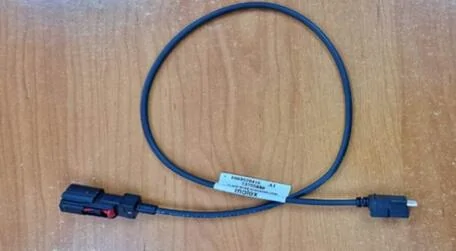
CAUSE:Misfit USB cable Fig.1.
USB Cable For Center Console Harness This replacing the center console USB cable.
REPAIR SUMMARY: CLAIMS DATA:
Failure Code ZZ Service Action
SPARE PARTS:
Fig. 1
Labor Operation No: Labor Description Skill Category Labor Time
08-90-82-92Cable, USB Center Console - Replace (1 - Semi-Skilled)6 - Electrical and Body Systems0.9 Hrs.
Qty Part No. Description Notes
168658437AACableBlack USB Cable Console XY331-D3142A
DIAGNOSIS:
If the customer describes the symptom/condition listed above, perform the Repair Procedure.
REPAIR PROCEDURE:
  1. Remove the floor console. Refer to the detailed service procedures listed in DealerCONNECT> Service Library under: 23 - Body / Interior / Console, Floor / Removal.
  2. Remove the end cap from the floor console. Refer to the detailed service procedures listed in DealerCONNECT> Service Library under: 23 - Body / Interior / Console, Floor, End Cap / Removal.
  3. Disconnect off the existing USB connector and connect the NEW USB cable to the media port.
  4. Using zip ties, secure cable to existing console harness every 150mm (6 inches) to avoid a Buzz, Squeak
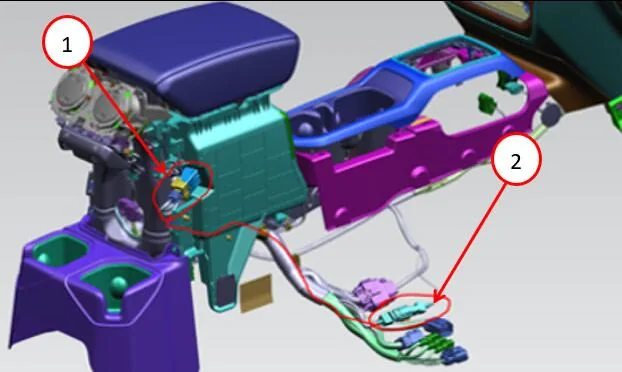
    or Rattle (BSR) condition when routing to the bracket under the passenger seat Fig. 2.
1 - USB Port to Floor Console End Cap
2 - USB Cable to Wire Harness Connector
Fig. 2
USB Connection End to End
NOTE: Perform push-pull-push on each connection to ensure the connector is fully seated.
  1. Install the end cap. Refer to the detailed service procedures listed in DealerCONNECT> Service Library under: 23 - Body / Interior / Console, Floor, End Cap / Installation.
  2. Install the floor console. Refer to the detailed service procedures listed in DealerCONNECT> Service Library under: 23 - Body / Interior / Console, Floor / Installation.
  3. Confirm USB port functionality.
POLICY:
Reimbursable within the provisions of the warranty.
This bulletin is supplied as technical information only and is not an authorization for repair. No part of this publication may be reproduced, stored in a retrieval system, or transmitted, in any form or by any means, electronic, mechanical, photocopying, or otherwise, without written permission of FCA US LLC.
Jeep Wrangler JL Solution Found for JL Center Console USB Car Play Issues 1720048414837-c
Jeep Wrangler JL Solution Found for JL Center Console USB Car Play Issues 1720048414878-hd
Jeep Wrangler JL Solution Found for JL Center Console USB Car Play Issues 1720048414911-xv
Jeep Wrangler JL Solution Found for JL Center Console USB Car Play Issues 1720048414941-p6
Jeep Wrangler JL Solution Found for JL Center Console USB Car Play Issues 1720048414970-k6
Jeep Wrangler JL Solution Found for JL Center Console USB Car Play Issues 1720048415235-dy
Jeep Wrangler JL Solution Found for JL Center Console USB Car Play Issues 1720048415269-t7
Jeep Wrangler JL Solution Found for JL Center Console USB Car Play Issues 1720048415297-vx
 

Wulfgott

Well-Known Member
Joined
Feb 21, 2022
Threads
9
Messages
195
Reaction score
139
Location
Riverside, CA
Vehicle(s)
2020 PUNK'N 2.0L Turbo JLUR
Build Thread
Link
Occupation
Meat popsicle
Check out this TSB. I ordered the cable and was going to do it myself. Removing the console was easy, but the console disassembly and wire routing scared me off. I'll be calling the dealer for an appointment to get the TSB done.

Also would love to know if someone has had this done.
 

LPMM

Member
First Name
Laurent
Joined
Aug 19, 2023
Threads
1
Messages
5
Reaction score
3
Location
DFW, TX
Vehicle(s)
2014 JKUR
Also would love to know if someone has had this done.
I had the TSB done on my daughter’s JL at the end of July and it did not seem to solve the erratic port behavior.

My daughter tested it with her iPhone 13 and a brand new cable plugged directly into it. CarPlay kept on freezing and it would come back if she wiggled or unplugged and replugged the connection at the iPhone side. The same thing happened with my Samsung S23 and a cable that I was using in my JK which has been dead nuts reliable, but when plugged into the center console port in the JL, it kept connecting and disconnecting rendering it totally unusable.

I then bought the cable the OP mentioned and an adapter (not the OP‘s) to use exclusively on our trip from TX to GA we completed 4 days ago. Carplay only froze 3 times during that trip, but then it froze much more during our short trips at our destination. Very strange behavior, not consistent at all. Of course, the dash ports are 100% reliable but we were hoping the TSB had fixed the issues to have a cleaner look without cables hanging in sight. No such luck, at least for us.
 
Last edited:

Sponsored

Jeep Wick

Well-Known Member
First Name
Wick
Joined
Dec 7, 2021
Threads
17
Messages
1,771
Reaction score
2,061
Location
America
Vehicle(s)
2022 High Tide XR
Occupation
Mechanic
I'm convinced this is a software issue, as I've had 2 Jeeps, multiple phones and cables all with Android Auto dropping out. When I use the phone navigation and music over Bluetooth (no screen) it works flawlessly.
 

mclaugh

Active Member
First Name
Joe
Joined
Jun 14, 2018
Threads
2
Messages
40
Reaction score
23
Location
NY
Vehicle(s)
2019 Ocean Blue JLU Moab
I'll add my experience (frustration!) with CarPlay, both wireless and wired, the past few weeks. 2019 Moab w/ 8/4" screen- CarPlay has worked perfectly wired, both through the dash USB as well as the center console between the seats (back seat also worked, much to my chagrin, when my kids figured that out).
Bought a carlinkit when they were first released and it also worked well, hidden away in the center console- like many others, it occasionally drops/ stutters/ blacks out the screen/ won't pair/ etc- but its usefulness far outweighed those issues. (If you go here, you can see how I added MagSafe charging so that I can wirelessly charge and use CarPlay- which again, has worked wonderfully).
Finally, I'll add that our family's 4 iPhones all interact with the CarPlay in this Jeep, as well as a 2022 RAV4 and an iLX-650 stereo in another vehicle- each has their own carlinkit, of various vintages.

About two weeks ago, CarPlay did not start up when I got into the Jeep. As mentioned, went through the 'usual stuff'- unplugging the carlinkit unit while driving and then plugging it back in- as that has always fixed it. When that failed to fix it, I looked online and saw a newer carlinkit 5.0 was available and ordered 2 of them (thinking I might also upgrade one of the other cars if it paired faster).
Neither of the new CarPlay devices will join CarPlay, despite being connected via BT and wifi to the Jeep. The carlinkit unit shows in CarPlay on my ios 18.0 iPhone 12, but just spins rather than connecting on the Jeep uconnect screen. I also tried connecting via cables at this point- usb-a to lightning, usb-c to lightning, trying both on the dash as well as in the center console. I can play music through USB by selecting USB/Ipod on the uconnect screen but CarPlay does not show up.

Reading these forums, I followed other shared advice-->
  • Deleted all phone references in the BT Jeep menu
  • Deleted all prior Jeep BT/wifi saved connections on my iPhone
  • I pulled fuse 97 and restarted the jeep several times, then reseated that fuse (it looked good)- while this totally reset the stereo, it did not fix it
  • I turned the stereo on and off several times- there is a reset uconnect menu but nothing (that I saw) to restart the stereo
  • I tried another cable, separate from the ones I used- brand new apple cable
  • I grabbed my wife's iOS 17.6.1 iPhone 15 and attempted to connect wirelessly (nope), then through usb-a and usb-c (same as me- could play music through the usb/iPod uconnect menu, no CarPlay)
I may have tried a few other items suggested in the forums, but can't recall right now.

I should add here that since this has begun, I've paid attention to our phones in the other vehicles- they are all working without issue.
At this point, I'm stumped. I have no other apparent issues, mechanically or otherwise. The fuse pull completely reset my stereo (reset my theme but subsequent Jeep restarts brought back saved radio stations)- not sure I can blame the shared Jeep usb cable (the TSB shared in this thread)? Not sure if it's related, we've also had the Sirius "Subscription Updating" issue intermittently lately that others are discussing here.
It feels like a software/uconnect issue? Service appts at Jeep have more than a month of lead time- has anyone else seen this and found a different solution? There was a media hub thread last month, but have not seen anything positive to suggest they resolved that issue.

Apologies for the long post- hope this eventually helps anyone else struggling with a similar issue.
Thanks.
 

wrang_stang

Well-Known Member
Joined
Jan 21, 2023
Threads
2
Messages
279
Reaction score
291
Location
TX
Vehicle(s)
24
edit: False alarm, ever since I upgraded to the 16 Pro I’ve had drops in the center console. This really needs to get fixed.

Friends, I am cautiously optimistic yet at the same time extremely excited to share that, it appears the issue has been fixed as of the latest UConnect 5 update!

A few weeks ago I received a uconnect update that described improvements to wireless carplay (which I will never use). Not really expecting anything I recently replugged in my adapter + Azog USB-C -> lightning cable into the center console USB port, and I haven’t had any drops all week. The USB A->C adapter isn’t even the one recommended here, just a no name adapter and it works flawlessly. Can also confirm it worked pre and post iOS 18. Give it a try if you haven’t in a while!

Center console USB A->C->Azog->iPhone 13
UConnect 5, 2024 JL4xe.
I can pull the UConnect version if someone needs it.
 
Last edited:

wrang_stang

Well-Known Member
Joined
Jan 21, 2023
Threads
2
Messages
279
Reaction score
291
Location
TX
Vehicle(s)
24
One more update, I think I’ve finally narrowed it down and can share some insight. I recently upgrade to iPhone 16 Pro, and with that another saga of cable hunting for USB-C.

What I’ve realized is this, whatever fishing line Jeep is using for communication between the console and media hub, or whatever 2003 Gameboy media processor its using to receive those signals *simply cannot handle high quality connections*. I’ve tried everything from the USB 2.0 cable that Apple includes with the phone, to Thunderbolt 4 cables capable of handling 40Gb/s transfer speeds and they all sputter out. The only cable that consistently works is a low data rate “charging-only” cable that came with a portable JBL speaker.

It is USB-A to USB-C, unlike the previous solution with the Agoz+adapter. I think the reason the previous solution worked was the same deal, the adapter and cable combination must have limited the speed of the connection in some way so that the vehicle wiring or media controller could handle it.

I hope this issue is finally “resolved” and it would behoove @JeepCares to bubble this up the chain of command.
 

sweet victory

New Member
Joined
Aug 12, 2023
Threads
0
Messages
1
Reaction score
1
Location
Long Beach
Vehicle(s)
2023 Wrangler Rubicon
To clarify, you're saying you only have a reliable carplay connection in the console using a "slow data rate" cable directly to your phone? Or are you able to use the wireless adapter?
Sponsored


Top