Sponsored

Solution Found for JL Center Console USB Car Play Issues

jromanmd

Well-Known Member
First Name
Jon
Joined
Oct 16, 2022
Threads
26
Messages
458
Reaction score
606
Location
Annapolis
Website
www.instagram.com
Vehicle(s)
2023 Jeep Wrangler Rubicon
So, after trying a lot of suggestions here and a few of my own, I found a solution. Unfortunately it is NOT wireless, but it works very well.

As a slight recap if someone new to the issue is reading this, a lot of JL's are plagued with intermittent CarPlay back when plugged in via the USB in the Center Console. For reference, I am driving a 2023 JLU Rubicon, and using a iP13 Pro.

I tried wireless first, and was able to get it to work with no issues with the Carlinkit 4.0 Adapter, however I returned it because after extensive testing, it would never turn off. Some speculated that it would after 60 minutes, but mine never did. Although it is not much on the battery, I do not want things draining power. But it did work with no reboots, never dropped out - worked flawlessly.

The other solution which is what I ended up going with was trying different USB-C to Lighting cables and adapters. I do not know why the solution I will outline below works, but it does. I tried Apple Branded Cables, generic ones, certified ones, etc.. and all had issues with either dropping the CP connection or not working at all.

I bought a Agoz Apple MFI Certified Lightning to USB C Cable with a 90° Right Angle connection on both ends and used a USB-C to USB -A Adapter in the Port. I tried this on short trips, a long trip and daily driving. After 2 weeks of testing, I have had no issues at all with reliability.

This has been driving me nuts and hopefully helps out those that are like me and hate having cables dangle out of the front dash media connect hub.

Jeep Wrangler JL Solution Found for JL Center Console USB Car Play Issues 2023-01-02_12-47-52


Jeep Wrangler JL Solution Found for JL Center Console USB Car Play Issues 2023-01-02_12-48-25
Sponsored


IbizaGuy

Member
Joined
Jan 16, 2023
Threads
2
Messages
19
Reaction score
10
Location
Ibiza, Spain
Vehicle(s)
Jeep Wrangler JL, 2 Door, 2.0L Turbo ( 2021)
Hi, thank you

is the cable USB 3 or USB 2 rated? I will try this out, I did notice your USB port is orientated different than mine. I'm waiting for a dongle and shorter USB cable. Car just arrived and I'm having CarPlay freezes / crashes then disconnects with all ports.

From these forums and the web my checklist so far is:

• Change CarPlay background to solid black

• Turn off Siri Suggestions in Carplay

• Enable Siri on phone (including)
Listen for "Hey Siri"
Press Side Button for Siri
Allow Siri When Locked

• Turn off unnecessary background apps on phone

• True off all Carplay Apps except Apples own

• Clean any lint from lightning connector with a toothpick

• Try a different cable including Apples own brand. Try a shorter cable

• Try a USB-A to USB-C adapter and then a USB-C to Lighting cable

• Set Up iPhone to automatically turn off Wifi and Bluetooth (or either) when connecting to CarPlay

First of all, launch the Shortcuts app and head over to the Automation button at the bottom of the screen. Then, tap the option that reads “Create Personal Automation” and from the list of events, choose CarPlay from the Travel section.

In the next screen, pick the Connects option because we want Wi-Fi to be disabled when CarPlay connects. Hit Next, and then Add Action. Choose the Scripting button and scroll down to the Network section to pick the Set Wi-Fi option. In the next screen, you need to tap the blue On tag to toggle it to Off. Next choose bluetooth When you’re done, hit Next and that’s pretty much it.
At this point, your iPhone is configured to automatically disable Wi-Fi and bluetooth when CarPlay connects. Now you need to follow all these steps again to create a new automation when CarPlay disconnects, only that this time the action is Turn Wi-Fi and Bluetooth Off.

•
Check the seating of the fuses in the fuse box

• If the problem only persists only using USB port 2 in the armrest console try the USB port in the dash and if it works take the car to the dealer to have USB port 2 in the armrest console checked.
 

Xorak

Well-Known Member
Joined
Aug 1, 2022
Threads
2
Messages
504
Reaction score
964
Location
TN
Vehicle(s)
2020 Hellayella Sport, 2023 Reign Sahara
Different cables/adapters may or may not help. In our 2023 Sahara, my iPhone 12 Pro works fine with carplay, but my wife's iPhone 11 did not. Same cable, same plug, same everything except phone.

Jeep's official answer was use the dash USB port for carplay because the console port doesn't support it. The dash ports have worked every time for every phone and cable I've tried in multiple Wranglers.
 
OP
OP
jromanmd

jromanmd

Well-Known Member
First Name
Jon
Joined
Oct 16, 2022
Threads
26
Messages
458
Reaction score
606
Location
Annapolis
Website
www.instagram.com
Vehicle(s)
2023 Jeep Wrangler Rubicon
@IbizaGuy Wow, you have tried a lot. So, a few things.

I know its been said that differnet phones have different results. I believe this to be true, BUT the IP11 -IP13 line has not changed the communications lighting port. So no matter what model you have, they all communicate the same over the Lighting Port.

So, in theory, it should all work the same regardless. Now, that being said, I believe the cable is a 3.0. The official specs are below. Also, have you tried to reset Car Play to default settings? What phone are you using?

Here is the USB A to C Adapter link to the one I am using. Elebase USB to USB C Adapter 4 Pack,Type C Female to A Male Charger Converter for Apple Watch Ultra iWatch Series 8 7,iPhone 14 13 12 11 Pro Plus Max,Airpods,iPad 9 10 Air 5 Mini 6,Galaxy S21 S22 S23

Man, I hope this helps. It blows my mind the amount of time we all waste trying to make something work, that SHOULD be freaking working w/o all this effort.

GL my friend!

AGOZ APPLE MFI CERTIFIED 90 Degree Right Angle Lightning to Type C cables provide additional accessibility to your iPhone, iPad and iPod with Lightning connector. DURABLE Braided cables are built with high quality material. It provides enhanced strain relief.

COMPATIBLE WITH all iPhones, iPads, iPods, and AirPods Max with a lightning connector. The slim connector allows you to charge your phone with protector cover.
SUPPORT FAST charging and data transfer. Please note that your charger adapter must support fast charging

HEAVY-DUTY RUGGED MFI USB C to Lightning cable, built to last long.
Product Specifications
Cable Type USB , Lightning

Compatible Devices iPhone 14 Pro Max; iPhone 14 Pro; iPhone 14 PLUS; iPhone 14; iPhone 13 Pro Max; iPhone 13 Pro; iPhone 13; iPhone 13 Mini , iPhone 12 Pro Max; iPhone 12 Pro; iPhone 12; iPhone 12 Mini; iPhone 11 Pro Max; iPhone 11 Pro; iPhone 11 , iPhone SE 2020; iPhone SE 2022; iPhone XR; iPhone XS Max Pro; iPhone XS Max; iPhone XS; iPhone X , iPhone 8 Plus; iPhone 8; iPhone 7 Plus; iPhone 7; iPhone 6S Plus; iPhone 6S; iPhone 6 Plus; iPhone 6; iPhone 5 , iPad Mini 5; iPad Mini 4; iPad Mini 3; iPad Mini 2; iPad Mini 1

Connector Gender Male-to-Male
Model Number AGMF/16
UNSPSC Code 43202222
See more
Specification for this product family
Brand Name AGOZ
Color Black

Compatible Devices iPhone 13 Pro Max; iPhone 13 Pro; iPhone 13; iPhone 13 Mini , iPhone 12 Pro Max; iPhone 12 Pro; iPhone 12; iPhone 12 Mini; iPhone 11 Pro Max; iPhone 11 Pro; iPhone 11 , iPhone SE 2020; iPhone SE 2022; iPhone XR; iPhone XS Max Pro; iPhone XS Max; iPhone XS; iPhone X , iPhone 8 Plus; iPhone 8; iPhone 7 Plus; iPhone 7; iPhone 6S Plus; iPhone 6S; iPhone 6 Plus; iPhone 6; iPhone 5 , iPad Mini 5; iPad Mini 4; iPad Mini 3; iPad Mini 2; iPad Mini 1

Connector Type Lightning , USB Type C , 90 Degree Right Angle Connectors
Item Weight 3.00 ounces
Model Number AGMF/14
Number of Items 1
Part Number AGMF/16
UNSPSC Code 26121600
 

rebby

Member
First Name
Curt
Joined
Dec 27, 2022
Threads
0
Messages
6
Reaction score
5
Location
MN
Vehicle(s)
23 JLURD, 98 TJ, 97 TJ
I've tried a few of the suggestions here for how to fix this without any success. This one has been the exception for me. I've used the products that the OP suggested for about a month now without a single drop. This has even included several 5+ hour trips! Thank you!!!
 

Sponsored

OP
OP
jromanmd

jromanmd

Well-Known Member
First Name
Jon
Joined
Oct 16, 2022
Threads
26
Messages
458
Reaction score
606
Location
Annapolis
Website
www.instagram.com
Vehicle(s)
2023 Jeep Wrangler Rubicon
I know it's crazy right? Glad I was able to help another Jeeper out!
 

woody8476

Active Member
Joined
Mar 28, 2021
Threads
2
Messages
37
Reaction score
55
Location
Illinois
Vehicle(s)
2008 JKU (Sold), 2021 Rubicon 4xe
I just came across this post, and gave it a shot. Amazingly seems to be working, thank you @jromanmd! My OCD is finally satiated getting the extra cable out of the dash and closing that little cover.

Interestingly, the dongle delivered over night so I tried the Apple brand USB-C to Lightning cable while waiting for this one to arrive, and that still did not work. However, recommended cable works perfectly so far.
 
OP
OP
jromanmd

jromanmd

Well-Known Member
First Name
Jon
Joined
Oct 16, 2022
Threads
26
Messages
458
Reaction score
606
Location
Annapolis
Website
www.instagram.com
Vehicle(s)
2023 Jeep Wrangler Rubicon
Glad to hear @woody8476 It's nice to see fellow OCD'ers getting the help they so desperately need! :giggle:
 

kdiff

Well-Known Member
First Name
Kurtis
Joined
Aug 25, 2022
Threads
12
Messages
105
Reaction score
88
Location
Castle Rock, CO
Vehicle(s)
392 Rubicon, Sprinter
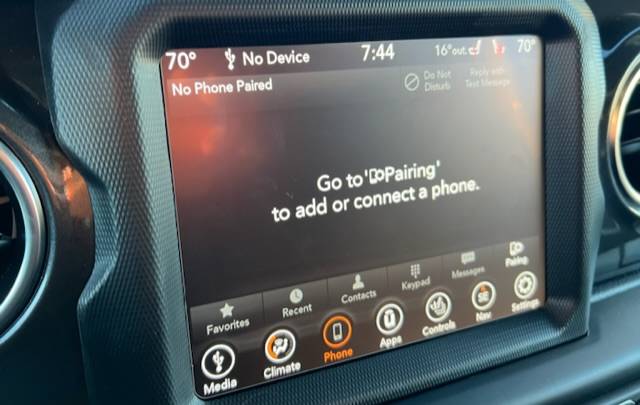
Jeep Wrangler JL Solution Found for JL Center Console USB Car Play Issues 715615E9-4C5B-4CCA-ADBF-D2F99D0F42D7


Is this the same issue you all were having before trying solution mentioned? Just wanted to confirm before I bought the cables and adapters. Thanks!

I’m using an unused newish Apple brand cable plugged into the center console and this happens about every 12 minutes.
 
OP
OP
jromanmd

jromanmd

Well-Known Member
First Name
Jon
Joined
Oct 16, 2022
Threads
26
Messages
458
Reaction score
606
Location
Annapolis
Website
www.instagram.com
Vehicle(s)
2023 Jeep Wrangler Rubicon
Yes, what is happening is frequent "disconnects" with the CarPlay iPhone/In-Dash Receiver.
 

Sponsored

Largefarva

Well-Known Member
First Name
Eric
Joined
Feb 23, 2023
Threads
10
Messages
78
Reaction score
37
Location
Milwaukee
Vehicle(s)
2023 Jeep Sahara
So, after trying a lot of suggestions here and a few of my own, I found a solution. Unfortunately it is NOT wireless, but it works very well.

As a slight recap if someone new to the issue is reading this, a lot of JL's are plagued with intermittent CarPlay back when plugged in via the USB in the Center Console. For reference, I am driving a 2023 JLU Rubicon, and using a iP13 Pro.

I tried wireless first, and was able to get it to work with no issues with the Carlinkit 4.0 Adapter, however I returned it because after extensive testing, it would never turn off. Some speculated that it would after 60 minutes, but mine never did. Although it is not much on the battery, I do not want things draining power. But it did work with no reboots, never dropped out - worked flawlessly.

The other solution which is what I ended up going with was trying different USB-C to Lighting cables and adapters. I do not know why the solution I will outline below works, but it does. I tried Apple Branded Cables, generic ones, certified ones, etc.. and all had issues with either dropping the CP connection or not working at all.

I bought a Agoz Apple MFI Certified Lightning to USB C Cable with a 90° Right Angle connection on both ends and used a USB-C to USB -A Adapter in the Port. I tried this on short trips, a long trip and daily driving. After 2 weeks of testing, I have had no issues at all with reliability.

This has been driving me nuts and hopefully helps out those that are like me and hate having cables dangle out of the front dash media connect hub.

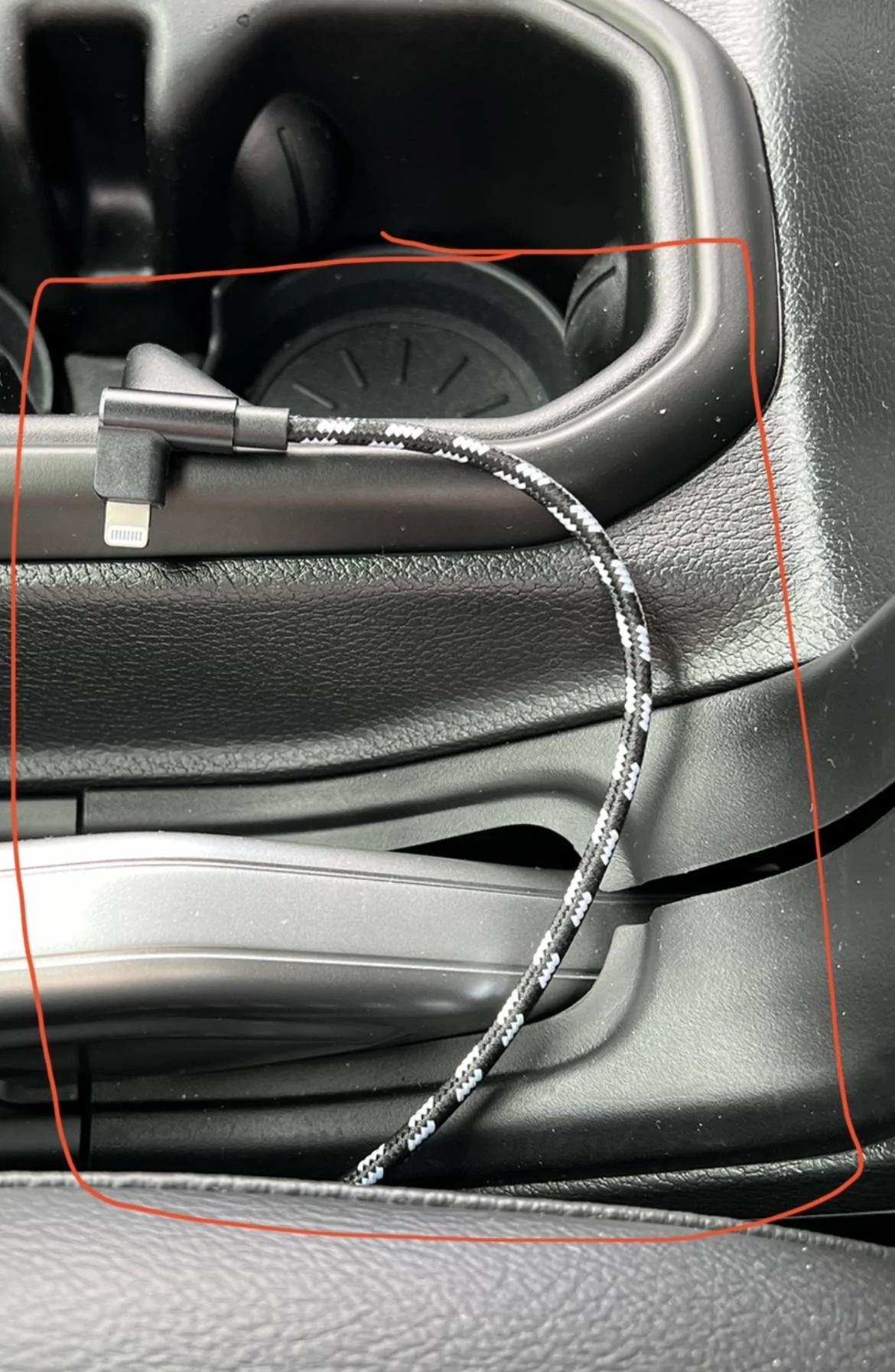
2023-01-02_12-47-52.jpg


2023-01-02_12-48-25.jpg
What was your solution with the carlinkit 4.0 in the center console? I got one a couple weeks ago and it dropped out a couple times so I moved it to the usb a port in the front dash. It’s been working just fine so far but I would really rather have it in the center console where it’s completely out of the way. So if there’s a certain cable to use for it to be more reliable in the center console I’d like to try it out.
 

2mnycars

Well-Known Member
First Name
Dave
Joined
Sep 15, 2019
Threads
13
Messages
632
Reaction score
369
Location
Canada
Vehicle(s)
JLUR
I returned the carlin kit 4.0 because I must have my blue tooth hearing aids paired to my phone, for safety reasons.
The manufacturer/supplier said to return it; however, I still want wireless CarPlay!

DaveL
Toronto
 

2mnycars

Well-Known Member
First Name
Dave
Joined
Sep 15, 2019
Threads
13
Messages
632
Reaction score
369
Location
Canada
Vehicle(s)
JLUR
I mean, if you dont mind, the easiest and simplest solution that I’ve been using since I bought my Jeep almost two years ago is:

  1. Buy StarTech.com 1 ft Mini USB 2.0 Cable - USB A to Mini B F/M - USB Cable - USB (F) to Mini-USB Type B (M) - USB 2.0-1 ft - Black - USBMUSBFM1 from amazon: https://www.amazon.ca/gp/product/B004ZMYEMY/ref=ppx_yo_dt_b_asin_title_o02_s00?ie=UTF8&psc=1
  2. Remove the buttons panel, the one where you have AC/volume controls. Below it you’ll find the a usb cable that connects to it and runs back to the center console.
  3. Remove the cable above, connect the adapter you bought from Amazon and connect any USB cable to it.
Done, works forever.

The problem is the cable jeep used to connect the centre console port back to the panel is garbage, thats why it’s so unreliable and sometimes it works better with different cables.

Doing what I said above you completely eliminate this variable.

Also the other USB port on the dash will still work fine
Thanks for the link.
Does the USB connection in the console still work?

CarlinKit 4.0 issue for me was caused by having my hearing aids being paired when I installed the dongle. That was the explanation from the vendor's techsupport. They authorized return and repaid me. Since my hearing aids MUST be paired the CarlinKit 4. doesn't work for me.

I may try a different make.

DaveL
Toronto
 

Moblrn

Well-Known Member
First Name
Rod
Joined
Feb 20, 2022
Threads
11
Messages
124
Reaction score
65
Location
I travel
Vehicle(s)
2022 Wrangler Sport S 3.6 liter V6
Occupation
RN
So, I don't currently have an iPhone and as you can see below I've been using Android Auto. I've had nothing but problems with the connection ever since the Jeep was new. I've taken it to two different dealers who say it's working fine. Sure it works fine sitting in their shop. I'm having issues every time I "DRIVE IT".

That said, I'm also having a few issues with my Verizon I do not believe they are related, but if going to T-Mobile will resolve both and add the other thing, I'm switching.

the below is a copy and paste from posts on a couple other forums. If you happen to read the other one's let me know and accept my apology for blasting you today.

Going to visit the T-Mobile store in the next few days and most likely will try out one of their plans.

I'm currently in a Grandfathered Verizon plan that has served me very well until recently and I'm not sure why it's causing me troubles now.

Another thing that I noticed with a recent trip to visit my youngest daughter(who has an iPhone). Her Mother, friends and such can always tell where she is. I'm not sure how it works, but with her recently being the next door neighbor to the majority of the news reports regarding the Tornado in Norman, OK. I'd like to have the option of at least knowing where her phone is too. I'm sure I'll have to have an iPhone and she will have to grant me access to her locations.

I've also become accustomed to the Android Auto in my Jeep. The Jeep is parked for a bit and my other vehicles are much older. I'm thinking of upgrading the head unit in both the truck and VehiCross and hope I can get a similar model in both and maybe move a screen from one to the other depending on which one is being used. Not sure yet if that's even possible.

As you can see I have fallen for the Advertisements from T-Mobile even when I hardly ever turn on a TV and do not listen to commercial radio ever.

Thanks in advance for any comments, suggestions or feedback.

Rod
 

Rhinebeck01

Well-Known Member
Joined
May 9, 2018
Threads
169
Messages
12,679
Reaction score
19,169
Location
Ormond Beach, Florida
Vehicle(s)
'18 JL Rubi, '26 Cybertruck, '01 Harley FatBoy
Occupation
Retired at 55 ..
So, I don't currently have an iPhone and as you can see below I've been using Android Auto. I've had nothing but problems with the connection ever since the Jeep was new. I've taken it to two different dealers who say it's working fine. Sure it works fine sitting in their shop. I'm having issues every time I "DRIVE IT".

That said, I'm also having a few issues with my Verizon I do not believe they are related, but if going to T-Mobile will resolve both and add the other thing, I'm switching.

the below is a copy and paste from posts on a couple other forums. If you happen to read the other one's let me know and accept my apology for blasting you today.

Going to visit the T-Mobile store in the next few days and most likely will try out one of their plans.

I'm currently in a Grandfathered Verizon plan that has served me very well until recently and I'm not sure why it's causing me troubles now.

Another thing that I noticed with a recent trip to visit my youngest daughter(who has an iPhone). Her Mother, friends and such can always tell where she is. I'm not sure how it works, but with her recently being the next door neighbor to the majority of the news reports regarding the Tornado in Norman, OK. I'd like to have the option of at least knowing where her phone is too. I'm sure I'll have to have an iPhone and she will have to grant me access to her locations.

I've also become accustomed to the Android Auto in my Jeep. The Jeep is parked for a bit and my other vehicles are much older. I'm thinking of upgrading the head unit in both the truck and VehiCross and hope I can get a similar model in both and maybe move a screen from one to the other depending on which one is being used. Not sure yet if that's even possible.

As you can see I have fallen for the Advertisements from T-Mobile even when I hardly ever turn on a TV and do not listen to commercial radio ever.

Thanks in advance for any comments, suggestions or feedback.

Rod
IF you do interstate traveling you will truly regret bailing on Verizon and going with T-Mobile or another carrier. You cannot beat Verizon in regard to coverage across/in most parts of the USA.
Sponsored


Top