Sponsored

Tazer JL Mini Programming - One Guy's Experience/Review

Obi Wan

Well-Known Member
First Name
Obi
Joined
May 14, 2022
Threads
17
Messages
385
Reaction score
1,690
Location
Tatooine, Outer Rim
Website
starwars.fandom.com
Vehicle(s)
2023 JLU SPORT S 2.0, 2004 TJ SPORT 5.3LS
Occupation
Jedi Knight
I spent considerable time reading the manual, and *trying* to do everything correct, AND working with a shop that's done many tazer installs. They were as mystified as me, and unable to resolve the problem with tazer support, as far as the sixth gear ESS issue.

I followed those instructions multiple times, as did the shop that installed my gears and tires. Finally, on this forum, I connected with a couple other owners of 6 speed JLs. They both confirmed that for the new size to fully be accepted, an additional step, not listed in the manual, needed to be performed - disconnect the battery for 30 minutes to reset the computer. (I won't describe those steps here. Suffice to say that simply disconnecting the black negative terminal on the main battery is NOT sufficient.)
It all listed right in the user guide my man :giggle:


Jeep Wrangler JL Tazer JL Mini Programming - One Guy's Experience/Review LOL


I don't believe you or your mechanic are reading the most recent user guide as the problem you ranted about is clearly listed in the troubleshooting section of the most recent one posted on Zautomotive's website (I've attached it for your viewing pleasure)

With that said, it's up to you to make sure you have the correct information.
Sponsored


Attachments

Last edited:

RAMSTEEL

Well-Known Member
First Name
Rick
Joined
Sep 9, 2020
Threads
23
Messages
592
Reaction score
848
Location
Virginia
Vehicle(s)
2023 392 XR
Occupation
Army (Ret), Fed Guy
It all listed right in the user guide my man :giggle:


LOL.JPG


I don't believe you or your mechanic are reading the most recent user guide as the problem you ranted about is clearly listed in the troubleshooting section of the most recent one posted on Zautomotive's website (I've attached it for your viewing pleasure)

With that said, it's up to you to make sure you have the correct information.
If only they could just add that one page to the existing manual :) WTH
 
OP
OP
bjm00se

bjm00se

Well-Known Member
First Name
Steve
Joined
Jan 26, 2021
Threads
7
Messages
1,457
Reaction score
3,465
Location
California
Vehicle(s)
JLUR 6sp ordered 11/3/21, picked up 8/30/22
It all listed right in the user guide my man :giggle:


LOL.webp


I don't believe you or your mechanic are reading the most recent user guide as the problem you ranted about is clearly listed in the troubleshooting section of the most recent one posted on Zautomotive's website (I've attached it for your viewing pleasure)

With that said, it's up to you to make sure you have the correct information.
As I've pointed a couple times in this thread now, I printed out and followed those specific instructions. There's a step missing from them. After you follow them, you may also need to disconnect the battery. That step isn't there.
 

Apexcars

Well-Known Member
Joined
Mar 12, 2021
Threads
17
Messages
745
Reaction score
1,614
Location
North Texas
Vehicle(s)
2020 RAM 1500
I definitely don't get the snark at the OP. I don't own a Tazer so I haven't experienced any of this and there is probably lots of useful information scattered around the internet that explains all of the different ways it can be used and what torubleshooting steps to follow if you spend enough time researching it. But, to start making snide remarks to the OP and saying that maybe he shouldn't even be trying to chnage his tire size with the product because he hadn't made a whole National Treasure style 5 year internet search about every possible scenario and then expressed his frustration and gave what to many would be helpful tips seems petty and short-sighted. He did not come on here and call your baby ugly or even worse say that Jeep is not the only capable off road vehicle in the world.

To the OP, thanks for posting this I have thought of buying a Tazer and reading a concise description of it good and bad points helps me make an informed decision.
 

RubiSc0tt

Well-Known Member
First Name
Scott
Joined
Jun 12, 2018
Threads
64
Messages
1,747
Reaction score
2,379
Location
Upstate NY
Vehicle(s)
2019 JLUR in Punk'n Orange
Build Thread
Link
Occupation
Turn Wrenches/ Write code
My Jeep has a six speed manual transmission. When you change the tire size on a manual, there's an ENTIRE manual supplement on additional steps you have to take to get the Jeep to recognize those settings:

FURTHER EDIT - folks don't seem to be aware that I'm both aware of and specifically referring to this supplement on the Zautomotive page. If you're changing tire size or gear ratio on a 6sp wrangler, you need this supplement!
https://www.zautomotive.com/zpu/instructions/jlm6relearn.pdf

BUT -- EVEN AFTER following those instructions (which I printed out and did)
You may STILL experience the following failure:

  • Gears one thru four function normally.
  • then, 5 to 30 seconds after shifting into 5th or 6th gear, you'll get an ESS error on the dash.
  • the gear position indicator will blank out.
  • the front and rear camera displays will cease to work
  • ...until the next time you restart the Jeep.

I followed those instructions multiple times, as did the shop that installed my gears and tires. Finally, on this forum, I connected with a couple other owners of 6 speed JLs. They both confirmed that for the new size to fully be accepted, an additional step, not listed in the manual, needed to be performed - disconnect the battery for 30 minutes to reset the computer. (I won't describe those steps here. Suffice to say that simply disconnecting the black negative terminal on the main battery is NOT sufficient.)

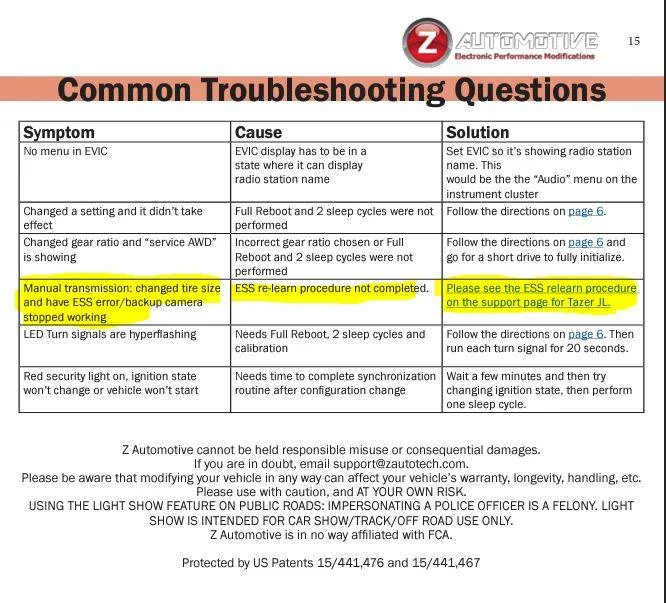
THAT was the magic incantation to get ESS working again with the new tire size.
I can confirm this happens to a manual trans Jeep, and it doesn’t seem to matter 5/6 gear. Happened on the way home from work yesterday, and I definitely don’t hit 5th.
It happened again today, with the cruise control engaged, and that froze Carplay. I took it off Bluetook and unplugged the transmitter, and tried going hard wired- Carplay froze again and didn’t come back until I restarted the Jeep.

Also: if it wasn't For this thread, I would have never known about the appendix to the manual for Manual trans Jeeps.
 

Sponsored

J0E

Well-Known Member
First Name
J0e
Joined
Sep 1, 2018
Threads
55
Messages
1,359
Reaction score
1,162
Location
Hawaii, MT, SLC, NYC
Website
bt39.com
Vehicle(s)
2021 JLR, 05 LJR on 43s
Build Thread
Link
Occupation
Drywall construction - reel estate
And "anchor mode" for winching. That seems really useful; be able to run your winch on the Jeep while not simultaneously sitting in the driver seat holding the brake pedal. I thought I followed the steps, but what I did didn't cause anything to happen. So I've got "some more learnings" to get before I can activate that feature. :)
Anchor mode is disabled when a door is opened or if the seat belt isn't engaged. Even so, I've got the latest Tazer mini update and I can't get anchor mode to work. It would be super useful for winching if I could get out of the rig, but that doesn't seem possible.
 
OP
OP
bjm00se

bjm00se

Well-Known Member
First Name
Steve
Joined
Jan 26, 2021
Threads
7
Messages
1,457
Reaction score
3,465
Location
California
Vehicle(s)
JLUR 6sp ordered 11/3/21, picked up 8/30/22
Anchor mode is disabled when a door is opened or if the seat belt isn't engaged. Even so, I've got the latest Tazer mini update and I can't get anchor mode to work. It would be super useful for winching if I could get out of the rig, but that doesn't seem possible.
I mean, really, in that case, what the heck is the point of the feature? Keep your foot from getting tired? 0mph winching cruise control?

[replying to this now since someone else recently bumped the thread]
 

Bobby Hank

Well-Known Member
First Name
Robert
Joined
Oct 14, 2023
Threads
45
Messages
691
Reaction score
1,224
Location
Gulf Breeze Florida
Vehicle(s)
2024 JL Wrangler Rubicon X 2D
Occupation
Educator
Just got mine in today, and while it was easy to marry and get the fog lights how I wanted, I still have no idea how to find the setting to change when the garage door opener works for 30s longer and/or with door open. Can’t find it.
Want to do the Hood alarm too, never saw that either. Is it automatic if married? Don’t wanna scare the neighbors or wife at the moment finding out… can’t find “Kill 3 Honk” either.
Light show in the garage freaked the cat out pretty good.
 

Dadawada

Well-Known Member
First Name
Barrett
Joined
Jul 10, 2018
Threads
25
Messages
187
Reaction score
110
Location
Raleigh, NC
Vehicle(s)
2018 Rubicon Unlimited, 2020 Honda Goldwing Bagger
Occupation
Network Technology Executive
So I took the Tazer dive so to speak. I have previously had the Superchips FlashCal F5 and used it to change my tire size. That was pretty much it. For that it worked fine.

I upgraded my headlights to the OEM LEDs. They work fine. I upgraded the DRLs and they worked fine for a while. Now they act wonky. One side working fine, the other sometimes coming on sometimes not. coming on when I manually turn the lights on then going off. Very odd. I also had the dealer install the Mopar steel bumper that comes with LEDs. At first they worked but then after the dealer replaced the batteries (I hate the start stop system) the bumper LEDs stopped working. Dealer can't figure it out. So I thought I'd pick up a Tazer and try to fix my LED issues and finally get rid of the start stop system.

First thing was I downloaded the software from Z-Automotive since the instructions everyone gave was to make sure I had the latest software loaded. When it got to the separate "drivers" install I was instructed to turn off the Windows Core Isolation Memory Integrity setting. This seemed odd but I went ahead with the install. Checked the device and it had the latest software already installed. However, my Windows system was now giving me warnings about the Core Isolation and Memory Integrity being turned off. There was no way to turn the protection back on as the "drivers" that were installed were apparently from 2014 and not compatible with Windows 11 Pro. It took me forever to try and get the software and those drivers uninstalled. I'm still dealing with issues. Strike one...

I unmarried the FlashCal and married the Tazer. So far so good. Kept it simple and just adjusted the tire size to correct that and then focused only on setting the fog lights to LED....done.

Expecting to have my fogs now turn on I was disappointed to find it made no difference...still no fogs...odd since this system is all Mopar. Strike two...

Time will tell if I made a mistake. The tazer does appear to offer a lot of great options, many more than the FlashCal. I hope I can get the LED situation fixed with the dealer...
 

Capt Milks

Active Member
First Name
MJ
Joined
May 23, 2021
Threads
2
Messages
28
Reaction score
15
Location
Virginia
Vehicle(s)
2024 Rubicon 2 door
Thanks Steve for the post. Informative.
Arrogance is a minds inability to deal with others in a kind and informative manor since that person thinks they know everything. Its sad that so many are quick on the typewriter, in their secure space, that want to bash you and your methods. My take was you were trying to help others, And it looks like you have helped several.
 

Sponsored

evo8904

Well-Known Member
Joined
Jul 24, 2019
Threads
0
Messages
101
Reaction score
125
Location
Tampa
Vehicle(s)
2017 Ram/ Wrangler soon
I found that the tazer mini is easy to use. My only issue was the install. WTF was Jeep thinking with the placement of those cables lol! I ended up ordering the extension. But this is an amazing product!!! I love the honk kill and having my lockers in 2H or 4H.
 

CarolinaJL

New Member
First Name
Jeremy
Joined
Feb 16, 2024
Threads
0
Messages
4
Reaction score
4
Location
Columbia SC
Vehicle(s)
2024 2dr Sport S
I appreciate the long review from the OP. I bought this thing just for tire size and auto on/off. It is definitely more ‘lab project’ than ‘ready for the average consumer‘.
And yes I watched YouTube and read the latest directions. And on my ‘24 it was very easy to install.

But like the OP said, the menus are constantly showing other information so it’s hard to know where you are. I did not see this on YouTube.

And the instructions suck. It reads like if you don’t do everything right you’ll ruin your new JL. Bold, red, big fonts, little fonts - it’s chaotic and not clear. Just one example - one place in the procedure after you update it says to turn ’on’, another it says to just open/close the door. I got it done but i was constantly worried - do I open the door, release the button, why does it say “updating” etc.

Bottom line, it seems like it works, but I would probably not buy again since I only wanted a couple of the features and I just don’t know that I trust it.
 

wjcubellis

Well-Known Member
First Name
William
Joined
Jul 12, 2023
Threads
15
Messages
130
Reaction score
95
Location
07450
Vehicle(s)
2024 Rubicon
I don't claim to be an expert here. Far from it. To the contrary, I think the benefit I bring to any potential discussion here is as an uninitiated user.

Time was I worked on accounting software. I used to joke that our product was "the software folks loved to hate" because it had quirks and oddities that made it much harder to pick up and use than you'd ideally like; and yet, people keep using it because it let them run their businesses like no other product would. But I digress.

Anyhow, Tazer is kinda like that. I love it, because without it - my modified Jeep wouldn't work right at all. But MAN it's quirky, and therefore I also hate it.

Start off with the manual. All 15 pages of it. It's OK. You can see they're trying. But it could still be better.

NOOB LESSON ONE: Allow time to read the manual. It's important.

Yeah, you want to read through that to see what it can do for you. But, some of the descriptions are terse, and what you think they mean, vs what they actually mean, may not always line up. An example is: (text edited from original) the OffRoad menu "SwayBar" setting. You set it to "YES" to indicate that you've REMOVED the original Rubicon electronic swaybar. Then in the "live" section, there's a separate function titled "SwayKill" to allow use of sway bar disconnect in 2wd In newer versions of the software, on the display it's called "SwayBar Kill" (or was it SwayKill?) and you turn it ON if you've REMOVED the Rubicon electronic sway bar. But the manual still just calls it the "SwayBar" setting.

And another place in the manual. There's some description, some description about the radio display, and then "Turn It Off." Do they mean turn the JEEP off, or the RADIO off? I'm pretty sure they meant the Jeep. But still to this day not 100% sure.

And "anchor mode" for winching. That seems really useful; be able to run your winch on the Jeep while not simultaneously sitting in the driver seat holding the brake pedal. I thought I followed the steps, but what I did didn't cause anything to happen. So I've got "some more learnings" to get before I can activate that feature. :)

NOOB LESSON TWO - After reading the instructions, you may still need to try things a couple different times or a couple different ways to get the result you expected.

And that leads us to setting the programming. The most important pages in the manual are pages 5 and 6, which tell you how to access the settings programming, and the critical "reboot" steps that are performed after you change settings.

You have to have the dash display (i.e. the digital display between the tach and the speedo - they call it the EVIC display) set to the "audio" page by using the up/down controls on the left side of the front of the steering wheel. Once there, Tazer has you control the programming by using key combinations of the left side arrows and right side cruise-control buttons to program the tazer.

But while you're doing that, the dash display keeps flipping up Jeep messages about the cruise control features that are not active while you're in this mode. This does NOT inspire confidence in the user. Did I do it right? Am I in the wrong mode?? Jeep thinks I'm trying to activate cruise control instead of program Tazer. Arg!

NOOB LESSON THREE - Don't be distracted by "cruise control" messages you see while trying to program Tazer. Ignore those and proceed.

SUGGESTION: We're have the display in audio mode here. On the BACK of the steering wheel are buttons dedicated ONLY to audio controls. Why doesn't Tazer programming take its input from those controls instead? Perhaps there's a good reason, but that would seem to me to be an aid in avoiding needless distraction and confusion.

But that's really only the beginning of my Tale of Quirks and Oddities. My Jeep has a six speed manual transmission. When you change the tire size on a manual, there's an ENTIRE manual supplement on additional steps you have to take to get the Jeep to recognize those settings:

FURTHER EDIT - folks don't seem to be aware that I'm both aware of and specifically referring to this supplement on the Zautomotive page. If you're changing tire size or gear ratio on a 6sp wrangler, you need this supplement!
https://www.zautomotive.com/zpu/instructions/jlm6relearn.pdf

BUT -- EVEN AFTER following those instructions (which I printed out and did)
You may STILL experience the following failure:

  • Gears one thru four function normally.
  • then, 5 to 30 seconds after shifting into 5th or 6th gear, you'll get an ESS error on the dash.
  • the gear position indicator will blank out.
  • the front and rear camera displays will cease to work
  • ...until the next time you restart the Jeep.

I followed those instructions multiple times, as did the shop that installed my gears and tires. Finally, on this forum, I connected with a couple other owners of 6 speed JLs. They both confirmed that for the new size to fully be accepted, an additional step, not listed in the manual, needed to be performed - disconnect the battery for 30 minutes to reset the computer. (I won't describe those steps here. Suffice to say that simply disconnecting the black negative terminal on the main battery is NOT sufficient.)

THAT was the magic incantation to get ESS working again with the new tire size.

OK! Great! We're done! The Jeep is working and I won't need to change anything. Except. After a long road trip, I came to realize that 37psi is really not required, nor particularly comfortable, when running oversize 37" tires. After a quick "chalk test" and some driving, I settled on 28psi. Tazer lets you change the TPMS threshold. Yay! I've got this programming down cold now. How hard could it be? A quick run thru of the steps, change front/rear PSI and.....

Oh My Gawd.

Check Engine Light. ABS light. SRT radio display. Fuel indicator shows weird combination of completely full/completely empty. U0140E. "Implausible Vehicle Configuration Received" U0415. BCM U1514-87

What. In. The. Actual. Fuck?

OK. No problem. Part of the process in solving any hard complicated problem is what I call "problem solving mindset." This has two parts:
  • Being open to any new information about the problem, whether or not it agrees with what I *think* I know about the problem
  • Absolute confidence that the problem WILL finally be solved, and the only unanswered question is, how long will it take to come to a resolution?
I think I first read about this type of mindset decades ago in a book called "Zen, and the Art of Motorcycle Maintenance" by Robert Pirsig. But I digress.

Google showed me that other folks have experienced other similar problems after using Tazer.

1. It's not JUST me.
2. It's solvable.

NOOB LESSON FOUR: Don't Panic!

I'd recently had good experience by doing full battery disconnect reset. So I tried that first. No dice. Nothing changed.

Forums suggested that once in this untenable state, the best approach is to "UnMarry" the Tazer to return to stock configuration, and start over. This I did.

Navigate through all the menus and write down on paper all my custom configuration settings. Tire size. Gear ratio. Swaybar Kill. Front TPMS. Rear TPMS.

Use the Tazer to clear all the current trouble codes.

Unmarry. (full reboot and two sleep cycles)
Marry. (full reboot and two sleep cycles)
Navigate through all the menus re-applying my Jeep's custom settings.
Full reboot and two sleep cycles.

Restart. Voila! No errors! It works!!

I still have no idea what caused the weird state errors. Maybe I fat-fingered some setting. Maybe I had my foot on the brake during the reboots. Maybe the steering wheel wasn't perfectly straight. Maybe the Tazer was hit by stray cosmic radiation from a solar flare.

SUMMARY NOOB BEST PRACTICES AND LESSONS:
  • Allow more time than you think you'll need, and don't be in a hurry.
  • Print out the instructions, make an extra copy of page five "Menu Navigation" to leave up on the dash for quick reference to keystrokes while separately turning to whatever menu page the description of the current setting/feature is on.
  • It's probably best to record all your settings on a separate piece of paper.
  • Navigating settings will generate irrelevant "cruise control" messages on the dash display that you should ignore.
  • You have to "full reboot and two sleep cycles" after changing settings, but you can set ALL the settings you want, and THEN go thru the reboot process. You don't have to set/reboot, set/reboot, set/reboot etc....
  • The instructions point out that full reboots should have the wheel straight and your foot off the brake. That's probably important.
  • Don't Panic.
  • You may need to disconnect the battery to get your settings fully accepted.
  • You may need to unmarry the tazer and remarry, especially if you do something wrong along the way.
Hope someone finds this helpful, or at least mildly entertaining.
I don't claim to be an expert here. Far from it. To the contrary, I think the benefit I bring to any potential discussion here is as an uninitiated user.

Time was I worked on accounting software. I used to joke that our product was "the software folks loved to hate" because it had quirks and oddities that made it much harder to pick up and use than you'd ideally like; and yet, people keep using it because it let them run their businesses like no other product would. But I digress.

Anyhow, Tazer is kinda like that. I love it, because without it - my modified Jeep wouldn't work right at all. But MAN it's quirky, and therefore I also hate it.

Start off with the manual. All 15 pages of it. It's OK. You can see they're trying. But it could still be better.

NOOB LESSON ONE: Allow time to read the manual. It's important.

Yeah, you want to read through that to see what it can do for you. But, some of the descriptions are terse, and what you think they mean, vs what they actually mean, may not always line up. An example is: (text edited from original) the OffRoad menu "SwayBar" setting. You set it to "YES" to indicate that you've REMOVED the original Rubicon electronic swaybar. Then in the "live" section, there's a separate function titled "SwayKill" to allow use of sway bar disconnect in 2wd In newer versions of the software, on the display it's called "SwayBar Kill" (or was it SwayKill?) and you turn it ON if you've REMOVED the Rubicon electronic sway bar. But the manual still just calls it the "SwayBar" setting.

And another place in the manual. There's some description, some description about the radio display, and then "Turn It Off." Do they mean turn the JEEP off, or the RADIO off? I'm pretty sure they meant the Jeep. But still to this day not 100% sure.

And "anchor mode" for winching. That seems really useful; be able to run your winch on the Jeep while not simultaneously sitting in the driver seat holding the brake pedal. I thought I followed the steps, but what I did didn't cause anything to happen. So I've got "some more learnings" to get before I can activate that feature. :)

NOOB LESSON TWO - After reading the instructions, you may still need to try things a couple different times or a couple different ways to get the result you expected.

And that leads us to setting the programming. The most important pages in the manual are pages 5 and 6, which tell you how to access the settings programming, and the critical "reboot" steps that are performed after you change settings.

You have to have the dash display (i.e. the digital display between the tach and the speedo - they call it the EVIC display) set to the "audio" page by using the up/down controls on the left side of the front of the steering wheel. Once there, Tazer has you control the programming by using key combinations of the left side arrows and right side cruise-control buttons to program the tazer.

But while you're doing that, the dash display keeps flipping up Jeep messages about the cruise control features that are not active while you're in this mode. This does NOT inspire confidence in the user. Did I do it right? Am I in the wrong mode?? Jeep thinks I'm trying to activate cruise control instead of program Tazer. Arg!

NOOB LESSON THREE - Don't be distracted by "cruise control" messages you see while trying to program Tazer. Ignore those and proceed.

SUGGESTION: We're have the display in audio mode here. On the BACK of the steering wheel are buttons dedicated ONLY to audio controls. Why doesn't Tazer programming take its input from those controls instead? Perhaps there's a good reason, but that would seem to me to be an aid in avoiding needless distraction and confusion.

But that's really only the beginning of my Tale of Quirks and Oddities. My Jeep has a six speed manual transmission. When you change the tire size on a manual, there's an ENTIRE manual supplement on additional steps you have to take to get the Jeep to recognize those settings:

FURTHER EDIT - folks don't seem to be aware that I'm both aware of and specifically referring to this supplement on the Zautomotive page. If you're changing tire size or gear ratio on a 6sp wrangler, you need this supplement!
https://www.zautomotive.com/zpu/instructions/jlm6relearn.pdf

BUT -- EVEN AFTER following those instructions (which I printed out and did)
You may STILL experience the following failure:

  • Gears one thru four function normally.
  • then, 5 to 30 seconds after shifting into 5th or 6th gear, you'll get an ESS error on the dash.
  • the gear position indicator will blank out.
  • the front and rear camera displays will cease to work
  • ...until the next time you restart the Jeep.

I followed those instructions multiple times, as did the shop that installed my gears and tires. Finally, on this forum, I connected with a couple other owners of 6 speed JLs. They both confirmed that for the new size to fully be accepted, an additional step, not listed in the manual, needed to be performed - disconnect the battery for 30 minutes to reset the computer. (I won't describe those steps here. Suffice to say that simply disconnecting the black negative terminal on the main battery is NOT sufficient.)

THAT was the magic incantation to get ESS working again with the new tire size.

OK! Great! We're done! The Jeep is working and I won't need to change anything. Except. After a long road trip, I came to realize that 37psi is really not required, nor particularly comfortable, when running oversize 37" tires. After a quick "chalk test" and some driving, I settled on 28psi. Tazer lets you change the TPMS threshold. Yay! I've got this programming down cold now. How hard could it be? A quick run thru of the steps, change front/rear PSI and.....

Oh My Gawd.

Check Engine Light. ABS light. SRT radio display. Fuel indicator shows weird combination of completely full/completely empty. U0140E. "Implausible Vehicle Configuration Received" U0415. BCM U1514-87

What. In. The. Actual. Fuck?

OK. No problem. Part of the process in solving any hard complicated problem is what I call "problem solving mindset." This has two parts:
  • Being open to any new information about the problem, whether or not it agrees with what I *think* I know about the problem
  • Absolute confidence that the problem WILL finally be solved, and the only unanswered question is, how long will it take to come to a resolution?
I think I first read about this type of mindset decades ago in a book called "Zen, and the Art of Motorcycle Maintenance" by Robert Pirsig. But I digress.

Google showed me that other folks have experienced other similar problems after using Tazer.

1. It's not JUST me.
2. It's solvable.

NOOB LESSON FOUR: Don't Panic!

I'd recently had good experience by doing full battery disconnect reset. So I tried that first. No dice. Nothing changed.

Forums suggested that once in this untenable state, the best approach is to "UnMarry" the Tazer to return to stock configuration, and start over. This I did.

Navigate through all the menus and write down on paper all my custom configuration settings. Tire size. Gear ratio. Swaybar Kill. Front TPMS. Rear TPMS.

Use the Tazer to clear all the current trouble codes.

Unmarry. (full reboot and two sleep cycles)
Marry. (full reboot and two sleep cycles)
Navigate through all the menus re-applying my Jeep's custom settings.
Full reboot and two sleep cycles.

Restart. Voila! No errors! It works!!

I still have no idea what caused the weird state errors. Maybe I fat-fingered some setting. Maybe I had my foot on the brake during the reboots. Maybe the steering wheel wasn't perfectly straight. Maybe the Tazer was hit by stray cosmic radiation from a solar flare.

SUMMARY NOOB BEST PRACTICES AND LESSONS:
  • Allow more time than you think you'll need, and don't be in a hurry.
  • Print out the instructions, make an extra copy of page five "Menu Navigation" to leave up on the dash for quick reference to keystrokes while separately turning to whatever menu page the description of the current setting/feature is on.
  • It's probably best to record all your settings on a separate piece of paper.
  • Navigating settings will generate irrelevant "cruise control" messages on the dash display that you should ignore.
  • You have to "full reboot and two sleep cycles" after changing settings, but you can set ALL the settings you want, and THEN go thru the reboot process. You don't have to set/reboot, set/reboot, set/reboot etc....
  • The instructions point out that full reboots should have the wheel straight and your foot off the brake. That's probably important.
  • Don't Panic.
  • You may need to disconnect the battery to get your settings fully accepted.
  • You may need to unmarry the tazer and remarry, especially if you do something wrong along the way.
Hope someone finds this helpful, or at least mildly entertaining.
While I see this is an old thread, I just received my Tazer JL.
I'm technically better than average but I found navigating a challenge until I realized a couple of things.
1.
I
I don't claim to be an expert here. Far from it. To the contrary, I think the benefit I bring to any potential discussion here is as an uninitiated user.

Time was I worked on accounting software. I used to joke that our product was "the software folks loved to hate" because it had quirks and oddities that made it much harder to pick up and use than you'd ideally like; and yet, people keep using it because it let them run their businesses like no other product would. But I digress.

Anyhow, Tazer is kinda like that. I love it, because without it - my modified Jeep wouldn't work right at all. But MAN it's quirky, and therefore I also hate it.

Start off with the manual. All 15 pages of it. It's OK. You can see they're trying. But it could still be better.

NOOB LESSON ONE: Allow time to read the manual. It's important.

Yeah, you want to read through that to see what it can do for you. But, some of the descriptions are terse, and what you think they mean, vs what they actually mean, may not always line up. An example is: (text edited from original) the OffRoad menu "SwayBar" setting. You set it to "YES" to indicate that you've REMOVED the original Rubicon electronic swaybar. Then in the "live" section, there's a separate function titled "SwayKill" to allow use of sway bar disconnect in 2wd In newer versions of the software, on the display it's called "SwayBar Kill" (or was it SwayKill?) and you turn it ON if you've REMOVED the Rubicon electronic sway bar. But the manual still just calls it the "SwayBar" setting.

And another place in the manual. There's some description, some description about the radio display, and then "Turn It Off." Do they mean turn the JEEP off, or the RADIO off? I'm pretty sure they meant the Jeep. But still to this day not 100% sure.

And "anchor mode" for winching. That seems really useful; be able to run your winch on the Jeep while not simultaneously sitting in the driver seat holding the brake pedal. I thought I followed the steps, but what I did didn't cause anything to happen. So I've got "some more learnings" to get before I can activate that feature. :)

NOOB LESSON TWO - After reading the instructions, you may still need to try things a couple different times or a couple different ways to get the result you expected.

And that leads us to setting the programming. The most important pages in the manual are pages 5 and 6, which tell you how to access the settings programming, and the critical "reboot" steps that are performed after you change settings.

You have to have the dash display (i.e. the digital display between the tach and the speedo - they call it the EVIC display) set to the "audio" page by using the up/down controls on the left side of the front of the steering wheel. Once there, Tazer has you control the programming by using key combinations of the left side arrows and right side cruise-control buttons to program the tazer.

But while you're doing that, the dash display keeps flipping up Jeep messages about the cruise control features that are not active while you're in this mode. This does NOT inspire confidence in the user. Did I do it right? Am I in the wrong mode?? Jeep thinks I'm trying to activate cruise control instead of program Tazer. Arg!

NOOB LESSON THREE - Don't be distracted by "cruise control" messages you see while trying to program Tazer. Ignore those and proceed.

SUGGESTION: We're have the display in audio mode here. On the BACK of the steering wheel are buttons dedicated ONLY to audio controls. Why doesn't Tazer programming take its input from those controls instead? Perhaps there's a good reason, but that would seem to me to be an aid in avoiding needless distraction and confusion.

But that's really only the beginning of my Tale of Quirks and Oddities. My Jeep has a six speed manual transmission. When you change the tire size on a manual, there's an ENTIRE manual supplement on additional steps you have to take to get the Jeep to recognize those settings:

FURTHER EDIT - folks don't seem to be aware that I'm both aware of and specifically referring to this supplement on the Zautomotive page. If you're changing tire size or gear ratio on a 6sp wrangler, you need this supplement!
https://www.zautomotive.com/zpu/instructions/jlm6relearn.pdf

BUT -- EVEN AFTER following those instructions (which I printed out and did)
You may STILL experience the following failure:

  • Gears one thru four function normally.
  • then, 5 to 30 seconds after shifting into 5th or 6th gear, you'll get an ESS error on the dash.
  • the gear position indicator will blank out.
  • the front and rear camera displays will cease to work
  • ...until the next time you restart the Jeep.

I followed those instructions multiple times, as did the shop that installed my gears and tires. Finally, on this forum, I connected with a couple other owners of 6 speed JLs. They both confirmed that for the new size to fully be accepted, an additional step, not listed in the manual, needed to be performed - disconnect the battery for 30 minutes to reset the computer. (I won't describe those steps here. Suffice to say that simply disconnecting the black negative terminal on the main battery is NOT sufficient.)

THAT was the magic incantation to get ESS working again with the new tire size.

OK! Great! We're done! The Jeep is working and I won't need to change anything. Except. After a long road trip, I came to realize that 37psi is really not required, nor particularly comfortable, when running oversize 37" tires. After a quick "chalk test" and some driving, I settled on 28psi. Tazer lets you change the TPMS threshold. Yay! I've got this programming down cold now. How hard could it be? A quick run thru of the steps, change front/rear PSI and.....

Oh My Gawd.

Check Engine Light. ABS light. SRT radio display. Fuel indicator shows weird combination of completely full/completely empty. U0140E. "Implausible Vehicle Configuration Received" U0415. BCM U1514-87

What. In. The. Actual. Fuck?

OK. No problem. Part of the process in solving any hard complicated problem is what I call "problem solving mindset." This has two parts:
  • Being open to any new information about the problem, whether or not it agrees with what I *think* I know about the problem
  • Absolute confidence that the problem WILL finally be solved, and the only unanswered question is, how long will it take to come to a resolution?
I think I first read about this type of mindset decades ago in a book called "Zen, and the Art of Motorcycle Maintenance" by Robert Pirsig. But I digress.

Google showed me that other folks have experienced other similar problems after using Tazer.

1. It's not JUST me.
2. It's solvable.

NOOB LESSON FOUR: Don't Panic!

I'd recently had good experience by doing full battery disconnect reset. So I tried that first. No dice. Nothing changed.

Forums suggested that once in this untenable state, the best approach is to "UnMarry" the Tazer to return to stock configuration, and start over. This I did.

Navigate through all the menus and write down on paper all my custom configuration settings. Tire size. Gear ratio. Swaybar Kill. Front TPMS. Rear TPMS.

Use the Tazer to clear all the current trouble codes.

Unmarry. (full reboot and two sleep cycles)
Marry. (full reboot and two sleep cycles)
Navigate through all the menus re-applying my Jeep's custom settings.
Full reboot and two sleep cycles.

Restart. Voila! No errors! It works!!

I still have no idea what caused the weird state errors. Maybe I fat-fingered some setting. Maybe I had my foot on the brake during the reboots. Maybe the steering wheel wasn't perfectly straight. Maybe the Tazer was hit by stray cosmic radiation from a solar flare.

SUMMARY NOOB BEST PRACTICES AND LESSONS:
  • Allow more time than you think you'll need, and don't be in a hurry.
  • Print out the instructions, make an extra copy of page five "Menu Navigation" to leave up on the dash for quick reference to keystrokes while separately turning to whatever menu page the description of the current setting/feature is on.
  • It's probably best to record all your settings on a separate piece of paper.
  • Navigating settings will generate irrelevant "cruise control" messages on the dash display that you should ignore.
  • You have to "full reboot and two sleep cycles" after changing settings, but you can set ALL the settings you want, and THEN go thru the reboot process. You don't have to set/reboot, set/reboot, set/reboot etc....
  • The instructions point out that full reboots should have the wheel straight and your foot off the brake. That's probably important.
  • Don't Panic.
  • You may need to disconnect the battery to get your settings fully accepted.
  • You may need to unmarry the tazer and remarry, especially if you do something wrong along the way.
Hope someone finds this helpful, or at least mildly entertaining.
I don't claim to be an expert here. Far from it. To the contrary, I think the benefit I bring to any potential discussion here is as an uninitiated user.

Time was I worked on accounting software. I used to joke that our product was "the software folks loved to hate" because it had quirks and oddities that made it much harder to pick up and use than you'd ideally like; and yet, people keep using it because it let them run their businesses like no other product would. But I digress.

Anyhow, Tazer is kinda like that. I love it, because without it - my modified Jeep wouldn't work right at all. But MAN it's quirky, and therefore I also hate it.

Start off with the manual. All 15 pages of it. It's OK. You can see they're trying. But it could still be better.

NOOB LESSON ONE: Allow time to read the manual. It's important.

Yeah, you want to read through that to see what it can do for you. But, some of the descriptions are terse, and what you think they mean, vs what they actually mean, may not always line up. An example is: (text edited from original) the OffRoad menu "SwayBar" setting. You set it to "YES" to indicate that you've REMOVED the original Rubicon electronic swaybar. Then in the "live" section, there's a separate function titled "SwayKill" to allow use of sway bar disconnect in 2wd In newer versions of the software, on the display it's called "SwayBar Kill" (or was it SwayKill?) and you turn it ON if you've REMOVED the Rubicon electronic sway bar. But the manual still just calls it the "SwayBar" setting.

And another place in the manual. There's some description, some description about the radio display, and then "Turn It Off." Do they mean turn the JEEP off, or the RADIO off? I'm pretty sure they meant the Jeep. But still to this day not 100% sure.

And "anchor mode" for winching. That seems really useful; be able to run your winch on the Jeep while not simultaneously sitting in the driver seat holding the brake pedal. I thought I followed the steps, but what I did didn't cause anything to happen. So I've got "some more learnings" to get before I can activate that feature. :)

NOOB LESSON TWO - After reading the instructions, you may still need to try things a couple different times or a couple different ways to get the result you expected.

And that leads us to setting the programming. The most important pages in the manual are pages 5 and 6, which tell you how to access the settings programming, and the critical "reboot" steps that are performed after you change settings.

You have to have the dash display (i.e. the digital display between the tach and the speedo - they call it the EVIC display) set to the "audio" page by using the up/down controls on the left side of the front of the steering wheel. Once there, Tazer has you control the programming by using key combinations of the left side arrows and right side cruise-control buttons to program the tazer.

But while you're doing that, the dash display keeps flipping up Jeep messages about the cruise control features that are not active while you're in this mode. This does NOT inspire confidence in the user. Did I do it right? Am I in the wrong mode?? Jeep thinks I'm trying to activate cruise control instead of program Tazer. Arg!

NOOB LESSON THREE - Don't be distracted by "cruise control" messages you see while trying to program Tazer. Ignore those and proceed.

SUGGESTION: We're have the display in audio mode here. On the BACK of the steering wheel are buttons dedicated ONLY to audio controls. Why doesn't Tazer programming take its input from those controls instead? Perhaps there's a good reason, but that would seem to me to be an aid in avoiding needless distraction and confusion.

But that's really only the beginning of my Tale of Quirks and Oddities. My Jeep has a six speed manual transmission. When you change the tire size on a manual, there's an ENTIRE manual supplement on additional steps you have to take to get the Jeep to recognize those settings:

FURTHER EDIT - folks don't seem to be aware that I'm both aware of and specifically referring to this supplement on the Zautomotive page. If you're changing tire size or gear ratio on a 6sp wrangler, you need this supplement!
https://www.zautomotive.com/zpu/instructions/jlm6relearn.pdf

BUT -- EVEN AFTER following those instructions (which I printed out and did)
You may STILL experience the following failure:

  • Gears one thru four function normally.
  • then, 5 to 30 seconds after shifting into 5th or 6th gear, you'll get an ESS error on the dash.
  • the gear position indicator will blank out.
  • the front and rear camera displays will cease to work
  • ...until the next time you restart the Jeep.

I followed those instructions multiple times, as did the shop that installed my gears and tires. Finally, on this forum, I connected with a couple other owners of 6 speed JLs. They both confirmed that for the new size to fully be accepted, an additional step, not listed in the manual, needed to be performed - disconnect the battery for 30 minutes to reset the computer. (I won't describe those steps here. Suffice to say that simply disconnecting the black negative terminal on the main battery is NOT sufficient.)

THAT was the magic incantation to get ESS working again with the new tire size.

OK! Great! We're done! The Jeep is working and I won't need to change anything. Except. After a long road trip, I came to realize that 37psi is really not required, nor particularly comfortable, when running oversize 37" tires. After a quick "chalk test" and some driving, I settled on 28psi. Tazer lets you change the TPMS threshold. Yay! I've got this programming down cold now. How hard could it be? A quick run thru of the steps, change front/rear PSI and.....

Oh My Gawd.

Check Engine Light. ABS light. SRT radio display. Fuel indicator shows weird combination of completely full/completely empty. U0140E. "Implausible Vehicle Configuration Received" U0415. BCM U1514-87

What. In. The. Actual. Fuck?

OK. No problem. Part of the process in solving any hard complicated problem is what I call "problem solving mindset." This has two parts:
  • Being open to any new information about the problem, whether or not it agrees with what I *think* I know about the problem
  • Absolute confidence that the problem WILL finally be solved, and the only unanswered question is, how long will it take to come to a resolution?
I think I first read about this type of mindset decades ago in a book called "Zen, and the Art of Motorcycle Maintenance" by Robert Pirsig. But I digress.

Google showed me that other folks have experienced other similar problems after using Tazer.

1. It's not JUST me.
2. It's solvable.

NOOB LESSON FOUR: Don't Panic!

I'd recently had good experience by doing full battery disconnect reset. So I tried that first. No dice. Nothing changed.

Forums suggested that once in this untenable state, the best approach is to "UnMarry" the Tazer to return to stock configuration, and start over. This I did.

Navigate through all the menus and write down on paper all my custom configuration settings. Tire size. Gear ratio. Swaybar Kill. Front TPMS. Rear TPMS.

Use the Tazer to clear all the current trouble codes.

Unmarry. (full reboot and two sleep cycles)
Marry. (full reboot and two sleep cycles)
Navigate through all the menus re-applying my Jeep's custom settings.
Full reboot and two sleep cycles.

Restart. Voila! No errors! It works!!

I still have no idea what caused the weird state errors. Maybe I fat-fingered some setting. Maybe I had my foot on the brake during the reboots. Maybe the steering wheel wasn't perfectly straight. Maybe the Tazer was hit by stray cosmic radiation from a solar flare.

SUMMARY NOOB BEST PRACTICES AND LESSONS:
  • Allow more time than you think you'll need, and don't be in a hurry.
  • Print out the instructions, make an extra copy of page five "Menu Navigation" to leave up on the dash for quick reference to keystrokes while separately turning to whatever menu page the description of the current setting/feature is on.
  • It's probably best to record all your settings on a separate piece of paper.
  • Navigating settings will generate irrelevant "cruise control" messages on the dash display that you should ignore.
  • You have to "full reboot and two sleep cycles" after changing settings, but you can set ALL the settings you want, and THEN go thru the reboot process. You don't have to set/reboot, set/reboot, set/reboot etc....
  • The instructions point out that full reboots should have the wheel straight and your foot off the brake. That's probably important.
  • Don't Panic.
  • You may need to disconnect the battery to get your settings fully accepted.
  • You may need to unmarry the tazer and remarry, especially if you do something wrong along the way.
Hope someone finds this helpful, or at least mildly entertaining.
I don't claim to be an expert here. Far from it. To the contrary, I think the benefit I bring to any potential discussion here is as an uninitiated user.

Time was I worked on accounting software. I used to joke that our product was "the software folks loved to hate" because it had quirks and oddities that made it much harder to pick up and use than you'd ideally like; and yet, people keep using it because it let them run their businesses like no other product would. But I digress.

Anyhow, Tazer is kinda like that. I love it, because without it - my modified Jeep wouldn't work right at all. But MAN it's quirky, and therefore I also hate it.

Start off with the manual. All 15 pages of it. It's OK. You can see they're trying. But it could still be better.

NOOB LESSON ONE: Allow time to read the manual. It's important.

Yeah, you want to read through that to see what it can do for you. But, some of the descriptions are terse, and what you think they mean, vs what they actually mean, may not always line up. An example is: (text edited from original) the OffRoad menu "SwayBar" setting. You set it to "YES" to indicate that you've REMOVED the original Rubicon electronic swaybar. Then in the "live" section, there's a separate function titled "SwayKill" to allow use of sway bar disconnect in 2wd In newer versions of the software, on the display it's called "SwayBar Kill" (or was it SwayKill?) and you turn it ON if you've REMOVED the Rubicon electronic sway bar. But the manual still just calls it the "SwayBar" setting.

And another place in the manual. There's some description, some description about the radio display, and then "Turn It Off." Do they mean turn the JEEP off, or the RADIO off? I'm pretty sure they meant the Jeep. But still to this day not 100% sure.

And "anchor mode" for winching. That seems really useful; be able to run your winch on the Jeep while not simultaneously sitting in the driver seat holding the brake pedal. I thought I followed the steps, but what I did didn't cause anything to happen. So I've got "some more learnings" to get before I can activate that feature. :)

NOOB LESSON TWO - After reading the instructions, you may still need to try things a couple different times or a couple different ways to get the result you expected.

And that leads us to setting the programming. The most important pages in the manual are pages 5 and 6, which tell you how to access the settings programming, and the critical "reboot" steps that are performed after you change settings.

You have to have the dash display (i.e. the digital display between the tach and the speedo - they call it the EVIC display) set to the "audio" page by using the up/down controls on the left side of the front of the steering wheel. Once there, Tazer has you control the programming by using key combinations of the left side arrows and right side cruise-control buttons to program the tazer.

But while you're doing that, the dash display keeps flipping up Jeep messages about the cruise control features that are not active while you're in this mode. This does NOT inspire confidence in the user. Did I do it right? Am I in the wrong mode?? Jeep thinks I'm trying to activate cruise control instead of program Tazer. Arg!

NOOB LESSON THREE - Don't be distracted by "cruise control" messages you see while trying to program Tazer. Ignore those and proceed.

SUGGESTION: We're have the display in audio mode here. On the BACK of the steering wheel are buttons dedicated ONLY to audio controls. Why doesn't Tazer programming take its input from those controls instead? Perhaps there's a good reason, but that would seem to me to be an aid in avoiding needless distraction and confusion.

But that's really only the beginning of my Tale of Quirks and Oddities. My Jeep has a six speed manual transmission. When you change the tire size on a manual, there's an ENTIRE manual supplement on additional steps you have to take to get the Jeep to recognize those settings:

FURTHER EDIT - folks don't seem to be aware that I'm both aware of and specifically referring to this supplement on the Zautomotive page. If you're changing tire size or gear ratio on a 6sp wrangler, you need this supplement!
https://www.zautomotive.com/zpu/instructions/jlm6relearn.pdf

BUT -- EVEN AFTER following those instructions (which I printed out and did)
You may STILL experience the following failure:

  • Gears one thru four function normally.
  • then, 5 to 30 seconds after shifting into 5th or 6th gear, you'll get an ESS error on the dash.
  • the gear position indicator will blank out.
  • the front and rear camera displays will cease to work
  • ...until the next time you restart the Jeep.

I followed those instructions multiple times, as did the shop that installed my gears and tires. Finally, on this forum, I connected with a couple other owners of 6 speed JLs. They both confirmed that for the new size to fully be accepted, an additional step, not listed in the manual, needed to be performed - disconnect the battery for 30 minutes to reset the computer. (I won't describe those steps here. Suffice to say that simply disconnecting the black negative terminal on the main battery is NOT sufficient.)

THAT was the magic incantation to get ESS working again with the new tire size.

OK! Great! We're done! The Jeep is working and I won't need to change anything. Except. After a long road trip, I came to realize that 37psi is really not required, nor particularly comfortable, when running oversize 37" tires. After a quick "chalk test" and some driving, I settled on 28psi. Tazer lets you change the TPMS threshold. Yay! I've got this programming down cold now. How hard could it be? A quick run thru of the steps, change front/rear PSI and.....

Oh My Gawd.

Check Engine Light. ABS light. SRT radio display. Fuel indicator shows weird combination of completely full/completely empty. U0140E. "Implausible Vehicle Configuration Received" U0415. BCM U1514-87

What. In. The. Actual. Fuck?

OK. No problem. Part of the process in solving any hard complicated problem is what I call "problem solving mindset." This has two parts:
  • Being open to any new information about the problem, whether or not it agrees with what I *think* I know about the problem
  • Absolute confidence that the problem WILL finally be solved, and the only unanswered question is, how long will it take to come to a resolution?
I think I first read about this type of mindset decades ago in a book called "Zen, and the Art of Motorcycle Maintenance" by Robert Pirsig. But I digress.

Google showed me that other folks have experienced other similar problems after using Tazer.

1. It's not JUST me.
2. It's solvable.

NOOB LESSON FOUR: Don't Panic!

I'd recently had good experience by doing full battery disconnect reset. So I tried that first. No dice. Nothing changed.

Forums suggested that once in this untenable state, the best approach is to "UnMarry" the Tazer to return to stock configuration, and start over. This I did.

Navigate through all the menus and write down on paper all my custom configuration settings. Tire size. Gear ratio. Swaybar Kill. Front TPMS. Rear TPMS.

Use the Tazer to clear all the current trouble codes.

Unmarry. (full reboot and two sleep cycles)
Marry. (full reboot and two sleep cycles)
Navigate through all the menus re-applying my Jeep's custom settings.
Full reboot and two sleep cycles.

Restart. Voila! No errors! It works!!

I still have no idea what caused the weird state errors. Maybe I fat-fingered some setting. Maybe I had my foot on the brake during the reboots. Maybe the steering wheel wasn't perfectly straight. Maybe the Tazer was hit by stray cosmic radiation from a solar flare.

SUMMARY NOOB BEST PRACTICES AND LESSONS:
  • Allow more time than you think you'll need, and don't be in a hurry.
  • Print out the instructions, make an extra copy of page five "Menu Navigation" to leave up on the dash for quick reference to keystrokes while separately turning to whatever menu page the description of the current setting/feature is on.
  • It's probably best to record all your settings on a separate piece of paper.
  • Navigating settings will generate irrelevant "cruise control" messages on the dash display that you should ignore.
  • You have to "full reboot and two sleep cycles" after changing settings, but you can set ALL the settings you want, and THEN go thru the reboot process. You don't have to set/reboot, set/reboot, set/reboot etc....
  • The instructions point out that full reboots should have the wheel straight and your foot off the brake. That's probably important.
  • Don't Panic.
  • You may need to disconnect the battery to get your settings fully accepted.
  • You may need to unmarry the tazer and remarry, especially if you do something wrong along the way.
Hope someone finds this helpful, or at least mildly entertaining.
While I see this is an old thread, I just received my Tazer JL.
I'm technically better than average but I found navigating a challenge until I realized a couple of things.
1. You have to press&hold both buttons momentarily. Quick presses don't always take.
2. the "HOLD + CUISE CANC" does 2 things.
1st open the programming menu and
2nd scrolls through functions.
I suggest only using this combination until you page through the menus and the flow becomes clear.
While I KNOW that's EXACTY what the instructions say, it's not intuitive until you've done it a bunch of times.
3. same for "HOLD + CUISE ON/OFF". It does 3 things.
1st, Selects (takes you into) the option of your choice.
2nd, changes the option (eg ON/OFF).
3rd Saves (or takes you out of) the selection you make.
Lastly, for me the "Kill3honk" functions works with the doors on. When I remove the doors, the honk returns until I put the doors back on.
 

siggy

Well-Known Member
Joined
Oct 3, 2017
Threads
4
Messages
1,212
Reaction score
2,057
Location
Kansas City, MO
Vehicle(s)
Fun ones!
While I see this is an old thread, I just received my Tazer JL.
I'm technically better than average but I found navigating a challenge until I realized a couple of things.
1.
I


While I see this is an old thread, I just received my Tazer JL.
I'm technically better than average but I found navigating a challenge until I realized a couple of things.
1. You have to press&hold both buttons momentarily. Quick presses don't always take.
2. the "HOLD + CUISE CANC" does 2 things.
1st open the programming menu and
2nd scrolls through functions.
I suggest only using this combination until you page through the menus and the flow becomes clear.
While I KNOW that's EXACTY what the instructions say, it's not intuitive until you've done it a bunch of times.
3. same for "HOLD + CUISE ON/OFF". It does 3 things.
1st, Selects (takes you into) the option of your choice.
2nd, changes the option (eg ON/OFF).
3rd Saves (or takes you out of) the selection you make.
Lastly, for me the "Kill3honk" functions works with the doors on. When I remove the doors, the honk returns until I put the doors back on.
The kill3honk doesn't work for me. I got my '24 a couple of months ago and the doors haven't been on since so I can't speak to it if the doors are on. It definitely does NOT work doorless. I hate the stupid 3 honks. It's obnoxious. I keep my keys in my pocket and hop out all the time to go back in the garage or run in the store, and HONK HONK HONK. It's terrible.
 

wjcubellis

Well-Known Member
First Name
William
Joined
Jul 12, 2023
Threads
15
Messages
130
Reaction score
95
Location
07450
Vehicle(s)
2024 Rubicon
The kill3honk doesn't work for me. I got my '24 a couple of months ago and the doors haven't been on since so I can't speak to it if the doors are on. It definitely does NOT work doorless. I hate the stupid 3 honks. It's obnoxious. I keep my keys in my pocket and hop out all the time to go back in the garage or run in the store, and HONK HONK HONK. It's terrible.
Do you have a 2 or 4 door?
I have a 2 door and I got to to work with the doors on.
You should check with tech support ( [email protected] ). They are very responsive.
Sponsored


Top