jromanmd
Well-Known Member
- First Name
- Jon
- Joined
- Oct 16, 2022
- Threads
- 26
- Messages
- 458
- Reaction score
- 606
- Location
- Annapolis
- Website
- www.instagram.com
- Vehicle(s)
- 2023 Jeep Wrangler Rubicon
Awesome thank you!Welcome to the Forums! Here is the link for the adapter.
Hmm this link is taking me to a usb c to usb c adapter.... is should be a "USB-C to USB -A Adapter" like your pic right?Welcome to the Forums! Here is the link for the adapter.
Ok weird when i click through the link the adapter is: "JSAUX 90 Degree USB-C Male to USB-C Female Adapter"It is USB-A to C. The port in the center console is a A.
So, after trying a lot of suggestions here and a few of my own, I found a solution. Unfortunately it is NOT wireless, but it works very well.
As a slight recap if someone new to the issue is reading this, a lot of JL's are plagued with intermittent CarPlay back when plugged in via the USB in the Center Console. For reference, I am driving a 2023 JLU Rubicon, and using a iP13 Pro.
I tried wireless first, and was able to get it to work with no issues with the Carlinkit 4.0 Adapter, however I returned it because after extensive testing, it would never turn off. Some speculated that it would after 60 minutes, but mine never did. Although it is not much on the battery, I do not want things draining power. But it did work with no reboots, never dropped out - worked flawlessly.
The other solution which is what I ended up going with was trying different USB-C to Lighting cables and adapters. I do not know why the solution I will outline below works, but it does. I tried Apple Branded Cables, generic ones, certified ones, etc.. and all had issues with either dropping the CP connection or not working at all.
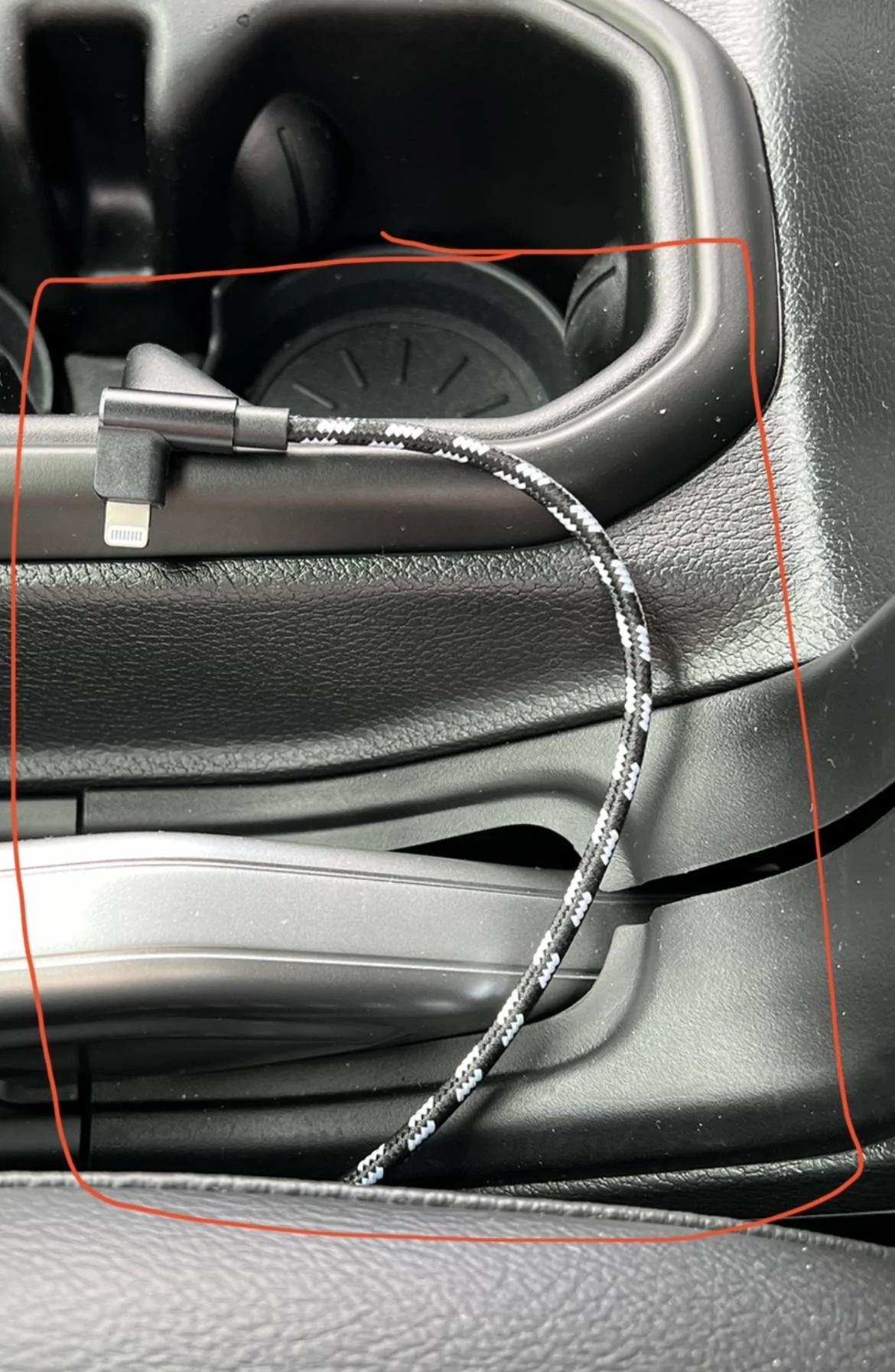
I bought a Agoz Apple MFI Certified Lightning to USB C Cable with a 90° Right Angle connection on both ends and used a USB-C to USB -A Adapter in the Port. I tried this on short trips, a long trip and daily driving. After 2 weeks of testing, I have had no issues at all with reliability.
This has been driving me nuts and hopefully helps out those that are like me and hate having cables dangle out of the front dash media connect hub.
![]()
![]()
You are a genius. I did everything you said. It did the trick. Thanks so much for posting and sharing your findings.So, after trying a lot of suggestions here and a few of my own, I found a solution. Unfortunately it is NOT wireless, but it works very well.
As a slight recap if someone new to the issue is reading this, a lot of JL's are plagued with intermittent CarPlay back when plugged in via the USB in the Center Console. For reference, I am driving a 2023 JLU Rubicon, and using a iP13 Pro.
I tried wireless first, and was able to get it to work with no issues with the Carlinkit 4.0 Adapter, however I returned it because after extensive testing, it would never turn off. Some speculated that it would after 60 minutes, but mine never did. Although it is not much on the battery, I do not want things draining power. But it did work with no reboots, never dropped out - worked flawlessly.
The other solution which is what I ended up going with was trying different USB-C to Lighting cables and adapters. I do not know why the solution I will outline below works, but it does. I tried Apple Branded Cables, generic ones, certified ones, etc.. and all had issues with either dropping the CP connection or not working at all.
I bought a Agoz Apple MFI Certified Lightning to USB C Cable with a 90° Right Angle connection on both ends and used a USB-C to USB -A Adapter in the Port. I tried this on short trips, a long trip and daily driving. After 2 weeks of testing, I have had no issues at all with reliability.
This has been driving me nuts and hopefully helps out those that are like me and hate having cables dangle out of the front dash media connect hub.
![]()
![]()
In case this helps....So, after trying a lot of suggestions here and a few of my own, I found a solution. Unfortunately it is NOT wireless, but it works very well.
As a slight recap if someone new to the issue is reading this, a lot of JL's are plagued with intermittent CarPlay back when plugged in via the USB in the Center Console. For reference, I am driving a 2023 JLU Rubicon, and using a iP13 Pro.
I tried wireless first, and was able to get it to work with no issues with the Carlinkit 4.0 Adapter, however I returned it because after extensive testing, it would never turn off. Some speculated that it would after 60 minutes, but mine never did. Although it is not much on the battery, I do not want things draining power. But it did work with no reboots, never dropped out - worked flawlessly.
The other solution which is what I ended up going with was trying different USB-C to Lighting cables and adapters. I do not know why the solution I will outline below works, but it does. I tried Apple Branded Cables, generic ones, certified ones, etc.. and all had issues with either dropping the CP connection or not working at all.
I bought a Agoz Apple MFI Certified Lightning to USB C Cable with a 90° Right Angle connection on both ends and used a USB-C to USB -A Adapter in the Port. I tried this on short trips, a long trip and daily driving. After 2 weeks of testing, I have had no issues at all with reliability.
This has been driving me nuts and hopefully helps out those that are like me and hate having cables dangle out of the front dash media connect hub.
![]()
![]()
Unfortunately I do not. So far so good, my CarPlay has been working for over a year now.Anyone found a solution for the iPhone 15 with USB-C instead of lightning? The initial solution worked great for me but now that I have a new phone, I'm back to the same old issues (actually worse, I have to plug / un-plug / plug the phone in several times to get it to work even w/the port on the dash).
It appears that 17.2 may have fixed this issue. -> https://www.jlwranglerforums.com/fo...x-carplay-works-intermittently.119281/page-22Anyone found a solution for the iPhone 15 with USB-C instead of lightning? The initial solution worked great for me but now that I have a new phone, I'm back to the same old issues (actually worse, I have to plug / un-plug / plug the phone in several times to get it to work even w/the port on the dash).
Same here, I just finished dropping my returns back to Amazon.Well... After trying this hack it didnt do it for me. Problem still persists. What a nightmare