Sponsored

Off-Road Camera (front facing) writeup

BSw

Well-Known Member
First Name
Bert
Joined
Oct 22, 2017
Threads
17
Messages
186
Reaction score
195
Location
Sacramento, CA
Vehicle(s)
2018 JLUR - 2015 Ford Mustang - 2018 Volvo S90
Reverse camera is unaffected. Under the apps view, you'll still have the option for the backup camera and after adding the new camera and configuring the Tazer, you'll see a Cargo Cam option as well. When you put the vehicle in reverse, you can also toggle between the two cameras using the icons in the top left corner. Rear view is still the backup camera and the cargo cam is the front camera.

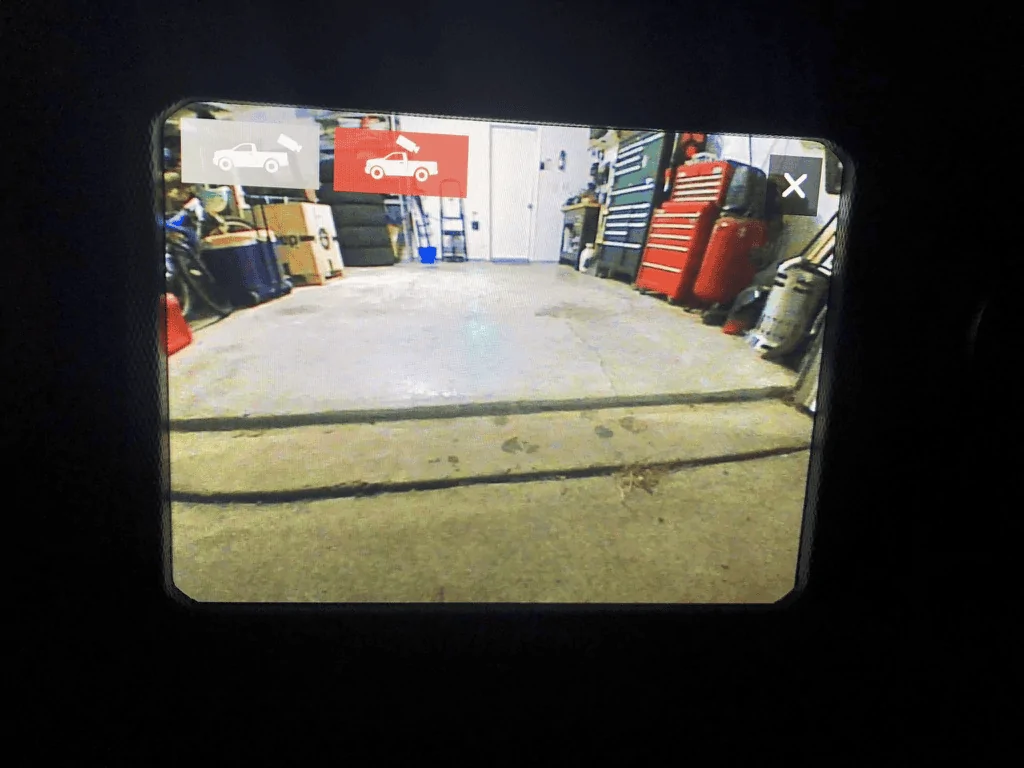
80941.webp
I tried getting this to work with my Tazer but I don’t see any cargo icon or toggle icon on the back up screen
Does this only work when you have it wired up in the back of the head unit or should that icon be available as soon as you enable it in the tazer setup?
Sponsored

 

Kansascoast

Well-Known Member
First Name
Jim
Joined
Nov 6, 2017
Threads
7
Messages
125
Reaction score
259
Location
Kansas
Vehicle(s)
Wrangler JKU, 2drJL
I tried getting this to work with my Tazer but I don’t see any cargo icon or toggle icon on the back up screen
Does this only work when you have it wired up in the back of the head unit or should that icon be available as soon as you enable it in the tazer setup?
Having the same problem...no icons. Anybody have some suggestions?
 

mazeppa

Well-Known Member
First Name
y = x/0
Joined
Feb 11, 2018
Threads
9
Messages
291
Reaction score
431
Location
ICBM complex at Kodlosk
Vehicle(s)
2021 JTR Panda
Occupation
knife sharpening snob
I would have assumed that that the cargo and backup icons would both appear after the cargo camera was enabled with the Tazer. I did not enable my cargo camera until after I had a physically wired in a camera to test.
 

Kansascoast

Well-Known Member
First Name
Jim
Joined
Nov 6, 2017
Threads
7
Messages
125
Reaction score
259
Location
Kansas
Vehicle(s)
Wrangler JKU, 2drJL
I got mine working. I had done a reboot after enabling the cargo cam....BUT....I didn’t do a “FULL REBOOT”. After doing the full reboot everything worked as it should and the icon showed up on the screen next to the backup camera.
 

ItsUhJEEP

Well-Known Member
First Name
JP
Joined
Jun 9, 2018
Threads
13
Messages
93
Reaction score
119
Location
Destin Florida
Vehicle(s)
2023 JLU Rubicon
Before I got the camera, I was able to get the cargo cam(two view buttons) to appear on the backup cam view. Now that I have a camera pinned, I have lost my backup camera all together. I cannot get it to activate in reverse nor by pressing the cam button under the "controls" screen.

**edit**
I did a full reboot to include the door sequence and 1minute wait. Everything now works accordingly. It did give me a chance to go through the fuse box and I found a bunch of barely seated fuses(as stated in other threads).

cheers to everyone on this thread for the details and knowledge
 
Last edited:

Sponsored

Brew211

Well-Known Member
Joined
Jun 18, 2018
Threads
45
Messages
824
Reaction score
719
Location
Peoria, Arizona
Vehicle(s)
2018 JLURM, 2022 392 XR, 2024 F250
Vehicle Showcase
1
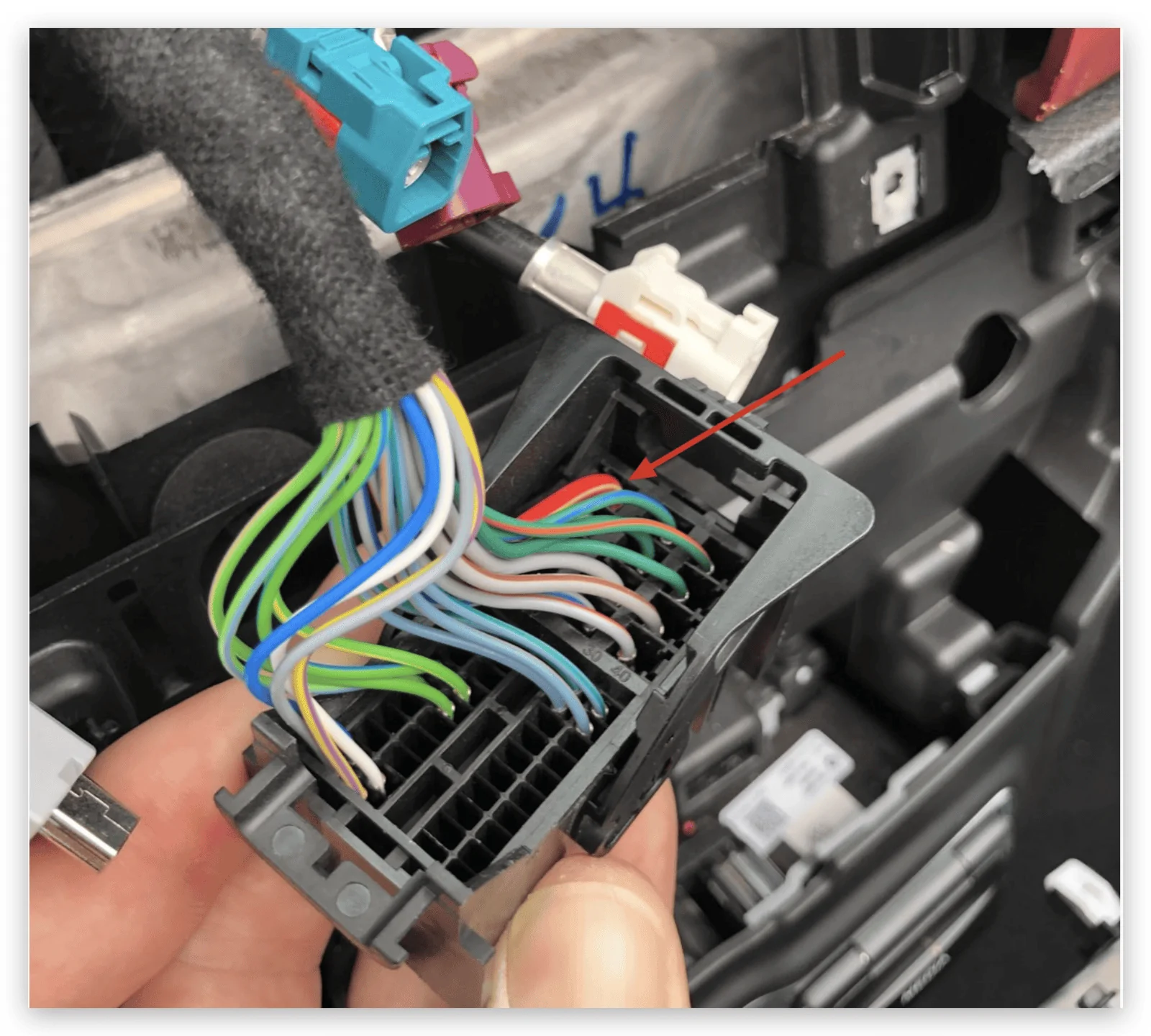
Sure thing. Power source should be the larger red wire indicated below. Safest thing to do is to verify with a volt meter, but that's the one it was for me.
upload_2018-11-28_15-22-46.webp


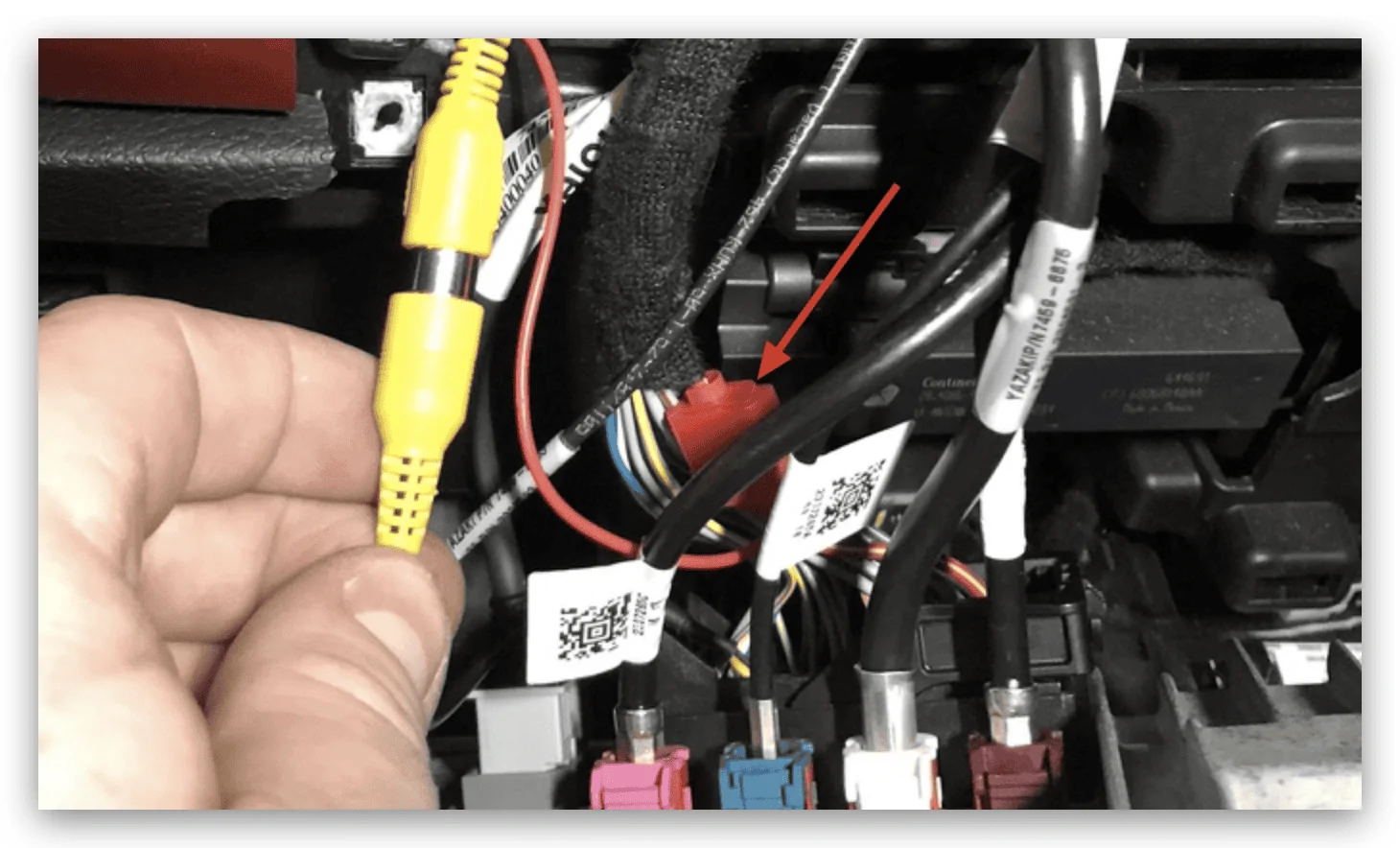
If your camera is like mine and has the hot wire pigtailed off the RCA connector, just make sure you get a good connection. That wire for me was super thin, so I stripped it back and folded it over the insulation in order to get good contact and not have it fall out. I used a simple vampire connector to tie into the 12v source instead of trying to pull that pin and splice something in. For the ground, I just picked a bolt on the front end near the camera and grounded it there.
upload_2018-11-28_15-26-35.webp

One more question, I can't figure out why the camera is reversed. I cut both the green and white wires and still reversed. Suggestions?
 

Brew211

Well-Known Member
Joined
Jun 18, 2018
Threads
45
Messages
824
Reaction score
719
Location
Peoria, Arizona
Vehicle(s)
2018 JLURM, 2022 392 XR, 2024 F250
Vehicle Showcase
1
Ne
One more question, I can't figure out why the camera is reversed. I cut both the green and white wires and still reversed. Suggestions?
Never mind, it auto corrected itself. Problem solved. Thanks for all the help.
 

Jlwizard

Member
Joined
Dec 8, 2018
Threads
2
Messages
23
Reaction score
13
Location
Minnasota
Vehicle(s)
2018 Jl 2 door sport, cant wait to mod
Has anyone made this work with the base model 5 inch screen?
 

wrangler-rob

Well-Known Member
First Name
Robert
Joined
Apr 9, 2018
Threads
3
Messages
120
Reaction score
63
Location
New Jersey
Vehicle(s)
2018 JLUR
One more question, I can't figure out why the camera is reversed. I cut both the green and white wires and still reversed. Suggestions?
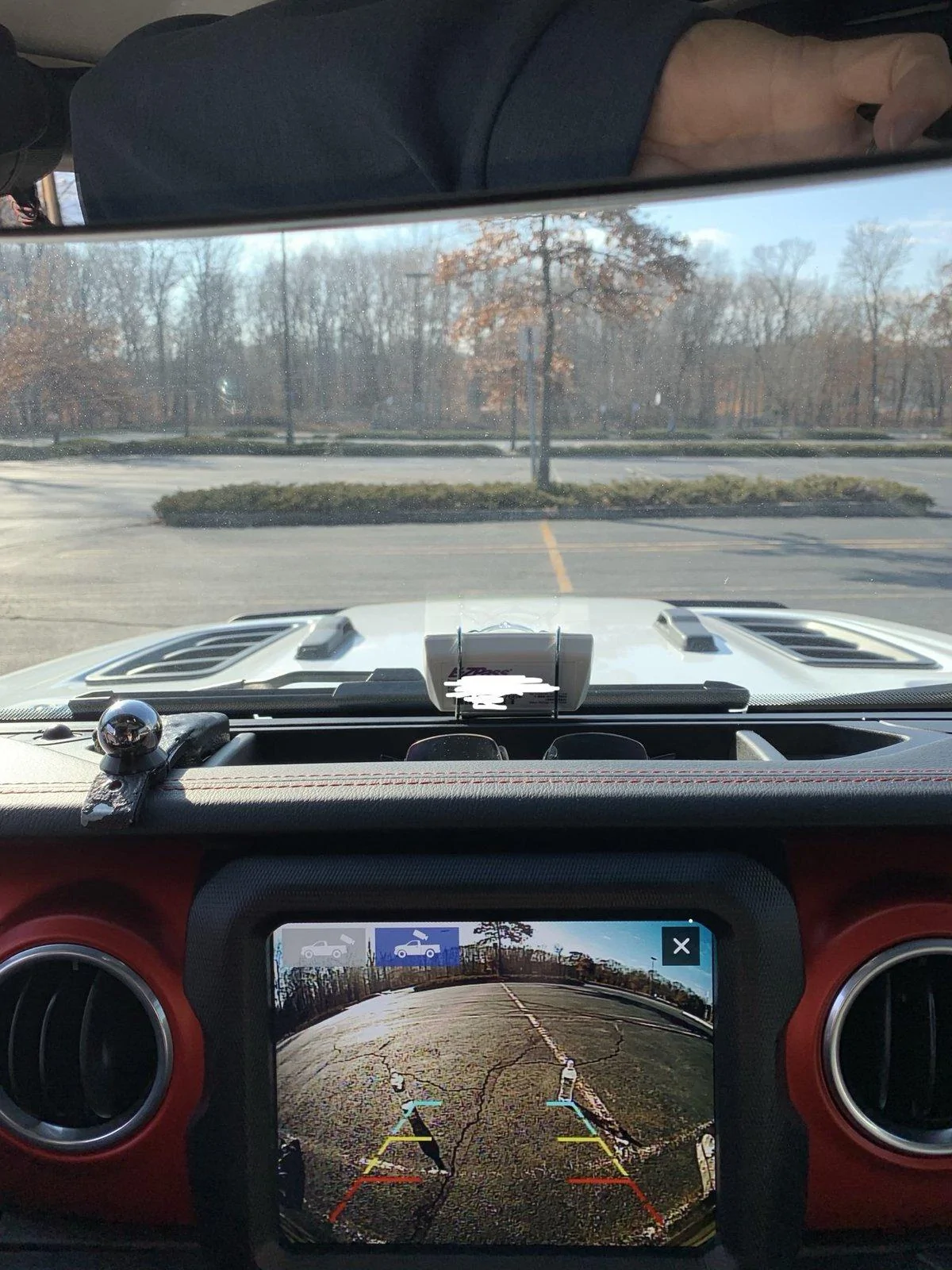
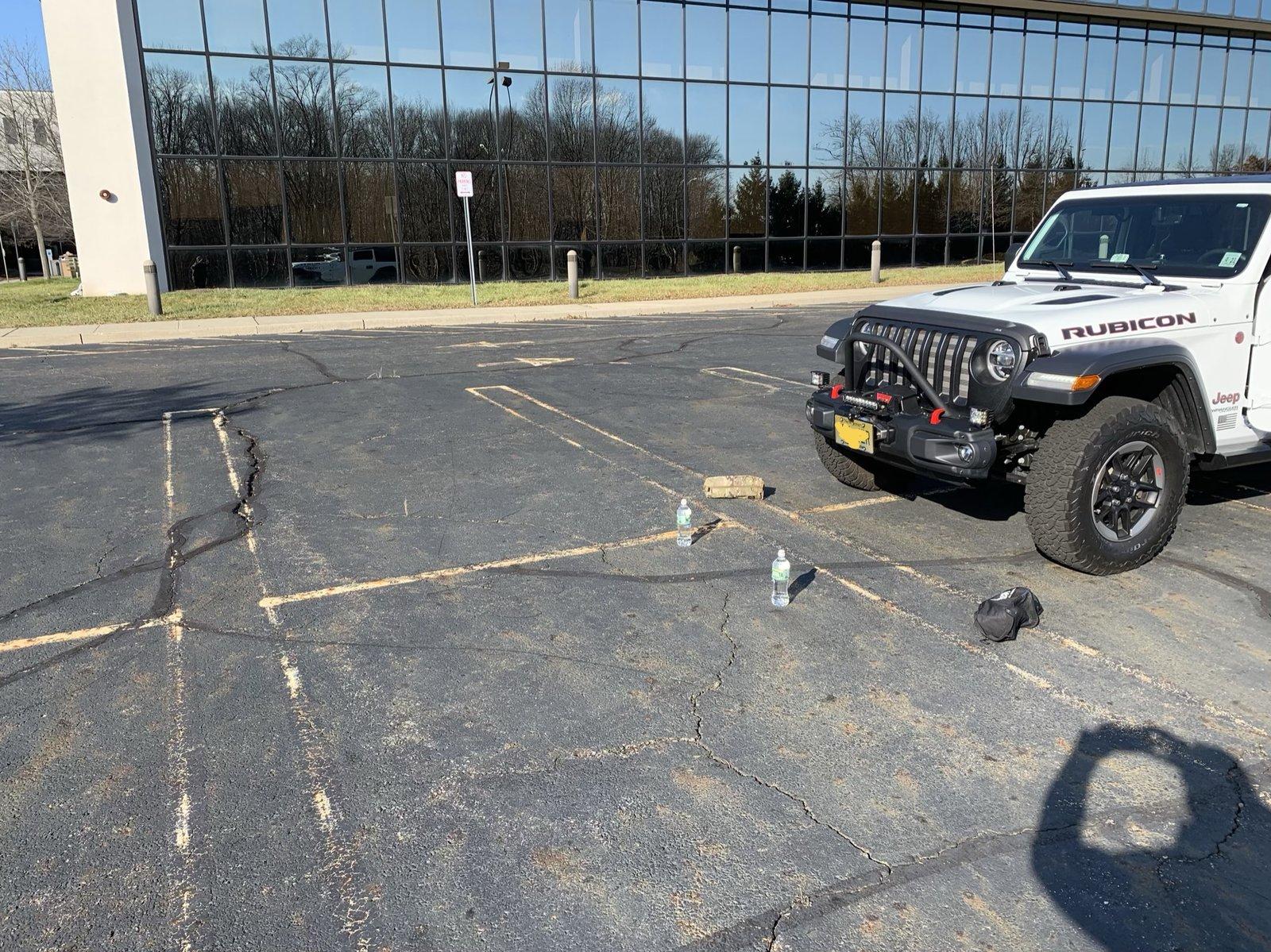
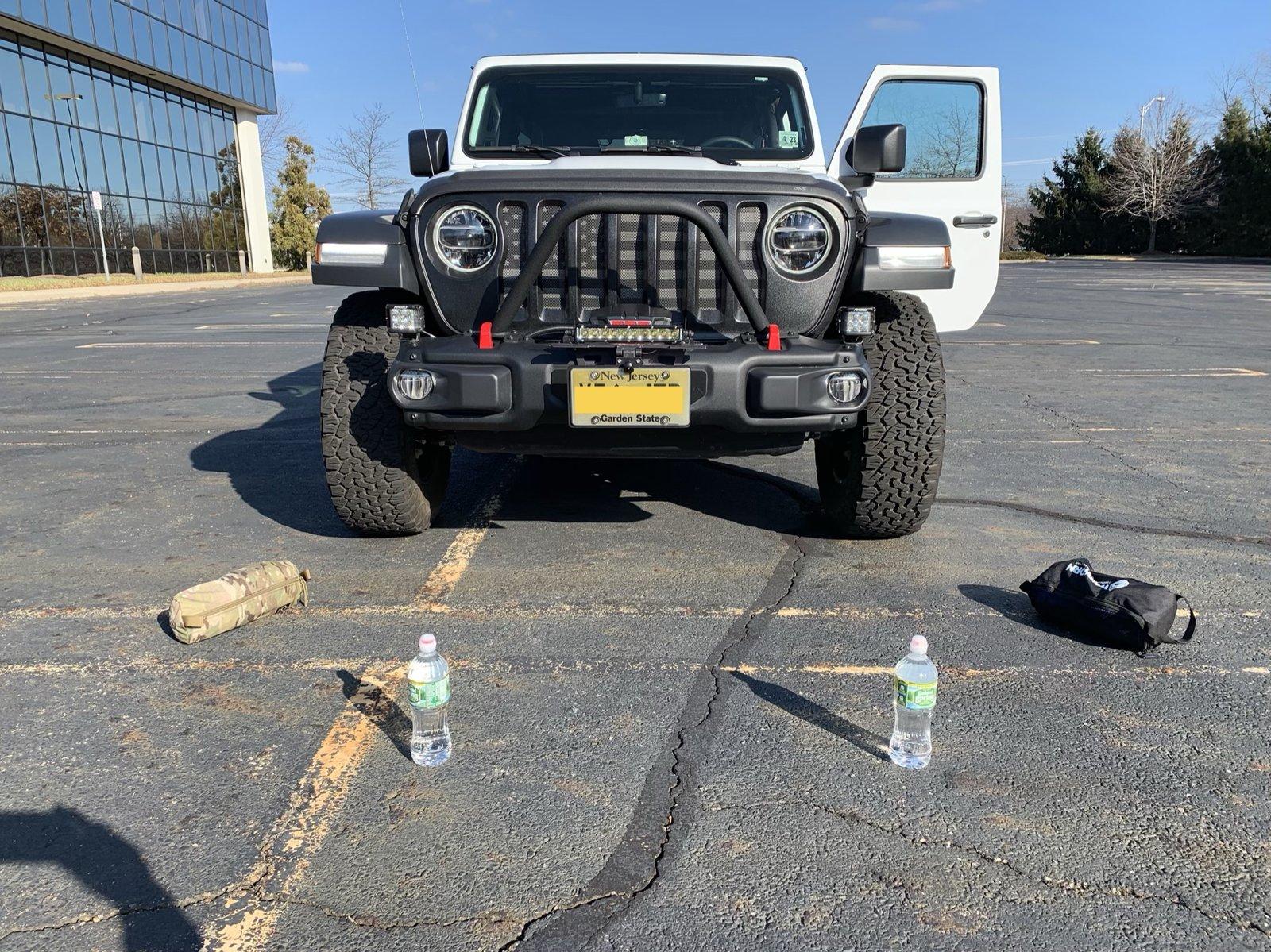
Great thread, this thread along with the Zautomotive manual helped me complete my install. I purchased two cameras and opted for the natika. I had both the bullet Cam earlier in this thread and the natika. Bullet cam was only 90 degree visibility which I did not like as much as the 145 of the natika. The other thing I liked about the natika was the contact on the cabling: MUCH lower profile which made snaking through the dash significantly easier, bullet camera was RCA on both sides IE bulkier and harder to pull through the dash. Here is the link for the camera I opted for:

NATIKA Backup/Front/Side View Camera,IP69K Waterproof Great Night Vision HD and Super Wide Angle Metal OEM Style Reverse Rear View Backup Camera for Cars, Pickup Trucks, SUVs,RVs,Vans (Black) https://www.amazon.com/dp/B07H852D49/ref=cm_sw_r_cp_api_i_dJPdCbJQN3F6N

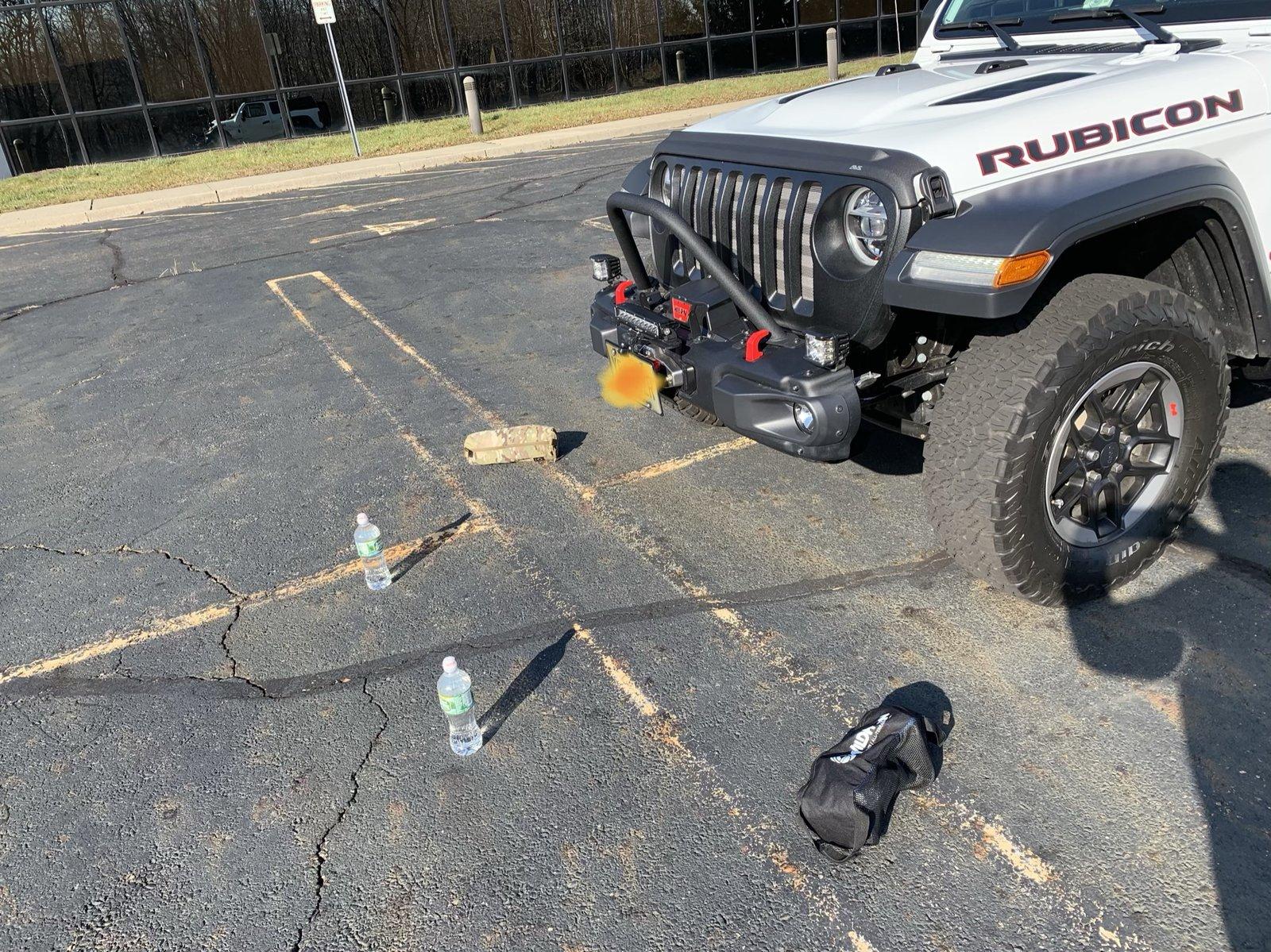
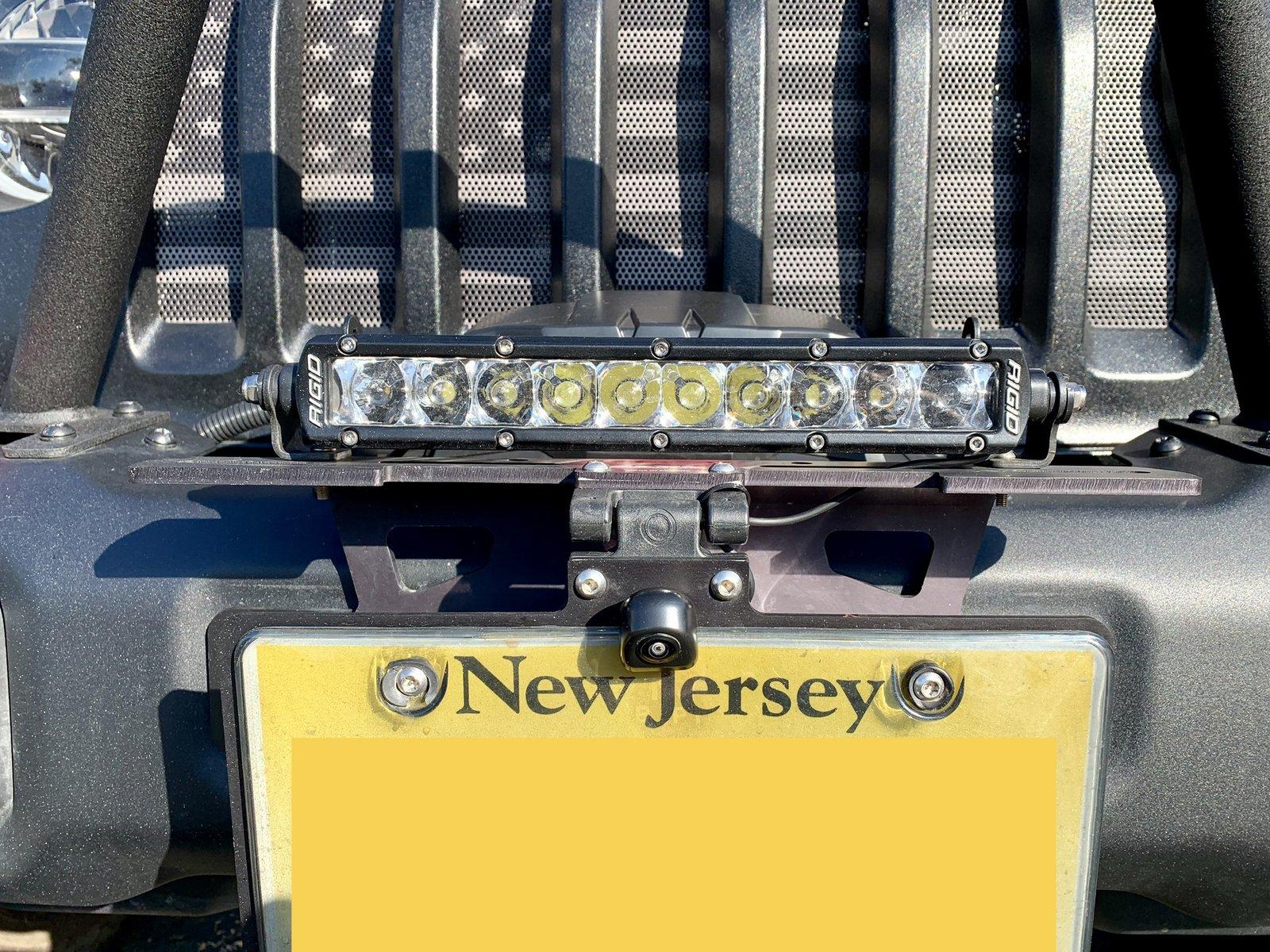
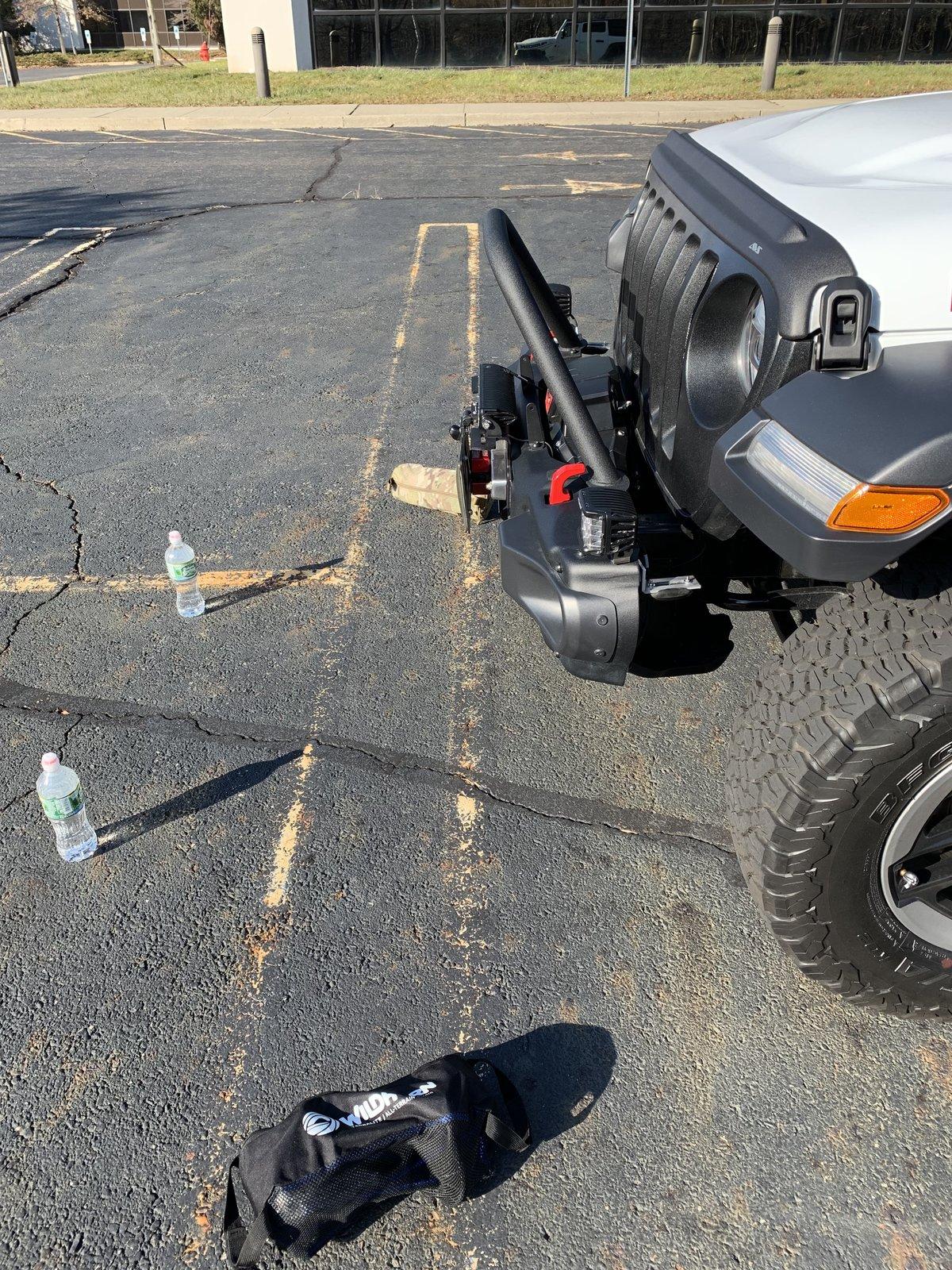
Photos below, I used a parking lot hoping it might add additional perspective on distance of visibility, etc. pretty much the inside of my front wheels will track to the outside of the red lines, hence I opted to keep the lines as I thought this might be beneficial for spotting. Finally, I mounted the camera just above my plate on the cascadia bracket which allows me additional adjustability by nature of the pivot the cascadia offers. Cheers all!

Jeep Wrangler JL Off-Road Camera (front facing) writeup BBC5508A-E938-4C0A-94D8-3FE99C8705D6


Jeep Wrangler JL Off-Road Camera (front facing) writeup EECE03DD-9EFC-4054-80CE-0F425A03450F


Jeep Wrangler JL Off-Road Camera (front facing) writeup 53F49F42-544B-43E9-9C69-2576E1A9BA26


Jeep Wrangler JL Off-Road Camera (front facing) writeup 23682CA3-B065-4180-AFC8-5377C2514216


Jeep Wrangler JL Off-Road Camera (front facing) writeup B92C447C-3165-4B2C-91DE-3ED340EA8B34


Jeep Wrangler JL Off-Road Camera (front facing) writeup F25AA0C3-3F37-4668-9F7C-A29811E4F9B1
 

Sponsored

Jondrew

Well-Known Member
First Name
Bob
Joined
Dec 3, 2018
Threads
33
Messages
873
Reaction score
956
Location
Central Fl
Vehicle(s)
2018 Rubicon
Sweet install.

NJ? What exit?

Great thread, this thread along with the Zautomotive manual helped me complete my install. I purchased two cameras and opted for the natika. I had both the bullet Cam earlier in this thread and the natika. Bullet cam was only 90 degree visibility which I did not like as much as the 145 of the natika. The other thing I liked about the natika was the contact on the cabling: MUCH lower profile which made snaking through the dash significantly easier, bullet camera was RCA on both sides IE bulkier and harder to pull through the dash. Here is the link for the camera I opted for:

NATIKA Backup/Front/Side View Camera,IP69K Waterproof Great Night Vision HD and Super Wide Angle Metal OEM Style Reverse Rear View Backup Camera for Cars, Pickup Trucks, SUVs,RVs,Vans (Black) https://www.amazon.com/dp/B07H852D49/ref=cm_sw_r_cp_api_i_dJPdCbJQN3F6N

Photos below, I used a parking lot hoping it might add additional perspective on distance of visibility, etc. pretty much the inside of my front wheels will track to the outside of the red lines, hence I opted to keep the lines as I thought this might be beneficial for spotting. Finally, I mounted the camera just above my plate on the cascadia bracket which allows me additional adjustability by nature of the pivot the cascadia offers. Cheers all!

BBC5508A-E938-4C0A-94D8-3FE99C8705D6.webp


EECE03DD-9EFC-4054-80CE-0F425A03450F.jpeg


53F49F42-544B-43E9-9C69-2576E1A9BA26.jpeg


23682CA3-B065-4180-AFC8-5377C2514216.jpeg


B92C447C-3165-4B2C-91DE-3ED340EA8B34.jpeg


F25AA0C3-3F37-4668-9F7C-A29811E4F9B1.jpeg
 

Mark

Well-Known Member
Joined
Jan 14, 2017
Threads
6
Messages
149
Reaction score
461
Location
Utah
Vehicle(s)
2018 Jeep JLU
Vehicle Showcase
2
Anyone have any luck with the 7” screen? I’ve hooked mine up an no luck getting the icons to turn on. I’ve done a full reboot a few times with Tazer and nothing. Looks like I might be out of luck with the 7” screen.
 

wrangler-rob

Well-Known Member
First Name
Robert
Joined
Apr 9, 2018
Threads
3
Messages
120
Reaction score
63
Location
New Jersey
Vehicle(s)
2018 JLUR
Anyone have any luck with the 7” screen? I’ve hooked mine up an no luck getting the icons to turn on. I’ve done a full reboot a few times with Tazer and nothing. Looks like I might be out of luck with the 7” screen.
If you check the Tazer instructions they specifically call out the 8.4”.... IE: I too think you are out of luck here my friend...
Sponsored


Top