Sponsored

"Looking for GPS Signal"

Crownline

Well-Known Member
Joined
Oct 21, 2019
Threads
4
Messages
57
Reaction score
19
Location
STL
Vehicle(s)
Wrangler
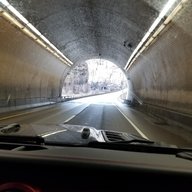
My 2020 JLUR with 24,000 miles is having GPS issues. First thing I noticed was the direction on the dash was showing two dashes instead of N, E, S, W. Now when I go to maps, it shows a highway I was on over the weekend and says "Looking for GPS Signal..." and never finds it.

I have done a little research and it says to pull fuse 11 or 97, but I haven't tried that yet. I know the antenna is above the passenger side roll bar, but I haven't messed with that yet. Any other suggestions?? I can't even figure out how to do a hard reset (holding power button and tune do nothing).

Jeep Wrangler JL "Looking for GPS Signal" 20240709_180926
Sponsored


jludave

Well-Known Member
First Name
Dave
Joined
Feb 13, 2020
Threads
13
Messages
4,158
Reaction score
4,287
Location
The Isle of Long
Vehicle(s)
2020 Wrangler Unlimited Sport Altitude
Occupation
IT Manager
Vehicle Showcase
1
Clubs
 
OP
OP
Crownline

Crownline

Well-Known Member
Joined
Oct 21, 2019
Threads
4
Messages
57
Reaction score
19
Location
STL
Vehicle(s)
Wrangler
It's likely that the air card in the radio went bad. It's needed for GPS and cellular functionality.
When this card dies, the nav system loses the ability to have the correct GPS position.

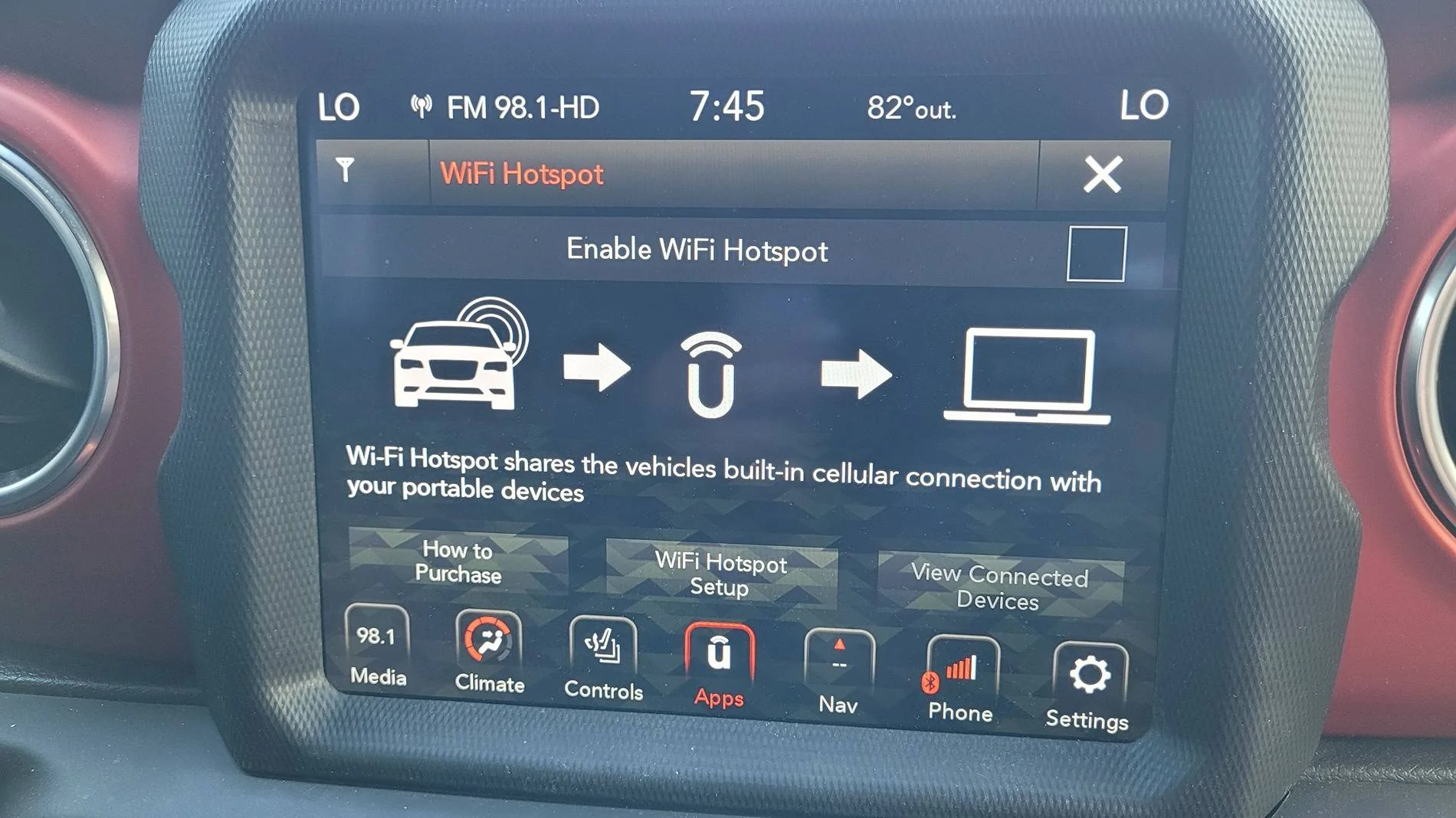
To see if your card has failed, go to the the wi-fi hotspot app and see if you have any cell signal bars.

Look here:

https://www.jlwranglerforums.com/fo...-with-dash-compass-and-gps.30477/post-1255594
Now occasionally I'm getting "Device not Supported" on the screen that pops up.

When I go to the wifi app, I don't see a place to see bars. This is what's on the wifi app screen.

Jeep Wrangler JL "Looking for GPS Signal" 20240710_194503
 

GtX

Well-Known Member
First Name
David
Joined
Nov 9, 2019
Threads
8
Messages
2,080
Reaction score
3,310
Location
Illinois
Vehicle(s)
2020 JLUR 3.0D
Occupation
Working for the man.
Vehicle Showcase
1
I get a mail earlier this week telling me that my navigation maps were out of date with an offer of $99 to upgrade. As I tossed it in the trash, I wondered if anyone uses the uconnect navigation. I guess someone does.

Why not Google or Apple through your phone?
 
OP
OP
Crownline

Crownline

Well-Known Member
Joined
Oct 21, 2019
Threads
4
Messages
57
Reaction score
19
Location
STL
Vehicle(s)
Wrangler
I get a mail earlier this week telling me that my navigation maps were out of date with an offer of $99 to upgrade. As I tossed it in the trash, I wondered if anyone uses the uconnect navigation. I guess someone does.

Why not Google or Apple through your phone?
Are you responding to me? It's not a maps issue...I have NO GPS at all!! No compass direction. When I plug in my phone, Uconnect doesn't show my apps so I can't even use that to show a map on the screen either. I have a "Device not Supported" screen that pops up occasionally even if nothing is connected (wired or wireless) to the Jeep.

It's certainly not a maps issues. Lol!
 

Sponsored

sunset

Well-Known Member
First Name
Jay
Joined
Sep 4, 2023
Threads
17
Messages
539
Reaction score
594
Location
Seattle
Vehicle(s)
1984 Camaro Berlinetta V8, 2024 Wrangler Rubicon 392
I get a mail earlier this week telling me that my navigation maps were out of date with an offer of $99 to upgrade. As I tossed it in the trash, I wondered if anyone uses the uconnect navigation. I guess someone does.

Why not Google or Apple through your phone?
I'm still learning how to use my 12-inch display in the 2024 models. I have both NAV (using male voice) and Android Auto (using female voice). So far, I've learned that NAV uses the entire display width while AAA uses three fifths of it and the remaining two-fifths tells me I have no music connected. How annoying when I'd rather have the full width for the map. I can program NAV to show me where the gas stations are as I travel along, which I really like, while I don't know yet if AA does that. AA gives me a distant aerial view in that three-fifths space while the NAV full width makes it easier for me to spatially understand. The NAV voice speaks clearly while the AA voice (Google Maps?) cuts off the very end of everything she says. One thing about NAV that bothers me is when I do a Search for a business name and, when it presents me with choices from which to select, it retains the dang keyboard, covering most of the addresses. Not sure yet how to get around that.

Like I say, I'm still exploring both but, so far, I lean towards NAV. However, I had a very annoying experience with it yesterday. I was traveling nowhere near home and decided I wanted to go to Dairy Queen for a Blizzard. There are no DQ's in Seattle so I typed in Dairy Queen Lynnwood and it presented me with a map and an ETA. I decided WTF and followed it, taking me on I-5 during sluggish traffic until finally it presented me in the backside of Alderwood Mall where all I saw were brick walls with no windows and a single door saying Macy's. So was the DQ inside the mall? The annoying part was, get this, only after I arrived did my screen say Business Closed. So, I sat through bad interstate traffic and a circuitous route just to be told when I got there that it is closed?

Ok, only now am I laughing but I sure was ticked at the time.
 

Ratbert

Well-Known Member
First Name
John
Joined
Jun 20, 2020
Threads
159
Messages
16,001
Reaction score
24,932
Location
PNW
Vehicle(s)
2022 AEV JL370 JLURD
Build Thread
Link
Occupation
Software Engineer
Clubs
 
I'm still learning how to use my 12-inch display in the 2024 models. I have both NAV (using male voice) and Android Auto (using female voice). So far, I've learned that NAV uses the entire display width while AAA uses three fifths of it and the remaining two-fifths tells me I have no music connected. How annoying when I'd rather have the full width for the map. I can program NAV to show me where the gas stations are as I travel along, which I really like, while I don't know yet if AA does that. AA gives me a distant aerial view in that three-fifths space while the NAV full width makes it easier for me to spatially understand. The NAV voice speaks clearly while the AA voice (Google Maps?) cuts off the very end of everything she says. One thing about NAV that bothers me is when I do a Search for a business name and, when it presents me with choices from which to select, it retains the dang keyboard, covering most of the addresses. Not sure yet how to get around that.

Like I say, I'm still exploring both but, so far, I lean towards NAV. However, I had a very annoying experience with it yesterday. I was traveling nowhere near home and decided I wanted to go to Dairy Queen for a Blizzard. There are no DQ's in Seattle so I typed in Dairy Queen Lynnwood and it presented me with a map and an ETA. I decided WTF and followed it, taking me on I-5 during sluggish traffic until finally it presented me in the backside of Alderwood Mall where all I saw were brick walls with no windows and a single door saying Macy's. So was the DQ inside the mall? The annoying part was, get this, only after I arrived did my screen say Business Closed. So, I sat through bad interstate traffic and a circuitous route just to be told when I got there that it is closed?

Ok, only now am I laughing but I sure was ticked at the time.
Most of the "hell no, the built-in Nav sucks" comments come from pre-24 owners. I don't use it because it pretty much sucks from every perspective. It's supposed to be significantly better in the 24s.

And yes, Android Auto is notorious for being unable to complete a sentence. It's rather irritating.

Your DQ driving directions experience sounds a lot like how Waze worked when it first came out (long before it was bought by Google). Simply an indication of an immature / incomplete map database. It's really bad, however, that it gave you no indication that DQ wouldn't be open. Maybe it doesn't have that feature or it's just out of date?
 

JeepCares

Well-Known Member
Joined
Feb 1, 2018
Threads
16
Messages
5,423
Reaction score
2,800
Location
Auburn Hills, MI
Vehicle(s)
JL
My 2020 JLUR with 24,000 miles is having GPS issues. First thing I noticed was the direction on the dash was showing two dashes instead of N, E, S, W. Now when I go to maps, it shows a highway I was on over the weekend and says "Looking for GPS Signal..." and never finds it.

I have done a little research and it says to pull fuse 11 or 97, but I haven't tried that yet. I know the antenna is above the passenger side roll bar, but I haven't messed with that yet. Any other suggestions?? I can't even figure out how to do a hard reset (holding power button and tune do nothing).
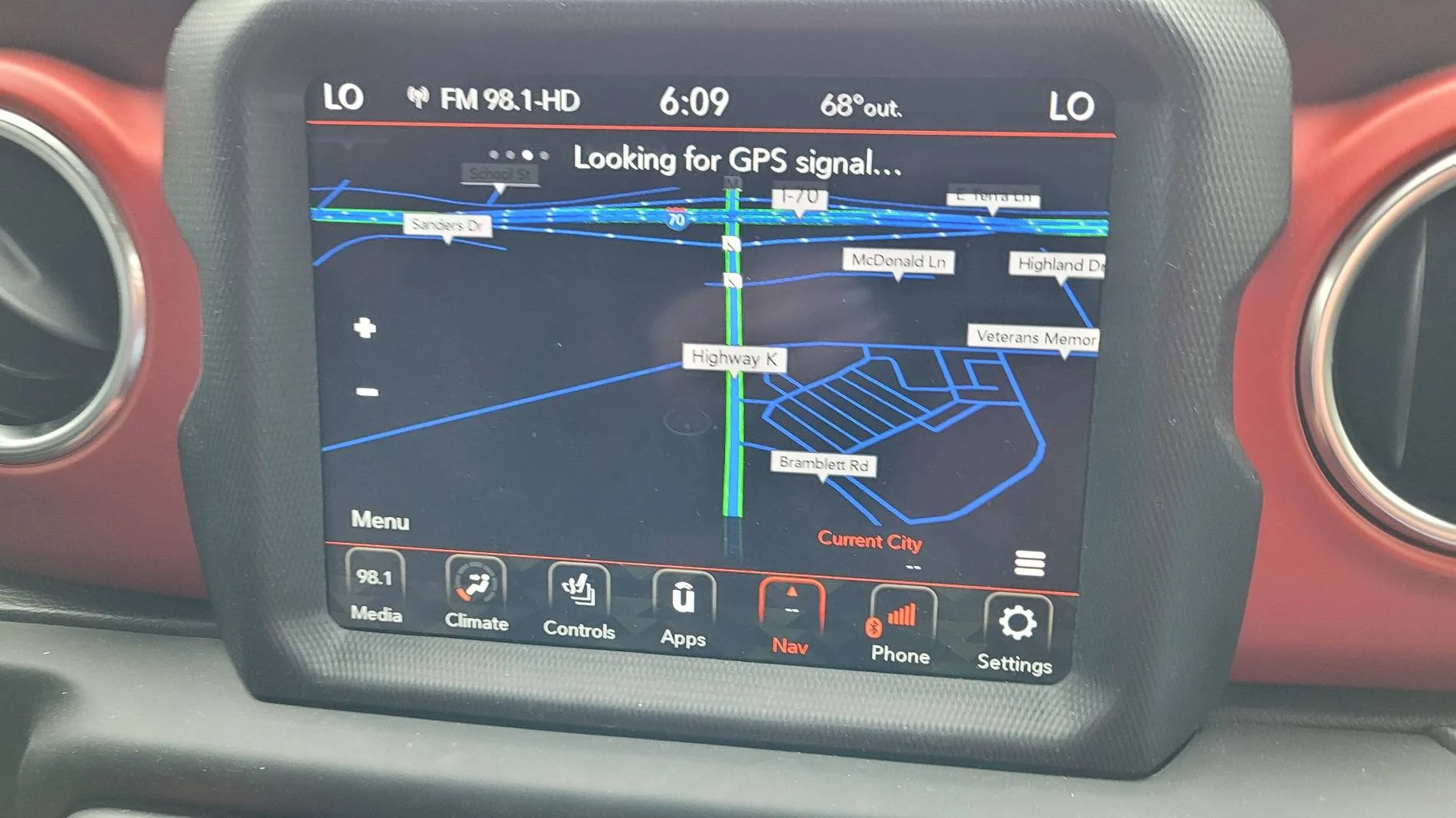
20240709_180926.jpg
I'm still learning how to use my 12-inch display in the 2024 models. I have both NAV (using male voice) and Android Auto (using female voice). So far, I've learned that NAV uses the entire display width while AAA uses three fifths of it and the remaining two-fifths tells me I have no music connected. How annoying when I'd rather have the full width for the map. I can program NAV to show me where the gas stations are as I travel along, which I really like, while I don't know yet if AA does that. AA gives me a distant aerial view in that three-fifths space while the NAV full width makes it easier for me to spatially understand. The NAV voice speaks clearly while the AA voice (Google Maps?) cuts off the very end of everything she says. One thing about NAV that bothers me is when I do a Search for a business name and, when it presents me with choices from which to select, it retains the dang keyboard, covering most of the addresses. Not sure yet how to get around that.

Like I say, I'm still exploring both but, so far, I lean towards NAV. However, I had a very annoying experience with it yesterday. I was traveling nowhere near home and decided I wanted to go to Dairy Queen for a Blizzard. There are no DQ's in Seattle so I typed in Dairy Queen Lynnwood and it presented me with a map and an ETA. I decided WTF and followed it, taking me on I-5 during sluggish traffic until finally it presented me in the backside of Alderwood Mall where all I saw were brick walls with no windows and a single door saying Macy's. So was the DQ inside the mall? The annoying part was, get this, only after I arrived did my screen say Business Closed. So, I sat through bad interstate traffic and a circuitous route just to be told when I got there that it is closed?

Ok, only now am I laughing but I sure was ticked at the time.
Hello,

Vehicle concerns are the last thing we want for any of our customers. Our team is more than willing to assist in resolving this alongside your dealer if needed. Please individually send our team your VIN(s) for us to review via private message so we can determine the next steps of support. Thank you and we hope to connect with each of you soon!

Dakota
Jeep Cares
 

B&ZRubi

Well-Known Member
First Name
Bruce
Joined
Sep 11, 2020
Threads
1
Messages
64
Reaction score
40
Location
Bluffton, SC
Website
flyingmpartners.com
Vehicle(s)
2020 2dr Rubicon JL
Occupation
Retired
Not sure this came up, but if you did something like adding insulation or sound damping material to the roof, it could block the signal to the antenna located in the roller on the right side.
 
OP
OP
Crownline

Crownline

Well-Known Member
Joined
Oct 21, 2019
Threads
4
Messages
57
Reaction score
19
Location
STL
Vehicle(s)
Wrangler
Not sure this came up, but if you did something like adding insulation or sound damping material to the roof, it could block the signal to the antenna located in the roller on the right side.
Thanks, but I haven't added anything. It does have the sound panels or whatever they are called, but that's how it was Sheff it was brought brand new. Guess it was an option that was on it.
 

Sponsored

B&ZRubi

Well-Known Member
First Name
Bruce
Joined
Sep 11, 2020
Threads
1
Messages
64
Reaction score
40
Location
Bluffton, SC
Website
flyingmpartners.com
Vehicle(s)
2020 2dr Rubicon JL
Occupation
Retired
Thanks, but I haven't added anything. It does have the sound panels or whatever they are called, but that's how it was Sheff it was brought brand new. Guess it was an option that was on it.
I have the same Jeep and just upgraded to a 2020 8.4" radio and the GPS and XM Radio use the same antenna. Does the XM radio work? And I am going to wait for the 2024 map update to come out later in October before I think about paying for a map update.
 

alphawolff

Well-Known Member
Joined
Jul 31, 2023
Threads
1
Messages
3,343
Reaction score
5,586
Location
california
Vehicle(s)
2021 JLU
My 2020 JLUR with 24,000 miles is having GPS issues. First thing I noticed was the direction on the dash was showing two dashes instead of N, E, S, W. Now when I go to maps, it shows a highway I was on over the weekend and says "Looking for GPS Signal..." and never finds it.

I have done a little research and it says to pull fuse 11 or 97, but I haven't tried that yet. I know the antenna is above the passenger side roll bar, but I haven't messed with that yet. Any other suggestions?? I can't even figure out how to do a hard reset (holding power button and tune do nothing).

20240709_180926.jpg
Assuming no active antenna DTCs you have a failed radio. All the GPS functions are internal to the unit. I wouldn't say it's common but I've seen them fail frequently enough.
 
OP
OP
Crownline

Crownline

Well-Known Member
Joined
Oct 21, 2019
Threads
4
Messages
57
Reaction score
19
Location
STL
Vehicle(s)
Wrangler
I have the same Jeep and just upgraded to a 2020 8.4" radio and the GPS and XM Radio use the same antenna. Does the XM radio work? And I am going to wait for the 2024 map update to come out later in October before I think about paying for a map update.
I don't have an active Sirius subscription, but the ads play. Not sure if the ads would play anyway??
 
OP
OP
Crownline

Crownline

Well-Known Member
Joined
Oct 21, 2019
Threads
4
Messages
57
Reaction score
19
Location
STL
Vehicle(s)
Wrangler
Assuming no active antenna DTCs you have a failed radio. All the GPS functions are internal to the unit. I wouldn't say it's common but I've seen them fail frequently enough.
Some say it might be a bad aircard that you can replace separately?? I haven't done much research on it, though.
 

alphawolff

Well-Known Member
Joined
Jul 31, 2023
Threads
1
Messages
3,343
Reaction score
5,586
Location
california
Vehicle(s)
2021 JLU
Some say it might be a bad aircard that you can replace separately?? I haven't done much research on it, though.
It's definitely replaceable but not user friendly at all. Your time is better invested in replacing the entire radio, it's what we do here at the dealer.
Sponsored


Top