Sponsored

iPad for GPS????

fat_head

Well-Known Member
Joined
Mar 28, 2018
Threads
45
Messages
1,055
Reaction score
2,305
Location
Texas
Vehicle(s)
2018 JLU
You can even use an iPad without cellular ability with a gps antenna that you pair with your iPad via Bluetooth like I did here. I bought the gps antenna on Amazon

Jeep Wrangler JL iPad for GPS???? C0B7A78E-94F2-4B8B-BCF0-A9B3D91E681E
 

FitBliss

Well-Known Member
First Name
Gabriel
Joined
May 31, 2019
Threads
3
Messages
261
Reaction score
459
Location
MN
Vehicle(s)
2019 Jeep Wrangler Limited Rubicon
Vehicle Showcase
1
got the 67 designs rail setup with a iPad Air, just waiting on my second ball attachment for the second carbon arm, 67 designs sold out of the balls. ;) Pretty stoked, downloaded some apps but loving the info on this thread for different ideas.
 

MadDog27

Well-Known Member
First Name
Jon
Joined
Mar 5, 2019
Threads
13
Messages
908
Reaction score
1,624
Location
Aurora, Colorado
Vehicle(s)
2022 Tacoma
Vehicle Showcase
1
Just curious, if you phone has GPS built in, why not use that instead? Is it for the bigger screen?
 

fat_head

Well-Known Member
Joined
Mar 28, 2018
Threads
45
Messages
1,055
Reaction score
2,305
Location
Texas
Vehicle(s)
2018 JLU
Just curious, if you phone has GPS built in, why not use that instead? Is it for the bigger screen?
Phone works just fine, I find it nice though to see a bigger view. Easier for me to see.
 

Sponsored

MadDog27

Well-Known Member
First Name
Jon
Joined
Mar 5, 2019
Threads
13
Messages
908
Reaction score
1,624
Location
Aurora, Colorado
Vehicle(s)
2022 Tacoma
Vehicle Showcase
1
Phone works just fine, I find it nice though to see a bigger view. Easier for me to see.
Makes sense and figured. Just wanted to make sure. I agree, using an iPad would be easier to view.
 

EZMFE

Well-Known Member
Joined
Oct 31, 2018
Threads
25
Messages
304
Reaction score
235
Location
UT
Vehicle(s)
2018 JLUR
Vehicle Showcase
1
I've ben thinking about using an iPad w/ cellular for GPS. I have 2 questions:
  1. Can someone confirm that the IPad with cellular has GPS even without cellular reception?
  2. Which app/software is the best?

Thank you so much for your help,
Todd
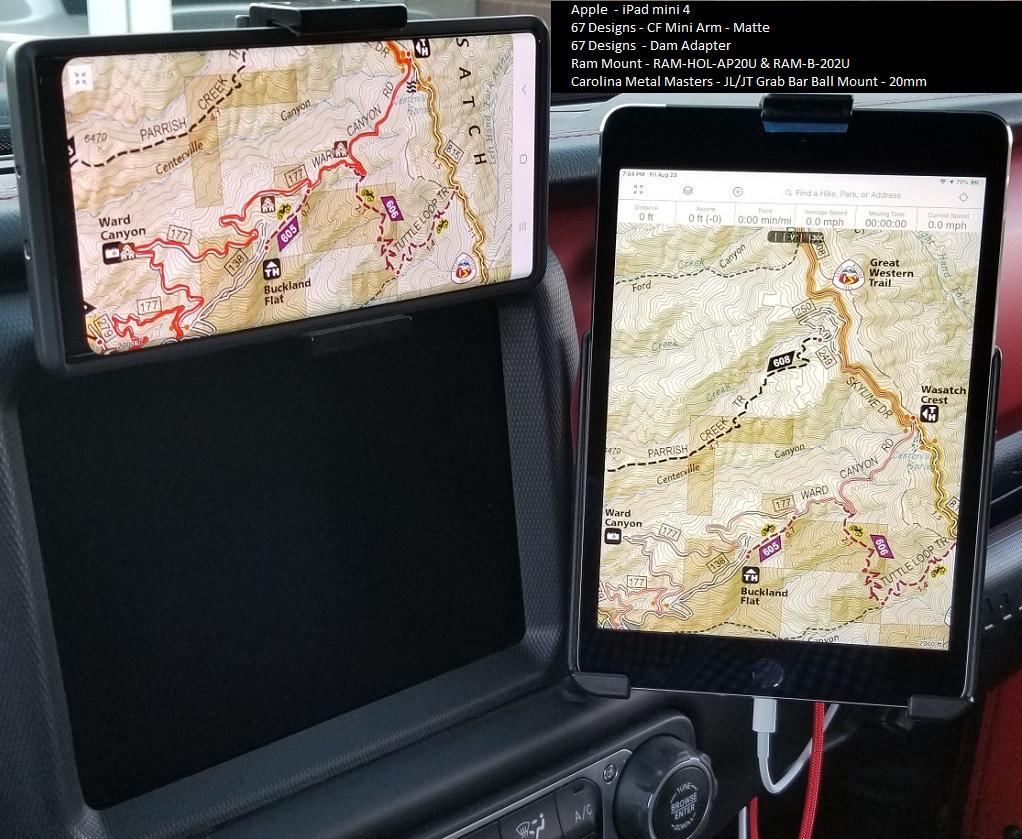
Here are a couple pictures of how my ipad mini 4 is setup. For an ipad you will want to buy the model that includes the cellular option. You will not need to have it added to a plan but that is the model that includes GPS. If you go with a model that doesn't have it, you will need to add an external GPS that the ipad can connect to via bluetooth. Most Android tablets have GPS built in but check specs.

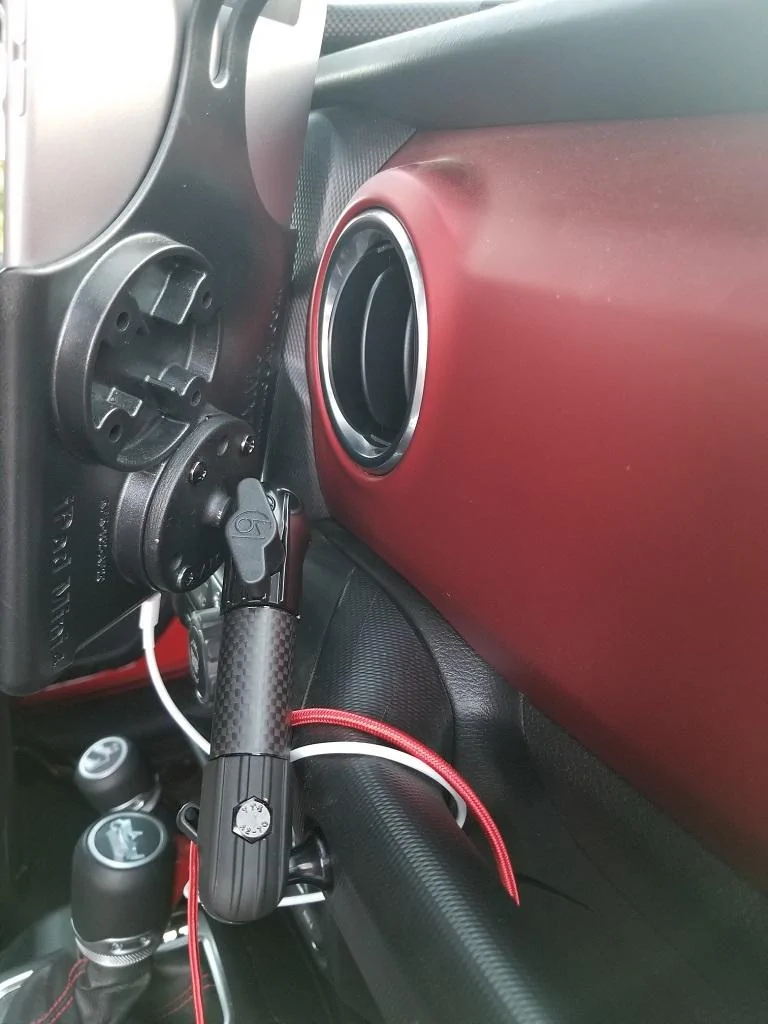
I have the 67 designs rail mount and ran it off of that for a while but needed two arms, an elbow, and the dam adapter... as well as the ram mount ipad mini 4 cradle and 1" ball base. Changed over to the CMM 20mm grab bar ball mount and simplified it all plus took one of the arms and the elbow out of the equation. It is way easier to adjust now... not that I really adjust it much. One other item is having the mini allows for the passenger to still have plenty of room and if needed they can easily swing it over to them.

I had the mini mounted where you see the phone in the pics below. It was really easy to access but for me it was too flashy... and kind of got in my field of view so went with the side mount.

One thing I would recommend is to remove it any time you are away from your vehicle. You don't want to give anyone a reason to try and steal it.

Pardon the trail dust :movember:

Jeep Wrangler JL iPad for GPS???? Ipad_mount_1


Jeep Wrangler JL iPad for GPS???? ipad_mount
 

Squibbles

Well-Known Member
Joined
Apr 20, 2019
Threads
16
Messages
324
Reaction score
265
Location
Albuquerque
Vehicle(s)
GTI, Ranger
I would recommend an iPad Pro for navigation. The GPS antennae is much better than the regular “amateur” iPad.

And as someone already mentioned, download the maps before you leave.

You could save some money over the Pro by getting the Garmin Overlander. 700$, I know my girlfriend spent like 1000-1100 on her pro. It’s android based but I’ve heard good things.
 

Stormin’ Moorman

Well-Known Member
First Name
Michael
Joined
Mar 11, 2019
Threads
52
Messages
1,710
Reaction score
6,373
Location
Georgia
Vehicle(s)
19 JLUR, 20 JLUR, 21 JL, 21 GCL, 89 YJ, 04 LJ
Occupation
Forester
Vehicle Showcase
1
You could save some money over the Pro by getting the Garmin Overlander. 700$, I know my girlfriend spent like 1000-1100 on her pro. It’s android based but I’ve heard good things.
You could definitely do that if you wanted to run their program. I use GIS/GPS in my job so I'm running a souped up ESRI program that let's me create data, edit and upload to the cloud on the fly. I would definitely consider a cheap tablet as well if i was going to dedicate it to nav.
 

wanderer

Well-Known Member
First Name
Ralph
Joined
Aug 10, 2017
Threads
255
Messages
1,973
Reaction score
1,082
Location
Carlsbad CA
Vehicle(s)
2018 jlu rubicon. Surfboard. Bare feet, moose drawn air sled, Interstellar time warp space transport fighter
Occupation
Engineering Geologist
@Stormin’ Moorman what program are you using. I am a geologist and use gps a lot. Gaiaisok but lacks the ability to add significant detail. Best resolution. Is 1:4800 half as much of a usgs 7.5 minute And you limited to a 100,000 tile down load. Not very good at all.
 

Sponsored

Stormin’ Moorman

Well-Known Member
First Name
Michael
Joined
Mar 11, 2019
Threads
52
Messages
1,710
Reaction score
6,373
Location
Georgia
Vehicle(s)
19 JLUR, 20 JLUR, 21 JL, 21 GCL, 89 YJ, 04 LJ
Occupation
Forester
Vehicle Showcase
1
@Stormin’ Moorman what program are you using. I am a geologist and use gps a lot. Gaiaisok but lacks the ability to add significant detail. Best resolution. Is 1:4800 half as much of a usgs 7.5 minute And you limited to a 100,000 tile down load. Not very good at all.
On my desktop I use ArcGis Pro, which is cloud based. On my pad I use ESRI Collector or Navigator. This way I can set it up at home, or McDonald’s or wherever and it automatically shows up on my pad. Seamless. If I think I’ll be getting into a poor coverage area I download the base maps. (Ortho, usgs, National Geographic, streets and roads, etc).

The GPS on the iPad is pretty good but I also have a Garmin inReach mini that I can use as a Bluetooth antennae if need arises.

I’ve been navigating to isolated tracts of land for 20 years; with paper maps, then GPS/laptop and now the iPad. The iPad is by far the easiest.
 

RubenZ

Well-Known Member
First Name
Ruben
Joined
Jun 24, 2018
Threads
64
Messages
1,831
Reaction score
1,707
Location
Deep South Texas
Website
cyberrube.com
Vehicle(s)
2018 Silverado 2500HD Duramax, 18’ Toyota 4Runner
Yes the iPad with Cellular has a real GPS antenna. So what you have to do is just download the MAPS ahead of time and then your an use them like you normally would. But you must download the MAPS onto the device locally.

I use GIAGPS.
 

McGilli

Well-Known Member
Joined
Sep 16, 2020
Threads
27
Messages
409
Reaction score
694
Location
Richmond BC Canada
Vehicle(s)
2020 Sahara Unlimited Altitude
4D316803-D84B-4CEE-A77F-09B68CDC0A13.jpeg
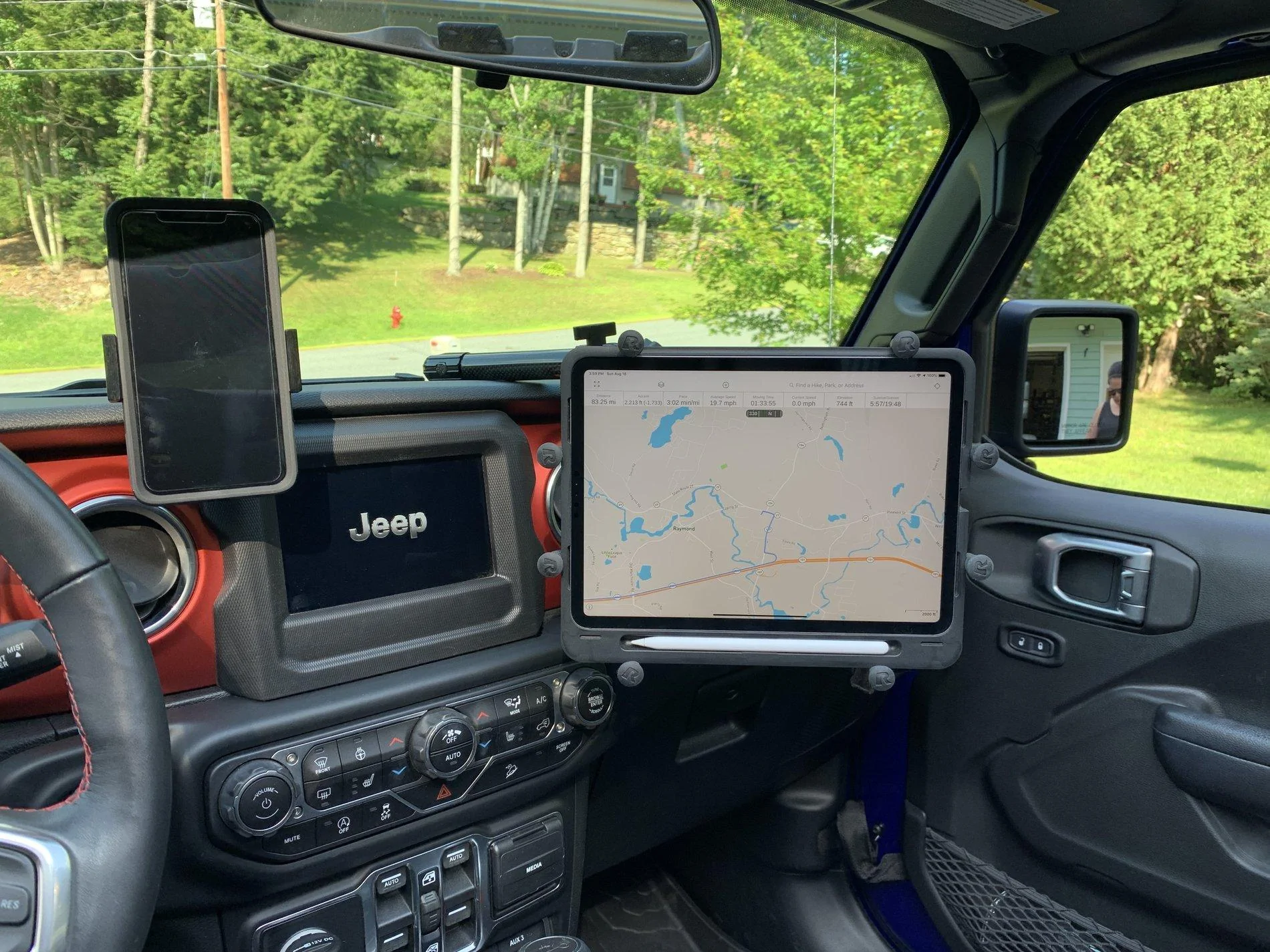
This is my setup using an iPad Pro. Works great with Gaia.
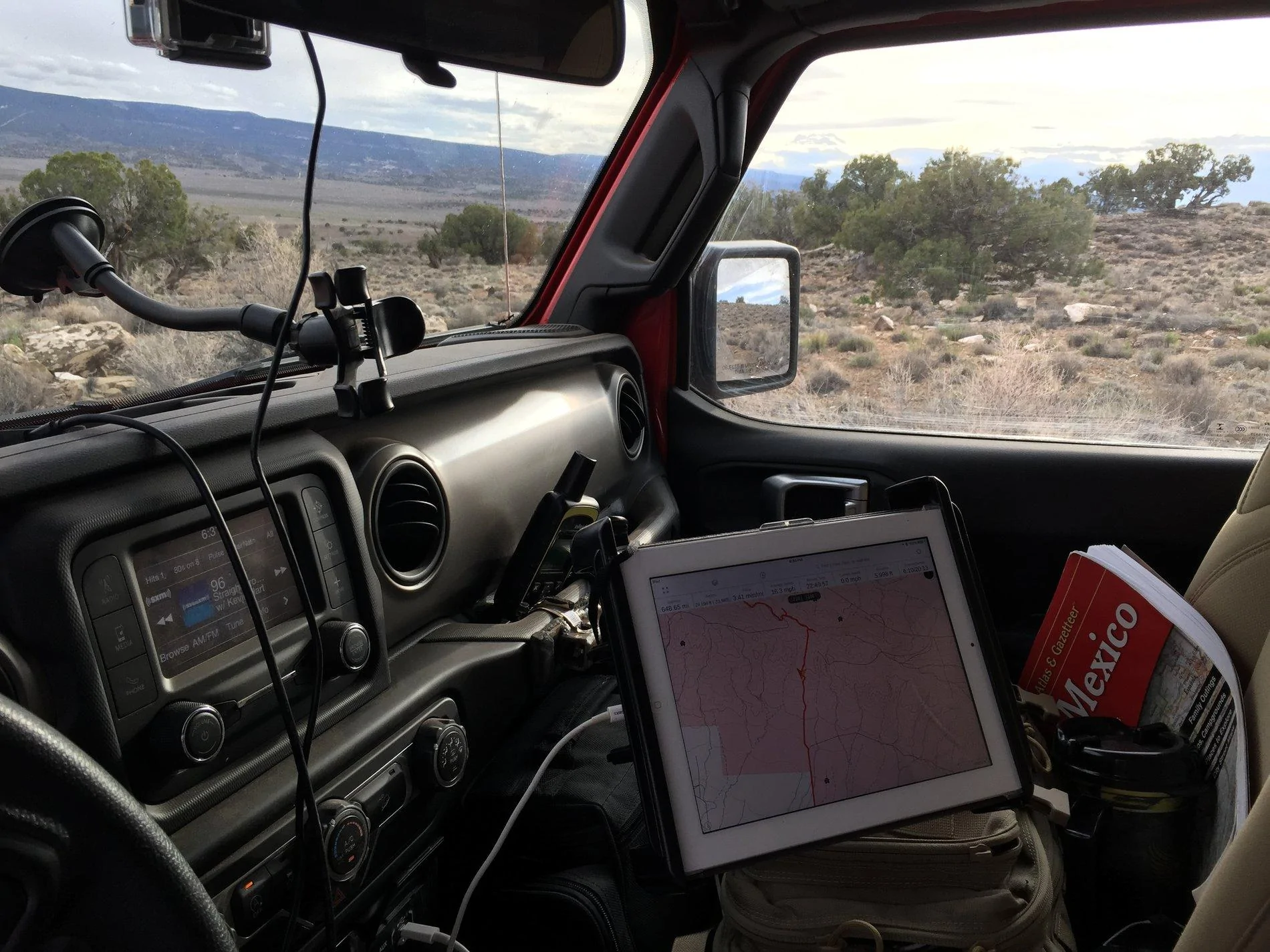
I know this is an old post - but very helpful. I was out this past weekend and had to leave my iPad Pro sitting on the passenger seat with Gaia while trying to navigate, and so I've ordered all the RAM parts I'll need to make this happen.
Sponsored


Top