Sponsored

Disconnecting Security Gateway Module 2021 Rubicon

Barney392

Well-Known Member
Joined
Sep 19, 2022
Threads
0
Messages
256
Reaction score
318
Location
High Desert So Cal / Lake Havasu, AZ
Vehicle(s)
2022 392
Ok thank you.. I haven't had that 2nd cup of coffee yet so my apologies for my dumbness.. I get it now.. Geez.. Thank You again..
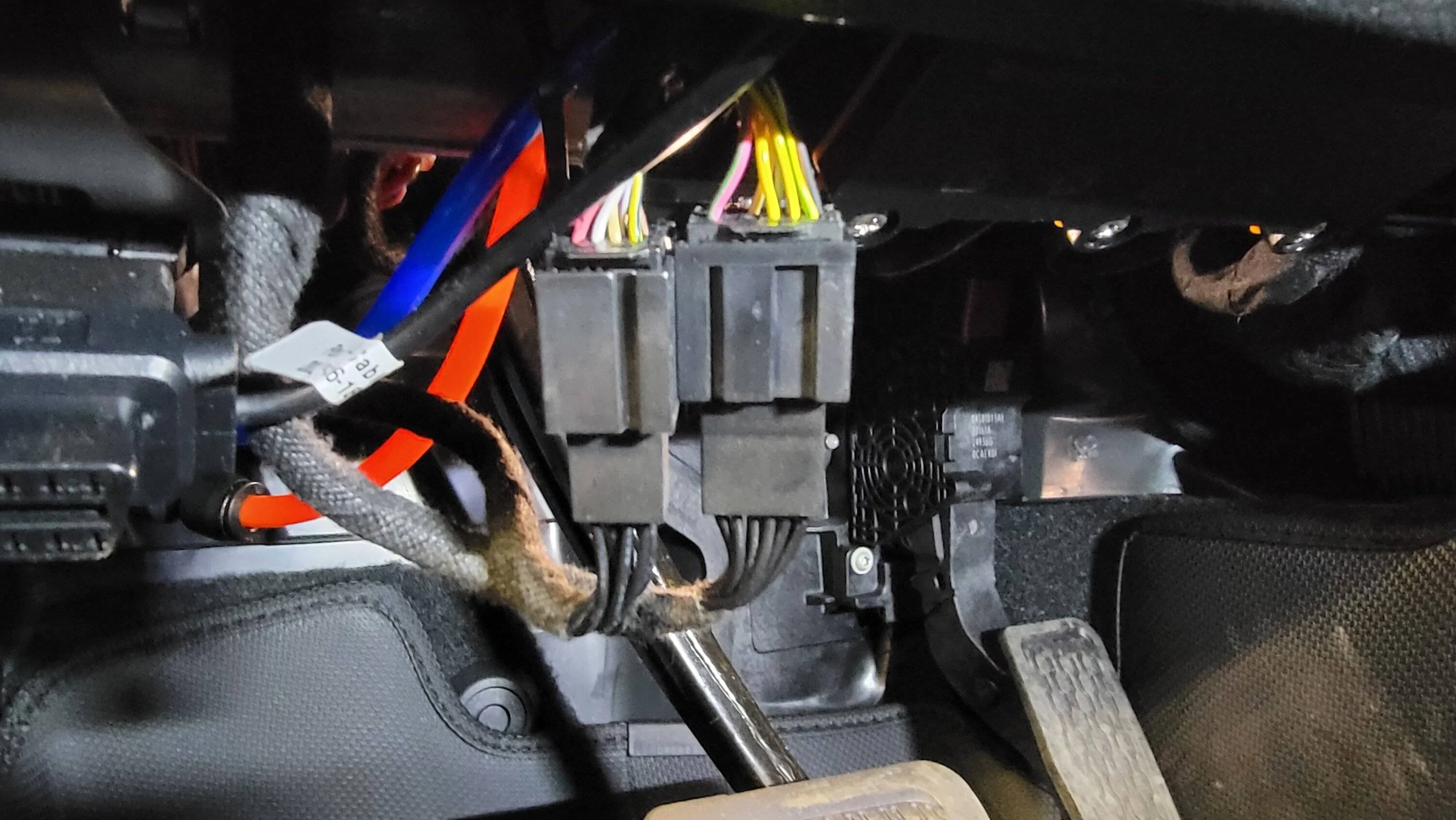
Here's a picture of my Jeep looking below the dash panels. The connectors at the bottom with all black wires are now connected to the SGW. The connectors on top with all the different colors are the connectors that were originally connected to the SGW. This way you can easily get to them without all the hassle.

Jeep Wrangler JL Disconnecting Security Gateway Module 2021 Rubicon SGW Extension Cables
 

Terpsmandan

Well-Known Member
First Name
Dan
Joined
Sep 17, 2021
Threads
65
Messages
1,935
Reaction score
1,272
Location
Penn Yan
Vehicle(s)
2021 JLUR Diesel, 2022 JLUR Diesel
Another idea is the SGW extension cable from Z Automotive:

https://www.zautomotive.com/product/z_sgw_ext/

I have one for my Tazer and it just extends the SGW plugs. When I did the stereo, I forgot to move the SGW to the new speaker pod and the SGW now sits in my console with my Tazer connected to the sgw line.
 

Gmanjeeper

Well-Known Member
First Name
Mike
Joined
Oct 25, 2022
Threads
0
Messages
236
Reaction score
60
Location
Arkansas
Vehicle(s)
2022 JLR
Another idea is the SGW extension cable from Z Automotive:

https://www.zautomotive.com/product/z_sgw_ext/

I have one for my Tazer and it just extends the SGW plugs. When I did the stereo, I forgot to move the SGW to the new speaker pod and the SGW now sits in my console with my Tazer connected to the sgw line.
Finally! I successfully removed the two cable plugs from the security gateway in my JLR. After several hours and many trips back and forth, I figured this out. Basically with my left hand I held a long, thin screwdriver blade on the push tab and with my right hand I wiggled and pulled on the cable. It was a bit nerve wracking - I did not want to damage anything with the screw driver blade and I certainly did not want to pull any of the wires out of the connector. Wiggling with firm pulls on the cable eventually got it! Now I need to figure out how to connect the Z automotive extension cable back up in the security gateway!
 

Sponsored

Gmanjeeper

Well-Known Member
First Name
Mike
Joined
Oct 25, 2022
Threads
0
Messages
236
Reaction score
60
Location
Arkansas
Vehicle(s)
2022 JLR
Yup, the best method is the long flat blade screwdriver to push the tab for each connector one at a time. Then just shove in the Z cable and never remove the cable. The 392 is slightly easier due to the swg moving a bit.
Did you tug on the cables or were you able to get your fingers up onto the plastic connectors to pull directly on the connectors. I have heard one guy pulled one of the wires out. I really did not know what I was doing and really the only thing I could get any leverage on were the cables. I have a friend who, now that I have mine out wants me to help him and I do not want to damage his wiring. If the wiring is damaged I am not sure what the fix would be.
 

Gmanjeeper

Well-Known Member
First Name
Mike
Joined
Oct 25, 2022
Threads
0
Messages
236
Reaction score
60
Location
Arkansas
Vehicle(s)
2022 JLR
I just pull on the cables. When you release the lock with the screwdriver there is very little resistance. If in doubt find another oem connector and practice on it. The screwdriver blade width maters.
Ok, I need a bit of a refresher. I successfully pulled the OEM security cables and installed the Z Automotive extension in the OEM security ports. As I recall, I plugged the other ends of the Z Automotive extension into my ECRI bypass module and then made a few changes using my OBD Bluetooth scanner and JSCAN app. I had to have some work done at the dealer and so I disconnected the ECRI module from the Z extension and then plugged the OEM security cables into the Z extension (where the ECRI module had been). I now want to plug the ECRI module back into the Z extension so I can make a few more changes via JSCAN. Two questions. To disconnect the OEM security cables from the Z extension, do I just pull on them or is there a lever of some sort that I need to squeeze or press first? (I have taken a quick upside down look and do not see anything to squeeze or press). Second, once I get these cables disconnected and the ECRI module plugged back in, do I just leave the OEM security cables dangling (at least until I go back to the dealer)?
Thanks.
 

Rhinebeck01

Well-Known Member
Joined
May 9, 2018
Threads
169
Messages
12,679
Reaction score
19,169
Location
Ormond Beach, Florida
Vehicle(s)
'18 JL Rubi, '26 Cybertruck, '01 Harley FatBoy
Occupation
Retired at 55 ..
Ok, I need a bit of a refresher. I successfully pulled the OEM security cables and installed the Z Automotive extension in the OEM security ports. As I recall, I plugged the other ends of the Z Automotive extension into my ECRI bypass module and then made a few changes using my OBD Bluetooth scanner and JSCAN app. I had to have some work done at the dealer and so I disconnected the ECRI module from the Z extension and then plugged the OEM security cables into the Z extension (where the ECRI module had been). I now want to plug the ECRI module back into the Z extension so I can make a few more changes via JSCAN. Two questions. To disconnect the OEM security cables from the Z extension, do I just pull on them or is there a lever of some sort that I need to squeeze or press first? (I have taken a quick upside down look and do not see anything to squeeze or press). Second, once I get these cables disconnected and the ECRI module plugged back in, do I just leave the OEM security cables dangling (at least until I go back to the dealer)?
Thanks.
https://www.jlwranglerforums.com/fo...teway-extension-cable-use-explained-➿.111159/
 

Rhinebeck01

Well-Known Member
Joined
May 9, 2018
Threads
169
Messages
12,679
Reaction score
19,169
Location
Ormond Beach, Florida
Vehicle(s)
'18 JL Rubi, '26 Cybertruck, '01 Harley FatBoy
Occupation
Retired at 55 ..
Ok, I need a bit of a refresher. I successfully pulled the OEM security cables and installed the Z Automotive extension in the OEM security ports. As I recall, I plugged the other ends of the Z Automotive extension into my ECRI bypass module and then made a few changes using my OBD Bluetooth scanner and JSCAN app. I had to have some work done at the dealer and so I disconnected the ECRI module from the Z extension and then plugged the OEM security cables into the Z extension (where the ECRI module had been). I now want to plug the ECRI module back into the Z extension so I can make a few more changes via JSCAN. Two questions. To disconnect the OEM security cables from the Z extension, do I just pull on them or is there a lever of some sort that I need to squeeze or press first? (I have taken a quick upside down look and do not see anything to squeeze or press). Second, once I get these cables disconnected and the ECRI module plugged back in, do I just leave the OEM security cables dangling (at least until I go back to the dealer)?
Thanks.
https://www.jlwranglerforums.com/forum/threads/tazer-mini-install.79683/post-1665568
 

Gmanjeeper

Well-Known Member
First Name
Mike
Joined
Oct 25, 2022
Threads
0
Messages
236
Reaction score
60
Location
Arkansas
Vehicle(s)
2022 JLR

Sponsored

Rhinebeck01

Well-Known Member
Joined
May 9, 2018
Threads
169
Messages
12,679
Reaction score
19,169
Location
Ormond Beach, Florida
Vehicle(s)
'18 JL Rubi, '26 Cybertruck, '01 Harley FatBoy
Occupation
Retired at 55 ..

phi502

Member
First Name
Nick
Joined
Sep 13, 2023
Threads
2
Messages
9
Reaction score
7
Location
TN
Vehicle(s)
21 JT Rubicon
Agree with the suggestion for the harness extension. I bought these on Amazon and they have worked great... you actually get 2 sets for the price
https://amzn.to/3raQgJS
 

Rhinebeck01

Well-Known Member
Joined
May 9, 2018
Threads
169
Messages
12,679
Reaction score
19,169
Location
Ormond Beach, Florida
Vehicle(s)
'18 JL Rubi, '26 Cybertruck, '01 Harley FatBoy
Occupation
Retired at 55 ..
Agree with the suggestion for the harness extension. I bought these on Amazon and they have worked great... you actually get 2 sets for the price
https://amzn.to/3raQgJS
I have seen them. Bulky, Crappy. Would not use if you gave them to me for free..


Top