Sponsored

Built-in Navigation is Pretty Damn Bad

Jeep Wick

Well-Known Member
First Name
Wick
Joined
Dec 7, 2021
Threads
17
Messages
1,771
Reaction score
2,061
Location
America
Vehicle(s)
2022 High Tide XR
Occupation
Mechanic
It's a good backup if you're driving somewhere that doesn't have good cell service. But yea, it's pretty bad. Before CarPlay, it was a $500-$1,000 add-on + ongoing map updates.
Offline maps, you get a whole state or wherever you're going before you lose service. (Google maps)
Sponsored

 
Last edited:

morph860

Well-Known Member
Joined
Aug 13, 2020
Threads
42
Messages
652
Reaction score
611
Location
NSB, FL
Vehicle(s)
'24 JLURX 4xe, '24 GC 4xe
Offline maps, you get a whole state or whatever you're going before you lose service.
I usually use Waze. Don't think they have an offline mode. But I've only run into an issue once where I lost cell service and didn't know where I was going. Somewhere in Utah near Zion. Built-in Nav bailed me out until I was able to get back onto Waze.
 

jhmartin

Well-Known Member
First Name
Jason
Joined
Jun 8, 2019
Threads
10
Messages
90
Reaction score
201
Location
Seattle, WA
Vehicle(s)
JLUR
Clubs
 
I wish the built in nav had a way to capture a route and export it to USB. It is a handy backup if all else has failed, but otherwise its Waze / OsmAnd / Gaia. My Honda Odyssey is able to show turn-by-turn for Waze in the speedometer area, wish the jeep could do that.
 

NewbJLUOwner

Well-Known Member
Joined
Jan 13, 2022
Threads
94
Messages
667
Reaction score
959
Location
Florida
Vehicle(s)
JLU Rubicon Diesel 2022
Vehicle Showcase
1
Ok, I finally caved in and actually tried using the built-in navigation in my '22 JLURD. I'd played around with it before, but never tried to really use it. Oh boy, it's bad.

First off is you apparently have to be stopped to enter your destination. And entering that detail is stupidly clunky. Maybe you can use voice to enter it on the fly?

Navigation itself was decent although the graphics seem to be about a decade old. A pleasant voice and cute arrows on the speedo when it's time to turn.

Then it was time to take my exit off the interstate. Nope, it insisted that I should drive about eight miles out of my way through the next town at the next exit. And it continued to insist that I needed to turn around for the next five or so miles until I got about a mile and a half from home. Simply the wrong directions.

Later in the day I needed to go to Home Depot. It seemed to really, really want to go the much longer / slower way by interstate that passes right by Home Depot.

Then on the way home it seemed to be confused and said that the speed limit was 65 on the 45 mph road that I was on.

Yeah, stick with Google Maps, Waze, or Apple Maps instead. Free / frequent updates and they fundamentally work.
I also have a 2022 JLURD
Absolutely agree with staying with Google Maps. I have the Motorola MA1 Wireless Android Auto adapter and use with my Samsung S22 Ultra. Works flawlessly
I played with the OEM mapping. Voice recognition works, but its terrible, especially when trying to find POIs. Google Maps voice recognition, especially for POIs is almost flawless.
OEM mapping needs to updated and theirs a cost that's not worth it
The 8" Uconnect is however a fantastic infotainment system, just the OEM mapping that's meh
 

Kyanche

Well-Known Member
Joined
Jun 17, 2019
Threads
9
Messages
1,667
Reaction score
1,781
Location
California
Vehicle(s)
2020 Wrangler Unlimited Rubicon
I'm not sure why they even include the nav function anymore. I don't know anyone who uses it. You would think they would save themselves the licensing fees and just leave it off.
I realize that wireless carplay/android auto is a thing now, but I always liked having the map on my screen when I hadn't bothered to connect my phone. It's still a good passive tool for when you encounter a traffic jam and wonder if you can take a side street to get around it or forgot a direction and want to quickly double check where you are.

The phone apps aren't as good for that - they tend to pressure you into telling them your destination even if you don't want to right now lol. In my experience they're also not the best at knowing which way you're facing because they rely on the phone for that - and I often have my phone upside down in the cupholder... so I'll be driving along and the map keeps on rotating itself. The built-in GPS systems usually know exactly which way you're going because they use the vehicle's compass and know its orientation.

I do agree that routing is annoying, the map UI itself could also be better (I think the text on the uconnect 8.4 map is hard to read). The voice recognition in the JL is crap (it was great on my jk's ancient system lol).

I think the situation with those could potentially get better with the newer systems since those are pretty much all android based...
 

Sponsored

Dusty Dude

Well-Known Member
Joined
Apr 16, 2023
Threads
57
Messages
1,693
Reaction score
3,809
Location
Colorado Springs, CO
Vehicle(s)
1970 Ply Roadrunner, 2010 Challenger SRT
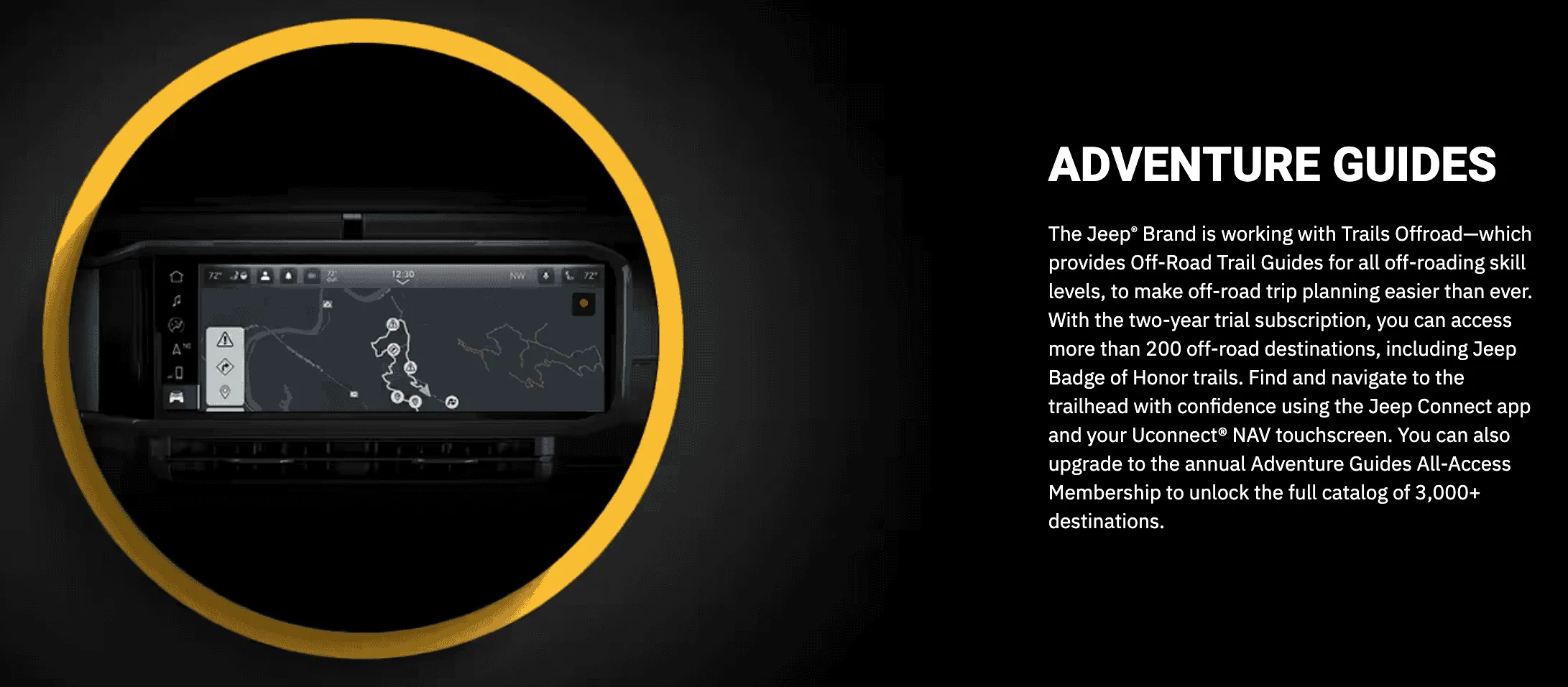
The only reason I bought the nav was for the camera and the adventure guides that I am still trying to get to work.
 
OP
OP
Ratbert

Ratbert

Well-Known Member
First Name
John
Joined
Jun 20, 2020
Threads
159
Messages
16,132
Reaction score
25,163
Location
PNW
Vehicle(s)
2022 AEV JL370 JLURD
Build Thread
Link
Occupation
Software Engineer
Clubs
 
It's still a good passive tool for when you encounter a traffic jam and wonder if you can take a side street to get around it or forgot a direction and want to quickly double check where you are.
I haven't use the built-in nav enough to know if it actually has those traffic details. Google Maps, etc. usually route you around those traffic jams before you know they're there. Does our built-in nav know about traffic? I wouldn't think so, making it even more anemic.

The phone apps aren't as good for that - they tend to pressure you into telling them your destination even if you don't want to right now lol.
I almost always give Google or Waze a destination if I'm going over a few miles, especially if an interstate is involved. Accidents / traffic jams seem to pop up along my route so damn often when I don't.
 
OP
OP
Ratbert

Ratbert

Well-Known Member
First Name
John
Joined
Jun 20, 2020
Threads
159
Messages
16,132
Reaction score
25,163
Location
PNW
Vehicle(s)
2022 AEV JL370 JLURD
Build Thread
Link
Occupation
Software Engineer
Clubs
 
The only reason I bought the nav was for the camera and the adventure guides that I am still trying to get to work.
You bought the nav? I'm fairly confident that the built-in navigation has nothing to do with a camera or adventure guides. Other than, of course, they share the same screen.
 
OP
OP
Ratbert

Ratbert

Well-Known Member
First Name
John
Joined
Jun 20, 2020
Threads
159
Messages
16,132
Reaction score
25,163
Location
PNW
Vehicle(s)
2022 AEV JL370 JLURD
Build Thread
Link
Occupation
Software Engineer
Clubs
 
I usually use Waze. Don't think they have an offline mode. But I've only run into an issue once where I lost cell service and didn't know where I was going. Somewhere in Utah near Zion. Built-in Nav bailed me out until I was able to get back onto Waze.
On longer trips Google Maps will ask if you want to download the maps along your path if it thinks that coverage might be an issue. That can help a lot.
 

Sponsored

tomk62

Well-Known Member
First Name
Tom
Joined
May 26, 2023
Threads
15
Messages
891
Reaction score
1,329
Location
South Carolina
Vehicle(s)
2024 JLU Sahara Anvil, 2019 Cherokee
Build Thread
Link
Clubs
 
You bought the nav? I'm fairly confident that the built-in navigation has nothing to do with a camera or adventure guides. Other than, of course, they share the same screen.
I did. The new Adventure Guides feature requires Nav.

https://www.jlwranglerforums.com/fo...ng-adventure-guide.116759/page-9#post-2579337

They don't make this clear and that's obviously upset a bunch of folks, but it's somewhat implied here:

https://www.jeep.com/wrangler/technology.html

"... using the Jeep Connect App and your Uconnect NAV touchscreen."

Jeep Wrangler JL Built-in Navigation is Pretty Damn Bad 1707261241709
 

C.Sco

Well-Known Member
Joined
Mar 19, 2023
Threads
13
Messages
1,264
Reaction score
2,698
Location
California
Vehicle(s)
2023 4xe Rubicon
Build Thread
Link
Vehicle Showcase
1
I'm not sure why they even include the nav function anymore. I don't know anyone who uses it. You would think they would save themselves the licensing fees and just leave it off.
My thoughts exactly. I've never used the built-in nav in my Wrangler, or my Grand Cherokee before that., because no matter how good it is, it's never going to be anywhere near as good as Google Maps / Waze / Whatever with realtime streaming road conditions and traffic data.
 

NWJeepr

Banned
Banned
Banned
Joined
Apr 28, 2023
Threads
29
Messages
3,638
Reaction score
7,877
Location
Twin Peaks
Vehicle(s)
2025 Wrangler 2-door
Factory Nav is an artifact of the past. If I'm going where there isn't service, I'd prefer to have a paper map, or an offline set of maps on a device. Factory nav is clunky in about every car I've used it.

I've used a few newer vehicles with Google built in and it's quite good. Otherwise, I'm used to using CarPlay with Apple maps.

We bought an onX subscription for our trip to Moab last year. Pfft. I did not find it helpful. Anyone else not get the onX hype?
 

Opus

Well-Known Member
Joined
Jul 17, 2022
Threads
112
Messages
4,173
Reaction score
10,254
Location
Midwest US
Website
www.jlwranglerforums.com
Vehicle(s)
2023 Sport S, 2022 Sahara... 2014 Lynskey Peloton, 1983 Trek 420
Build Thread
Link
The GO HOME button comes in handy once in a while. Other than that, the phone is a better/easier choice.
 

Wbino

Well-Known Member
Joined
Mar 15, 2021
Threads
116
Messages
4,271
Reaction score
7,625
Location
NJ
Vehicle(s)
2021 Wrangler JL 3.6 Etorque -- 1999 SLK 230
Occupation
Retired
I like the OEM map, I just traveled 10 hours on a trip and the graphics for the off ramps were very helpful.
OP there are settings for the navigation, did you use them?
Sponsored


Top