TrentYoung
Well-Known Member
I tried... nothing I can think of. Tried Wi-fi but it won't even go there.Does Mac allow for any other format options on the USB drive? That's the only thing I can think of...
Sponsored
I tried... nothing I can think of. Tried Wi-fi but it won't even go there.Does Mac allow for any other format options on the USB drive? That's the only thing I can think of...
![Jeep Wrangler JL UConnect5 V2024.09 navigation map update available 20241201_141123[1]](https://cdn.jlwranglerforums.com/attachments/944/944978-8885ec75c19af6700d6fdeae32189b23.jpg)
![Jeep Wrangler JL UConnect5 V2024.09 navigation map update available 20241201_145134[1]](https://cdn.jlwranglerforums.com/attachments/944/944979-0f3d85ec1ac94b27871b8a776d5c4503.jpg)

Did not think about that... wil try a smaller drive!Could 128GB be too big? I know Corvettes get weird with SD cards larger than 64GB.
Thank you so much for this!!!!!Can't help with the MAC. I did this upgrade last weekend on my 2024 Gladiator Rubicon-X. No issues with the upgrade. Formatted a 32G Sandisk Cruzer Glide to FAT32.
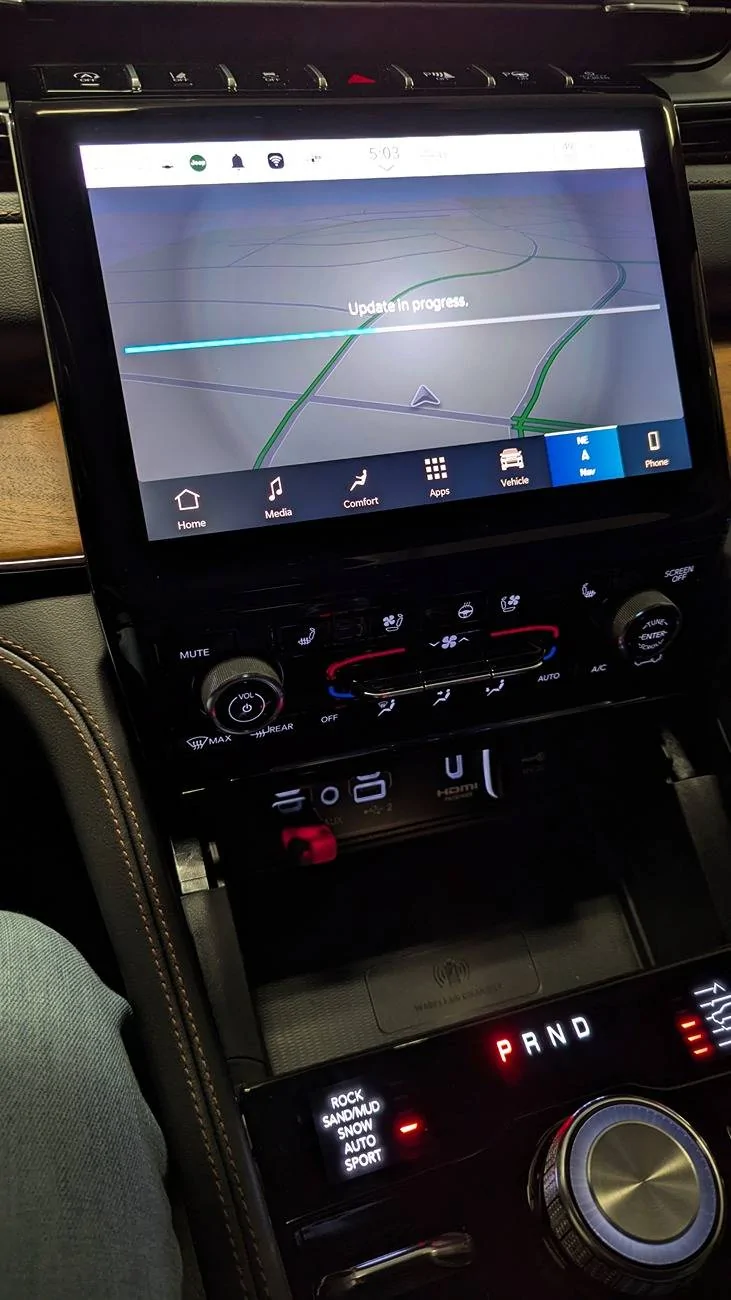
Before:
![20241201_141123[1].jpg](data:image/svg+xml;charset=utf-8,%3Csvg xmlns%3D'http%3A%2F%2Fwww.w3.org%2F2000%2Fsvg' width='1300' height='1300' viewBox%3D'0 0 1300 1300'%2F%3E)
After:

Exactly the same message I am getting. I tried multiple and I also keep getting the exact same message.I'm on a Mac as well. No luck with the Ex-FAT format, but MS-DOS (FAT32) format worked. My Jeep read the drive. Asked me if I wanted to install the update, and then I got an error that said:
The map on your USB device has been modified. Please repeat the map download procedure on your computer.
Trying to find someone that has a PC. Everyone I know has a MAC. But I tend to belive you are correct that it is a MAC issue.This seems like a Mac-related issue. Any way either of you could try it from a PC?
@Kracka Thank you for posting this. Very much appreciated. I was able to download the update yesterday, extract the files to a USB thumb drive and I installed the update today on my commute home from work. The update installed while I was driving my Jeep, and it took about 45 minutes.For you 2024+ guys... Our Wrangler is a 2023 but I just updated our 2024 Grand Cherokee again last night. Can't argue 4 free map updates per year. You'll need a large USB drive as the North American files are 17GB. Download to your computer, unzip, and copy the individual files (no folders) into the NTFS or FAT32 formatted USB drive. I've personally found NTFS works better. Engine must be running and it errors out for me if driving so I had to do it while parked in the garage. Enjoy!
https://stellantis.navshop.com/#/downloads

My problem is that I have a MAC and it just won't read the download from the MAC even though it is MOS Dos Fat 32. Sure would hate to buy a PC to do it...@Kracka Thank you for posting this. Very much appreciated. I was able to download the update yesterday, extract the files to a USB thumb drive and I installed the update today on my commute home from work. The update installed while I was driving my Jeep, and it took about 45 minutes.
There's always the library, I suppose.My problem is that I have a MAC and it just won't read the download from the MAC even though it is MOS Dos Fat 32. Sure would hate to buy a PC to do it...
Ha! I did not think about that! Thank you!!!There's always the library, I suppose.
I sincerely thank you for that. It looks like I need to get hold of a PC... I think it may b time for the library!So I finally was able to update my '24 JLUR Rubicon but it took a few tries as I was getting "The map on your USB device has been modified. Please repeat the map download procedure on your computer" error repeatedly. I knew it was a formatting error as I also use a Mac. So I approached this methodically.
First I formatted the thumb drive as "exFAT", loaded the files (takes like 15 min as the files are big)....no go. Reformatted as MS-DOS FAT32, reloaded files...no go. I then used my MS PC laptop and reformatted in NTFS, reloaded files and BINGO! that worked. Updated my Jeep and my '22 Durango too.
TL:DR....Format in NTFS, load the files and go.