Sponsored

No Off-Roading & Trail Maps?!?

miguelroboso

Active Member
Joined
Oct 10, 2018
Threads
2
Messages
27
Reaction score
12
Location
Bay Area
Vehicle(s)
2020 JLUR
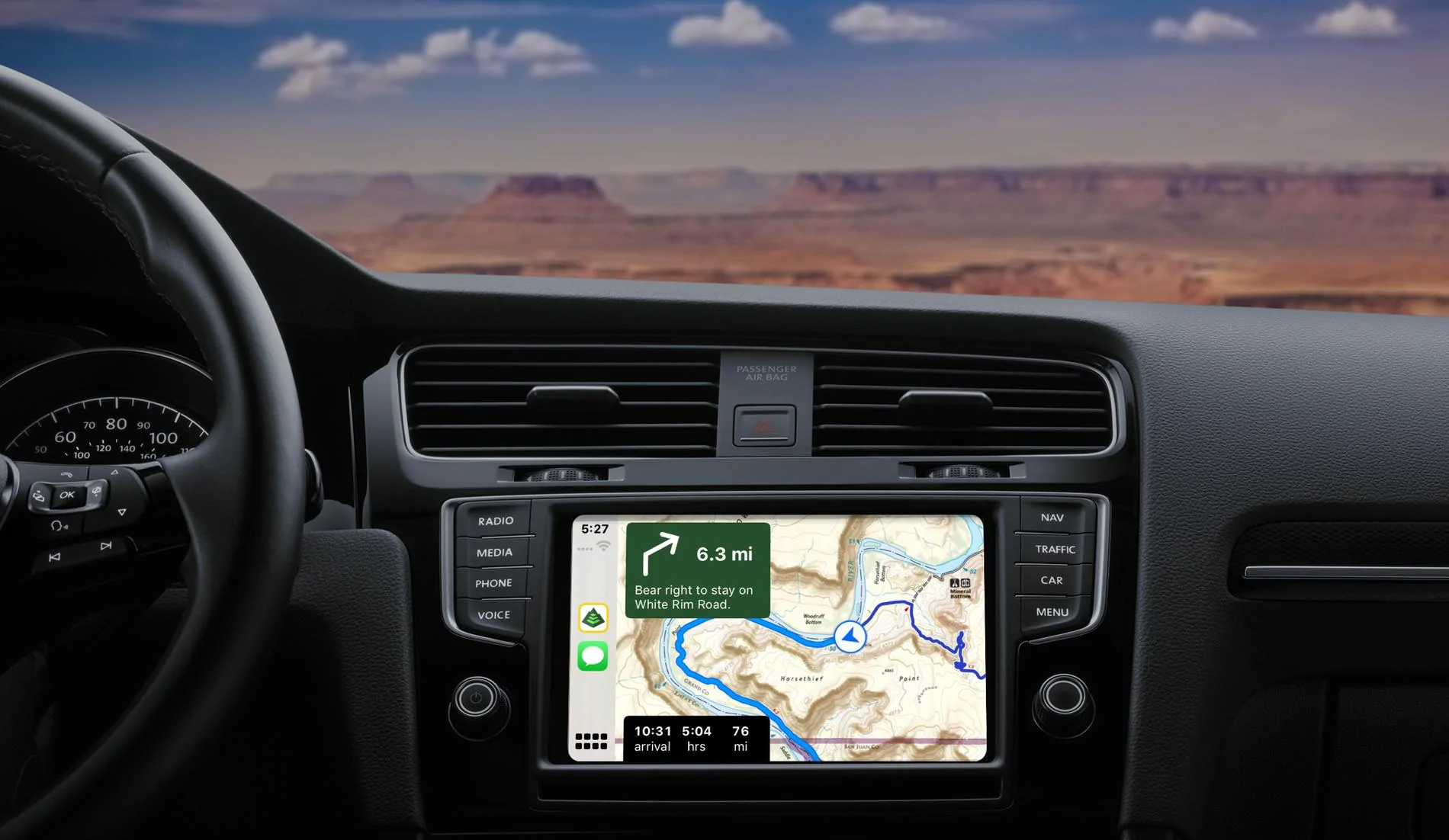
I am testing Gaia's integration with Carplay and so far it was great (some bugs here and there, but overall no issue)

Edit: I believe that the new release of Gaia now supports Carplay (not only the beta).
Here is the email I got yesterday from them:

Gaia GPS Launches First Outdoor Maps for Apple CarPlay
Jeep Wrangler JL No Off-Roading & Trail Maps?!? original

Navigate through national parks or on multi-day overlanding adventures deep into the backcountry and use turn-by-turn directions on any saved drivable route within the app. CarPlay brings hands-free navigation to those dusty backroads using your favorite Gaia GPS map source.

Here's the link: https://blog.gaiagps.com/gaia-gps-i...il&utm_campaign=february-newsletter-2-premium
Sponsored

 
Last edited:
  • Like
Reactions: TMP

Grooster

Well-Known Member
First Name
Greg
Joined
Aug 23, 2019
Threads
2
Messages
265
Reaction score
342
Location
Wichita, Kansas
Vehicle(s)
2023 Unlimited Rubicon, 2016 Cherokee Latitude
Occupation
IT Business Solutions Director
Gaia GPS is working great for me via Car Play. I ran through the Beta test and this latest build works very well. Use their website to create your maps then refresh the app. Perfect for off road exploring. I compared my paper trail maps to the Gaia map and liked what I saw. I carry paper maps in my gear anyway. Easier to show my group where we are heading while taking a break from the trail.

Waze is great for city exploring followed by either Google or Apple Maps. To each their own, really. I remember the GPS that came factory in my 2000 Grand Cherokee - the screen was ok but not great. Maps were on DVD. My 2005 GMC touch screen GPS was a great step up but again, maps on DVD. Uconnect GPS on the 8.4 screen is amazing and no DVD for maps! My JLU has the 7 inch Uconnect so I have to rely on Car Play for maps. So far, it has worked very well. Oh, one last thing - Gaia doesn’t need cellular when I download the maps I need for my trip. GPS from my phone covers everything. Pretty slick!
 

xtopherm

Well-Known Member
Joined
Feb 13, 2019
Threads
7
Messages
239
Reaction score
380
Location
Boston, MA
Vehicle(s)
HellaYella 2019 JLUR
I am new to the Jeep world but not the off-roading world. We recently picked up a 2018 JLUR and have been loving it. I was very impressed with the new technology in the Wranglers and the UConnect 8.4 system. A nice big screen that connects to your phone, has nav, etc..... However, I'm learning just how limited this system truly is! I am finding out that getting any pics or videos on the screen is impossible. Ok, I can do without that but come on....we have the technology! But let me expand on something that is blowing me away....No Maps!!! I don't mean Google Maps or Apple Maps or Waze. I mean Trail maps, Topo maps, off roading maps! How is it that Jeep can put this much technology in a Wrangler and NOT allow ANY off-roading or Trail maps?!? It blows me away!

So, we have an 8.4" HD screen with a plethora of available connections but we have to run an additional screen (a Tablet or phone) to view and follow a map via an app?? Serious? If ANY vehicle on this planet should have this capability out of the box it would be the World Famous Jeep Wrangler! I shake my head at this.......

End of rant.....
I just bite the bullet and use a cellular iPad mini as my topo screen (running Gaia, of course). The advantage to doing that is that you can run two GPS maps at once, which is handy on the trail (Google Maps in satellite view mode on the in-dash screen powered by your phone and Gaia on the tablet displaying some topo layers), but it is also quite useful on the street: I hate the look and feel and general illegibility of Waze, but like the traffic and intelligence, and I really like the legibility and ease of use with Apple maps, but wish it had more traffic re-routing intel. By running them both (one on tablet and one on dash screen) I can kind of average and work my way through - plus it allows me to show Waze Map on screen and waze alerts on phone). And one major bonus is that if you run an apple watch, using apple maps means you get silent taps on the wrist when it is time to turn, so you don't have to listen to a voice interrupting your music, radio, book or podcast. Obviously, there is some cost involved with the cellular subscription, but (1) I use that iPad for tethering my laptop and productivity when I travel, and (2) I saved a ton by going with the 7" Jeep dash over the 8.4" due to exactly the kinds of limitations you suggest. I once made the mistake of going high-end on built in car tech and will never make that mistake again - it was out of date within a year.
 
Last edited:

xtopherm

Well-Known Member
Joined
Feb 13, 2019
Threads
7
Messages
239
Reaction score
380
Location
Boston, MA
Vehicle(s)
HellaYella 2019 JLUR
why the heck do you want a digital mapping system on your jeep display for a trail anyway? where is your sense of adventure and exploration. Maybe you want someone to drive it for you. Maybe you don't know your left from your right. Maybe you cant identify the natural signs on the ground which way a trail runs. maybe you actually need some type of artificial intelligence to tell you how not to get lost. Whats wrong with a paper Map? cant figure out which way is North? I guess they don't make MEN like they used to. Guess I'm just too accustomed to my U.S. Army Airborne Ranger Mentality that's all. Let me call you a "WHAAAABULANCE" That's My Rant.
LOL. (At least I think there was some humor intended by your rant.) I agree that if you cannot read a trail or find north, you should probably be careful going to far off the beaten path and assuming you can rely on gizmos to help you (speaking of that, you should also have recovery gear and know how to recover a stuck vehicle), but you did miss one potentially good use of the digital topo maps: discovery of features around you. Sometimes you can discover a lake or other feature right near you that you would never have known about otherwise, and it can actually help your spirt of adventure by helping you find the *longer* spur over the shorter one when you come to a fork in the trail...
 

Blu bi Kong

Well-Known Member
First Name
Vic
Joined
Apr 3, 2018
Threads
102
Messages
1,163
Reaction score
1,902
Location
Colorado Springs
Vehicle(s)
2018 Rubicon JL
Does anyone use the Uconnect Trail Recording feature? I messed with it a time or two last summer but it felt pretty pointless to me. I thought I'd be able to record a trail, name it "Route to the Secret Fishing Hole" then next time I want to run it just navigate to it. But instead it seems more like a poorly executed breadcrumb tool. Am I missing some features of it? Can it be useful offroad?

btw I use an app called Fog of World which is basically a breadcrumb app that is always running on my phone. You need to just accept that they (big brother, new world order, google, facebook) are always tracking you anyways to really be comfortable using Fog of World, but once you get past that privacy issue it's sorta neat. Mainly I just find it fun to have a map of everywhere I've been, and that is what it is intended for, but I have used it to backtrack off road before.
Google maps and leave pins where I want
 

AZ Hella

Well-Known Member
First Name
Mark
Joined
Sep 11, 2018
Threads
60
Messages
1,701
Reaction score
2,932
Location
Sonoran Desert
Vehicle(s)
JLUR
Vehicle Showcase
1
Clubs
 
Anyone here using an older tablet for navigation? I have a newer iPad I can use but I also have a 2013 nexus7 lying around that’s collecting dust and is a great size imo. Just wondering if anyone is using an older device.
Sponsored


Top