Sponsored

LooselyHeldPlans

Well-Known Member
First Name
Brandon
Joined
Aug 7, 2019
Threads
67
Messages
990
Reaction score
1,213
Location
SW Colorado
Vehicle(s)
2020 3.6 JLUR
Occupation
Several
You know, I've been wanting to do this kind of thing for a while. (CAN bus hacking, that is.) A little over a month ago, I went looking for others (outside of a professional capacity) who had experimented with the Wrangler's CAN bus, and I managed to find just one person. That was redracer.

Today, it looks like others are finding interest in their Wrangler's CAN bus, and they should be. There are a lot of really interesting things to be discovered, and there are going to be even more interesting creations to build from that knowledge. I expect to see more participants come January, but as of today, I stand ready to add any and all outside additions to the tracking spreadsheet.

From the beginning, I've shared my own research with others in the hopes that this could snowball a collaborative effort with many participants. There's plenty enough to go around (and ten times that when you start working with Unified Diagnostic Services over CAN). You know, Wrangler owners are famous for how they customize their vehicles, and today we're just now starting to build upon that tradition in a whole new way. We're just at the beginning of this journey. So in a narrow sense, that's crowdsourcing. It's just so early that it doesn't yet look like it... yet!

When you talked about support, assuming you meant the financial kind, I can't think of anything I need right now to cover my involvement or motivate my efforts. In all honesty, I can think of a number of ways that money could be put to good use here (the purchase of professional diagnostic equipment which provide Wrangler ECU configuration settings and diagnostic commands that we can learn from, the building of one or two standardized in-vehicle platforms which a diverse pool of community-built projects could execute from, there's also the commercial references which can help fill in any major missing pieces, etc). But assuming we get others get on-board, that might be a discussion for tomorrow.

If you were suggesting added support in the form of a wider net (not just Wrangler owners), I don't see myself refusing an outsider's contribution (of knowledge, of effort) without cause, but this early-on, I'd hope that we might focus on fishing for participants from our own pond first. Wrangler owners are going to be well motivated, and they're going to have access to their own vehicles, which is a big plus. Two months from now, if things are stagnating and this same conversation has weight, it might be time for that wider net.

On that note, it's going to be tough going for those without a Wrangler to participate, but the right people will be able to work through that handicap. Ive posted a Wranlger JL CAN bus extract from a four mile drive (beginning to end). If you or anyone wants to crack it open and take a look, by all means, go ahead. As it turns out, at least one other person has managed to pull some useful information out of that extract. I learned of this when they privately asked me to fill them in on one particular aspect of that drive. ?
I was referring to financial help. Maybe a bounty program would help encourage development for those items that are outstanding.

Down the line I want to create my own sPod with a pi and have thought about also tieing other things into the pi as well.

One fun idea, since I’ll shortly not be able to see out my back window, I could replace my rear view mirror with one of their wide aspect LCDs. Using this CAN info, I could overlay the steering angle on a rear camera feed to replicate the steering lines that show up in uConnect.

How freaking cool is that!!

Edit: here’s a perfect LCD:
https://www.amazon.com/dp/B096FPZTZP/ref=cm_sw_r_cp_api_glt_fabc_XCJ7YGJD4NYC0NQGDCRX?psc=1

Imagine having this instead of your rear view and a video feed that switches from front, left, right, or rear depending on user definable (or CAN driven) setting.

I think this dream might take me from a spectator to someone that fiddles with this stuff.
Sponsored

 
Last edited:

OP
OP
jmccorm

jmccorm

Well-Known Member
First Name
Josh
Joined
Sep 15, 2021
Threads
55
Messages
1,170
Reaction score
1,322
Location
Tulsa, OK
Vehicle(s)
2021 JLUR
Build Thread
Link
Occupation
Systems Engineering
I was referring to financial help. Maybe a bounty program would help encourage development for those items that are outstanding.
If you want to offer a bounty, I'm certainly not going to stand in your way. (I've offered a few bounties myself, truth be told.) I know that I'm not likely to be your guy for any kind of hardware solutions, but hopefully we'll find the right people down the road as more people join in with us.

If you are (or if someone else is) looking for another set of eyes to look things over before publishing your bounty offer, I'd be happy to offer you a private peer-review. Mind you, that's not a requirement, and no offense taken if you're just as good to do without.

Down the line I want to create my own sPod with a pi and have thought about also tieing other things into the pi as well.
Sounds like a great plan! In fact, I've been mulling over the idea of making some smart lights for the Wrangler.

Not just on/off control of undercarriage lights, but rock lights which dim and brighten in real-time to vehicle parameters such as engine load, turbo boost, braking, or even better... your vehicle's own per-axle reaction sensors at locations $24E and $252.​
You could have reactive rock lights which brightly flash in proportion to the impact your vehicle receives as it drives over rough terrain. Those visual cues might be not only be decorative, but of some use to vehicles which follow along the trail.​
While I think that this is a cool idea, it's not any immediate priority for me. I'd be just as pleased to see someone else take a shot at implementing it on their own.​

At the moment, I'm just trying to find a decent case for my stuff. I just recently bought the Argon40 Poly+ Case for the Raspberry Pi 4. I haven't had a chance yet to put it all together. It includes a controllable (PWM) fan while also offering internal space for small third-party CAN HATs. Amazon sells it for only $11. I'm hoping this'll work well for what I have going. Now I just need something that'll manage the power and wake up the Pi from it's power-saving sleep mode.

One fun idea, since I’ll shortly not be able to see out my back window, I could replace my rear view mirror with one of their wide aspect LCDs. Using this CAN info, I could overlay the steering angle on a rear camera feed to replicate the steering lines that show up in uConnect. How freaking cool is that!!
I like it! That's yet another great application, and I have to admit, I'm just as impressed by how slick of a high-resolution LCD (with HDMI input) you found for it, too.

You're right, you're going to have full access to the steering wheel's position (and steering force) at ID $023, so you could recreate those steering lines and... I wonder....

I know that the Wrangler's steering lines react in real-time to wheel direction, but do they also react to vehicle speed? Or is that going too far with the concept to actually be useful?​

Anyhow, I bet you could find even more ways to turn it all into a smart mirror. (If it wasn't for my vehicle's lack of the Safety Group packages, I think I could have been able to decode some of the real-time ParkSense output for it to integrate as well.)

Hey, if it doesn't want to work out as a rear-view mirror replacement, another good mounting spot might be above the dash (directly behind the wheel) as a secondary vehicle information display. If it works out, I think that kind of placement is something that a number of different projects might take advantage of.

As a digital rear-view mirror, the one major hurdle you're going to have to overcome is the Raspberry Pi's slow boot time. I'm told that you can create custom OS images that significantly shorted that boot delay? If not, you'd have to come up with some routine that offers a major power reduction while the Pi idles (or get one of those "suspend to SD card" routines working).

The default 30 second boot time might be acceptable for a desktop PC, but it's horrible for automotive applications, you know? I haven't checked into Ubuntu for the Raspberry Pi, but it's supposed to targeted towards IoT applications. Somewhere I read that it'll do a 10 second boot to desktop. Not that you'd want to go as far as a full-fledged desktop in your rear-view mirror, mind you. ?

At the other then of the spectrum, you have these tiny microcontrollers to work with. It's a more difficult point to start building complex solutions from, but those near-instant boot times and superior power-saving attributes make them difficult to ignore. (Even for a hardcore UNIX/Linux fanatic like myself.)

EDIT: I did a lot more reading. There are plenty of ways to improve on OS boot times, typically explored once you have a product that's near completion. In the most extreme versions, you either boot to your application instead of the Linux initd, or going even further, you forgo Linux altogether and boot to a bare-metal environment that you code in assembly language (effectively turning it into a microcontroller). For better power management (specifically: a low power sleep function), the BeagleBoard may serve better than a Raspberry Pi. I believe someone else mentioned that earlier. But development can start in a normal Raspberry Pi environment and then optimized for boot time as it approaches production.
 
Last edited:
OP
OP
jmccorm

jmccorm

Well-Known Member
First Name
Josh
Joined
Sep 15, 2021
Threads
55
Messages
1,170
Reaction score
1,322
Location
Tulsa, OK
Vehicle(s)
2021 JLUR
Build Thread
Link
Occupation
Systems Engineering
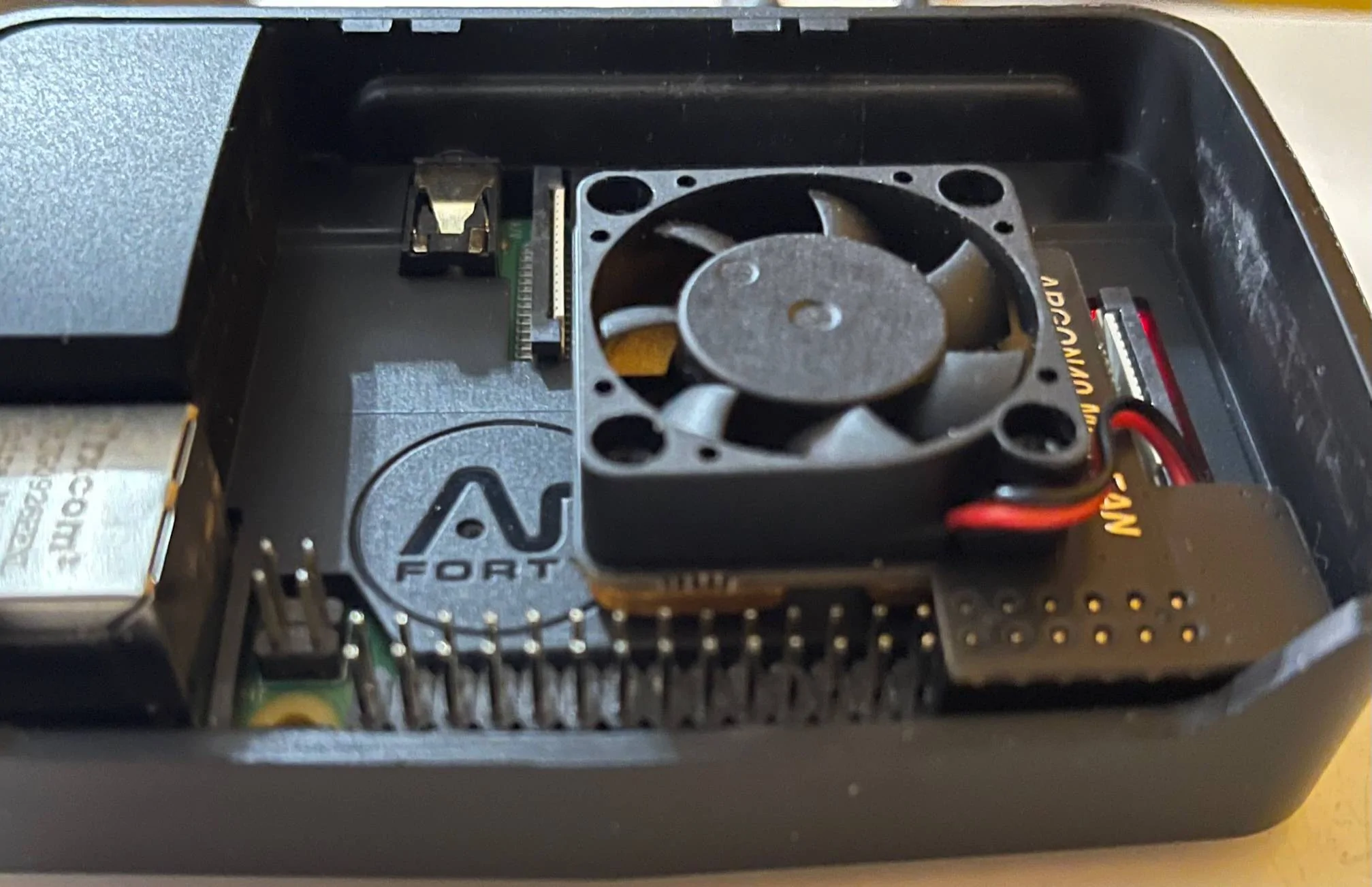
I spent a bit of time putting together the Argon40 Poly+ case for an existing Raspberry Pi 4. The case comes with a separate internal fan, which is an extra benefit (although not necessarily needed for my intended use).

Unfortunately, the included fan also makes use of the same GPIO header pins that the Waveshare 2-Channel CAN HAT uses. (That's the adapter with two channels that redracer suggested, which we know is good.)

So if you want to make use of the Poly+ case, you'll either need to forgo the fan (it's an optional component) or you'll have to get creative. Because of a problem I was having with misaligned GPIO pins, I had to relegate this board for other tasks (Kodi).

As you can see from the scratch marks in the image below (inside the case, right-hand side), I didn't give up before I at least gave the Waveshare 2-CH CAN HAT a try:

Jeep Wrangler JL JEEP HACKING CAN-C / CAN-IHS / UDS ! (Reverse Engineering) Argon40 Poly+ Case for RPi4


I went as far as I could with the Waveshare board, and it just barely fits inside of the case (as far as length and width). Shaving off just a millimeter on the right hand side and then along nearest corners would have made for a very comfortable fit inside the case.

From there, all you'd need is to drill a hole to pass through the CAN bus wires through the top of the case. The Raspberry Pi and the CAN adapter board would have both been enclosed and nicely protected inside this ventilated case.

So I don't know if this case is going to be ideal for others or not (with the lack of room for a CPU fan being a primary consideration), but I thought I'd share my experience.

If anyone else has a suggestion for a better Raspberry Pi 3 or 4 case with cooling and room for a third party HAT, I'm open to try something different.

EDIT: Updated an image.
 
Last edited:
OP
OP
jmccorm

jmccorm

Well-Known Member
First Name
Josh
Joined
Sep 15, 2021
Threads
55
Messages
1,170
Reaction score
1,322
Location
Tulsa, OK
Vehicle(s)
2021 JLUR
Build Thread
Link
Occupation
Systems Engineering
USE YOUR KEYFOB TO AUTOMATICALLY ENABLE AND DISABLE WIFI ACCESS TO YOUR RASPBERRY PI

The following script disables WiFi (and your WiFi transmitter, saving significant power) when you use the keyfob (and only the keyfob) to lock your vehicle. To enable WiFi, rapidly press the Unlock button two times in a row, and then wait about 10 seconds for it to resume it's WiFi session.

This takes advantage of message id $1C0 which exists both on the CAN-C and the CAN-IHS bus. New messages are sent every tenth of a second. If a new remote command is received, it will contain an ID which represents the command. If no additional commands are received, it will continuously report an ID which represents an idle state. When the vehicle goes into sleep mode, it will produce no messages until the vehicle wakes back up again.

The following script is suitable to be placed into /etc/rc.local to automatically start up when your Raspberry Pi is powered up:

nohup /home/pi/bin/remote &

It may be possible to repurpose the script to invoke different instructions and based upon different CAN bus messages. If you come up with anything interesting, please share!

Bash (Shell) Script follows:

Bash:
#!/bin/bash

# Monitors for *remote* door lock/unlock commands and uses
# those to disable/enable the Raspberry Pi's WiFi transmitter.
#
# Locked = WiFi Off (secure)
# Unlocked = WiFi On (less secure)

# Tunable variables:

# Name for the CAN-IHS interface (can0, can1, vcan0, etc)
CANIHS=can0
WIFIDEV=wlan0
DEBUG=true   # Values: true,false,raw

LASTREMOTE="1C0#FFFFFFFFFFFF"
sleep 5

candump -L $CANIHS,01C0:0FFFF | while read time bus REMOTE
do

[ $DEBUG == "raw" ] && echo CAN-IHS data: $REMOTE
HEADER="TIME  : $time $( date )\nDATA  : $REMOTE"

# LOCK COMMAND: WIFI TURNED OFF (SECURED)
if [ "$REMOTE" == "1C0#210000900000" ] ; then
  if [ "$REMOTE" != "$LASTREMOTE" ] ; then
    [ $DEBUG == "true" ] && echo -e $HEADER
    [ $DEBUG == "true" ] && echo "EVENT : KEYFOB LOCK COMMAND RECEIVED"
    [ $DEBUG == "true" ] && echo "ACTION: TURNING OFF WIFI DEVICE"

    # DISABLING WIFI TRANSMITTER

    ifconfig $WIFIDEV down
    sleep 2
    iwconfig $WIFIDEV txpower off

    [ $DEBUG == "true" ] && echo ""

  fi
fi

# 1ST UNLOCK COMMAND: NO ACTION TAKEN
if [ $REMOTE == "1C0#230000900000" ] ; then
  if [ "$REMOTE" != "$LASTREMOTE" ] ; then
    [ $DEBUG == "true" ] && echo -e $HEADER
    [ $DEBUG == "true" ] && echo "EVENT : KEYFOB 1ST UNLOCK COMMAND RECEIVED"
    [ $DEBUG == "true" ] && echo "ACTION: NONE"
    [ $DEBUG == "true" ] && echo ""
  fi
fi

# 2ND UNLOCK COMMAND: WIFI TURNED ON (LESS SECURED)
if [ $REMOTE == "1C0#240000900000" ] ; then
  if [ "$REMOTE" != "$LASTREMOTE" ] ; then
    [ $DEBUG == "true" ] && echo -e $HEADER
    [ $DEBUG == "true" ] && echo "EVENT : KEYFOB 2ND UNLOCK COMMAND RECEIVED"
    [ $DEBUG == "true" ] && echo "ACTION: TURNING ON WIFI DEVICE"

    # ENABLING WIFI TRANSMITTER
    # All commands appear to be necessary even if they return errors.
    # Use extreme care when editing the following section.

    iwconfig $WIFIDEV txpower on
    sleep 4
    iwconfig $WIFIDEV txpower auto
    sleep 1
    ifconfig $WIFIDEV up

    [ $DEBUG == "true" ] && echo ""

  fi
fi

# IDLE (NO COMMANDS): NO ACTION
if [ $REMOTE == "1C0#000000800000" ] ; then
  if [ "$REMOTE" != "$LASTREMOTE" ] ; then
    [ $DEBUG == "true" ] && echo -e $HEADER
    [ $DEBUG == "true" ] && echo "EVENT : IDLE STATE (DEFAULT) HAS RESUMED"
    [ $DEBUG == "true" ] && echo "ACTION: NO ACTION IS NECESSARY"
    [ $DEBUG == "true" ] && echo ""
  fi
fi

# KEEP TRACK OF WHAT THE PREVIOUS COMMAND WAS.
# THIS MAY BE USEFUL TO TRACK WHEN MONITORING OTHER CAN BUS IDs.
LASTREMOTE=$REMOTE

done
If you're able to make use of this script, or if you turn it into anything interesting, please let others know! (Merry Christmas!)
 
Last edited:
OP
OP
jmccorm

jmccorm

Well-Known Member
First Name
Josh
Joined
Sep 15, 2021
Threads
55
Messages
1,170
Reaction score
1,322
Location
Tulsa, OK
Vehicle(s)
2021 JLUR
Build Thread
Link
Occupation
Systems Engineering
IGNITION SWITCH MONITOR
An important handler for custom code.


The following script launches a black-box data recording script and a remote start HVAC automation script which the ignition is put into RUN mode or the vehicle is remotely started. When the vehicle goes back into OFF or ACCESSORY mode, it terminates the black box data recorder.

The HVAC script will make it's own determination of if the vehicle was remote started or not. It also handles it's own exit and does not need to be killed like the black box monitor does.

This script takes advantage of message id $122 which exists only on the CAN-IHS bus. Messages are sent every tenth of a second, containing the current status of the ignition switch. It is up to the programmer to catch when the virtual ignition switch changes from one mode to another. When the vehicle goes into sleep mode, it will produce no messages until the vehicle wakes back up again.

The following script is suitable to be placed into /etc/rc.local to automatically start up when your Raspberry Pi is powered up:

nohup /home/pi/bin/monitor &

It may be possible to repurpose the script to start or kill other processes or automatically perform certain actions (such as turning ESS off) as the vehicle goes between OFF/ACCESSORY and START/RUN modes.

Bash (Shell) Script follows:
Code:
#!/bin/bash

# MONITOR
# Monitors the vehicle's ignition switch to determine when
# certain processes are launched or killed.

# TUNABLE VARIABLES

# Name for the CAN-IHS interface (can0, can1, vcan0, etc)
CANIHS=can0

# Name of the WiFi device used in ifconfig, iwconfig
WIFIDEV=wlan0

# ENABLE OR DISABLE DEBUG STATEMENTS
DEBUG=true   # Values: true,false,raw

# LOCAL VARIABLES WHICH STORE STATE INFORMATION

dumpid=0
LASTIGNITION=99

# Wait five seconds and then change the CPU governor to powersave mode.

sleep 5
echo "powersave" > /sys/devices/system/cpu/cpufreq/policy0/scaling_governor

# CONSTANTLY MONITOR THE IGNITION SWITCH FOR ITS LATEST VALUE.

candump -L $CANIHS,0122:0FFFF | while read TIME BUS IGNITION
do

[ $DEBUG == "raw" ] && echo CAN-IHS data: $IGNITION
HEADER="TIME   : $TIME $( date )\nDATA   : $IGNITION"

# CONVERT $IGNITION TO A *DECIMAL NUMBER* SO WE CAN DO EASY COMPARISONS
# RUN MODE OR ENGINE STARTING/RUNNING: GREATER THAN 67108863
# ACCESSORY MODE OR VEHICLE OFF:       LESS    THAN 67108864

IGNITION=$( echo $IGNITION | cut -d"#" -f2 )
IGNITION=$( printf %d 0x$IGNITION )

# DEBUGGING STATEMENT

[ $DEBUG == "raw" ] && echo IGNITION: $IGNITION   LASTIGNITION: $LASTIGNITION

# WHEN ENGINE GOES FROM OFF TO ON, LAUNCH OUR ROUTINES.

if [ $IGNITION -gt 67108863 ] ; then
  if [ $LASTIGNITION -lt 67108864 ] ; then
    [ $DEBUG == "true" ] && echo -e $HEADER
    [ $DEBUG == "true" ] && echo "EVENT : VEHICLE HAS BEEN TURNED ON"

    # CHANGING CPU GOVERNOR TO THE ONDEMAND POLICY
    # Make more CPU power available while the engine is running.

    [ $DEBUG == "true" ] && echo "ACTION: CHANGING CPU GOVERNOR TO ONDEMAND"
    echo "ondemand" > /sys/devices/system/cpu/cpufreq/policy0/scaling_governor

    # STARTING THE BLACK BOX RECORDER, STORING INTO: /home/pi/log

    [ $DEBUG == "true" ] && echo "ACTION: STARTING BLACK BOX RECORDER"
    nohup /home/pi/bin/dump any > /dev/null &
    dumpid="$!"
    sleep 2
    dumpid=$( pgrep -P $dumpid )
    echo "DUMP STARTED, PID: $dumpid"

    # A SHORT DELAY BEFORE STARTING THE NEXT SECTION
    sleep 5

    # STARTUP ROUTINE FOR HVAC AUTOMATION AFTER IGNITION-START
    # When the vehicle is started, we want the remote-start HVAC automation routine
    # to run. The only exemption is if the engine was already running when this
    # script was launched. If that's the case ($LASTIGNITION == 99), then we do nothing.

    if [ $LASTIGNITION != 99 ] ; then
      [ $DEBUG == "true" ] && echo "ACTION: STARTING HVAC AUTOMATION FOR REMOTE-START"

      # The heater routine will exit if the vehicle was not remote started.
      # Either way, it will shortly terminate after starting and does not need monitoring.

      /home/pi/bin/autohvac &
    fi
    [ $DEBUG == "true" ] && echo ""
  fi
fi

# ENGINE IS NO LONGER RUNNING, KILL THE BLACK BOX

if [ $IGNITION -lt 67108864 ] ; then
  if [ $LASTIGNITION -gt 67108863 ] ; then
    [ $DEBUG == "true" ] && echo -e $HEADER
    [ $DEBUG == "true" ] && echo "EVENT : VEHICLE HAS BEEN TURNED OFF"
    [ $DEBUG == "true" ] && echo "ACTION: TERMINATING BLACK BOX RECORDER"

    # KILLING THE BLACK BOX RECORDER (IF ACTIVE)

    if [ $dumpid -gt 0 ] ; then
      sleep 2
      echo "ENGINE OFF, KILLING DUMP."
      pkill -TERM -P $dumpid
      kill -TERM $dumpid
      dumpid=0
    fi

    # CHANGING CPU GOVERNOR TO THE POWERSAVE POLICY
    # Become more energy efficient while the engine is not running.

    [ $DEBUG == "true" ] && echo "ACTION: CHANGING CPU GOVERNOR TO POWERSAVE"
    echo "powersave" > /sys/devices/system/cpu/cpufreq/policy0/scaling_governor
    [ $DEBUG == "true" ] && echo ""
  fi
fi

# KEEP TRACK OF WHAT THE PREVIOUS STATE OF THE IGNITIOIN SWITCH WAS.
# This is how we can tell if it has changed or not, since we want to
# take action only when there has been a change in it's value.

LASTIGNITION=$IGNITION

done
If you're able to make use of this script, or if you turn it into anything interesting, please let others know! (Merry Christmas!)
 

Sponsored

OP
OP
jmccorm

jmccorm

Well-Known Member
First Name
Josh
Joined
Sep 15, 2021
Threads
55
Messages
1,170
Reaction score
1,322
Location
Tulsa, OK
Vehicle(s)
2021 JLUR
Build Thread
Link
Occupation
Systems Engineering
Next feature under consideration:
Courtesy Honking

Instead of blaring the vehicle's horn in as long solid tone, it would play a short staccato honking pattern that's enough to grab someone's attention, but feels more friendlier and less aggressive. The feature would be engaged by pressing and holding the FOG LIGHT button (far left) on the dash.

So this is going to require two new things. First, unless someone else has it, I have to figure out which message ID gives us the signal for the fog light button.

Second, I'm going to have to come up with the Wrangler's identifier for the horn that's used within the Unified Diagnostic Services command to make an Input/Output Control by Identifier.

Might someone already have some CAN bus information which covers the fog light button?


Old feature still in progress:
Remote-Start HVAC Automation

Given the current state of what we know, it looks like the best I'm able to accomplish is something that turns the HVAC on where you left it when you last shut down the vehicle.

I am able to press all sorts of buttons (by automation) which increase heat and switch modes, turn on air recirculation, etc, but it seems like every now and then it misses one of my button presses, so it can leave things in a weird mode.

There's also a fair bit that stands between where we are now and productionizing this. I might have enough information to pass along to a fellow hobbiest with a Raspberry Pi, but I don't have something yet worthy of giving to a non-IT person that they can just stick in their car and have it run.

Still more work needs to be done in making a Raspberry Pi and/or a smaller microcontroller that's ready to program and fit within someone's vehicle.
 
Last edited:

Temperance

Member
First Name
Amelia
Joined
Dec 30, 2021
Threads
0
Messages
17
Reaction score
23
Location
Washington
Vehicle(s)
2020 Jeep Gladiator Mojave
Occupation
Software Engineer
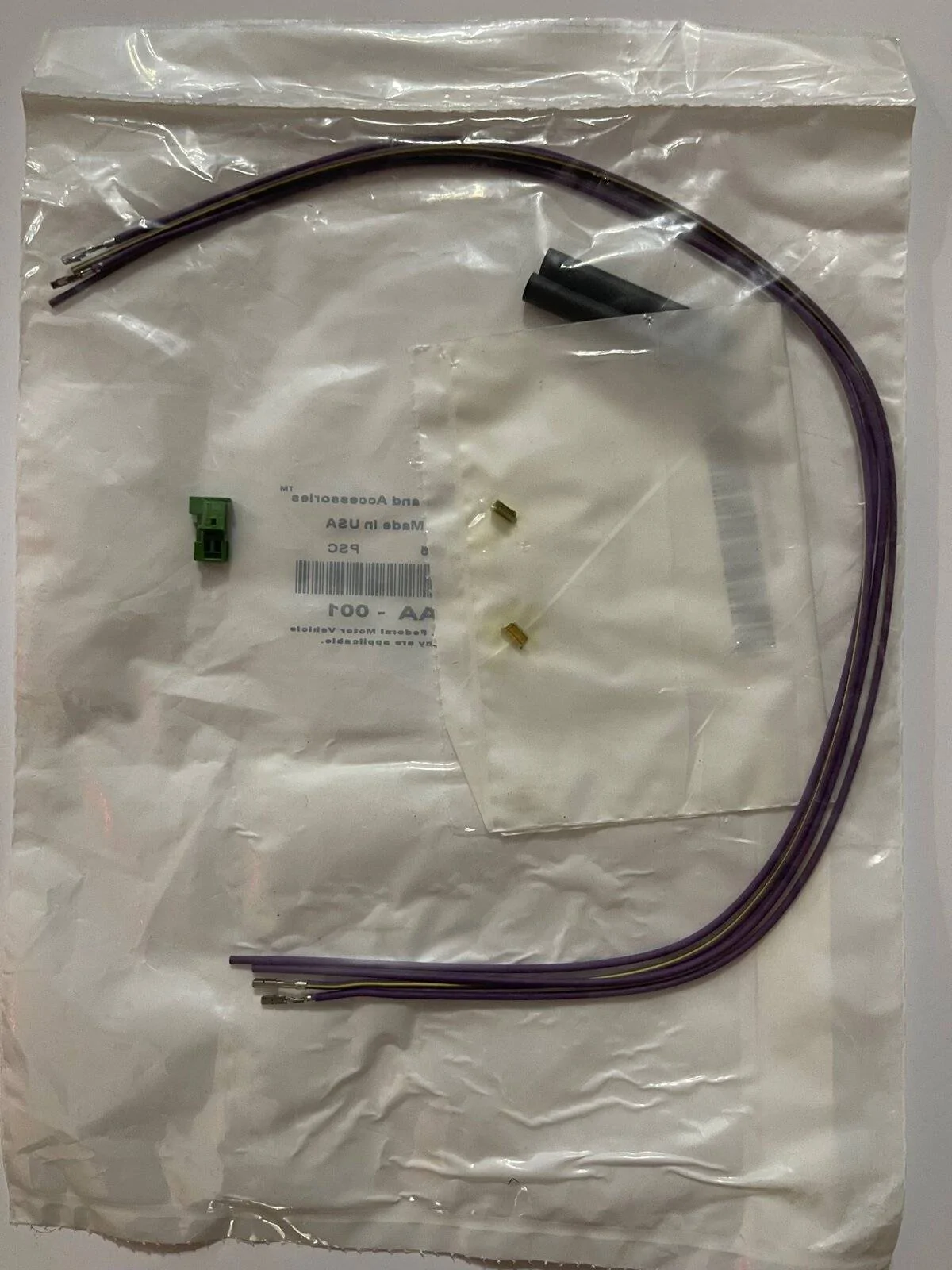
The dealer called to let me know that my package was in. Sure enough, another CAN cable. Up until now, I've been playing with the CAN-C network. But not I finally got a CAN-IHS bus connector to work with!

IMG_1121.jpg


The two small metallic pieces in their own bag are crimps for splicing two cables together. What I found really interesting were two business cards tucked inside the package. Take a look!

IMG_1123.jpg


The first card probably goes a long ways to explain why one cable was nearly $100 and then other was around $30. I'm going to guess that the first connector I ordered was gold plated! The second card is actually some pretty good advice. Twisting the cables helps cancel out interference, and RF interference is the last thing you want on a CAN bus.

So, wow, everything I've done up until now has been on the CAN-C body (critical systems) bus. I'll need to rework some of my documentation to reflect what bus or busses they apply to. But I'm ready to make a whole lot of new discoveries now that I've got the IHS (interior high speed) bus open to me!
I found this thread while doing research for my own CAN bus hacking. I believe that I found the plug for the mopar star connector. Although I haven't ordered it to find out for sure. At 44 cents it's a little cheaper than the dealer, but you'll also need to find the terminals for it as well.

https://www.mouser.com/ProductDetail/TE-Connectivity/2-1418639-5?qs=IkKGUj/sB9VdrsET8B6Xzw==

https://www.mouser.com/datasheet/2/418/6/ENG_CD_1418639_B-2006119.pdf

I plan on building a module to make use of the sway bar disconnect switch on the off road control panel.
 
OP
OP
jmccorm

jmccorm

Well-Known Member
First Name
Josh
Joined
Sep 15, 2021
Threads
55
Messages
1,170
Reaction score
1,322
Location
Tulsa, OK
Vehicle(s)
2021 JLUR
Build Thread
Link
Occupation
Systems Engineering
I found this thread while doing research for my own CAN bus hacking. I believe that I found the plug for the mopar star connector. Although I haven't ordered it to find out for sure. At 44 cents it's a little cheaper than the dealer, but you'll also need to find the terminals for it as well.
I'm glad to see potential discoveries such as this! Hardware is not my forte'.

You've made an awesome find, and I'd be surprised if that wasn't a match. And at what a cost savings! You better believe I'm going to try it. I'll check some of my earlier documentation to see if that's a CAN-C or a CAN-IHS connector (they're different).

Either way, I'm very happy to see what you've provided. Thank you!

As far as the terminals, my connector kit came with them but did NOT say what size they were. I do believe I saw a reference to them over at Mopar Connector Repair Kits (someone else found this site). I'll go look up the connector and see if it gives us the terminal size.

I plan on building a module to make use of the sway bar disconnect switch on the off road control panel.
Do you need to see if that panel has some CAN bus messages that I can pull from it?
 
OP
OP
jmccorm

jmccorm

Well-Known Member
First Name
Josh
Joined
Sep 15, 2021
Threads
55
Messages
1,170
Reaction score
1,322
Location
Tulsa, OK
Vehicle(s)
2021 JLUR
Build Thread
Link
Occupation
Systems Engineering
At 44 cents it's a little cheaper than the dealer, but you'll also need to find the terminals for it as well.
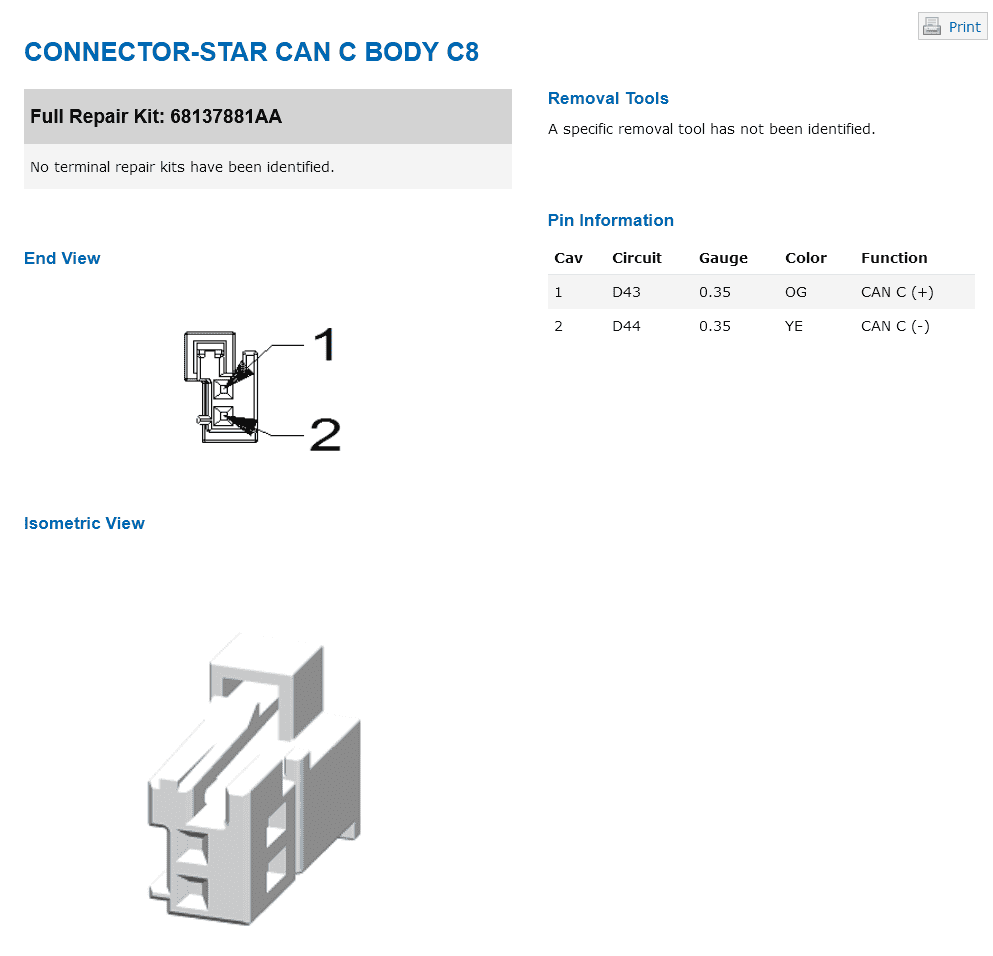
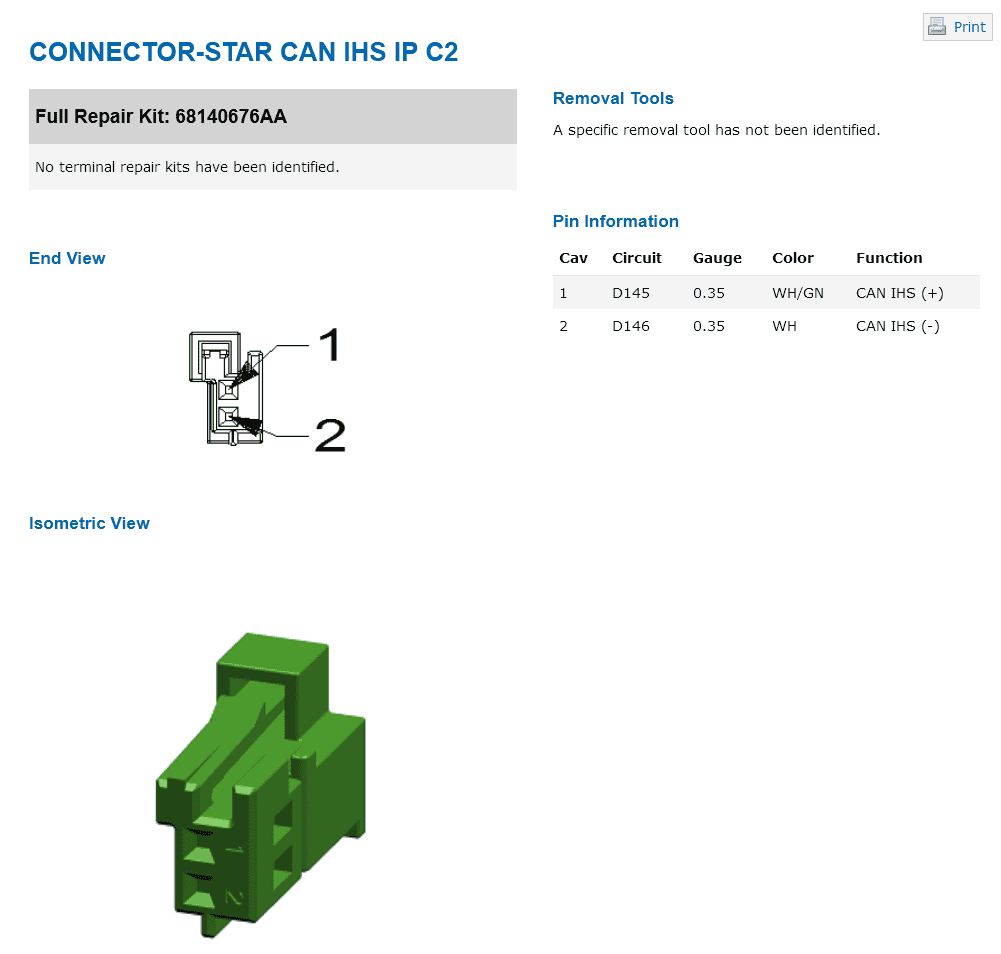
Again, I'm not much of a hardware person, but I've included diagrams from the Mopar Connector Repair Kits website for the CAN-C and the CAN-IHS connector.

In comparing them to your findings on Mouser, congratulations! As best my eyes can determine, you've found a CAN-C connector! (EDIT: Almost, but not quite? My mistake, please read on.)

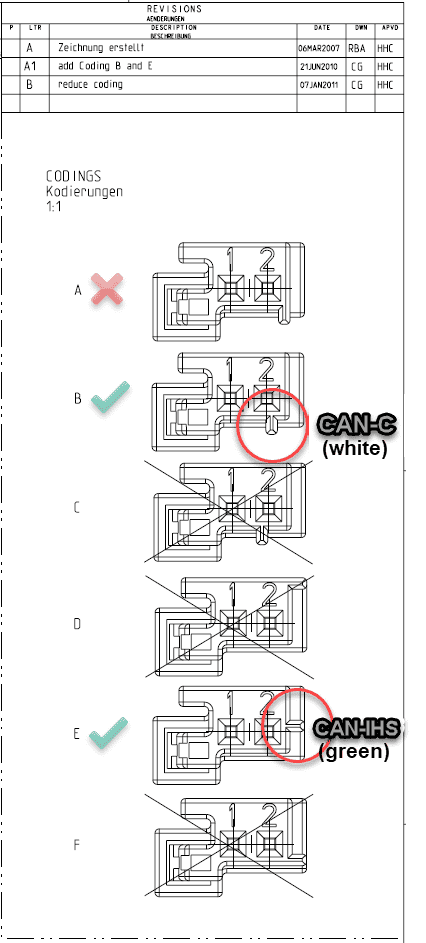
There's either a horizontal or a vertical coding key next to pin #2. Jeep uses this to distinguish between the Wrangler's two types of CAN bus connections. (The manufacturer appears to offer six variations total.)

Also, I don't know enough about connector terminals to correctly specify one, but it may be helpful that they both are listed as 0.35 gauge pins?

Jeep Wrangler JL JEEP HACKING CAN-C / CAN-IHS / UDS ! (Reverse Engineering) CAN-C Bus Connector
Jeep Wrangler JL JEEP HACKING CAN-C / CAN-IHS / UDS ! (Reverse Engineering) CAN-IHS Bus Connector


If I'm reading the datasheet correctly for the 2-1418639-5 you found over on Mouser, it looks like it has a type "A" key coding on the connector? Wait a second... that's close to what the Wrangler uses for a CAN-C connector, but not quite?

I've marked up one of their diagrams. Take a look:

Jeep Wrangler JL JEEP HACKING CAN-C / CAN-IHS / UDS ! (Reverse Engineering) CAN Bus Connector Codings


Under "Customers Also Bought", I see 5-2138650-1 which is colored green like a CAN-IHS connector, but also has the type "A" key coding on the connector.

But again, I'm not a hardware person, and I rarely order from Mouser. There's a 2-1418639-1 and a 2-1418639-5 but they both have a type "A" key coding? Can someone look over all of this and double-check my work please? I may have easily made a mistake here through my own ignorance.

EDIT: I went back to make sure that I gave credit where credit is due. It was @redracer who first pointed us over to the Mopar Connector Repair Kits website in post #10 on our original thread.

Thank you again, redracer! And you too, @Temperance!
 
Last edited:

redracer

Well-Known Member
First Name
Robert
Joined
Aug 22, 2017
Threads
20
Messages
576
Reaction score
650
Location
Manteca, CA
Vehicle(s)
2023 4xe Rubicon
Awesome find!

As for cheaper hardware, how about this? Esp32 with can hardware built on. I've tinkered with Esp32 for my home automation and they are quite easy to work with.
https://www.tindie.com/products/lilygo/lilygo-ttgo-t-can485-esp32-can-rs-485/

Also another thought about the spreadsheet... I wonder if the extra values around the steering data would include the electric pump details like working pressure and temperature. I'd really like to find the power steering temp values as when wheeling I have been hit with an high temp warning before.

I'm really ready to craft up a 5 or 7 inch touch display to go above the radio to display my front trail camera and overlay a bunch of info and I was even thinking of a artificial horizon indicator to display the pitch and yaw data. I started on this in python last year but got stalled... It's time to start up again.
 

Sponsored

OP
OP
jmccorm

jmccorm

Well-Known Member
First Name
Josh
Joined
Sep 15, 2021
Threads
55
Messages
1,170
Reaction score
1,322
Location
Tulsa, OK
Vehicle(s)
2021 JLUR
Build Thread
Link
Occupation
Systems Engineering
Also another thought about the spreadsheet... I wonder if the extra values around the steering data would include the electric pump details like working pressure and temperature.
I'll make a note to go back and see, thanks!

I'm really ready to craft up a 5 or 7 inch touch display to go above the radio to display my front trail camera and overlay a bunch of info and I was even thinking of a artificial horizon indicator to display the pitch and yaw data. I started on this in python last year but got stalled... It's time to start up again.
Love it! And if you can find a way to decode those 'road sensors' I found earlier, you could add a wireframe outline of the Jeep which actively shows the real-time articulation you're getting out of the front and rear axles. (That's in addition to the standarcd vehicle yaw/pitch/roll sensor.)

I know of nothing else that exists today that'll do that!

An Arduino board with the CAN bus connector and the option of one or two 1.8A relays? I love it. And depending on what you're doing, it's very likely that you may only need a single CAN bus connection and not both.

By the way, I haven't gone full Raspberry Pi. Ive started re-introducing myself to Arduino. I'm convinced that when the level of complexity is low, I'd want to go Arduino. But when things start to get complex (or I'm developing a solution), I want to stick with the Raspberry Pi. (I'm finding potential projects on BOTH ends of the spectrum.)

Have you come across any boards with two or three CAN connections? (I think the first board you posted was CAN + RS-485, which isn't quite the same.)
 

Temperance

Member
First Name
Amelia
Joined
Dec 30, 2021
Threads
0
Messages
17
Reaction score
23
Location
Washington
Vehicle(s)
2020 Jeep Gladiator Mojave
Occupation
Software Engineer
Again, I'm not much of a hardware person, but I've included diagrams from the Mopar Connector Repair Kits website for the CAN-C and the CAN-IHS connector.

In comparing them to your findings on Mouser, congratulations! As best my eyes can determine, you've found a CAN-C connector! (EDIT: Almost, but not quite? My mistake, please read on.)

There's either a horizontal or a vertical coding key next to pin #2. Jeep uses this to distinguish between the Wrangler's two types of CAN bus connections. (The manufacturer appears to offer six variations total.)

Also, I don't know enough about connector terminals to correctly specify one, but it may be helpful that they both are listed as 0.35 gauge pins?

CAN-C Bus Connector.png
CAN-IHS Bus Connector.png


If I'm reading the datasheet correctly for the 2-1418639-5 you found over on Mouser, it looks like it has a type "A" key coding on the connector? Wait a second... that's close to what the Wrangler uses for a CAN-C connector, but not quite?

I've marked up one of their diagrams. Take a look:

CAN Bus Connector Codings.png


Under "Customers Also Bought", I see 5-2138650-1 which is colored green like a CAN-IHS connector, but also has the type "A" key coding on the connector.

But again, I'm not a hardware person, and I rarely order from Mouser. There's a 2-1418639-1 and a 2-1418639-5 but they both have a type "A" key coding? Can someone look over all of this and double-check my work please? I may have easily made a mistake here through my own ignorance.

EDIT: I went back to make sure that I gave credit where credit is due. It was @redracer who first pointed us over to the Mopar Connector Repair Kits website in post #10 on our original thread.

Thank you again, redracer! And you too, @Temperance!
This appears to be the CAN IHS connector.

https://www.mouser.com/ProductDetail/571-5-2138650-1

...and I'm hoping that these are the terminals.

https://www.mouser.com/ProductDetail/571-5-963715-6
 
OP
OP
jmccorm

jmccorm

Well-Known Member
First Name
Josh
Joined
Sep 15, 2021
Threads
55
Messages
1,170
Reaction score
1,322
Location
Tulsa, OK
Vehicle(s)
2021 JLUR
Build Thread
Link
Occupation
Systems Engineering
Also another thought about the spreadsheet... I wonder if the extra values around the steering data would include the electric pump details like working pressure and temperature. I'd really like to find the power steering temp values as when wheeling I have been hit with an high temp warning before.
I went through CAN-C message $023 again. It's steering wheel position (2 bytes), steering wheel force applied by driver (2 bytes), apparently unused data of $0000 (2 bytes), and then a checksum plus counter (2 bytes). It's not going to be there.

One of the best ways is going to be to record a CAN dump while a vehicle is misbehaving. But we're a little ways away from that in terms of hardware and setting something up that we could distribute to willing volunteers.

On the other hand, someone privately suggested a procedure to better identify what car module is responsible for which messages. You create a list of all the message IDs and then you unplug on of the CAN-C or CAN-IHS connectors from the bus (behind the glovebox). You note which feature(s) have been disabled on your vehicle. You massage the CAN bus traffic to determine which message IDs have disappeared. You can then associate what messages are transmitted by what device.

I know that the Power Steering Module is on the CAN bus, and that second procedure will work well for that. Now that I'm on vacation, I think I finally need to disconnect CAN bus connectors one-by-one and see what associations I'm able to make.

PS: As I go over more strange numbers, I'll keep an eye out for a floating value that might be connected to wide steering events.
 

Temperance

Member
First Name
Amelia
Joined
Dec 30, 2021
Threads
0
Messages
17
Reaction score
23
Location
Washington
Vehicle(s)
2020 Jeep Gladiator Mojave
Occupation
Software Engineer
I'm glad to see potential discoveries such as this! Hardware is not my forte'.

You've made an awesome find, and I'd be surprised if that wasn't a match. And at what a cost savings! You better believe I'm going to try it. I'll check some of my earlier documentation to see if that's a CAN-C or a CAN-IHS connector (they're different).

Either way, I'm very happy to see what you've provided. Thank you!

As far as the terminals, my connector kit came with them but did NOT say what size they were. I do believe I saw a reference to them over at Mopar Connector Repair Kits (someone else found this site). I'll go look up the connector and see if it gives us the terminal size.


Do you need to see if that panel has some CAN bus messages that I can pull from it?
I did a little tinkering today trying to find the address used for sending the state of the sway bar switch. I didn't have any luck but this is also my first time messing with the CAN bus. I would absolutely love it if someone can help me track down the codes sent by the sway bar module. My Mojave doesn't have this module so I don't have access to them.

On a related not I saw some discussion of cheap hardware for building modules. I intend to use this: https://www.adafruit.com/product/4759 It can be programmed like an Arduino or using CircuitPython.
Sponsored


Top