Sponsored
OP
OP
jmccorm

jmccorm

Well-Known Member
First Name
Josh
Joined
Sep 15, 2021
Threads
55
Messages
1,170
Reaction score
1,322
Location
Tulsa, OK
Vehicle(s)
2021 JLUR
Build Thread
Link
Occupation
Systems Engineering
I'm just diving in to this, I found the pins for the CAN connectors behind the glove bow are compatible with standard breadboard connectors (2.54mm). So I just plugged in some extensions wires and it works. They fit really well, nice and snug!
I seem to remember redracer telling me something very similar only a month ago. If both of you are comfortable with it, then it may not be as bad as I imagine.

Here's the reason why I'm a bit skittish about this:

High Quality Connections Are Important!

About a month ago, I was making a wide left-hand turn (more than 90 degrees) across five lanes of traffic. It was just enough to shift things around slightly... including my CAN cables. I have to admit that I didn't wire up the CAN adapter's ground reference as robustly as I should have. Unfortunately, that shifting around was enough to cause a quick flurry of noise on the CAN bus. And a quick flurry is all it takes.

The Wrangler doesn't take very kindly to devices which pollute the CAN bus. It ends up shutting OFF any vehicle module which it thinks might have been responsible... and it doesn't go looking for a Raspberry Pi or an Arduino. I was hit by a number of dash messages in rapid succession, with the only one I could make out (the last one) telling me that I should service my shifter soon. But there was a more immediate problem.

While still in the middle of my wide left hand turn, my power steering went OUT. It seems that the Power Steering Module was disabled as part of the Wrangler's big attempt to eliminate the source of the CAN noise.

I quickly figured out what was happening, completed my turn safely, then pulled over into a parking lot where I turned my vehicle off... except, the ignition switch wasn't working either! So I started to get my tools together to disconnect the battery and clear everything up. Before I could, the ignition switch must have worked it's way out of the penalty box, because it started working again.

I turned the vehicle off and started it again, and everything was fine... but the lesson was learned. And that's why I'm a stickler for really solid connections to the CAN bus.

The way the protocol works, it doesn't matter if it is your Raspberry Pi, your Arduino, or if it's a vehicle module which senses a CAN bus error, it immediately reports it to all the other modules in the network. So if your own connection has problems, those problems are propagated through the rest of the vehicle's network.

The breadboard connectors may not end up being a problem, but keep an eye on your error rate from time-to-time just to make sure you don't have a problem that's sneaking up on you.

PS: Sorry if I'm being preachy here, it isn't aimed at you. I have been looking for an opportunity to share this story because I wanted others to know the importance of maintaining highly quality CAN bus connections.

PPS: Also, thank you for your continued contributions!
Sponsored

 

Damenx

New Member
First Name
Damen
Joined
Aug 29, 2021
Threads
0
Messages
4
Reaction score
9
Location
Texas
Vehicle(s)
2020 JLU
Just wanted to take a moment to share my plans. I want to add some functionality to my Jeep.
1. Intelligent Auxiliary light controls
Mode1/City - lights turn on with user input, IF headlights transition from Bright to Low; All Auxiliary lighting OFF
Mode2/Rural - Mode1 + ditch lights turn on with corresponding blinker. Rear Aux lights on with reverse lights
Mode3/OFF Road- Mode2 + IF high beams on; ALL forward Auxiliary lights are on.
2. Pin pad to replace Key fob
I've done some testing, I'm cheating by using the transponder board from the spare fob. An Arduino powers up the transponder when I want, and the vehicle thinks the transponder just came into range. Might try a fingerprint scanner, but the one I had was to finnicky.
3. Replace the factory Headunit with OpenAuto
To do this I need to work around a few functions that depend on the headunit, like Aux switches, amplifiers, Audio hud on dashboard and whatever else comes up.
4. A second display
Display fuel economy in gallons / 100 miles, fuel level in gallons, density graph of speed vs fuel consumption and fuel consumption per hour.
Graphics for the following: wheel slip, individual brake application from traction and stability control systems, suspension movement, steer angle, Actual throttle valve position.
5. I'd love to be able to exploit the Downhill Assist and BrakeLock Differential functions and expand their functionality to be more on par with Toyota's CrawlControll feature. We'll see, just a thought at this point.
 

Damenx

New Member
First Name
Damen
Joined
Aug 29, 2021
Threads
0
Messages
4
Reaction score
9
Location
Texas
Vehicle(s)
2020 JLU
I seem to remember redracer telling me something very similar only a month ago. If both of you are comfortable with it, then it may not be as bad as I imagine.

Here's the reason why I'm a bit skittish about this:

High Quality Connections Are Important!

About a month ago, I was making a wide left-hand turn (more than 90 degrees) across five lanes of traffic. It was just enough to shift things around slightly... including my CAN cables. I have to admit that I didn't wire up the CAN adapter's ground reference as robustly as I should have. Unfortunately, that shifting around was enough to cause a quick flurry of noise on the CAN bus. And a quick flurry is all it takes.

The Wrangler doesn't take very kindly to devices which pollute the CAN bus. It ends up shutting OFF any vehicle module which it thinks might have been responsible... and it doesn't go looking for a Raspberry Pi or an Arduino. I was hit by a number of dash messages in rapid succession, with the only one I could make out (the last one) telling me that I should service my shifter soon. But there was a more immediate problem.

While still in the middle of my wide left hand turn, my power steering went OUT. It seems that the Power Steering Module was disabled as part of the Wrangler's big attempt to eliminate the source of the CAN noise.

I quickly figured out what was happening, completed my turn safely, then pulled over into a parking lot where I turned my vehicle off... except, the ignition switch wasn't working either! So I started to get my tools together to disconnect the battery and clear everything up. Before I could, the ignition switch must have worked it's way out of the penalty box, because it started working again.

I turned the vehicle off and started it again, and everything was fine... but the lesson was learned. And that's why I'm a stickler for really solid connections to the CAN bus.

The way the protocol works, it doesn't matter if it is your Raspberry Pi, your Arduino, or if it's a vehicle module which senses a CAN bus error, it immediately reports it to all the other modules in the network. So if your own connection has problems, those problems are propagated through the rest of the vehicle's network.

The breadboard connectors may not end up being a problem, but keep an eye on your error rate from time-to-time just to make sure you don't have a problem that's sneaking up on you.

PS: Sorry if I'm being preachy here, it isn't aimed at you. I have been looking for an opportunity to share this story because I wanted others to know the importance of maintaining highly quality CAN bus connections.

PPS: Also, thank you for your continued contributions!
I will do something more secure in the future... the near future after that story. The CAN interfaces I'm used to are allot more tolerant than it sound like these are... the networks I work on have a 2 second window the bus can be down before a hard failure is triped. I'll mind my complacency lol!
 

jeepingib

Well-Known Member
First Name
Dusty
Joined
Jun 26, 2018
Threads
25
Messages
10,261
Reaction score
40,157
Location
College Station, TX
Vehicle(s)
18' JLUR Punk'n
Occupation
BBQ prophet
Wow, you all are in a completely different league. I lost track of this thread for a few weeks and you have gotten so many things identified and work arounds started. Bravo to all of you.
 
OP
OP
jmccorm

jmccorm

Well-Known Member
First Name
Josh
Joined
Sep 15, 2021
Threads
55
Messages
1,170
Reaction score
1,322
Location
Tulsa, OK
Vehicle(s)
2021 JLUR
Build Thread
Link
Occupation
Systems Engineering
Wow, you all are in a completely different league. I lost track of this thread for a few weeks and you have gotten so many things identified and work arounds started. Bravo to all of you.
It takes all kinds of people to keep the ball moving forward! Speaking of which, a few new opportunities have opened up:

We need people to flesh out the text and expand on the knowledge of the message IDs we've already discovered. And we also need those who can figure out any of numerous IDs that have yet to be identified.

Beyond that, there's also a new opportunity for more generalized knowledge workers to improve our craft as far as formatting and data presentation. How?

Our Excel spreadsheet has been replaced by a link to Google Docs:

The CAN-C and CAN-IHS Spreadsheet for the 2018+ Jeep Wrangler "JL" Spreadsheet at Google Docs

Members who wish to do so may visit the bottom of this thread's first post for instructions on how to request write/modify access to our new shared spreadsheet. Technical contributions welcome! Enhancements to our existing writing, style, and presentation are welcome, too!

As I write this, I see that there are plenty of other types of contributions possible here that need a better home than plain forum messages. Perhaps I should create a share folder for less structured contributions, such as documents and instructions (third party and our own)?
 

Sponsored

Temperance

Member
First Name
Amelia
Joined
Dec 30, 2021
Threads
0
Messages
17
Reaction score
23
Location
Washington
Vehicle(s)
2020 Jeep Gladiator Mojave
Occupation
Software Engineer
We need people to flesh out the text and expand on the knowledge of the message IDs we've already discovered. And we also need those who can figure out any of numerous IDs that have yet to be identified.

Beyond that, there's also a new opportunity for more generalized knowledge workers to improve our craft as far as formatting and data presentation. How?
Is anyone else using SavvyCAN? It utilizes a configuration file called a CAN database file (DBC). Which helps identify messages and defines how to parse and interpret them. If not, what is everyone else using to visualize or parse the CAN data?
 
OP
OP
jmccorm

jmccorm

Well-Known Member
First Name
Josh
Joined
Sep 15, 2021
Threads
55
Messages
1,170
Reaction score
1,322
Location
Tulsa, OK
Vehicle(s)
2021 JLUR
Build Thread
Link
Occupation
Systems Engineering
Is anyone else using SavvyCAN? It utilizes a configuration file called a CAN database file (DBC). Which helps identify messages and defines how to parse and interpret them. If not, what is everyone else using to visualize or parse the CAN data?
Only as part of my effort to reverse engineer CAN bus messages, I have a shell script that will read recorded data and interpret the output. BUT, I have to caution, it's a tad too slow to be used real-time. If you want it, I can provide a copy. The code won't be pretty.

Finally, I wanted to provide the raw output from some of today's effort.

Reverse Engineering with JScan (a small UDS intro)

Many times you'll want to use the numbers you already find on the bus because they're there for free. You don't have to do anything special to make them update, they just do. But there is even more advanced information and advanced controls that are available if you're able to do some work. That's UDS.

When you come across a tool that does something interesting (be it a Tazer, or Jscan, or a semi-professional vehicle diagnostic tool), many times you can capture and replicate that behavior. In today's case, I used Jscan. Connect Jscan up to your vehicle and have everything working.

With a Raspberry Pi, you'll want to have two terminal windows open. Two to receive data, one to send data.

On the first window, type:
isotpdump -s 620 -d 504 -c -ta -u any

On the second window, type:
candump any,400:400 | egrep -v "can.*4[01234]. "

These windows will let you see what is going on when you do things in Jscan. In Jscan, click on Modules then "Heat Ventilation and A/C". Click on "Live Data" and select "Battery Voltage - (V)". This will give us the battery voltage as detected at the HVAC Module. After selecting just the one item, hit OK. And then press the Green Play button in the lower-right corner. It should start streaming the live voltage data to your screen. "14.4" "14.5" "14.4" ... that kind of thing.

No go back and look one your terminal windows, what do you see? The first one has nothing. The second one has a flood of traffic like this:

can0 783 [8] 03 22 D0 20 00 00 00 00
can0 503 [8] 05 62 D0 20 91 91 00 00
can0 783 [8] 03 22 D0 20 00 00 00 00

can0 503 [8] 05 62 D0 20 8F 8F 00 00

On the first window, you'll need to adjust some of your parameters because the HVAC unit expects for it's commands to be sent with an ID of $783 and it sends replies back on an ID of $503.

You may need to adjust the -s ### and the -d ### to match what we've found for the HVAC Module, so the new command is:
isotpdump -s 783 -d 503 -c -ta -u any

Now, I'll break down the traffic we had just seen...

can0 783 [8] 03 22 D0 20 00 00 00 00

03 = "I've got a message that's three bytes long."
22 = "I want to read a vehicle parameter with a given identifier."
D0 20 = "That particular identifier is $D020"
00 ... = "Padding out an 8 byte message with extra zeros."

And in return, the Wrangler's HVAC module gave us the following...

can0 503 [8] 05 62 D0 20 91 91 00 00

05 = "I've got a reply that's five bytes long."
62 = "Your command of 22 was successful." (40=success, 22+40=62)
D0 20 = "You requested identifier $D020"
91 91 = "And it's value is 91. Let me repeat that! 91."
[ Anything after those 5 characters should be ignored. ]

$91 is the number 145 decimal. And that was also our voltage as shown on the screen by Jscan. At least, close enough. 14.5 Volts!

You might also see things in JScan called Activations. These usually are the same thing as we just saw, but instead of asking for what an identifier is, you're telling the vehicle what an identifier should be set to!

NOTE: Some Activations may work by command 0x2E, which writes a given value into the provided identifier. These are often used to change permanent vehicle parameters. Take care that you use the opposite function, 0x22 to read data by identifier before you write! That way, you can back out your changes.

Let's go to the Body Control Module, Activations, and then Honk. That uses an Input/Output Control by Identifier, so it's safer to use. We turn the horn on and off and we see something close to this:

can1 620 [8] 02 10 03 00 00 00 00 00
can1 504 [8] 06 50 03 00 14 00 C8 03
can1 620 [8] 05 2F D0 AD 03 01 00 00
can1 504 [8] 04 6F D0 AD 03 00 C8 03
can1 620 [8] 05 2F D0 AD 03 00 00 00

can1 504 [8] 04 6F D0 AD 03 00 C8 03

Let me decode that for you, but a little less detailed than before.

can1 620 [8] 02 10 03 00 00 00 00 00

02 = "I have a message that's two bytes long."
10 = "I wish to control this diagnostic session."
03 = "I want an extended session where more features are unlocked."

can1 504 [8] 06 50 03 00 14 00 C8 03

06 = "I have a reply that's six bytes long."
50 = "Your command 10 was successful." (40=success, 10+40=50)
03 = "You wanted an extended session."
00 14 00 C8 = [Representation of any time constraints for this.]
03 = Garbage spare character that needs ignored.

Basically, it just asked the Body Control Module for permission to unlock some slightly restricted diagnostic features, and permission was granted... but only for a very limited amount of time. This gives you permission to honk the horn (through software) and to do other disruptive things.

can1 620 [8] 05 2F D0 AD 03 01 00 00

05 = "I have a message that's five bytes long."
2F = "I want input/output control of a device by identifier."
D0 AD 03 = "It's the horn."
01 = "Turn it on!"

To which we receive a reply back...

can1 504 [8] 04 6F D0 AD 03 00 C8 03

04 6F D0 AD 03 = "The horn's status was successfully changed."

Now, if we're quick enough, we're still in our extended diagnostic session. If not, we'd have to repeat that command. Happily, only 0.01 seconds have passed, so we don't need to extended our session before unhonking the horn.

can1 620 [8] 05 2F D0 AD 03 00 00 00

05 = "I have a message that's five bytes long."
2F = "I want input/output control of a device by identifier."
D0 AD 03 = "It's the horn."
01 = "Turn it off already!"

To which we receive a reply back...

can1 504 [8] 04 6F D0 AD 03 00 C8 03

04 6F D0 AD 03 = "The horn's status was successfully changed."

Now, things can get more complex than this. Particularly when there's a message longer than seven bytes (usually one of the module's replies). That can hold off until another day. For now, here's a quick piece of shell code that ultra-quickly honks the horn five times (pretty much as quick as I can get the Wrangler to honk it's own horn):

Bash:
# Unlock protected features
cansend can1 620#02.10.03.00.00.00.00.00
# Rapidly honk the horn five times
for i in `seq 1 5` ; do
  # Turn the horn on
  cansend can1 620#05.2f.d0.ad.03.01.00.00 ; sleep 0.02
  # Turn the horn off
  cansend can1 620#05.2f.d0.ad.03.00.00.00 ; sleep 0.02
done
In my next post, I'll include the raw data from some other variables I was able to manually pull from some vehicle modules. These may or may not normally be found in our regular bus traffic that we've been exploring to date, but again, this is the whole different rabbit hole I've been talking about.

I'm wondering if I should branch off UDS into it's own thread, and all this extra complexity may only serve to scare people away.
 
Last edited:
OP
OP
jmccorm

jmccorm

Well-Known Member
First Name
Josh
Joined
Sep 15, 2021
Threads
55
Messages
1,170
Reaction score
1,322
Location
Tulsa, OK
Vehicle(s)
2021 JLUR
Build Thread
Link
Occupation
Systems Engineering
Raw notes from earlier today when I was reverse-engineering vehicle parameters using JScan. Mind you, any automotive tool with similar features would have worked. This happens to be a nice inexpensive one that a number of us have on-hand.

NOTE: IF SOMEONE COULD HELP ME FIGURE OUT HOW TO DECODE CABIN TEMPERATURE (TYPE: REAL48) USING SHELL SCRIPT, I'D APPRECIATE IT. THE VALUE IS: $FF 90 74 AC 00 34

Code:
Intake Manifold Absolute Pressure (40 or 41 kPa)

  can1  7DF   [8]  02 01 0B 00 00 00 00 00
  can1  7E8   [8]  03 41 0B 27 28 02 01 30

Ambient Air Temperature (+13C / ??F)

  can1  7DF   [8]  02 01 46 00 00 00 00 00
  can1  7E8   [8]  03 41 46 35 28 02 01 30 $35 = 53 (decimal)
  can1  7DF   [8]  02 01 46 00 00 00 00 00 Per document, subtrct 40
  can1  7E8   [8]  03 41 46 35 28 02 01 30 53-40=13C [ a match!]

Ambient Air Temperature (+15C / ??F)

  can1  7DF   [8]  02 01 46 00 00 00 00 00
  can1  7E8   [8]  03 41 46 38 28 02 01 30 $38 = 56
  can1  7DF   [8]  02 01 46 00 00 00 00 00 56-40=16C [close enough]
  can1  7E8   [8]  03 41 46 38 28 02 01 30

Misfire Cylinder 1 (none):

  can1  7DF   [8]  03 06 A2 0C 00 00 00 00
  can1  7E8   [8]  10 13 46 A2 0B 24 00 00    13 46 A2 0B 24 00 00
  can1  7E0   [8]  30 00 01 00 00 00 00 00
  can1  7E8   [8]  21 00 00 FF FF A2 0C 24   00 00 FF FF A2 0C 24
  can1  7E8   [8]  22 00 00 00 00 FF FF 24    00 00 = 00 (last digit)
  can1  7DF   [8]  03 06 A2 0C 00 00 00 00
  can1  7E8   [8]  10 13 46 A2 0B 24 00 00
  can1  7E0   [8]  30 00 01 00 00 00 00 00
  can1  7E8   [8]  21 00 00 FF FF A2 0C 24
  can1  7E8   [8]  22 00 00 00 00 FF FF 24

Misfire Cylinder 4 (two):

  can1  7DF   [8]  03 06 A5 0C 00 00 00 00
  can1  7E8   [8]  10 13 46 A5 0B 24 00 00   13 46 A5 0B 24 00
  can1  7E0   [8]  30 00 01 00 00 00 00 00
  can1  7E8   [8]  21 00 00 FF FF A5 0C 24  00 00 FF FF A5 0C 24
  can1  7E8   [8]  22 00 02 00 00 FF FF 24   22 00 02 = 02 (last digit)
  can1  7DF   [8]  03 06 A5 0C 00 00 00 00
  can1  7E8   [8]  10 13 46 A5 0B 24 00 00
  can1  7E0   [8]  30 00 01 00 00 00 00 00
  can1  7E8   [8]  21 00 00 FF FF A5 0C 24
  can1  7E8   [8]  22 00 02 00 00 FF FF 24


Cabin Temperature (+17.0xxx or +18.0xxx or a little more C)

  can0  783   [8]  03 22 D0 1E 00 00 00 00
  can0  503   [8]  10 09 62 D0 1E FF 90 74  [Real48 Value TBD]
  can0  783   [8]  30 00 01 00 00 00 00 00
  can0  503   [8]  21 AC 00 34 00 00 00 00
  can0  783   [8]  03 22 D0 1E 00 00 00 00
  can0  503   [8]  10 09 62 D0 1E FF 90 74
  can0  783   [8]  30 00 01 00 00 00 00 00
  can0  503   [8]  21 AC 00 34 00 00 00 00

Battery Volt: 14
  can0  783   [8]  03 22 D0 08 00 00 00 00
  can0  503   [8]  05 62 D0 08 64 4C 00 00    [unknown format]
  can0  783   [8]  03 22 D0 08 00 00 00 00
  can0  503   [8]  05 62 D0 08 64 4C 00 00

Battery Volt: 14.4 or 14.5
  can0  783   [8]  03 22 D0 20 00 00 00 00
  can0  503   [8]  05 62 D0 20 91 91 00 00    $91 = 145 [match]
  can0  783   [8]  03 22 D0 20 00 00 00 00
  can0  503   [8]  05 62 D0 20 8F 8F 00 00
  can0  783   [8]  03 22 D0 20 00 00 00 00

Sway Bar Button Request (PRESSED)
  can1  620   [8]  03 22 A0 39 00 00 00 00
  can1  504   [8]  04 62 A0 39 01 46 25 03    $01 = Pressed


Sway Bar Button Request (UNPRESSED)
  can1  620   [8]  03 22 A0 39 00 00 00 00
  can1  504   [8]  04 62 A0 39 00 46 25 03    $00 = Not Pressed

Avg Fuel Economy Value 15.15? km/l
  can1  742   [8]  03 22 A0 22 00 00 00 00
  can1  4C2   [8]  10 09 62 A0 22 00 B9 02
  can1  742   [8]  30 00 01 00 00 00 00 00   [format unknown]
  can1  4C2   [8]  21 03 00 00 22 00 B9 02  [incomplete capture?]
  can1  742   [8]  03 22 A0 22 00 00 00 00
  can1  4C2   [8]  10 09 62 A0 22 00 8A 02
  can1  742   [8]  30 00 01 00 00 00 00 00
  can1  4C2   [8]  21 03 00 00 22 00 8A 02

Fuel Tank Level 85.88
  can1  7DF   [8]  02 01 2F 00 00 00 00 00    [$DB=#219 / 255 = 85.88%]
  can1  7E8   [8]  03 41 2F DB 31 36 34 38
  can1  7DF   [8]  02 01 2F 00 00 00 00 00
  can1  7E8   [8]  03 41 2F DB 31 36 34 38
  can1  7DF   [8]  02 01 2F 00 00 00 00 00
  can1  7E8   [8]  03 41 2F DB 31 36 34 38

Long-term trim Fuel Bank 1 (0.00%):
  can1  7DF   [8]  02 01 07 00 00 00 00 00   # This uses a standard
  can1  7E8   [8]  03 41 07 80 68 30 34 38   # OBD-II parameter and
  can1  7DF   [8]  02 01 07 00 00 00 00 00   # it's encoding.
  can1  7E8   [8]  03 41 07 80 68 30 34 38   # A = $80 = 128
                                             # TRIM = (A-128) * 100/128

HONK HORN:
  can1  620#02.10.03.00.00.00.00.00   - unlocks ability
  can1  620#05.2f.d0.ad.03.01.00.00   - honks
UNHONK HORN:
  can1  620#05.2f.d0.ad.03.00.00.00   - unhonks

MICRO HONK BURST (5 QUICK TAPS OF THE HORN):

Bash:
#!/bin/bash
# Wake up the CAN BUS (in case it's asleep) with faked button press.
cansend can0 2D3#0700000000000000 ; sleep 0.1
# Change to an extended diagnostic session.
cansend can1 620#02.10.03.00.00.00.00.00 ; sleep 0.1
# We'll do a series of 5 very quick taps of the horn.
for i in `seq 1 5` ; do
  # Hold the horn for 0.025 seconds
  cansend can1 620#05.2f.d0.ad.03.01.00.00 ; sleep 0.025
  # Lay off the horn for 0.025 seconds
  cansend can1 620#05.2f.d0.ad.03.00.00.00 ; sleep 0.025
done
 
Last edited:
OP
OP
jmccorm

jmccorm

Well-Known Member
First Name
Josh
Joined
Sep 15, 2021
Threads
55
Messages
1,170
Reaction score
1,322
Location
Tulsa, OK
Vehicle(s)
2021 JLUR
Build Thread
Link
Occupation
Systems Engineering
Official Name for the CAN-C and CAN-IHS Bus

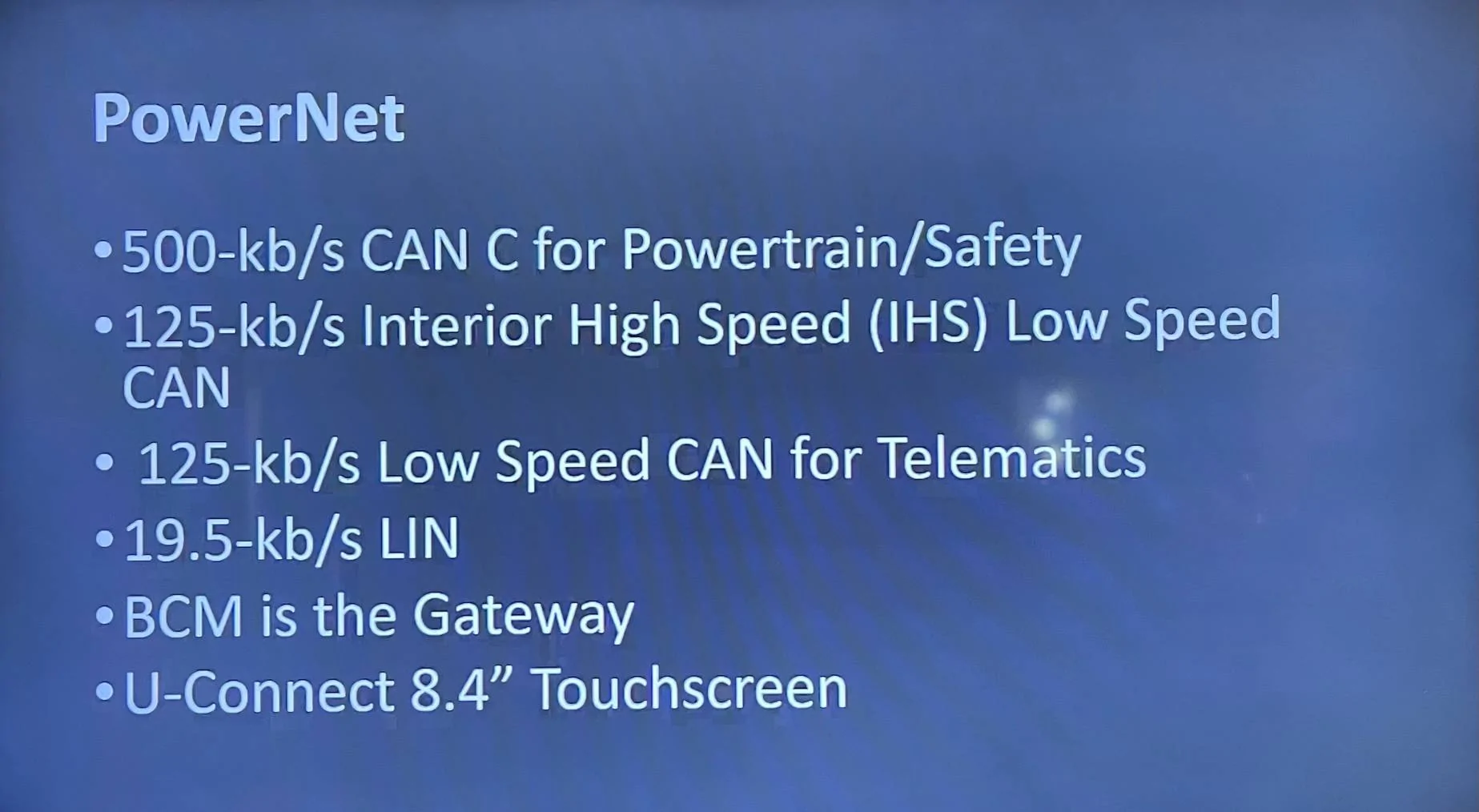
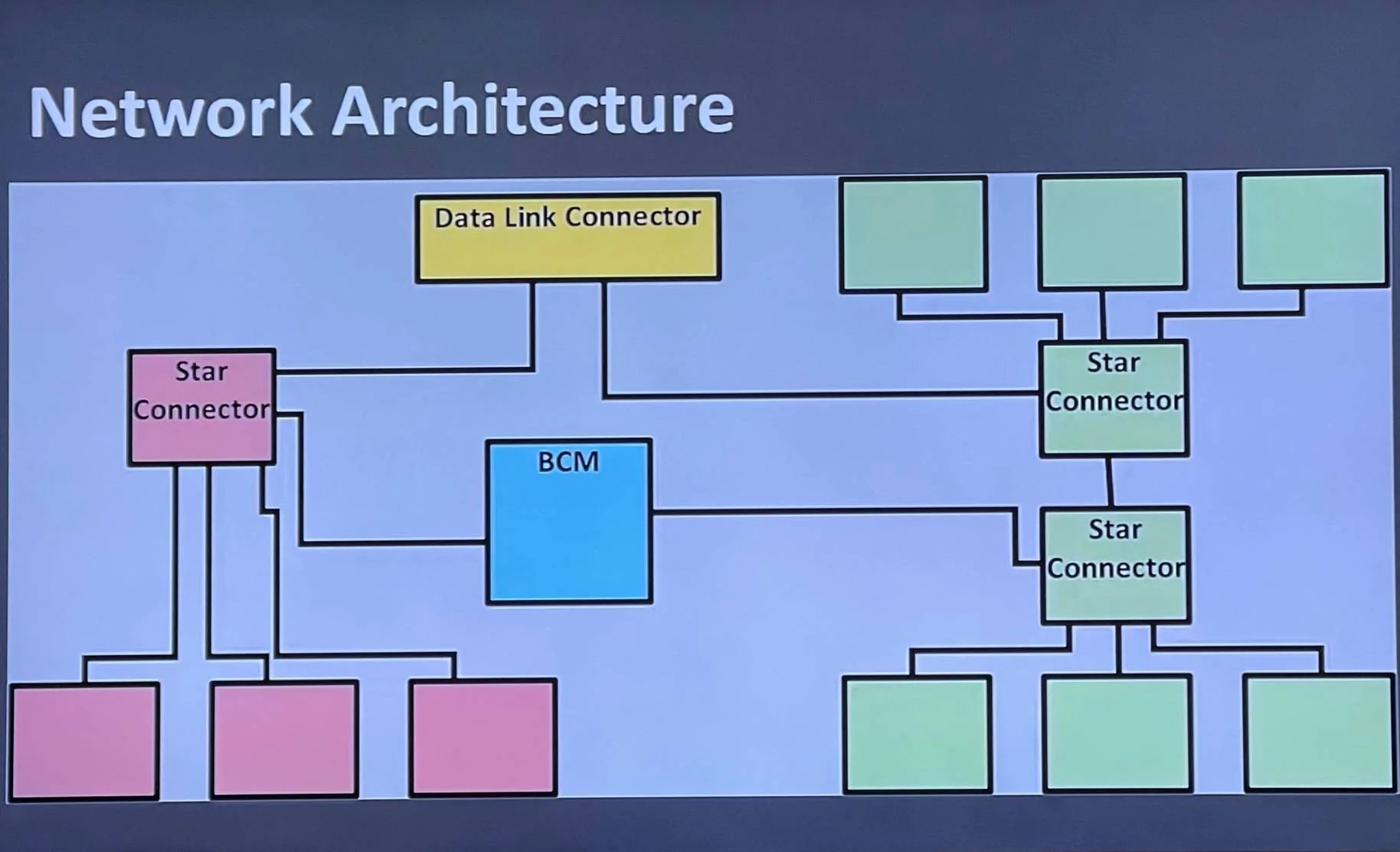
As I was doing some CAN bus research, I happened to come across two slides which not only give a few facts about our CAN networks and a diagram, but what also appears to be an official name for the automotive network we share with other Chrysler / Dodge / Fiat / Jeep vehicles.

Are you ready for it?


Jeep Wrangler JL JEEP HACKING CAN-C / CAN-IHS / UDS ! (Reverse Engineering) IMG_1344

Jeep Wrangler JL JEEP HACKING CAN-C / CAN-IHS / UDS ! (Reverse Engineering) IMG_1346


There it is! PowerNet is the name for the combination CAN-C and CAN-IHS bus which is used in the Wrangler as well as some of the other more modern vehicles in Chrysler/Dodge/Jeep/Fiat family.

Three questions...

1. Anyone know where we can get some PowerNet documents?
2. Any idea which Chrysler/Dodge/Jeep/Fiat vehicles are the ones that share our automotive computer network?
3. The diagram implies that there's a second CAN-C star bus connector. It may or may not apply, so does this ring any bells with anyone?


Both questions can be important, but I'm hoping to invite more hackers from other models over to our scene where the only real activity seems to be happening right now. ?

It may feel like we're behind, but we're actually ahead of the curve! ?

UPDATE: I just read a January 2020 press release from FCA that says when PowerNet is on it's way out, it will be replaced by an architecture known as Atlantis (not Stellantis) which will be supported by uConnect5 hardware. No telling if the chip shortage affected (or accelerated) those plans.
 
Last edited:
OP
OP
jmccorm

jmccorm

Well-Known Member
First Name
Josh
Joined
Sep 15, 2021
Threads
55
Messages
1,170
Reaction score
1,322
Location
Tulsa, OK
Vehicle(s)
2021 JLUR
Build Thread
Link
Occupation
Systems Engineering
Is anyone else using SavvyCAN? It utilizes a configuration file called a CAN database file (DBC). Which helps identify messages and defines how to parse and interpret them. If not, what is everyone else using to visualize or parse the CAN data?
Temperance,

Be aware that this (as a group effort) just started a month ago, and I think we have yet to hit critical mass. We are expecting more participants now that January has rolled around, and I just started reaching out to other forums (Gladiator, Dodge Charger, Reddit /r/CarHacking) to let people know that we exist. So you yourself might set some defacto standard, with others who come along later coalescing around what you've already got going.

I was corresponding with the author or SavvyCAN and the topic of those DBC files came up (because as a UNIX person, I really didn't understand them). I'll go ahead and include that correspondence in case it's interesting:

Collin said:
Interpret frames on the main window will use loaded DBC files to interpret the traffic. DBC files are a file format that describes signals in CAN messages. You can set up signals that automatically interpret the data. For instance, if you know where the RPM is sent you can turn the raw CAN data into RPM and list the RPM. If you know how gear position is encoded you can turn raw data into "DRIVE" "REVERSE" "NEUTRAL", etc. This makes viewing data much more convenient. Basically, a DBC would be a way to store all the things you've already decoded in a portable format. SavvyCAN can load DBC files and it can write them as well. That's a whole other complication in a program that I'm aware is already kind of complicated to use. But, being able to store your work is pretty handy.
In other news, I touched base with BiggRanger (the guy we inherited the spreadsheet's format from). If anyone's interested, here's a link to his reply on Reddit. He's working on a CAN reverse-engineering package. Unfortunately, he doesn't think it will be releasable until mid-2022. We should probably go ahead with whatever direction suits us for now.

To answer more of your original question, what I do is that I have my shell script which plays back a number of known factors from a four mile drive I recorded and understand pretty well. I've got accelerator, brake, throttle vane motor, steering wheel angle, current gear, RPMs, speed (MPH). These all print out on one single [wide] line every second, or tenth of a second (my choice).

When I have a cool new variable that I can't quite figure out, I code it in and have it print out at the end of the line. That way, I'm able to compare it against everything else I know of the vehicle's current state and see how it fits in. It's gotten me a long ways so far, but I think I'm just beginning to reach the point where other methods may start giving me more traction when it comes to figuring out these unknowns.
 

Sponsored

TheBirdie72

Well-Known Member
First Name
Steve
Joined
Dec 16, 2021
Threads
25
Messages
5,389
Reaction score
25,733
Location
Rhode Island
Vehicle(s)
2021 Jeep Wrangler Freedom Edition 2 Door
I’m sorry, not to interrupt… apologies…

But can I just say that this is the most technical Jeep-related thread I have seen yet! I get what the goal here is, and I think it is VERY cool! Going to be hugely beneficial to people who want to mod their Jeeps in the future!

That said, I’m not going to even pretend that I understand even 10% of what you Jeep tech nerds are talking about here. It might as well be written in Chinese as far as my non-technical dumb ass is concerned.

So on behalf of all the other non-technical enthusiasts on here that are in the same boat as me, I just want to say thank you for figuring stuff like this out for the rest of us! It will only make the Jeep product better in the future! ? Feel free to continue nerd’ing; I’ll interrupt no more.
 
OP
OP
jmccorm

jmccorm

Well-Known Member
First Name
Josh
Joined
Sep 15, 2021
Threads
55
Messages
1,170
Reaction score
1,322
Location
Tulsa, OK
Vehicle(s)
2021 JLUR
Build Thread
Link
Occupation
Systems Engineering
So on behalf of all the other non-technical enthusiasts on here that are in the same boat as me, I just want to say thank you for figuring stuff like this out for the rest of us! It will only make the Jeep product better in the future! ? Feel free to continue nerd’ing; I’ll interrupt no more.
Steve,

It takes all kinds to keep the ball moving forward, and not all of them have to be technical!

You may not be our guy, but if someone reading this has some pull or has a decent contact with someone at Jeep, I'd love to see if any vendor assistance might be available to us. After all, our community of modding customers is exactly what they're known for. ?

Cheers.
 
OP
OP
jmccorm

jmccorm

Well-Known Member
First Name
Josh
Joined
Sep 15, 2021
Threads
55
Messages
1,170
Reaction score
1,322
Location
Tulsa, OK
Vehicle(s)
2021 JLUR
Build Thread
Link
Occupation
Systems Engineering
I'd like to get the heater running a little bit hotter on those cold mornings.

Does anyone have any thoughts about raising the idle to 2000 RPMs after it's already been idling for 60 seconds? This isn't so much for warming up the engine as it is to warm up the cabin much quicker.

Any wear and tear on the vehicle to be concerned about?
 
Last edited:

redracer

Well-Known Member
First Name
Robert
Joined
Aug 22, 2017
Threads
20
Messages
576
Reaction score
650
Location
Manteca, CA
Vehicle(s)
2023 4xe Rubicon
I'd like to get the heater running a little bit hotter on those cold mornings.

Does anyone have any thoughts about raising the idle to 2000 RPMs after it's already been idling for 60 seconds? This isn't so much for warming up the engine as it is to warm up the cabin much quicker.

Any wear and tear on the vehicle to be concerned about?
the Tazer has a high idle feature, it's called winch mode. I can create a dump while commanding this.
 
OP
OP
jmccorm

jmccorm

Well-Known Member
First Name
Josh
Joined
Sep 15, 2021
Threads
55
Messages
1,170
Reaction score
1,322
Location
Tulsa, OK
Vehicle(s)
2021 JLUR
Build Thread
Link
Occupation
Systems Engineering
the Tazer has a high idle feature, it's called winch mode. I can create a dump while commanding this.
I'll take it!

Just wanted to take a moment to share my plans. I want to add some functionality to my Jeep.
4. A second display
Display fuel economy in gallons / 100 miles, fuel level in gallons, density graph of speed vs fuel consumption and fuel consumption per hour.
Graphics for the following: wheel slip, individual brake application from traction and stability control systems, suspension movement, steer angle, Actual throttle valve position.
I wanted to circle back around and make some more comments here.

Regarding your fuel parameters: I noted the existence of UDS service identifier in the BCM which provides the fuel capacity (in Liters) of whatever Wrangler it currently runs on. Couple that with a more well-known OBD-II parameter ($2F - Fuel Level Input), and you can determine (in 255 increments from empty to full) how much fuel remains in a tank, and not just a percentage. But it's still an averaged estimate (as fuel gets sloshed around while driving, it has to average).

Yesterday, I could have sworn that I came across a really obscure parameter that was like "microliters of gas consumed per millisecond" (or something of the sort). I made a quick look again today but didn't find where I saw that.

I like where you're heading with graphics. I particularly think that most drivers are unaware of how much slip happens on which tire(s) and when, and that kind of feedback is useful to a driver who wants to know where their limits are. Those have potential for everyday driving scenarios as well as off-road trails.

A new application might be in rock-crawling scenarios where the display not only shows it's axle geometry, but it also signals the driver when they're approaching the limits of their vehicle's articulation. If a driver is going slow enough, it may also be possible (in some scenarios) to warn them before one or more of their wheels completely lose footing.

A few messages back, I had a section called "Reverse Engineering with JScan (a small UDS intro)". Let me add a bit more to that with something you and others may find useful:

Hunting for Obscure Parameters in JScan

As mentioned earlier, I'm using JScan, but you could do much of the same with any sophisticated OBD-II tool (or competing OBD-II smartphone scanners such as AlphaOBD). I'm only using JScan because it seems to be popular among forum owners.

When you use a service identifier, you're going to have to poll for a response. That is, you have to manually send out a query, and then you have to manually wait for a response, and you have to repeat that each time you want it updated (or invoke a more complex UDS service to have it automatically stream that information to you).

That's the downside of OBD-II and using UDS data. You have to set it up before you can listen on the bus for it. The upside is that you're going to have access to an absolutely bonkers array of new and obscure parameters that most drivers wouldn't even suspect existed.

For the most accurate information, you'd want to run JScan against your live vehicle, but second best (and often as good) is to run it with a Demo connection instead of a Bluetooth or WiFi connection to your vehicle.

If you go immediately into Live Data, you'll find a limited number of parameters, and those parameters conform to your standard OBD-II PIDs. They're very easy to reproduce (even without sniffing) and very easy to interpret. This message gives a good example on how to query any well-known OBD-II parameter.

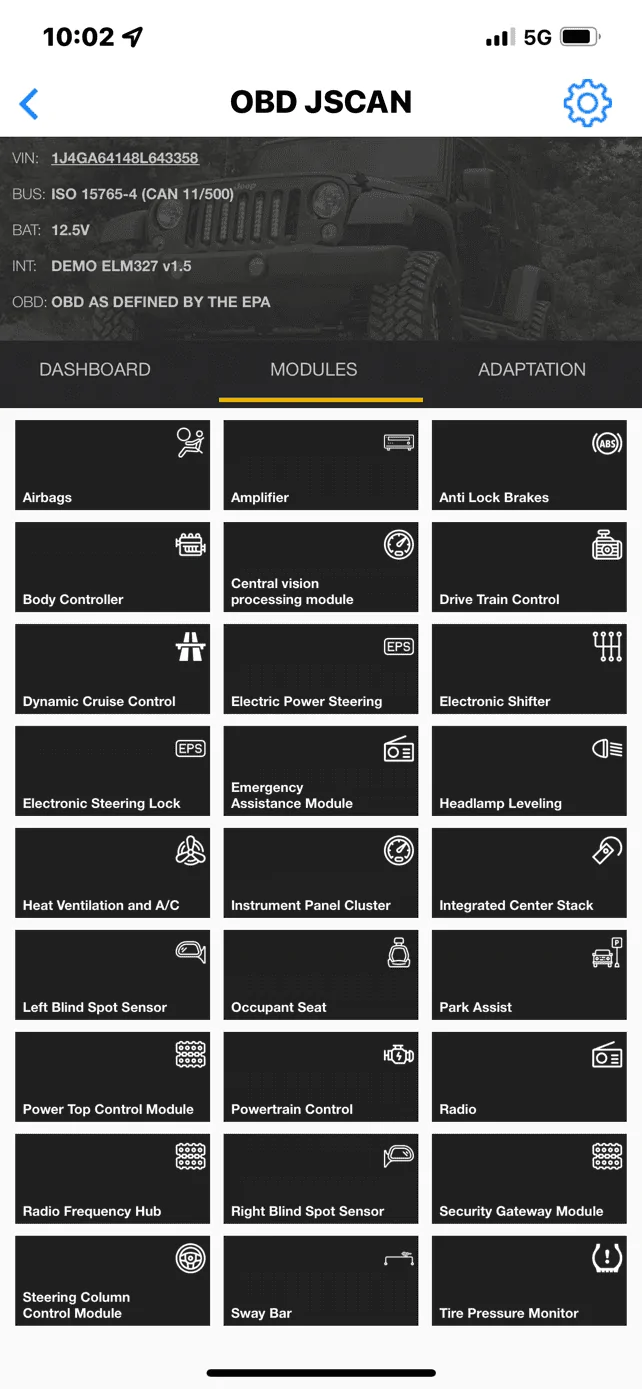
The real magic begins when you exit out of Live Data and select "Modules" just above it. You're presented with a list of vehicle modules to choose from.

Jeep Wrangler JL JEEP HACKING CAN-C / CAN-IHS / UDS ! (Reverse Engineering) JScan Modules


Like last time, I'd choose something like the HVAC module. Click on that, go into Live Data, and just scroll through all the names of things which are stored in the HVAC Module (and may or may not ever normally make it's way onto the CAN bus). A few examples:
  • Driver Sun Load Sensor
  • Evaporator Sensor Temperature (C)
  • Passenger Temperature Door Position (%)
  • R134a Pressure
If you find something you might want to use, then try out the parameter on a real vehicle and see if it provides useful information. If so, you'll want to do some of the reverse engineering with JScan that was covered yesterday. Do them one at a time. Just be sure you capture the source ID, destination ID, the actual message which requests the value, and try to figure out how the return information is encoded. (It can get tricky when it isn't a short answer.)

Using this technique, you might make your cool new tool even cooler. (No pun was intended.)
Sponsored

 
Last edited:


Top