Sponsored
OP
OP
jmccorm

jmccorm

Well-Known Member
First Name
Josh
Joined
Sep 15, 2021
Threads
55
Messages
1,170
Reaction score
1,322
Location
Tulsa, OK
Vehicle(s)
2021 JLUR
Build Thread
Link
Occupation
Systems Engineering
I'm hoping! But here's what I'm stumbling with:

Pull up the 5-2138650-1 datasheet. Look on the far-left side of the PDF document. Do you see the KEYING section? I'll repost what I created earlier since it appears to apply here, too:
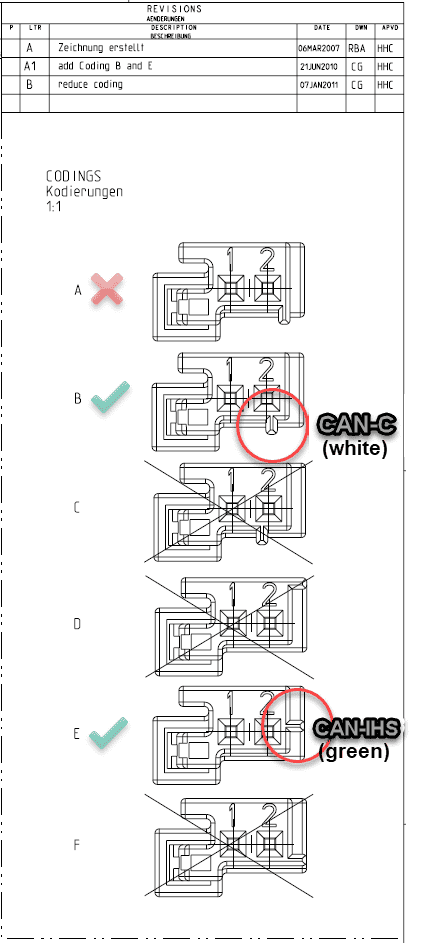
Jeep Wrangler JL JEEP HACKING CAN-C / CAN-IHS / UDS ! (Reverse Engineering) CAN Bus Connector Codings


So here's my question:

When you order 5-2138650-1, what kind of key coding are you going to get? I'm assuming "A" (as shown in the picture above) or is there some other way to know for sure, or to select which one you're going to get? Or does it have some way of selecting it yourself? The only key coding that's useful is going to be B and E.

...and I'm hoping that these are the terminals.
https://www.mouser.com/ProductDetail/571-5-963715-6
I'll give it a shot! (I also saw it under "Customers Also Bought".)

I did a little tinkering today trying to find the address used for sending the state of the sway bar switch. I didn't have any luck but this is also my first time messing with the CAN bus. I would absolutely love it if someone can help me track down the codes sent by the sway bar module. My Mojave doesn't have this module so I don't have access to them.
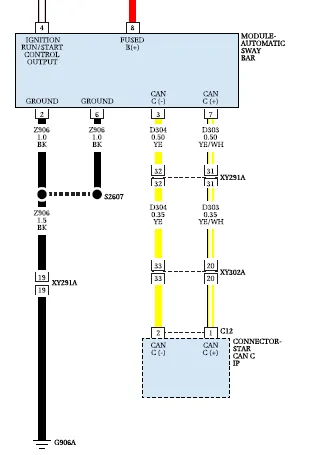
I'll raise that one's priority on my to-do list. I see that the Automatic Sway Bar Module itself lives on the CAN-C bus...

Jeep Wrangler JL JEEP HACKING CAN-C / CAN-IHS / UDS ! (Reverse Engineering) Automatic Sway Bar Modul


I could not find anything in the Wrangler's wiring diagram which covered just the sway bar switch itself, but I'm hoping it's part of the Integrated Center Stack Switch Bank Module on the CAN-IHS bus:
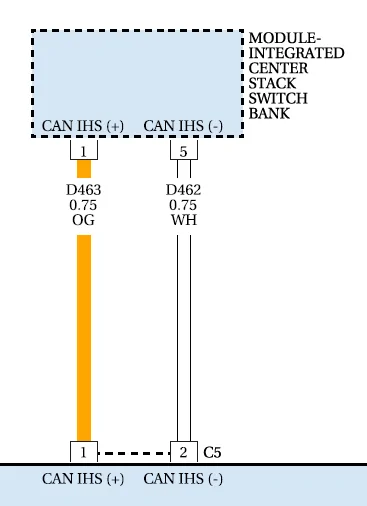
Jeep Wrangler JL JEEP HACKING CAN-C / CAN-IHS / UDS ! (Reverse Engineering) Integrated Center Stack Switch Bank Modul


...if so, I've got a tool that'll help identify it pretty quickly.
Sponsored

 
OP
OP
jmccorm

jmccorm

Well-Known Member
First Name
Josh
Joined
Sep 15, 2021
Threads
55
Messages
1,170
Reaction score
1,322
Location
Tulsa, OK
Vehicle(s)
2021 JLUR
Build Thread
Link
Occupation
Systems Engineering
All --

Now and again, you might have seen that I reference the vehicle's wiring diagrams. These may be good to know when working with some of the Wrangler's CAN bus systems... or systems which you think should be on the CAN bus but aren't!

You can grab your own copy here:
Jeep JL Wrangler Wiring Diagrams

Enjoy!
 

Temperance

Member
First Name
Amelia
Joined
Dec 30, 2021
Threads
0
Messages
17
Reaction score
23
Location
Washington
Vehicle(s)
2020 Jeep Gladiator Mojave
Occupation
Software Engineer
So here's my question:

When you order 5-2138650-1, what kind of key coding are you going to get? I'm assuming "A" (as shown in the picture above) or is there some other way to know for sure, or to select which one you're going to get? Or does it have some way of selecting it yourself? The only key coding that's useful is going to be B and E.
Part number for B:
https://www.te.com/usa-en/product-2-2138650-1.html

Part number for E:
https://www.te.com/usa-en/product-5-2138650-1.html

I'll raise that one's priority on my to-do list. I see that the Automatic Sway Bar Module itself lives on the CAN-C bus...

I could not find anything in the Wrangler's wiring diagram which covered just the sway bar switch itself, but I'm hoping it's part of the Integrated Center Stack Switch Bank Module on the CAN-IHS bus:

...if so, I've got a tool that'll help identify it pretty quickly.
<3
 
OP
OP
jmccorm

jmccorm

Well-Known Member
First Name
Josh
Joined
Sep 15, 2021
Threads
55
Messages
1,170
Reaction score
1,322
Location
Tulsa, OK
Vehicle(s)
2021 JLUR
Build Thread
Link
Occupation
Systems Engineering

Temperance

Member
First Name
Amelia
Joined
Dec 30, 2021
Threads
0
Messages
17
Reaction score
23
Location
Washington
Vehicle(s)
2020 Jeep Gladiator Mojave
Occupation
Software Engineer
I follow! SOLID WORK, THANK YOU!

The next time I pull a keyboard and monitor into my Wrangler, identification of your Sway Bar Button is at the top of my list.
Thank you! <3
 

Sponsored

OP
OP
jmccorm

jmccorm

Well-Known Member
First Name
Josh
Joined
Sep 15, 2021
Threads
55
Messages
1,170
Reaction score
1,322
Location
Tulsa, OK
Vehicle(s)
2021 JLUR
Build Thread
Link
Occupation
Systems Engineering
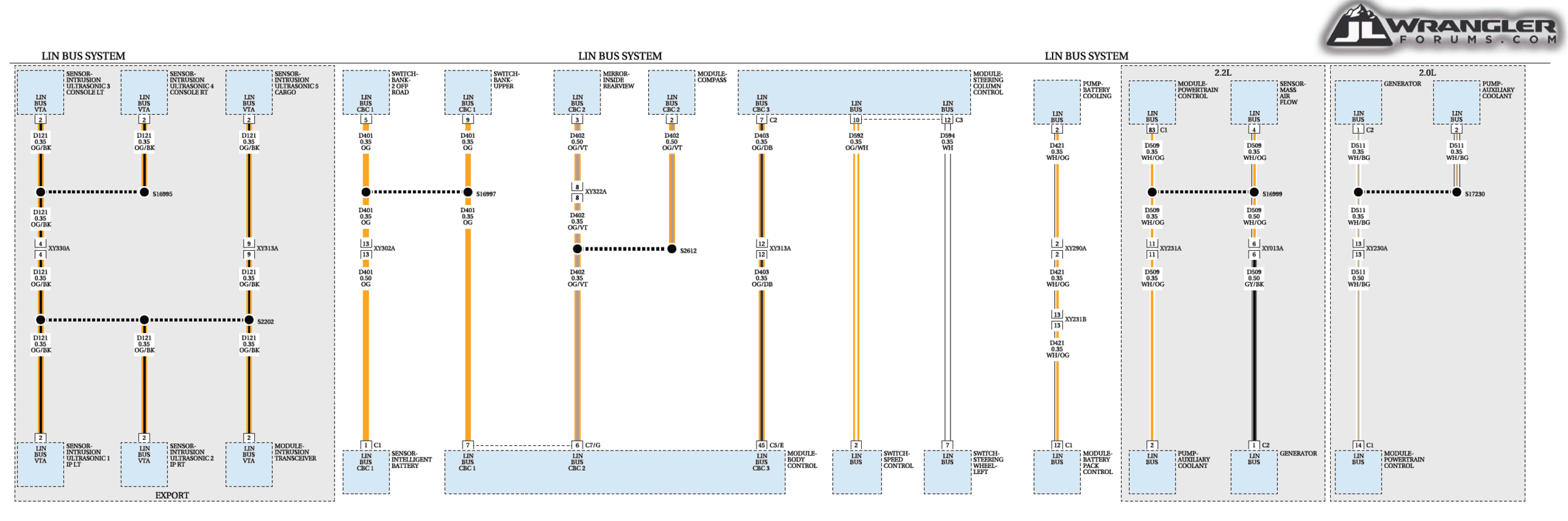
Does anyone have an angle on how we might connect to the LIN bus? What kind of hardware we're going to need? Where the various bus connectors are?

I haven't yet checked into Temperance's request, but I happened to notice a "Off-Road Switch Bank" that's connected to the LIN bus. That might end up being the source she's looking for. In any case, it'd be nice if we had a chance of decoding LIN messages, too.

For reference, I've included a wiring diagram of the LIN bus:

Jeep Wrangler JL JEEP HACKING CAN-C / CAN-IHS / UDS ! (Reverse Engineering) LIN Bus
 

Temperance

Member
First Name
Amelia
Joined
Dec 30, 2021
Threads
0
Messages
17
Reaction score
23
Location
Washington
Vehicle(s)
2020 Jeep Gladiator Mojave
Occupation
Software Engineer
Does anyone have an angle on how we might connect to the LIN bus? What kind of hardware we're going to need? Where the various bus connectors are?

I haven't yet checked into Temperance's request, but I happened to notice a "Off-Road Switch Bank" that's connected to the LIN bus. That might end up being the source she's looking for. In any case, it'd be nice if we had a chance of decoding LIN messages, too.

For reference, I've included a wiring diagram of the LIN bus:
I saw this as well, but I'm thinking it shouldn't be necessary? I found a project and a few posts for someone that created a pass-through can bus module for the JK sway bar. The sway bar module is responsible for all of the sway bar logic. That means that the messages used to enable the sway bar and the messages that report its status come in to and out of the sway bar module on the can bus. My hope is that even though the messages are different that the system is still the same.

https://www.jkowners.com/threads/can-bus-hacking-sway-bar-disconnect.376786/

But you may be right that the message from the switch won't get passed on to the can c bus unless the functionality is enabled. Enabling the sway bar may cause the dash to display errors with no sway bar module on the bus reporting its status.
 
OP
OP
jmccorm

jmccorm

Well-Known Member
First Name
Josh
Joined
Sep 15, 2021
Threads
55
Messages
1,170
Reaction score
1,322
Location
Tulsa, OK
Vehicle(s)
2021 JLUR
Build Thread
Link
Occupation
Systems Engineering
I had some thoughts on how to manage CAN-enabled devices which are particularly power hungry. In all honesty, I'm just kind of bouncing this around in my own head, so it isn't entirely baked, but I thought I'd go ahead and share where my thoughts are on this.

Auto-power for CAN devices... with a USB-C port?

I think I've got an idea here, but it needs a few more rough edges figured out. Does anyone know any rules which govern when there is and is not power on the USB-C media connector?

When the vehicle is off and the USB-C connection continues to have power, so far I've been able to figure out that it will stay powered for an (unknown) minimum amount of time. After a certain amount of time has elapsed (15 minutes?), it will then stay powered only until the vehicle's CAN bus becomes active, or until 60 minutes have elapsed since the vehicle was turned off, whichever comes first. (CAN bus activity can be triggered with something as simple as a message which says that NO button has been pressed.)

I suspect that there's a shutdown timer for USB-C power, but it never gets called if nothing is happening and the vehicle's CAN bus is asleep. Probably because those power control functions expect the CAN bus to be active for they themselves to operate. A mistake, or... ?​

Once USB-C is powered off, that's not the end of the story. There seem to be certain functions (remote lock/unlock) which will power up the USB-C connection once again, allowing a USB-C device to run for yet another hour. A Raspberry Pi with a tiny UPS battery might withstand a power-off event long enough to send a command to re-power it's USB-C connection.

The vibe that I'm getting here is that it may be possible for a Raspberry Pi to generate it's own CAN bus messages to determine how long it is kept alive after the vehicle is shut down, and after a minimum period of time has elapsed, for it to power down it's own USB-C power feed. Just a few more details need to be puzzled out.

It just seems like USB-C power isn't working to anyone's actual design specs. Or is it, just I'm not understanding how?


Auto-power for CAN devices... with an AUX switch?

I have yet to test this in operation, but I have a pretty good theory for how this should work. With CAN-IHS message ID $314, you can change the settings for AUX1 - AUX4. The two modes that look interesting to me are these:

1. Latching, Ignition, Last State On [on/off with ignition switch]​
2. Latching, Battery, Last State On [always on]​

What I figure is that the CAN component (such as a Raspberry Pi) would be powered by an AUX switch connection, and it would configure itself to match the ignition switch. So whenever the vehicle is started, the Raspberry Pi would be powered on.

Once on, the Raspberry Pi would immediately reconfigure it's own AUX switch, going to Latching, Battery, and with a Last State of ON. The Raspberry Pi would permanently remain powered unless it altered it's own state (or someone hit the AUX button to power it down).

So when the vehicle is turned off, a Raspberry Pi can make it's own decision of if it wants to remain latched to battery power. Then and there, or at a later time, if it wants to reconfigure itself to be latched to the ignition switch status, it can do that. The Raspberry Pi would immediately be powered off, only to be powered back on again the next time the vehicle is restarted.

Alternatively, a power-hungry device may have the potential to continue operating 24x7. If and when it senses that the vehicle's battery has fallen below a safety threshold (CAN-IHS ID $2C2), it cuts it's own power so that the vehicle will have enough reserve to start up normally once again. (Starting up the device along with it.)​

Where the AUX switch is installed, it seems like a really smart way to handle all the power on/off considerations. I also like that there's a built-in safety mechanism: the driver still has the option to power down the Raspberry Pi at any time if he believes there may be a problem.
 
Last edited:
OP
OP
jmccorm

jmccorm

Well-Known Member
First Name
Josh
Joined
Sep 15, 2021
Threads
55
Messages
1,170
Reaction score
1,322
Location
Tulsa, OK
Vehicle(s)
2021 JLUR
Build Thread
Link
Occupation
Systems Engineering
CAN Data Analysis with SavvyCAN

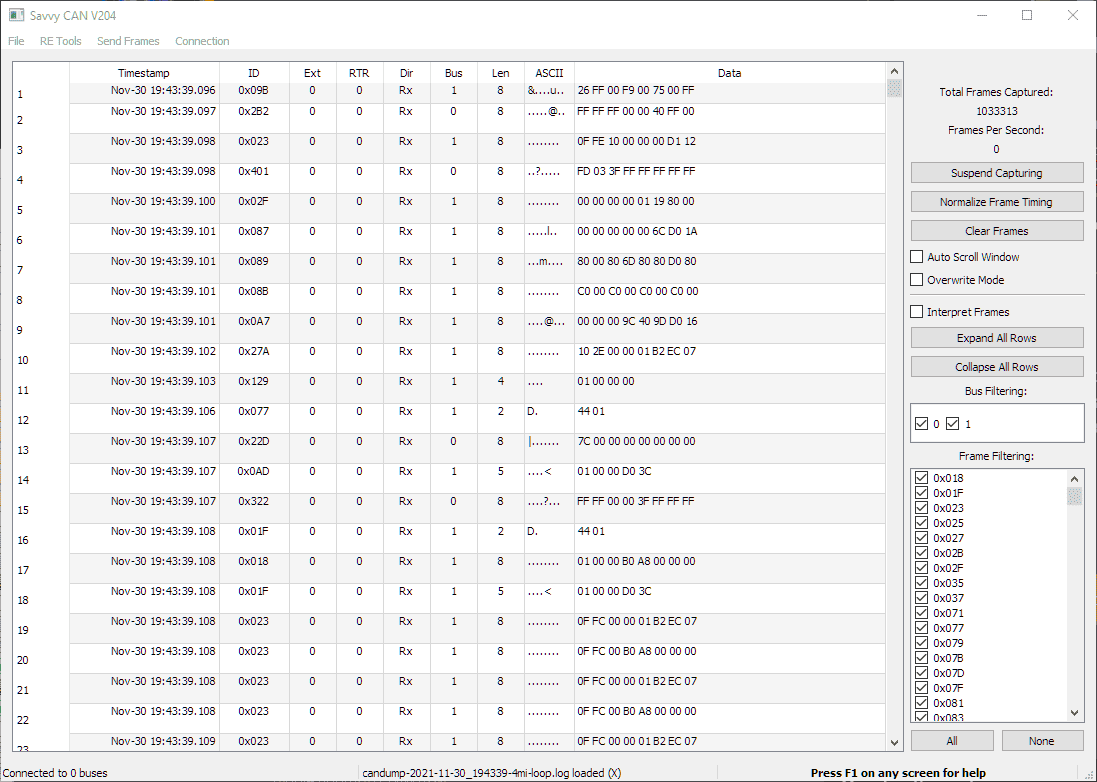
I spent some time last night trying to play around with CAN analysis tools that don't require a license to read the CAN log data from candump on a Raspberry Pi. The first one I've found so far was SavvyCAN. By going to "File" then "Load Log Flie", a dump of my vehicle's candump traffic from a 4 mile test loop that was posted just last month.

Here's the main screen of SavvyCAN using our own public log file:


Jeep Wrangler JL JEEP HACKING CAN-C / CAN-IHS / UDS ! (Reverse Engineering) SavvyCAN Main Scree


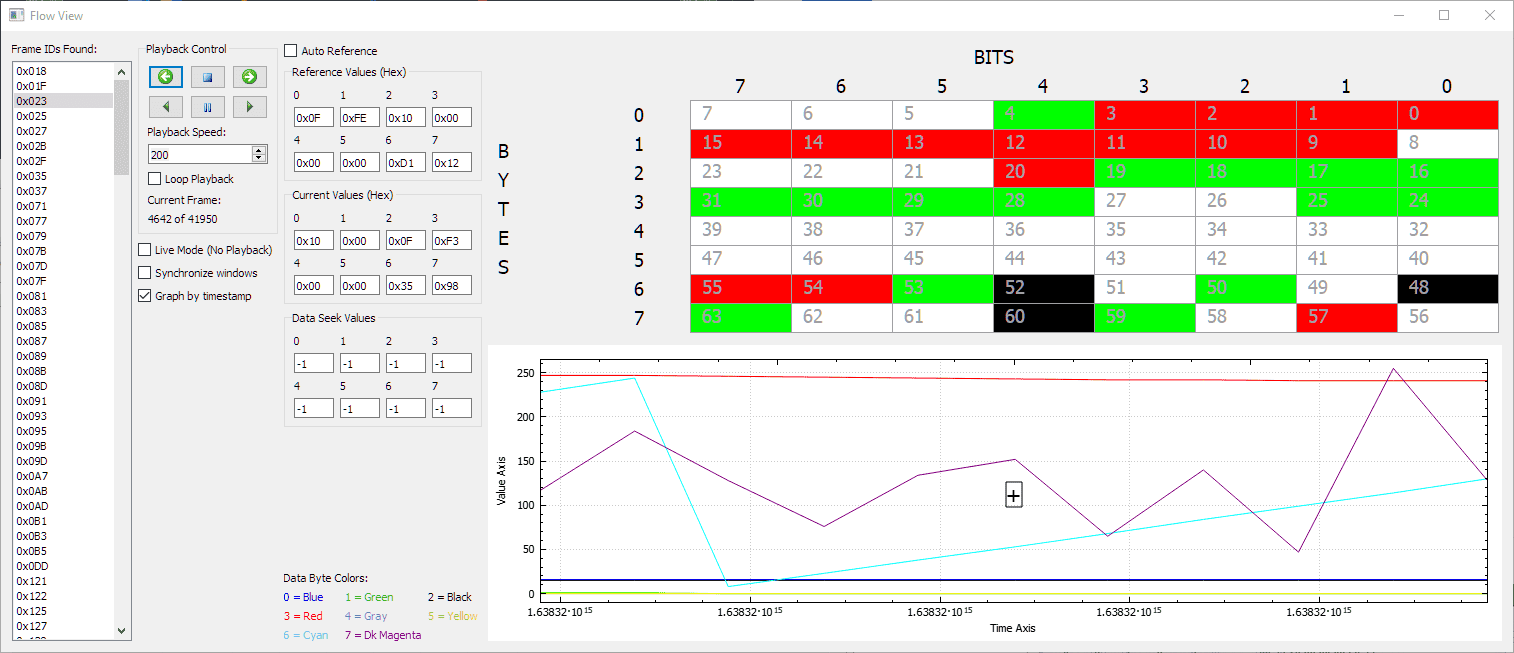
The tool seems a bit obtuse, a little difficult to use, but if you're willing to put some time into it, those built-in graphs can help uncover what some of these unknown CAN messages might actually represent. I went to "RE Tools" (reverse-engineering tools) and selected the first option, which was "Flow View". On that screen, I selected Frame ID $023 (steering data) from the IDs listed on the far left. Here's what we got:

Jeep Wrangler JL JEEP HACKING CAN-C / CAN-IHS / UDS ! (Reverse Engineering) SavvyCAN Flow View


This screen allows you to play back a file at whatever playback speed you want. There are a lot of functions here, including a seek mode (mid-left) which creates a stop point when a byte matches a specified value, a spreadsheet representation (top right) of what bits are active in what bytes, and a live graph (bottom right) of all eight bytes. The playback controls are located in the upper-left.

There are even more reverse engineering tools, such as Frame Data Analysis. After selecting Frame ID $2B1 (HVAC status), it selects a range of 460 frames and presents a very detailed interpretation of the data:

Jeep Wrangler JL JEEP HACKING CAN-C / CAN-IHS / UDS ! (Reverse Engineering) SavvyCAN Frame Data Analysis


A person who is technically inclined (but does not yet have a CAN tool hooked up to their vehicle) might use this method to make new discoveries (or enhance existing discoveries) with this tool alone!

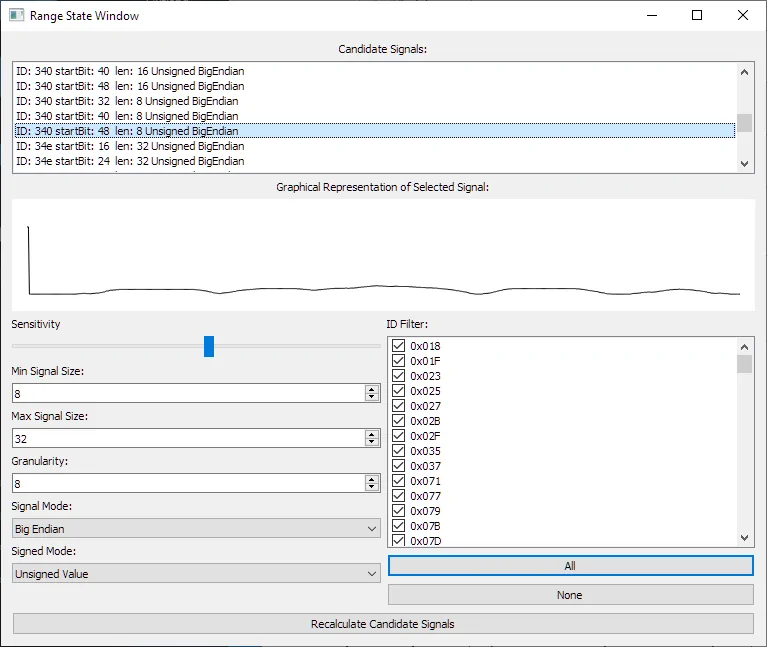
Yet another tool can be found by going to "RE Tools" then "Range State". Take a look:

Jeep Wrangler JL JEEP HACKING CAN-C / CAN-IHS / UDS ! (Reverse Engineering) SavvyCAN Range State Windo


Based upon the parameters you provide (lower left) you hit the "Recalculate Candidate Signals" button (bottom) and it goes through the log to try to identify any potential signals in the data. For each signal, it gives the message ID, start bit, length, and assumed encoding method. It then graphs the signal (covering the entire length of the log file) below that.

What you see graphed is a representation of what gear the vehicle was in throughout the drive (1-8). It initially starts with a much higher value only because Park is represented by gear number 13 (decimal).

Of course, this is a Windows application, and if you have a USB to CAN adapter (they're cheap), you have additional options available, such as listening to live data from your vehicle, and manually sending messages back to your vehicle.

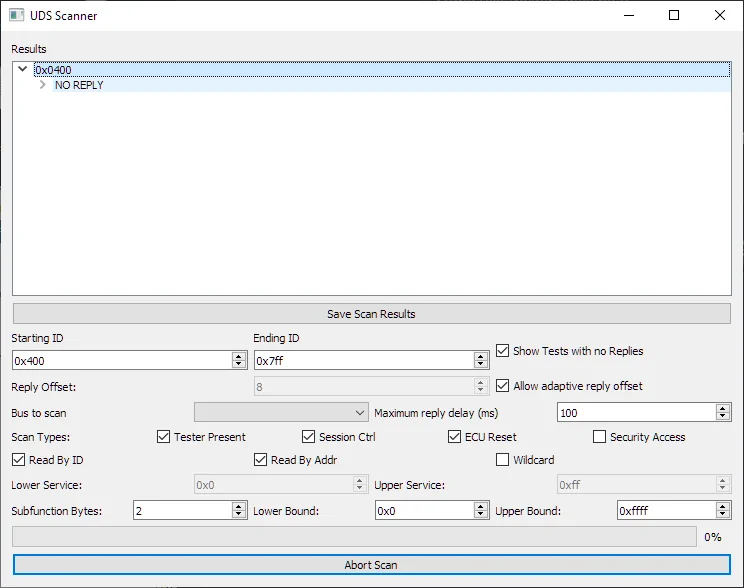
Finally, there's one advanced option I wanted to make mention of, which is the UDS Scanner. Unified Diagnostic Services is the mechanism that tools like Tazer and JScan use to read data, change data, and operate components of your vehicle. You can find this in SavvyCAN by going to Send Frames then UDS Scanner.

Jeep Wrangler JL JEEP HACKING CAN-C / CAN-IHS / UDS ! (Reverse Engineering) SavvyCAN UDS Scanner


This tool is particularly slow (with the options I selected), so after scanning less than 1% of the data, it has yet to make a significant find. Given enough time, it should be able to detect the Tazer's use of UDS to flash my third brake light in a custom pattern.

EDIT: Whoops! The UDS Scanner is a tool to be used live against an actual vehicle, not to read a log file and look for UDS traffic.

The tool seems very useful, but it is also a bit obtuse. The biggest annoyance is that the Wrangler will often dedicate the last two bytes of a message to a counter byte and a checksum byte. They should be easy to identify, and when identified, they really should be filtered out. Unfortunately these values tend to pollute long-running graphs with distracting visual noise.

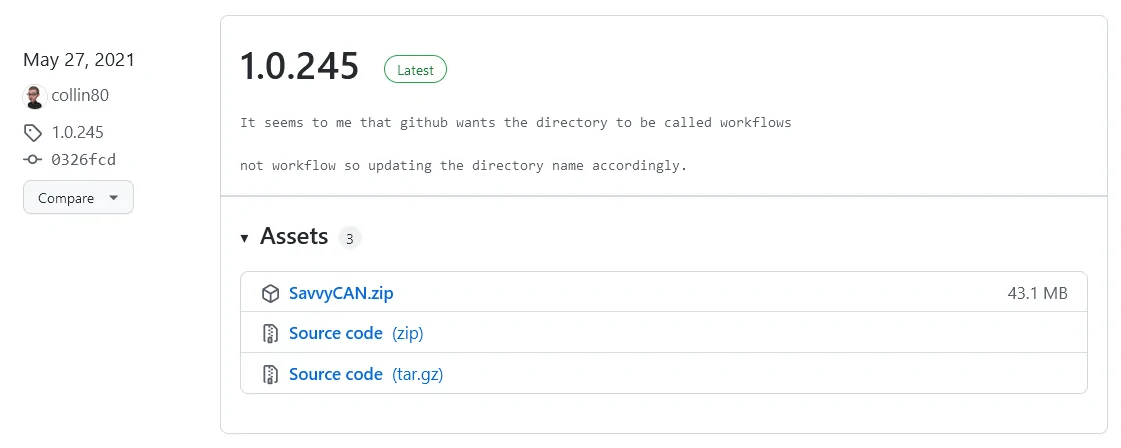
If you want to learn more about SavvyCan, you can visit their homepage or you might want to visit an introduction created by the manufacturer of a data capturing dongle. a data If you want to pick up a copy of SavvyCAN (free), the best way to get the latest copy is to go to it's Release Page on GitHub and select the latest numbered release. As of this moment, you'd want this copy of SavvyCan.zip:

Jeep Wrangler JL JEEP HACKING CAN-C / CAN-IHS / UDS ! (Reverse Engineering) SavvyCAN Releases


Hope this helps! If you come across some interesting free or low-cost tools, the write-up doesn't have to be as elaborate as this one, but please share!

UPDATE: I spoke with the author of SavvyCan and it appears that their latest numbered release is far behind their development build. For a much improved version, you'd go to to Development Build Release and then, for windows, select, download, and extract "SavvyCAN_CIBuild.zip" to your PC.
 
Last edited:

redracer

Well-Known Member
First Name
Robert
Joined
Aug 22, 2017
Threads
20
Messages
576
Reaction score
650
Location
Manteca, CA
Vehicle(s)
2023 4xe Rubicon
The aux switches is how I have my pi wired and it works well in the latching, battery mode. My thought on this is that the aux switches have low voltage cutoffs built right in so if I forget to turn it off, the jeep will protect its own battery. I hadn't thought of the pi turning these ports back off by itself, but this could be useful as the pi and it's aux switch power a front camera and USB video capture board as well, which the pi going to sleep could not shut down normally.

Why the camera? Well my other use case is not only to view my own hd front trail camera, but to record it like a dash cam using the motioneye security camera packages as well. My internet is to tie it into the rear camera as well. But this does draw a fair amount of power to keep working.

This is fun!
 

Sponsored

paryl

New Member
Joined
Jan 1, 2022
Threads
0
Messages
1
Reaction score
1
Location
US
Vehicle(s)
2020 JL Rubicon
So much fantastic work that's been done so far! Someone linked me here from a thread on another site... wish I had known someone else was working on this sooner!

I've been trying to use an ESP32 with a TJA1051 board. I have a Blackvue dual dashcam with one on my windshield and one on the back window, and just running that is enough to drain the aux battery after ~30 hours. I work remotely, so I don't drive daily, which means my battery is constantly too low to run everything. My main goal with this, in addition to playing around with adding my own convenience features, is to use the ESP32 in low power mode, waking up every N seconds and checking motion and sound sensors. If one of those sensors is over a set value, I'll then switch on the forward/rear cameras on until I no longer detect activity.

Anyway, I don't technically need CAN for that, but I still want it for other uses, like using keyfob position, the internal microphones, or even the horn as a preemptive warning. But whether I connect via the header under the dash or using a 12+8 cable and bypassing the SGM, I have never been able to get fast readings. Some of the examples in this thread show different modules sending data multiple times per second, but with my setup I might get one per second total.

Any idea what I might be doing wrong? I could imagine it possibly being an issue with the hardware I'm using, except that it IS working to receive data... just not the amount of data I'm expecting. I see you mentioning CAN-C vs CAN-IHS... is it possible I've been using the wrong header?
 
OP
OP
jmccorm

jmccorm

Well-Known Member
First Name
Josh
Joined
Sep 15, 2021
Threads
55
Messages
1,170
Reaction score
1,322
Location
Tulsa, OK
Vehicle(s)
2021 JLUR
Build Thread
Link
Occupation
Systems Engineering
Sniffing ISO-TP Messages over CAN (advanced)

For beginners: ignore this except as an inspiration piece for what's possible. And with the right tools, even something as wild as this can be made simple and more accessible.

For advanced users: up until now, most of what we've been doing involves sniffing the CAN bus for simple CAN traffic. We use candump to look at the traffic (see below) and we try to interpret that traffic to determine what the vehicle's modules are telling each other:

# candump can0 any​
(0.775574) can1 027#89AE07D40000A04F R​
(0.776797) can1 09B#260000F9007500FF R​
(0.777063) can1 332#000003FF00000000 R​
(0.777340) can1 3EB#43E810040FA009C4 R​
(0.778468) can1 02B#080607F508022054 R​

But there are problems with this. The largest CAN frame has only 8 bytes of data. There's no easy way to send a multi-part message with more than 8 bytes of data, and no way to make sure all the parts were received or if any need to be transmitted. Enter ISO-TP.

For (network) programming types, the analogy is this:

CAN - It's UDP/IP. You send a letter with a destination address and content. You have no idea if it got there in one piece or not. And you're limited to how much you can stuff in an envelope.

ISO-TP - It's TCP/IP. It's a telephone call you make from a source and destination telephone number. You can talk as much as you want and everything goes back-and-forth until you hang up the phone.

Why is ISO-TP important?
Because it's the key to using Unified Diagnostic Services (UDS).

Why is UDS important?
Because that's the key to reading (and writing) more advanced information (and more persistent vehicle configuration settings) from all of your vehicle's modules. It's also the way you can read the current state of the vehicle's many I/O devices... and then output to them so that you can do operations such as honking the horn, flashing the headlights, and locking your front lockers. AND MORE. Like diagnostic test routines, or automatic brake bleeding operations.

It's going to be a while before I migrate my attention over to UDS. See the earlier discussion on this. For those with a Tazer (and Raspberry Pi or Linux), I wanted to pass along another opportunity for you to get your feet wet with ISO-TP. This time, in the form of a new command: isotpdump

Assuming that CAN-C is on your can1 device, issue the following command:

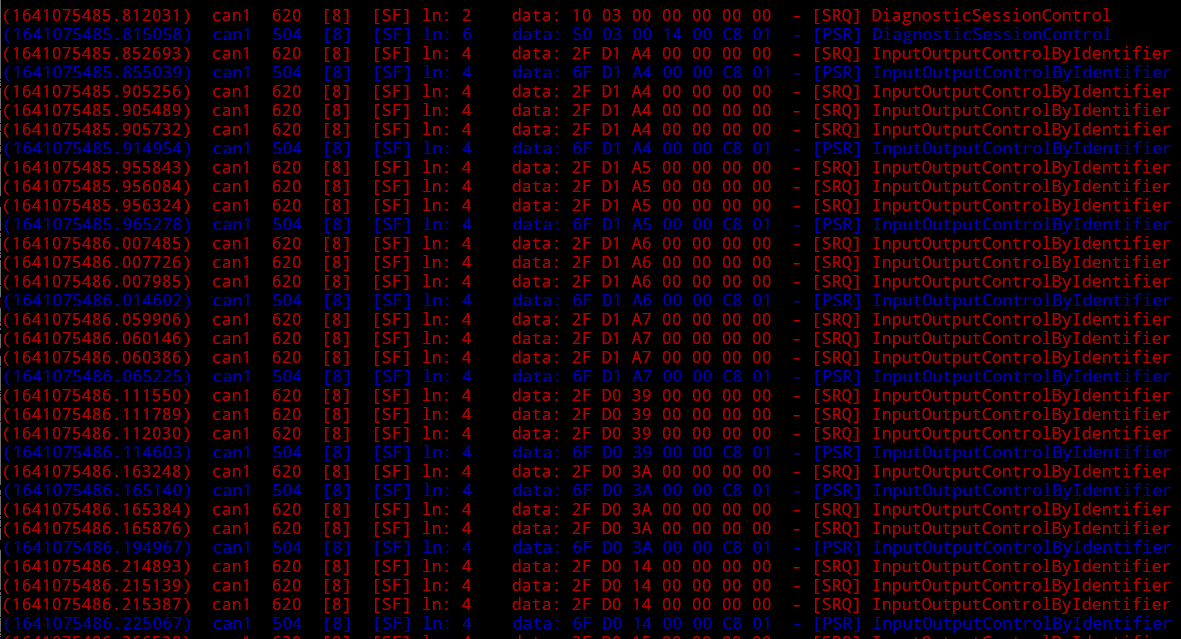
isotpdump -s 620 -d 504 -c -ta -u can1

Now, using your keyfob, enter the following keyfob sequence to remotely activate your Tazer JL Lightshow:

QUICKLY PRESS: UNLOCK UNLOCK LOCK UNLOCK​
(It's important to be quick, but even more so on those first two UNLOCK commands!)​
You should start seeing a stream of ISO-TP messages between your Tazer JL Mini (id 620 in RED) and your vehicle's Body Controller Module (id 504 in BLUE). Example:

Jeep Wrangler JL JEEP HACKING CAN-C / CAN-IHS / UDS ! (Reverse Engineering) isotpdum


Let it run longer and you may see additional commands such as "Tester Present" or responses such as "Conditions Not Correct".

To stop the lightshow...

QUICKLY PRESS: LOCK LOCK​
...but be sure to give your terminal window a few seconds to catch up.

Mind you, there are some oddities in how the Tazer goes about things, and based on observation, *I think* that it may only be running off of a rudimentary ISO-TP implementation, but it's enough to get the job done. The "InputOutputControlByIdentifier" commands are what it actually uses to turn lights off and on during a lightshow.

Using "isotpdump" with the right parameters, the next time you perform a task or request information using a Tazer or JScan, you'll be able to see the underlying mechanism that it uses. And then later, you'll be able to repeat or even modify those for yourself.

But how do you know what ID number is which device?
Watching what your tools do and then copying them. Or you could go one-by-one and start reading what each value is (mich like we're doing now for CAN bus messages). I'd strongly advise AGAINST writing unknown values to unknown locations. You could convince your vehicle it's a European model, or worse, you might shut down the oil pump (or even convince it that there's never going to be an oil pump which it can control at all)!

In closing:
As we become more advanced with what we're doing (or we have more advanced people join the group), if you're comfortable, feel free to dive into the world of ISO-TP and UDS services. I'm spending a good chunk of my own time in creating the groundwork for others, so nothing would make me happier than to see others dive into these advanced features well ahead of me!

Enjoy.
 
Last edited:
OP
OP
jmccorm

jmccorm

Well-Known Member
First Name
Josh
Joined
Sep 15, 2021
Threads
55
Messages
1,170
Reaction score
1,322
Location
Tulsa, OK
Vehicle(s)
2021 JLUR
Build Thread
Link
Occupation
Systems Engineering
I've been trying to use an ESP32 with a TJA1051 board. I have a Blackvue dual dashcam with one on my windshield and one on the back window, and just running that is enough to drain the aux battery after ~30 hours.
We have at least one person here running a microcontroller. Myself, I'm using a Raspberry Pi, so if we're talking power drain, I understand. Right now I connect it up to a large portable USB battery when I see myself working on something for an extended period of time.

My main goal with this, in addition to playing around with adding my own convenience features, is to use the ESP32 in low power mode, waking up every N seconds and checking motion and sound sensors. If one of those sensors is over a set value, I'll then switch on the forward/rear cameras on until I no longer detect activity.

Anyway, I don't technically need CAN for that, but I still want it for other uses, like using keyfob position, the internal microphones, or even the horn as a preemptive warning.
We've got some good vehicular motion sensors covered, but the audio sensors have yet to be identified. You want to honk the horn? Believe it or not, we don't yet have a handle on that one, but we are able to turn the vehicle's panic alarm on and off as needed! ?

But whether I connect via the header under the dash or using a 12+8 cable and bypassing the SGM, I have never been able to get fast readings. Some of the examples in this thread show different modules sending data multiple times per second, but with my setup I might get one per second total.
If the vehicle is idle, there will be no messages. When the vehicle is not idle, you should be seeing like HUNDREDS of messages per second. It sounds like something is wrong.

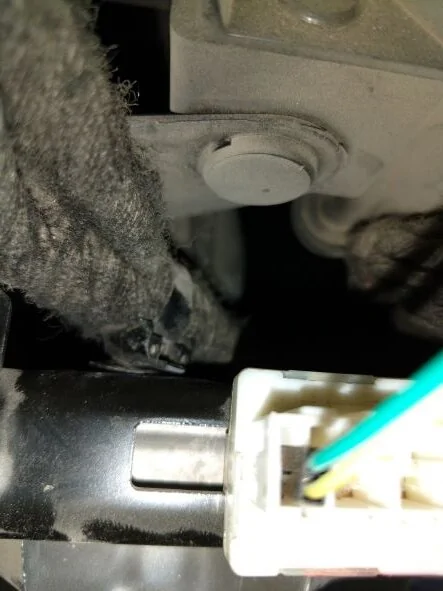
Perhaps you can start by telling us what pinouts of the OBD-II connector you're using and provide a picture of how you actually have it hooked up? Using the OBD-II port should give you (read) access to the CAN-C and/or the CAN-IHS bus. Since you asked, the the method popularized here involves using the vehicle's own CAN bus connector which is located behind the glovebox.

If there is any chance you'll be driving around while connected to a CAN bus, I strongly recommend that you do it the right way and use a reliable connector that's made to plug into whichever bus connector you use. If you accidentally create too much noise on the CAN bus, the vehicle may end up disabling important components (power steering, gear selector, etc) in an attempt to keep the bus working properly.

Let us know more about how you have it wired up. And maybe you have a basic code sample you could share?
 
Last edited:

Temperance

Member
First Name
Amelia
Joined
Dec 30, 2021
Threads
0
Messages
17
Reaction score
23
Location
Washington
Vehicle(s)
2020 Jeep Gladiator Mojave
Occupation
Software Engineer
I had some thoughts on how to manage CAN-enabled devices which are particularly power hungry. In all honesty, I'm just kind of bouncing this around in my own head, so it isn't entirely baked, but I thought I'd go ahead and share where my thoughts are on this.
I'm using this for a micro controller: https://www.adafruit.com/product/4739 You can control it using the enable control (en) setting it high for on and low for off. It has enough output for a Raspberry Pi 3.

For my own testing I just use a battery pack that runs a Raspberry Pi 3 with a can hat and small touch screen monitor.
Sponsored


Top