Sponsored
OP
OP
jmccorm

jmccorm

Well-Known Member
First Name
Josh
Joined
Sep 15, 2021
Threads
55
Messages
1,170
Reaction score
1,322
Location
Tulsa, OK
Vehicle(s)
2021 JLUR
Build Thread
Link
Occupation
Systems Engineering
With your knowledge you could help those of us who want to get rid of the nanny crap. Also a aftermarket solenoid for the differential lockers. Thanks for what your doing.
Let me go down the rabbit hole real quick and chase this idea down for you. I think I'm seeing three different paths to get there:

1. CONVOLUTED:

You'd have a microcontroller hidden somewhere in the cabin that handles all the input/output control logic. You could either wire the axle locker control and status lines directly up to the microcontroller, or you could use the CAN bus to avoid extensive wiring. But that's going to cost you an additional microcontroller to do the translation between the lockers and the CAN bus. In the cabin, you directly wire a dedicated button and status light up the original smart microcontroller. But this is a solution looking for a problem. There are better ways to handle this without a CAN bus.

There's one alternative here. You could skip adding the extra interior controls and just repurpose an existing set of dash buttons to create a unique lock/unlock button combo. Like holding down the fog light button while tapping and up/down HVAC button. That would put a CAN bus connection to good use.

2. IMPROVED:

Same as above, but you add an authentic Rubicon axle locker dash module to your vehicle. Your microcontroller uses the module's native CAN connection to talk to it. It also reads the vehicle's current speed and transfer case status. Finally, it talks to your third party axle lockers, with or without their own dedicated CAN bus connection.

3. IDEAL CASE:

I've believe I've spotted the Drivetrain Control Module (DCM) variables which enable the front and rear axle locker featureset. If those features can be successfully enabled in the DCM, then you'll need to use authentic Rubicon dash module, and the vehicle itself handles the axle lockers just like the real thing. There's just one more hurdle, but it doesn't look so bad.

The Wrangler's stock axle lockers don't have CAN connections. They're wired directly into the Drivetrain Control Module, each with a status line and a control line. If someone could document the parameters for those two signals (should be easy), you'd just meed a microcontroller to help make your third party axle locker emulate a stock component. That should be fairly straightforward. (In fact, they may have avoided using a CAN connection for that very reason!) An enthusiast or an off-road solutions company to produce a small module that allows a third-party axle locker to look and act identical in all respects to the factory-made variety.

The funny thing is that the ideal case only uses the CAN bus one time, and that's to unlock the featureset in the DCM. The rest may not be so difficult, perhaps not even requiring a microcontroller.
Sponsored


oldcjguy

Well-Known Member
First Name
Jim
Joined
Aug 26, 2020
Threads
3
Messages
609
Reaction score
760
Location
Central FL
Vehicle(s)
16 Challenger Hellcat, 19 Challenger Scatpack, 20 JLUR Recon
Occupation
Software Engineer
Let me go down the rabbit hole real quick and chase this idea down for you. I think I'm seeing three different paths to get there:

1. CONVOLUTED:

You'd have a microcontroller hidden somewhere in the cabin that handles all the input/output control logic. You could either wire the axle locker control and status lines directly up to the microcontroller, or you could use the CAN bus to avoid extensive wiring. But that's going to cost you an additional microcontroller to do the translation between the lockers and the CAN bus. In the cabin, you directly wire a dedicated button and status light up the original smart microcontroller. But this is a solution looking for a problem. There are better ways to handle this without a CAN bus.

There's one alternative here. You could skip adding the extra interior controls and just repurpose an existing set of dash buttons to create a unique lock/unlock button combo. Like holding down the fog light button while tapping and up/down HVAC button. That would put a CAN bus connection to good use.

2. IMPROVED:

Same as above, but you add an authentic Rubicon axle locker dash module to your vehicle. Your microcontroller uses the module's native CAN connection to talk to it. It also reads the vehicle's current speed and transfer case status. Finally, it talks to your third party axle lockers, with or without their own dedicated CAN bus connection.

3. IDEAL CASE:

I've believe I've spotted the Drivetrain Control Module (DCM) variables which enable the front and rear axle locker featureset. If those features can be successfully enabled in the DCM, then you'll need to use authentic Rubicon dash module, and the vehicle itself handles the axle lockers just like the real thing. There's just one more hurdle, but it doesn't look so bad.

The Wrangler's stock axle lockers don't have CAN connections. They're wired directly into the Drivetrain Control Module, each with a status line and a control line. If someone could document the parameters for those two signals (should be easy), you'd just meed a microcontroller to help make your third party axle locker emulate a stock component. That should be fairly straightforward. (In fact, they may have avoided using a CAN connection for that very reason!) An enthusiast or an off-road solutions company to produce a small module that allows a third-party axle locker to look and act identical in all respects to the factory-made variety.

The funny thing is that the ideal case only uses the CAN bus one time, and that's to unlock the featureset in the DCM. The rest may not be so difficult, perhaps not even requiring a microcontroller.
There is another thread on here somewhere with someone who did detail analysis of the locker modules. If the sensor in the diff fails there is no replacement part available. Right now it that happens and you're under warranty Jeep replaces your entire different assembly rotor to rotor!

Somewhere around here there is info. https://www.jlwranglerforums.com/fo...le-locker-system”-light-on.13241/post-1140349

Someone had actually drawn out an electrical diagram but I can't find that one
 
OP
OP
jmccorm

jmccorm

Well-Known Member
First Name
Josh
Joined
Sep 15, 2021
Threads
55
Messages
1,170
Reaction score
1,322
Location
Tulsa, OK
Vehicle(s)
2021 JLUR
Build Thread
Link
Occupation
Systems Engineering
Somewhere around here there is info. https://www.jlwranglerforums.com/forum/threads/“service-axle-locker-system”-light-on.13241/post-1140349

Someone had actually drawn out an electrical diagram but I can't find that one
That thread fills in a lot more details! It's more complicated than I would have believed. I'd go with the third solution, or nothing at all. (And if that sensor's bad, it won't work.) Mind you, solutions #1 and #2 are still possible, but there are more components to manage and figure out what should be doing what.
 

AusJeepNoob

Well-Known Member
First Name
Michael
Joined
Jan 7, 2021
Threads
12
Messages
184
Reaction score
99
Location
Sydney, Australia
Vehicle(s)
2020 JL Wrangler Unlimited - Rubicon EcoDiesel
You lost me at CAN :CWL:.

Before I bought my JL I was looking to stuff a different engine into a JK (Aussie 4.0l turbo 6 cylinder) and was talking to a guy about the CAN modules that he makes for conversions using that engine so you can get speed and a whole heap of other info on the factory dash of the vehicle you're transplanting the engine to. He said he'd need a vehicle for 6 - 8 weeks in order to pull the commands and create the translation. I assume what you're doing will help if someone wants to do an engine swap on a JL.
 
OP
OP
jmccorm

jmccorm

Well-Known Member
First Name
Josh
Joined
Sep 15, 2021
Threads
55
Messages
1,170
Reaction score
1,322
Location
Tulsa, OK
Vehicle(s)
2021 JLUR
Build Thread
Link
Occupation
Systems Engineering
He said he'd need a vehicle for 6 - 8 weeks in order to pull the commands and create the translation. I assume what you're doing will help if someone wants to do an engine swap on a JL.
What happens when shops swap in a non-factory engine on modern-day vehicles, and how do they do it? I got no idea. I'd hope they're pulling the information from a commercial source and then taking the time to make sure their custom solution works on the real thing. But if they're trying to pull that information from scratch, yikes! Yes, this would be a real asset.

Here's another way the information can be used. The JKs had a much simpler system that was decoded some years back. Here's the kind of thing that's possible once you've got things figured out:

Jeep Wrangler JL JEEP HACKING CAN-C / CAN-IHS / UDS ! (Reverse Engineering) clim


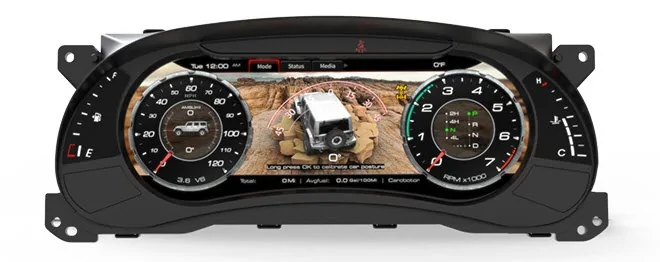
They've developed an awfully cool digital dash that's a plug-and-play replacement for the factory dash. It reads the exact same information from the CAN bus and presents it in a totally different way and with totally different technology. They did a great job with it! It's the Carobotor J Pro, if you're interested in checking it out.

I wouldn't mind it if they made a Wrangler JL version!
 

Sponsored

OP
OP
jmccorm

jmccorm

Well-Known Member
First Name
Josh
Joined
Sep 15, 2021
Threads
55
Messages
1,170
Reaction score
1,322
Location
Tulsa, OK
Vehicle(s)
2021 JLUR
Build Thread
Link
Occupation
Systems Engineering
UPDATE
AUTOMATIC HEATER:

This morning, the automatic heater didn't work. I came into the vehicle and the HVAC was off. It looks like I'm lacking a command to activate an HVAC relay when the vehicle is remotely started. (Up until now, it seems the only reason it was working was that it's environment was cooler than 40F, which starts a mild HVAC program of it's own.)

So the automatic HVAC function is on-hold until I find a way to remotely activate the HVAC power relay. It's possible that we may have already found it with CAN-IHS id $230. I'll try a few commands against it. If not, we'll have to do some more searching. We'll get there!

NEW FIND
UNITS OF MEASURE:

ID $32A on CAN-IHS contains the driver's chosen units of measurement. Temperature: C vs F. Mileage: km/L, L/100km, UK MPG, US MPG. Pressure: kpa,bar,psi. Distance: km, miles, Units for speed: km/h, mph. This allows you to create apps that display information that matches the driver's preferences.

ADDITIONAL FINDS
ACCELEROMETERS:

I don't have any real-world with these devices, so I don't know what all they measure. I believe I've identified yaw/pitch/roll at $02B on the CAN-C bus. There's another device at $025 but it is different in a way that I don't understand. Perhaps it's just X/Y/Z acceleration? And yet another at $027. Hopefully someone else will take the ball and run with it from there.

NEW FIND
BRAKE SYSTEM (BRAKE BOOSTER? PRESSURE?):

I found a variable on CAN-C at $02F (producing strong positive numbers, but very rarely small negative ones) that correlates with the brakes being pressed. It seems to have larger and more smoothed out numbers than what you get from the brake pedal position sensor. It seems like a braking system pressure indicator of some sort.

NEW FIND
REMOTE-CONTROL VEHICLE COMMANDS:

Message ID $1C0 contains vehicle control commands from the uConnect app, the remote keyfob, the keyless entry system, and with the possibility of other devices. It seems to be a key component which activates remote lock/unlock, remote panic alarm, and remote vehicle start.

That last item (remote start) requires more some additional factors, yet to be identified, to actually engage. I'm assuming it's a key value. The best I can get it to do is lock all the doors, and if you've already done two remote starts, it'll put a message on the screen saying you'll have to manually start the vehicle.

You can read it's current status from CAN-IHS or CAN-C, and you can actually send your own vehicle commands if you place them on CAN-C. I can remote-lock/unlock the vehicle and active it's panic alarm over a Wi-Fi connection.

How might someone take advantage of that? If I had a high-tech home automation system, I could connect to the car over the network and make the car alarm go off whenever motion is detected in a restricted area, or to activate along with the home's alarm when it triggers.

You could also add additional trigger's to the vehicle's panic alarm. If someone leans on the vehicle, it could be sensed via the accelerometers, or via the wheel sensor movements which actually would pick up a body lean. Perhaps there are other ways? Enhancing the car alarm might be worthwhile.

Here's what we've got so far:​

000000800000 – none (idle)​
210000800000 – keyfob lock​
230000900000 - 1st press keyfob unlock​
240000900000 - 2nd press keyfob unlock​
2E0000900000 – keyfob panic​
410000800000 – unknown​
430000800000 – drvr keyless entry​
5B0000800000 – unknown​
6A0000800000 – (app or keyfob) cancel start​
690000800000 – keyfob remote start​
810000880000 – app lock​
830000880000 – app unlock​
830000880000 – app panic​

NOTE: There may be additional commands here that are just waiting to be discovered.

FEATURE UNDER DEVELOPMENT
DISABLING WI-FI WHILE THE VEHICLE IS AWAY:

I'm working out how I want to handle Wi-Fi. I don't want Wi-Fi to be active when I'm driving, and I certainly don't want it active when the car is parked somewhere other than home.

One way would be to scan the available Wi-Fi networks in the area...
# iwlist wlan0 scan | grep -B 5 ESSID
Cell 01 - Address: F0:AF:85:AD:45:80
Channel:1
Frequency:2.412 GHz (Channel 1)
Quality=36/70 Signal level=-74 dBm
Encryption key:on
ESSID:"Harley_Chick"
--
Cell 08 - Address: DC:7F:A4:E9:BE:D9
Channel:8
Frequency:2.447 GHz (Channel 8)
Quality=38/70 Signal level=-72 dBm
Encryption key:on
ESSID:"ATT5IRI3z9"

If it doesn't see my home's Wi-Fi network, it powers down the Wi-Fi transmitter. That prevents any access and conserves battery power, all at the same time!

# ifconfig wlan0 down
# sleep 2
# iwconfig wlan0 txpower off
# sleep 2

From there, it piggybacks onto the ignition switch monitoring routine (which seems to become more and more important). When another drive cycle completes and the engine is turned off (presumably at a new location), it scans for Wi-Fi networks once again (something it can do with the Wi-Fi transmitter still powered down).

If it seems my local Wi-Fi network, that should mean I'm back at home. It powers the Wi-Fi transmitter back up, waits for a bit, and then re-enables the wlan0 network interface. Wi-Fi is resumed!

Alternatively...
There's another method I'm considering because the key component which made it possible just fell into place (the remote-command features).

The other way of handling this might be to automatically disable Wi-Fi any time there's a change in the vehicle's ignition switch status. (Vehicle is turned on, vehicle is turned off.) That pretty much leaves the vehicle with a default state of Wi-Fi off.

How do we turn Wi-Fi and remote access to the vehicle back on? You use the keyfob and you unlock the vehicle's doors. (Seems that I'd only want to be using Wi-Fi in a place where I can trust leaving the doors unlocked for a short period of time.)

Ready to close back up Wi-Fi access to the vehicle? Use the keyfob to lock everything back up, and that too will power down the Wi-Fi. Of course, any time you drive the the Wrangler somewhere, that'll turn off Wi-Fi too. I might add an activity timeout function just to make sure it isn't forgotten? I dunno.

CLOSING:
Let me know if you comments or questions on the new items. The right person will be able to contribute on the accelerometer readings. I'm also open to ideas and comments on how to keep Wi-Fi securely disabled except for those times where I specifically want it back on and running again.
 
Last edited:

redracer

Well-Known Member
First Name
Robert
Joined
Aug 22, 2017
Threads
20
Messages
576
Reaction score
650
Location
Manteca, CA
Vehicle(s)
2023 4xe Rubicon
Great work as always!

Another idea for wifi management... Geofencing. And I can think of two ways of achieving this:

1) I'm pretty sure that the radio (7" or 8.4") hands out GPS coordinates on the bus. I know this because if you change out your radio, one of the OBDII Codes set is invalid GPS data on one of the subsystems.

or 2) just place a usb GPS dongle (they are about the size of a silver dollar now) on the dash and plug it into the Pi. I've played with this method before on my APRS efforts, and it's really easy. There's a daemon called GPSd, available in Apt, that handles all of the serial work and provides clean libraries and scripts to play with. As a bonus, this also sets your clock to gps time on startup.
 
OP
OP
jmccorm

jmccorm

Well-Known Member
First Name
Josh
Joined
Sep 15, 2021
Threads
55
Messages
1,170
Reaction score
1,322
Location
Tulsa, OK
Vehicle(s)
2021 JLUR
Build Thread
Link
Occupation
Systems Engineering
Another idea for wifi management... Geofencing. And I can think of two ways of achieving this...
Good suggestion! I haven't played with one of those since... 2018? But they do just as you say. It was one of those cheap $15 Amazon low-cost magnetic USB GPS modules, too. You're right, and a GPS antenna is also a particularly good choice for someone looking to replace their uConnect radio with a single board computer.
I'm pretty sure that the radio (7" or 8.4") hands out GPS coordinates on the bus. I know this because if you change out your radio, one of the OBDII Codes set is invalid GPS data on one of the subsystems.
Earlier I came across a time/date message on both the CAN-IHS and CAN-C bus (id $350) which almost certainly comes from the uConnect radio. So far, my search specifically for longitude and latitude has come up blank. I'm hoping I or someone else will stumble across it once things get narrowed down a bit.

I did find some GPS related Unified Diagnostic Services IDs associated with the uConnect radio. GPS date, UTC time, eliposoid height, but no longitude and latitude. I'm hoping it isn't keeping those particularly good bits to itself.

Here's a bit of trivia: the uConnect radio may be offering two more parameters of interest: GPS heading (degrees) and GPS speed, but the speed units are a little obtuse. Know anyone who can convert centimeters per second per bit into MPH!!?! These two items might be a good backup for someone with a broken speedometer and compass... or a great way for someone to automatically check the accuracy of a working one!
2) just place a usb GPS dongle (they are about the size of a silver dollar now) on the dash and plug it into the Pi.
I've watched a few YouTube videos for third party radio module replacements for the Wrangler. I thought it was worth sharing because these guys seem to set the gold standard.

They're using a flat GPS antenna, magnetically mounted on top of the B-pillar (with the rest of the uConnect antennas) and they take apart a few bits of trim to hide the cable above the driver's door, down the A-pillar, and into the dash.

Onto another topic, today I ran an experiment hoping that the keyless entry system shared the same authorization pathway as the remote start system. I wrote a script that constantly listened for the keyless entry unlock command on the CAN-C bus that would immediately fired back with a remote start command. It triggered, but unfortunately it didn't fare any better than my other primitive attempts at a remote start shortcut. I think we'll just have to do our homework on this one.

But I was thinking... might anyone else know of something worth triggering or toggling when an authorized driver grabs onto one of the keyless entry handles (front driver/passenger, or the rear swing gate)? That'd be either with or without actually opening the door.

It seems like there could be some sort of good use case here, but It eludes me. I thought I'd throw this out there in case it strikes home with someone. So many opportunities here, you know?
 
Last edited:

redracer

Well-Known Member
First Name
Robert
Joined
Aug 22, 2017
Threads
20
Messages
576
Reaction score
650
Location
Manteca, CA
Vehicle(s)
2023 4xe Rubicon
Here's a bit of trivia: the uConnect radio may be offering two more parameters of interest: GPS heading (degrees) and GPS speed, but the speed units are a little obtuse. Know anyone who can confirm centimeters per second per bit into MPH!!?! These two items might be a good backup for someone with a broken speedometer and compass... or a great way for someone to automatically check the accuracy of a working one!
I'll see you trivia and raise you another. Did you know that the speedometer uses the GPS speed to automatically correct for tire wear and size changes (up to some percentage)? BUT, this does not fix the odometer or fuel mileage calculations. So, in order to calculate corrections, it's necessary to disable the radio for a test drive to get the true measured speed.
 

LooselyHeldPlans

Well-Known Member
First Name
Brandon
Joined
Aug 7, 2019
Threads
67
Messages
990
Reaction score
1,213
Location
SW Colorado
Vehicle(s)
2020 3.6 JLUR
Occupation
Several
Great work you guys are doing. I can understand a lot more Spanish than I can speak… and this feels about the same.

Have you thought about crowd sourcing your efforts? I, and I’m sure others, would be happy to support you if it would create awesome stuff for the community.
 

Sponsored

OP
OP
jmccorm

jmccorm

Well-Known Member
First Name
Josh
Joined
Sep 15, 2021
Threads
55
Messages
1,170
Reaction score
1,322
Location
Tulsa, OK
Vehicle(s)
2021 JLUR
Build Thread
Link
Occupation
Systems Engineering
Have you thought about crowd sourcing your efforts? I, and I’m sure others, would be happy to support you if it would create awesome stuff for the community.
You know, I've been wanting to do this kind of thing for a while. (CAN bus hacking, that is.) A little over a month ago, I went looking for others (outside of a professional capacity) who had experimented with the Wrangler's CAN bus, and I managed to find just one person. That was redracer.

Today, it looks like others are finding interest in their Wrangler's CAN bus, and they should be. There are a lot of really interesting things to be discovered, and there are going to be even more interesting creations to build from that knowledge. I expect to see more participants come January, but as of today, I stand ready to add any and all outside additions to the tracking spreadsheet.

From the beginning, I've shared my own research with others in the hopes that this could snowball a collaborative effort with many participants. There's plenty enough to go around (and ten times that when you start working with Unified Diagnostic Services over CAN). You know, Wrangler owners are famous for how they customize their vehicles, and today we're just now starting to build upon that tradition in a whole new way. We're just at the beginning of this journey. So in a narrow sense, that's crowdsourcing. It's just so early that it doesn't yet look like it... yet!

When you talked about support, assuming you meant the financial kind, I can't think of anything I need right now to cover my involvement or motivate my efforts. In all honesty, I can think of a number of ways that money could be put to good use here (the purchase of professional diagnostic equipment which provide Wrangler ECU configuration settings and diagnostic commands that we can learn from, the building of one or two standardized in-vehicle platforms which a diverse pool of community-built projects could execute from, there's also the commercial references which can help fill in any major missing pieces, etc). But assuming we get others get on-board, that might be a discussion for tomorrow.

If you were suggesting added support in the form of a wider net (not just Wrangler owners), I don't see myself refusing an outsider's contribution (of knowledge, of effort) without cause, but this early-on, I'd hope that we might focus on fishing for participants from our own pond first. Wrangler owners are going to be well motivated, and they're going to have access to their own vehicles, which is a big plus. Two months from now, if things are stagnating and this same conversation has weight, it might be time for that wider net.

On that note, it's going to be tough going for those without a Wrangler to participate, but the right people will be able to work through that handicap. Ive posted a Wranlger JL CAN bus extract from a four mile drive (beginning to end). If you or anyone wants to crack it open and take a look, by all means, go ahead. As it turns out, at least one other person has managed to pull some useful information out of that extract. I learned of this when they privately asked me to fill them in on one particular aspect of that drive. ?
 
OP
OP
jmccorm

jmccorm

Well-Known Member
First Name
Josh
Joined
Sep 15, 2021
Threads
55
Messages
1,170
Reaction score
1,322
Location
Tulsa, OK
Vehicle(s)
2021 JLUR
Build Thread
Link
Occupation
Systems Engineering
I'll see you trivia and raise you another. Did you know that the speedometer uses the GPS speed to automatically correct for tire wear and size changes (up to some percentage)? BUT, this does not fix the odometer or fuel mileage calculations.
You have excellent timing. In fact, you just explained some math that wasn't adding for me last night. I'll see if I can paste some sample data here shortly.

Message ID $08B (CAN-C) contains the individual speed of each tire, and updated every 1/50th of a second, and with the latest information (no long-period average). Unlike similar message IDs which provide wheel travel information, this time, they've provided it in a far more useful unit of measurement. They're in MPH * 20 (decimal).

After you divide down the values, you've got individual tire readings, constantly updated, and with a resolution of only 0.05 MPH. I can't find myself wanting for too much better than that!

The problem came when I compared them against the vehicle's primary measure of speed, coming from the transmission (CAN-IHS id $340). Not just here and there, but constantly, the main speedometer reading read higher than the individual tire readings. The difference wasn't big (perhaps 1 or 2 MPH). But it was enough to see that there was a mismatch between the two sources of data.

I think you may have given me the answer right before I even had a chance to ask it! Nicely done.
 
OP
OP
jmccorm

jmccorm

Well-Known Member
First Name
Josh
Joined
Sep 15, 2021
Threads
55
Messages
1,170
Reaction score
1,322
Location
Tulsa, OK
Vehicle(s)
2021 JLUR
Build Thread
Link
Occupation
Systems Engineering
(CAN-C $08B) MILES PER HOUR PER TIRE (MPH-PT?!?)
0.05 MPH resolution, updated 20 times per second:


This is the data that was discussed in my previous message. It does not report the overall speed of the vehicle. Instead it reports back with four individual speeds, one for each of the Wrangler's four tires. Here's a sample of the data (updated at 0.1 second intervals) recorded from an accelerating vehicle:

TIME: 0.1 RPM: 3.0k GEAR: DRV 3 MPH: 40 TIRE MPH f:43.05/43.20 r:44.05/44.10
TIME: 0.2
RPM: 3.2k GEAR: DRV 3 MPH: 40 TIRE MPH f:43.45/43.65 r:44.70/44.55
TIME: 0.3
RPM: 3.4k GEAR: DRV 3 MPH: 40 TIRE MPH f:43.95/44.10 r:44.80/45.00
TIME: 0.4
RPM: 3.7k GEAR: DRV 3 MPH: 40 TIRE MPH f:44.30/44.45 r:45.20/45.30
TIME: 0.5
RPM: 4.0k GEAR: DRV 3 MPH: 42 TIRE MPH f:44.65/44.80 r:45.80/45.75
TIME: 0.6
RPM: 4.1k GEAR: DRV 3 MPH: 42 TIRE MPH f:45.40/45.45 r:46.65/46.60
TIME: 0.7
RPM: 4.1k GEAR: DRV 3 MPH: 42 TIRE MPH f:45.95/46.05 r:47.30/47.50
TIME: 0.8
RPM: 4.2k GEAR: DRV 3 MPH: 42 TIRE MPH f:46.55/46.60 r:48.25/48.25
TIME: 0.9
RPM: 4.2k GEAR: DRV 3 MPH: 42 TIRE MPH f:47.40/47.60 r:48.90/49.00
TIME: 1.0
RPM: 4.3k GEAR: DRV 3 MPH: 45 TIRE MPH f:48.15/48.35 r:49.85/49.65


This shows what I mentioned earlier. I'm seeing a slightly faster speed from my rear tires than from my front tires while quickly accelerating. Upon closer inspection, you might see something else, too.

As redracer mentioned, the Wrangler uses the uConnect radio's information to auto-calibrate the speedometer. So that explain why, even while driving at a steady speed, all my tires report their speed as nearly 10% faster than what the speedometer gives us.

Armed with this information, it should be possible to create a routine that automatically detects and notifies the driver when their vehicle needs this recalibration. After a few sanity checks, it simply compares the raw and reported vehicle speed parameters, and flags when that mismatch is preset (over an extended period of time).

Sure, this doesn't rank as a Check Engine Light type of event, but it is still more than worthy of the driver's attention. As I work with these CAN messages, I think I'm finding more and more driver notifications that fall into the same category (not urgent, but quite possibly worthwhile). I'd love to see preventative maintenance style health reports become "a thing". More than just an engine's trouble code list.

Finally, I'm thinking this speedometer mismatch might have something to do with how my vehicle sometimes takes too long to complete a shift. As soon as I finish my reclibration, I'll have to circle back around and see if this improves things. If I'm doing my math right, I'm hoping a larger tire setting will make things better.

Oh! Here's the other condition we talked about...

TIME: 0.1 STEER: Left 23% MPH: 17 Tire: fl:17.85 fr:19.25 rl:17.80 rr:19.20
TIME: 0.2
STEER: Left 24% MPH: 17 Tire: fl:17.80 fr:19.30 rl:17.85 rr:19.30
TIME: 0.3
STEER: Left 24% MPH: 17 Tire: fl:17.65 fr:19.20 rl:17.75 rr:19.15
TIME: 0.4
STEER: Left 25% MPH: 17 Tire: fl:17.35 fr:19.15 rl:17.50 rr:19.10
TIME: 0.5
STEER: Left 25% MPH: 17 Tire: fl:17.05 fr:18.70 rl:17.20 rr:18.80
TIME: 0.6
STEER: Left 26% MPH: 17 Tire: fl:17.20 fr:18.90 rl:17.15 rr:18.75
TIME: 0.7
STEER: Left 26% MPH: 17 Tire: fl:17.10 fr:18.95 rl:17.10 rr:19.00
TIME: 0.8
STEER: Left 25% MPH: 17 Tire: fl:17.00 fr:18.90 rl:17.15 rr:18.90
TIME: 0.9
STEER: Left 24% MPH: 17 Tire: fl:17.05 fr:18.80 rl:17.05 rr:18.65


What we have here is a vehicle that's making a moderate left-hand turn at 17 MPH. The CAN bus is not only telling us this information, but also that the passenger side tires are moving over 1 MPH faster than the driver's side tires.

That's normal, of course. It's just a pleasant surprise that the vehicle can discern that information and then report it over the CAN bus with a resolution of 0.05 MPH and with a refresh interval of 0.05 seconds.


MISC:

I've identified a few more CAN bus messages, most of which will still need added refinement. Two examples would be the air flow (or perhaps air pressure) related messages seen at CAN-C IDs $035 and $089. I've also moved the "NOTES" field to make it more visible. Along the the increased visibility, I've started offering suggestions for how any particular piece of data might be repurposed to create new or different vehicle features.

For example: using the data we just discussed (message ID $089 which reports miles per hour per tire), we can run some basic comparisons that allow us to automatically detect when their vehicle would most likely benefit from an having it's alignment adjusted, and to notify the owner of this new information.​
An ever smarter version of that same tool might be able to look back and give you the exact time and date the parameter fell out of specification. I know some married couples who'd like to know THAT information!​

That's all for now.
 
Last edited:
OP
OP
jmccorm

jmccorm

Well-Known Member
First Name
Josh
Joined
Sep 15, 2021
Threads
55
Messages
1,170
Reaction score
1,322
Location
Tulsa, OK
Vehicle(s)
2021 JLUR
Build Thread
Link
Occupation
Systems Engineering
I was looking at this video of a classic chrysler with the voice alerts, and.. welp, I think I've found a reason to jump into this now lol. I want them on my Jeep!
Not my thing, but that's exactly what this is all about. Customizing your Wrangler the way you want. It'll be a while before I have more details (because it relies upon Unified Diagnostic Services), but I might have found a way to tell if you've left a smartphone plugged in to one of it's USB ports.

I might be willing to put up with talking vehicle reminders for that alone!
Sponsored


Top