Sponsored

redracer

Well-Known Member
First Name
Robert
Joined
Aug 22, 2017
Threads
20
Messages
576
Reaction score
650
Location
Manteca, CA
Vehicle(s)
2023 4xe Rubicon
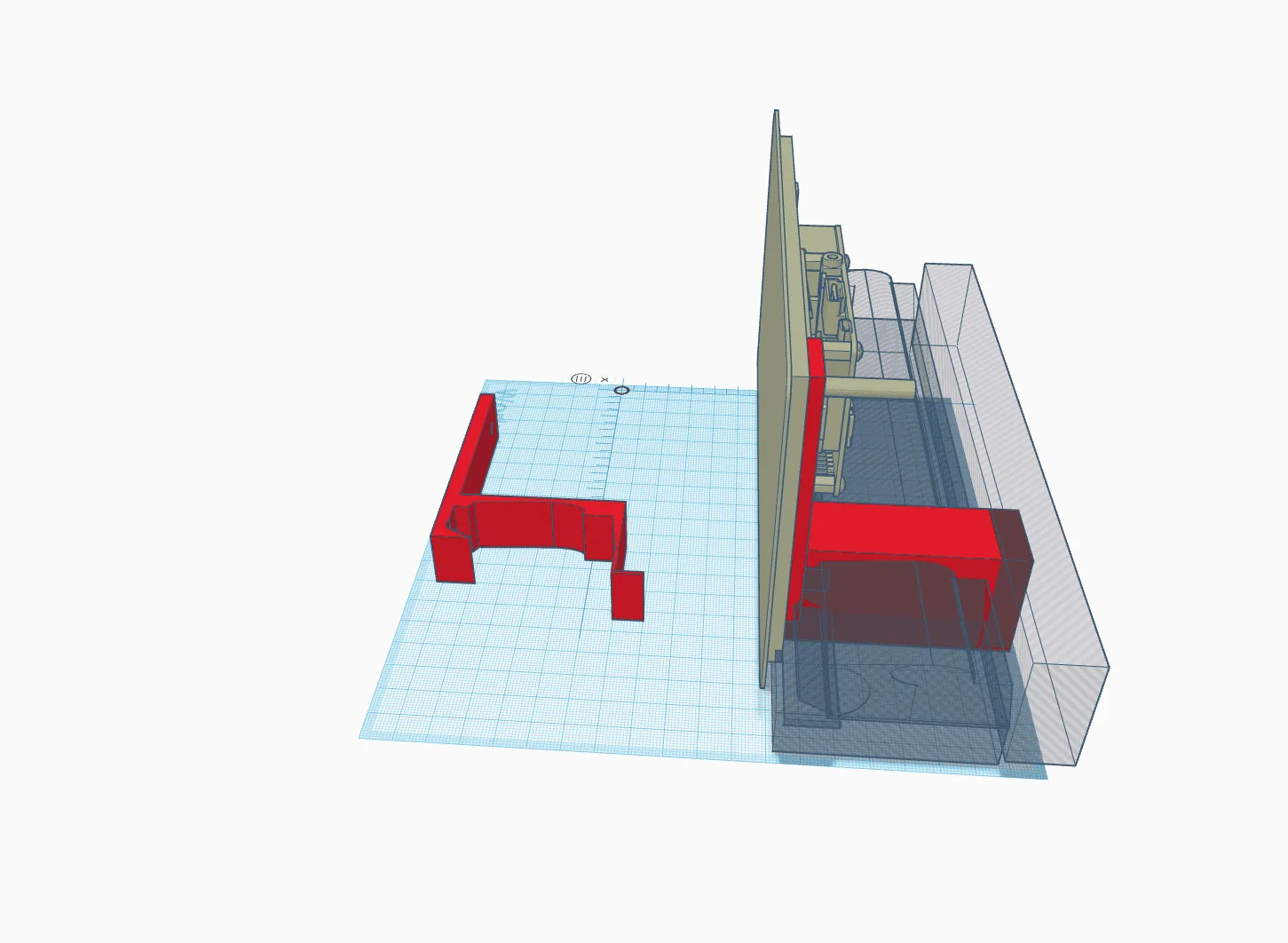
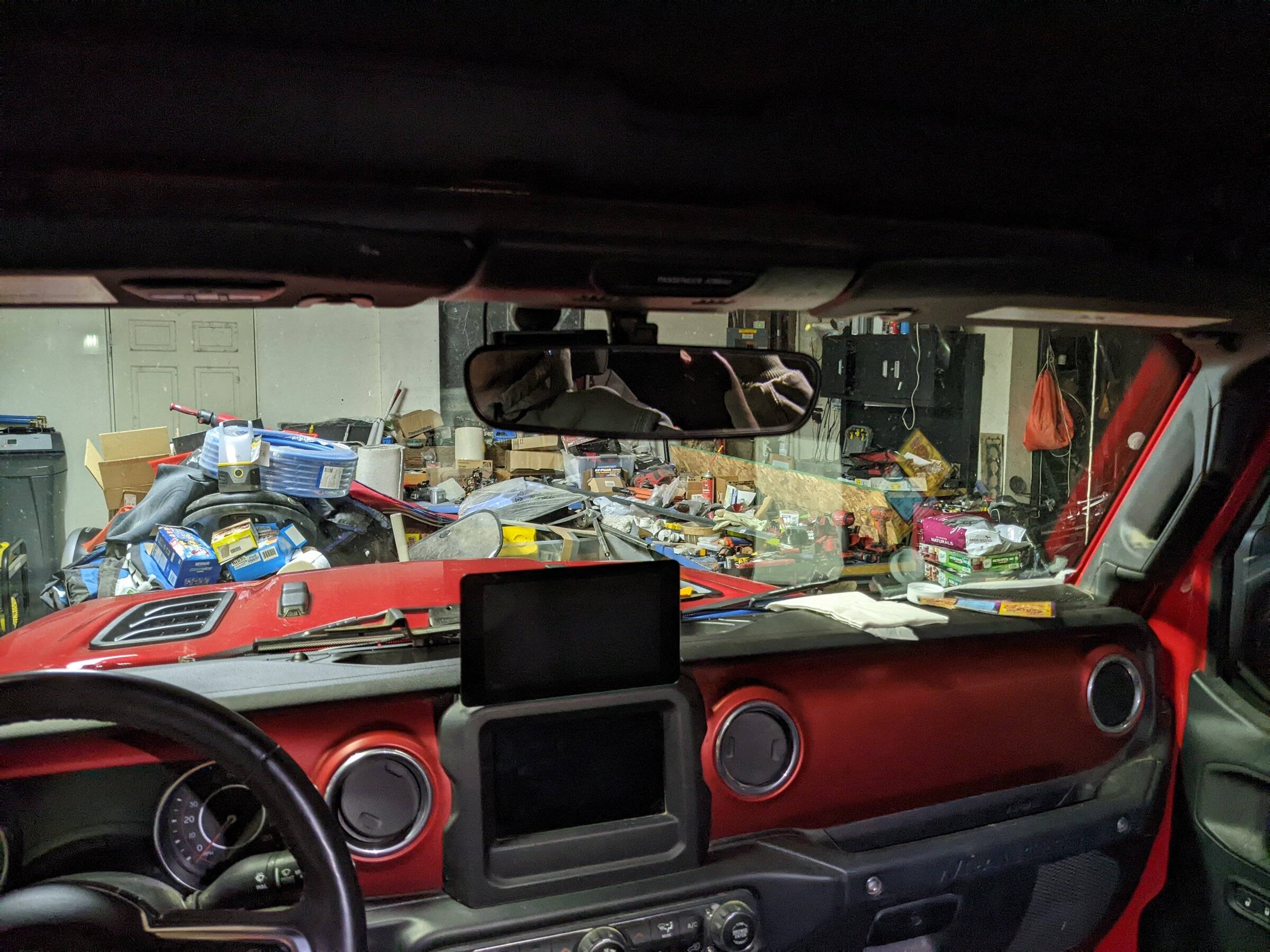
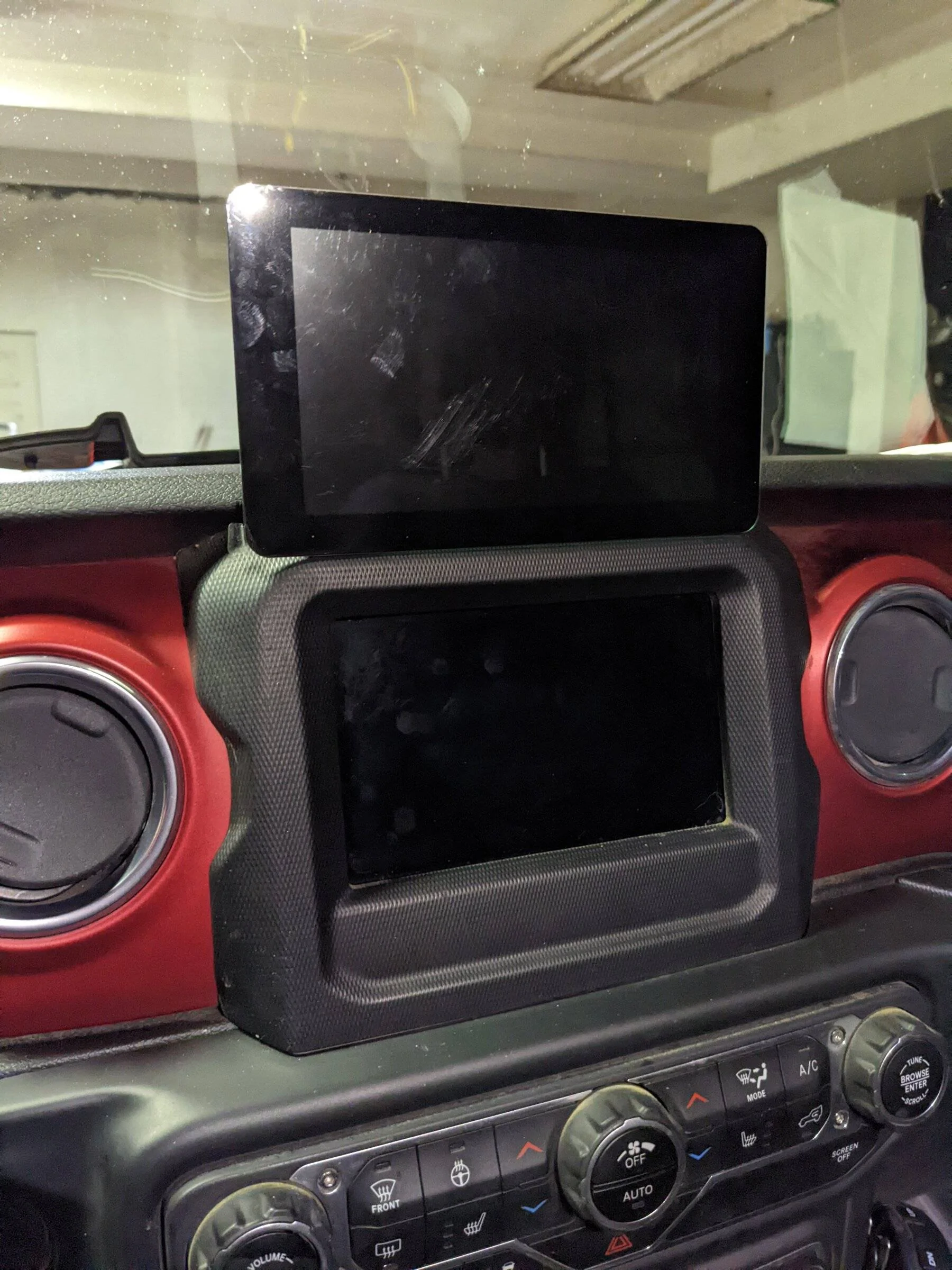
So, I've designed a screen mount for the Raspberry Pi 7" Display to place it directly above the radio. The idea is for the bottom of the screen to sit as close to the top of the radio as possible so that the screen does not block my view of the road.

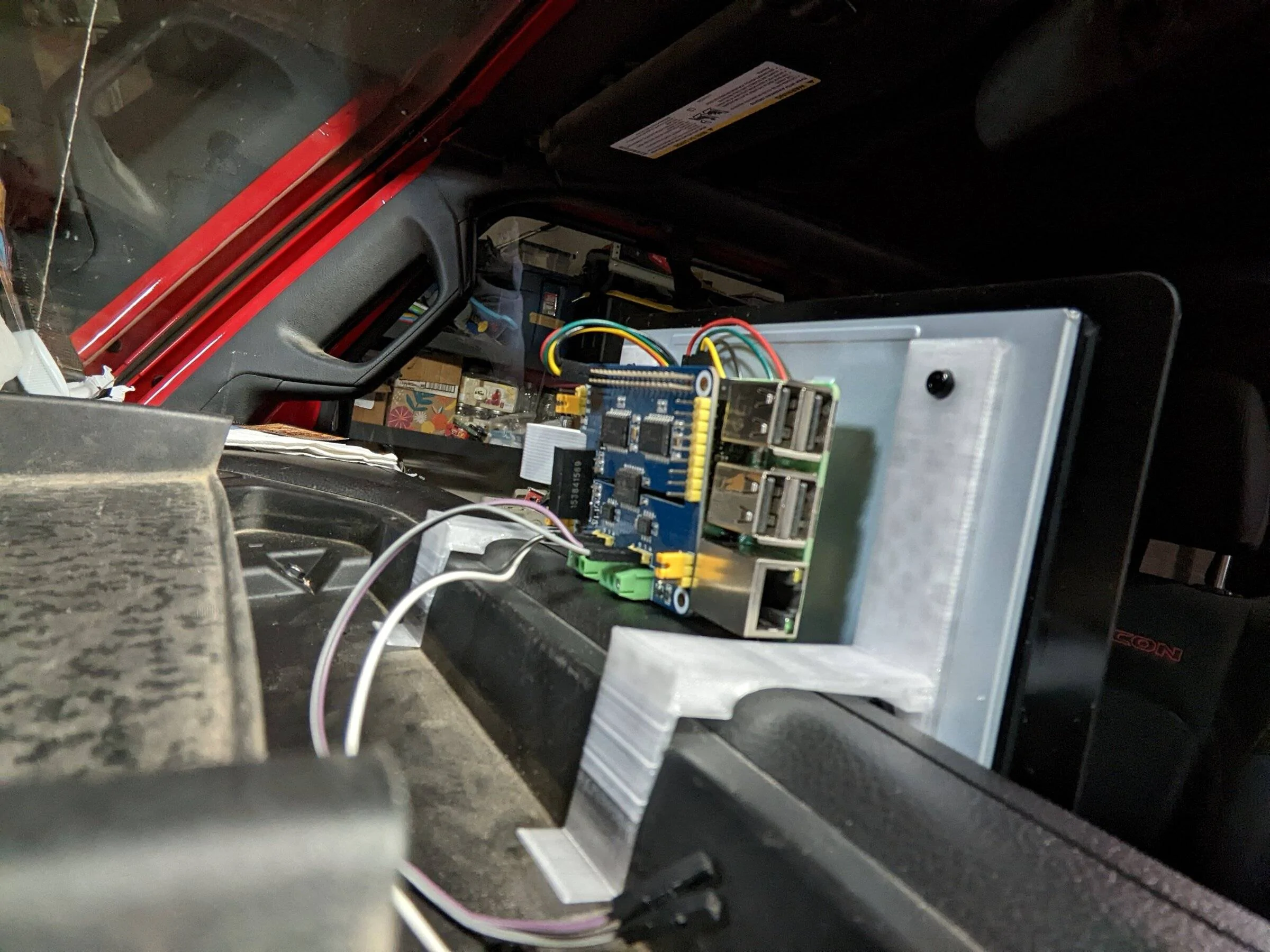
I have it molded to the dash contour and have it pinched below the cubby rubber protector to hold it in place, but I think that I will have to change this so that it ties into the dash screws instead.

I'm printing it now as a first attempt.

If anyone wants to play with this, here is the link...
https://www.tinkercad.com/things/6E...e=FmV-OPNF7DBfyOKCjcDeUQFzBwYj0V32qJpgPT-cmRo

Jeep Wrangler JL JEEP HACKING CAN-C / CAN-IHS / UDS ! (Reverse Engineering) Dazzling Rottis
Sponsored

 
OP
OP
jmccorm

jmccorm

Well-Known Member
First Name
Josh
Joined
Sep 15, 2021
Threads
55
Messages
1,170
Reaction score
1,322
Location
Tulsa, OK
Vehicle(s)
2021 JLUR
Build Thread
Link
Occupation
Systems Engineering
So, I've designed a screen mount for the Raspberry Pi 7" Display to place it directly above the radio. The idea is for the bottom of the screen to sit as close to the top of the radio as possible so that the screen does not block my view of the road.
Awesome! What kind of printer are you using, and what type of media are you printing with?
 

redracer

Well-Known Member
First Name
Robert
Joined
Aug 22, 2017
Threads
20
Messages
576
Reaction score
650
Location
Manteca, CA
Vehicle(s)
2023 4xe Rubicon
Awesome! What kind of printer are you using, and what type of media are you printing with?
I have a Creality Ender 3 that I've modified a bit, mostly just with a direct drive extruder / hot end setup. And I'm printing this in a clear PETG.

I like printing automotive items out of PETG as it can survive the summer heat without deforming. But, it's because of this that I had to change my printer as the higher temperatures would always deform / melt the bowden tubes in the hot end and create issues after a print or two. This is why i switched to direct drive as I got fed up with always rebuilding the hot end after printing anything other than PLA.

3d printers are just like jeeps. One innocent change causes other things to need attention and it's a never ending upgrade path. lol.
 
OP
OP
jmccorm

jmccorm

Well-Known Member
First Name
Josh
Joined
Sep 15, 2021
Threads
55
Messages
1,170
Reaction score
1,322
Location
Tulsa, OK
Vehicle(s)
2021 JLUR
Build Thread
Link
Occupation
Systems Engineering
UPDATED: Recurring Data Collection Script

Once the engine is running, the following script (autocollect) is designed to be a scaffold for you to place routines that need to be run as follows:
  1. Once a vehicle is powered up (Tip Start button, remote start)
  2. Once an engine has started and is stable.
  3. Every minute the engine remains running.
  4. Every ten minutes the engine remains running.
  5. Every hour the engine remains running.
  6. Once a running engine has been stopped.
My own intent is to use this as a place to put OBD-II or UDS queries so that I'm regularly logging some advanced vehicle information such as per-cylinder misfire counts, long-term fuel trim, vehicles temperatures, and more.

UPDATE: I have reworked the code to use ID $077 to monitor ignition and engine status. This works far better than the previous version of the script.

Code:
#!/bin/bash

# AUTOCOLLECT: This script monitors the state of the engine, launching
# independent functions when vehicle is powered on, the engine is running,
# every minute the engine is running, every 10 minutes the engine is
# running, every hour the engine is running, and when the engine has been
# shut down.

# HERE ARE THE FUNCTIONS YOU MAY POPULATE AS NEEDED ------------------

# Called when the vehicle has been powered up (TIP button or remote start)

vehiclepoweredon () {
  echo "$(date) AUTOCOLLECT: Vehicle power-on items go here."
}

# Called when the engine was just started and is stable

enginestarted () {
  echo "$(date) AUTOCOLLECT: Post engine-start items go here."
}

# Called in one minute intervals after the engine is running.

oneminute() {
  echo "$(date) AUTOCOLLECT: One minute items go here."
}

# Called in ten minute intervals after the engine is running.

tenminute() {
  echo "$(date) AUTOCOLLECT: Ten minute items go here."
}

# Called in one hour intervals after the engine is running.

onehour() {
  echo "$(date) AUTOCOLLECT: One hour items go here."
}

# Called when the engine is shutting down or has been shut down.

engineshutdown () {
  echo "$(date) AUTOCOLLECT: Engine shutdown items go here."

  # Flush out any cached/pending IO activity (like to the SD card).
  sync ; sync ; sleep 5 ; sync ; sync

}

# THE MAIN SCRIPT BEGINS HERE ---------------------------------------

echo "$(date) AUTOCOLLECT: Script started, waiting for events."

# Set some flags that we'll use later.

VEHICLEON=0
STARTED=0
LAST=77777

# THE ENGINE MONITORING LOOP BEGINS HERE ----------------------------

COMMAND="/usr/bin/candump -T 1000 -L can1,0077:0FFF"
$COMMAND | while read TIME BUS MESSAGE
do

  # Regardless of what rate we receive messages at, we will analyze
  # them only once per second. (Conserves CPU.)

  NOW=$SECONDS
  [ "$NOW" != "$LAST" ] && {
    DATA=${MESSAGE:4}
    STATE=${DATA:0:4}

    # A work-around for hexadecimal digits during remote start.

    [ "$STATE" == "5D21" ] && STATE=5555

    # Determine when the engine is running.

    if [ "$STATE" == "0422" -o "$STATE" == "4421" ]
      then

        [ $STARTED -eq 0 ] && enginestarted &
        STARTED=1

        # Call the oneminute function once per minute.
        [ $(( $SECONDS % 60 )) -eq 45 ] && oneminute &

        # Call the tenminute function once per ten minutes.
        [ $(( $SECONDS % 600 )) -eq 599 ] && tenminute &

        # Call the onehour function once per hour.
        [ $(( $SECONDS % 36000 )) -eq 35970 ] && onehour &
       fi

    # Determine when the vehicle has been powered up.

    if [ "$STATE" -gt "0399" ]
      then
        # Vehicle is on. Engine may or may not be running.
        [ $VEHICLEON -eq 0 ] && vehiclepoweredon &
        VEHICLEON=1
      fi

    # Determine when the engine is no longer running.

    if [ "$STATE" -lt "0400" ]
      then

        # Engine has just shut down or is shutting down right now.

        [ $STARTED -eq 1 ] && {
          engineshutdown &
          break 2
          break
          exit 0
        }
        STARTED=0
        VEHICLEON=0
      fi
  }
  LAST=$NOW
done

# THIS LAST PART HAPPENS WHEN ALL BUS TRAFFIC HAS DIED DOWN ---------

echo $(date) AUTOCOLLECT: No bus traffic, script ending.
Tested and works without issues. Behaves as expected if the bus is quiet (does not lock up). I call it from the monitor script (provided earlier) which automatically launches a number of other routines (auto-HVAC controls, black box vehicle recorder) when the vehicle has been turned on. The script is multi-threaded, so anything you put in one of the functions won't interfere with the main loop that constantly monitors the vehicle's state.

This new version works far better than the previous one I provided. Enjoy!
 
Last edited:

redracer

Well-Known Member
First Name
Robert
Joined
Aug 22, 2017
Threads
20
Messages
576
Reaction score
650
Location
Manteca, CA
Vehicle(s)
2023 4xe Rubicon
My first pass was very close. I had to raise the screen slightly more to clear the rpi board edge. I'm printing a revision now.

Jeep Wrangler JL JEEP HACKING CAN-C / CAN-IHS / UDS ! (Reverse Engineering) PXL_20220111_073005480


Jeep Wrangler JL JEEP HACKING CAN-C / CAN-IHS / UDS ! (Reverse Engineering) PXL_20220111_072809082


Jeep Wrangler JL JEEP HACKING CAN-C / CAN-IHS / UDS ! (Reverse Engineering) PXL_20220111_072733191
 

Sponsored

OP
OP
jmccorm

jmccorm

Well-Known Member
First Name
Josh
Joined
Sep 15, 2021
Threads
55
Messages
1,170
Reaction score
1,322
Location
Tulsa, OK
Vehicle(s)
2021 JLUR
Build Thread
Link
Occupation
Systems Engineering
Redracer, since you appear to use some of my scripts, I thought I'd like you know that I completely reworked the autocollect script. If you're using the previous version, you'll definitely want to replace it with the latest copy.

My first pass was very close. I had to raise the screen slightly more to clear the rpi board edge. I'm printing a revision now.
Far better than anything utilitarian I've attempted with a 3D printer. Nice job! Later on, would you angle the display towards the driver? That's the only suggestion I could come up with (although that seems more troublesome to pull off).
 

redracer

Well-Known Member
First Name
Robert
Joined
Aug 22, 2017
Threads
20
Messages
576
Reaction score
650
Location
Manteca, CA
Vehicle(s)
2023 4xe Rubicon

rcadden

Well-Known Member
First Name
Ricky
Joined
May 4, 2021
Threads
89
Messages
2,932
Reaction score
6,321
Location
Asheville, NC
Vehicle(s)
2021 Hydro Blue Sahara Altitude
Build Thread
Link
Occupation
Marketing
Clubs
 
With regards to the Remote Start HVAC script, I had a few thoughts:

  1. Rather than using a target *outside* temperature to trigger things, would it be a better user experience to use a target *inside* temperature, wouldn't it? I.e. if the cabin temp is 60, then do these things until it reaches 70, then do these things, etc? This would mimic the automatic climate control vs forcing things on
  2. With regards to vent usage, IMO it would make sense to be different for hot air and cold air:
    1. Heat - when the the HVAC is blowing hot air, it should blow on the windshield/footwells. The windshield for reasons already discovered in this thread, but the footwells because hot air rises, so blowing hot air low would create air movement throughout the cabin and [theoretically] heat the overall air more quickly
    2. Cold - when it's blowing A/C, the opposite is true. You'd want to blow the cold air full-blast out of the vents, so that the hot air at the top of the cabin (assuming direction of the vents, obviously) is being pushed around and down.
  3. Probably not a great idea, but a *decent* idea would be the ability, in the summer, to crack the windows ~a quarter inch, to allow the hot air to escape while the cold air routine is running - this seems like it would cool the overall cabin more quickly (and it'd be kinda cool).
    1. Yes, of course, there are all sorts of reasons this could go wrong, which is why I didn't call it a great idea. :)
Otherwise, epic work going on here.
 
OP
OP
jmccorm

jmccorm

Well-Known Member
First Name
Josh
Joined
Sep 15, 2021
Threads
55
Messages
1,170
Reaction score
1,322
Location
Tulsa, OK
Vehicle(s)
2021 JLUR
Build Thread
Link
Occupation
Systems Engineering
  1. Rather than using a target *outside* temperature to trigger things, would it be a better user experience to use a target *inside* temperature, wouldn't it? I.e. if the cabin temp is 60, then do these things until it reaches 70, then do these things, etc? This would mimic the automatic climate control vs forcing things on
This is good. I need someone to bounce some of these ideas off of. I had a more convoluted "elaborate" system in mind, although I haven't yet worked out the exact logic.

What I want to do is to use the outside temperature as my cue for if I'd want to heat or cool the cabin. On a hot day, I want cool air, and on a cool day, I want warm air. On a mild day, I'd simply want to set the target temperature and let the automatic setting go at a low fan speed. (EDIT: Really, on a cold day, I want it to be hotter than normal. On a hot day, I want it to be cooler than normal. I want the cabin temperature to be on the opposite side of what would ordinarily be a comfortable temperature. )

On top of that, I was thinking of using the difference between the interior and the exterior temperature to decide how aggressive of a response it is going to chase (when the difference is big, be less aggressive because it has already been adjusted). Then again, I'm probably over-engineering the whole response.

Using the interior temperature is a pretty good yardstick, but I'd want to avoid is getting the vehicle cozy, making a stop, remote starting it, and then having the vehicle decide my cozy-warm cabin needs hosed down with the A/C. I'm just not quite sure what kind of decision I'd want to make there without comparing against the exterior temperature?

I do know that I'd prefer a system that's stateless (current decisions don't require a knowledge of what it's previous decisions were), but I'd be willing to give that up for a good reason. Along those lines, I'm also trying to handle those spring/fall days where the temperature fluctuate wildly, and so you're heating in the morning, cooling in the evening, and the next day could go either way.

There's a lot of facets to all of this.

  1. With regards to vent usage, IMO it would make sense to be different for hot air and cold air...
I can agree with everything you've said!
  1. Probably not a great idea, but a *decent* idea would be the ability, in the summer, to crack the windows ~a quarter inch, to allow the hot air to escape while the cold air routine is running - this seems like it would cool the overall cabin more quickly (and it'd be kinda cool).
I'd love to gain control over the power windows. Unfortunately, the Wrangler isn't going to allow that. The best I can control are the lockouts which enable (or prevent) the power window buttons from working, but I cannot manually control the window up or down buttons themselves. They're electrical and not digital.

Amusingly enough, I'm pretty sure that I could control the Sky One-Touch Power Top and retract it (in part or in full). But the potential for rain makes that idea too dangerous to use. Still, I'll check and see how well it might be opened just a crack.
 
Last edited:
OP
OP
jmccorm

jmccorm

Well-Known Member
First Name
Josh
Joined
Sep 15, 2021
Threads
55
Messages
1,170
Reaction score
1,322
Location
Tulsa, OK
Vehicle(s)
2021 JLUR
Build Thread
Link
Occupation
Systems Engineering
Note: this only works for the 8" units. I have tried this on my 7" and nothing happens. to my knowledge, the only way to reboot a 7" is via the tazer or jscan option to reboot all modules. This is something that I want to sniff as well.
An ECU Reset should be a code 0x11, but I don't have the full syntax for how it is used. But looking for $11 messages (instead of $22, $2E, and $2F) should give you a head-start.
 

Sponsored

CaJLMetalHead

Well-Known Member
First Name
CAJLMetalHead
Joined
Sep 6, 2018
Threads
19
Messages
969
Reaction score
1,873
Location
96049
Vehicle(s)
Jeep Wrangler Sport Unlimited
My first pass was very close. I had to raise the screen slightly more to clear the rpi board edge. I'm printing a revision now.
Nicely done.. !!

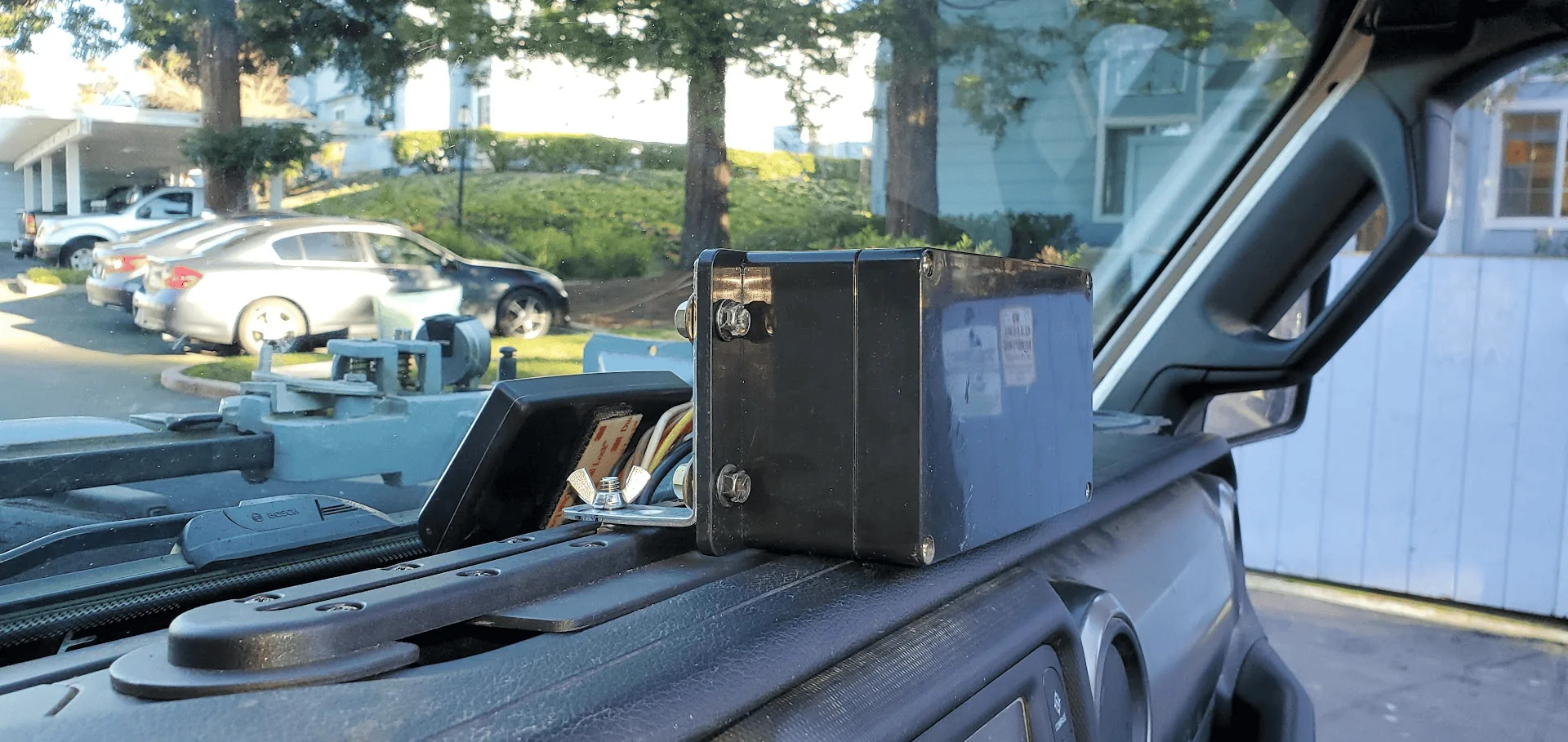
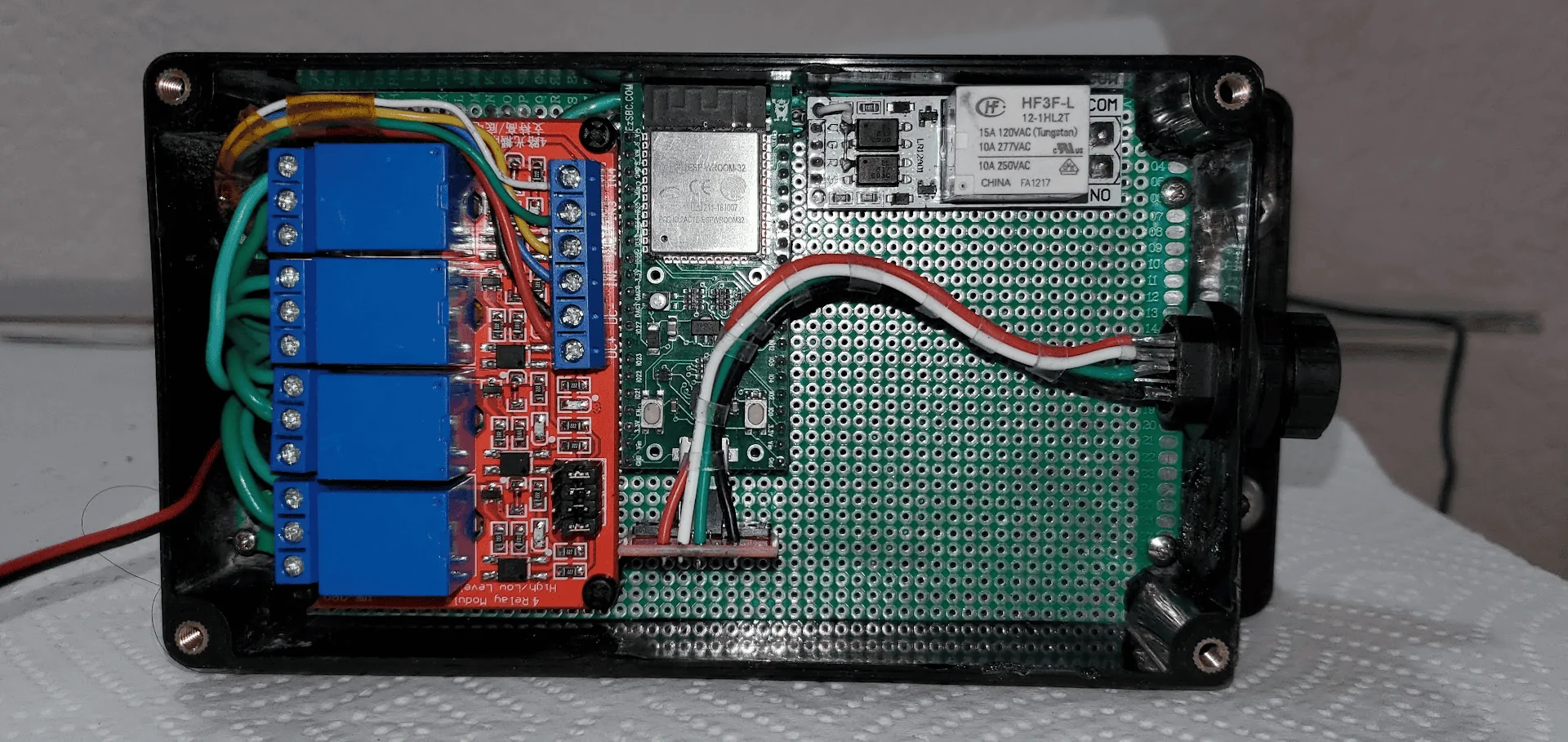
I don't have a 3D printer... so I decided to go with a plastic waterproof enclosure secured to the Ram Mount Tough Track with L-shaped brackets..

Jeep Wrangler JL JEEP HACKING CAN-C / CAN-IHS / UDS ! (Reverse Engineering) 1641955260676


Jeep Wrangler JL JEEP HACKING CAN-C / CAN-IHS / UDS ! (Reverse Engineering) 1641955298825
 

CaJLMetalHead

Well-Known Member
First Name
CAJLMetalHead
Joined
Sep 6, 2018
Threads
19
Messages
969
Reaction score
1,873
Location
96049
Vehicle(s)
Jeep Wrangler Sport Unlimited
also, looks like I found most of the can data around the sway bar and lockers...

0x26F 00 40 FF FF FF 7F 7F 7F Sway Bar Request - unlock / lock toggle - need to test this.
0x371 51 02 00 00 00 00 00 00 sway bar unlock in progress
0x371 70 01 00 00 00 00 00 00 sway bar unlocked
0x371 42 02 00 00 00 00 00 00 sway bar lock in progress
0x371 61 00 00 00 00 00 00 00 sway bar locked

0x2C2 14 B3 78 00 Locker unlocked
0x25D 23 FC 00 00 7F 7F 7F 7F Rear Locker Request
0x2C2 14 B3 77 00 Locker (s) locked , not sure if this designates rear only or any
0x25D 13 FC 00 00 7F 7F 7F 7F Front + Rear Locker Request
0x277 ??? this seems related to locker operation, but I can't correlate the changes yet.
0x25D 43 FC 00 00 7F 7F 7F 7F Unlock both request

I have not found the front locker status yet, or the correct front / rear locker status yet. need more seat time with cansniffer.
Please let me know the results once you get to test the Sway bar unlock / lock toggle.. I tested the smartbar on my bench .. I sent the packet but the smartbar did not react to it.. and I did not see any sway bar response on 0x371 ( I only see the sway bar generic poll every second with
0x371 00 00 00 00 00 00 00 00 ,,, that is all... no response to the toggle command.. no movement of the motor.. ☹ )

Thanks!!!!

Also.. I noticed that the Smartbar reports the plunger sensor value on D0 ...

D0 = 0 when the plunger sensor is fully extended
Jeep Wrangler JL JEEP HACKING CAN-C / CAN-IHS / UDS ! (Reverse Engineering) 1641975094728


D0 = 2 when the plunger sensor is halfway depressed:
Jeep Wrangler JL JEEP HACKING CAN-C / CAN-IHS / UDS ! (Reverse Engineering) 1641974862559


D0 = 1 when the plunger sensor is fully depressed:
Jeep Wrangler JL JEEP HACKING CAN-C / CAN-IHS / UDS ! (Reverse Engineering) 1641975154051
 
Last edited:
OP
OP
jmccorm

jmccorm

Well-Known Member
First Name
Josh
Joined
Sep 15, 2021
Threads
55
Messages
1,170
Reaction score
1,322
Location
Tulsa, OK
Vehicle(s)
2021 JLUR
Build Thread
Link
Occupation
Systems Engineering
CAN Bus Messages Matching with UDS Identifiers?

Using JScan, I scanned for a piece of live data on the Body Control Module. I selected the entry for "Performance Shift Enable Customer Settings Menu (Vehicle Config CSM1)". With a sniffer, I extracted the UDS identifier, which was $0146. The data was:

00307641E4A3C710
Interestingly enough, I found a message ID that almost entirely matched that pattern. All but the first character, in fact:

3B3#01307641E4A3C710
This nearly confirms something that I've believed for a while now.

When we see message IDs with constant numbers (and those numbers may vary slightly between vehicles but still remain constant), those are constants are likely to be configuration bitmasks for the vehicle. Further, those constants are the the same values which can be read (and written to) via UDS services. Like JScan does with it's Activations.

If we go further with this, we may find that any (or perhaps all) data that we can query one of the modules for (particularly as I'm doing for ambient temperature/cabin temperature/steering wheel temperature), may already be on the CAN bus. It's just a matter of identifying at what location.

This may substantially help us identify more CAN bus messages if we can associate them with known UDS functions.
 
OP
OP
jmccorm

jmccorm

Well-Known Member
First Name
Josh
Joined
Sep 15, 2021
Threads
55
Messages
1,170
Reaction score
1,322
Location
Tulsa, OK
Vehicle(s)
2021 JLUR
Build Thread
Link
Occupation
Systems Engineering
0x371 51 02 00 00 00 00 00 00 sway bar unlock in progress
0x371 70 01 00 00 00 00 00 00 sway bar unlocked
0x371 42 02 00 00 00 00 00 00 sway bar lock in progress
0x371 61 00 00 00 00 00 00 00 sway bar locked
I only see the sway bar generic poll every second with
0x371 00 00 00 00 00 00 00 00 ,,, that is all... no response to the toggle command.. no movement of the motor.. ☹ )

Also.. I noticed that the Smartbar reports the plunger sensor value on D0 ...

D0 = 0 when the plunger sensor is fully extended
1641975094728.png

D0 = 2 when the plunger sensor is halfway depressed:
1641974862559.png

D0 = 1 when the plunger sensor is fully pressed:
1641975154051.png
I'm trying to document message ID $371 in the spreadsheet, but it looks like both of you are describing it two different ways? RedRacer has a wider-ranged value in the first byte and that 00-02 status in the second byte. You've got just a 00-02 status as the first byte and that's it. Both of you have the rest of your bytes padded with zeros. Which way is it?

As it stands, I've currently documented it as:
Jeep Wrangler JL JEEP HACKING CAN-C / CAN-IHS / UDS ! (Reverse Engineering) id371
 

redracer

Well-Known Member
First Name
Robert
Joined
Aug 22, 2017
Threads
20
Messages
576
Reaction score
650
Location
Manteca, CA
Vehicle(s)
2023 4xe Rubicon
Please let me know the results once you get to test the Sway bar unlock / lock toggle.. I tested the smartbar on my bench .. I sent the packet but the smartbar did not react to it.. and I did not see any sway bar response on 0x371 ( I only see the sway bar generic poll every second with
0x371 00 00 00 00 00 00 00 00 ,,, that is all... no response to the toggle command.. no movement of the motor.. ☹ )

Thanks!!!!

Also.. I noticed that the Smartbar reports the plunger sensor value on D0 ...

D0 = 0 when the plunger sensor is fully extended
1641975094728.png


D0 = 2 when the plunger sensor is halfway depressed:
1641974862559.png


D0 = 1 when the plunger sensor is fully pressed:
1641975154051.png
Hmm, interesting...

So you are testing a new one on your bench, sending commands directly to it? without it being attached to the jeep's wiring?

I'm wondering if the sway bar, being a critical safety component, is on the other bus for critical things. Someone earlier mentioned the bus name, but I can't remember it. I'd bet that we are sending commands to a different module that in turn is commanding the smart sway bar to operate. Does this make sense?
Sponsored


Top