Sponsored

Backup Camera issue

ijeep2

Well-Known Member
First Name
Bill
Joined
Jan 5, 2018
Threads
0
Messages
56
Reaction score
131
Location
Dallas, TX
Vehicle(s)
2016 Jeep JKU Rubicon (Sand Spider) and 2018 Jeep JLU Rubicon (RedCat)
Mine did the same, starting working again this morning. Must have been some type of update or something.
Sponsored
 

hockey523

Well-Known Member
First Name
Andy
Joined
Dec 19, 2017
Threads
3
Messages
50
Reaction score
82
Location
Downingtown, Pa
Vehicle(s)
'23 Audi S5, '18 JLUR, '05 TJ Sport, '10 Harley Davidson Heritage Softtail
JLUR and about 3 weeks old. I have now had the same issue. It also started working again. One additional point on this though - I was driving at night when this happened and when I turned off the car the 8.4" display turned off all graphics/text but it was clearly still on. The display was a light grey indicating that the screen was still trying to display. I tried many things - start the car/turn off the car, manually turn off the display, etc but it would never shut off. Anyone else notice this?
I was concerned that it would stay on all night and drain the battery but it must have eventually turned off. I came out two hours later and it was off and the cam was working again.
There clearly are a few TSB's which will need to come out.
 

Ruby Jack

Well-Known Member
Joined
Mar 20, 2018
Threads
11
Messages
284
Reaction score
257
Location
CT
Vehicle(s)
'18 JLUR
Nope. The jeep was not fooled by the disconnect the battery trick. Even left it off for about 20 minutes. I tried the uconnect reset listed in the uconnect forum but I couldn't get into the engineering settings, only the dealer settings. I guess I'll have to take her in next week
The new JLs have a small auxiliary battery just beneath the fuse box (for the ESS). Guessing disconnecting the main battery causes that one to kick in.
 

JLSpartan

Well-Known Member
First Name
Roman
Joined
Mar 25, 2018
Threads
5
Messages
49
Reaction score
62
Location
Michigan
Vehicle(s)
18 JL Sport
Vehicle Showcase
1
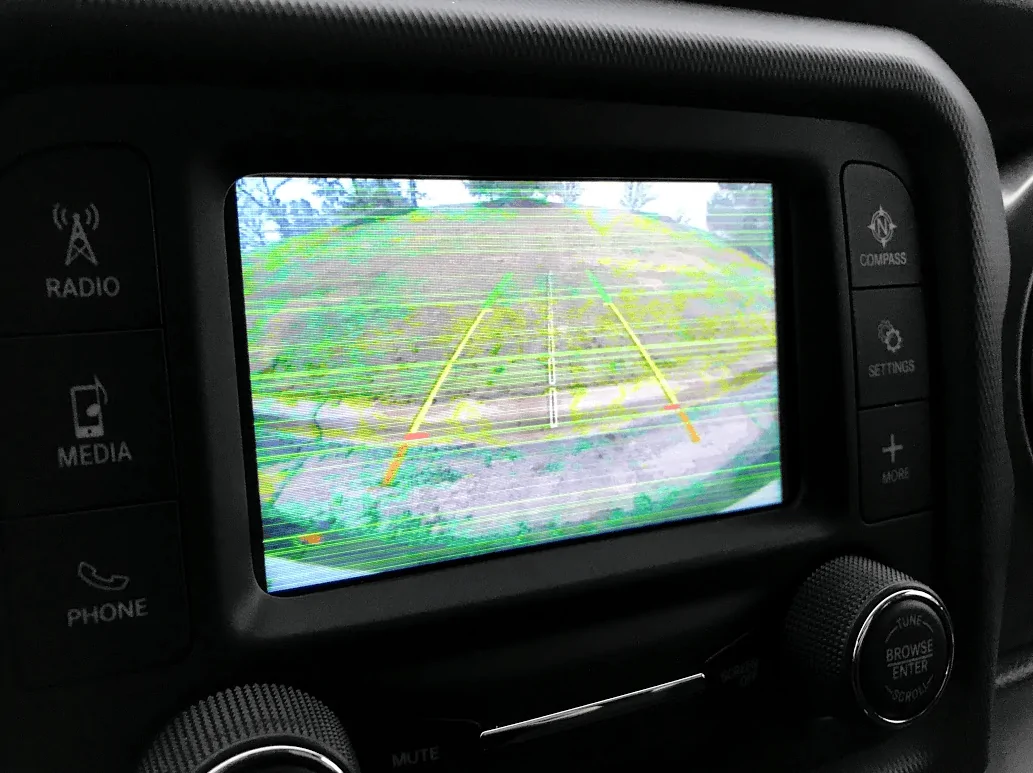
Welp, add me to the same list... Had the Jeep for 2 days, went to get out of the driveway and backup camera had green lines through it as well as jittery image. After shutting it off and starting again, it went back to normal... Will see how it reacts the rest of the day. Really crappy feeling to have this happen on day 3 of ownership...
 

JeepCares

Well-Known Member
Joined
Feb 1, 2018
Threads
16
Messages
5,423
Reaction score
2,800
Location
Auburn Hills, MI
Vehicle(s)
JL
Hi everyone,
We would like to begin looking into this further. Please send us a private message with additional details of what you are each experiencing.
Julie
Jeep Social Care Specialist
 

Sponsored

JLSpartan

Well-Known Member
First Name
Roman
Joined
Mar 25, 2018
Threads
5
Messages
49
Reaction score
62
Location
Michigan
Vehicle(s)
18 JL Sport
Vehicle Showcase
1
Welp its back again, hopefully will be back to normal when I drive next time. @JeepCares got a PM from me already, but have not heard from them yet :)
Jeep Wrangler JL Backup Camera issue upload_2018-3-29_8-8-53
 

djmason9

Well-Known Member
First Name
James
Joined
Dec 13, 2017
Threads
5
Messages
138
Reaction score
168
Location
Arizona
Website
bitcowsStickers.com
Vehicle(s)
2018 JL 4 door Rubi, 2019 Alfa Romeo Giulia
Vehicle Showcase
1
Sadly my back up camera stopped working today. I’m just over 2 months of ownership and this is the first issue. Was working all day, then boom nothing not e even manually pressing helped. Hopefully it will fix itself. Also not aware of any new updates as of late with uconnect.
 

FatBoy01

Banned
Banned
Banned
Joined
Feb 9, 2018
Threads
50
Messages
1,266
Reaction score
1,442
Location
NY
Vehicle(s)
2014 Wrangler Sahara; 2001 Harley FatBoy; 2018 Wrangler Rubicon JL (Ordered)
Occupation
Retired @ 55
Sadly my back up camera stopped working today. I’m just over 2 months of ownership and this is the first issue. Was working all day, then boom nothing not e even manually pressing helped. Hopefully it will fix itself. Also not aware of any new updates as of late with uconnect.
@djmason9

Not sure if you saw the past post by @JeepCares but they suggested you do the following in an attempt to correct the camera issue:

Soft Reset Instruction
1) Put your vehicle into the accessories mode (ACC or RUN)

**For keyless start (push-button) vehicles: push the start button twice without having their foot on the gas or brake pedal**

2) Hold down the Phone and voice recognition buttons, at the same time, for thirty seconds.

3) Let go of the buttons

4) Turn vehicle off

5) Open driver’s side door for thirty seconds (or until dash illumination goes black)

6) Close door

7) Restart vehicle

8) Let the media center load up and see if concern is still present
 

djmason9

Well-Known Member
First Name
James
Joined
Dec 13, 2017
Threads
5
Messages
138
Reaction score
168
Location
Arizona
Website
bitcowsStickers.com
Vehicle(s)
2018 JL 4 door Rubi, 2019 Alfa Romeo Giulia
Vehicle Showcase
1
@djmason9

Not sure if you saw the past post by @JeepCares but they suggested you do the following in an attempt to correct the camera issue:

Soft Reset Instruction
1) Put your vehicle into the accessories mode (ACC or RUN)

**For keyless start (push-button) vehicles: push the start button twice without having their foot on the gas or brake pedal**

2) Hold down the Phone and voice recognition buttons, at the same time, for thirty seconds.

3) Let go of the buttons

4) Turn vehicle off

5) Open driver’s side door for thirty seconds (or until dash illumination goes black)

6) Close door

7) Restart vehicle

8) Let the media center load up and see if concern is still present
I did not see that but thank you and fortunately for me the camera started working a few hours later
 

Skippy

Well-Known Member
First Name
Aaron
Joined
Mar 21, 2018
Threads
2
Messages
107
Reaction score
77
Location
Fountain Hills, Arizona
Vehicle(s)
1996 Ford Bronco 351W, 2021 Rubicon 4xe
I also just had this issue with my camera. I found that if I started the jeep and within 2-3 seconds of starting it went in to reverse my camera didn't work, I couldn't use the backup camera button and my entire head unit would not even turn off at all. I had to leave it off (the jeep off) for 10-30 minutes before it would operate again as normal. That is the only time I've had that happen and I attributed that to me being in too much of a rush to leave the house. I wish these radios had the reset/hard power off like the previous models where you could hold down the volume and tune buttons for 7-10 seconds and it would hard boot the radio. I am sure there are some tricks out there to be discovered
 

Sponsored

Hetrab

Member
First Name
David
Joined
Mar 6, 2018
Threads
0
Messages
6
Reaction score
2
Location
Draper, Utah
Vehicle(s)
2018 JLU Rubicon Wrangler
I've had my Rubicon 3 days and now I have the same backup camera issue as those above. Put it in reverse and the camera doesn't come on. It knows it is in reverse as you can try to select other functions and they won't change. The circle around the icon shows up but no function change. When in park, the backup camera icon does nothing. When the vehicle is turned off, the main screen doesn't turn off (stays lit black/gray). I've noticed that the system never truly restarts, either, as the "Accept" screen doesn't come up and the screen goes directly to the last app that was running. I feel like if there was a way to reset the system it would start working again. The above soft reset method doesn't seem to work. I'm going to PM @JeepCares. Pretty disappointed. Hopefully there will be an easy/software fix.
 

Hetrab

Member
First Name
David
Joined
Mar 6, 2018
Threads
0
Messages
6
Reaction score
2
Location
Draper, Utah
Vehicle(s)
2018 JLU Rubicon Wrangler
As a follow-up, after a few hours the screen finally turned off. When I started the car, the "accept" screen came up and the backup camera works again. So this seemed to be some sort of software hangup that clears once the system finally restarts. I'm guessing this will need a firmware upgrade to fix?
 

FatBoy01

Banned
Banned
Banned
Joined
Feb 9, 2018
Threads
50
Messages
1,266
Reaction score
1,442
Location
NY
Vehicle(s)
2014 Wrangler Sahara; 2001 Harley FatBoy; 2018 Wrangler Rubicon JL (Ordered)
Occupation
Retired @ 55
snipe:
I feel like if there was a way to reset the system it would start working again. The above soft reset method doesn't seem to work. I'm going to PM @JeepCares. Pretty disappointed. Hopefully there will be an easy/software fix.
Dave, Are you saying you tried to do the reset as explained and you could not get it to reset .....

or you accomplished the reset but the camera still would not come on?
 

Hetrab

Member
First Name
David
Joined
Mar 6, 2018
Threads
0
Messages
6
Reaction score
2
Location
Draper, Utah
Vehicle(s)
2018 JLU Rubicon Wrangler
snipe:


Dave, Are you saying you tried to do the reset as explained and you could not get it to reset .....

or you accomplished the reset but the camera still would not come on?
I tried to do the reset and got nothing. Held the green phone button and the voice recognition button for over 30 seconds (no indication of when you are "done"). When I turn off the vehicle and open the door, the gauge display turns off but the head unit does not. When turning the vehicle back on it goes directly to the last screen (does not run the "Accept" screen).

From what I have been reading, it sounds like the cause is when you put the vehicle in reverse right away after starting without giving the head unit time to finish booting up it doesn't initialize the camera properly. Eventually (30+ minutes of off time) it seems to clear the error and allow a normal boot.
 

maguro

Well-Known Member
First Name
Ken
Joined
Nov 25, 2017
Threads
8
Messages
438
Reaction score
572
Location
Canadian Rockies
Vehicle(s)
Punk'n JLUR
From what I have been reading, it sounds like the cause is when you put the vehicle in reverse right away after starting without giving the head unit time to finish booting up it doesn't initialize the camera properly. Eventually (30+ minutes of off time) it seems to clear the error and allow a normal boot.
It sounds like the rearview camera display is just an App which runs on of the operating environment.

If so, maybe there are times when its performing an update to the environment and can't handle the display app.
Sponsored


Top