Sponsored

Android Auto - Smartphone App Update Related

Bryce

Well-Known Member
First Name
Bryce
Joined
Jun 2, 2019
Threads
13
Messages
1,302
Reaction score
2,800
Location
Acworth, GA
Vehicle(s)
2019 JLUR
Vehicle Showcase
1
I tested an hour or so ago. I am able to say "Hey Google" or "Ok Google" and I can ask a question, etc., and I get an answer. I can do this both when Waze is in play or Google Maps.

Check to be sure.... that when you are say in your office, room in the house and you say to your smartphone "Hey Google" or "Ok Google that Google awakens ... If you see that work , you should be seeing "Hey Google" or "Ok Google work when in the JL and using Waze or Maps.
Ya, all works away from the jeep. I can even say "take me home" and Waze routes me home while sitting at my desk. In the jeep, I can say Call XXXX and it calls or ask it some question and it tries to answer.
Sponsored

 
OP
OP
Rhinebeck01

Rhinebeck01

Well-Known Member
Joined
May 9, 2018
Threads
169
Messages
12,679
Reaction score
19,169
Location
Ormond Beach, Florida
Vehicle(s)
'18 JL Rubi, '26 Cybertruck, '01 Harley FatBoy
Occupation
Retired at 55 ..
Ya, all works away from the jeep. I can even say "take me home" and Waze routes me home while sitting at my desk


I'm not sure why "Hey Google" or "Ok Google is not working for you for both Waze and Maps. Again, I tested today and with both it works well.

Must be a setting thing for you..

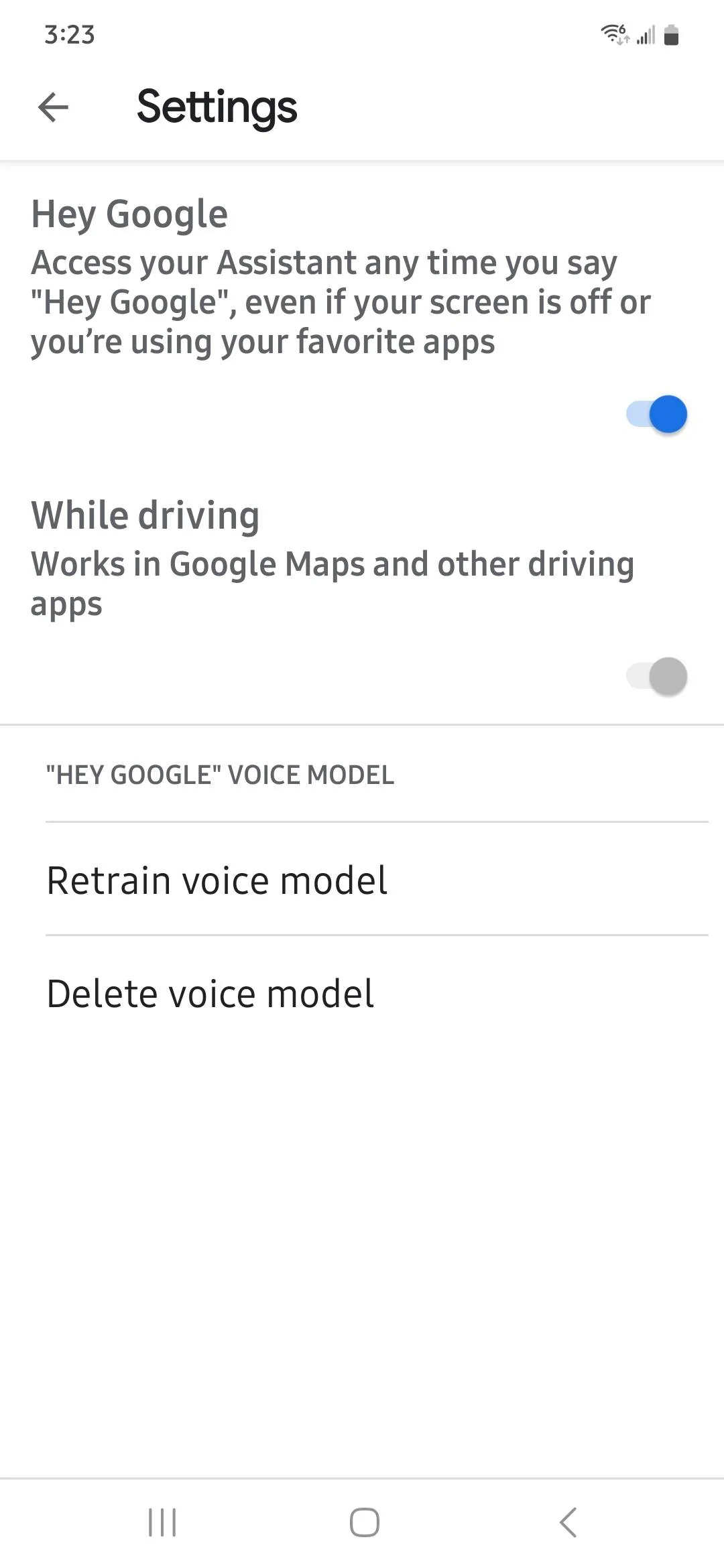
In my Android Auto ... in regard to Hey Google, here is what I have toggled..
Jeep Wrangler JL Android Auto - Smartphone App Update Related Screenshot_20230208_152357_Googl
 

Bryce

Well-Known Member
First Name
Bryce
Joined
Jun 2, 2019
Threads
13
Messages
1,302
Reaction score
2,800
Location
Acworth, GA
Vehicle(s)
2019 JLUR
Vehicle Showcase
1
I'm not sure why "Hey Google" or "Ok Google is not working for you for both Waze and Maps. Again, I tested today and with both it works well.

Must be a setting thing for you..

In my Android Auto ... in regard to Hey Google, here is what I have toggled..
Screenshot_20230208_152357_Google.webp
My settings are the same. AA/Google Assistant picks it up and I get the dictation on the screen showing that it hears and understands me. If I have Google Maps open on the Jeeps screen, it'll route me with Google Maps. If I have Waze open instead, Google Assistant hears me and gets my message (dictated on the screen) then just does nothing. Almost like AA or Google Assistant isn't passing my commands to Waze. Happens if I say Hey Google or hold down the steering wheel button to activate Google Assistant.
Other apps seems to take commands too.
Waze started ignoring my commands after side loading the beta last night.
 
OP
OP
Rhinebeck01

Rhinebeck01

Well-Known Member
Joined
May 9, 2018
Threads
169
Messages
12,679
Reaction score
19,169
Location
Ormond Beach, Florida
Vehicle(s)
'18 JL Rubi, '26 Cybertruck, '01 Harley FatBoy
Occupation
Retired at 55 ..
My settings are the same. AA/Google Assistant picks it up and I get the dictation on the screen showing that it hears and understands me. If I have Google Maps open on the Jeeps screen, it'll route me with Google Maps. If I have Waze open instead, Google Assistant hears me and gets my message (dictated on the screen) then just does nothing. Almost like AA or Google Assistant isn't passing my commands to Waze. Happens if I say Hey Google or hold down the steering wheel button to activate Google Assistant.
Other apps seems to take commands too.
Waze started ignoring my commands after side loading the beta last night.
I too have been seeing this also --> " If I have Google Maps open on the Jeeps screen, it'll route me with Google Maps. If I have Waze open instead, Google Assistant hears me and gets my message (dictated on the screen) then just does nothing."

Hopefully, eventually this hiccup will be fixed.. BUT, like I said with Waze or Google Maps up, Google will answer questions.
 

oldcjguy

Well-Known Member
First Name
Jim
Joined
Aug 26, 2020
Threads
3
Messages
609
Reaction score
760
Location
Central FL
Vehicle(s)
16 Challenger Hellcat, 19 Challenger Scatpack, 20 JLUR Recon
Occupation
Software Engineer
Whether I toggle that Android Auto setting, Taskbar widgets on or off I always get the widgets...
Strange. When I toggle that I get a widget. Otherwise I see icons for the last 3 or 4 apps I ran
 

Sponsored

OP
OP
Rhinebeck01

Rhinebeck01

Well-Known Member
Joined
May 9, 2018
Threads
169
Messages
12,679
Reaction score
19,169
Location
Ormond Beach, Florida
Vehicle(s)
'18 JL Rubi, '26 Cybertruck, '01 Harley FatBoy
Occupation
Retired at 55 ..
Strange. When I toggle that I get a widget. Otherwise I see icons for the last 3 or 4 apps I ran
Toggled or not in Android Auto settings..... I get an icon for what's up currently and an icon for each of the last 3 used.... for a total of 4 icons.

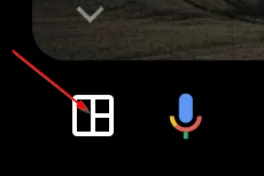
Note: If I click twice on the the Coolwalk, split screen icon as pointed to with a red arrow in the pic below, I get screen coming up with all that are listed and selected in my Android Auto launch list.

Jeep Wrangler JL Android Auto - Smartphone App Update Related 99988
 

Joe's_Roxy

Well-Known Member
First Name
Joe
Joined
Nov 8, 2021
Threads
1
Messages
8,470
Reaction score
75,165
Location
Arkansas
Vehicle(s)
2018 JL Rubicon, 2009 JK Sport, 2006 LJ Sport
Occupation
Quality Manager
I had an update to the radio within the last couple of weeks. I then update the app on my phone. Figured that would get me there.
I went out to the jeep after work today and I have coolwalk now. Cool!!!
 

NeilP

Well-Known Member
First Name
Neil
Joined
Jan 10, 2023
Threads
36
Messages
655
Reaction score
832
Location
South Dakota
Vehicle(s)
2024 Jeep Wrangler Sahara Unlimited
Occupation
RETIRED!

Ratbert

Well-Known Member
First Name
John
Joined
Jun 20, 2020
Threads
159
Messages
16,055
Reaction score
25,026
Location
PNW
Vehicle(s)
2022 AEV JL370 JLURD
Build Thread
Link
Occupation
Software Engineer
Clubs
 
CoolWalk finally came to life on my UConnect today. Finally.

Android Auto, however, has been very flaky recently. Wired no longer works at all (new cable on order) and the MA1 only works for about half an before shutting down for a few minutes. Cleared cache, uninstalled, beta, etc. hasn't helped.
 

Sponsored

OP
OP
Rhinebeck01

Rhinebeck01

Well-Known Member
Joined
May 9, 2018
Threads
169
Messages
12,679
Reaction score
19,169
Location
Ormond Beach, Florida
Vehicle(s)
'18 JL Rubi, '26 Cybertruck, '01 Harley FatBoy
Occupation
Retired at 55 ..
CoolWalk finally came to life on my UConnect today. Finally.

Android Auto, however, has been very flaky recently. Wired no longer works at all (new cable on order) and the MA1 only works for about half an before shutting down for a few minutes. Cleared cache, uninstalled, beta, etc. hasn't helped.
You might want to Clear caches for apps... Android Auto, Google Play Services and immediately after that, go to UConnect Projection Manager and remove any and all devices listed there and then add back just your smartphone.

Once you see all Android Auto working correctly with wired connection, then add back your cleared MA1.

I have a newAndroid smartphone on the way ..... a Samsung S23 and I will be using / doing the above when I go to set-up that new smartphone. Good approach is to get everything back to square one so to speak..
 

Ratbert

Well-Known Member
First Name
John
Joined
Jun 20, 2020
Threads
159
Messages
16,055
Reaction score
25,026
Location
PNW
Vehicle(s)
2022 AEV JL370 JLURD
Build Thread
Link
Occupation
Software Engineer
Clubs
 
You might want to Clear caches for apps... Android Auto, Google Play Services and immediately after that, go to UConnect Projection Manager and remove any and all devices listed there and then add back just your smartphone.

Once you see all Android Auto working correctly with wired connection, then add back your cleared MA1.

I have a newAndroid smartphone on the way ..... a Samsung S23 and I will be using / doing the above when I go to set-up that new smartphone. Good approach is to get everything back to square one so to speak..
Thanks for your detailed response. I did as you directed and I still get the dreaded "Device Not Supported" dialog when plugging in the cable. Hopefully that'll be remedied with a new cable.

We'll see if the MA1 is any more reliable now when I get a chance to test it again.
 

Bryce

Well-Known Member
First Name
Bryce
Joined
Jun 2, 2019
Threads
13
Messages
1,302
Reaction score
2,800
Location
Acworth, GA
Vehicle(s)
2019 JLUR
Vehicle Showcase
1
Thanks for your detailed response. I did as you directed and I still get the dreaded "Device Not Supported" dialog when plugging in the cable. Hopefully that'll be remedied with a new cable.

We'll see if the MA1 is any more reliable now when I get a chance to test it again.
you could try rebooting the radio too. Pull Fuse 97 for a few minutes. It'll take a bit for everything to reload
 

MrGneissGuy

Well-Known Member
First Name
Dennis
Joined
Dec 8, 2020
Threads
7
Messages
2,700
Reaction score
22,496
Location
Indiana
Vehicle(s)
2021 Wrangler JL Unlimited Sport
Thanks for your detailed response. I did as you directed and I still get the dreaded "Device Not Supported" dialog when plugging in the cable. Hopefully that'll be remedied with a new cable.

We'll see if the MA1 is any more reliable now when I get a chance to test it again.

you could try rebooting the radio too. Pull Fuse 97 for a few minutes. It'll take a bit for everything to reload
Holding down the power/volume knob and the tuner knob together for 10 seconds does a soft reset type of thing to the radio, and that worked for me sometimes in the past. But I did find that most often, a new cable was the best fix. I actually started keeping a spare in the console.
 

unsavory

Well-Known Member
First Name
Jimmy
Joined
Sep 17, 2018
Threads
27
Messages
608
Reaction score
816
Location
California
Vehicle(s)
2022 JLUR XR 2.0T Auto, 2019 JLUR V6 Manual (sold)
Started up the Jeep this morning, and discovered I am now cool enough for the new update. Split screen is working in Android Auto now.

Don't know how I feel about it, but it's definitely different.

Kinda wish the right side pane was used for more things. I don't need Spotify taking up that much real estate. Would be cool if they showed like the next 3 turns (with distances) on the right or something, above the music player.
Sponsored


Top