Sponsored

Android Auto Maps are gone

GMONEY

Well-Known Member
First Name
Greg
Joined
Sep 24, 2022
Threads
22
Messages
1,409
Reaction score
1,912
Location
Temecula California
Vehicle(s)
23 2D Rubi Earl
Clubs
 
I have a 2023 JLR with the 8.4 inch radio. Recently when I connect my phone via USB Android Auto starts but maps is not available. I'm unable to use my Google maps to navigate on the screen and have had to go back to using the phone. I've gone through all the settings on the phone and unit (at least from what I can tell).

Anyone have any ideas what the issue could be and how I could get maps back on my screen?
Sponsored

 

Rhinebeck01

Well-Known Member
Joined
May 9, 2018
Threads
169
Messages
12,679
Reaction score
19,168
Location
Ormond Beach, Florida
Vehicle(s)
'18 JL Rubi, '26 Cybertruck, '01 Harley FatBoy
Occupation
Retired at 55 ..
Do try another cable. A highly recommended USB cable

Update your Android Auto to the most current release of same.. Read through this thread.

Also be sure you have the most current version of Maps on your smartphone.

Clear caches..... Remember to routinely, clear caches of Maps, Waze, Android Auto, Google Play Services ... in all the apps you see displayed in your Android Auto launcher be sure to routinely clear caches.

--> On your smartphone.... Have you gone to Android Auto and checked your car screen launcher list?

Go to Android Auto and then to "Customize Launcher" and look at your launch list.

Place "Maps" at the very top of the launch list. IF you also use Waze, (I would)
place Waze second down on the launcher list.

By the way.... have you thought about running un-tethered/wireless. Read here.

.
 

tk1700

Well-Known Member
First Name
Tom
Joined
Nov 21, 2019
Threads
8
Messages
683
Reaction score
1,214
Location
New Mexico
Vehicle(s)
2021 JLUR, 2016 Tundra, 2025 Hyundai Palisade
If you're using the USB in the center console this may help. I've ordered a new cable to see if it fixes my issues with Android Auto.

Technical Service Bulletin (TSB)
Floor Console USB Inoperative
REFERENCE:TSB: 08-020-24 GROUP: 08 - ElectricalDate:January 13, 2024REVISION:–
VEHICLES AFFECTED:2018 - 2023 (JL) Jeep Wrangler
2020 - 2023 (JT) Jeep Gladiator
This bulletin applies to vehicles equipped with a Remote USB Port (Sales Code RSX).
MARKET APPLICABILITY:
NA MEA SA IAP EE CH
CUSTOMER SYMPTOM:Customers may comment on the following:
â—Ź Customer states the Apple Carplay/Android AutoTM does not work or is intermittently working when their device is plugged into the center console bin USB port.
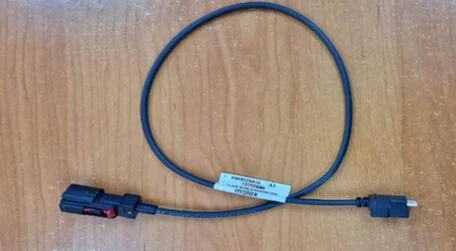
CAUSE:Misfit USB cable Fig.1.
USB Cable For Center Console Harness This replacing the center console USB cable.
REPAIR SUMMARY: CLAIMS DATA:
Failure Code ZZ Service Action
SPARE PARTS:
Fig. 1
Labor Operation No: Labor Description Skill Category Labor Time
08-90-82-92Cable, USB Center Console - Replace (1 - Semi-Skilled)6 - Electrical and Body Systems0.9 Hrs.
Qty Part No. Description Notes
168658437AACableBlack USB Cable Console XY331-D3142A
DIAGNOSIS:
If the customer describes the symptom/condition listed above, perform the Repair Procedure.
REPAIR PROCEDURE:
  1. Remove the floor console. Refer to the detailed service procedures listed in DealerCONNECT> Service Library under: 23 - Body / Interior / Console, Floor / Removal.
  2. Remove the end cap from the floor console. Refer to the detailed service procedures listed in DealerCONNECT> Service Library under: 23 - Body / Interior / Console, Floor, End Cap / Removal.
  3. Disconnect off the existing USB connector and connect the NEW USB cable to the media port.
  4. Using zip ties, secure cable to existing console harness every 150mm (6 inches) to avoid a Buzz, Squeak
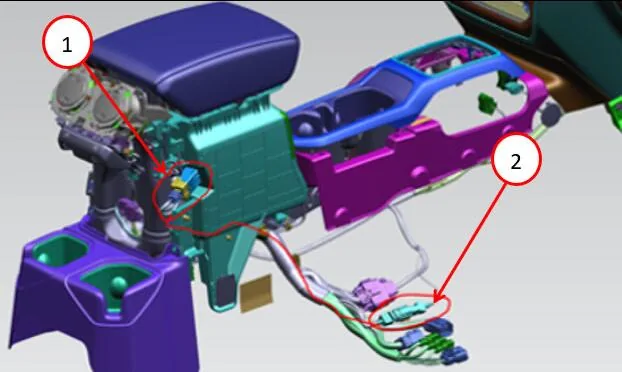
    or Rattle (BSR) condition when routing to the bracket under the passenger seat Fig. 2.
1 - USB Port to Floor Console End Cap
2 - USB Cable to Wire Harness Connector
Fig. 2
USB Connection End to End
NOTE: Perform push-pull-push on each connection to ensure the connector is fully seated.
  1. Install the end cap. Refer to the detailed service procedures listed in DealerCONNECT> Service Library under: 23 - Body / Interior / Console, Floor, End Cap / Installation.
  2. Install the floor console. Refer to the detailed service procedures listed in DealerCONNECT> Service Library under: 23 - Body / Interior / Console, Floor / Installation.
  3. Confirm USB port functionality.
POLICY:
Reimbursable within the provisions of the warranty.
This bulletin is supplied as technical information only and is not an authorization for repair. No part of this publication may be reproduced, stored in a retrieval system, or transmitted, in any form or by any means, electronic, mechanical, photocopying, or otherwise, without written permission of FCA US LLC.
Jeep Wrangler JL Android Auto Maps are gone 1718972537453-i9
Jeep Wrangler JL Android Auto Maps are gone 1718972537489-oa
Jeep Wrangler JL Android Auto Maps are gone 1718972537514-81
Jeep Wrangler JL Android Auto Maps are gone 1718972537537-z2
Jeep Wrangler JL Android Auto Maps are gone 1718972537559-d
Jeep Wrangler JL Android Auto Maps are gone 1718972537586-74
Jeep Wrangler JL Android Auto Maps are gone 1718972537617-lt
Jeep Wrangler JL Android Auto Maps are gone 1718972537652-6f
Jeep Wrangler JL Android Auto Maps are gone 1718972537748-4f
Jeep Wrangler JL Android Auto Maps are gone 1718972537765-sg
 

Tncdrew

Well-Known Member
First Name
Tom
Joined
May 3, 2022
Threads
24
Messages
1,781
Reaction score
3,496
Location
East Tennessee
Vehicle(s)
2022 JL Willys, 3.6L - 8spd
By the way.... have you thought about running un-tethered/wireless. Read here.

.
I read though your link... very nice piece! It appears the original AAWireless dongle is unavailable now (on Amazon), as they are soon to be releasing a V.2.
 

Sponsored

73TAWM

Well-Known Member
First Name
Troy
Joined
Jul 14, 2023
Threads
6
Messages
462
Reaction score
467
Location
Missouri
Vehicle(s)
21 JLU RUBICON 2.0T 3"LIFT 37's
Occupation
Lumber Sales
It could be as simple as the setting in your phone under Android Auto. Maybe you recently had a software update on your phone? I would check that first.
Apologies if I'm repeating what others have said, I did not read all the comments, but I have Android and know that you can choose what apps you want to show up when in Android Auto is in use.
 

Rhinebeck01

Well-Known Member
Joined
May 9, 2018
Threads
169
Messages
12,679
Reaction score
19,168
Location
Ormond Beach, Florida
Vehicle(s)
'18 JL Rubi, '26 Cybertruck, '01 Harley FatBoy
Occupation
Retired at 55 ..
I read though your link... very nice piece! It appears the original AAWireless dongle is unavailable now (on Amazon), as they are soon to be releasing a V.2.
I am not at liberty to talk about v2 that will be available in the near future.

Will say to those that have the AAWireless dongle v1, that though the v2 is a different footprint, (it's nice) you are gonna be aok with the v1 going forward so to speak.
 
OP
OP
GMONEY

GMONEY

Well-Known Member
First Name
Greg
Joined
Sep 24, 2022
Threads
22
Messages
1,409
Reaction score
1,912
Location
Temecula California
Vehicle(s)
23 2D Rubi Earl
Clubs
 
If you're using the USB in the center console this may help. I've ordered a new cable to see if it fixes my issues with Android Auto.

Technical Service Bulletin (TSB)
Floor Console USB Inoperative
REFERENCE:TSB: 08-020-24 GROUP: 08 - ElectricalDate:January 13, 2024REVISION:–
VEHICLES AFFECTED:2018 - 2023 (JL) Jeep Wrangler
2020 - 2023 (JT) Jeep Gladiator
This bulletin applies to vehicles equipped with a Remote USB Port (Sales Code RSX).
MARKET APPLICABILITY:
NA MEA SA IAP EE CH
CUSTOMER SYMPTOM:Customers may comment on the following:
â—Ź Customer states the Apple Carplay/Android AutoTM does not work or is intermittently working when their device is plugged into the center console bin USB port.
CAUSE:Misfit USB cable Fig.1.
USB Cable For Center Console Harness This replacing the center console USB cable.
REPAIR SUMMARY: CLAIMS DATA:
Failure Code ZZ Service Action
SPARE PARTS:
Fig. 1
Labor Operation No: Labor Description Skill Category Labor Time
08-90-82-92Cable, USB Center Console - Replace (1 - Semi-Skilled)6 - Electrical and Body Systems0.9 Hrs.
Qty Part No. Description Notes
168658437AACableBlack USB Cable Console XY331-D3142A
DIAGNOSIS:
If the customer describes the symptom/condition listed above, perform the Repair Procedure.
REPAIR PROCEDURE:
  1. Remove the floor console. Refer to the detailed service procedures listed in DealerCONNECT> Service Library under: 23 - Body / Interior / Console, Floor / Removal.
  2. Remove the end cap from the floor console. Refer to the detailed service procedures listed in DealerCONNECT> Service Library under: 23 - Body / Interior / Console, Floor, End Cap / Removal.
  3. Disconnect off the existing USB connector and connect the NEW USB cable to the media port.
  4. Using zip ties, secure cable to existing console harness every 150mm (6 inches) to avoid a Buzz, Squeak
    or Rattle (BSR) condition when routing to the bracket under the passenger seat Fig. 2.
1 - USB Port to Floor Console End Cap
2 - USB Cable to Wire Harness Connector
Fig. 2
USB Connection End to End
NOTE: Perform push-pull-push on each connection to ensure the connector is fully seated.
  1. Install the end cap. Refer to the detailed service procedures listed in DealerCONNECT> Service Library under: 23 - Body / Interior / Console, Floor, End Cap / Installation.
  2. Install the floor console. Refer to the detailed service procedures listed in DealerCONNECT> Service Library under: 23 - Body / Interior / Console, Floor / Installation.
  3. Confirm USB port functionality.
POLICY:
Reimbursable within the provisions of the warranty.
This bulletin is supplied as technical information only and is not an authorization for repair. No part of this publication may be reproduced, stored in a retrieval system, or transmitted, in any form or by any means, electronic, mechanical, photocopying, or otherwise, without written permission of FCA US LLC.
1718972537453-i9.jpg
1718972537489-oa.jpg
1718972537514-81.jpg
1718972537537-z2.jpg
1718972537559-db.jpg
1718972537586-74.jpg
1718972537617-lt.jpg
1718972537652-6f.jpg
1718972537748-4f.jpg
1718972537765-sg.jpg
I'm using the USB in the dash thanks though.
 
OP
OP
GMONEY

GMONEY

Well-Known Member
First Name
Greg
Joined
Sep 24, 2022
Threads
22
Messages
1,409
Reaction score
1,912
Location
Temecula California
Vehicle(s)
23 2D Rubi Earl
Clubs
 
It could be as simple as the setting in your phone under Android Auto. Maybe you recently had a software update on your phone? I would check that first.
Apologies if I'm repeating what others have said, I did not read all the comments, but I have Android and know that you can choose what apps you want to show up when in Android Auto is in use.
Didn't appear to be a strong on my phone as it works in other cars both wired and wireless (I travel a lot for work and rent a lot of cars).
 

Rhinebeck01

Well-Known Member
Joined
May 9, 2018
Threads
169
Messages
12,679
Reaction score
19,168
Location
Ormond Beach, Florida
Vehicle(s)
'18 JL Rubi, '26 Cybertruck, '01 Harley FatBoy
Occupation
Retired at 55 ..
I read though your link... very nice piece! It appears the original AAWireless dongle is unavailable now (on Amazon), as they are soon to be releasing a V.2.

I just got some word.... and AAWireless v.2 is still slated for release in 3rd quarter of 2024.

For now though, AAWireless, v. 1 is available on Amazon .. here for $59.99 today 6/27/24.
 

Ratbert

Well-Known Member
First Name
John
Joined
Jun 20, 2020
Threads
158
Messages
15,974
Reaction score
24,884
Location
PNW
Vehicle(s)
2022 AEV JL370 JLURD
Build Thread
Link
Occupation
Software Engineer
Clubs
 
I am not at liberty to talk about v2 that will be available in the near future.

Will say to those that have the AAWireless dongle v1, that though the v2 is a different footprint, (it's nice) you are gonna be aok with the v1 going forward so to speak.
From what I've read, v2 won't be massively different unless the button adds significant value to some of us for switching between devices.

If CarPlay support works well (my wife uses an iPhone) that might come in handy. It'd probably mean using Velcro / Command Strips to attach it near the top of the center console so we don't have to dig for it.

https://9to5google.com/2024/01/12/aawireless-2-quick-look-gallery-comparison/
Sponsored


Top