Sponsored

Tazor upgrades

MacombRoger

Well-Known Member
First Name
Roger
Joined
Jan 29, 2018
Threads
12
Messages
806
Reaction score
1,094
Location
SE Michigan
Vehicle(s)
2018 JLUR Ocean Blue
Occupation
Solution Architect
Download the firmware separately and do a manual update.
Sounds good... how? Soon as you go to that screen, the page takes over.

Thanks!
Sponsored


EbyCreek

Well-Known Member
First Name
Troy
Joined
Dec 20, 2017
Threads
4
Messages
382
Reaction score
435
Location
Eagle, Colorado
Vehicle(s)
2021 Wrangler 392
Occupation
ARMY (Retired) UH-60 ME/IP

firedude

Well-Known Member
First Name
Bret
Joined
Feb 7, 2022
Threads
3
Messages
508
Reaction score
830
Location
AZ
Vehicle(s)
2022 Rubicon XR 392 Stingray
Build Thread
Link
Occupation
Retired firefighter
I use my Tazer quite a bit. TPMS, Sway kill (I have antirocks and removed electro sway), force fans on, Winch mode, kill three honk, force 2wd and more. It is a great tool. The user manual is a little difficult at first but once you learn it its not bad. Do read it and follow to the letter.
 

firedude

Well-Known Member
First Name
Bret
Joined
Feb 7, 2022
Threads
3
Messages
508
Reaction score
830
Location
AZ
Vehicle(s)
2022 Rubicon XR 392 Stingray
Build Thread
Link
Occupation
Retired firefighter
Ok, so I know there are a bunch of threads about this here and there, but I figured I'd start a fresh one to put together all the things that the Tazor (and any other aftermarket products) can do when it comes to computer related mods/ upgrades for the 392:rock:
You might want to change tazer spelling in your title. This will help people doing a search in the future.
 

Sponsored

notacon

Active Member
First Name
John
Joined
Aug 8, 2020
Threads
2
Messages
30
Reaction score
44
Location
Fountain Valley, Ca
Vehicle(s)
2019 wrangler sport unlimited
Just a FYI, i installed a taser lite on my 2.0T to adjust the gearing. Worked great, then I installed new KC headlights (awesome by the way) and noticed that during the day only 1 headlight would come on, worked great at night. After a lot of checking the wiring and changing connectors I discovered it was the Taser. I took i out and everything was fine. Software bug? The moral is if you install a Taser and try to leave it in to access some of the other features if you start having electrical bugs remove it and recheck before you spend time and money on anything else.
 

JustinB

Well-Known Member
Joined
Nov 23, 2020
Threads
6
Messages
143
Reaction score
151
Location
Arkansas
Vehicle(s)
Jeep Cherokee, Ninja 650R, Jeep 392, Yamaha TTR230
With all due respect, the Tazer has never had a user-friendly instruction manual, until perhaps now.

With the latest firmware update (11.4.1), which now has a "PIN Lock" feature, where one can assign a steering wheel button sequence to be required before driving the vehicle, the Instruction Manual seems to be less vague.

Historically when you're enabling any particular setting the confusion was like, Ok?... Did the setting actually activate something or de-activate something.?.

For example, the "Set Sway Bar" setting.
An excerpt from an older instruction manual, "Set Sway Bar: If the Electronic Sway Bar has been removed, you can use this setting to delete the warnings." Well, I have an electronic sway bar so do I select YES because I have an electric sway bar OR do I select NO it hasn't been removed so I don't want to delete the warnings? Or is it just the opposite??? Again as an example, this type of instruction is way too ambiguous. I ultimately selected YES [which I've now learned was wrong]. Now imagine an individual going thru all their settings with this ambiguity. :facepalm: Maybe intuition & gut feeling got me thru 90% of the settings... but that 10% can really screw things up.


Here is an excerpt from the revised manual, 11.4.1. "Set Sway Bar “SwayBar”: Set to YES, this deletes the warnings after the Electronic Sway Bar has been removed." Well, I obviously should have selected NO months back. Adding verbiage in the manual like, "Set to Yes..." makes all the difference!

Looking thru the manual now many of the setting instructions have a more definitive definition using more specific instruction, BUT NOT ALL OF THEM, unfortunately. Not sure yet just how refined the manual is until I get in the Jeep later this weekend.

I Love my TAZER and really appreciate the people continually developing & updating their products with new features. So, to those working there, Thank You! With that and with upmost respect, If I had any constructive input with ZAutomotive, I'd suggest that each and every setting's instruction be broken down in the manual to its most concise definition and instruction. Add the If Set To 'Yes', or If Left On the 'This', or any other 'if set to variation', please please do so. YES, be redundant if need be!!! In my opinion it is better to have an extra page added to the manual than to mess up even one setting due to ambiguity.

I updated my Tazer last night. Later today/this weekend I'm going to go thru all my settings while referencing this updated instruction guide. From an end-users point of view I may respond back.

Like I've historically done, I've highlighted the new User's Guide with my personal use highlights to break the manual down better into the 3 sections, as I'm flipping thru the pages while I'm actually sitting in the Jeep. Though this has nothing to do with my previous comments. I've included/attached my personal copy.

Hope Everyone has a Great Weekend!!! ✌
 

Attachments

JAF1

Well-Known Member
Joined
Jan 11, 2021
Threads
18
Messages
145
Reaction score
126
Location
Pittsburgh, PA
Vehicle(s)
2021 JLUR (RIP)
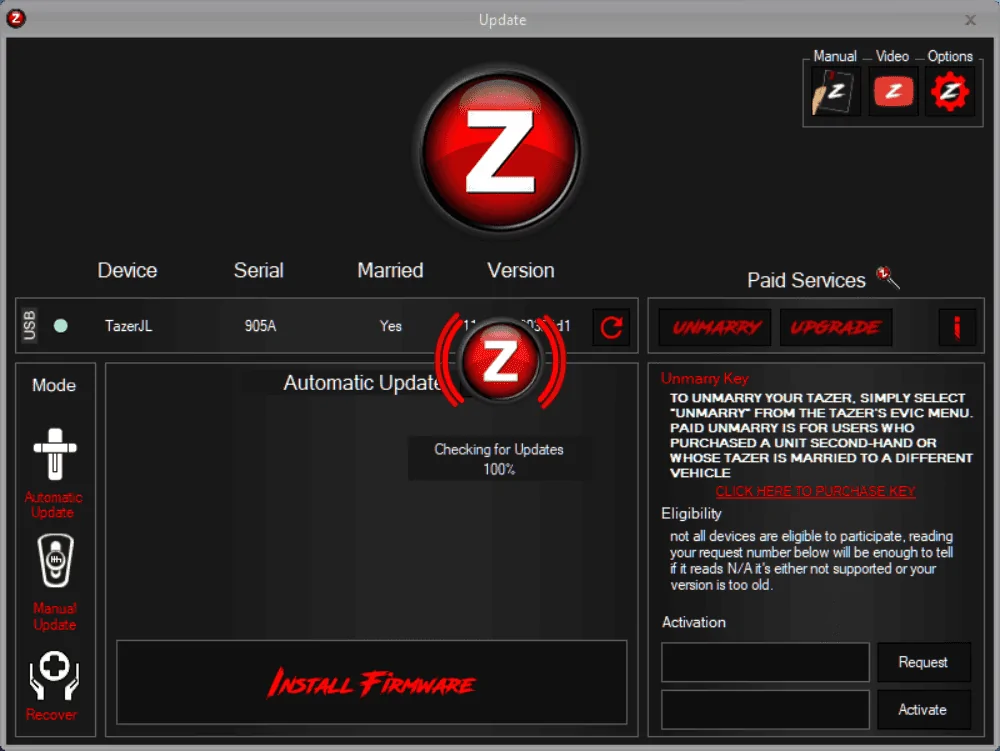
So I have a problem. I am about 5 versions old, but really wanted to add the pin lock. First 5 or so times, using th software, it could not find the tazer... been there and done that. But last night, multiple tries, I could never get past this message:

1668784705753.png


Any ideas? Anyone?

I have the newest version of the software. Other pages seem to work (Reading Canbus and programming light shows), but this page never gets past here.

Maybe I need to actually pull it from the Jeep and try a different computer?
Make sure you are using the latest version of the installer software (not the firmware). I think this was updated earlier this year.
 

Ratbert

Well-Known Member
First Name
John
Joined
Jun 20, 2020
Threads
158
Messages
15,975
Reaction score
24,895
Location
PNW
Vehicle(s)
2022 AEV JL370 JLURD
Build Thread
Link
Occupation
Software Engineer
Clubs
 
Make sure you are using the latest version of the installer software (not the firmware). I think this was updated earlier this year.
That's something that I wouldn't have thought of. It checks that the firmware is the latest, but not the installer itself??
 

Sponsored

JAF1

Well-Known Member
Joined
Jan 11, 2021
Threads
18
Messages
145
Reaction score
126
Location
Pittsburgh, PA
Vehicle(s)
2021 JLUR (RIP)
That's something that I wouldn't have thought of. It checks that the firmware is the latest, but not the installer itself??
I'd just grab the latest version off their site to be safe. Just a thought in case that was causing the problem.
 

MacombRoger

Well-Known Member
First Name
Roger
Joined
Jan 29, 2018
Threads
12
Messages
806
Reaction score
1,094
Location
SE Michigan
Vehicle(s)
2018 JLUR Ocean Blue
Occupation
Solution Architect
Make sure you are using the latest version of the installer software (not the firmware). I think this was updated earlier this year.
Got it done. I did have the latest software too.... Think it was my work laptop. I have the SWG extension cables on the tazer, so it is easy to get to. Just unplugged the damn thing and brought it into to my desktop PC. Had it recognized and updated in under a minute.

I had some trouble setting the pin, in fact had to clear it when it said it was set before I finished creating one, leaving me to holding the brake for 10 minutes to clear it. Whew!

Got a "pin" set now, works very nicely. I park in a garage, but lot of vehicle thefts lately around me, so I think this is a good 2nd line of defense, that is easy to thwart thieves.
 

MacombRoger

Well-Known Member
First Name
Roger
Joined
Jan 29, 2018
Threads
12
Messages
806
Reaction score
1,094
Location
SE Michigan
Vehicle(s)
2018 JLUR Ocean Blue
Occupation
Solution Architect
Got a "pin" set now, works very nicely. I park in a garage, but lot of vehicle thefts lately around me, so I think this is a good 2nd line of defense, that is easy to thwart thieves.
I just will have to remember to clear it before taking it in for any service or valet in the future. :)
 

JustinB

Well-Known Member
Joined
Nov 23, 2020
Threads
6
Messages
143
Reaction score
151
Location
Arkansas
Vehicle(s)
Jeep Cherokee, Ninja 650R, Jeep 392, Yamaha TTR230
With all due respect, the Tazer has never had a user-friendly instruction manual, until perhaps now.

With the latest firmware update (11.4.1), which now has a "PIN Lock" feature, where one can assign a steering wheel button sequence to be required before driving the vehicle, the Instruction Manual seems to be less vague.

Historically when you're enabling any particular setting the confusion was like, Ok?... Did the setting actually activate something or de-activate something.?.

For example, the "Set Sway Bar" setting.
An excerpt from an older instruction manual, "Set Sway Bar: If the Electronic Sway Bar has been removed, you can use this setting to delete the warnings." Well, I have an electronic sway bar so do I select YES because I have an electric sway bar OR do I select NO it hasn't been removed so I don't want to delete the warnings? Or is it just the opposite??? Again as an example, this type of instruction is way too ambiguous. I ultimately selected YES [which I've now learned was wrong]. Now imagine an individual going thru all their settings with this ambiguity. :facepalm: Maybe intuition & gut feeling got me thru 90% of the settings... but that 10% can really screw things up.
Here is an excerpt from the revised manual, 11.4.1. "Set Sway Bar “SwayBar”: Set to YES, this deletes the warnings after the Electronic Sway Bar has been removed." Well, I obviously should have selected NO months back. Adding verbiage in the manual like, "Set to Yes..." makes all the difference!

Looking thru the manual now many of the setting instructions have a more definitive definition using more specific instruction, BUT NOT ALL OF THEM, unfortunately. Not sure yet just how refined the manual is until I get in the Jeep later this weekend.

I Love my TAZER and really appreciate the people continually developing & updating their products with new features. So, to those working there, Thank You! With that and with upmost respect, If I had any constructive input with ZAutomotive, I'd suggest that each and every setting's instruction be broken down in the manual to its most concise definition and instruction. Add the If Set To 'Yes', or If Left On the 'This', or any other 'if set to variation', please please do so. YES, be redundant if need be!!! In my opinion it is better to have an extra page added to the manual than to mess up even one setting due to ambiguity.

I updated my Tazer last night. Later today/this weekend I'm going to go thru all my settings while referencing this updated instruction guide. From an end-users point of view I may respond back.

Like I've historically done, I've highlighted the new User's Guide with my personal use highlights to break the manual down better into the 3 sections, as I'm flipping thru the pages while I'm actually sitting in the Jeep. Though this has nothing to do with my previous comments. I've included/attached my personal copy.

Hope Everyone has a Great Weekend!!! ✌
Tazer Instruction Manual UPDATE, a follow up to my initial post:

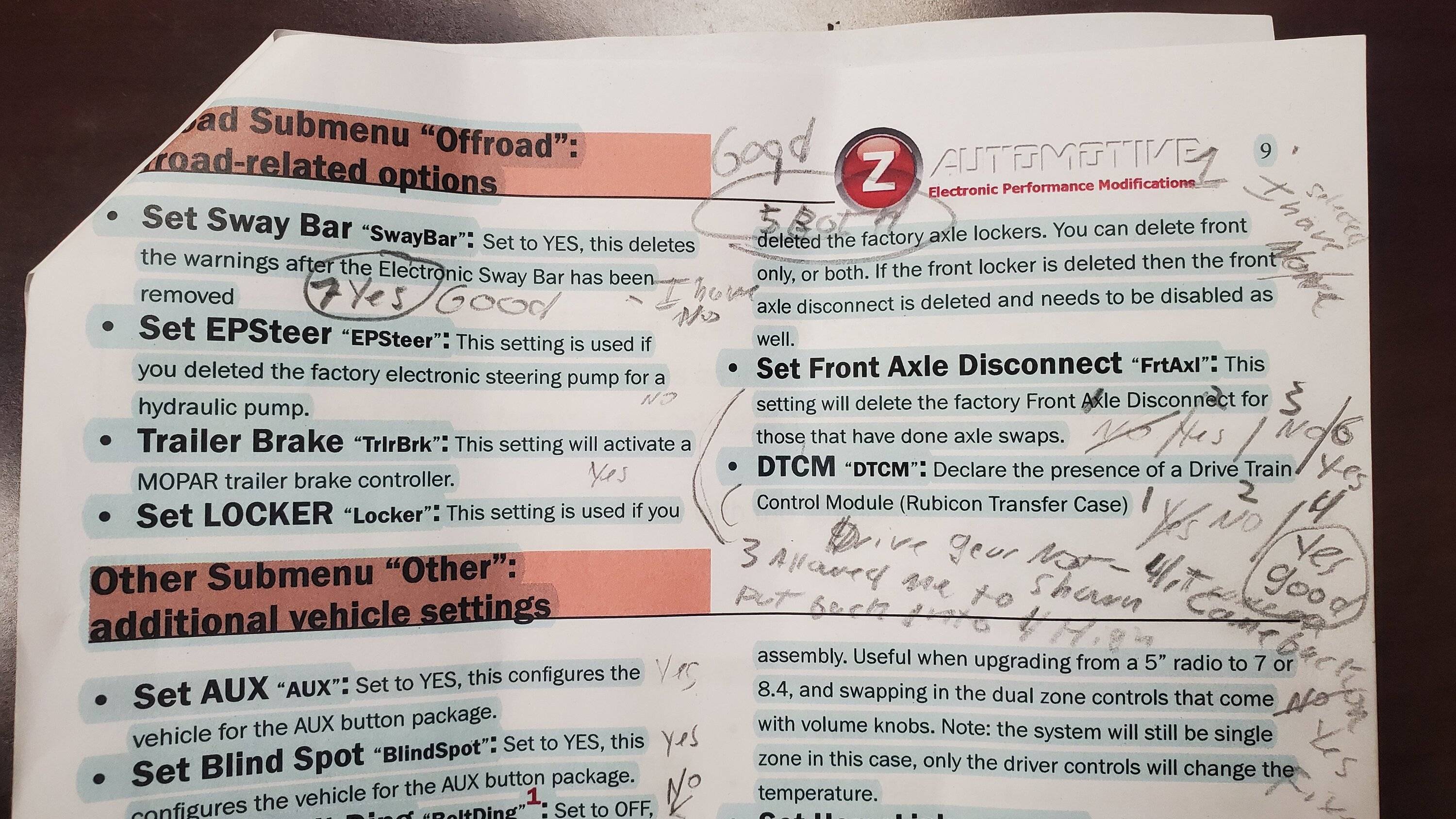
This weekend I was able to invest some time in an attempt to see if the Tazer’s User Manual (version 11.4.1) became more user friendly. In short, it was not. My primary focus was to set up the OFFROAD Submenu, this because one [or more] of the Tazer settings was preventing my Jeep from engaging the lockers and or transfer case. I say “or more” because some settings appear to be dependent on other setting. So, I invested 1.5 hours playing with all the Offroad settings. I’ve included a pic of my working document, this more so to share the madness that was going on in my mind as I passed thru 7 Reboots & 14 sleep cycles to finally get the Offroad Settings, set lockers, functioning. I’m still not 100% certain they are all accurate, but I was able to get my red locker dash switch working (light up) and engage the lockers. I am not taking a shot at Zautomotive. As I expressed earlier, I love my Tazer (when set up properly). The following examples will detail my thought process and what I experienced.

For awareness I have a Jeep Wrangler Rubicon 392. In other words, I have all the same factory equipment in the Offroad Sub Menu minus the Trailer Brake. Although I have the Tow Package, I do not have the MOPAR brake controller. I have not physically removed or added anything from the Jeep as it relates to this particular sub-menu.

I’ll be primarily providing the last measure of the 7 Reboots that left me with engaging lockers. Keep in mind that I went back and forth on a few settings because some settings were dependent on other settings.

An excerpt from the 11.4.1 User Manual along with my notes:

“Set Sway Bar “SwayBar”: Set to YES, this deletes the warnings after the Electronic Sway Bar has been removed”
I initially had this set to NO, as in I do not want my warnings deleted. My Electric Sway Bar is installed. A YES setting implies that the sway bar has been removed. I learned the correct setting for my Jeep is YES. When set to NO the Jeep does not ‘see’ the factory electric sway bar. This instruction is completely backwards.


“Set EPSteer “EPSteer”: This setting is used if you deleted the factory electronic steering pump for a hydraulic pump.”
Following the instructional format from the previous instruction, if “Set to Yes”, I have this setting at NO. A YES implies the electronic steering pump was removed. I do not know which one is correct. Currently set at NO my power steering is still working. As my power steering is working, this instruction contradicts the format of the previous instruction. With that said, I Do Not Know if I have potentially turned off a warning sensor for the power steering, or indirectly affected any other system that is dependent on the Jeep ‘seeing’ an electronic power steering pump. Understanding this instruction may be completely backwards as well, I have no symptoms at the moment to show me what the correct setting should be. Less ambiguity is required.

“Trailer Brake “TrlrBrk”: This setting will activate a MOPAR trailer brake controller.”
There is no if, “Set to Yes” in this instruction. I currently have this set to YES. I figure if/when I get a MOPAR brake controller I should be able to simply install it and it’ll function. Less ambiguity is required, as I could be completely wrong based off previous instructional attempts and the results.


“Set LOCKER “Locker”: This setting is used if you deleted the factory axle lockers. You can delete front only, or both. If the front locker is deleted then the front axle disconnect is deleted and needs to be disabled as well.”
This one here is a real doozy and I believe impacted other settings, as I went back and forth with my 7 reboots. Ok, the instruction clearly states I can disable the front only or the front & rear [Both]. It clearly implies I need to pick the lockers to delete. Again, I physically removed nothing from this Jeep. While viewing the EVIC screen my options are Front, Both, and None. I would certainly think None is the correct setting, I have not deleted either of my lockers; therefore, I should not select any of my lockers for deletion, right? Wrong. For me to actually get my lockers to work this setting has to be set to BOTH. This instruction is way to ambiguous.

“Set Front Axle Disconnect “FrtAxl”: This setting will delete the factory Front Axle Disconnect for those that have done axle swaps.”
Again, pretty straight forward if using the “If Set To Yes” theory; however, at this point in my reboots I had become pretty lost on the whole Yes vs NO selection, switching this setting back and forth to figure out what allows other settings to work. In short, I started off with a NO setting, as I’ve not done an axle swap. YES, ultimately was the correct setting, and allowed other settings to take.

“DTCM “DTCM”: Declare the presence of a Drive Train Control Module (Rubicon Transfer Case).”
Just like the front axle disconnect instruction this was pretty straight forward, I have a Rubicon transfer case, so I declared it with a YES which was the correct selection.

A FEW THINGS TO NOTE that are not relative to the Offroad Sub-menu. These are just some things I stumbled across and happen to make note at the time, my priority was figuring out Offroad settings…

Under the Lighting Submenu.


“Set DRL Location “DRL Loc”: Choose which lights to use as DRLs (results vary with vehicle model) - choices:
DRL
Turns
Fogs
High beams
Low beams”


Dedic”, is a selection that can be made. It is not noted as a selection and there’s no definition on what this setting is or how this setting affects the vehicle.

“Set DRL Dropout “DRL Drop”: Set to OFF, this will keep the DRLs on even when a turn signal is in use.”
There is no OFF setting. The options on the EVIC are YES or NO.

“Set Fog Dropout “Fog Drop”: Set to OFF, this will keep the fogs on even when the high beams are in use.”
There is no OFF setting. The options on the EVIC are YES or NO.


Under the Other Submenu.

“Set Seatbelt Ding “BeltDing”1: Set to OFF, this will disable the chime when your seatbelt is off. The seat belt warnings on the dash will continue to function.”
There is no OFF setting. The options on the EVIC are YES or NO.

Summary. Because of the ambiguity within just the Offroad submenu alone, I am highly concerned that many of my other settings are incorrect. And they may be incorrect because I have not yet noticed a symptom to correct it. More concerningly, I may never notice the impact, direct or indirect, on how some of my settings may be impacting the system of the vehicle as a whole.

I.E.
“Set Travel Link “TravelLnk”: This setting adds the ability to disable SiriusXM Travel Link, which turns off the weather pop-ups. Also disables SiriusXM Traffic information.”
I have my, “Set Travel Link” to NO. Is that the correct setting if I want to receive travel alerts? Does the NO mean I won’t get the alerts or does NO mean it’s not going to disable Travel Link and I will receive notifications??? There is no “If Set To XXX”. This same concern holds true with a multitude of the settings I’ve adjusted over time.


I have spent a good part of my day writing all this up. The reason is because I care. I care to get it right. I care because it affects the most enjoyable vehicle I have ever owned. I care because I know others enjoy their Jeep just the same. I write all this because I am not some internet troll trying to get a rise, no troll spends 3 hours reviewing notes and typing all this up to try and get a rise out of someone, I really do care, this paper is only intended to be constructive.

The individuals writing Tazer code are way way smarter than I, I haven’t the brain power and could never do that. I would consider writing a Standard Operating Procedure though. That is more in my wheelhouse …. If so desired, I can discuss offline.

What would really be best is if the user had the ability to plug their Tazer in and make adjustments while using their laptop, selecting boxes as we go along. This has to happen with updates as it is. Or perhaps a Bluetooth Tazer with a phone app is in the works ?

Take Care

~justin

Jeep Wrangler JL Tazor upgrades Working Doc -Tazer
 
Last edited:

Ratbert

Well-Known Member
First Name
John
Joined
Jun 20, 2020
Threads
158
Messages
15,975
Reaction score
24,895
Location
PNW
Vehicle(s)
2022 AEV JL370 JLURD
Build Thread
Link
Occupation
Software Engineer
Clubs
 
Tazer Instruction Manual UPDATE, a follow up to my initial post:

This weekend I was able to invest some time in an attempt to see if the Tazer’s User Manual (version 11.4.1) became more user friendly. In short, it was not. My primary focus was to set up the OFFROAD Submenu, this because one [or more] of the Tazer settings was preventing my Jeep from engaging the lockers and or transfer case. I say “and or” because some settings appear to be dependent on other setting. So, I invested 1.5 hours playing with all the Offroad settings. I’ve included a pic of my working document, this more so to share the madness that was going on in my mind as I passed thru 7 Reboots & 14 sleep cycles to finally get the Offroad Settings, set lockers, functioning. I’m still not 100% certain they are all accurate, but I was able to get my red locker dash switch working (light up) and engage the lockers. I am not taking a shot at Zautomotive. As I expressed earlier, I love my Tazer (when set up properly). The following examples will detail my thought process and what I experienced.

For awareness I have a Jeep Wrangler Rubicon 392. In other words, I have all the same factory equipment in the Offroad Sub Menu minus the Trailer Brake. Although I have the Tow Package, I do not have the MOPAR brake controller. I have not physically removed or added anything from the Jeep as it relates to this particular sub-menu.

I’ll be primarily providing the last measure of the 7 Reboots that left me with engaging lockers. Keep in mind that I went back and forth on a few settings because some settings were dependent on other settings.

An excerpt from the 11.4.1 User Manual along with my notes:

“Set Sway Bar “SwayBar”: Set to YES, this deletes the warnings after the Electronic Sway Bar has been removed”
I initially had this set to NO, as in I do not want my warnings deleted. My Electric Sway Bar is installed. A YES setting implies that the sway bar has been removed. I learned the correct setting for my Jeep is YES. When set to NO the Jeep does not ‘see’ the factory electric sway bar. This instruction is completely backwards.


“Set EPSteer “EPSteer”: This setting is used if you deleted the factory electronic steering pump for a hydraulic pump.”
Following the instructional format from the previous instruction, if “Set to Yes”, I have this setting at NO. A YES implies the electronic steering pump was removed. I do not know which one is correct. Currently set at NO my power steering is still working. As my power steering is working, this instruction contradicts the format of the previous instruction. With that said, I Do Not Know if I have potentially turned off a warning sensor for the power steering, or indirectly affected any other system that is dependent on the Jeep ‘seeing’ an electronic power steering pump. Understanding this instruction may be completely backwards as well, I have no symptoms at the moment to show me what the correct setting should be. Less ambiguity is required.

“Trailer Brake “TrlrBrk”: This setting will activate a MOPAR trailer brake controller.”
There is no if, “Set to Yes” in this instruction. I currently have this set to YES. I figure if/when I get a MOPAR brake controller I should be able to simply install it and it’ll function. Less ambiguity is required, as I could be completely wrong based off previous instructional attempts and the results.


“Set LOCKER “Locker”: This setting is used if you deleted the factory axle lockers. You can delete front only, or both. If the front locker is deleted then the front axle disconnect is deleted and needs to be disabled as well.”
This one here is a real doozy and I believe impacted other settings, as I went back and forth with my 7 reboots. Ok, the instruction clearly states I can disable the front only or the front & rear [Both]. It clearly implies I need to pick the lockers to delete. Again, I physically removed nothing from this Jeep. While viewing the EVIC screen my options are Front, Both, and None. I would certainly think None is the correct setting, I have not deleted either of my lockers; therefore, I should not select any of my lockers for deletion, right? Wrong. For me to actually get my lockers to work this setting has to be set to BOTH. This instruction is way to ambiguous.

“Set Front Axle Disconnect “FrtAxl”: This setting will delete the factory Front Axle Disconnect for those that have done axle swaps.”
Again, pretty straight forward if using the “If Set To Yes” theory; however, at this point in my reboots I had become pretty lost on the whole Yes vs NO selection, switching this setting back and forth to figure out what allows other settings to work. In short, I started off with a NO setting, as I’ve not done an axle swap. YES, ultimately was the correct setting, and allowed other settings to take.

“DTCM “DTCM”: Declare the presence of a Drive Train Control Module (Rubicon Transfer Case).”
Just like the front axle disconnect instruction this was pretty straight forward, I have a Rubicon transfer case, so I declared it with a YES which was the correct selection.

A FEW THINGS TO NOTE that are not relative to the Offroad Sub-menu. These are just some things I stumbled across and happen to make note at the time, my priority was figuring out Offroad settings…

Under the Lighting Submenu.


“Set DRL Location “DRL Loc”: Choose which lights to use as DRLs (results vary with vehicle model) - choices:
DRL
Turns
Fogs
High beams
Low beams”


Dedic”, is a selection that can be made. It is not noted as a selection and there’s no definition on what this setting is or how this setting affects the vehicle.

“Set DRL Dropout “DRL Drop”: Set to OFF, this will keep the DRLs on even when a turn signal is in use.”
There is no OFF setting. The options on the EVIC are YES or NO.

“Set Fog Dropout “Fog Drop”: Set to OFF, this will keep the fogs on even when the high beams are in use.”
There is no OFF setting. The options on the EVIC are YES or NO.


Under the Other Submenu.

“Set Seatbelt Ding “BeltDing”1: Set to OFF, this will disable the chime when your seatbelt is off. The seat belt warnings on the dash will continue to function.”
There is no OFF setting. The options on the EVIC are YES or NO.

Summary. Because of the ambiguity within just the Offroad submenu alone, I am highly concerned that many of my other settings are incorrect. And they may be incorrect because I have not yet noticed a symptom to correct it. More concerningly, I may never notice the impact, direct or indirect, on how some of my settings may be impacting the system of the vehicle as a whole.

I.E.
“Set Travel Link “TravelLnk”: This setting adds the ability to disable SiriusXM Travel Link, which turns off the weather pop-ups. Also disables SiriusXM Traffic information.”
I have my, “Set Travel Link” to NO. Is that the correct setting if I want to receive travel alerts? Does the NO mean I won’t get the alerts or does NO mean it’s not going to disable Travel Link and I will receive notifications??? There is no “If Set To XXX”. This same concern holds true with a multitude of the settings I’ve adjusted over time.


I have spent a good part of my day writing all this up. The reason is because I care. I care to get it right. I care because it affects the most enjoyable vehicle I have ever owned. I care because I know others enjoy their Jeep just the same. I write all this because I am not some internet troll trying to get a rise, no troll spends 3 hours reviewing notes and typing all this up to try and get a rise out of someone, I really do care, this paper is only intended to be constructive.

The individuals writing Tazer code are way way smarter than I, I haven’t the brain power and could never do that. I would consider writing a Standard Operating Procedure though. That is more in my wheelhouse …. If so desired, I can discuss offline.

What would really be best is if the user had the ability to plug their Tazer in and make adjustments while using their laptop, selecting boxes as we go along. This has to happen with updates as it is. Or perhaps a Bluetooth Tazer with a phone app is in the works ?

Take Care

~justin

Working Doc -Tazer.jpg
Thanks for the thorough analysis. Maybe @Rhinebeck01 can do his magic with ZAutomotive to get these issues addressed.
Sponsored


Top