Sponsored

five9dak

Well-Known Member
First Name
Chris
Joined
Feb 26, 2021
Threads
0
Messages
1,008
Reaction score
1,762
Location
PA
Vehicle(s)
Bikini '20 JL Freedom, '99 Dakota R/T, '11 Boxster
I was looking at this video of a classic chrysler with the voice alerts, and.. welp, I think I've found a reason to jump into this now lol. I want them on my Jeep!

I had this car with the same interior and talking/digital dash. Mine was an 86 turbo with only 30k original miles.
Sponsored


CaJLMetalHead

Well-Known Member
First Name
CAJLMetalHead
Joined
Sep 6, 2018
Threads
19
Messages
969
Reaction score
1,873
Location
96049
Vehicle(s)
Jeep Wrangler Sport Unlimited
Hmm, interesting...

So you are testing a new one on your bench, sending commands directly to it? without it being attached to the jeep's wiring?

I'm wondering if the sway bar, being a critical safety component, is on the other bus for critical things. Someone earlier mentioned the bus name, but I can't remember it. I'd bet that we are sending commands to a different module that in turn is commanding the smart sway bar to operate. Does this make sense?
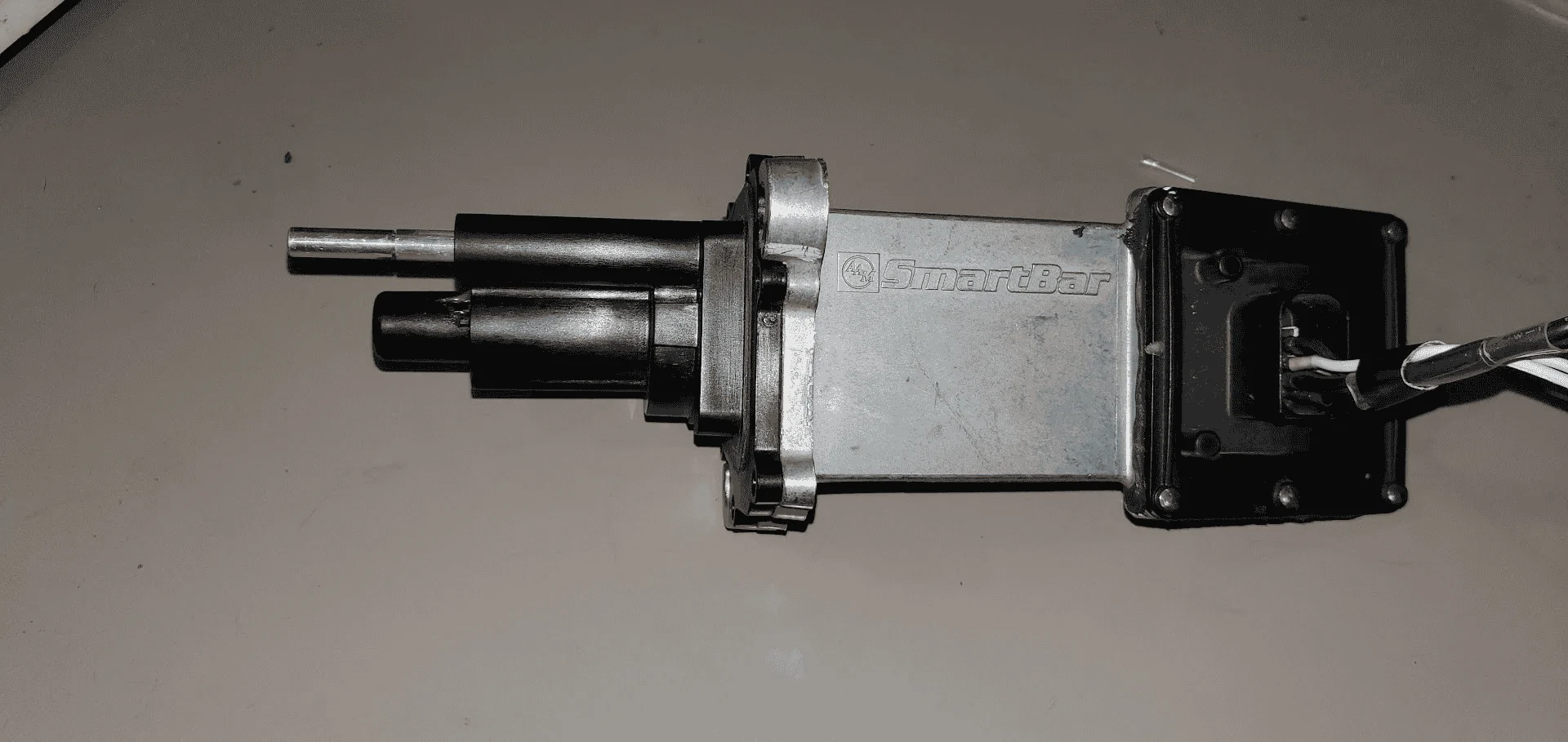
My sway bar came from a JT Rubicon which was basically brand new when removed... I have not connected the sway bar to the JL's wiring because mine is a JLU Sport.. it does not come with that sway bar wiring (the wiring diagram shows the sway bar connected to the CAN-C bus) ... also.. I only have the motor / control module on the bench.. .not the entire assembly (I wonder if the thing has to be completely assembled for it to work... ??? I doubt it)

The shiny metal rod is the plunger sensor.. the one below is the actual motor actuated plunger that pushes the collar to engage/disengage the sway bar mechanism (this photo is of my smartbar on the bench)
Jeep Wrangler JL JEEP HACKING CAN-C / CAN-IHS / UDS ! (Reverse Engineering) 1642003026559
 
Last edited:

CaJLMetalHead

Well-Known Member
First Name
CAJLMetalHead
Joined
Sep 6, 2018
Threads
19
Messages
969
Reaction score
1,873
Location
96049
Vehicle(s)
Jeep Wrangler Sport Unlimited
I'm trying to document message ID $371 in the spreadsheet, but it looks like both of you are describing it two different ways? RedRacer has a wider-ranged value in the first byte and that 00-02 status in the second byte. You've got just a 00-02 status as the first byte and that's it. Both of you have the rest of your bytes padded with zeros. Which way is it?

As it stands, I've currently documented it as:
id371.webp

Could it be that what RedRacer sees on the bus with that first byte D0 being populated with different values and the plunger sensor value moved to the second byte is only when a toggle command is issued by ID 0x26F ??

RedRacer... when you get a chance.. can you please check what the sway bar sends to the bus
when no commands are being issued? do you see 0x371 sending all Zeroes on all bytes about once a second? Thanks!!!


This is what Redracer sees:
0x26F 00 40 FF FF FF 7F 7F 7F Sway Bar Request - unlock / lock toggle - need to test this.
0x371 51 02 00 00 00 00 00 00 sway bar unlock in progress
0x371 70 01 00 00 00 00 00 00 sway bar unlocked
0x371 42 02 00 00 00 00 00 00 sway bar lock in progress
0x371 61 00 00 00 00 00 00 00 sway bar locked
 

Temperance

Member
First Name
Amelia
Joined
Dec 30, 2021
Threads
0
Messages
17
Reaction score
23
Location
Washington
Vehicle(s)
2020 Jeep Gladiator Mojave
Occupation
Software Engineer
Please let me know the results once you get to test the Sway bar unlock / lock toggle.. I tested the smartbar on my bench .. I sent the packet but the smartbar did not react to it.. and I did not see any sway bar response on 0x371 ( I only see the sway bar generic poll every second with
0x371 00 00 00 00 00 00 00 00 ,,, that is all... no response to the toggle command.. no movement of the motor.. ☹ )

Thanks!!!!
The sway bar module has all of the safety logic located inside of it. It needs to know the status of the 4wd shifter and vehicle speed. There may be other things that it listens for as well. But if this status is not present on the bus that the sway bar is connected to then it won't respond. It may also have to be enabled (using a tazer or something similar).
 

CaJLMetalHead

Well-Known Member
First Name
CAJLMetalHead
Joined
Sep 6, 2018
Threads
19
Messages
969
Reaction score
1,873
Location
96049
Vehicle(s)
Jeep Wrangler Sport Unlimited
The sway bar module has all of the safety logic located inside of it. It needs to know the status of the 4wd shifter and vehicle speed. There may be other things that it listens for as well. But if this status is not present on the bus that the sway bar is connected to then it won't respond. It may also have to be enabled (using a tazer or something similar).
Good points... Thanks!.. I will connect it to the canbus at some point in the coming weeks.. a little issue is that I have not been able to find the connector anywhere... I actually wrote to both Hirsmannn Automotive USA and Austria about where to buy the connector... I received no reply.. ugh..
 

Sponsored

redracer

Well-Known Member
First Name
Robert
Joined
Aug 22, 2017
Threads
20
Messages
576
Reaction score
650
Location
Manteca, CA
Vehicle(s)
2023 4xe Rubicon
doing more sniffing...

Headlights / interior lights switch
0x291 - 00 00 00 00 00 00 xx 00 interior dimmer 22=lowest C8=highest
0x291 - 00 00 0x 00 00 00 00 00 Running Lights 0=off 1=on
0x291 - 00 00 00 00 00 00 00 0x Head Lights 0=off 2=low 4=high
0x291 - 00 00 00 00 00 0x 00 00 Cabin Lights 0=off 1=on
 
OP
OP
jmccorm

jmccorm

Well-Known Member
First Name
Josh
Joined
Sep 15, 2021
Threads
55
Messages
1,170
Reaction score
1,322
Location
Tulsa, OK
Vehicle(s)
2021 JLUR
Build Thread
Link
Occupation
Systems Engineering
doing more sniffing...
Headlights / interior lights switch
Updated! Last night, the weather was nice enough for me to take my computer outside again. I noticed similar values happening at $2FA, which I'll add to the documentation. In $2FA, the first byte contained which door(s) were opened, and the fourth byte was connected to the power locks. I wonder if the same is true for $291?
 

Temperance

Member
First Name
Amelia
Joined
Dec 30, 2021
Threads
0
Messages
17
Reaction score
23
Location
Washington
Vehicle(s)
2020 Jeep Gladiator Mojave
Occupation
Software Engineer
Good points... Thanks!.. I will connect it to the canbus at some point in the coming weeks.. a little issue is that I have not been able to find the connector anywhere... I actually wrote to both Hirsmannn Automotive USA and Austria about where to buy the connector... I received no reply.. ugh..
TE Connectivity makes a lot of the connectors for Mopar. I'd try looking at these sites to see if you can find it.

https://www.mouser.com/c/?m=TE Connectivity

https://www.te.com/usa-en/plp/automotive-connector-housings/Y30Dy.html
 

CaJLMetalHead

Well-Known Member
First Name
CAJLMetalHead
Joined
Sep 6, 2018
Threads
19
Messages
969
Reaction score
1,873
Location
96049
Vehicle(s)
Jeep Wrangler Sport Unlimited
TE Connectivity makes a lot of the connectors for Mopar. I'd try looking at these sites to see if you can find it.

https://www.mouser.com/c/?m=TE Connectivity

https://www.te.com/usa-en/plp/automotive-connector-housings/Y30Dy.html
Thanks for the links.. I already looked around on the TE site... there are similar
connectors... but I am pretty certain the one for the Sway Bar is made
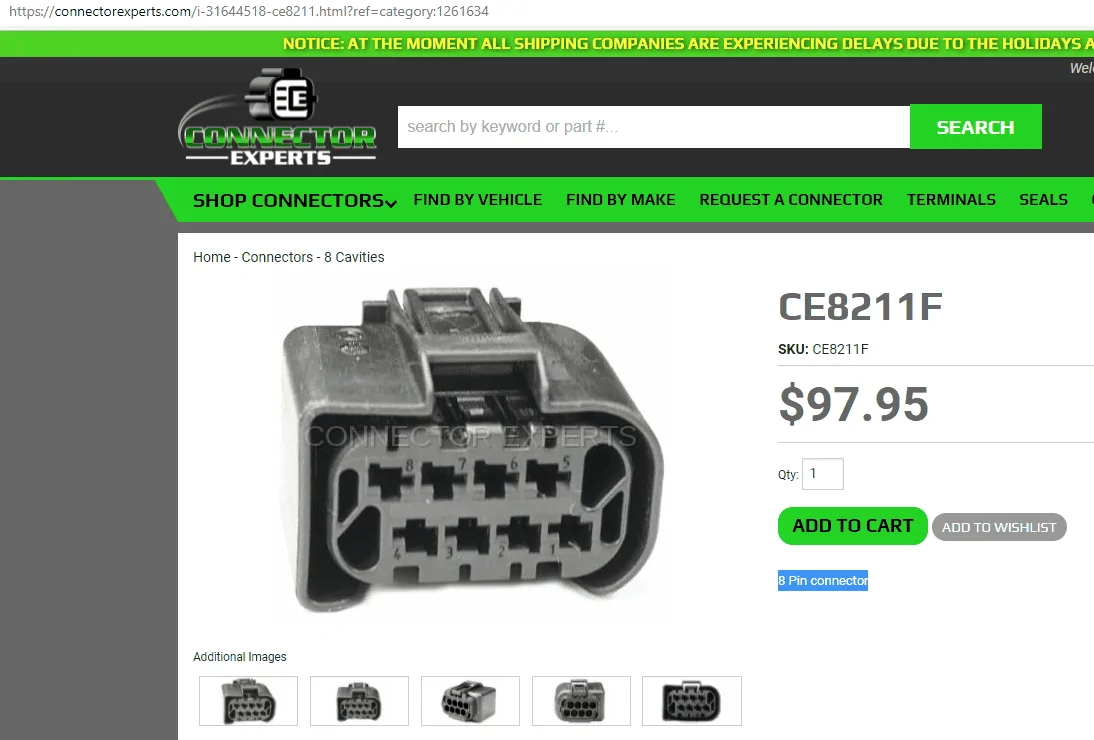
by Hirschmann Automotive... this little guy..

I will look into TE again... Thanks!

The Hirschmann part number is 807-871-
Jeep Wrangler JL JEEP HACKING CAN-C / CAN-IHS / UDS ! (Reverse Engineering) 1642087355946


This company has it under a different part number at $97 yikes..
Jeep Wrangler JL JEEP HACKING CAN-C / CAN-IHS / UDS ! (Reverse Engineering) 1642087102650
 
OP
OP
jmccorm

jmccorm

Well-Known Member
First Name
Josh
Joined
Sep 15, 2021
Threads
55
Messages
1,170
Reaction score
1,322
Location
Tulsa, OK
Vehicle(s)
2021 JLUR
Build Thread
Link
Occupation
Systems Engineering
At that price, I have to wonder if a Mopar replacement connector might be cheaper. Have you checked into that? (There's a link to the Mopar connector website towards the start of this thread.)

EDIT: If this is the item, a pre-wired Mopoar harness is going to cost even more. (But not too much more.)
 
Last edited:

Sponsored

OP
OP
jmccorm

jmccorm

Well-Known Member
First Name
Josh
Joined
Sep 15, 2021
Threads
55
Messages
1,170
Reaction score
1,322
Location
Tulsa, OK
Vehicle(s)
2021 JLUR
Build Thread
Link
Occupation
Systems Engineering
Read OBD-II Parameters via Script

This morning I made a general-purpose script "obd" that reads OBD-II parameters and returns the response. You'll find a list of OBD-II parameters accepted by the Wrangler on the second tab of the CAN bus spreadsheet. The engine must be running for these to work.

The challenge here is that a response might be one, two, four, and in a few cases, even more bytes long. To reduce the complexity of handling multi-part messages, the number of bytes it returns will be limited to 4 or 5 (depending on the situation).

Each byte will be returned as individual decimal numbers. I figured that would be the easiest and most universal form to work with. If there is no response, it will try again with a longer delay. If there is an error or there again is no response, it returns an error message and a result code greater than 0. (There may be a better way of handling that.)

So in the spreadsheet where you see that the formula for Engine RPM ($0C) is " ((A*256)+B)/4 ", then you would take the first number, multiply by 256, add it to the second number, and divide the grand total by four.

Example:

# obd 0c
17 184

((A*256)+B)/4 = ((17*256)+184)/4

17 * 256 = 4352​
4352 + 184 = 4536​
4536 / 4 = 1134 RPMs​

Here's an easier example with Intake Air Temperature ($0F). The formula (given on the spreadsheet) is A-40. So...

# obd F​
78​

78-40 = 38F

So this is super straightforward and easy to work with. And if you're running a black box recorder, remember that any query you make will have it's result permanently stored in your log for later review.

Let me know if you have any questions.
 
Last edited:
OP
OP
jmccorm

jmccorm

Well-Known Member
First Name
Josh
Joined
Sep 15, 2021
Threads
55
Messages
1,170
Reaction score
1,322
Location
Tulsa, OK
Vehicle(s)
2021 JLUR
Build Thread
Link
Occupation
Systems Engineering
Read OBD-II Parameters via Script

This morning I made a general-purpose script "obd" that reads OBD-II parameters and returns the response. You'll find a list of OBD-II parameters accepted by the Wrangler on the second tab of the CAN bus spreadsheet. The engine must be running for these to work.
I forgot the most important part. The script! Here we go...
Code:
#!/bin/bash

# NOTE: This script sends an OBD-II command and returns
#       with the response string.

error() {
  # Exit with a message and a failure result code
  echo "NO RESPONSE"
  exit 1
}

initialize () {
  # 1/10th of a second from now, send the OBD-II query with the
  # user-provided PID.

  ( sleep 0.1 ; cansend can1 7E0#0201${PID}0000000000 ) &

  # Collect any messages on CAN-C which have an ID of $7E8.
  # After a predefined number of seconds, stop collecting.

  COMMAND="timeout -s 1 $WAIT /usr/bin/candump -L can1,7E8:0FFF"

  # Only look for messages which are a successful response to our
  # particular OBD-II query.
  # UDS query. If we received more than one response, only use
  # the last one. And isolate the output so it only contains the
  # byte that we're looking for.

  RESPONSE=$( $COMMAND | egrep "\#..41${PID}|\#10..41${PID}" | cut -d# -f2 | head -1)
  DATA=${RESPONSE:6}
  # As long as we receive data, continue evaluating the output.
  [ "$DATA" != "" ] && {
    LENGTH=${RESPONSE:0:2}
    # If the length is 10 (HEX) then we have a response longer than
    # we can process, and in a different format. We'll have to adjust
    # things slightly so that we can read the first four characters.
    [ $LENGTH == "10" ] && {
      LENGTH=${RESPONSE:2:2}
      DATA=${DATA:2}
    }
    # Extract the message length and message data.
    LENGTH=$( printf "%d" 0x$LENGTH ) 2>/dev/null
    LENGTH=$(( $LENGTH - 2 )) >> /dev/null 2>/dev/null
    DATA=${DATA:0:$(( LENGTH * 2 ))} 2>/dev/null
  }
}

# MAIN CODE BEGINS HERE ---------------------------------------------------

# Take the user-provded OBD-II PID and convert it to uppercase.
# If they did not provide a pid, print a help message and exit.

PID=$( echo $1 | tr '[:lower:]' '[:upper:]' )
if [ "$PID" == "" ] ; then
  echo "USAGE: `basename $0` [XX]"
  echo ""
  exit 1
fi

# If they provided a single hex digit, then prepend it with a 0.
if [ $(echo ${#PID}) -eq 1 ] ; then
  PID="0$PID"
fi

# Test to see if it is a hex number. If not, print an error and exit.
printf "%d" 0x$PID > /dev/null 2>&1
if [ $? -ne 0 ] ; then
  echo "ERROR: $PID is not a valid hexadecimal value"
  echo ""
  exit 2
fi

# Send the OBD-II query to the BCM.
# NOTE: This REQUIIRES the vehicle to be running.
WAIT=0.2
initialize

# If there was no response, we could have missed the message. Or it
# could have taken too long to reply. Try again, this time waiting
# up to 0.5 seconds for a reply.
if [ "$LENGTH" == "" ] ; then
  WAIT=0.5
  initialize
  if [ "$LENGTH" == "" ] ; then error; fi
fi

# Print the response as individual decimal numbers.
# They will need to be reassembled via the published OBD-II formulas.
for i in $(echo $DATA | fold -w2 | paste -sd' ')
do
  printf "%d " 0x$i
done
echo ""
 
OP
OP
jmccorm

jmccorm

Well-Known Member
First Name
Josh
Joined
Sep 15, 2021
Threads
55
Messages
1,170
Reaction score
1,322
Location
Tulsa, OK
Vehicle(s)
2021 JLUR
Build Thread
Link
Occupation
Systems Engineering
Hi, just a quick shout-out. If someone came over to this thread from another thread that was based on issues with the HVAC, please private message me (and if you can, remind me what the topic was). Thanks!
 
OP
OP
jmccorm

jmccorm

Well-Known Member
First Name
Josh
Joined
Sep 15, 2021
Threads
55
Messages
1,170
Reaction score
1,322
Location
Tulsa, OK
Vehicle(s)
2021 JLUR
Build Thread
Link
Occupation
Systems Engineering
Get Ti
RASPBERRY PI SHELL SCRIPT:
EXTRACT DATE AND TIME FROM THE CAN-IHS BUS


Ideally, any computer you choose to connect to your CAN bus should be heavily firewalled and/or disconnected from the Internet. This means that your device may not have the ability to read the latest time and keep it's clock in sync. Even more so because your vehicle is in motion and any network-based source for that information may not take your current location (timezone) into consideration.
I have a mild update for the script, and I'd also like to demonstrate how to make the most of it. The following command (best used in a script that's called from /etc/rc.local) can be used to automatically set the Raspberry Pi's clock upon boot. This negates the need or any benefit from adding a real-time clock module (or maintaining an Internet connection) with your setup. The script just pulls the current information from the vehicle and then the Raspberry Pi runs with it.

sleep 2 ; date -s "$(gettime)"

The new version of gettime automatically tickles the CAN bus if it's asleep, and it automatically retries if the first attempt to pull the time and date was not successful. Here's the new script:

Bash:
#!/bin/bash

# This script reads the current date and time from the CAN-IHS bus
# and returns the output.

# If we run into an error, this fuction displays a generic error message and exits.
error() {
  echo "ERROR: Is the vehicle off? Current time and date not found."
  echo "DEBUG: A valid ID 350 message was not seen on CAN-IHS within 3 seconds."
  echo " "
  # Exit with a failure result code
  exit 1
}

initialize () {
# The method we use to read any CAN-IHS message with an ID of 350 is stored in $COMMAND.
# The "timeout" command limits how long we're willing to wait to only one second.
COMMAND="timeout -s 9 1.1 /usr/bin/candump -L can0,0350:0fff"

# We begin by grabbing out message.
# If we got lucky and received two, we only keep the last one.
can350=$( $COMMAND | tail -1 )
}

initialize
# Retry if no message received.
if [ "$can350" == "" ] ; then
  # Wake the CAN bus and try again.
  cansend can0 2D3#0700000000000000 ; sleep 1.1
  initialize
  # Display an error and exit if no messages were received.
  [ "$can350" == "" ] && error
fi

# Display an error and exit if the clock has not been initialized.
if [ "$( echo "$can350" | cut -c30-43 )" == "FFFFFFFFFFFFFF" ] ; then error; fi

# Extract the hexadecimal numbers from the message.
rawtime="$( echo "$can350" | cut -d# -f2 )"

# Reformat the numbers as hexadecimal bytes with spaces in between them.
rawtime="$( echo "$rawtime" | fold -w2 | paste -sd' ' )"

# Change year so that it is represented as one word instead of two bytes.
rawtime="$( echo "$rawtime" | cut -c1-11,13-20 )"

# Read the six hexadecimal fields as: seconds minutes hours year month day
# Convert to decimal, Reformat as: day/month/year hours:minutes:seconds
time="$( echo $rawtime | { read seconds minutes hours year month day ; \
  printf "%d/%d/%d %02d:%02d:%02d\n" \
    0x$month 0x$day 0x$year 0x$hours 0x$minutes 0x$seconds ; } )"

# Print the result to the screen
echo "$time"

# Exit with a successful result code
exit 0
NOTE: This also assumes that you've correctly configured your can0 and can1 devices to automatically start on boot. If someone needs a help with the /etc/network/interfaces/can0 and can1 file, I can share my copy.
 

redracer

Well-Known Member
First Name
Robert
Joined
Aug 22, 2017
Threads
20
Messages
576
Reaction score
650
Location
Manteca, CA
Vehicle(s)
2023 4xe Rubicon
Awesome! I had this on my mind yesterday as I was doing my sniffing. Thanks!

Oh, and the reason for finding the dash dimming is so that I can scale the backlight on the Pi 7" display to match. This is the beauty of the official 7" display, writing to a /sys file with 0-199 adjusts the actual backlight. And it can get as dim as the radio and console screens. To be exact, it's:
/sys/class/backlight/rpi_backlight/brightness .

This is a great project! Now i just need to brush up on my python and tkinter to write an ugly UI.
Sponsored


Top