Sponsored
OP
OP
jmccorm

jmccorm

Well-Known Member
First Name
Josh
Joined
Sep 15, 2021
Threads
55
Messages
1,170
Reaction score
1,322
Location
Tulsa, OK
Vehicle(s)
2021 JLUR
Build Thread
Link
Occupation
Systems Engineering
PowerNet Bus Voltages

I came across a table with the different voltages typically seen on the Wrangler's CAN bus and what they mean:

Jeep Wrangler JL JEEP HACKING CAN-C / CAN-IHS / UDS ! (Reverse Engineering) 1643828507166


Based upon that, I was thinking...

As it stands now, there isn't a good way to have the Raspberry Pi shut itself down cleanly (because power is abruptly pulled from it) or spend additional time processing after the vehicle has been turned off because after it shuts down, it can't wake itself up when the vehicle restarts.

When the CAN+ line goes from 0V to 2V+, if we had a circuit that momentarily shorts a 3.3V reset line, we could have a device that wakes up the Raspberry Pi from it's shutdown state (via the RPi P6 header) whenever the vehicle wakes up.

Anyone know how to put together a circuit like that?

EDIT: I think it may be called a rising edge trigger momentary relay or even a (retriggerable) monostable multivibrator? Something like an SN74123 might be a good choice, but I wouldn't be able to design a circuit around it. (Lack of mad electronic skills.)
Sponsored

 
Last edited:
OP
OP
jmccorm

jmccorm

Well-Known Member
First Name
Josh
Joined
Sep 15, 2021
Threads
55
Messages
1,170
Reaction score
1,322
Location
Tulsa, OK
Vehicle(s)
2021 JLUR
Build Thread
Link
Occupation
Systems Engineering
Ignition Switch Monitor

This script ('montior') is designed to launch processes (and in one case, kill a process) based upon the changes to the vehicle's ignition status. It also adjusts the CPU governor to allow for more performance while the engine is running. (If you do not wish for it to muck around with the governor, replace the "governor=true" statement towards the top with "governor=false".) This is essentially the same script was was posted sometime earlier, but with an important change.

A small but important change (read only if this really interests you):

The previous version of the script was designed for a Raspberry Pi that was constantly powered on. So if the script started up and the vehicle was already running, it assumed that the vehicle had been running and the Raspberry Pi rebooted. In that situation, it avoided re-running the HVAC automation script. But in most situations, the Raspberry Pi will be constantly powered on. Instead, it will be powered on with the vehicle's accessory or ignition switch. So after the Raspberry Pi takes 30 seconds to boot, the engine will always have been running for that 30 seconds or so.​
To compensate for this, the new version of the script will always run the HVAC control script "autohvac" and not attempt to detect reboots while the engine is running. (There is a more elegant way figuring out if the Raspberry Pi rebooted while the engine was running, but that change can wait until another time.)​
What's also different is that this version of the script tries to maintain the same delay (about 30 seconds) whether or not the Raspberry Pi was always on or if it started with the vehicle. Currently, it does a "sleep 30" when it needs to add a delay, but with all things, there is a more elegant way of handling that.​
Maintaining the delay is important because the HVAC script won't work properly if executed immediately after the vehicle has started. We want the same delay regardless of how the Raspberry Pi powers on.​
This was all likely way too much explanation for something so simple.

Script follows:
Bash:
#!/bin/bash

PATH=$PATH:/home/pi/bin
touch /tmp/monitor

# MONITOR:
#          Monitors the vehicle's ignition switch to determine when
#          certain major processes are launched or killed.

# TUNABLE VARIABLES

# Name for the CAN-IHS interface (can0, can1, vcan0, etc)
CANIHS=can0
# Name of the WiFi device used in ifconfig, iwconfig
WIFIDEV=wlan0
# ENABLE OR DISABLE DEBUG STATEMENTS
DEBUG=false # Values: true,false,raw
# AUTOMATICALLY TUNE THE CPU GOVERNOR? (ONDEMAND VS POWERSAVE?)
GOVERNOR=true

# LOCAL VARIABLES WHICH STORE STATE INFORMATION

dumpid=0
LASTIGNITION=99

# Wait five seconds and then change the CPU governor to powersave mode.

sleep 5
echo $(date) MONITOR: Initializing.
echo $(date) MONITOR: uptime $(uptime | cut -d, -f1-2)
if [ "$GOVERNOR" == "true" ] ; then
  echo $(date) MONITOR: Changing CPU governor to: POWERSAVE
  echo "powersave" > /sys/devices/system/cpu/cpufreq/policy0/scaling_governor
fi

# CONSTANTLY MONITOR THE IGNITION SWITCH FOR ITS LATEST VALUE.

candump -L $CANIHS,0122:0FFFF | while read TIME BUS IGNITION
do

[ $DEBUG == "raw" ] && echo CAN-IHS data: $IGNITION
HEADER="TIME   : $TIME $( date )\nDATA   : $IGNITION"

# CONVERT $IGNITION TO A *DECIMAL NUMBER* SO WE CAN DO EASY COMPARISONS
# RUN MODE OR ENGINE STARTING/RUNNING: GREATER THAN 67108863
# ACCESSORY MODE OR VEHICLE OFF:       LESS    THAN 67108864

IGNITION=$( echo $IGNITION | cut -d"#" -f2 )
IGNITION=$( printf %d 0x$IGNITION )

# DEBUGGING STATEMENT

[ $DEBUG == "raw" ] && echo IGNITION: $IGNITION   LASTIGNITION: $LASTIGNITION

# WHEN ENGINE GOES FROM OFF TO ON, LAUNCH OUR ROUTINES.

if [ $IGNITION -gt 67108863 ] ; then
  if [ $LASTIGNITION -lt 67108864 ] ; then
    [ $DEBUG == "true" ] && echo -e $HEADER
    [ $DEBUG == "true" ] && echo "EVENT : VEHICLE HAS BEEN TURNED ON"

    # CHANGING CPU GOVERNOR TO THE ONDEMAND POLICY
    # Make more CPU power available while the engine is running.

    echo $(date) MONITOR: Vehicle starting up.

    if [ "$GOVERNOR" == "true" ] ; then
      echo $(date) MONITOR: Changing CPU governor to: ONDEMAND
      echo "ondemand"> /sys/devices/system/cpu/cpufreq/policy0/scaling_governor
    fi

    # START THE AUTOMATED COLLECTION OF VEHICLE STATISTICS

    echo $(date) MONITOR: Starting Autocollect script.
    /home/pi/bin/autocollect &

    # STARTING THE BLACK BOX RECORDER, STORING INTO: /home/pi/log

    echo $(date) MONITOR: Starting Black Box Recorder.
    nohup /home/pi/bin/dump any > /dev/null &
    dumpid="$!"
    sleep 2
    dumpid=$( pgrep -P $dumpid )
    [ $DEBUG == "true" ] && echo "DUMP STARTED, PID: $dumpid"

    # A SHORT DELAY BEFORE STARTING THE NEXT SECTION
    sleep 5

    # STARTUP ROUTINE FOR HVAC AUTOMATION AFTER IGNITION-START
    # When the vehicle is started, we want the remote-start HVAC automation
    # routine to run. The only exemption is if the engine was already running
    # when this script was launched. If that's the case ($LASTIGNITION == 99),
    # then we do nothing.

    # THIS SCRIPT WAS ORIGINALLY DESIGNED FOR A RASPBERRY
    # PI THAT RECEIVED CONSTANT POWER. SO IF THIS SCRIPT
    # SAW THAT THE ENGINE WAS ALREADY RUNNING, IT WOULD NOT
    # LAUNCH THE AUTOHVAC SCRIPT BECAUSE IT THOUGHT IT MAY
    # HAVE BEEN REBOOTED WHILE THE ENGINE WAS RUNNING.
    #
    # NOW THAT I HAVE THE RASPBERRY PI POWERING ON WITH
    # THE VEHICLE'S IGNITION (AND BOOTING 30 SECONDS AFTER
    # THAT), THE TEST IS NO LONGER NEEDED. BUT THE LOGIC
    # IS LEFT IN PLACE, JUST IT LOOKS FOR AN ABSURD VALUE
    # OF 123456 INSTEAD OF 99 AS IT'S TEST CONDITION.

    if [ $LASTIGNITION != 123456 ] ; then
      echo $(date) MONITOR: Starting AutoHVAC

      # The timing of autohvac expects that it's been called after the
      # the Raspberry Pi had to time booting, which would have been a
      # good 30 seconds after the car started. So if the engine WASN'T
      # already running when this script began, this adds a 30 second
      # delay so that we wait the same amount (and have reproducable
      # timings) whether or not the Raspberry Pi had been running or if
      # it had to take time booting from scratch.

      [ $LASTIGNITION != 99 ]] && sleep 30

      # The heater routine will exit if the vehicle was not remote started.
      # Either way, it will shortly terminate after starting and does not
      # need monitoring.

      /home/pi/bin/autohvac &
    fi
    [ $DEBUG == "true" ] && echo ""
  fi
fi

# ENGINE IS NO LONGER RUNNING, KILL THE BLACK BOX

if [ $IGNITION -lt 67108864 ] ; then
  if [ $LASTIGNITION -gt 67108863 ] ; then
    [ $DEBUG == "true" ] && echo -e $HEADER
    [ $DEBUG == "true" ] && echo "EVENT : VEHICLE HAS BEEN TURNED OFF"
    [ $DEBUG == "true" ] && echo "ACTION: TERMINATING BLACK BOX RECORDER"

    # KILLING THE BLACK BOX RECORDER (IF ACTIVE)

    if [ $dumpid -gt 0 ] ; then
      sleep 2
      echo $(date) MONITOR: Black Box Recorder ended.
      pkill -TERM -P $dumpid
      kill -TERM $dumpid
      dumpid=0
    fi

    # CHANGING CPU GOVERNOR TO THE POWERSAVE POLICY
    # Become more energy efficient while the engine is not running.

    if [ "$GOVERNOR" == "true" ] ; then
      echo $(date) MONITOR: Changing CPU governor to: POWERSAVE
      echo "powersave">/sys/devices/system/cpu/cpufreq/policy0/scaling_governor
    fi
    [ $DEBUG == "true" ] && echo ""
  fi
fi

# KEEP TRACK OF WHAT THE PREVIOUS STATE OF THE IGNITIOIN SWITCH WAS.
# This is how we can tell if it has changed or not, since we want to
# take action only when there has been a change in it's value.

LASTIGNITION=$IGNITION

done
The autohvac script will be provided at a later time.
 
OP
OP
jmccorm

jmccorm

Well-Known Member
First Name
Josh
Joined
Sep 15, 2021
Threads
55
Messages
1,170
Reaction score
1,322
Location
Tulsa, OK
Vehicle(s)
2021 JLUR
Build Thread
Link
Occupation
Systems Engineering
Power Management?

I'm considering using the Witty Pi 3 Rev2 for power management.

1. It has a 5V input and then a second input with an accepted voltage range from 6V-28V. It it able to sense input voltages (on the second input) and can allow for decisions to power on or off the Raspberry Pi based upon voltage levels (power on above a threshold, power off below a threshold).

2. It allows for an external switch to be used to start up or shut down the Raspberry Pi. With some additional external circuitry, this could be used to determine when a sleeping CAN bus has woken up, and with a switch signal could be used to wake up the Raspberry Pi.

It claims to fully cut power to the Raspberry Pi when shutdown, which is good. It also allows for host-based scripts to execute a graceful shutdown (rather than being exclusively hardware based).

Either of the two would methods would work for waking up the Raspberry Pi and gracefully shutting it down again. The problem with the first method is that you'll need to feed your Raspberrry Pi a battery wire and then an ignition wire or an AUX3 wire (configured as latched, ignition) in it's place. The second method is that it requires no additional wires but the problem is that it requires additional circuitry to take advantage of the CAN lines already running to the Raspberry Pi.

It has a Real-Time Clock (RTC), but that's not very useful here since the vehicle regularly broadcasts time and date on the CAN bus. It can wake up and go to sleep based on a schedule, but I don't find that to be very helpful (unless it does some regular end-of-month processing).

It has a temperature sensor (affected by it's own heat as well as the Raspberry Pi's heat), but I don't see having an additional temperature sensor very important either.

I'm thinking of using this board to handle all the power management. Particularly providing a graceful shutdown (and the ability to run a little longer after the vehicle has shut down, if needed). The price is decent, and it allows for poweron/shutdown to be controlled two different ways.

Anyone have any thoughts on this?

UPDATE: There's also a Witty Pi 3 Mini, with a smaller side, supercapacitor instead of a battery, and no voltage regulator. There's also a Zero2Go Omini Rev 2 with just the power management features. That looks very similar and without the RTC. I also think I underestimated how useful it is to have a 5V DC-DC converter built into it. One less component needed elsewhere.
 
Last edited:
OP
OP
jmccorm

jmccorm

Well-Known Member
First Name
Josh
Joined
Sep 15, 2021
Threads
55
Messages
1,170
Reaction score
1,322
Location
Tulsa, OK
Vehicle(s)
2021 JLUR
Build Thread
Link
Occupation
Systems Engineering
Robert,

Just in plain everyday language, can you explain to me what these are? I'm just not entirely sure what the labels represent, but if you can give me a better idea of what they're about, I'm more than happy to do some more wordsmithing on these entries.

BRAKE SYSTEM
$xxxx???????? – In Motion and Brake force
$????xxxx???? – Brake force
$????????xxxx – Speed

And also, thank you for another good find!
 

Sponsored

redracer

Well-Known Member
First Name
Robert
Joined
Aug 22, 2017
Threads
20
Messages
576
Reaction score
650
Location
Manteca, CA
Vehicle(s)
2023 4xe Rubicon
Robert,

Just in plain everyday language, can you explain to me what these are? I'm just not entirely sure what the labels represent, but if you can give me a better idea of what they're about, I'm more than happy to do some more wordsmithing on these entries.

BRAKE SYSTEM
$xxxx???????? – In Motion and Brake force
$????xxxx???? – Brake force
$????????xxxx – Speed

And also, thank you for another good find!
Yes, I wasn't sure quite how to describe them.

first word, MSB seems to change depending on if we are fully stopped or not. otherwise the first word appears to be braking pressure. It lags behind the 2nd word.

2nd word appears to perfectly track the brake pedal pressure.

and 3rd word is a raw speed reading / 200
 
OP
OP
jmccorm

jmccorm

Well-Known Member
First Name
Josh
Joined
Sep 15, 2021
Threads
55
Messages
1,170
Reaction score
1,322
Location
Tulsa, OK
Vehicle(s)
2021 JLUR
Build Thread
Link
Occupation
Systems Engineering
Yes, I wasn't sure quite how to describe them.
No problem, this helps! These were some of the very first values that I started to decode, so I know I didn't do anywhere near as complete of a job as I would have today. Truth be told, I think the logreader.sh script actually throws away the first digit and uses the remainder as brake pressure! I didn't know what to make of the MSB at the time.

I put some more words in there for now, but I'll see if I can help make some additional observations tomorrow. I'm glad we're addressing this one.

...and 3rd word is a raw speed reading / 200
Thank goodness for an easy one! So you're saying that this instance of the speedometer isn't GPS corrected, right?
 

CaJLMetalHead

Well-Known Member
First Name
CAJLMetalHead
Joined
Sep 6, 2018
Threads
19
Messages
969
Reaction score
1,873
Location
96049
Vehicle(s)
Jeep Wrangler Sport Unlimited
PowerNet Bus Voltages

I came across a table with the different voltages typically seen on the Wrangler's CAN bus and what they mean:
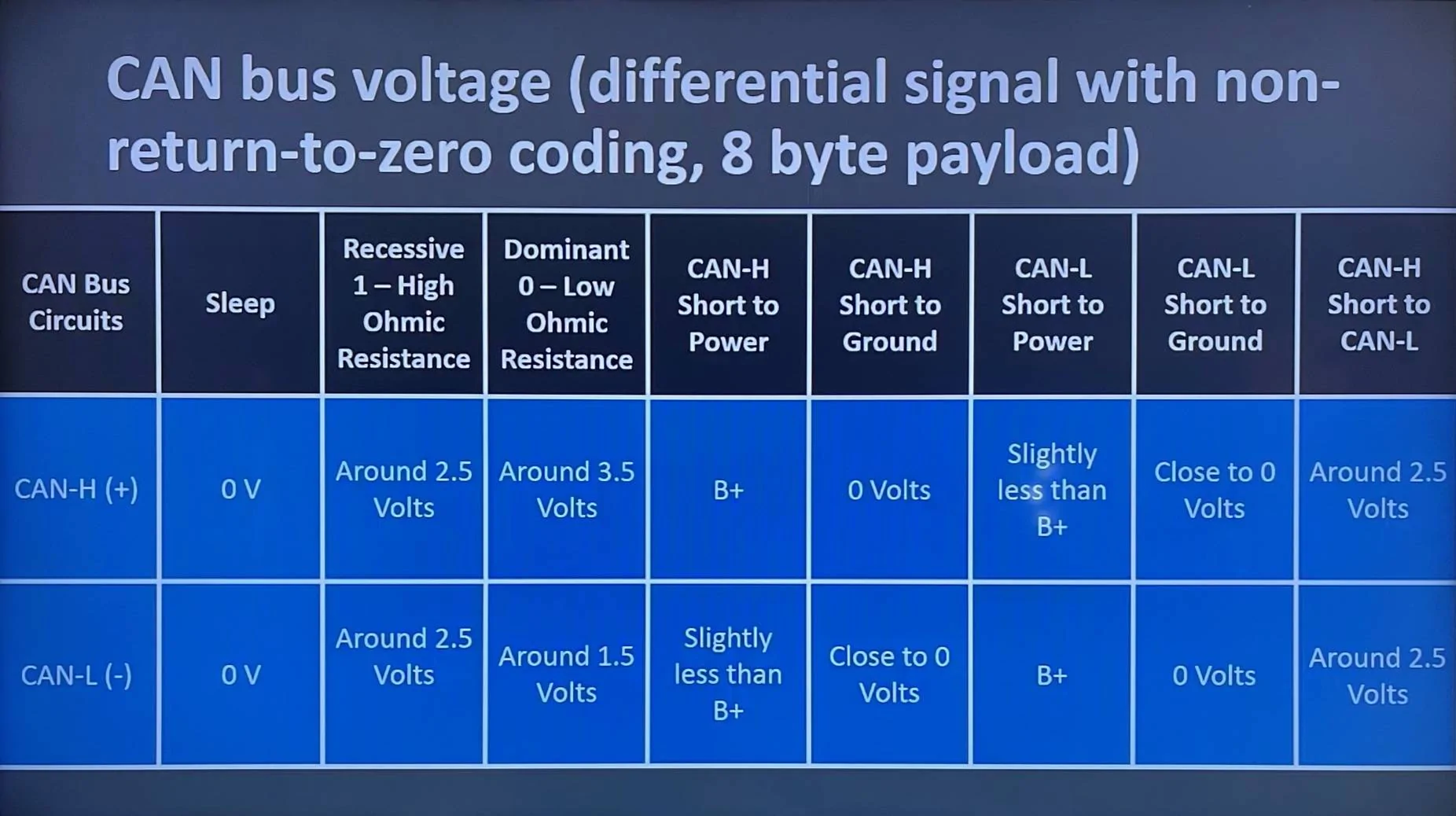
1643828507166.webp


Based upon that, I was thinking...

As it stands now, there isn't a good way to have the Raspberry Pi shut itself down cleanly (because power is abruptly pulled from it) or spend additional time processing after the vehicle has been turned off because after it shuts down, it can't wake itself up when the vehicle restarts.

When the CAN+ line goes from 0V to 2V+, if we had a circuit that momentarily shorts a 3.3V reset line, we could have a device that wakes up the Raspberry Pi from it's shutdown state (via the RPi P6 header) whenever the vehicle wakes up.

Anyone know how to put together a circuit like that?

EDIT: I think it may be called a rising edge trigger momentary relay or even a (retriggerable) monostable multivibrator? Something like an SN74123 might be a good choice, but I wouldn't be able to design a circuit around it. (Lack of mad electronic skills.)

I know there are CANBus transceivers with a Wake-up feature... the CANBus transceiver goes to sleep .. and then wakes up with CANBus activity and it has a pin that is pulled high when it happens.. then you can use that pin to.. let's say.. control a Voltage regulator with enable pin... it wakes up the regulator... it gives power to the RPI.. so it is worth investigating those CANBus transceivers with the Wake-up feature.. here is one of those chips:

TJA1145.fm (nxp.com)


I am not familiar with RPI.... I see that the RPIs do not have a deep sleep function... otherwise, you could simply power it directly from the battery.. I get that...

I also understand that once the RPI is powered off.. the only way to turn it back on is to short-circuit a pin (I am not familiar with the details)

This leads me to another question.. .how do you power your RPI? with the ignition battery?.. please provide the details and I will do my best to help you with your request... :)

One more question.. which model of the Raspberry Pi are you using?.. I think is time I buy one and start tinkering with it.. LOL
 

redracer

Well-Known Member
First Name
Robert
Joined
Aug 22, 2017
Threads
20
Messages
576
Reaction score
650
Location
Manteca, CA
Vehicle(s)
2023 4xe Rubicon
No problem, this helps! These were some of the very first values that I started to decode, so I know I didn't do anywhere near as complete of a job as I would have today. Truth be told, I think the logreader.sh script actually throws away the first digit and uses the remainder as brake pressure! I didn't know what to make of the MSB at the time.

I put some more words in there for now, but I'll see if I can help make some additional observations tomorrow. I'm glad we're addressing this one.


Thank goodness for an easy one! So you're saying that this instance of the speedometer isn't GPS corrected, right?
Yep, it looks to be without correction. same data as 0x322
 
OP
OP
jmccorm

jmccorm

Well-Known Member
First Name
Josh
Joined
Sep 15, 2021
Threads
55
Messages
1,170
Reaction score
1,322
Location
Tulsa, OK
Vehicle(s)
2021 JLUR
Build Thread
Link
Occupation
Systems Engineering
I am not familiar with RPI....
The closest analogy to a Raspberry Pi that you're likely familiar with would actually be an everyday PC running Windows. But a very strange Windows that's got history from the 1960s and really prefers it's text based interface for anything serious you want to do.

Like Windows, you have kernel modules built into the operating system which implements your basic protocols (For CAN, we're using a kernel module called socketcan.) Then you'd have chipset drivers which allow you to use certain hardware. (We're using our SPI bus to communicate with an MCP2515 CAN controller which in turn communicates with the CAN bus through a SI65HVD230 transceiver that it's been paired with).

So you've got a whole stack of things that make CAN possible under Raspbian (the flavor of Linux designed especially for the Raspberry Pi). So this isn't a situation where I'm directly communicating with a chip and I'm able to take advantage of any feature that I want. It is entirely abstracted away from me, which generally is good, because it allows me to concentrate more on what I want to do and less on how it's being done.

You're right, even the spec sheet for the MCP2515 describes how the host can configure it into a wake-on-CAN state. However, we're up against three problems. The current device driver doesn't implement that feature, the kernel module doesn't implement a wake-on-CAN feature, and the OS's suspend function (as you mentioned) is disabled in Raspbian Linux.

So there's not a direct way to take advantage of that. You did give me an idea of a poor man's method that might work. There's a signal line which indicate when the OS has been shutdown. When that signal's high, we could take advantage of the interrupt line on the MCP2515 controller. If we're lucky, the interrupt line will be low and stay low while the CAN bus is asleep. When CAN traffic resumes, it goes high and we could use both signals being high as a trigger to pulse the CPU reset line, causing the Raspberry Pi to boot on CAN.

But that's a lot of what-if's that are above my paygrade as a guy who does little professional dabbling in hardware.

This leads me to another question.. .how do you power your RPI? with the ignition battery?.. please provide the details and I will do my best to help you with your request... :)
Originally, I powered it with vehicle battery. Due to the drain, I switched over to a large portable USB battery that I'd lug to the vehicle and recharge overnight. As of this weekend, I connected it to AUX3 (set as a latched trigger on ignition) so it effectively acts as ignition. To step down the voltage, I use a fairly common 5V DC:DC converter.

I realize that I can power the Raspberry Pi from battery and then cause a reset (reboot) when the ignition wire goes from 0v to 12V, but that's going to require additional vehicle wiring.

While that works out fine for me, for some people (specifically those who did not get the towing & HD electrical package and are missing all those good wires just below the glovebox), it will be a real pain for them to get both battery and ignition voltage into the glovebox. Ideal (in terms of simplicity) seemed to be Wake-on-CAN solution because (once solved) it would be less hassle for anyone to implement as it only requires battery + CAN (or ignition + CAN as a fallback).

Now, mind you, if this turns out to be a big headache, this isn't a showstopper. Just more of an inconvenience when onboarding new people or sharing any plug-and-play solutions we create with others.

One more question.. which model of the Raspberry Pi are you using?.. I think is time I buy one and start tinkering with it.. LOL
Be warned, the Raspberry Pi is tougher and more complex than a microcontroller (not a positive pair of attributes in the automotive space). But it's also vastly more capable. You'll probably want to avoid something like the 400 which is a Raspberry Pi that's integrated into a keyboard (like the old 8-bit computers of the 80s).

I'm currently using a Raspberry Pi 3B+. I selected that version in particular because it was what I had laying around, and I was having some initial hardware problems as I was hooking things up for the first time on a Raspberry Pi 4 B. Either one's a good choice, but I'd probably lean on the older 3B+ because it is said to run cooler.

Be aware that right now the chip shortage has heavily impacted all models of the Raspberry Pi. There's generally unavailable, or only available in combo packages (which may not be so bad since you'lld need power supply, microSD card, etc), or available at scalper prices (particularly from Amazon vendors). It's going to be best to shop around a number of different sources.

And if you'd like to talk to your vehicle, you'd be well served by the 2 channel CAN HAT from Waveshare.

Hope this helps!
 

Sponsored

CaJLMetalHead

Well-Known Member
First Name
CAJLMetalHead
Joined
Sep 6, 2018
Threads
19
Messages
969
Reaction score
1,873
Location
96049
Vehicle(s)
Jeep Wrangler Sport Unlimited
The closest analogy to a Raspberry Pi that you're likely familiar with would actually be an everyday PC running Windows. But a very strange Windows that's got history from the 1960s and really prefers it's text based interface for anything serious you want to do.

Like Windows, you have kernel modules built into the operating system which implements your basic protocols (For CAN, we're using a kernel module called socketcan.) Then you'd have chipset drivers which allow you to use certain hardware. (We're using our SPI bus to communicate with an MCP2515 CAN controller which in turn communicates with the CAN bus through a SI65HVD230 transceiver that it's been paired with).

So you've got a whole stack of things that make CAN possible under Raspbian (the flavor of Linux designed especially for the Raspberry Pi). So this isn't a situation where I'm directly communicating with a chip and I'm able to take advantage of any feature that I want. It is entirely abstracted away from me, which generally is good, because it allows me to concentrate more on what I want to do and less on how it's being done.

You're right, even the spec sheet for the MCP2515 describes how the host can configure it into a wake-on-CAN state. However, we're up against three problems. The current device driver doesn't implement that feature, the kernel module doesn't implement a wake-on-CAN feature, and the OS's suspend function (as you mentioned) is disabled in Raspbian Linux.

So there's not a direct way to take advantage of that. You did give me an idea of a poor man's method that might work. There's a signal line which indicate when the OS has been shutdown. When that signal's high, we could take advantage of the interrupt line on the MCP2515 controller. If we're lucky, the interrupt line will be low and stay low while the CAN bus is asleep. When CAN traffic resumes, it goes high and we could use both signals being high as a trigger to pulse the CPU reset line, causing the Raspberry Pi to boot on CAN.

But that's a lot of what-if's that are above my paygrade as a guy who does little professional dabbling in hardware.


Originally, I powered it with vehicle battery. Due to the drain, I switched over to a large portable USB battery that I'd lug to the vehicle and recharge overnight. As of this weekend, I connected it to AUX3 (set as a latched trigger on ignition) so it effectively acts as ignition. To step down the voltage, I use a fairly common 5V DC:DC converter.

I realize that I can power the Raspberry Pi from battery and then cause a reset (reboot) when the ignition wire goes from 0v to 12V, but that's going to require additional vehicle wiring.

While that works out fine for me, for some people (specifically those who did not get the towing & HD electrical package and are missing all those good wires just below the glovebox), it will be a real pain for them to get both battery and ignition voltage into the glovebox. Ideal (in terms of simplicity) seemed to be Wake-on-CAN solution because (once solved) it would be less hassle for anyone to implement as it only requires battery + CAN (or ignition + CAN as a fallback).

Now, mind you, if this turns out to be a big headache, this isn't a showstopper. Just more of an inconvenience when onboarding new people or sharing any plug-and-play solutions we create with others.


Be warned, the Raspberry Pi is tougher and more complex than a microcontroller (not a positive pair of attributes in the automotive space). But it's also vastly more capable. You'll probably want to avoid something like the 400 which is a Raspberry Pi that's integrated into a keyboard (like the old 8-bit computers of the 80s).

I'm currently using a Raspberry Pi 3B+. I selected that version in particular because it was what I had laying around, and I was having some initial hardware problems as I was hooking things up for the first time on a Raspberry Pi 4 B. Either one's a good choice, but I'd probably lean on the older 3B+ because it is said to run cooler.

Be aware that right now the chip shortage has heavily impacted all models of the Raspberry Pi. There's generally unavailable, or only available in combo packages (which may not be so bad since you'lld need power supply, microSD card, etc), or available at scalper prices (particularly from Amazon vendors). It's going to be best to shop around a number of different sources.

And if you'd like to talk to your vehicle, you'd be well served by the 2 channel CAN HAT from Waveshare.

Hope this helps!

This could be an option for controlling when to shut down / wake up the RPI... is is called Sleepy PI... it is an Arduino board that controls when to shut down or power the RPI based on external events.. (no idea if you have seen this product before)

Sleepy Pi 2 - Intelligent Battery Power for RPi from Spell Foundry on Tindie

You are not kidding about the price of the RPI !!.. some kit costs as much as a cheap laptop.. LOL
 
OP
OP
jmccorm

jmccorm

Well-Known Member
First Name
Josh
Joined
Sep 15, 2021
Threads
55
Messages
1,170
Reaction score
1,322
Location
Tulsa, OK
Vehicle(s)
2021 JLUR
Build Thread
Link
Occupation
Systems Engineering
This could be an option for controlling when to shut down / wake up the RPI... is is called Sleepy PI... it is an Arduino board that controls when to shut down or power the RPI based on external events.. (no idea if you have seen this product before)
Never seen it before. I'm encouraged by this diagram...

Jeep Wrangler JL JEEP HACKING CAN-C / CAN-IHS / UDS ! (Reverse Engineering) 1643898593135


...along with this document on triggering a wakeup. If I'm reading this correctly, we might have the opportunity I just discussed with the interrupt signal from the Waveshare CAN HAT.

If the CAN HAT remained powered on, and if (unconfirmed) it still sends interrupts on CAN traffic when the host is powered down (and for no other reason), then Sleepy Pi could monitor that pin and use it as a reset signal for the Raspberry Pi. Alternatively, CAN+ could be wired to a GPIO input on the Sleepy Pi, and ordinary CAN traffic could be enough to trigger a state change from low to high.

Rather than a custom circuit, this might do the trick too! Perhaps a custom circuit is too fancy of a wish-item at low volumes and something like this should fill in the gap unless/until there's more demand.

You are not kidding about the price of the RPI !!.. some kit costs as much as a cheap laptop.. LOL
I've never really looked at the Raspberry Pi Zero models, but if I was looking for a Raspberry Pi in the current market, unless someone else knows of a reason why not, I'd seriously consider one.

Amazon has a Rasbperry Pi Zero 2 W starter kit with slow shipping (10-20 days, likely from China) for $70. Newegg also has it with an estimated 7-9 shipping days for $70. Keyboard, mouse, and screen not included.
 

Drdyer9051

Active Member
First Name
Bradley
Joined
Feb 1, 2022
Threads
0
Messages
33
Reaction score
24
Location
East Tennessee
Vehicle(s)
4BT-Tj,Tj,4B-Comanche,2021JLUR,diesel 22JTR
just found YouTube video describing deep sleep on raspberry pico. could one use a pico to wake the pi? really good part starts at 4:30 uses rising edge to trigger awake

Raspberry Pi Pico Deep Sleep Low Power Tutorial

deep sleep current is .002 A
 
OP
OP
jmccorm

jmccorm

Well-Known Member
First Name
Josh
Joined
Sep 15, 2021
Threads
55
Messages
1,170
Reaction score
1,322
Location
Tulsa, OK
Vehicle(s)
2021 JLUR
Build Thread
Link
Occupation
Systems Engineering
just found YouTube video describing deep sleep on raspberry pico. could one use a pico to wake the pi?
I blame the Raspberry Pi Foundation.

Up until recently, the Raspberry Pi name was used to describe a small single board computer that was capable of running Linux, Android, and even a version of Windows. They decided to expand upon their success and start producing microcontrollers, still with the Raspberry Pi name, but called a "pico".

Unfortunately, the two items are totally separate and in no way interchangeable in terms of features or compatibility. The pico is a much more limited device that's geared towards microcontroller type tasks. The other Raspberry Pi models are (in relative terms) bloated and geared more towards Windows PC type tasks.

I appreciate the extra set of eyes, but the Raspberry Pi Foundation has confused things for those not involved with the platform. The only significant power saving modes on a Raspberry Pi (except pico) require a full shutdown (and reboot) instead of a lightweight suspend operation. ?

But yes, if some small amount of outside computation or device monitoring be needed to watch for an event, then you could use something like a pico to do the monitoring (at a lower power level) and then wake the larger Raspberry Pi 3B+ when ready. That's essentially what CaJLMetalHead's Sleepy Pi 2 does.
 

CaJLMetalHead

Well-Known Member
First Name
CAJLMetalHead
Joined
Sep 6, 2018
Threads
19
Messages
969
Reaction score
1,873
Location
96049
Vehicle(s)
Jeep Wrangler Sport Unlimited
just found YouTube video describing deep sleep on raspberry pico. could one use a pico to wake the pi? really good part starts at 4:30 uses rising edge to trigger awake

Raspberry Pi Pico Deep Sleep Low Power Tutorial

deep sleep current is .002 A
Hey!... yeah... but I think the Raspberry Pico is a barebones microcontroller... not a computer like the Rasberry Pi 3 or 4 ... so it does not have the memory.. CPU power... and no peripherals like HDMI LCD... USB ports.. Bluetooth / WIFI... so the Pico is more similar to an Arduino ... the Raspberry Pi Zero W is still a computer.. although cheaper and less powerful than a Pi3 or Pi4 .. :)
Sponsored


Top