redracer
Well-Known Member
- First Name
- Robert
- Joined
- Aug 22, 2017
- Threads
- 20
- Messages
- 576
- Reaction score
- 650
- Location
- Manteca, CA
- Vehicle(s)
- 2023 4xe Rubicon
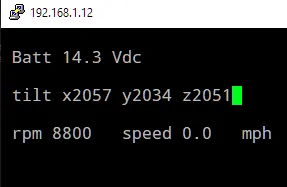
I wrote up my first attempt at a python can display. This one is just a text console display using curses. I'm display battery voltage, X Y Z from 0B2 , and RPM and speed data. It works!
I'm calling this simply pycan.py
you will need python3 and the python-can library. To install the library use:
pip3 install python-can
Updated. I fixed the data overwrite issues and added some can cleanup on termination.
I'm calling this simply pycan.py
you will need python3 and the python-can library. To install the library use:
pip3 install python-can
Code:
#!/usr/bin/python3
# jeep canbus live data display

# import libraries
import can
import curses

# start curses screen management
stdscr = curses.initscr()

# lay out our plain text
stdscr.addstr(1,1,'Batt')
stdscr.addstr(1,11,'Vdc')
stdscr.addstr(3,1,'Roll')
stdscr.addstr(3,14,'Tilt')
stdscr.addstr(3,26,'Yaw')
stdscr.addstr(5,1,'RPM')
stdscr.addstr(5,14,'MPH')
stdscr.addstr(7,1,'Steering Angle')
stdscr.addstr(7,25,'Torque')

# update the screen with the text
stdscr.refresh()

# startup the canbus interface and filter only the ids that we want
bus = can.interface.Bus('', bustype='socketcan',filter=[{"can_id": 0x2C2, "can_mask": 0xFFF},{"can_id": 0x02B, "can_mask": 0xFFF},{"can_id": 0x322, "can_mask": 0xFFF},{"can_id": 0x023, "can_mask": 0xFFF}])

# wrap everything in a try to catch exceptions cleanly
try:
  # iterate through all messages received
  for msg in bus:
    # match a can id and can bus
    if msg.arbitration_id == 0x2C2 and msg.channel == 'can0':
      # place data using str to convert float data to a string
      # this is using the 3rd hex word, deviding by 10
      stdscr.addstr(1,6,'%-5s' % str(msg.data[2] / 10))
      # once the message has been processes, refresh the screen with the data
      stdscr.refresh()
    # match another message
    if msg.arbitration_id == 0x02B and msg.channel == 'can1':
      # place data, multiple words each in its own spot
      stdscr.addstr(3,6,'%-6s' % str(((msg.data[0]<<8) + msg.data[1] - 2048) / 10))
      stdscr.addstr(3,20,'%-6s' % str(((msg.data[2]<<8) + msg.data[3] - 2032) / 10))
      stdscr.addstr(3,30,'%-6s' % str(((msg.data[4]<<8) + msg.data[5] - 2048) / 10))
      # once the message has been processes, refresh the screen with the data
      stdscr.refresh()
    if msg.arbitration_id == 0x322 and msg.channel == 'can0':
      rpmstr =  str(((msg.data[0]<<8) +  msg.data[1]))
      if rpmstr == "65535":
        rpmstr = str(0)
      stdscr.addstr(5,6,'%-6s' % rpmstr)
      stdscr.addstr(5,20,'%-6s' % str(((msg.data[2]<<8) + msg.data[3]) / 200))
      # once the message has been processes, refresh the screen with the data
      stdscr.refresh()
    if msg.arbitration_id == 0x023 and msg.channel == 'can1':
      stdscr.addstr(7,15,'%-6s' % str((((msg.data[0]<<8) + msg.data[1]) - 4096) * .5 ))
      stdscr.addstr(7,32,'%-6s' % str((msg.data[2]<<8) + msg.data[3]))
      stdscr.refresh()
# catch errors, display them, and exit cleanly
except:
  bus.shutdown()
  curses.nocbreak()
  stdscr.keypad(0)
  curses.echo()
  curses.endwin()
raiseSponsored
Last edited: