Sponsored

redracer

Well-Known Member
First Name
Robert
Joined
Aug 22, 2017
Threads
20
Messages
576
Reaction score
650
Location
Manteca, CA
Vehicle(s)
2023 4xe Rubicon
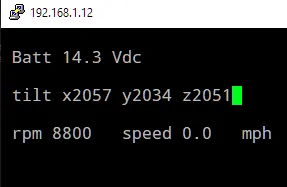
I wrote up my first attempt at a python can display. This one is just a text console display using curses. I'm display battery voltage, X Y Z from 0B2 , and RPM and speed data. It works!

I'm calling this simply pycan.py

you will need python3 and the python-can library. To install the library use:
pip3 install python-can

Code:
#!/usr/bin/python3
# jeep canbus live data display

# import libraries
import can
import curses

# start curses screen management
stdscr = curses.initscr()

# lay out our plain text
stdscr.addstr(1,1,'Batt')
stdscr.addstr(1,11,'Vdc')
stdscr.addstr(3,1,'Roll')
stdscr.addstr(3,14,'Tilt')
stdscr.addstr(3,26,'Yaw')
stdscr.addstr(5,1,'RPM')
stdscr.addstr(5,14,'MPH')
stdscr.addstr(7,1,'Steering Angle')
stdscr.addstr(7,25,'Torque')

# update the screen with the text
stdscr.refresh()

# startup the canbus interface and filter only the ids that we want
bus = can.interface.Bus('', bustype='socketcan',filter=[{"can_id": 0x2C2, "can_mask": 0xFFF},{"can_id": 0x02B, "can_mask": 0xFFF},{"can_id": 0x322, "can_mask": 0xFFF},{"can_id": 0x023, "can_mask": 0xFFF}])

# wrap everything in a try to catch exceptions cleanly
try:
  # iterate through all messages received
  for msg in bus:
    # match a can id and can bus
    if msg.arbitration_id == 0x2C2 and msg.channel == 'can0':
      # place data using str to convert float data to a string
      # this is using the 3rd hex word, deviding by 10
      stdscr.addstr(1,6,'%-5s' % str(msg.data[2] / 10))
      # once the message has been processes, refresh the screen with the data
      stdscr.refresh()
    # match another message
    if msg.arbitration_id == 0x02B and msg.channel == 'can1':
      # place data, multiple words each in its own spot
      stdscr.addstr(3,6,'%-6s' % str(((msg.data[0]<<8) + msg.data[1] - 2048) / 10))
      stdscr.addstr(3,20,'%-6s' % str(((msg.data[2]<<8) + msg.data[3] - 2032) / 10))
      stdscr.addstr(3,30,'%-6s' % str(((msg.data[4]<<8) + msg.data[5] - 2048) / 10))
      # once the message has been processes, refresh the screen with the data
      stdscr.refresh()
    if msg.arbitration_id == 0x322 and msg.channel == 'can0':
      rpmstr =  str(((msg.data[0]<<8) +  msg.data[1]))
      if rpmstr == "65535":
        rpmstr = str(0)
      stdscr.addstr(5,6,'%-6s' % rpmstr)
      stdscr.addstr(5,20,'%-6s' % str(((msg.data[2]<<8) + msg.data[3]) / 200))
      # once the message has been processes, refresh the screen with the data
      stdscr.refresh()
    if msg.arbitration_id == 0x023 and msg.channel == 'can1':
      stdscr.addstr(7,15,'%-6s' % str((((msg.data[0]<<8) + msg.data[1]) - 4096) * .5 ))
      stdscr.addstr(7,32,'%-6s' % str((msg.data[2]<<8) + msg.data[3]))
      stdscr.refresh()
# catch errors, display them, and exit cleanly
except:
  bus.shutdown()
  curses.nocbreak()
  stdscr.keypad(0)
  curses.echo()
  curses.endwin()
  raise
Updated. I fixed the data overwrite issues and added some can cleanup on termination.
Sponsored

 
Last edited:
OP
OP
jmccorm

jmccorm

Well-Known Member
First Name
Josh
Joined
Sep 15, 2021
Threads
55
Messages
1,170
Reaction score
1,322
Location
Tulsa, OK
Vehicle(s)
2021 JLUR
Build Thread
Link
Occupation
Systems Engineering
I wrote up my first attempt at a python can display. This one is just a text console display using curses. I'm display battery voltage, X Y Z from 02B, and RPM and speed data. It works!
Hey, it's nice to plug in someone else's code for the Wrangler and to try it out on your own vehicle. It works!

Jeep Wrangler JL JEEP HACKING CAN-C / CAN-IHS / UDS ! (Reverse Engineering) 1643476945908


The curses library? I didn't expect that, good choice. It's a very nice and easy way to get things done! And, depending on your display, you might have the ability to change your display settings to scale the text up or down as you so choose.

You might read the notes (further to the right) on id $02B for values to subtract from each of them to have signed integer values. I'm keep going back-and-forth between these being yaw/pitch/roll and accelerometer readings, but my current best guess is that they're accelerometer (with gravity cancelled out).

If you get a chance, you might wipe out some of the old numbers before displaying the new ones. I'm sure you've seen it yourself, but in the example above, RPMs are display as "8800" instead of 880 because a four digit number previous held that place.

But that can wait. Awesome!

I'm glad to see another person's code running against my vehicle! I'm glad to see we're finally sharing code back-and-forth on each other's vehicles. First time on a Wrangler, no?
 
OP
OP
jmccorm

jmccorm

Well-Known Member
First Name
Josh
Joined
Sep 15, 2021
Threads
55
Messages
1,170
Reaction score
1,322
Location
Tulsa, OK
Vehicle(s)
2021 JLUR
Build Thread
Link
Occupation
Systems Engineering
FYI Only --

I tried using $314 to perform some tricks with the AUX switches. Some success, but I couldn't get it to do everything that I wanted it to.

While the vehicle was on, I could write to $314 to tell it to change AUX3 to battery power (constant on). When I turned the vehicle off, AUX3 would remain powered on. That's good.

The problem I had (while the vehicle was still off and AUX3 was on) was in trying to reverse the procedure (power off AUX3 until the vehicle was turned on). It would power off AUX3, but I couldn't get the vehicle to automatically turn AUX3 back on when the vehicle had ignition again.

Either I was doing something wrong, or I think this may be one of those cases of painting yourself into a corner. ?
 

redracer

Well-Known Member
First Name
Robert
Joined
Aug 22, 2017
Threads
20
Messages
576
Reaction score
650
Location
Manteca, CA
Vehicle(s)
2023 4xe Rubicon
Oh ya, in my little bit of testing I have noticed that the speed data from 0x322 differs slightly from the dash readout. I'm pretty sure that this speed is a true wheel speed, not the gps corrected speed that the dash uses. I want to compare this to the other speed results that you have found. Perhaps we can use this to calculate correction values for the tire size settings.
 

Sponsored

OP
OP
jmccorm

jmccorm

Well-Known Member
First Name
Josh
Joined
Sep 15, 2021
Threads
55
Messages
1,170
Reaction score
1,322
Location
Tulsa, OK
Vehicle(s)
2021 JLUR
Build Thread
Link
Occupation
Systems Engineering
Oh ya, in my little bit of testing I have noticed that the speed data from 0x322 differs slightly from the dash readout. I'm pretty sure that this speed is a true wheel speed, not the gps corrected speed that the dash uses. I want to compare this to the other speed results that you have found. Perhaps we can use this to calculate correction values for the tire size settings.
I've augmented the notes of message IDs $322 (raw) and $340 (GPS adjusted), as those are the two you'll want to compare. Yes, you can compare these two to see if the vehicle's tire size is wrong. Yes, you would be able to determine if there's a mismatch, and if so, how much. It'd be easier to do if you knew their gearing, but I think you're still going to be able to figure it out even without that information if you can compare their values over a known ranges of speed (20mph, 60mph).
 

redracer

Well-Known Member
First Name
Robert
Joined
Aug 22, 2017
Threads
20
Messages
576
Reaction score
650
Location
Manteca, CA
Vehicle(s)
2023 4xe Rubicon
If you get a chance, you might wipe out some of the old numbers before displaying the new ones. I'm sure you've seen it yourself, but in the example above, RPMs are display as "8800" instead of 880 because a four digit number previous held that place.
I have fixed these overwrite issues.
Next I want to add more values in.

I'm wondering if there is an easier way to manage this list of things to display.... this can get unwieldily quickly.
 

redracer

Well-Known Member
First Name
Robert
Joined
Aug 22, 2017
Threads
20
Messages
576
Reaction score
650
Location
Manteca, CA
Vehicle(s)
2023 4xe Rubicon
I'm keep going back-and-forth between these being yaw/pitch/roll and accelerometer readings
I can now answer this! all thanks to a large bump in my lawn. these are comparing my monitor results to the off-road angle/tilt page on the cluster display.

0x02B xxxxyyyyzzzz

xxxx -2048 = body roll, -15 = 2degrees left, 50 = 5 degrees right
yyyy -2032 = body tilt, 50 = 5 degrees up
zzzz -2048 = body yaw or turn rate, turning in either direction while traveling forward results in large positive numbers, while in reverse results in negative numbers.
 
OP
OP
jmccorm

jmccorm

Well-Known Member
First Name
Josh
Joined
Sep 15, 2021
Threads
55
Messages
1,170
Reaction score
1,322
Location
Tulsa, OK
Vehicle(s)
2021 JLUR
Build Thread
Link
Occupation
Systems Engineering
I'm wondering if there is an easier way to manage this list of things to display.... this can get unwieldily quickly.
I'd be interested to see if you come up with a better approach.

Off the top of my head, I might try a table approach with:

1. Matching message ID and bus
2. Starting byte and any shifting to isolate the actual value
3. Any additional mathematical transformations (-2048, etc)
4. Position and name of on-screen label
5. Position for on-screen value (EDIT: and perhaps length so you'd know how much space to clear each time)
6. Flags for any other special transformations/treatments (boolean, etc)
7. ???
 
Last edited:
OP
OP
jmccorm

jmccorm

Well-Known Member
First Name
Josh
Joined
Sep 15, 2021
Threads
55
Messages
1,170
Reaction score
1,322
Location
Tulsa, OK
Vehicle(s)
2021 JLUR
Build Thread
Link
Occupation
Systems Engineering
I can now answer this! all thanks to a large bump in my lawn. these are comparing my monitor results to the off-road angle/tilt page on the cluster display.
You have to know how thankful I am for another set of eyes here. Thank you very much for making those observations! I'll fill it into the spreadsheet here shortly.
 

Sponsored

OP
OP
jmccorm

jmccorm

Well-Known Member
First Name
Josh
Joined
Sep 15, 2021
Threads
55
Messages
1,170
Reaction score
1,322
Location
Tulsa, OK
Vehicle(s)
2021 JLUR
Build Thread
Link
Occupation
Systems Engineering
2. Starting byte and any shifting to isolate the actual value
3. Any additional mathematical transformations (-2048, etc)
6. Flags for any other special transformations/treatments (boolean, etc)
Regarding those items, I don't know if Python allows this or not, but in Bash, a string can contain actual commands and you can execute a string as though it were a command. As an example:

You define a variable with the command that you want to run...​
COMMAND="candump -L any"
...and then you execute the string by simply calling it...​
$COMMAND

You've actually seen a bit of that in the bash code to date. So if Python allows it, the table itself could contain the actual commands that your program uses when it wants to transform a particular message ID.

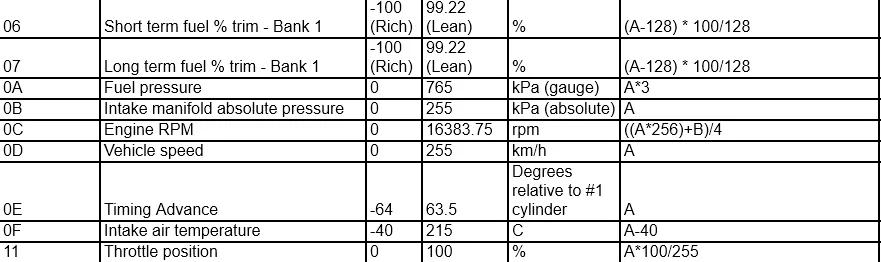
I was thinking of using something similar to handle all the OBD values, since it is pretty much the same kinds of formulas used over and over:

Jeep Wrangler JL JEEP HACKING CAN-C / CAN-IHS / UDS ! (Reverse Engineering) 1643554833518

Anyhow, just a suggestion. Do what works well for you.
 

redracer

Well-Known Member
First Name
Robert
Joined
Aug 22, 2017
Threads
20
Messages
576
Reaction score
650
Location
Manteca, CA
Vehicle(s)
2023 4xe Rubicon
You have to know how thankful I am for another set of eyes here. Thank you very much for making those observations! I'll fill it into the spreadsheet here shortly.
I checked on your spreadsheet update. Unfortunatly, you reversed Yaw and Roll. That's enough to confuse any pilot. Hah!

Also, you might want to include the math of (xxxx - 2048) / 10 for roll and (xxxx - 2032) / 10 for pitch to get degrees of tilt.
 
OP
OP
jmccorm

jmccorm

Well-Known Member
First Name
Josh
Joined
Sep 15, 2021
Threads
55
Messages
1,170
Reaction score
1,322
Location
Tulsa, OK
Vehicle(s)
2021 JLUR
Build Thread
Link
Occupation
Systems Engineering
I checked on your spreadsheet update. Unfortunately, you reversed Yaw and Roll. That's enough to confuse any pilot. Hah!
And I can see one of two ways I might of confused it, but you'll have to tell me which is which. Does the vehicle actually report them as Roll/Pitch/Yaw? Or is the Roll/Pitch/Yaw label correct and it's just my descriptions for what Yaw and Pitch mean that are reversed? Or... ?

It might just save time if you could copy-paste-rewrite here how it should be. Or I can give you read/write permission on the spreadsheet itself if you hit the request button...

Jeep Wrangler JL JEEP HACKING CAN-C / CAN-IHS / UDS ! (Reverse Engineering) 1643567641109


Also, you might want to include the math of (xxxx - 2048) / 10 for roll and (xxxx - 2032) / 10 for pitch to get degrees of tilt.
I had that in the paragraph just above it, but I can see how that can get lost in the sea of words. I've moved the offsets so they're right in the middle of the descriptions. You're right, the brain processes it better that way.
 

redracer

Well-Known Member
First Name
Robert
Joined
Aug 22, 2017
Threads
20
Messages
576
Reaction score
650
Location
Manteca, CA
Vehicle(s)
2023 4xe Rubicon
rewrite to:
ROLL/PITCH/YAW

$xxxx???????? – vehicle roll (tlit left/left)
$????xxxx???? – vehicle pitch (nose up/down)
$????????xxxx – vehicle yaw (rate of turn)

See notes column (to the right) for usage information and experimental values.
 
OP
OP
jmccorm

jmccorm

Well-Known Member
First Name
Josh
Joined
Sep 15, 2021
Threads
55
Messages
1,170
Reaction score
1,322
Location
Tulsa, OK
Vehicle(s)
2021 JLUR
Build Thread
Link
Occupation
Systems Engineering
rewrite to: [...]
Done! I think it's obvious I was not the subject matter expert to be writing this one. But I really wanted this variable nailed down. :)
Sponsored


Top