Sponsored

Rodn

New Member
First Name
Rod
Joined
Jan 14, 2022
Threads
0
Messages
3
Reaction score
1
Location
Canada
Vehicle(s)
2015 ram
I went through CAN-C message $023 again. It's steering wheel position (2 bytes), steering wheel force applied by driver (2 bytes), apparently unused data of $0000 (2 bytes), and then a checksum plus counter (2 bytes). It's not going to be there.

One of the best ways is going to be to record a CAN dump while a vehicle is misbehaving. But we're a little ways away from that in terms of hardware and setting something up that we could distribute to willing volunteers.

On the other hand, someone privately suggested a procedure to better identify what car module is responsible for which messages. You create a list of all the message IDs and then you unplug on of the CAN-C or CAN-IHS connectors from the bus (behind the glovebox). You note which feature(s) have been disabled on your vehicle. You massage the CAN bus traffic to determine which message IDs have disappeared. You can then associate what messages are transmitted by what device.

I know that the Power Steering Module is on the CAN bus, and that second procedure will work well for that. Now that I'm on vacation, I think I finally need to disconnect CAN bus connectors one-by-one and see what associations I'm able to make.

PS: As I go over more strange numbers, I'll keep an eye out for a floating value that might be connected to wide steering events.
Hi there
I have been working on the dodge / jeep electric power steering pump for a electric car conversion project. I figured out the can packet to enable the pump (believe it's to default 80% output) would like to be able to control the speed as well. I tried a few of the packets you posted (vehicle speed, steering wheel position, torque etc) and no luck in changing the speed. Any ideas.
Thanks a lot and keep up the great work!!
Sponsored


 
OP
OP
jmccorm

jmccorm

Well-Known Member
First Name
Josh
Joined
Sep 15, 2021
Threads
55
Messages
1,170
Reaction score
1,322
Location
Tulsa, OK
Vehicle(s)
2021 JLUR
Build Thread
Link
Occupation
Systems Engineering
I have been working on the dodge / jeep electric power steering pump for a electric car conversion project. I figured out the can packet to enable the pump (believe it's to default 80% output) would like to be able to control the speed as well. I tried a few of the packets you posted (vehicle speed, steering wheel position, torque etc) and no luck in changing the speed. Any ideas.
Cool! As a combined effort, we've only been at this a couple of months. We've made fantastic progress, but as of yet we don't have any documentation on the electric power steering pump.

But what we've seen time and against is that one piece of knowledge builds upon another. Anything you can tell us would be helpful. With any luck, we might just spot some additional parameters or make new associations with existing data that we haven't seen before.

There's one thing I've been wanting to do which is to unplug the cables, one-by-one on the CAN-IHS and the CAN-C bus and see what message IDs disappear. Then I'd use the color-coding on the wire to backtrace it to what module it was. Of course, that won't tell us what message IDs the power steering pump is looking for, but each little clue helps build the next.

Also, you might try replaying one of the candump files (from a 4 mile drive) that I posted early into this thread and seeing what (if anything) the pump responds to. The thing is, if you get a response from anything, then half the work is done. I don't know if you're familiar with the concept of a binary search, so I'll briefly explain.

If you know that a log file causes a change in behavior from the pump, you'd divide that log file into two halves. You play back both halves, one at a time, and see which one gets a reaction. If one half does not get a reaction, discard that. If both get a reaction, then choose to discard one of them. From there, you divide your remaining log file in half AGAIN, and repeat this process of dividing and checking over and over until you find the message that causes a reaction. (The same process could be done with a man-in-the-middle attack and choosing to filter out half of the message IDs.)

That may be more work than you're wanting to do, but that's a quicker path to an answer. Otherwise, it's going to take time.
 
OP
OP
jmccorm

jmccorm

Well-Known Member
First Name
Josh
Joined
Sep 15, 2021
Threads
55
Messages
1,170
Reaction score
1,322
Location
Tulsa, OK
Vehicle(s)
2021 JLUR
Build Thread
Link
Occupation
Systems Engineering
UPDATE ON THE REMOTE-START HVAC CONTROLS:

It's working great! I'm not going to provide any more code samples for this program in particular, but I'll explain it's current theory of operation. When a vehicle is remotely started, it pursues several different things at the same time:

  1. AUTORPM: Sixty seconds after the engine has started, it checks to see if the interior cabin temperature is cold. It also checks to see if the engine is cold. If both are true, it raises the engine's idle to 2000 rpm to help generate additional heat. When the driver enters the vehicle, it automatically restores the normal idling behavior and the process terminates. (The driver doesn't have to do anything special to manage it.) Of course, none of this happens if the engine is warm or if it will be cooling the cabin (instead of heating).
  2. AUTOHEAT or AUTOCOOL: It automatically adjusts the HVAC controls to either a full-blast heating or full-blast cooling. Maximum fan speed, maximum temperature, no compromise. But this makes for an unpleasant experience when entering the vehicle (blowing air, noisy fans) so it automatically moderates things when the driver enters the vehicle. No pushing buttons or anything required. It sets a neutral temperature and sets the fan speed to AUTO (which should practically turn them off if the vehicle reached it's desired temperature).
  3. AUTOHONK: After remote starting the vehicle, if left unattended for an extended period of time, it will try to get the driver's attention. At the 12, 13 and 14 minute mark, it honks the horn in a playful pattern to help alert the driver that they need to get moving. It also serves as a warning that the vehicle (by design) automatically shuts itself down if left unattended for 15 minutes.
There's one more feature which I'm wanting to add which monitors the temperature of the steering wheel and automatically turns it off when it gets too hot. I'd also like to do the same thing with the seat warmer, but it's going to take some serious hunting to find something that'll give me a temperature reading from it. Otherwise, I might go with a fuzzy logic approach.

That's all I got. Things are working well, but I hope to make them even better! I'm willing to explore suggestions if someone has some ideas related to remote-start or HVAC controls.

PS: I'm bad at names. "Remote Start Auto-HVAC Controls" is awful. What's going to work here? I'm kind of thinking "Remote Smart", or perhaps that's too generic. That idea was inspired by it's function of adding some additional smarts to the vehicle's own remote start function.
 
Last edited:

redracer

Well-Known Member
First Name
Robert
Joined
Aug 22, 2017
Threads
20
Messages
576
Reaction score
650
Location
Manteca, CA
Vehicle(s)
2023 4xe Rubicon
UPDATE ON THE REMOTE-START HVAC CONTROLS:

It's working great! I'm not going to provide any more code samples, but I'll explain it's current theory of operation. When a vehicle is remotely started, it pursues several different things at the same time:

  1. AUTORPM: Sixty seconds after the engine has started, it checks to see if the interior cabin temperature is cold. It also checks to see if the engine is cold. If both are true, it raises the engine's idle to 2000 rpm to help generate additional heat. When the driver enters the vehicle, it automatically restores the normal idling behavior and the process terminates. (The driver doesn't have to do anything special to manage it.) Of course, none of this happens if the engine is warm or if it will be cooling the cabin (instead of heating).
  2. AUTOHEAT or AUTOCOOL: It automatically adjusts the HVAC controls to either a full-blast heating or full-blast cooling. Maximum fan speed, maximum temperature, no compromise. But this makes for an unpleasant experience when entering the vehicle (blowing air, noisy fans) so it automatically moderates things when the driver enters the vehicle. No pushing buttons or anything required. It sets a neutral temperature and sets the fan speed to AUTO (which should practically turn them off if the vehicle reached it's desired temperature).
  3. AUTOHONK: After remote starting the vehicle, if left unattended for an extended period of time, it will try to get the driver's attention. At the 12, 13 and 14 minute mark, it honks the horn in a playful pattern to help alert the driver that they need to get moving, and that the vehicle will automatically be shutting itself down (at the 15 minute mark) if left unattended.
There's one more feature which I'm wanting to add which monitor the temperature of the steering wheel and automatically turns it off when it gets too hot. I'd also like to do the same thing with the seat warmer, but it's going to take some serious hunting to find something that'll give me a temperature reading from it. Otherwise, I go with a fuzzy logic approach.

That's all I got. Things are working well, but I hope to make them even better!
I'd love to eventually use this as well. But, I have to take a slightly different approach to it as I have a manual transmission and no remote start.

I'm thinking that I'll have this routine as one of the buttons on my dash mounted screen. I'll have to hop into the jeep, start it, then hit this button to start the warmup sequence.

I'd also like to add some safeties into mine so that if anyone presses the brake, clutch, or somehow gets it into gear that it shuts off the engine and honks the horn.

Now, I'd love to be able to do remote start, and I am hunting the keyfob IDs to try and simulate a button press with the fob present, but that's a much more dangerous prospect for a time way out in the future.
 
OP
OP
jmccorm

jmccorm

Well-Known Member
First Name
Josh
Joined
Sep 15, 2021
Threads
55
Messages
1,170
Reaction score
1,322
Location
Tulsa, OK
Vehicle(s)
2021 JLUR
Build Thread
Link
Occupation
Systems Engineering
I'd love to eventually use this as well. But, I have to take a slightly different approach to it as I have a manual transmission and no remote start.

I'm thinking that I'll have this routine as one of the buttons on my dash mounted screen. I'll have to hop into the jeep, start it, then hit this button to start the warmup sequence.
As it stands now, I'm willing to give you a copy as long as it goes no further. At least, not until I figure out what I want to do with the HVAC stuff. (That, and the black box data recorder / player... but I've already shared a substantial chunk of that code.)

These programs have the potential to go as far as standalone commercial products, but I really want to keep my involvement more at a "fun hobbyist level". That said, if someone puts together a Raspberry Pi hardware kit with cables and all, I'd think I'd be willing to donate a substantial collection of code for the cause. (They provide the hardware, I provide the OS and software.)

I'd also like to add some safeties into mine so that if anyone presses the brake, clutch, or somehow gets it into gear that it shuts off the engine and honks the horn.
My primary safety is a check of the ignition switch (exiting Remote Start mode that's required before you can do anything useful with the [automatic transmission] vehicle). You're right. That's not going to work in your situation with a manual transmission.

The autocool/autoheat scripts also detect door unlocks and door openings. But again, that's not going to work out if they're launching it from a screen inside the vehicle. Sounds like you've got the weak spots figured out.

Now, I'd love to be able to do remote start, and I am hunting the keyfob IDs to try and simulate a button press with the fob present, but that's a much more dangerous prospect for a time way out in the future.
Right now I've got too many things left to explore, but that's a nice juicy target that's going to interest more people and for any number of reasons!.

Starting the vehicle over Wi-Fi would be a real highlight, wouldn't it?
 
Last edited:

Sponsored

OP
OP
jmccorm

jmccorm

Well-Known Member
First Name
Josh
Joined
Sep 15, 2021
Threads
55
Messages
1,170
Reaction score
1,322
Location
Tulsa, OK
Vehicle(s)
2021 JLUR
Build Thread
Link
Occupation
Systems Engineering
Oh, and the reason for finding the dash dimming is so that I can scale the backlight on the Pi 7" display to match. [...] Now i just need to brush up on my python and tkinter to write an ugly UI.
I've had some good luck using Fiverr to fill in some of the gaps when it comes to music and graphics in my own projects. And the rates tend to be dirt cheap. If you've got a yearning for a snazzy UI and you've got some money to throw into it, you might want to check it out. [just an unsolicited suggestion... no reply necessary]
 

redracer

Well-Known Member
First Name
Robert
Joined
Aug 22, 2017
Threads
20
Messages
576
Reaction score
650
Location
Manteca, CA
Vehicle(s)
2023 4xe Rubicon
I wrote up a quick first attempt at dimming control.... @jmccorm I used a few of your scripts as reference... this is pican-dimmer.sh

Bash:
#!/bin/bash
# Raspberry Pi Backlight control via
# Jeep wrangler JL canbus

LAST=77777
LASTDIM=199

# Watch the canbus for packets from the light switch
COMMAND="/usr/bin/candump -L can1,0291:0FFF"
$COMMAND | while read TIME BUS MESSAGE
do
  NOW=$SECONDS
  # Run just once per second to save CPU
  [ "$NOW" != "$LAST" ] && {
    #Pick out just the data bits that we need
    DATA=${MESSAGE:4}
    RUNL=${DATA:5:1}
    DIML=${DATA:12:2}
    # Only change the dimmer if the running lights are on
    if [[ "$RUNL" == "3"  || "$RUNL" == "1" ]]
    then
      # change hex into decimal
      DIMRAW="$(printf "%d" 0x$DIML)"
      # scale the 22-200 input to 0-53
      DIMCALC="`bc <<< $((DIMRAW - 22))*.3`"
      # drop the floating point and add 7 to meet the screen minimum
      DIMLEVEL="$(($(printf %.0f $DIMCALC)+7))"
    else
      # full brightness if lights are off
      DIMLEVEL=199
    fi
    # only change the screen brightness if there is a change
    if [ "$DIMLEVEL" != "$LASTDIM" ]
    then
      echo "Dimming to $DIMLEVEL / 200"
      # update the screen brightness
      echo $DIMLEVEL > /sys/class/backlight/rpi_backlight/brightness
      LASTDIM=$DIMLEVEL
    fi
    LAST=$NOW
  }
done
i don't know if this even works yet. I'm at work and Jeep is home.

UPDATE: I got to testing and had to rework the math a bit. But, it does work and it matches the interior dimming quite nicely!
 
Last edited:

Rodn

New Member
First Name
Rod
Joined
Jan 14, 2022
Threads
0
Messages
3
Reaction score
1
Location
Canada
Vehicle(s)
2015 ram
Cool! As a combined effort, we've only been at this a couple of months. We've made fantastic progress, but as of yet we don't have any documentation on the electric power steering pump.

But what we've seen time and against is that one piece of knowledge builds upon another. Anything you can tell us would be helpful. With any luck, we might just spot some additional parameters or make new associations with existing data that we haven't seen before.

There's one thing I've been wanting to do which is to unplug the cables, one-by-one on the CAN-IHS and the CAN-C bus and see what message IDs disappear. Then I'd use the color-coding on the wire to backtrace it to what module it was. Of course, that won't tell us what message IDs the power steering pump is looking for, but each little clue helps build the next.

Also, you might try replaying one of the candump files (from a 4 mile drive) that I posted early into this thread and seeing what (if anything) the pump responds to. The thing is, if you get a response from anything, then half the work is done. I don't know if you're familiar with the concept of a binary search, so I'll briefly explain.

If you know that a log file causes a change in behavior from the pump, you'd divide that log file into two halves. You play back both halves, one at a time, and see which one gets a reaction. If one half does not get a reaction, discard that. If both get a reaction, then choose to discard one of them. From there, you divide your remaining log file in half AGAIN, and repeat this process of dividing and checking over and over until you find the message that causes a reaction. (The same process could be done with a man-in-the-middle attack and choosing to filter out half of the message IDs.)

That may be more work than you're wanting to do, but that's a quicker path to an answer. Otherwise, it's going to take time.
hey thanks for the reply
this one is off a 2014 Jeep Cherokee (not sure what year your jeep is?)

I went through your 4 mile drive and tried throwing a couple hundred different packets from around 60 mph at it and it never changed a thing
the packet I am sending to get it moving is 0x308 0x54 0x01 0x40 0x00 0x00 0x00 0x00 0x00

the pump is sending out 3 different queries and would be cool to see the proper response (checked your logs and there is nothing in there unfortunately)

if anyone can supply logs form a 2011-15 at highway speeds it would help. Thanks!

Jeep Wrangler JL JEEP HACKING CAN-C / CAN-IHS / UDS ! (Reverse Engineering) Capture.PNG
 
Last edited:
OP
OP
jmccorm

jmccorm

Well-Known Member
First Name
Josh
Joined
Sep 15, 2021
Threads
55
Messages
1,170
Reaction score
1,322
Location
Tulsa, OK
Vehicle(s)
2021 JLUR
Build Thread
Link
Occupation
Systems Engineering
hey thanks for the reply
this one is off a 2014 Jeep Cherokee (not sure what year your jeep is?)
Regretfully, your hardware is almost certainly too old to be compatible with what we're working with. We're looking at 2018 and newer Wranglers, or the "JL" model. Before that was the "JK" model which used a completely different format (which is more likely that you'd share). Someone named BiggRanger created a spreadsheet with many of the values he found over time. There's a chance he could have found something of interest.

Other than that, the only other suggestion I'd have is that if and only if you're dealing with a single component and if and only if bad values are unlikely to destroy it, you could create a program that generated random messages and then sent that message through a range of message IDs. Once you see a response, you could have some idea what triggered it, and you could further refine your methods from there.
 

Rodn

New Member
First Name
Rod
Joined
Jan 14, 2022
Threads
0
Messages
3
Reaction score
1
Location
Canada
Vehicle(s)
2015 ram
Regretfully, your hardware is almost certainly too old to be compatible with what we're working with. We're looking at 2018 and newer Wranglers, or the "JL" model. Before that was the "JK" model which used a completely different format (which is more likely that you'd share). Someone named BiggRanger created a spreadsheet with many of the values he found over time. There's a chance he could have found something of interest.

Other than that, the only other suggestion I'd have is that if and only if you're dealing with a single component and if and only if bad values are unlikely to destroy it, you could create a program that generated random messages and then sent that message through a range of message IDs. Once you see a response, you could have some idea what triggered it, and you could further refine your methods from there.
I'll see if I can find a pump off a JL.. might be easier!!
Thanks
 

Sponsored

redracer

Well-Known Member
First Name
Robert
Joined
Aug 22, 2017
Threads
20
Messages
576
Reaction score
650
Location
Manteca, CA
Vehicle(s)
2023 4xe Rubicon
Hmm, found something strange. The running lights status for 0x291 has 0 or 1 for lights status before a engine run... but it also is 2 or 3 for during and after an engine run. 0 or 2 mean running lights off, and 1 or 3 is lights on.
 
OP
OP
jmccorm

jmccorm

Well-Known Member
First Name
Josh
Joined
Sep 15, 2021
Threads
55
Messages
1,170
Reaction score
1,322
Location
Tulsa, OK
Vehicle(s)
2021 JLUR
Build Thread
Link
Occupation
Systems Engineering
Hmm, found something strange. The running lights status for 0x291 has 0 or 1 for lights status before a engine run... but it also is 2 or 3 for during and after an engine run. 0 or 2 mean running lights off, and 1 or 3 is lights on.
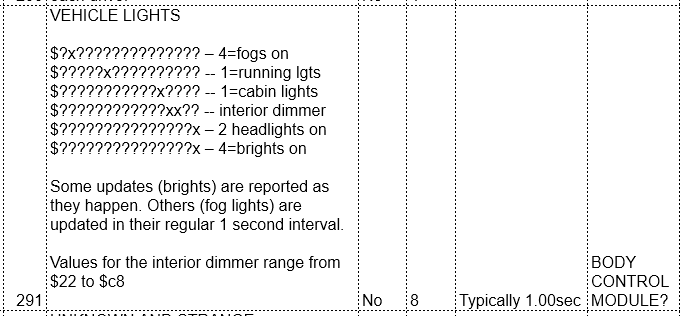
It's something I'm struggling with on how to be represent this on the spreadsheet without becoming overly wordy. I've at least added more of a hint to the comments on $291. What you're looking for isn't a literal number 1, but a bitwise match. (Same for the values which equal 2, and same of the values which equal 4.)

If someone could work out a better way of representing it (that's still compact for space and easy to understand), we can switch over to representing our finding that way.
 

eck

Well-Known Member
First Name
John
Joined
Dec 3, 2018
Threads
1
Messages
411
Reaction score
626
Location
Apex NC
Vehicle(s)
2018 JLU MOAB HellaYella
It's something I'm struggling with on how to be represent this on the spreadsheet without becoming overly wordy. I've at least added more of a hint to the comments on $291. What you're looking for isn't a literal number 1, but a bitwise match. (Same for the values which equal 2, and same of the values which equal 4.)

If someone could work out a better way of representing it (that's still compact for space and easy to understand), we can switch over to representing our finding that way.
mask it with 1, so maybe just put "value & 0x1" or something to indicate on/off

0b00 & 0b01 = 0 (off)
0b01 & 0b01 = 1 (on)
0b10 & 0b01 = 0 (off)
0b11 & 0b01 = 1 (on)
 
OP
OP
jmccorm

jmccorm

Well-Known Member
First Name
Josh
Joined
Sep 15, 2021
Threads
55
Messages
1,170
Reaction score
1,322
Location
Tulsa, OK
Vehicle(s)
2021 JLUR
Build Thread
Link
Occupation
Systems Engineering
mask it with 1, so maybe just put "value & 0x1" or something to indicate on/off
Sounds doable. This is what I have now:

Jeep Wrangler JL JEEP HACKING CAN-C / CAN-IHS / UDS ! (Reverse Engineering) 1642361541885


I really have resisted widening that column, but it looks like the only way forward.
 

Ellivnarg

New Member
First Name
Granville
Joined
Jan 17, 2022
Threads
0
Messages
4
Reaction score
7
Location
Starkville, MS
Vehicle(s)
2021 Sahara 4xE
Hi Guys,

I found this great thread late last night, and just finished reading it all. We just traded a Tesla last week for a 4xE to use as a new tow car behind the RV. I have a beaglebone CAN logger I built to log messages in the Tesla several years ago. I'll dig it out and start logging too!

Josh, I can't wait to try your HVAC script in the 4xE.

I'd really like to see if there's a way to implement brake-hold like in a tesla, but I'd probably want a junker brake module to test anything like that with.

Great work guys, and I hope to be contributing soon!

--
Granville
2021 Sharah 4xE
Sponsored


Top