Sponsored

c7j6y1

Well-Known Member
First Name
Cory
Joined
Aug 9, 2021
Threads
10
Messages
123
Reaction score
306
Location
Terrell, TX
Vehicle(s)
'22 JLUD "Bender" '22 Silverado RST "Reaper"
Occupation
Emergency vehicle technician.
These appea-r to be generic vehicle parameters which might be pulled from the CAN bus. The only ones that really stand out as being brand or model specific would be the Drivemode ones. And I see how you can associate those triggers with different actions.

It doesn't reveal the raw CAN bus data that it's looking for with each trigger, so it seems that the best way to know if something's going to work or not is simply to try it.

Given what you've provided in your manual, you're going to have the right connector to plug into the CAN-C bus and one of the late-model Chrysler vehicles should do the trick. A hatchback is ideal, if not, select a RAM truck. Choose one with the same number of doors as you have (2 or 4). The ECU classifies the Wrangler as a hatchback, presumably because of the swing gate in the back.

I can Choose the Following Chrysler/Dodge/Jeep Vehicles

Charger Pursuit 2015-2021,
Durango 2018-2021
Ram 2018-2021
Ram Classic 2019-2021
Ram 2500 2021
Grand Cherokee 2021

Im thinking try Durango or Grand Cherokee and see what works and what doesnt
Sponsored

 

Temperance

Member
First Name
Amelia
Joined
Dec 30, 2021
Threads
0
Messages
17
Reaction score
23
Location
Washington
Vehicle(s)
2020 Jeep Gladiator Mojave
Occupation
Software Engineer
also, looks like I found most of the can data around the sway bar and lockers...

0x26F 00 40 FF FF FF 7F 7F 7F Sway Bar Request - unlock / lock toggle - need to test this.
0x371 51 02 00 00 00 00 00 00 sway bar unlock in progress
0x371 70 01 00 00 00 00 00 00 sway bar unlocked
0x371 42 02 00 00 00 00 00 00 sway bar lock in progress
0x371 61 00 00 00 00 00 00 00 sway bar locked
I had a chance to do some testing of this. Looks like the sway bar request is correct, although my JT has a slightly different packet.

0x26F 00 40 FF 16 44 7F 7F 7F Sway Bar Request JT -button press

The indicators work as well. However, I had to enable the sway bar using a Tazer. In order to keep the Jeep happy I'd have to send the sway bar status at regular intervals. It also shows the sway bar text and indication in the dash. All of this is less than ideal. The good news is that it would be very easy to add a Rubicon sway bar to a Mohave if anyone feels so inclined. The bad news is that repurposing that switch is problematic.
 
OP
OP
jmccorm

jmccorm

Well-Known Member
First Name
Josh
Joined
Sep 15, 2021
Threads
55
Messages
1,170
Reaction score
1,322
Location
Tulsa, OK
Vehicle(s)
2021 JLUR
Build Thread
Link
Occupation
Systems Engineering
Im thinking try Durango or Grand Cherokee and see what works and what doesnt
My gut tells me that the plain Ram choice would work, but you can always try one of the others and then change it if it doesn't work out, right?
 

c7j6y1

Well-Known Member
First Name
Cory
Joined
Aug 9, 2021
Threads
10
Messages
123
Reaction score
306
Location
Terrell, TX
Vehicle(s)
'22 JLUD "Bender" '22 Silverado RST "Reaper"
Occupation
Emergency vehicle technician.
My gut tells me that the plain Ram choice would work, but you can always try one of the others and then change it if it doesn't work out, right?
Yeah I can. The Whelen Command software is a really versatile and advanced piece of work.
 
OP
OP
jmccorm

jmccorm

Well-Known Member
First Name
Josh
Joined
Sep 15, 2021
Threads
55
Messages
1,170
Reaction score
1,322
Location
Tulsa, OK
Vehicle(s)
2021 JLUR
Build Thread
Link
Occupation
Systems Engineering
I'll play with how to do that. Probably just starting a candump at the start of the script and checking the running output in the loop for any of these values would do... or perhaps checking in a trap.
It's been a long time since I've used a trap, so if you end up going that way, that sounds really interesting to me. When you're ready, let's swap code and see what we can learn from each other's implementation. Until then, I just wanted to share one observation:

The way I plan on adjusting engine idle RPMs is in a script that raises idle only when the vehicle is remotely started. So as long as enough time has passed since the vehicle entered remote-start mode (60 seconds), I'd want that high engine idle to happen.

Of course, we'd want to exit a high engine idle routine when the engine shuts off. That's obvious enough. We also exit remote start mode when the driver enters the vehicle and presses the ignition switch when they're about to drive off. So either way, those share a very simple trigger we can use for ending a high idle routine.

We can look at the first two bytes of message ID $122 (ignition switch status) and see if it is $4401 (vehicle remotely started) or if it is something else. Something else means we shouldn't be in a high RPM state. So that seems like one of the main things to monitor.

Other than that, I'd put in a routine where if the vehicle's ignition has been in a $4401 state for over 15 minutes, it honks the horn to remind the driver that they need to attend to their vehicle before the remote start timer elapses and the engine in automatically shut down (since it appears to have been abandoned).

Of course, you might have set a wider scope than I have. Like something that could be used anytime like the Tazer's winch function. In that case, wow, your script's going to be a lot more difficult than the situation I'm coding for.

I've ended up with 43 lines (after you take away the blank lines and comments). I also learned how I should be doing string manipulation in bash. All of that echoing strings and piping to 'cut' was really inefficient.

BEFORE:

IGNITION=$( echo $DATA | cut -c1-4 )
if [ $IGNITION != "4401" ] ...

AFTER:

IGNITION=${DATA:0:4}
if [ $IGNITION != "4401" ] ...

If I go back and update my existing code, I'm willing to bet that I can get my black box player to actually play back in real-time, which would be very advantageous. Speed has been the main problem that's prevented me from sharing it with everyone.
 
Last edited:

Sponsored

OP
OP
jmccorm

jmccorm

Well-Known Member
First Name
Josh
Joined
Sep 15, 2021
Threads
55
Messages
1,170
Reaction score
1,322
Location
Tulsa, OK
Vehicle(s)
2021 JLUR
Build Thread
Link
Occupation
Systems Engineering
The indicators work as well. However, I had to enable the sway bar using a Tazer. In order to keep the Jeep happy I'd have to send the sway bar status at regular intervals. It also shows the sway bar text and indication in the dash. All of this is less than ideal. The good news is that it would be very easy to add a Rubicon sway bar to a Mohave if anyone feels so inclined. The bad news is that repurposing that switch is problematic.
If it can be enabled with a Tazer, it can be sniffed and reverse engineered. I'll admit that I'm not 100% following everything that you're doing, but I can still tell that you've made a lot of progress here. What OS/hardware are you using? And are you making a creation just for yourself, or something that you're wanting to distribute to others?
 

Temperance

Member
First Name
Amelia
Joined
Dec 30, 2021
Threads
0
Messages
17
Reaction score
23
Location
Washington
Vehicle(s)
2020 Jeep Gladiator Mojave
Occupation
Software Engineer
If it can be enabled with a Tazer, it can be sniffed and reverse engineered. I'll admit that I'm not 100% following everything that you're doing, but I can still tell that you've made a lot of progress here. What OS/hardware are you using? And are you making a creation just for yourself, or something that you're wanting to distribute to others?
I can get it to work, but the issue is that the switch led status is tied to the rest of the dash indication. It has to go through the CAN C Bus to LIN Bus bridge. That means I'd need to tweak stuff within the LIN Bus to work how I wanted. Which sounds somewhere between extremely difficult to impossible.

The off road switch has three connections. LIN signal (5), ground (6?), and power (1?). I'd have to pull the console to test what the voltage is and whether those pins are correct. It may be possible to intercept and modify the signal to and from the off road switch. But that sounds like a ton of work with very little return.

Originally it was just for me, but if I just use a generic switch then I can tie into the CAN C Bus to read tire pressure. This makes it usable by a much bigger audience (JL, JT, anything with a CAN C Bus and TPMS?). It just means I have a button to mount somewhere...

I'm using a Raspberry Pi with a CAN Hat, small touch screen, and USB keyboard for testing. I made two different leads for plugging into the OBD or Star connector. Ultimately I will use an Adafruit Feather M4 Can with either a custom hat, which I can develop myself, or a relay hat and buck converter to supply the 5v. The Feather boards are tiny and relatively inexpensive. Using it to just sniff traffic should also be very safe since it won't expose any external interfaces.
 
OP
OP
jmccorm

jmccorm

Well-Known Member
First Name
Josh
Joined
Sep 15, 2021
Threads
55
Messages
1,170
Reaction score
1,322
Location
Tulsa, OK
Vehicle(s)
2021 JLUR
Build Thread
Link
Occupation
Systems Engineering
Cabin Temperature Query (Linux Bash Shell Script)

Below we have a Linux shell script called cabintemp. It prints the current cabin temperature. The output seems accurate and up-to-date. It is not known if there are any dependencies (such as an 8.4" uConnect radio) or if this variable is avalble on all models. It is also not known if there might be some global variable which would change the units from Fahrenheit to Celsius.
I've enhanced the cabin temperature script. If it receives no response, it tries again. No more worrying if the bus is asleep or not. It's easier and more stable that way.

Code:
#!/bin/bash

error() {
  echo "N/A"
  # Exit with a failure result code
  exit 1
}

initialize () {
  # 1/10th of a second from now, send the UDS query for Cabin Temperature
  # to the HVAC module, read the response, and store just the hexadecimal
  # digits we need into the $RESPONSE variable.
  #
  # NOTE: It currently replies back with cabin temperature in Fahrenheit. It
  #       is not known if there is a switch which might also make it output
  #       Celsius or not.
  ( sleep 0.1 ; cansend can0 783#0322D01E00000000 ) &

  # Collect any messages on CAN-IHS which have an ID of 0503.
  # After 0.5 seconds, stop collecting.
  COMMAND="timeout -s 1 0.6 /usr/bin/candump -L can0,0503:0FFF"

  # Only look for messages which report a *successful response* to our
  # query. If we received more than one response, only use the latest
  # response. Finally, we'll isolate only the byte that we're looking for.
  RESPONSE=$( $COMMAND | grep \#100962D01E | cut -d# -f2 | cut -c15-16 | tail -1)
}

# Send our UDS request and store the response.
initialize

# If no response was found, the bus may have been asleep. Try again.
if [ "$RESPONSE" == "" ] ; then
  initialize
  # If we still don't see a response, exit with an error.
  if [ "$RESPONSE" == "" ] ; then error; fi
fi

# Convert the resposne from hexadecimal to decimal.
RESPONSE=$( printf "%d" 0x$RESPONSE )

# Subtract 54 (a magic number) from the response so that we have an
# accurate reading. Range is: -54 to 201
RESPONSE=$( expr $RESPONSE - 54 )
if [ "$RESPONSE" -eq 201 ] ; then
  echo INVALID
  exit 2
fi

# Print the temperature to standard output.
echo ${RESPONSE}F
After this, I think I'm going to steer this towards a more universal script where you provide the module addresses and the parameter you want to query, and it returns the result. I might also switch to isotpsend and isotpdump to handle the query and response because some ECU replies are already longer than 8 bytes.


Update on the Remote Start HVAC Controls

Working well. After the first minute, it raises the idle speed to 2000 RPMs. At the twelve minute mark, it honked the horn at the start of every minute to remind you that the vehicle's remote start timer is about to expire (and shut down the engine). In fifteen minutes, it brought the cabin from 40F to 83F, making it nice and toasty. Here's some statistics I captured during this morning's remote start.

AMBIENT = true ambient temperature
AMBIENT2 = ambient temperature mixed with some engine heat
CABIN = cabin temperature
WHEEL = steering wheel temperature (wheel heater was off)
VOLTS = voltage of the AUX battery
ambient 45F ambient2 38F cabin 40F wheel 37F volts: 12.3 vdc​
ambient 45F ambient2 38F cabin 40F wheel 37F volts: 14.2 vdc​
ambient 45F ambient2 38F cabin 46F wheel 37F volts: 14.3 vdc​
ambient 45F ambient2 38F cabin 50F wheel 37F volts: 14.3 vdc​
ambient 45F ambient2 40F cabin 56F wheel 38F volts: 14.3 vdc​
ambient 45F ambient2 44F cabin 58F wheel 39F volts: 14.3 vdc​
ambient 45F ambient2 46F cabin 62F wheel 41F volts: 14.3 vdc​
ambient 45F ambient2 48F cabin 66F wheel 42F volts: 14.3 vdc​
ambient 45F ambient2 50F cabin 68F wheel 44F volts: 14.3 vdc​
ambient 45F ambient2 54F cabin 70F wheel 46F volts: 14.3 vdc​
ambient 45F ambient2 58F cabin 72F wheel 48F volts: 14.3 vdc​
ambient 45F ambient2 58F cabin 77F wheel 50F volts: 14.3 vdc​
ambient 45F ambient2 64F cabin 79F wheel 52F volts: 14.3 vdc​
ambient 45F ambient2 68F cabin 83F wheel 54F volts: 14.3 vdc​
ambient 45F ambient2 70F cabin 83F wheel 56F volts: 14.3 vdc​

After shutting down the engine, it still retains a really good amount of heat.

10 minutes later:
ambient 45F ambient2 98F cabin 83F wheel 61F volts: 12.4 vdc​
30 minutes later:
ambient 45F ambient2 98F cabin 74F wheel 57F volts: 12.3 vdc​

Overall, things are progressing nicely! You may have noticed that I'm measuring two ambient temperatures. Even if it is cold outside, I wanted to be able to detect if the engine is still warm, but without using coolant temperature as my measuring stick. I wanted to leave open the option to pursue a less aggressive cabin heating routine if the engine was still warm.

My vehicle is currently configured (in the uConnect radio menu) to automatically turn on the steering wheel and seat warmers. Here soon I hope to disable that routine and use my own because I want it to work at higher temperatures (40s, 50s, 60s). And now that I've fixed the steering wheel monitor, I hope to have the wheel warmer automatically shut off before the steering wheel becomes uncomfortably hot.

There's just too much fiddling around if I want to optimize the environmental controls in cold temperatures, so I'm hoping this code will take care of all those details and let me focus my attention on the driving.
 
Last edited:
OP
OP
jmccorm

jmccorm

Well-Known Member
First Name
Josh
Joined
Sep 15, 2021
Threads
55
Messages
1,170
Reaction score
1,322
Location
Tulsa, OK
Vehicle(s)
2021 JLUR
Build Thread
Link
Occupation
Systems Engineering
TURN-BY-TURN DASH MESSAGES

Anyone looking for an interesting puzzle to dive into? I've identified the address for turn-by-turn navigational messages on the dash. This will give you the ability to throw messages up on the dash while the speedometer is shown. It appears to follow a format very similar to the music screen on the EVIC Display. Very cool!

Here are some sample messages from a drive I took an hour ago:

Code:
(1641660784.862716) 3BC#3041004500200034
(1641660784.892778) 3BC#2001003100730074
(1641660784.923660) 3BC#1001002000530074
(1641660784.953435) 3BC#0001002000530000
(1641660825.102514) 3BC#3041004500200034
(1641660825.132577) 3BC#2001003100730074
(1641660825.162494) 3BC#1001002000530074
(1641660825.192775) 3BC#0001002000530000
(1641661135.120519) 3BC#B041004900200034
(1641661135.150853) 3BC#A001003400450042
(1641661135.180525) 3BC#900100200028004F
(1641661135.210504) 3BC#8001004B00200036
(1641661135.240509) 3BC#7001003600290045
(1641661135.270825) 3BC#6001004200200043
(1641661135.301111) 3BC#5001006C00610072
(1641661135.330500) 3BC#40010065006D006F
(1641661135.360575) 3BC#300100720065002C
(1641661135.390785) 3BC#20010020004A006F
(1641661135.420762) 3BC#10010070006C0069
(1641661135.450988) 3BC#0001006E00000000
(1641661140.120646) 3BC#2044004900690069
(1641661140.150946) 3BC#1004002000200020
(1641661140.180648) 3BC#0004002000200020
(1641661362.399146) 3BC#70410020005B0032
(1641661362.429270) 3BC#600100330031005D
(1641661362.459172) 3BC#5001002000200028
(1641661362.489375) 3BC#4001004F004B0020
(1641661362.519138) 3BC#3001003500310029
(1641661362.549448) 3BC#20010020004D0075
(1641661362.579072) 3BC#10010073006B006F
(1641661362.609317) 3BC#0001006700650065
(1641661364.139115) 3BC#2044006900690069
(1641661364.169305) 3BC#1004006900490020
(1641661364.199158) 3BC#0004002000200020
(1641661393.479013) 3BC#5041004F004B0020
(1641661393.508832) 3BC#4001003500310045
(1641661393.539070) 3BC#300100420020004D
(1641661393.568812) 3BC#200100750073006B
(1641661393.598977) 3BC#1001006F00670065
(1641661393.628748) 3BC#0001006500000000
(1641661394.209326) 3BC#2044006900490020
(1641661394.239124) 3BC#1004002000200020
(1641661394.268986) 3BC#0004002000200020
(1641661404.268660) 3BC#7041004100730070
(1641661404.298642) 3BC#60010065006E0020
(1641661404.328751) 3BC#5001004100760065
(1641661404.358811) 3BC#4001002E002F0031
(1641661404.388714) 3BC#3001003400350074
(1641661404.418764) 3BC#2001006800200045
(1641661404.449211) 3BC#1001002E00200041
(1641661404.478808) 3BC#000100760065002E
(1641661564.137587) 3BC#7041004100730070
(1641661564.167635) 3BC#60010065006E0020
(1641661564.197684) 3BC#5001004100760065
(1641661564.227618) 3BC#4001002E002F0031
(1641661564.257713) 3BC#3001003400350074
(1641661564.287799) 3BC#2001006800200045
(1641661564.317569) 3BC#1001002E00200041
(1641661564.347893) 3BC#000100760065002E
(1641661566.127677) 3BC#2044006900690069
(1641661566.157793) 3BC#1004004900200020
(1641661566.187788) 3BC#0004002000200020
(1641661659.197379) 3BC#3041004E00200041
(1641661659.227272) 3BC#2001007300700065
(1641661659.257325) 3BC#1001006E00200041
(1641661659.287438) 3BC#0001007600650000
(1641661662.067285) 3BC#2044004900690069
(1641661662.097331) 3BC#1004002000200020
(1641661662.127160) 3BC#0004002000200020
(1641661716.176740) 3BC#3041005700200047
(1641661716.207102) 3BC#200100720061006E
(1641661716.236966) 3BC#1001006700650072
(1641661716.266922) 3BC#0001002000530074
(1641661720.106861) 3BC#2044006900490020
(1641661720.136891) 3BC#1004002000200020
(1641661720.166972) 3BC#0004002000200020
(1641661755.136517) 3BC#30410055006E006E
(1641661755.166538) 3BC#20010061006D0065
(1641661755.196523) 3BC#1001006400200052
(1641661755.226508) 3BC#0001006F00610064
(1641661771.147242) 3BC#3041005700200047
(1641661771.176666) 3BC#200100720061006E
(1641661771.206816) 3BC#1001006700650072
(1641661771.236787) 3BC#0001002000530074
(1641661785.206424) 3BC#3041005700200041
(1641661785.236372) 3BC#2001006C00620061
(1641661785.266421) 3BC#1001006E00790020
(1641661785.296396) 3BC#0001004400720000
(1641661832.166339) 3BC#3041005700200041
(1641661832.196123) 3BC#2001006C00620061
(1641661832.226298) 3BC#1001006E00790020
(1641661832.256245) 3BC#0001004400720000
You can try playing them back to your vehicle (and see how it responds even if you don't have the 8.4" uConnect radio), and modifying the message would be fairly low-risk. I'm sure there's a lot of neat things to figure out here! Custom background images, too? This could be ideal for third party CAN modules to take advantage of.

As far as text goes...
(1641661832.166339) 3BC#3041005700200041​
(1641661832.196123) 3BC#2001006C00620061​
(1641661832.226298) 3BC#1001006E00790020​
(1641661832.256245) 3BC#0001004400720000​

Hex values: 5720416C62616E79204472
...that decodes to "W Albany Dr".

UPDATE: I tried sending those messages but I didn't get any response from the dash. It looks like other messages from another location have to be sent to get the dash to accept freeform text for directions. I think the key may be messages in the $300 range, especially ones that are sent on can0 and can1 at almost the same time.
 
Last edited:
OP
OP
jmccorm

jmccorm

Well-Known Member
First Name
Josh
Joined
Sep 15, 2021
Threads
55
Messages
1,170
Reaction score
1,322
Location
Tulsa, OK
Vehicle(s)
2021 JLUR
Build Thread
Link
Occupation
Systems Engineering
Wrangler CAN Bus Log Reader

This is the script I've been using for the past month to read "candump -l" log file and try to reverse even more parameters by putting them side-by-side with other known events that happen while I drive. Example:

KEY: Run BRK: 13% ACCL: 0% (VALVE 1%) RPM: 1068
STEER: CENTR DIR: E GEAR: D3 (4403) OD: 7425.9mi MPH: 12.30

You might also be able to directly pipe the output of "candump -L any" to it and watch your vehicle parameters in real-time. I have to warn you, the script is QUITE UGLY. The goal here was to help me in the moment to reverse engineer more addresses, so none of the emphasis was put on proper structure or programming correctness.

Linux Bash Shell Script Follows:
Code:
#!/bin/bash
TMPDIR=/run/tmpfiles.d

# Set only one of these to 1, the rest to 0
UPDATE_SECONDS=1
UPDATE_TENTHS=0
UPDATE_HUNDREDTHS=0

# Enable if you want some alternate values displayed (where available)
SHOW_ALTERNATES=0

flag="02B"
flag2="08B"
flag3="027"

echo "00000000" > /$TMPDIR/0AB
echo "023#FFFF" > /$TMPDIR/023
echo "F" > /$TMPDIR/358
echo "000001" > /$TMPDIR/3D2
echo "00" > /$TMPDIR/232
echo "0000000000000000" > /$TMPDIR/$flag
echo "FFFFFFFFFFFFFFFF" > /$TMPDIR/$flag2
echo "000000000" > /$TMPDIR/07B
echo "000" > /$TMPDIR/079
echo "0000000000000000" > /$TMPDIR/$flag3
echo "000000000000" > /$TMPDIR/322

GO=0
cat $1 | egrep " 023#| 079#| 07B#| $flag3#| 232#| 340#| 358#| 3D2#| 322#| 122#| 0AB#| $flag#| $flag2#" | while read a b c
do

case "$c" in

$flag3#*) echo "${c:4:16}" > /$TMPDIR/$flag3 ;;
$flag2#*) echo "${c:4:16}" > /$TMPDIR/$flag2 ;;
$flag#*)  echo "${c:4:16}" > /$TMPDIR/$flag ;;
079#*)    echo "${c:5:9}"  > /$TMPDIR/079 ;;
07B#*)    echo "${c:5:9}"  > /$TMPDIR/07B ;;
232#*)    echo "${c:6:2}"  > /$TMPDIR/232 ;;
358#*)    echo "${c:5:1}"  > /$TMPDIR/358  ;;
3D2#*)    echo "${c:4:6}"  >  /$TMPDIR/3D2 ;;
0AB#*)    echo "${c:8:4}"  > /$TMPDIR/0AB ;;
122#*)    echo "${c:4:4}"  > /$TMPDIR/122 ;;


023#*)
[ "$UPDATE_HUNDREDTHS" == "1" ] && GO=1
echo "$c" > /$TMPDIR/023
;;

322#*)
echo "${c:4:12}" > /$TMPDIR/322
[ "$UPDATE_TENTHS" == "1" ] && GO=1
;;

# CASE 340
340#*)
echo "$c" | cut -c9-10,19,20 > /$TMPDIR/340
[ "$UPDATE_SECONDS" == "1" ] && GO=1
;;
esac

if [ "$GO" == "1" ]
then

trans=`cat /$TMPDIR/340`
speed="${trans:2:2}"

# The date is done here
time="${a:6:13}"
echo -n "$time  "

rawkey=`cat /$TMPDIR/122`
key="Unk${rawkey} "
case "$rawkey" in
  0301) key="Kill" ;;
  0302) key="Kill" ;;
  0502) key="Acc " ;;
  1502) key="Acc " ;;
  0000) key="Off " ;;
  0001) key="Off " ;;
  4501) key="Strt" ;;
  5D01) key="Crnk" ;;
  4401)
    key="RRun"
    [ "$rpm1" == "0.0k" ] && key="RAcc"
    ;;
  0402) key="Run " ;;
esac
echo -n "KEY: $key  "

BRAKE=`cat /$TMPDIR/079 | cut -c1-3`
BRAKE=$(printf "%d" 0x$BRAKE)
BRAKE=`echo "0k $BRAKE 22.5 / p" | dc`
[ "$BRAKE" -gt 100 ] && BRAKE=100
[ "$BRAKE" -lt 100 ] && BRAKE=" $BRAKE"
[ "$BRAKE" -lt 10 ] && BRAKE=" $BRAKE"
echo -n "BRK:$BRAKE%"

ACC="$(cat /$TMPDIR/07B)"
ACCEL="$(printf "%d" 0x${ACC:0:3})"
ACCEL2="$(printf "%d" 0x${ACC:6:3})"
[ $ACCEL2 -lt 2000 ] && ACCEL2=2000
ACCEL2=`echo "0k $ACCEL2 2000 - 18 / p" | dc`
ACCEL2=`printf "%2d" $ACCEL2`
[ "$ACCEL" -lt 1900 ] && ACCEL=1900
ACCEL=`echo "0k $ACCEL 1990 - 100 * 2000 / p" | dc`
[ "$ACCEL" -lt 0 ] && ACCEL=0
[ "$ACCEL" -lt 100 ] && ACCEL=" $ACCEL"
[ "$ACCEL" -lt 10 ] && ACCEL=" $ACCEL"
echo -n "  ACCL:$ACCEL% (VALVE $ACCEL2%) "

rpm1=`cat /$TMPDIR/322 | cut -c1-4`
#rpm2=`cat /$TMPDIR/322 | cut -c5-8`
rpm1="$(printf "%d" 0x$rpm1)"
[ $rpm1 = 65535 ] && rpm1="0"
#rpm1=`echo "1 k $rpm1 1000 / p" | dc`
#rpm1=`printf "%.1f" $rpm1`"k"
printf "RPM: %4d  " $rpm1
#echo -n "RPM: $rpm1  "

STEER=`cat /$TMPDIR/023 | cut -c5-8`
STEER="$(printf "%d" 0x$STEER)"
STEERSIGN="R "
[[ $STEER -gt 4096  ]] && STEERSIGN="L "
STEER=`echo "4096 $STEER -p" | dc | cut -d- -f2`
STEER=`echo "2k $STEER 200 / 100 * p" | dc | cut -d. -f1`
STEER=`printf "%3d\n" ${STEER}`
SYMBOL="°"
[ "$STEER" -lt  2 ]    && STEERSIGN="  " && STEER="  0"
[ "$STEER" -gt  1000 ] && STEERSIGN="IN" && STEER="VAL" && SYMBOL="D"
echo -n "WHEEL: ${STEERSIGN}${STEER}${SYMBOL}  "

[ "$speed" == "FF" ] && speed="00"
speed="$(printf "%d" 0x$speed)"

gear=`echo $trans | cut -c2`
[ "$gear" == "F" ] && gear="NA"
[ "$gear" == "B" ] && gear="R " && speed="-$speed"
[ "$gear" == "D" ] && gear="P "
if [[ "$gear" =~ ^[1-9]+$ ]]
then gear="D$gear"
fi
[ "$gear" == "0" ] && gear="N "

mph=`cat /$TMPDIR/322 | cut -c5-8`
mph="$( printf "%d" 0x$mph)"
[ $mph == 65535 ] && mph="0"
[ $gear == "R " ] && mph="-$mph"
mph=`echo "2 k $mph 200 / p" | dc`
mph=`printf "%2.2f" $mph`

compass=`cat /$TMPDIR/358`
case "$compass" in
F) compass="??" ;;
0) compass="N " ;;
1) compass="NE" ;;
2) compass=" E" ;;
3) compass="SE" ;;
4) compass="S " ;;
5) compass="SW" ;;
6) compass=" W" ;;
7) compass="NW" ;;
esac
echo -n "DIR: $compass "

echo -n " GEAR: $gear  "

echo -n "(`cat /$TMPDIR/0AB`)  "
echo -n "ODOM: "
odometer=`cat /$TMPDIR/3D2`
odometer="$(printf "%d" 0x$odometer)"
odometer=`echo " $odometer * 50 / 8 " | bc`
if [ "$odometer" == "6" ]
       then
         odometer="0"
         echo -n "??????.?mi  "
       else
        printf '%8.1f' `echo "$odometer / 100" | bc -l`
        echo -n "mi  "
fi

printf "MPH: %5s  " $mph

value=`cat /$TMPDIR/$flag2`
value1=$(( 0x${value:0:4} ))
value2=$(( 0x${value:4:4} ))
value3=$(( 0x${value:8:4} ))
value4=$(( 0x${value:12:4} ))
[ $value1 -eq  49152 ] && value1=0; # Initialization values
[ $value2 -eq  49152 ] && value2=0; # Initialization values
[ $value3 -eq  49152 ] && value3=0; # Initialization values
[ $value4 -eq  49152 ] && value4=0; # Initialization values
[ $value1 -gt  32767 ] && value1="$(( - $value1  + 0x7FFF ))"
[ $value2 -gt  32767 ] && value2="$(( - $value2  + 0x7FFF ))"
[ $value3 -gt  32767 ] && value3="$(( - $value3  + 0x7FFF ))"
[ $value4 -gt  32767 ] && value4="$(( - $value4  + 0x7FFF ))"
[ $value1 -gt  16383 ] && value1="$(( $value1  - 0x3FFF ))"
[ $value2 -gt  16383 ] && value2="$(( $value2  - 0x3FFF ))"
[ $value3 -gt  16383 ] && value3="$(( $value3  - 0x3FFF ))"
[ $value4 -gt  16383 ] && value4="$(( $value4  - 0x3FFF ))"
value1=$(echo "scale=2 ; $value1 / 20" | bc)
value2=$(echo "scale=2 ; $value2 / 20" | bc)
value3=$(echo "scale=2 ; $value3 / 20" | bc)
value4=$(echo "scale=2 ; $value4 / 20" | bc)

# By uncommenting this section, we will display RELATIVE tire speed
# instead of individual tire speed. Useful for watching the balance
# between individual tires throughout a drive.
[ $value1 == "0" ] && value1="0.001"
[ $value2 == "0" ] && value2="0.001"
[ $value3 == "0" ] && value3="0.001"
[ $value4 == "0" ] && value4="0.001"
tirea=$(echo "scale=3 ; ($value2 + $value3 + $value4) / 3" | bc)
tireb=$(echo "scale=3 ; ($value1 + $value3 + $value4) / 3" | bc)
tirec=$(echo "scale=3 ; ($value1 + $value2 + $value4) / 3" | bc)
tired=$(echo "scale=3 ; ($value1 + $value2 + $value3) / 3" | bc)
value1=$(echo "scale=2 ; $value1 / $tirea" | bc)
value2=$(echo "scale=2 ; $value2 / $tireb" | bc)
value3=$(echo "scale=2 ; $value3 / $tirec" | bc)
value4=$(echo "scale=2 ; $value4 / $tired" | bc)
printf "Wheels: [%4s %4s] [%4s %4s]  " $value1 $value2 $value3 $value4

# If the section above is commented, uncomment this.
# If the section above is uncommented, comment this.
# This adjusts the scale used to print tire speeds.
# printf "MPHx4: [%1.2f %1.2f] [%1.2f %1.2f]  " $value1 $value2 $value3 $value4

temp=`cat /$TMPDIR/232`
temp="$(printf "%d" 0x$temp)"
temp=`echo $temp | cut -d" " -f2`
#temp=`echo " $temp * 1.8 + 32 " | bc`
[ "$temp" -lt 100 ] && temp=" $temp"
[ "$temp" -lt 10 ] && temp=" $temp"
[ "$temp" == "255" ] && temp=" ??"
echo -n " RADIO: ${temp} F  "

echo ""
GO=0
fi

done
The last part of the display may take some explaining...

MPH: 4.92 Wheels: [ .98 .98] [1.01 1.00] RADIO: 121 F

The values after MPH (4.92 mph) represent the relative speed of one individual tire as compared to the rest. So while you're making a left-hand turn, you should be seeing larger numbers from your right-hand tires. The format these are displayed in are [LEFT FRONT RIGHT FRONT] and then [LEFT REAR RIGHT REAR]. You can always remove it from the code if you don't like it.

The last variable is what I believe to be the internal temperature for the uConnect radio.

Let me know if you do something cool with this! (Or add more variables onto the end and make some cool new discoveries!) OH! And be sure to set $TMPDIR to the path of a memory-based filesystem.
 
Last edited:

Sponsored

OP
OP
jmccorm

jmccorm

Well-Known Member
First Name
Josh
Joined
Sep 15, 2021
Threads
55
Messages
1,170
Reaction score
1,322
Location
Tulsa, OK
Vehicle(s)
2021 JLUR
Build Thread
Link
Occupation
Systems Engineering
Now and then we've brushed across the idea of a small module which intercepts and slightly modifies CAN traffic. I recently came across a video about a $20 cheat device that shaves 40,000km off of the BMW's odometer.


If that's got your interest, an extensive breakdown article provides even more information on how the software of the Arduino-like device actually works.

Now, let me be clear. Nobody is suggesting that an odometer cheating device be made for the Wrangler. That's the last thing I'd want. There are plenty of good things to be done with this knowledge.

Rather, I wanted to share this as an illustration of how our understanding of the CAN might be applied not just as stanalone devices (like my remote-start HVAC optimizer), but also to "man-in-the-middle" translating devices (the kind of which might be used to make ESS less susceptible to restarting the engine prematurely).
 
OP
OP
jmccorm

jmccorm

Well-Known Member
First Name
Josh
Joined
Sep 15, 2021
Threads
55
Messages
1,170
Reaction score
1,322
Location
Tulsa, OK
Vehicle(s)
2021 JLUR
Build Thread
Link
Occupation
Systems Engineering
I Accidentally Simulated A Car Crash

This is certainly the strangest system crash I ever encountered! But I was was working with some advanced tools that most enthusiasts shouldn't have to deal with once we've figured out these UDS features (which are above and beyond simple CAN bus signals).

So I've been a little slowed lately by the cold weather, which has kept my computer inside the house and away from the vehicle. Lots of back-and-forth back-and-forth kind of work as I reverse-engineer things, particularly these more advanced UDS features.

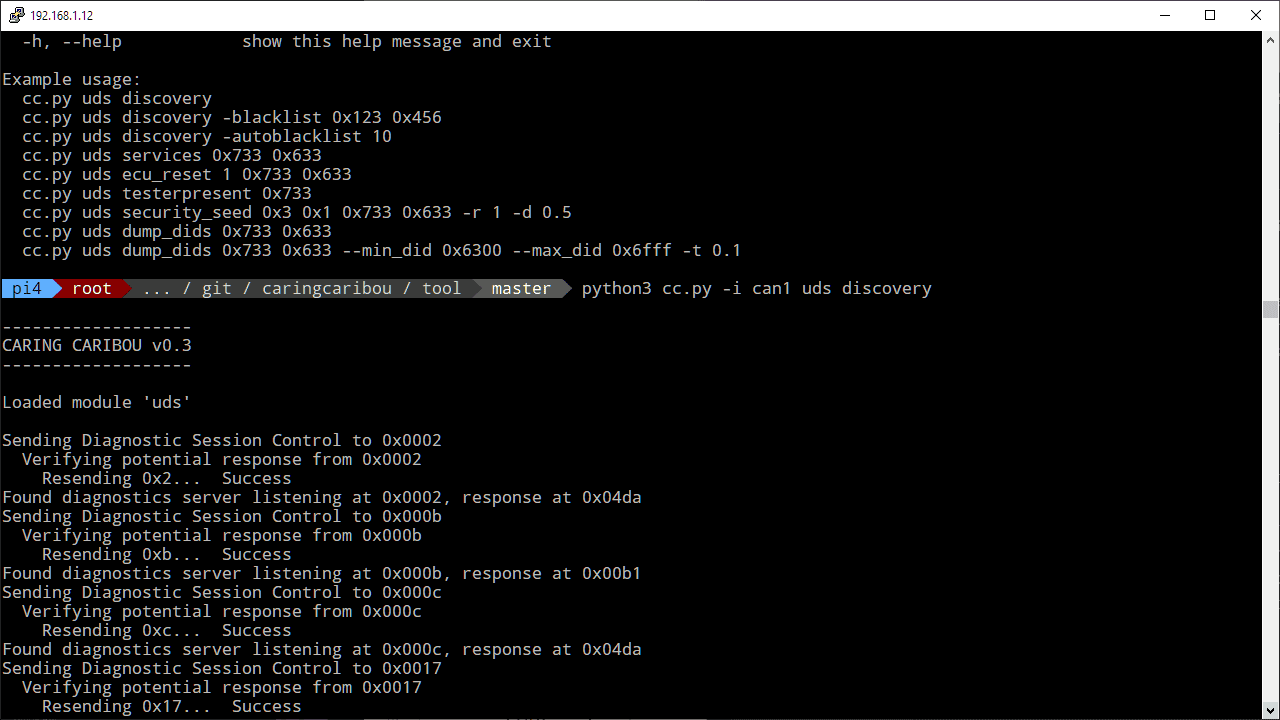
Today I set out to use a pretty well-known tool, Caring Caribou, in discovery mode to list the UDS modules on the CAN-C bus. Should be quite harmless (been run across many makes and models), so at the time, my engine was running so I wasn't going to make another trip outside to shut it off.

I ran the discovery module, and the results were poor quality. I was getting a lot of false identifications. Disheartened, I went out to the Wrangler and jumped into cab. The following pronouncement was waiting for me:

Jeep Wrangler JL JEEP HACKING CAN-C / CAN-IHS / UDS ! (Reverse Engineering) 1649671293590


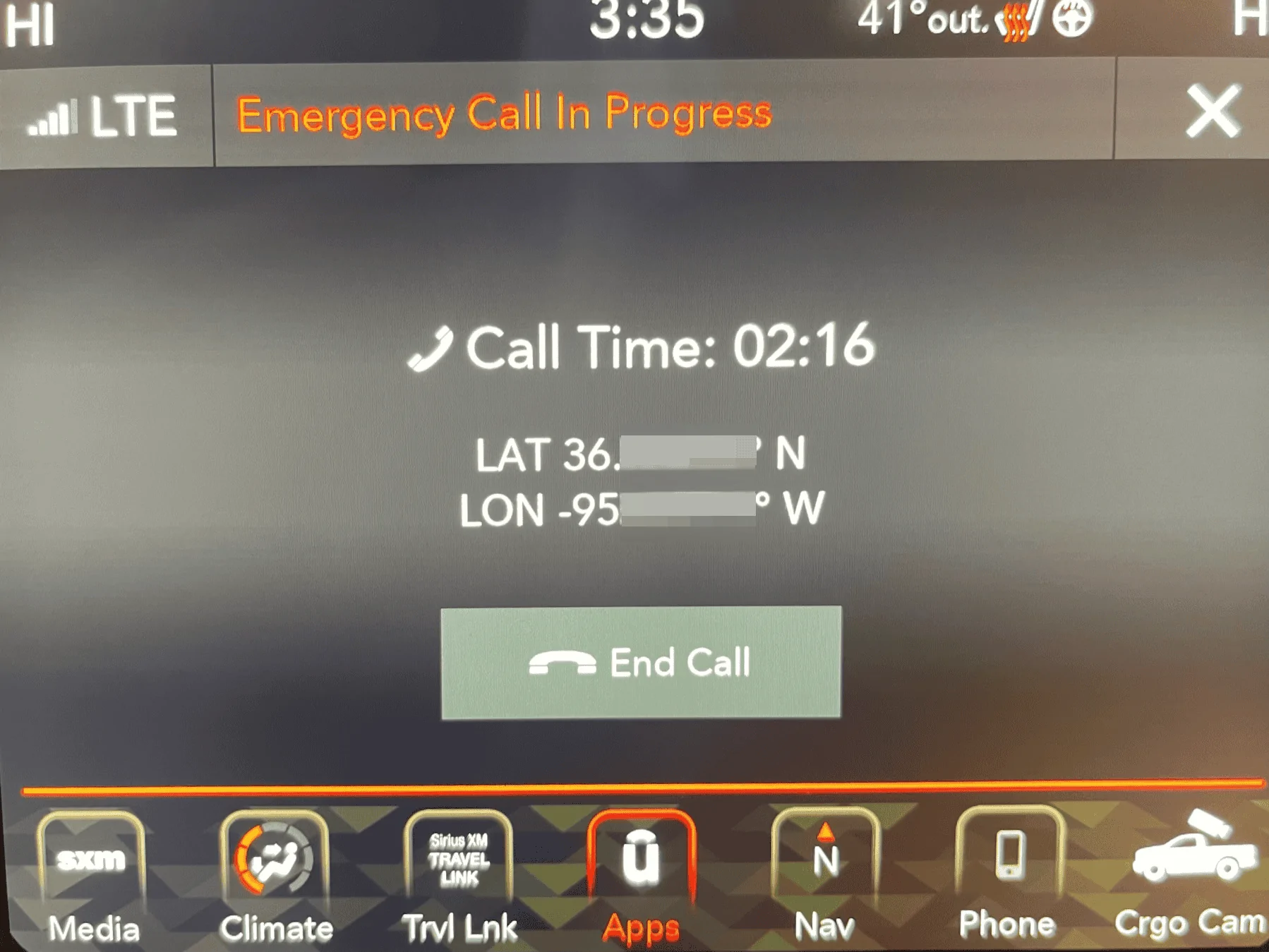
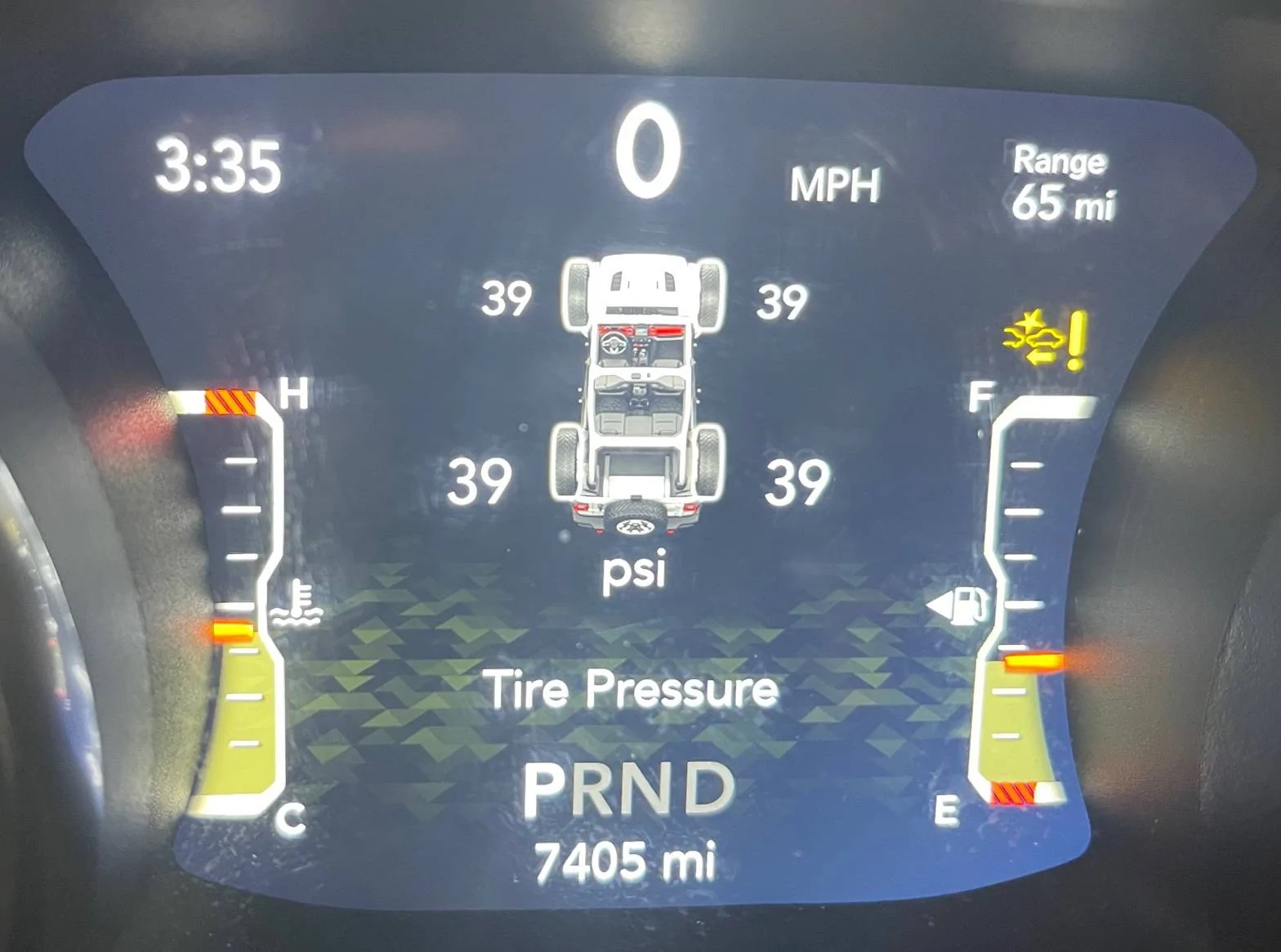
A friendly voice popped into the cab, letting me know that emergency services had been called to my location and that my vehicle has been in an accident. As I glace over to the dash, I see a small icon above the fuel tank with a big exclamation mark and seemed to depict a car crash.

Jeep Wrangler JL JEEP HACKING CAN-C / CAN-IHS / UDS ! (Reverse Engineering) IMG_1409


I explain to the woman that it was a false alarm, everything is fine, and no assistance is needed. She takes my claim at face value and cancels the emergency services response. As the call ends, I take a picture of the uConnect radio and dash, as you see pictured above.

I wasn't yet able to get an address for the Emergency Assistance Module. But if I do, I'll be sure to share it with a warning that it may not appreciate being tickled.

Jeep Wrangler JL JEEP HACKING CAN-C / CAN-IHS / UDS ! (Reverse Engineering) Caring Caribou


I shut the vehicle down, went inside, but noticed that lots of data was still streaming across the CAN bus. The bus didn't go quiet like it normally does. I pop back into the vehicle, start the engine, and... NOTHING. The ignition switch was non-responsive. The vehicle was off (except for the dash and radio) and decided to remain off.

I pulled the battery cable, waited a minute, and plugged everything back in. The vehicle returned to normal. But I can't help but to think that I've gotten my hand bitten, so I'd be wise to be a little bit more shy when it comes to blazing a new trail.

EDIT: Better pictures.
 
Last edited:
OP
OP
jmccorm

jmccorm

Well-Known Member
First Name
Josh
Joined
Sep 15, 2021
Threads
55
Messages
1,170
Reaction score
1,322
Location
Tulsa, OK
Vehicle(s)
2021 JLUR
Build Thread
Link
Occupation
Systems Engineering
I Accidentally Simulated A Car Crash

This is certainly the strangest system crash I ever encountered! But I was was working with some advanced tools that most enthusiasts shouldn't have to deal with once we've figured out these UDS features which are above and beyond simple CAN bus signals.
I had someone point out to me what happened and why it went wrong. To identify a UDS module, it wrote the following sequence to each and every address: 0210010000000000

That sequence is accepted by a UDS module as a request to enter a diagnostic session, which should almost always receive a successful reply.

The problem is that when you're writing that message to something that isn't a UDS module, you're potentially modifying an existing value in the vehicle. In my case, when I wrote the sequence to a particular (unknown) address, the right bits matched the signal for a vehicle crash, causing it to make an emergency call on my behalf.

All things told, I probably got lucky. Worse things could have happened (such as a critical module going off the CAN bus and permanently staying off the CAN bus). Lessons learned:

1. Do NOT use a UDS module discovery tool. Instead, use a third party device (like JScan, Tazer, AlfaOBD) and sniff for it's traffic to find bus modules.​
2. Do NOT allow any tool to do writes that you do not understand. Particularly against all IDs. I broke my own rule here, and didn't fully realize that until now.​

If you follow these two rules, you're going to be safe. And I'm writing this message for my own benefit as well as everyone else's. It's just not safe to go either route.

ALSO: If anyone else ends up having to power-cycle their vehicle, you can restore the uConnect radio settings more quickly if you hold in the center buttons on the left and right knobs for 60 seconds while the car is on, and then release. The uConnect radio will reboot a time or two and come back with your previous settings.

PS: I wish I had a junked Wrangler JL to play around with, but early on when I was looking for our CAN bus connectors, I couldn't even find one in a local junkyard. One yard owner said it spoke to the reliability of the latest model Wranglers.
 
Last edited:

redracer

Well-Known Member
First Name
Robert
Joined
Aug 22, 2017
Threads
20
Messages
576
Reaction score
650
Location
Manteca, CA
Vehicle(s)
2023 4xe Rubicon
ALSO: If anyone else ends up having to power-cycle their vehicle, you can restore the uConnect radio settings more quickly if you hold in the center buttons on the left and right knobs for 60 seconds while the car is on, and then release. The uConnect radio will reboot a time or two and come back with your previous settings.
Note: this only works for the 8" units. I have tried this on my 7" and nothing happens. to my knowledge, the only way to reboot a 7" is via the tazer or jscan option to reboot all modules. This is something that I want to sniff as well.
 
OP
OP
jmccorm

jmccorm

Well-Known Member
First Name
Josh
Joined
Sep 15, 2021
Threads
55
Messages
1,170
Reaction score
1,322
Location
Tulsa, OK
Vehicle(s)
2021 JLUR
Build Thread
Link
Occupation
Systems Engineering
Reference Vehicles Have Been Added

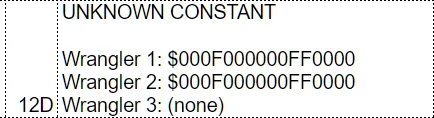
When we've identified messages that hold a constant value, the spreadsheet now contains values from three diverse Wrangler configurations. Special thanks to redracer for supplying his own vehicle dump!

Each vehicle is described at the top of the spreadsheet. Because these vehicles have different factory options (and owner settings), we're hoping they'll illuminate various settings or messages that are specific to certain configurations.

Jeep Wrangler JL JEEP HACKING CAN-C / CAN-IHS / UDS ! (Reverse Engineering) Spreadsheet Constants


We're eager to add more vehicles. A Gladiator is fine, other FCA models are fine as long as they're similar enough. All we need is a suitable log file ("candump -l" format or similar) with CAN-IHS as CAN0 and CAN-C as CAN-1. Or as close as you can get. The more diverse vehicles we have output from, the more we're going to be able to understand.


Steering Wheel Angle *Revised*

I went back and took another look at one of the parameters we discovered early on which we called Steering Wheel Position. Originally it was used to determine the position of the steering wheel in reference to it's extreme left and extreme right positions. I've refined that assessment.

Location $023 is now called Steering Wheel Angle. Starting at a midpoint (wheel center) of $4096, each increment or decrement of that number represents a half of a degree turn of the steering wheel. So if the wheel is turned 3 degrees to the left, then $4096 becomes $4090. (That's ignoring any vehicle alignment issues.)

My new reference code for determining steering wheel position looks like this:

Bash:
STEER=`cat /$TMPDIR/023 | cut -c5-8`
STEER="$(printf "%d" 0x$STEER)"
STEERSIGN="R "
[[ $STEER -gt 4096  ]] && STEERSIGN="L "
STEER=`echo "4096 $STEER -p" | dc | cut -d- -f2`
STEER=`echo "2k $STEER 200 / 100 * p" | dc | cut -d. -f1`
STEER=`printf "%3d\n" ${STEER}`
SYMBOL="°"
[ "$STEER" -lt  2 ]    && STEERSIGN="  " && STEER="  0"
[ "$STEER" -gt  1000 ] && STEERSIGN="IN" && STEER="VAL" && SYMBOL="D"
echo -n "WHEEL: ${STEERSIGN}${STEER}${SYMBOL}  "
...and here's the output of a test where I turned the wheel right 360 degrees, then right all the way, back to 360 degrees, then center. Left 360 degrees, left all the way, back to 360 degrees, and center again. I recentered the wheel and then turned the engine off:

Code:
08.4 KEY: Acc   BRK: 40%  ACCL:  0%  RPM:    0  WHEEL:     0°
08.5 KEY: Acc   BRK: 42%  ACCL:  0%  RPM:    0  WHEEL:     0°
08.5 KEY: Acc   BRK: 38%  ACCL:  0%  RPM:    0  WHEEL:     0°
08.7 KEY: Acc   BRK: 10%  ACCL:  0%  RPM:    0  WHEEL:     0°
09.4 KEY: Acc   BRK:  0%  ACCL:  0%  RPM:  892  WHEEL:     0°
09.7 KEY: Run   BRK:  0%  ACCL:  0%  RPM: 1339  WHEEL:     0°
10.7 KEY: Run   BRK:  0%  ACCL:  0%  RPM: 1509  WHEEL:     0°
11.7 KEY: Run   BRK:  0%  ACCL:  0%  RPM: 1356  WHEEL:     0°
12.7 KEY: Run   BRK:  0%  ACCL:  0%  RPM: 1367  WHEEL:     0°
13.7 KEY: Run   BRK:  0%  ACCL:  0%  RPM: 1343  WHEEL:     0°
14.7 KEY: Run   BRK:  0%  ACCL:  0%  RPM: 1366  WHEEL: R 235°
15.7 KEY: Run   BRK:  0%  ACCL:  0%  RPM: 1379  WHEEL: R 361°
16.7 KEY: Run   BRK:  0%  ACCL:  0%  RPM: 1415  WHEEL: R 360°
17.7 KEY: Run   BRK:  0%  ACCL:  0%  RPM: 1413  WHEEL: R 360°
18.7 KEY: Run   BRK:  0%  ACCL:  0%  RPM: 1426  WHEEL: R 360°
19.7 KEY: Run   BRK:  0%  ACCL:  0%  RPM: 1432  WHEEL: R 360°
20.7 KEY: Run   BRK:  0%  ACCL:  0%  RPM: 1361  WHEEL: R 593°
21.7 KEY: Run   BRK:  0%  ACCL:  0%  RPM: 1305  WHEEL: R 603°
22.7 KEY: Run   BRK:  0%  ACCL:  0%  RPM: 1352  WHEEL: R 602°
23.7 KEY: Run   BRK:  0%  ACCL:  0%  RPM: 1271  WHEEL: R 598°
24.7 KEY: Run   BRK:  0%  ACCL:  0%  RPM: 1251  WHEEL: R 599°
25.7 KEY: Run   BRK:  0%  ACCL:  0%  RPM: 1301  WHEEL: R 494°
26.7 KEY: Run   BRK:  0%  ACCL:  0%  RPM: 1240  WHEEL: R 351°
27.7 KEY: Run   BRK:  0%  ACCL:  0%  RPM: 1179  WHEEL: R 355°
28.7 KEY: Run   BRK:  0%  ACCL:  0%  RPM: 1187  WHEEL: R 356°
29.7 KEY: Run   BRK:  0%  ACCL:  0%  RPM: 1150  WHEEL: R 356°
30.7 KEY: Run   BRK:  0%  ACCL:  0%  RPM: 1143  WHEEL: R 277°
31.7 KEY: Run   BRK:  0%  ACCL:  0%  RPM: 1151  WHEEL: L  22°
32.7 KEY: Run   BRK:  0%  ACCL:  0%  RPM: 1162  WHEEL: L   2°
33.7 KEY: Run   BRK:  0%  ACCL:  0%  RPM: 1126  WHEEL:     0°
34.7 KEY: Run   BRK:  0%  ACCL:  0%  RPM: 1142  WHEEL:     0°
35.7 KEY: Run   BRK:  0%  ACCL:  0%  RPM: 1137  WHEEL:     0°
36.7 KEY: Run   BRK:  0%  ACCL:  0%  RPM: 1136  WHEEL:     0°
37.7 KEY: Run   BRK:  0%  ACCL:  0%  RPM: 1134  WHEEL:     0°
38.7 KEY: Run   BRK:  0%  ACCL:  0%  RPM: 1131  WHEEL: L 282°
39.7 KEY: Run   BRK:  0%  ACCL:  0%  RPM: 1175  WHEEL: L 364°
40.7 KEY: Run   BRK:  0%  ACCL:  0%  RPM: 1139  WHEEL: L 364°
41.7 KEY: Run   BRK:  0%  ACCL:  0%  RPM: 1164  WHEEL: L 363°
42.7 KEY: Run   BRK:  0%  ACCL:  0%  RPM: 1145  WHEEL: L 363°
43.7 KEY: Run   BRK:  0%  ACCL:  0%  RPM: 1150  WHEEL: L 363°
44.7 KEY: Run   BRK:  0%  ACCL:  0%  RPM: 1130  WHEEL: L 581°
45.7 KEY: Run   BRK:  0%  ACCL:  0%  RPM: 1137  WHEEL: L 580°
46.7 KEY: Run   BRK:  0%  ACCL:  0%  RPM: 1148  WHEEL: L 580°
47.7 KEY: Run   BRK:  0%  ACCL:  0%  RPM: 1184  WHEEL: L 580°
48.7 KEY: Run   BRK:  0%  ACCL:  0%  RPM: 1142  WHEEL: L 579°
49.7 KEY: Run   BRK:  0%  ACCL:  0%  RPM: 1132  WHEEL: L 554°
50.7 KEY: Run   BRK:  0%  ACCL:  0%  RPM: 1164  WHEEL: L 381°
51.7 KEY: Run   BRK:  0%  ACCL:  0%  RPM: 1125  WHEEL: L 361°
52.7 KEY: Run   BRK:  0%  ACCL:  0%  RPM: 1128  WHEEL: L 361°
53.7 KEY: Run   BRK:  0%  ACCL:  0%  RPM: 1126  WHEEL: L 361°
54.7 KEY: Run   BRK:  0%  ACCL:  0%  RPM: 1124  WHEEL: L 362°
55.7 KEY: Run   BRK:  0%  ACCL:  0%  RPM: 1108  WHEEL: L 251°
56.7 KEY: Run   BRK:  0%  ACCL:  0%  RPM: 1131  WHEEL: L  12°
57.7 KEY: Run   BRK:  0%  ACCL:  0%  RPM: 1190  WHEEL:     0°
58.7 KEY: Run   BRK:  0%  ACCL:  0%  RPM: 1140  WHEEL: R   2°
59.7 KEY: Run   BRK:  0%  ACCL:  0%  RPM: 1137  WHEEL: R   2°
60.7 KEY: Run   BRK:  0%  ACCL:  0%  RPM: 1108  WHEEL: R 110°
61.7 KEY: Run   BRK:  0%  ACCL:  0%  RPM: 1144  WHEEL: L   6°
62.7 KEY: Run   BRK:  0%  ACCL:  0%  RPM: 1149  WHEEL: R   2°
63.7 KEY: Run   BRK:  0%  ACCL:  0%  RPM: 1125  WHEEL:     0°
64.7 KEY: Kill  BRK:  0%  ACCL:  0%  RPM: 1138  WHEEL:     0°
65.7 KEY: Off   BRK:  0%  ACCL:  0%  RPM: 1120  WHEEL:     0°
I'll update the Wrangler CAN Bus Log Reader script with the new code.
Sponsored

 
Last edited:


Top