Sponsored

I want a CD player

JL MADDOG

Well-Known Member
First Name
Michael
Joined
Feb 8, 2021
Threads
33
Messages
931
Reaction score
1,497
Location
Apache Junction, AZ
Vehicle(s)
2021 JL 2.0L Turbo
Occupation
Jeepin'
If they would just sell pre recorded thumb drives/whatever drive like they sold cd’s, problem solved.
The beauty of having a large thumb drive that you can format & add music to is it's like a big mix tape. You can load up a large amount of diverse music genres, multiple artists, etc...and you are only limited by the size of the drive.

I started with a 64GB no name thumb drive. After going through a couple of those I got a 128GB PNY thumb drive off Amazon and those things just work. I had one in my car, one in my truck and one in the CEO's Mazda. After some years the one in the car finally died and I replaced it with the same model drive.

I eventually replaced the one in the truck, which was transferred to the JL when I purchased it, with a 2TB Western Digital USB drive which is also available on Amazon. It's small, fits in the center console with room to spare and works great.

A couple of things to remember when ripping CDs, loading tunes to the thumb drive and formatting the digital files you download or rip.

1. When ripping CD's use a utility designed for ripping. I use dbpoweramp cdripper. There are others out there if you don't want to pay for that particular product.

2. When adding files to the thumb drive load individual song files only. Do not load folders.

3. When I rip CDs I convert the tracks to .flac file format during the rip. When I download music from online sources I download the same format. I do this because they sound the best to me.

4. The OEM head unit will handle almost any PCM based file format through the aux USB or main USB connections. That includes .mp3, .flac, .wav, .aiff & .alac. I have no experience with the the iTunes files but I believe the head unit will decode the .aac file format as well.

Holler if you have any other questions. I'll be glad to help.
 

MacombRoger

Well-Known Member
First Name
Roger
Joined
Jan 29, 2018
Threads
12
Messages
809
Reaction score
1,099
Location
SE Michigan
Vehicle(s)
2018 JLUR Ocean Blue
Occupation
Solution Architect
2. When adding files to the thumb drive load individual song files only. Do not load folders.
Why? My CD collection is in many nested folders (artist -> Album) and works just fine. My thumb drive is simply a copy of my NAS based music collection.
 

JL MADDOG

Well-Known Member
First Name
Michael
Joined
Feb 8, 2021
Threads
33
Messages
931
Reaction score
1,497
Location
Apache Junction, AZ
Vehicle(s)
2021 JL 2.0L Turbo
Occupation
Jeepin'
Why? My CD collection is in many nested folders (artist -> Album) and works just fine. My thumb drive is simply a copy of my NAS based music collection.
Because copying over the folders loaded with files didn't work for me some time ago and I never tried it again.

I put my head unit on "Random" and let it sift through the files.
 

COBill

Well-Known Member
Joined
Nov 9, 2016
Threads
13
Messages
943
Reaction score
807
Location
Louisville, Colorado
Vehicle(s)
2011 Toyota FJ Cruiser
Get a Spotify subscription and then connect through car play. You won't regret it!

As long as you drive somewhere with adequate cell service to allow Spotify to work well and Spotify has a decent version of whatever you wanted to play from CD, neither of which is the case quite often.
 

Sponsored

OP
OP
ArmyRN

ArmyRN

Well-Known Member
First Name
Paul
Joined
Dec 21, 2022
Threads
26
Messages
876
Reaction score
2,204
Location
Longview, WA
Vehicle(s)
1946 Willys CJ2A, 1998 Jeep TJ, 2023 Willys JLU
It did that because you don’t have Spotify Premium. If you have Premium it will play exactly what you want, for the cheapskates you only get to make radios off a song suggestion.

And what you circled is the google assistant. It’s not that some people name theirs different names so much as Siri is specifically what Apple calls theirs.

Based on how this thread has gone I feel the need to explain that while the voice sounds feminine by default, it is not actually a human and is instead a computer program. Some of those programs are coded better than others; Google Assistant > Siri > Alexa > Bixby imo
I made Alice an honest woman - I signed up for Spotify.

So now when I drive from WA to FL (and back) in the next few weeks, I have the option of listening to either:

An honest-to-goodness CD
AM/FM radio (probably won't)
Pandora
Sirius
Spotify

That should be enough options.
 

Deleted User 38384

Banned
Banned
Banned
Joined
Aug 4, 2020
Threads
140
Messages
6,081
Reaction score
10,669
Clubs
 
The beauty of having a large thumb drive that you can format & add music to is it's like a big mix tape. You can load up a large amount of diverse music genres, multiple artists, etc...and you are only limited by the size of the drive.

I started with a 64GB no name thumb drive. After going through a couple of those I got a 128GB PNY thumb drive off Amazon and those things just work. I had one in my car, one in my truck and one in the CEO's Mazda. After some years the one in the car finally died and I replaced it with the same model drive.

I eventually replaced the one in the truck, which was transferred to the JL when I purchased it, with a 2TB Western Digital USB drive which is also available on Amazon. It's small, fits in the center console with room to spare and works great.

A couple of things to remember when ripping CDs, loading tunes to the thumb drive and formatting the digital files you download or rip.

1. When ripping CD's use a utility designed for ripping. I use dbpoweramp cdripper. There are others out there if you don't want to pay for that particular product.

2. When adding files to the thumb drive load individual song files only. Do not load folders.

3. When I rip CDs I convert the tracks to .flac file format during the rip. When I download music from online sources I download the same format. I do this because they sound the best to me.

4. The OEM head unit will handle almost any PCM based file format through the aux USB or main USB connections. That includes .mp3, .flac, .wav, .aiff & .alac. I have no experience with the the iTunes files but I believe the head unit will decode the .aac file format as well.

Holler if you have any other questions. I'll be glad to help.
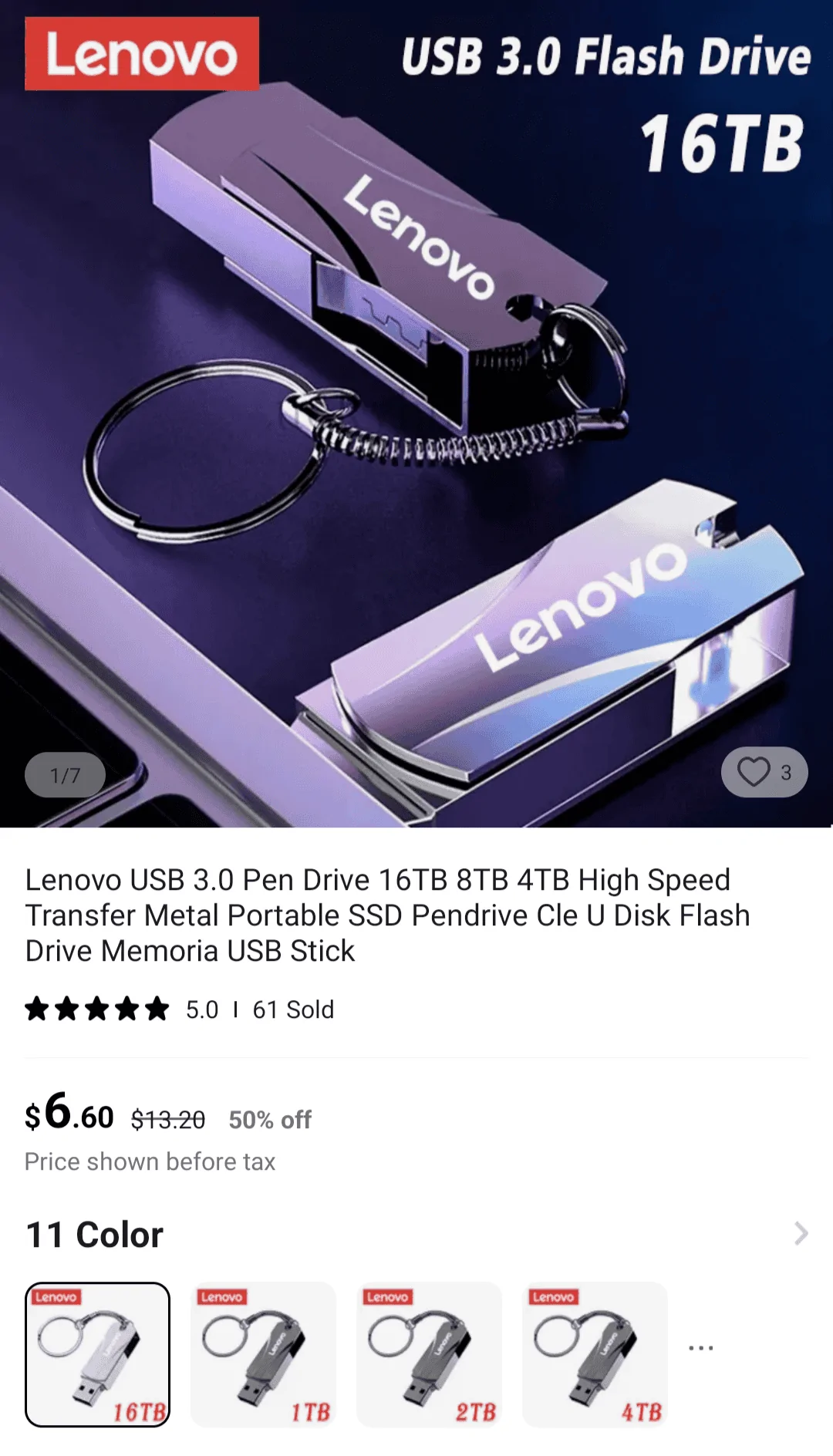
https://a.aliexpress.com/_mPbpKP4

Jeep Wrangler JL I want a CD player Screenshot_20230825-232953-569


Just sayin' ?
 

Zissou

Well-Known Member
Joined
Jul 5, 2022
Threads
3
Messages
227
Reaction score
324
Location
Charlottesville VA
Vehicle(s)
24 392, 21 BMW M2 competition, 97 Chevy K1500
I made Alice an honest woman - I signed up for Spotify.

So now when I drive from WA to FL (and back) in the next few weeks, I have the option of listening to either:

An honest-to-goodness CD
AM/FM radio (probably won't)
Pandora
Sirius
Spotify

That should be enough options.
If the combo of those can't provide enough music options then nothing will!
 

Sponsored

Vincenzo

Well-Known Member
First Name
Vince
Joined
Sep 28, 2023
Threads
2
Messages
61
Reaction score
61
Location
Los Angeles, CA USA
Vehicle(s)
Audi Q5
Ok... So I ordered this CD player on Saturday, and it arrived today (Thursday). Not too bad - got here fairly quick actually. Came very well packaged, and it looks nice. Here's what I ordered for those just checking this thread:

USB Integrated Add-On CD Player for 2018+ Jeep Wrangler – Ensight Automotive Solutions

Hopefully this weekend I can hook it up and test it out. I've got a baby shower on Saturday (new grandson) and they're a little over an hour away. So hopefully I can give it a good test on the drive. And test out Spotify (Siri isn't always doing exactly what I ask of her, but I've only messed with it very briefly).
Reviving this old thread. I also added this CD player about a month ago to the center console. Works okay. Seems to skip track 1 and doesn't show any album information but don't seem to skip. I love having a CD player in the Jeep. It definitely fits the 2 door, manual sport vibe.
 

roaniecowpony

Well-Known Member
Joined
Dec 4, 2018
Threads
194
Messages
12,932
Reaction score
20,460
Location
SoCal
Vehicle(s)
2018 JLUR, 14 GMC 1500 CC All TERRAIN
Occupation
Retired Engineer
You can copy many CDs onto a usb drive. No worries about skipping on bumpy roads.
 

cbrenthus

Well-Known Member
Joined
May 2, 2018
Threads
11
Messages
830
Reaction score
1,165
Location
FL
Vehicle(s)
'19 Mojito JLUR
If I went back 20 years ago and tried to tell people that in 2024 you couldn't buy CDs at Walmart or Best Buy anymore, but they had plenty of vinyl records, nobody would believe me!

I'd love to try the USB CD player, but its a bit rich. They make bluetooth CD players, I might try one of those. And for anyone saying we can rip our CDs into audio files and put them on the phone or a drive, you're missing the point. First, I don't have a CD/DVD drive in any of my current computers, and haven't for years. Second, that's a lot of work. And third, there is something very simplifying about putting an single album in the player at a time.
 

swampflyer

Well-Known Member
First Name
rick
Joined
Feb 10, 2022
Threads
20
Messages
982
Reaction score
1,080
Location
florida
Vehicle(s)
2020 jlr-2015 jette tdi-2013 mb
Occupation
retired
Just turned in my cd’s to my local computer guy and he’s going to put them on a thumb drive for me. Of course there is a fee. 😱
Sponsored


Top