Sponsored

Uconnect 8.4 UAV

dbldutch

Member
Joined
Feb 24, 2026
Threads
1
Messages
11
Reaction score
5
Location
Iowa
Vehicle(s)
2018 Pacifica
I have a 2018 with factory Uconnect 8.4 UAQ (I think). It has a 8.4" screen flush mounted and has NAV, Satellite Radio and emergency, if subscribed.

I bought used and failed to notice the internal GPS did not work prior to purchase.

Through another thread here (https://www.jlwranglerforums.com/fo...h-dead-navigation-using-a-uas-as-parts.59137/), I found the AirCard was what was needed to get GPS working again. As others wrote, it is about a 30-45 minute job.

Since the replacement, the car frequently gets 'lost' only to get back on the correct road after several miles (or days). One time, the clock was wildly off as well, it read 8;30 when it was 6:15, but this only happened once so far.
When I check the information for the satellites, I have 10-12 at all times now, whereas I had 0 prior to the AirCard replacement. In the same information screen, it sometimes says my altitude is 0 feet, when I am actually (and normally) ~1000 feet.

A fuse pull ALWAYS fixes it for a short time, but the problem reoccurs far too often for that to be my preferred solution

I am trying to get rid of this gremlin. I did apply new, non conductive thermal paste for the AirCard, but I did not replace or supplement the thermal interface pads in the remainder of the radio. I thought maybe a cable was poorly connected behind the unit, but I don't think that is it. Perhaps the GPS antenna has a spotty connection? If it did, I would not expect a fuse pull to consistently get it back to proper operation.

Ideas or personal experience?
Sponsored

 
OP
OP

dbldutch

Member
Joined
Feb 24, 2026
Threads
1
Messages
11
Reaction score
5
Location
Iowa
Vehicle(s)
2018 Pacifica
I have been paying attention and my uconnect nav seems to get off course when there is any steering movement. It also gets lost at many of the same places most times.

In one location, I take a left turn and often, the nav is ~500 feet off, in one direction or the other, about a mile later.

In another place, it will assume I took an exit ramp, then get back on the highway via the matching on-ramp. A short time later, nav assumes I took another exit and it can be a mile or more off course, before it fully corrects.

It corrects positioning in jerks, moving part way back, getting off again and repeating this until back on the correct highway.

I have learned uconnect nav uses wheel speed and steering wheel position to guess where the vehicle is if GPS is unavailable. It is odd it ever uses these as there are no issues with satellite quantity or signal strength. Indoors it reports 9-11 satellites. Outside it registers 10-13 satellites all the time. Indoors or outside, it always shows 'high' reliability.

I believe there are issues with either how often my uconnect nav obtains/uses GPS positioning or the priority it gives GPS versus the other vehicle positioning sensors.

I found this in a 2 year old thread, perhaps someone here knows more about this:
I connected my OBD2 Vgate VLinker MC+ adapter and through AlphaOBD on an Android phone. I started connecting to each module of the car, read the errors and cleared them. Some did not want to disappear (climate and radio modules).

After that, I went to change the configuration. Not sure everything from this is necessary, but I saw this on another forum for Jeep Renegade:
Car configuration change: Radio Type: 'LEVEL 2 (R1 LOW)' -> 'LEVEL 4'
Car configuration change: SDARS Travel Link: 'ABSENT' -> 'PRESENT'
Car configuration change: Navigation: 'ABSENT' -> 'PRESENT'
Car configuration change: GPS Dead Reckoning: 'ABSENT' -> 'PRESENT'
I really want to get this resolved but not enough to spend what the dealer wanted 🙃
 

YGBSM392

Well-Known Member
First Name
Kevin
Joined
Aug 24, 2022
Threads
10
Messages
1,029
Reaction score
2,493
Location
Oklahoma City
Vehicle(s)
2025 Rubicon 392, 2024 2-Door Rubicon X, 2024 Mojave X
Occupation
I fly da plane...
Have you tried a hard reset? Remove the battery ground? It has to be software.
 
OP
OP

dbldutch

Member
Joined
Feb 24, 2026
Threads
1
Messages
11
Reaction score
5
Location
Iowa
Vehicle(s)
2018 Pacifica
I appreciate the reply @YGBSM392 .

I doubt there is any difference between disconnecting the battery ground and pulling the UConnect fuse. Additionally, disconnecting the battery ground would 'reboot' everything, not just the UConnect.

An update, the UConnect nav is getting off course much less often and getting back on the correct roadway much more quickly. My theory: as the GPS corrects the 'dead reckoning', the dead reckoning is calibrating. The UConnect did not have a working GPS for at least a year. Prior to repairing the GPS, the 'dead-reckoning' system showed me near (and in) Lake Erie, but I am in central Iowa.

I will post another update if things change for the better or worse.
 
OP
OP

dbldutch

Member
Joined
Feb 24, 2026
Threads
1
Messages
11
Reaction score
5
Location
Iowa
Vehicle(s)
2018 Pacifica
Another update:
since I last wrote, there was ONE drive where the GPS was 'lost' for about 9 miles of driving. It ended up several miles off course as the compass went from correct to at least 90 degrees off before everything corrected.
Otherwise, just small, short errors
 

Sponsored

OP
OP

dbldutch

Member
Joined
Feb 24, 2026
Threads
1
Messages
11
Reaction score
5
Location
Iowa
Vehicle(s)
2018 Pacifica
I wanted to share that I decided to do a Uconnect update as a TSB (and FCA) state I need a newer version to correct the navigation issues.

It did not go well. My 2018 Pacifica Uconnect 4C is running 22.5. I tried to update to 28.3 and received the dreaded error code 20.

I scoured the internet for a solution. Nothing worked. I resolved myself to getting one from a junk yard.

Did one more search, found this and figured, why not?

THIS fixed mine:

I am still on 22.5 but at least my Uconnect isn't stuck in a loop. I didn't have to pay anybody either, though I would buy OP a beer any day!
 

YGBSM392

Well-Known Member
First Name
Kevin
Joined
Aug 24, 2022
Threads
10
Messages
1,029
Reaction score
2,493
Location
Oklahoma City
Vehicle(s)
2025 Rubicon 392, 2024 2-Door Rubicon X, 2024 Mojave X
Occupation
I fly da plane...
Thanks for the video. Uconnect is not a great system.
 

Spank

Well-Known Member
Joined
Mar 29, 2017
Threads
27
Messages
2,690
Reaction score
4,550
Location
Colorado
Vehicle(s)
2018 Jeep Wrangler Unlimited Rubicon, 2020 Dodge Challenger RT Scat Pack
You need to be at 22.6 before you can jump to 28.3.
 

Spank

Well-Known Member
Joined
Mar 29, 2017
Threads
27
Messages
2,690
Reaction score
4,550
Location
Colorado
Vehicle(s)
2018 Jeep Wrangler Unlimited Rubicon, 2020 Dodge Challenger RT Scat Pack
This thread says otherwise: https://www.pacificaforums.com/threads/uconnect-2018-update-from-22-5-to-39-5-version.53775

Do you have any pointers for trying to get to 22.6/22.64? Now that I have a recovery procedure, I am game to give it a try.
There is a TSB for 28.3 from Jeep that says you need to be at 22.64 first. However, some on this forum have been able to make the leap from 22.6.

https://www.mediafire.com/file/1c4ix739wlfjlz9/UCONNECT_8.4_UAQ_IR22.6_MY18.zip/file

Give this a try.
 

Sponsored

OP
OP

dbldutch

Member
Joined
Feb 24, 2026
Threads
1
Messages
11
Reaction score
5
Location
Iowa
Vehicle(s)
2018 Pacifica
Said this update was not compatible with the vehicle.
Since the AirCard I received from the eBay seller in Georgia did not work, I replaced it with one from a seller in Iowa. https://ebay.us/m/fIufK4 is the card I got that works. I may try the update again.

The two other cards on eBay are actually sold by the same place. They told me they would not do anything when I told them the card they sent was defective.
 
OP
OP

dbldutch

Member
Joined
Feb 24, 2026
Threads
1
Messages
11
Reaction score
5
Location
Iowa
Vehicle(s)
2018 Pacifica
I have been peppering various forums on this Uconnect issue. Here is a summary, I am hoping this helps others.

My original AirCard had failed. I bought a replacement from an eBay seller in Georgia. This is the card that was getting 'lost' only to get back on track after a bit.

I read TSBs linked from places that suggested updating the Uconnect software to fix the issue.

After finding the correct file, I tried the update only to get the dreaded "Error Code 20".

Many places said to replace the AirCard to get out of this loop. So I bought a card from a different seller (https://ebay.us/m/fIufK4) and I tried the update again.

There was no change. I resolved myself to replace the radio but the junk yard was closed for the day.

I did one more Internet search and found this video:

I figured, what the hell. THIS video worked for me. I was still on the old software but my radio was not longer stuck in an error loop.

I decided to leave things alone for a bit. Driving last night, the newest card never got lost.

I wrote the seller of the first card that it was defective. They told me they would do nothing about it. This is the same seller for the other two AirCards listed on eBay.
 

Spank

Well-Known Member
Joined
Mar 29, 2017
Threads
27
Messages
2,690
Reaction score
4,550
Location
Colorado
Vehicle(s)
2018 Jeep Wrangler Unlimited Rubicon, 2020 Dodge Challenger RT Scat Pack
I always thought the Pacifica ran the same build of Uconnect as Jeep and RAM, but maybe it doesn't.
 

Kingpre

Well-Known Member
First Name
Pedro
Joined
Aug 14, 2018
Threads
1
Messages
128
Reaction score
392
Location
Philadelphia, PA
Vehicle(s)
2018 JLUR Sting Gray, 2013 JKU Sahara
Vehicle Showcase
1
Thank you guys for all your info and tips!!

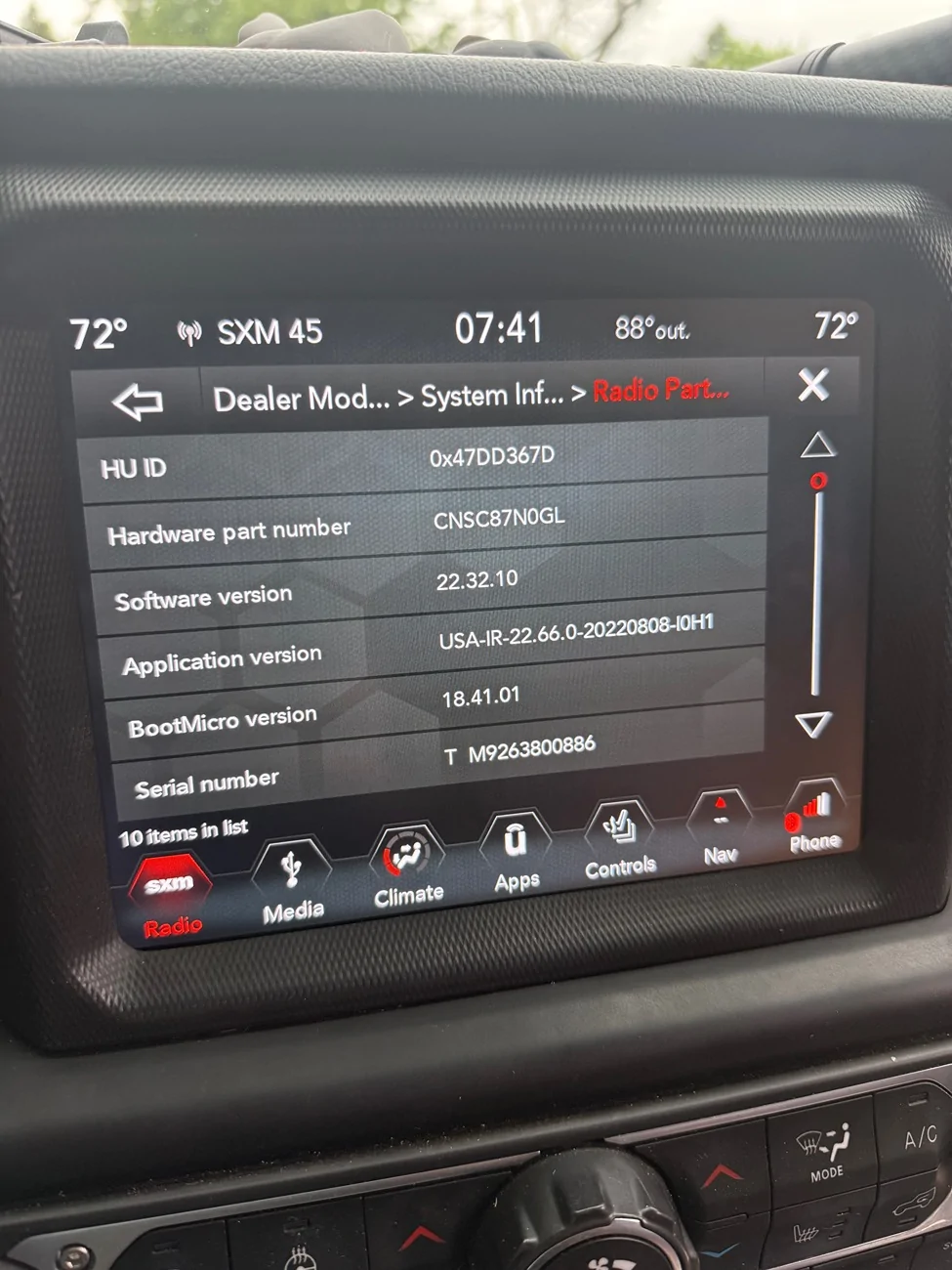
Just want to tell everyone I was able to fix my boot loop using this thread. I installed a "new" aircard from eBay and it restored my old version on my head unit. Everything is working as it used to. And now I'm debating to do the update as I'm on verision 22.66.

Jeep Wrangler JL Uconnect 8.4 UAV IMG_7564
Sponsored


Top