Sponsored

Steps on how to reset JL uConnect 4 system

Sierra Nevada

Well-Known Member
Joined
Dec 31, 2017
Threads
1
Messages
267
Reaction score
197
Location
usa
Vehicle(s)
Red Rubi JL Unlimited
After ORP update, Uconnect can no longer be reset via VoiceCmd/GrnPhone button reset sequence ... nor does Auto Play (USB music files play upon start up) work. Lots of functions are flakey. Took it in to service and left it for 1 day. Jeep service could not reset uconnect either. Waiting for a call back from Service ... maybe a week or 2.
Sponsored

 

JeepCares

Well-Known Member
Joined
Feb 1, 2018
Threads
16
Messages
5,425
Reaction score
2,800
Location
Auburn Hills, MI
Vehicle(s)
JL
After ORP update, Uconnect can no longer be reset via VoiceCmd/GrnPhone button reset sequence ... nor does Auto Play (USB music files play upon start up) work. Lots of functions are flakey. Took it in to service and left it for 1 day. Jeep service could not reset uconnect either. Waiting for a call back from Service ... maybe a week or 2.
When you mentioned Jeep service couldn't reset it, are you referring to the Uconnect Customer Care Team? Send me a direct message with your VIN as I'd like to discuss this in more detail and help in any way I can.

Jasmine
Jeep Social Care Specialist
 

bilcol81

Well-Known Member
First Name
Bill
Joined
Mar 19, 2018
Threads
5
Messages
114
Reaction score
296
Location
Altoona, FL
Vehicle(s)
2025 Wrangler Sahara 4xe
Occupation
Retired
If I do the factory reset will I lose ORP? Can I get them back?
 

Cole

Member
First Name
Cole
Joined
Nov 10, 2018
Threads
0
Messages
9
Reaction score
2
Location
Alexandria, VA
Vehicle(s)
2018 Jeep JL
My 7" system does the same thing when I use Google Maps (when plug in my phone/enable Android Auto). I contacted uConnect/Jeep about this and haven't heard back yet. I will try the reset procedure.
*I guess the 7" systems have some sort of GPS in them afterall?
My Android Auto Google Maps on the uConnect almost always thinks I am in Toledo, Ohio (back to the factory, I guess) or somewhere off the coast of Oregon--literally a few miles out in the water.
(Additionally, if I enable my clock on the uconnect system to "sync with GPS" it goes to Eastern time as well--probably because it is syncing with some hard-coded "GPS" in Toledo? Is there even a GPS in the 7" system?)
I've been having problems connecting my Google Pixel3 via the USB 2 connector in my center console. As soon as I connected it to USB 1, it worked just fine. It would also not recognize the USB3 connection. Not sure why.
 

porkchop

Well-Known Member
Joined
Jun 21, 2018
Threads
0
Messages
103
Reaction score
59
Location
SoCal
Vehicle(s)
2018 JLUR / Billet / Teraflex ST2 / Icon Shocks
I have the issue no matter which USB I’m plugged into. I’ve also noticed the clock changes time as well.
 

Sponsored

JeepCares

Well-Known Member
Joined
Feb 1, 2018
Threads
16
Messages
5,425
Reaction score
2,800
Location
Auburn Hills, MI
Vehicle(s)
JL
I've been having problems connecting my Google Pixel3 via the USB 2 connector in my center console. As soon as I connected it to USB 1, it worked just fine. It would also not recognize the USB3 connection. Not sure why.
I have the issue no matter which USB I’m plugged into. I’ve also noticed the clock changes time as well.
Hi Cole and porkchop,
There's a chance that CarPlay/Android Auto may have been disabled in your Jeeps. Following these steps may help with your concerns:
Select "Apps"
Select "Projection Manager"
Click on correct device listed
Make sure "Enable CarPlay" is checked. If not, select the box.
If the device is already plugged in via USB when you go through these steps, you must unplug and replug the USB port to the phone.

Lydia
Jeep Social Care Specialist
 

cbournis

Well-Known Member
First Name
Charlie
Joined
Oct 18, 2018
Threads
1
Messages
54
Reaction score
28
Location
New York
Vehicle(s)
Jeep Wrangler Rubicon
Hi Cole and porkchop,
There's a chance that CarPlay/Android Auto may have been disabled in your Jeeps. Following these steps may help with your concerns:
Select "Apps"
Select "Projection Manager"
Click on correct device listed
Make sure "Enable CarPlay" is checked. If not, select the box.
If the device is already plugged in via USB when you go through these steps, you must unplug and replug the USB port to the phone.

Lydia
Jeep Social Care Specialist
Hello Lydia,

This is happening on all current Android phones.... There is a thread on the Android Auto forums...
https://productforums.google.com/forum/#!topic/android-auto/1NmG3ojHX_k

This has something to do with Google Play Services not with the Uconnect system...
 

micmoor

Member
First Name
Mike
Joined
May 24, 2018
Threads
0
Messages
5
Reaction score
0
Location
Massachusetts
Vehicle(s)
2018 Wrangler JLU Sahara, 2008 Wrangler TJ Sahara
PROBLEM SOLVED!

My JLU is no longer stuck in Toledo!

I brought my JLU in for service this week and told them I needed the TSB to fix the radio. They called me later in the day saying they didn't find one. I then gave them the number TSB 08-012-18 (I tried to give them the number previously and they didn't want it, thinking they'd put in my VIN and it would pop up but it didn't). They looked it up and then had to download the update and then update the Jeep. This added another day of time at the dealer. Perhaps this is an optional TSB so you have to give them the number?

The good news is that now Apple CarPlay works as expected, and even better, I now have Waze, Google Maps, and several other apps from my phone that didn't show before. I had heard Waze was coming but hadn't seen a timeframe. I used it on the way home and it does exactly what you'd expect it to.

I'm still covered by Jeep Wave and warranty so there was no charge for my oil change, cruise control TSB, and the radio TSB.

###

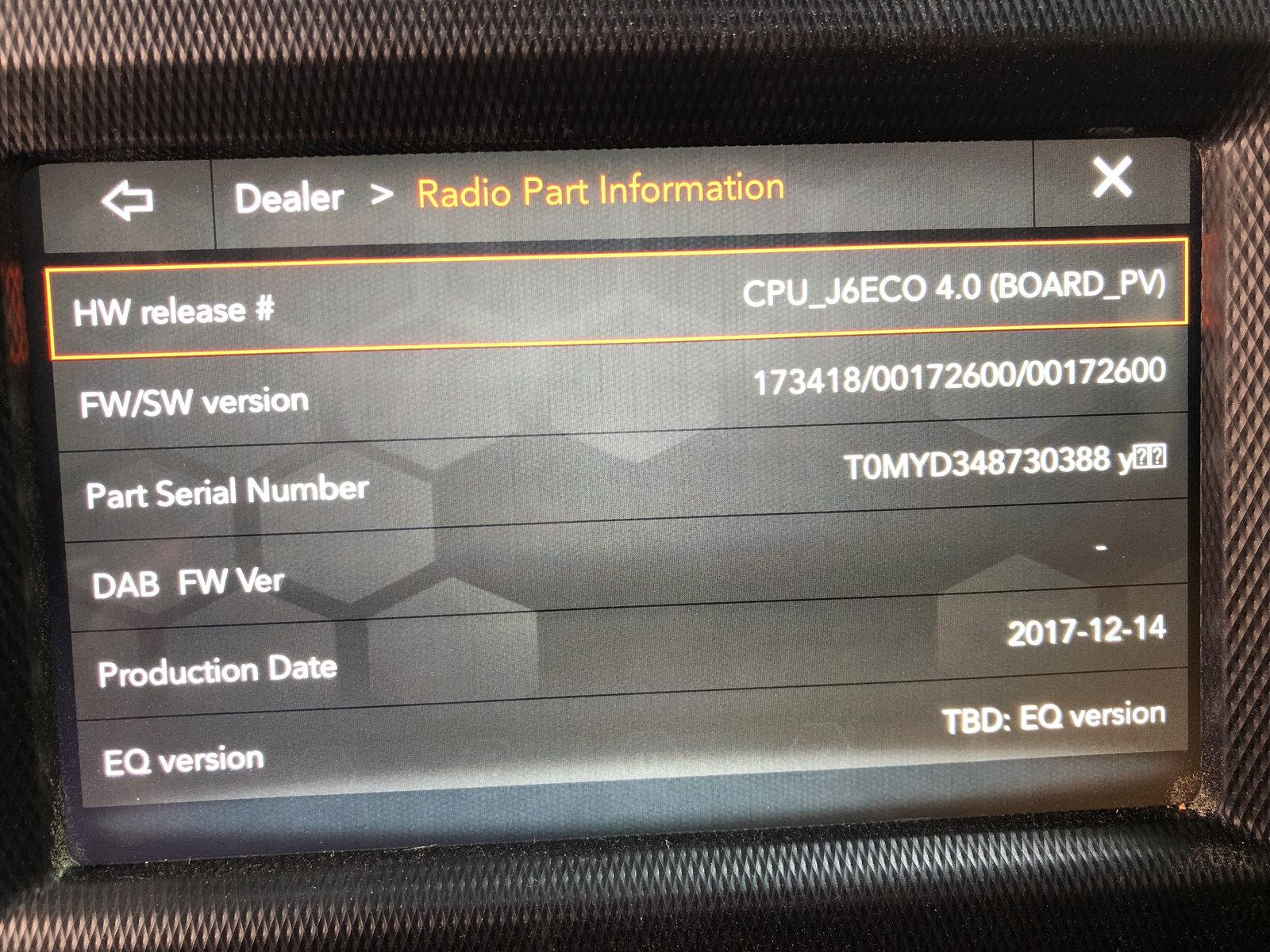
I sent a DM to the Jeep Cares team. They asked me for my software version number (which you can get by going into Dealer Mode - press and hold driver temp up and down switched along with front defrost for at least five seconds). My pic of the version number is attached.

This was their response:
"TSB 08-012-18 applies to your VIN, and it will update your radio software level to 1810.02 and improve certain functions of the radio. This may help your current concern. We recommend visiting your local dealer and having this TSB performed."

It looks like it's a dealer-only update.

20180824_132516408_iOS.jpg
 

brewskisteve

Well-Known Member
First Name
Steve
Joined
Aug 20, 2018
Threads
3
Messages
74
Reaction score
43
Location
Oceanside, CA
Vehicle(s)
2018 JLU Rubicon, 2001 Ford F350 4x4 crew cab 7.3L diesel
Occupation
Retired
Vehicle Showcase
1
Yeah my GPS does the same thing except for the dealership I purchased it at :( looks like I’ll be seeing a dealership soon.
I wish there was a way for CarPlay to take the iPhones gps over the car
I've had my 2018 JLU Rubi for 10 days and its showing the dealer ship as home as well. Tonight the back up camera stopped working. My first Jeep and I love it, but this U Connect system seems to have a ton of glitches !
 

jmcdtucson

Well-Known Member
First Name
Jerel
Joined
Jun 17, 2018
Threads
12
Messages
698
Reaction score
665
Location
Tucson, AZ
Vehicle(s)
2018 JLU Sport S
Vehicle Showcase
1
FYI, the byzantine reset sequence and the driving around in circles steps earlier in this thread fixed my maps and my compass. It took some time after doing the sequence for everything to figure itself out again, but no problems since then.
 

Sponsored

jlsahara

Well-Known Member
First Name
Oscar
Joined
Apr 20, 2018
Threads
7
Messages
454
Reaction score
510
Location
AZ
Vehicle(s)
2018 JLU
Nome of the reset options mentioned brings up a menu. Nothing happens with the steering wheel or AC tricks.
 

porkchop

Well-Known Member
Joined
Jun 21, 2018
Threads
0
Messages
103
Reaction score
59
Location
SoCal
Vehicle(s)
2018 JLUR / Billet / Teraflex ST2 / Icon Shocks
It’s a dealer flash.
 

Greg H

Well-Known Member
First Name
Greg
Joined
Jan 2, 2019
Threads
16
Messages
288
Reaction score
185
Location
Vallecito Lake, CO
Vehicle(s)
2018 Wrangler Unlimited JL Rubicon
Nome of the reset options mentioned brings up a menu. Nothing happens with the steering wheel or AC tricks.
From what I've read with the latest update you now have to hold the defrost button and the driver temperature up and down buttons at the same time for approximately 7 seconds with the motor running for the menu to pop up. But I haven't tried it yet.
 

HoosierJL

Well-Known Member
First Name
Fletch
Joined
Jan 26, 2019
Threads
1
Messages
62
Reaction score
35
Location
Lafayette, IN
Vehicle(s)
2019 JL Rubicon
From what I've read with the latest update you now have to hold the defrost button and the driver temperature up and down buttons at the same time for approximately 7 seconds with the motor running for the menu to pop up. But I haven't tried it yet.
The engine doesn't have to be running but the ignition button must be in "Run" mode. Press front defrost and temp up and down buttons at the same time for 7 seconds to get to the dealer menu.
 

LeoD

Active Member
First Name
Leo
Joined
Jun 4, 2018
Threads
1
Messages
28
Reaction score
13
Location
Kailua Kona, HI
Vehicle(s)
2018 Wrangler JLU Rubicon
Occupation
Real Estate Sales
Hello everyone,
If you are experiencing any concerns with your Apple CarPlay/Android Auto having the incorrect location once you plug your phone into the vehicle - please send us a PM with additional details. Include which phone system you are using, more details of what is happening, and if you've visited your dealer on this.
Thank you!
Julie
Jeep Social Care Specialist
Sponsored


Top