Sponsored

Navigation tools

Goin2drt

Well-Known Member
Joined
Oct 25, 2017
Threads
48
Messages
2,601
Reaction score
3,247
Location
Kentucky
Vehicle(s)
18 Rubicon, 17 Grand Cherokee Trailhawk
Can we discuss what everyone is using for navigation? I would like to see what others have for the tricks of the trade.

For example I am liking the trailsoffroad.com website as you can see the trails, read about them and understand the difficulty and even read reviews. It appears you can download the gpx file to your laptop. From there I am not sure what folks are using onboard their rig or even taking those GPX files and uploading them to something. First few times out I used my iPhone with the gaia app. I found my iPhone to bit a bit small. I also do not know what happens with an iPhone when you lose cell service (i never did), does it lose functionality meaning it stops being a navigation tool until you get service or does it still use satellite and GPS to give you accurate whereabouts.

I was also looking at the Magellan TRX7 but that seems to be a little limited. For example there were plenty of route it didn't even show that trailsoffroad did and plus they did not have any data on the trails I was looking at either (difficulty etc). It also appears the reviews are good but folks seem to move off it as they advance.

Anyone have a great set up for this?
Sponsored
 

JCatherine

Well-Known Member
Joined
Jun 16, 2018
Threads
9
Messages
141
Reaction score
115
Location
Bay Area, California
Vehicle(s)
2018 JL Sahara
Vehicle Showcase
1
It’s not perfect, but check out bad elf or similar devices. It gives you another option. Oh and you can download google maps for use off line.
 

47Jeepster

Well-Known Member
First Name
Tom
Joined
Jul 7, 2018
Threads
23
Messages
621
Reaction score
687
Location
Queen Creek, Arizona
Vehicle(s)
2025 JLUR X ... 2023 JLUR Diesel ... 2018 GC Summit
Occupation
Retired
TRAILS:
Look up the 2012 edition of "Guide to Arizona Backroads & 4-Wheel-Drive Trails on https://funtreks.com. You can buy just the book, or a microSD card with all of the trails ready for insertion into your Garmin GPS unit, or the combination. Check your local library for a copy of the book to see if it's worth buying ... it was for me. Funtreks has the same set up for Colorado, Utah, and California.

Here are some online sources for trails ... a couple only cover Arizona:

https://www.alltrails.com/
http://azoffroading.com/
https://www.trailsoffroad.com/
https://www.jeeptheusa.com/
http://azoffroad.net/

Alltrails looks to be mainly user supported, so it's a little haphazard. Sign up for the free version ... about a month later they will send you a half price offer. I like the trailsoffroad website ... they have a very professional layout plus, they have good YouTube videos of many of the trails. I also like jeeptheusa ... they have .gpx files and write-ups for a large number of trails in the southwest. Haven't spent much time with azoffroad and azoffroading.

There is some overlap with all five sources and some unique trails in each one. I've found good luck blending trails from different sources.

GPS UNITS:
The only ,gpx files that work on a Garmin Nuvi are FunTreks' trails. That severely limits the Nuvi usefulness off road. FunTreks told me they use proprietary software to convert the standard .gpx file into one that the Nuvi can read. If I could figure out how to get a Nuvi to read standard .gpx files, I'd be a happy Jeepster!


We have two Garmin Oregon units that we carry for geocaching. They work well for both FunTreks and standard .gpx trails, but the screen is really too small for a "mount it on the dash" type of usage. I have an old android smartphone with LocusMaps Pro loaded on it that I've been experimenting with. That seems to be a better compromise for size and ease of use ... regular .gpx files and the FunTreks .gpx files can both be loaded on it. Plus, you can add geocaches and other waypoints. If you upload maps before leaving home, the smartphone works offline ... a small shortcoming. If the smartphone/LotusMaps setup keeps showing promise, I'll probably buy an iPad mini with a bigger screen to replace the smartphone.
 

47Jeepster

Well-Known Member
First Name
Tom
Joined
Jul 7, 2018
Threads
23
Messages
621
Reaction score
687
Location
Queen Creek, Arizona
Vehicle(s)
2025 JLUR X ... 2023 JLUR Diesel ... 2018 GC Summit
Occupation
Retired
Oh yes, I forgot. Since we can now model our android and apple phones on the Uconnect screen, why can't we use the smartphone/LocusMaps combination and have it show up on the Uconnect screen?
 

Sponsored

47Jeepster

Well-Known Member
First Name
Tom
Joined
Jul 7, 2018
Threads
23
Messages
621
Reaction score
687
Location
Queen Creek, Arizona
Vehicle(s)
2025 JLUR X ... 2023 JLUR Diesel ... 2018 GC Summit
Occupation
Retired
Looks like TrailRecon is trying to answer your questions ... look from ~6:00 minutes to 8:00 minutes for the navigation discussion. You should also watch from ~8:00 minutes to 9:10 minutes where Brad talks about the new Spot X. I went with the inReach unit, but at least listen for why he bought the functionality.


LLANERO

Well-Known Member
First Name
Dario
Joined
Apr 24, 2018
Threads
23
Messages
514
Reaction score
622
Location
Virginia Beach
Vehicle(s)
2018 JL
If you are looking for a GPS for trail use, Gaia GPS is the way to go. It's available for iPhone and Android. Also there's a desktop version.
You can create routes on your computer and it will sync with your phone/tablet.
Also, you can download maps to your mobile device prior to your trip, in case there's no data coverage on the trails you will hit.
 

wpwood3

Member
First Name
Bill
Joined
Nov 9, 2018
Threads
1
Messages
17
Reaction score
12
Location
Atlanta
Vehicle(s)
2018 JLUR Ocean Blue, 2010 Toyota Sequoia
If you are looking for a GPS for trail use, Gaia GPS is the way to go. It's available for iPhone and Android. Also there's a desktop version.
You can create routes on your computer and it will sync with your phone/tablet.
Also, you can download maps to your mobile device prior to your trip, in case there's no data coverage on the trails you will hit.
I agree 100%. Gaia is the best GPS app for overlanding. You can see forest service roads, fire roads and BLM roads. Superb maps and very reasonable price. Free for basic and $95/year for Premium.

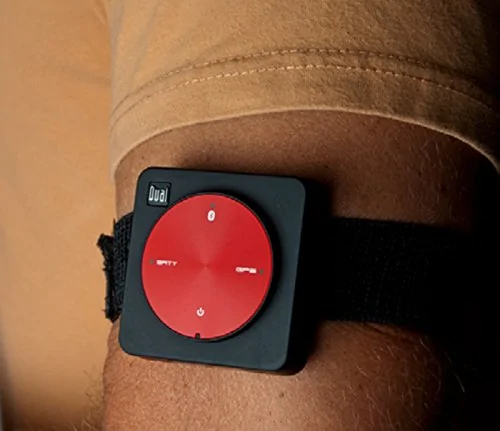
I use an iPad Air2 that only has WiFi. To make it work I bought a Dual Electronics XGPS150A. They are less than $90 on Amazon. Place it on your dashboard so it can see several satellites. It will communicate with your iPad or Android tablet via bluetooth. Has an internal battery but, charges via USB.

Highly recommended!
Jeep Wrangler JL Navigation tools 41aTWkM75KL


Jeep Wrangler JL Navigation tools GAIA_GPS
 
Last edited:

47Jeepster

Well-Known Member
First Name
Tom
Joined
Jul 7, 2018
Threads
23
Messages
621
Reaction score
687
Location
Queen Creek, Arizona
Vehicle(s)
2025 JLUR X ... 2023 JLUR Diesel ... 2018 GC Summit
Occupation
Retired
@wpwood3 ... one question and several comments.

When I look up the specs of the iPad Air2 with only wifi, I can't find where it has a GPS capability. That's why you've added the XGPS150A to the mix ... yes? I do like the Bluetooth connectivity ... you could hard wire the XGPS into the Jeep and have constant "no worries" tracking capability. Much better than using an old GPS unit and a USB cord to provide a non-GPS unit with guidance ... which was the norm about ten years ago.

I'm a great advocate of re-purposing old equipment. I'm currently using an old Android phone for off-road mapping. However, I purchased a Galaxy Tablet a couple of weeks ago for ~$110, that will replace the smartphone on the dash. Although the GPS in the smartphone and the tablet is not as accurate as a dedicated GPS unit, they are more than accurate for off-roading.

Something you might experiment with: I removed all the apps I could from the smartphone and disabled those I couldn't remove. Thus, the smartphone is dedicated primarily to my mapping app. The smartphone will run the mapping app in excess of 10 hours off the battery ... no cords running down the dash ... love it! Hoping the tablet will perform as well ... waiting on the new holder from 67 Designs to use it.

Look at this URL: https://www.jeeptheusa.com/use-gpx.html It contains a quick overview of the three major off-road mapping apps. Although covering basics in a similar manner, each one adds some extra features.

I downloaded the free versions of all three and played with them. All three use .gpx files in a similar manner for trail mapping. I settled on the Locus Map app because in addition to other features, it handles geocaching ... although it took me a couple of weeks to figure out how to download the points from my GSAK software. The Locus Map app has an uphill and bumpy learning curve 'cuz it is a very feature rich app and the YouTube tutorials are voiceless ... one really has to pay attention. I suspect that they're voiceless because of the worldwide usage of Locus Map. The purchase price was $7.49 with no monthly fees ... the family plan lets me install it on an unlimited number of owned devices.
 

Sponsored

wpwood3

Member
First Name
Bill
Joined
Nov 9, 2018
Threads
1
Messages
17
Reaction score
12
Location
Atlanta
Vehicle(s)
2018 JLUR Ocean Blue, 2010 Toyota Sequoia
@wpwood3 ... one question and several comments.

When I look up the specs of the iPad Air2 with only wifi, I can't find where it has a GPS capability. That's why you've added the XGPS150A to the mix ... yes?
The iPad Air2 has no internal GPS capability whatsoever. That's where the Dual XGPS150A comes in. It is an external GPS antenna that connects to your Apple or Android device. Yes, you could hard wire a USB cable to it to keep it charged but, it will run for 8 hours on its own internal battery. I just turn it on and place it in the little rubber tray on top of my dash. You can only pair it with one device at a time. Dual makes these for aviation and marine use. They work up to 59,000 feet and 1,150 mph.

Learning Gaia GPS takes a little time. It is nothing like Google Maps or Apple Maps. It does not do turn by turn directions. There are excellent videos on the Gaia website that teach you the basics. https://help.gaiagps.com/hc/en-us/articles/115011926448-Videos-and-Tutorials

Usually, I plan my route on my PC/Mac using the web version of Gaia. This is automatically sent to my iPhone and iPad via the Gaia cloud. Next I download all the maps and layers for my route on my iPad. Lastly I record my track on the iPad while I am driving so I leave "breadcrumbs".

The Premium version is $95/year but, you get TONS of maps and layers. Usually, I have MapBox Streets as my base map and have USFS 2016, Public Land and USFS MVUM as my 3 overlays. MVUM stands for Motor Vehicle Usage Map and shows all of the forest service roads. If you click on one it shows who maintains the road, what type of vehicle it is suitable for and what time of year it is open. There are also several Topo maps, satellite imagery, hunting maps, historical maps, etc. The Public Land overlay shows all National, State and Local Parks, forests and Bureau of Land Management land. The $95/year gives you access to Gaia on all of your PC/Mac, Apple iDevices, Android devices. Just download the appropriate app for your devices and login to your Gaia account.

Gaia is currently working on an interface for Apple CarPlay.

I follow several overlanders on YouTube including Venture4WD, TrailRecon and Coyote Works. All of them use Gaia GPS. I have used it for hundreds of off-road miles in Windrock OHV Park, Great Smoky Mountains National Park, Cherokee National Forest and Nantahala National Forest. I can't imagine using any other GPS app. I have no connection with Gaia and am not paid by them to endorse their product. I just think it kicks a**.
 

Cypher

Well-Known Member
First Name
J
Joined
Feb 8, 2018
Threads
37
Messages
2,429
Reaction score
2,246
Location
AZ
Vehicle(s)
2021 JLUR Eco-Diesel now. 18, 19, 20 JLUR 3.6 old.
Occupation
Cybersecurity Leader
Vehicle Showcase
5
I agree 100%. Gaia is the best GPS app for overlanding. You can see forest service roads, fire roads and BLM roads. Superb maps and very reasonable price. Free for basic and $95/year for Premium.

I use an iPad Air2 that only has WiFi. To make it work I bought a Dual Electronics XGPS150A. They are less than $90 on Amazon. Place it on your dashboard so it can see several satellites. It will communicate with your iPad or Android tablet via bluetooth. Has an internal battery but, charges via USB.

Highly recommended!
41aTWkM75KL.webp


GAIA_GPS.jpg
I have a Garmin GLO 2 with Gaia and a few others, FunTreks has some overlays I use on my android phone, but much prefer my iPad Pro with the Gaia software. Well worth the money.
Sponsored


Top