Sponsored

MB Quart Stage6/SUBR Alternate Amp Interface Thread - DSR1

Terpsmandan

Well-Known Member
First Name
Dan
Joined
Sep 17, 2021
Threads
65
Messages
1,935
Reaction score
1,272
Location
Penn Yan
Vehicle(s)
2021 JLUR Diesel, 2022 JLUR Diesel
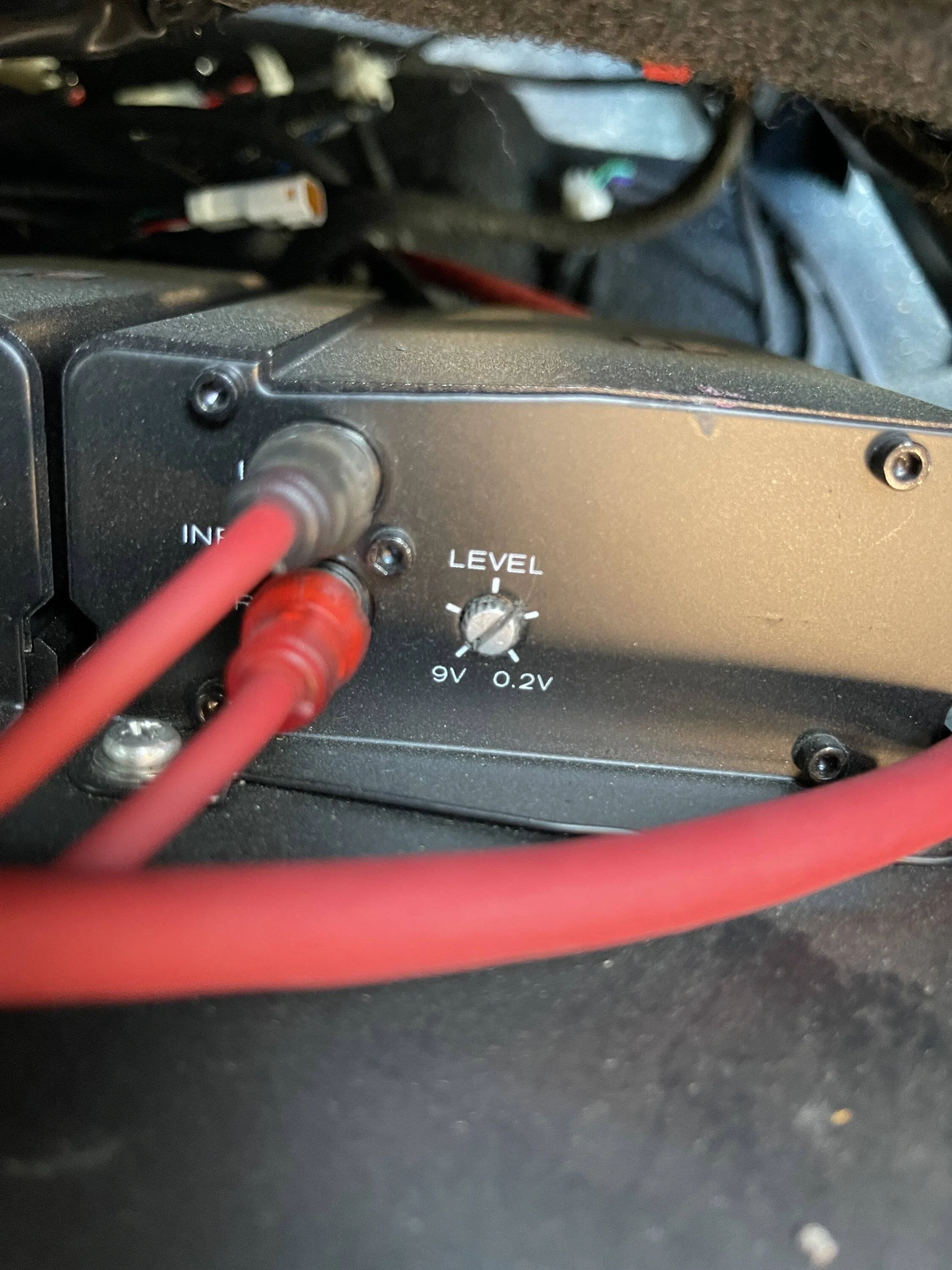
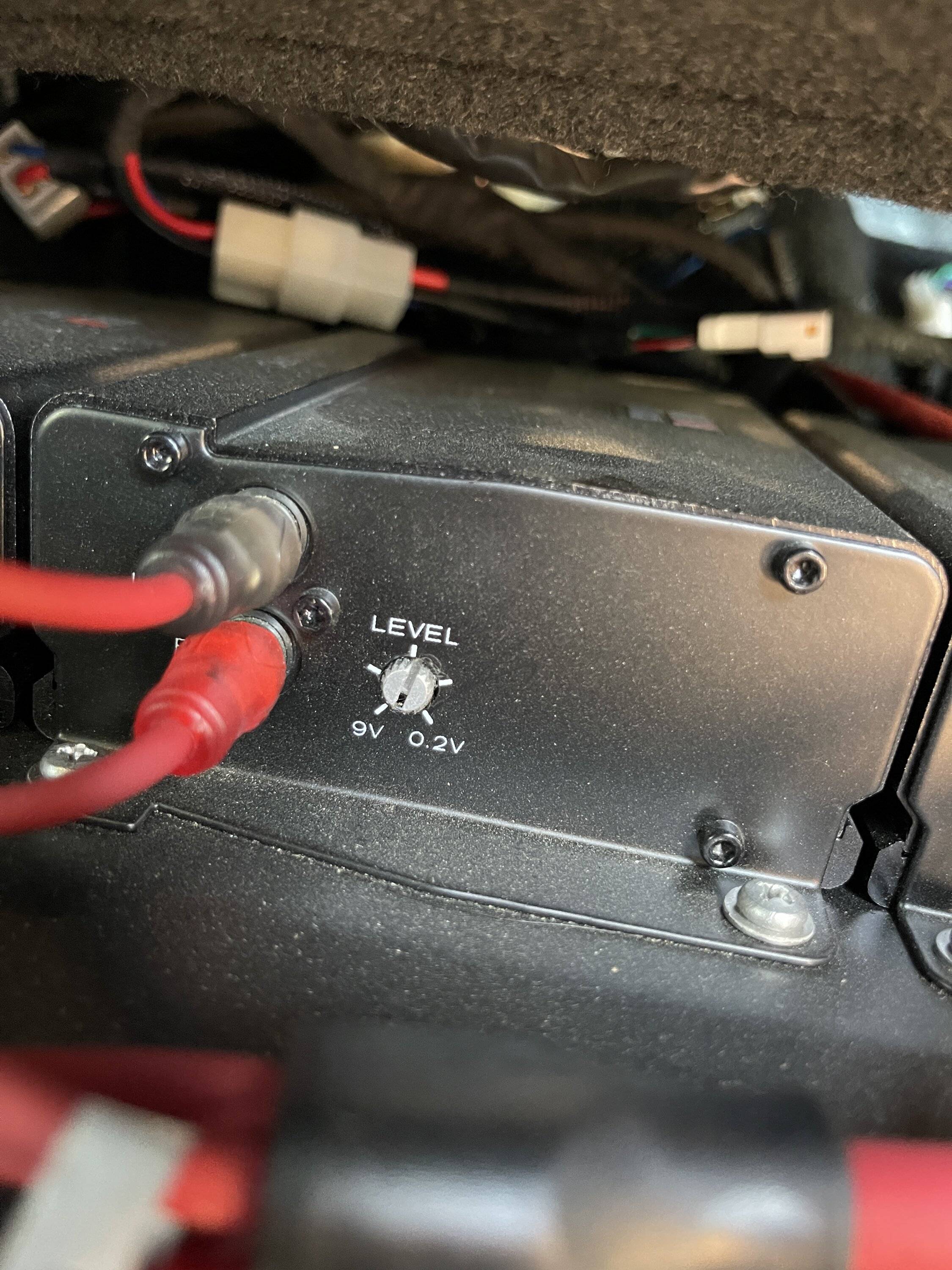
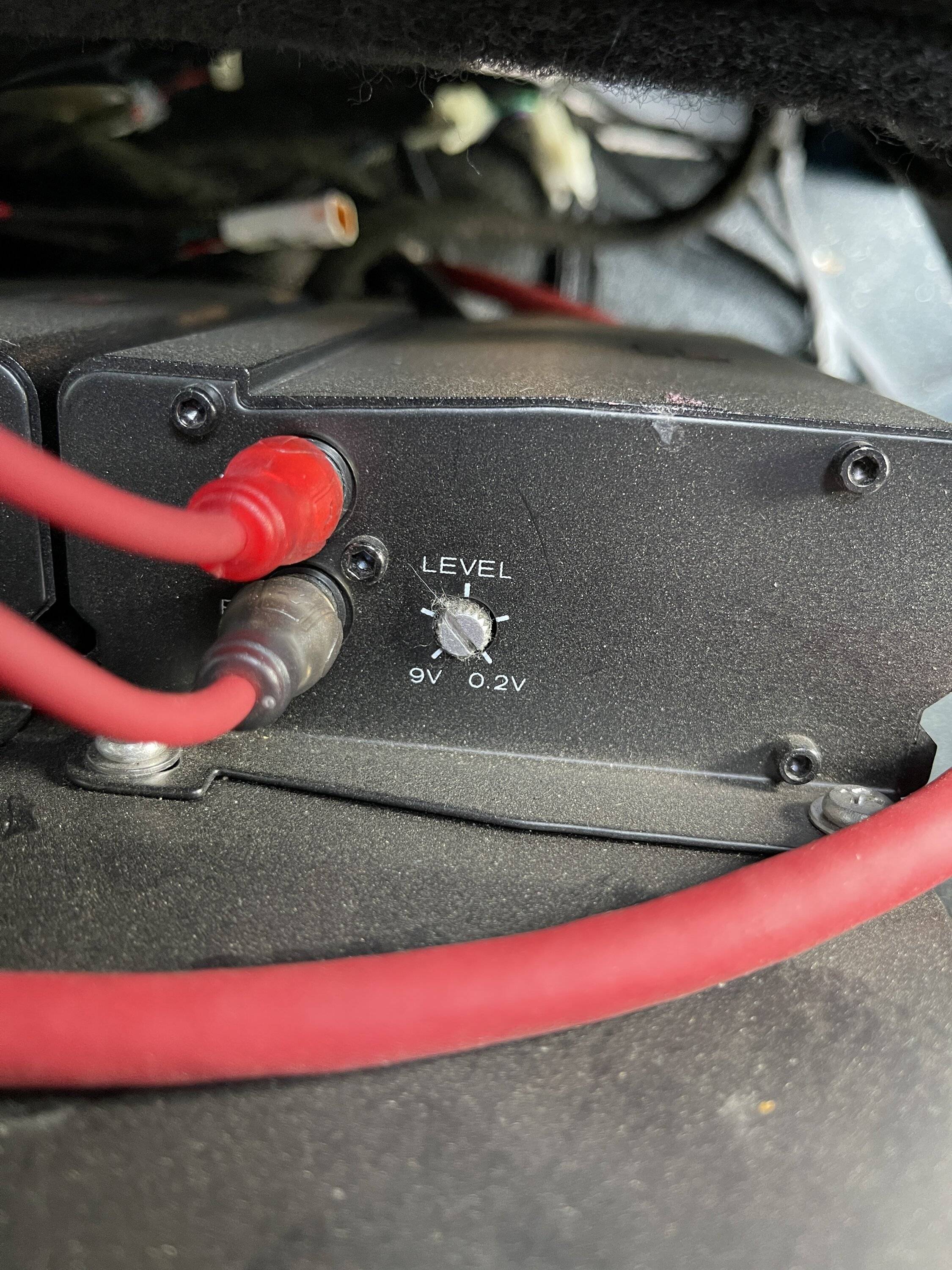
I got the PLC2 installed. I had to remove the entire panel and grind a little plastic off the backside. I also reset the amps with my o-scope. As I suspected, there was a lot of room in the gain settings. I used the settings that @Hpc3 sent which had the rear channel turned down farther than the front. Then with the scope, I maxed the gains with a -9db 1khz test tone with the HU volume at max (38). Also removed the AmpPro and ran the amp remote turn on across the dash. See how it all works tomorrow morning.
Jeep Wrangler JL MB Quart Stage6/SUBR Alternate Amp Interface Thread - DSR1 77BF193D-7CE2-43D9-839B-5A6D5BEF8D9D
Jeep Wrangler JL MB Quart Stage6/SUBR Alternate Amp Interface Thread - DSR1 712E6706-5EDE-4FDC-A2E9-0FFC173EEE95
Jeep Wrangler JL MB Quart Stage6/SUBR Alternate Amp Interface Thread - DSR1 EAC1F25B-992C-4E87-AE78-9D019399F13E
Sponsored


sillyphillie

Well-Known Member
First Name
Rich
Joined
Apr 12, 2023
Threads
0
Messages
48
Reaction score
29
Location
New Jersey
Vehicle(s)
2024 Jeep Wrangler 392 and 2022 Wagoneer
Hey all. Performed this upgrade on my 23 392. HUGE SHOUT OUT to @Hpc3 who has been advising me behind the scenes. Figured I would add my two cents to this thread and hopefully help those who need it as well.

First off, I made the mistake of buying the Stage 6 kit with the PAC. I purchased the DSR1 as the MB kit was in transit. PM me for a good price on the PAC if you need it.

The install videos on youtube were a great help but the order is wrong if you are doing the entire kit. I did this kit..
https://mbquart.com/shop/mobile/mob...-speakers-system-upgrade-for-oem-source-unit/

and also the Sub upgrade:
https://mbquart.com/shop/mobile/mob...jeep-wrangler-jl-tuned-oem-subwoofer-upgrade/.

These are the install videos I am referring to:

STAGE 6:

SUB:

A couple pieces of advice...

1) If you are doing the same kit and the DSR1 (Highly recommended), purchase the items from the opening post. I chose to stick with the included Subwoofer volume knob that came with the Sub kit.

2) If you are doing the Stage 6, Sub upgrade, and DSR1, DO NOT reinstall any of the steps after dismantling until completely finished. If you follow their videos you will be closing up some items only to reopen them on another install. I would install in this order:

Bottom Dash
Top Dash
Soundbar (Take this thing out to cut. You will thank me later) *** NOTE: The video shows the soundbar upgrade using the factory internal harness only to tell you later in the video to replace it when installing the AMPS. What a pain in the ass. Replace the harness all the way to the amp when doing the soundbar from the jump.
Sub
Amps
DSR1

3) If you chose the DSR1, as the opening post states, please update and flash before install. Follow these instructions: https://rftech.custhelp.com/app/answers/detail/a_id/1324

NOTE: I was not able to have the DSR Updater software recognize my DSR1 on ANY of my devices. I used 2 Windows 11 laptops, a Windows 11 desktop, and a MAC with parallels and could not detect it. Hoping it was fully updated from the factory before Crutchfield received. The Weblink Desktop programming worked like a charm, however. Before anyone questions my know how, I am an IT Director and have been in IT for 23 years. The DSR updater hasn't been updated since 2017 lol. ***EDIT*** I finally was able to make it work on a Windows 11 laptop. Seems you need the driver set from the Weblink Desktop App to have the DSR Updater to be able to scan and function. Because I used the Weblink Desktop on the Mac, it wasn't loaded on Windows until this point. Also, for you Mac people this WILL NOT work with Parallels. Seems as though it's a COM port issue with virtualization.


4) The video and instructions tell you not to remove the passenger seat for amp install. Why on earth they would say such is beyond me. Remove the damn seat and make your life easier. T50 Torx and you are golden. I also removed all my doors, rear side windows as well as opened my top for full access. The doors coming off to me were a necessity to get at the side dash easier. Also... get that offset 7MM wrench. It's not optional... It's a necessity.


At first turn up I was disappointed to be honest. 2 days of work and I was like "Meh. Money down the drain." But tweaking the settings and following the advice in this thread, magic happened later in the afternoon. The bass will rattle your brain! Crazy thing was the speakers out of the box sounded so flat. Once they warmed up, they went the opposite way and now they are a tinge bright. I have modified the settings each and every time I have jumped back in the jeep because they keep opening up brighter (Which to me is a good problem to have).

Oh and BTW... I mounted in the glovebox with the 2M extension cable.

Hope this helps some!
 
Last edited:

Terpsmandan

Well-Known Member
First Name
Dan
Joined
Sep 17, 2021
Threads
65
Messages
1,935
Reaction score
1,272
Location
Penn Yan
Vehicle(s)
2021 JLUR Diesel, 2022 JLUR Diesel
I ended up flashing the DSR on my son’s computer. For some reason my old Win 10 laptop wouldn’t see the unit when plugged in. Now for the update after setting the amp gains. The DSR is what Quart should have shipped with this kit. The Punch EQ curve to the sub is much fuller than the AmpPro (btw I also have an AmpPro for sale). I was using the settings that @Hpc3 emailed to me. I am going to max the gains in the DSR and reset the amp gains using a. -10 db 1000 hz test tone and post the updated results.
 
OP
OP
Hpc3

Hpc3

Well-Known Member
First Name
Hal
Joined
Sep 21, 2021
Threads
34
Messages
695
Reaction score
828
Location
SC
Vehicle(s)
Wrangler(s)
I ended up flashing the DSR on my son’s computer. For some reason my old Win 10 laptop wouldn’t see the unit when plugged in. Now for the update after setting the amp gains. The DSR is what Quart should have shipped with this kit. The Punch EQ curve to the sub is much fuller than the AmpPro (btw I also have an AmpPro for sale). I was using the settings that @Hpc3 emailed to me. I am going to max the gains in the DSR and reset the amp gains using a. -10 db 1000 hz test tone and post the updated results.
interested as well... thanks for the info.
 

Sponsored

mrtm1970

Well-Known Member
First Name
Marshall
Joined
Jun 30, 2022
Threads
38
Messages
1,354
Reaction score
3,006
Location
Orlando, FL
Vehicle(s)
2019 JL Unlimited Rubicon
Build Thread
Link
Occupation
Mechanical Engineer
Hey all. Performed this upgrade on my 23 392. HUGE SHOUT OUT to @Hpc3 who has been advising me behind the scenes. Figured I would add my two cents to this thread and hopefully help those who need it as well.

First off, I made the mistake of buying the Stage 6 kit with the PAC. I purchased the DSR1 as the MB kit was in transit. PM me for a good price on the PAC if you need it.

The install videos on youtube were a great help but the order is wrong if you are doing the entire kit. I did this kit..
https://mbquart.com/shop/mobile/mob...-speakers-system-upgrade-for-oem-source-unit/

and also the Sub upgrade:
https://mbquart.com/shop/mobile/mob...jeep-wrangler-jl-tuned-oem-subwoofer-upgrade/.

These are the install videos I am referring to:

STAGE 6:

SUB:

A couple pieces of advice...

1) If you are doing the same kit and the DSR1 (Highly recommended), purchase the items from the opening post. I chose to stick with the included Subwoofer volume knob that came with the Sub kit.

2) If you are doing the Stage 6, Sub upgrade, and DSR1, DO NOT reinstall any of the steps after dismantling until completely finished. If you follow their videos you will be closing up some items only to reopen them on another install. I would install in this order:

Bottom Dash
Top Dash
Soundbar (Take this thing out to cut. You will thank me later) *** NOTE: The video shows the soundbar upgrade using the factory internal harness only to tell you later in the video to replace it when installing the AMPS. What a pain in the ass. Replace the harness all the way to the amp when doing the soundbar from the jump.
Sub
Amps
DSR1

3) If you chose the DSR1, as the opening post states, please update and flash before install. Follow these instructions: https://rftech.custhelp.com/app/answers/detail/a_id/1324

NOTE: I was not able to have the DSR Updater software recognize my DSR1 on ANY of my devices. I used 2 Windows 11 laptops, a Windows 11 desktop, and a MAC with parallels and could not detect it. Hoping it was fully updated from the factory before Crutchfield received. The Weblink Desktop programming worked like a charm, however. Before anyone questions my know how, I am an IT Director and have been in IT for 23 years. The DSR updater hasn't been updated since 2017 lol. ***EDIT*** I finally was able to make it work on a Windows 11 laptop. Seems you need the driver set from the Weblink Desktop App to have the DSR Updater to be able to scan and function. Because I used the Weblink Desktop on the Mac, it wasn't loaded on Windows until this point. Also, for you Mac people this WILL NOT work with Parallels. Seems as though it's a COM port issue with virtualization.


4) The video and instructions tell you not to remove the passenger seat for amp install. Why on earth they would say such is beyond me. Remove the damn seat and make your life easier. T50 Torx and you are golden. I also removed all my doors, rear side windows as well as opened my top for full access. The doors coming off to me were a necessity to get at the side dash easier. Also... get that offset 7MM wrench. It's not optional... It's a necessity.


At first turn up I was disappointed to be honest. 2 days of work and I was like "Meh. Money down the drain." But tweaking the settings and following the advice in this thread, magic happened later in the afternoon. The bass will rattle your brain! Crazy thing was the speakers out of the box sounded so flat. Once they warmed up, they went the opposite way and now they are a tinge bright. I have modified the settings each and every time I have jumped back in the jeep because they keep opening up brighter (Which to me is a good problem to have).

Oh and BTW... I mounted in the glovebox with the 2M extension cable.

Hope this helps some!
Gotta love how in the first MB Quarts video the just “jump” to the sound bar is already out and not how they removed it or then reinstalled it.
 

sillyphillie

Well-Known Member
First Name
Rich
Joined
Apr 12, 2023
Threads
0
Messages
48
Reaction score
29
Location
New Jersey
Vehicle(s)
2024 Jeep Wrangler 392 and 2022 Wagoneer
Gotta love how in the first MB Quarts video the just “jump” to the sound bar is already out and not how they removed it or then reinstalled it.
It's a shame because they did a wonderful job instructing each step. They just will frustrate the sh!t out of someone and confuse them by trying to cover all the bases of different installs. This states "Stage 6 upgrade" but goes through the motions in the beginning like you aren't putting in the amps by having you reinstall the dash. I think to someone who has never installed a car system before will be overwhelmed or constantly inundate their support line. They should split this into seperate install videos to help them and the end user.

With that being said, this is such a wonderful product and I can't recommend it enough. Took another ride and tweaked down the highs again. It just keeps shaping the longer you play. Never have I seen such a turnaround with burn in. Your patience clearly pays off. I can't thank @Hpc3 for creating this thread and turning me onto this.
 

Terpsmandan

Well-Known Member
First Name
Dan
Joined
Sep 17, 2021
Threads
65
Messages
1,935
Reaction score
1,272
Location
Penn Yan
Vehicle(s)
2021 JLUR Diesel, 2022 JLUR Diesel
Well I left the sound bar in when I dremeled it out. Probably helped that is was a nice day in June and I had the top down. Also I did not remove the seat for the amp install. One thing I did do before the dash install was to watch as many YouTube videos as I could about the disassembly of the dash.
 

heyrobscott

Member
Joined
Mar 15, 2023
Threads
0
Messages
9
Reaction score
0
Location
Tennessee
Vehicle(s)
2019 Jeep Wrangler Unlimited Sahara
Just to confirm, if I want to use the DSR1 instead of the PAC, I can purchase the aftermarket speaker kit?

https://mbquart.com/shop/mobile/mob...s-system-upgrade-for-aftermarket-source-unit/

Does the aftermarket kit include everything that's needed other than the PAC, like correct length RCA cables, etc?

So this would be the final part list?

- MBQJ-STG6AH-1 6-speaker + amps kit (aftermarket kit, lack of PAC is the only difference between this and MBQJ-STG6A-1?)
- MBQJL-SUBR-1 subwoofer + amp kit
- Rockford Fosgate DSR1 unit
- Maestro iDatalink HRN-AR-CH4 t-harness
- (optional) Maestro iDatalink HRN-AR-EXT2 extension cable
- (optional) Rockford Fosgate PLC2 subwoofer control
 
OP
OP
Hpc3

Hpc3

Well-Known Member
First Name
Hal
Joined
Sep 21, 2021
Threads
34
Messages
695
Reaction score
828
Location
SC
Vehicle(s)
Wrangler(s)
Just to confirm, if I want to use the DSR1 instead of the PAC, I can purchase the aftermarket speaker kit?

https://mbquart.com/shop/mobile/mob...s-system-upgrade-for-aftermarket-source-unit/

Does the aftermarket kit include everything that's needed other than the PAC, like correct length RCA cables, etc?

So this would be the final part list?

- MBQJ-STG6AH-1 6-speaker + amps kit (aftermarket kit, lack of PAC is the only difference between this and MBQJ-STG6A-1?)
- MBQJL-SUBR-1 subwoofer + amp kit
- Rockford Fosgate DSR1 unit
- Maestro iDatalink HRN-AR-CH4 t-harness
- (optional) Maestro iDatalink HRN-AR-EXT2 extension cable
- (optional) Rockford Fosgate PLC2 subwoofer control
The RCA 6-into-1 patch cable is probably the only thing that may be needed to do this with the DSR1, I don't know if MBQ includes this with the aftermarket kit or not. You could email Dave/support to ask I assume. If that's not included 3 x 2ch 6' patch cables would cover it. Easy addition. Note the MBQ Sub kit comes with a volume knob that can be used, don't need the PLC2 unless you want to thin-mount it in the dash somewhere.
 

Sponsored

Terpsmandan

Well-Known Member
First Name
Dan
Joined
Sep 17, 2021
Threads
65
Messages
1,935
Reaction score
1,272
Location
Penn Yan
Vehicle(s)
2021 JLUR Diesel, 2022 JLUR Diesel
Just to confirm, if I want to use the DSR1 instead of the PAC, I can purchase the aftermarket speaker kit?

https://mbquart.com/shop/mobile/mob...s-system-upgrade-for-aftermarket-source-unit/

Does the aftermarket kit include everything that's needed other than the PAC, like correct length RCA cables, etc?

So this would be the final part list?

- MBQJ-STG6AH-1 6-speaker + amps kit (aftermarket kit, lack of PAC is the only difference between this and MBQJ-STG6A-1?)
- MBQJL-SUBR-1 subwoofer + amp kit
- Rockford Fosgate DSR1 unit
- Maestro iDatalink HRN-AR-CH4 t-harness
- (optional) Maestro iDatalink HRN-AR-EXT2 extension cable
- (optional) Rockford Fosgate PLC2 subwoofer control
Pretty sure the RCA cable was part of the kit and not part of the AmpPro. Also my ears say that there is a different curve to the Punch EQ control than the AmpPro knob that I was using before and IMO it’s better. Dave recommended the AmpPro knob over the knob packed with the 400.1. I rewired the stock sub, and used that last summer before the release of the Quart sub.
 

Terpsmandan

Well-Known Member
First Name
Dan
Joined
Sep 17, 2021
Threads
65
Messages
1,935
Reaction score
1,272
Location
Penn Yan
Vehicle(s)
2021 JLUR Diesel, 2022 JLUR Diesel
So I went back and reset the DSR gains to max, plugged the the tone generator with a -10 db 1000 hz sine wave and this is where I set the amps with the o-scope. Then I backed the rear channel off 2db with the DSR to balance. Also had the amps backwards and I fixed that. Now @Hpc3 the time alignment sound better. I would really like to take it to a car stereo shop and have them set the EQ with an RTA.

Jeep Wrangler JL MB Quart Stage6/SUBR Alternate Amp Interface Thread - DSR1 IMG_4009


Update. So on the morning commute, at that level it seems that there is still a little more in the amps. The levels I had with the AmpPro (5v out) with a -9db 1000 hz sine wave were closer to 11 o'clock. I am wondering if there is some distortion in the DSR with the levels maxed out. I did put the scope on the 8.4 when I first installed it and when maxed out there was no distortion with a tone as high as -3db.
 
Last edited:
Joined
Jun 15, 2021
Threads
4
Messages
9
Reaction score
4
Location
FL
Vehicle(s)
2021 JLUR (sold)
Thanks for this informative thread! I'm tempted to go down the DSR1 road with mine too.

A question: how do spoken directions ("in two miles, turn left...") sound from Apple Maps via CarPlay while playing music with the DSR1 in-path? Does it work like OEM, where the music level is smoothly reduced while the directions are spoken out of the left-front speaker, and then the music level smoothly transitions back to normal?

The reason I ask: I installed the MB Quart system in my 2021 Rubicon with the basic 7" head unit using the included PAC AP4-CH41 two weeks ago, and I've noticed that when Apple Maps / CarPlay speaks directions, the audio abruptly cuts off/stutters. It's not a simple all music off->speak->all music on sequence either; the music rapidly cuts in and out a couple of times around each voice prompt in a very unpleasant way. The only other person I can find on the whole internet complaining about it is this guy on reddit with a 2018 RAM. So, I wonder if anyone else's PAC does this and/or if the DSR1 resolves it.

I also immediately noticed the holes in the PAC-driven system's midbass response after firing up the system for the first time, which left me feeling disappointed in the money I'd spent on the MB Quart kit, and was glad to see @Hpc3 noted the same in his original post. I've not been able to correct it with the head unit's built in 3-band EQ, even after playing with the treble/mid/bass EQ midpoints and Q values in the PAC via its USB interface. So, if the DSR1 gives me the tools to better tune this system, and it doesn't have any wonky issues with CarPlay like I'm experiencing with the PAC, it sounds like a great solution. My other option would be to go optical out from the PAC to something like a JL TWK D8, but I think the carplay voice annoyances would persist with the PAC providing the audio stream.

If I install a DSR1, given that my rig did not come with a factory amplifier, according to Crutchfield I need to buy the HRN-DSP-CH3 harness instead of the HRN-AR-CH4 mentioned in the OP.
 

sillyphillie

Well-Known Member
First Name
Rich
Joined
Apr 12, 2023
Threads
0
Messages
48
Reaction score
29
Location
New Jersey
Vehicle(s)
2024 Jeep Wrangler 392 and 2022 Wagoneer
Thanks for this informative thread! I'm tempted to go down the DSR1 road with mine too.

A question: how do spoken directions ("in two miles, turn left...") sound from Apple Maps via CarPlay while playing music with the DSR1 in-path? Does it work like OEM, where the music level is smoothly reduced while the directions are spoken out of the left-front speaker, and then the music level smoothly transitions back to normal?

The reason I ask: I installed the MB Quart system in my 2021 Rubicon with the basic 7" head unit using the included PAC AP4-CH41 two weeks ago, and I've noticed that when Apple Maps / CarPlay speaks directions, the audio abruptly cuts off/stutters. It's not a simple all music off->speak->all music on sequence either; the music rapidly cuts in and out a couple of times around each voice prompt in a very unpleasant way. The only other person I can find on the whole internet complaining about it is this guy on reddit with a 2018 RAM. So, I wonder if anyone else's PAC does this and/or if the DSR1 resolves it.

I also immediately noticed the holes in the PAC-driven system's midbass response after firing up the system for the first time, which left me feeling disappointed in the money I'd spent on the MB Quart kit, and was glad to see @Hpc3 noted the same in his original post. I've not been able to correct it with the head unit's built in 3-band EQ, even after playing with the treble/mid/bass EQ midpoints and Q values in the PAC via its USB interface. So, if the DSR1 gives me the tools to better tune this system, and it doesn't have any wonky issues with CarPlay like I'm experiencing with the PAC, it sounds like a great solution. My other option would be to go optical out from the PAC to something like a JL TWK D8, but I think the carplay voice annoyances would persist with the PAC providing the audio stream.

If I install a DSR1, given that my rig did not come with a factory amplifier, according to Crutchfield I need to buy the HRN-DSP-CH3 harness instead of the HRN-AR-CH4 mentioned in the OP.
I don't drive around with the voice for turn by turn but I will try it for you on my next ride.

The DSR1 has a learning curve and takes a ton of tweaking, but gives you the oppotunity to get the most out of the MB Quart system. If you went this far you might as well get it and get the most out of your hard earned money you already spent.
 
OP
OP
Hpc3

Hpc3

Well-Known Member
First Name
Hal
Joined
Sep 21, 2021
Threads
34
Messages
695
Reaction score
828
Location
SC
Vehicle(s)
Wrangler(s)
Thanks for this informative thread! I'm tempted to go down the DSR1 road with mine too.

A question: how do spoken directions ("in two miles, turn left...") sound from Apple Maps via CarPlay while playing music with the DSR1 in-path? Does it work like OEM, where the music level is smoothly reduced while the directions are spoken out of the left-front speaker, and then the music level smoothly transitions back to normal?

The reason I ask: I installed the MB Quart system in my 2021 Rubicon with the basic 7" head unit using the included PAC AP4-CH41 two weeks ago, and I've noticed that when Apple Maps / CarPlay speaks directions, the audio abruptly cuts off/stutters. It's not a simple all music off->speak->all music on sequence either; the music rapidly cuts in and out a couple of times around each voice prompt in a very unpleasant way. The only other person I can find on the whole internet complaining about it is this guy on reddit with a 2018 RAM. So, I wonder if anyone else's PAC does this and/or if the DSR1 resolves it.

I also immediately noticed the holes in the PAC-driven system's midbass response after firing up the system for the first time, which left me feeling disappointed in the money I'd spent on the MB Quart kit, and was glad to see @Hpc3 noted the same in his original post. I've not been able to correct it with the head unit's built in 3-band EQ, even after playing with the treble/mid/bass EQ midpoints and Q values in the PAC via its USB interface. So, if the DSR1 gives me the tools to better tune this system, and it doesn't have any wonky issues with CarPlay like I'm experiencing with the PAC, it sounds like a great solution. My other option would be to go optical out from the PAC to something like a JL TWK D8, but I think the carplay voice annoyances would persist with the PAC providing the audio stream.

If I install a DSR1, given that my rig did not come with a factory amplifier, according to Crutchfield I need to buy the HRN-DSP-CH3 harness instead of the HRN-AR-CH4 mentioned in the OP.
The DSR1 handles the turn-by-turn just like the stock 8.4/AlpineAmp, adjustable volume levels for phone/directions/texting and all... I think the PAC that came with the MBQ kit did fine as well, don't think either of them have issues today. You do have to set the "alerts" volume manually if your jeep has the side/rear radar sensors on the DSR1 but it's easy to do after initial setup.

The DSR1/Jeep combo took a while to shake out initially. If you look at some of the firmware updates on RFs support matrix I was working with RF/Maestro support back in the Summer/Fall of 2018 on my Trailhawk to fix some of the initial CarPlay bugs. Lots of incremental code updates back then.
Sponsored


Top