Sponsored
OP
OP
jmccorm

jmccorm

Well-Known Member
First Name
Josh
Joined
Sep 15, 2021
Threads
55
Messages
1,170
Reaction score
1,322
Location
Tulsa, OK
Vehicle(s)
2021 JLUR
Build Thread
Link
Occupation
Systems Engineering
...for those that do not have access to jeep canBus yet. I believe that you can still learn from this discussion by taking a .log file as in page 3 of this thread, run it on a canplayer and learn to candump, cansniff, canplayer...etc then dive into python.
That's a solid suggestion for anyone who'd like to get their feet wet without going through all the time and hassle of actually connecting to a vehicle. I'd like to endorse that.

I'm wondering how it works if you only configured one vcan device, though. I'd guess that canplayer merges both the CAN-C and CAN-IHS traffic onto that single interface. That's slightly different from a real vehicle, but if it ends up being a problem, you can improve upon that.

If you create both a vcan0 interface and a vcan1 interface, then you should be able to launch canplayer like this...

canplayer -I <filename> vcan0=can0 vcan1=can1

...and then the traffic should split naturally across both of the different devices. Only the names would be different ("vcan" vs. "can").

Either way, what makes canplayer great to work with is that it will not only play back the traffic you have stored in a log file, but it'll do it with the exact same timings as the original, too. You're right, it's so good that it makes it like working with the real thing.

This weekend I'll see if I can update this message with a couple more log files for you to work with. Hit me up with a PM on Monday if those files aren't up there by then.
Sponsored

 

Drdyer9051

Active Member
First Name
Bradley
Joined
Feb 1, 2022
Threads
0
Messages
33
Reaction score
24
Location
East Tennessee
Vehicle(s)
4BT-Tj,Tj,4B-Comanche,2021JLUR,diesel 22JTR
I understand everything y'all wrote except this ....

Like a CAN ID of 0x400 and a CAN mask of 0x400 should (unless I've made a mistake) specify that you want to see any messages with a CAN ID of 0x400 to 0xFFF.


mask of 0xF00 would only have to match the F the last two can be anything.......correct?
then what if its a 4 or 0b100

or is it a rule that when id and mask are the same, then its id up to maximum id?
 

redracer

Well-Known Member
First Name
Robert
Joined
Aug 22, 2017
Threads
20
Messages
576
Reaction score
650
Location
Manteca, CA
Vehicle(s)
2023 4xe Rubicon
I always break masks down to binary. so...

111100000000 = 0xF00

Think of it as an AND statement, So only anything that matches where where the MASK is 1's will match, anywhere the mask is a 0 will be ignored.

When @jmccorm said that anything above 0xF00 would match, he was right, because the MSB ones are all selected and so the rest doesn't matter.

Example: We want to use 0xF00 as a filter with 0xF00 as a mask, and 0xF02 is input...

111100000000 = 0xF00 Filter
111100000000 = 0xF00 MASK
111100000010 = 0xF02 Input

All of the bits match between the Filter and Input, where a MASK bit is 1, so the match is accepted.

Make sense?
 
Last edited:

Drdyer9051

Active Member
First Name
Bradley
Joined
Feb 1, 2022
Threads
0
Messages
33
Reaction score
24
Location
East Tennessee
Vehicle(s)
4BT-Tj,Tj,4B-Comanche,2021JLUR,diesel 22JTR
I always break masks down to binary. so...

111100000000 = 0xF00

Think of it as an AND statement, So only anything that matches where where the MASK is 1's will match, anywhere the mask is a 0 will be ignored.

When @jmccorm said that anything above 0xF00 would match, he was right, because the MSB ones are all selected and so the rest doesn't matter.

Example: We want to use 0xF00 as a filter with 0xF00 as a mask, and 0xF02 is input...

111100000000 = 0xF00 Filter
111100000000 = 0xF00 MASK
111100000010 = 0xF02 Input

All of the bits match between the Filter and Input, where a MASK bit is 1, so the match is accepted.

Make sense?

yes so he had

0x400 filter.. 0100 0000 0000
0x400 mask 0100 0000 0000
0xFFF ........ 1111 1111 1111

since MSB is the 4 location ??? it matches so rest are 0's so it can be whatever ie all 1's and still accepted ?

thanks,
Bradley
 

Sponsored

redracer

Well-Known Member
First Name
Robert
Joined
Aug 22, 2017
Threads
20
Messages
576
Reaction score
650
Location
Manteca, CA
Vehicle(s)
2023 4xe Rubicon
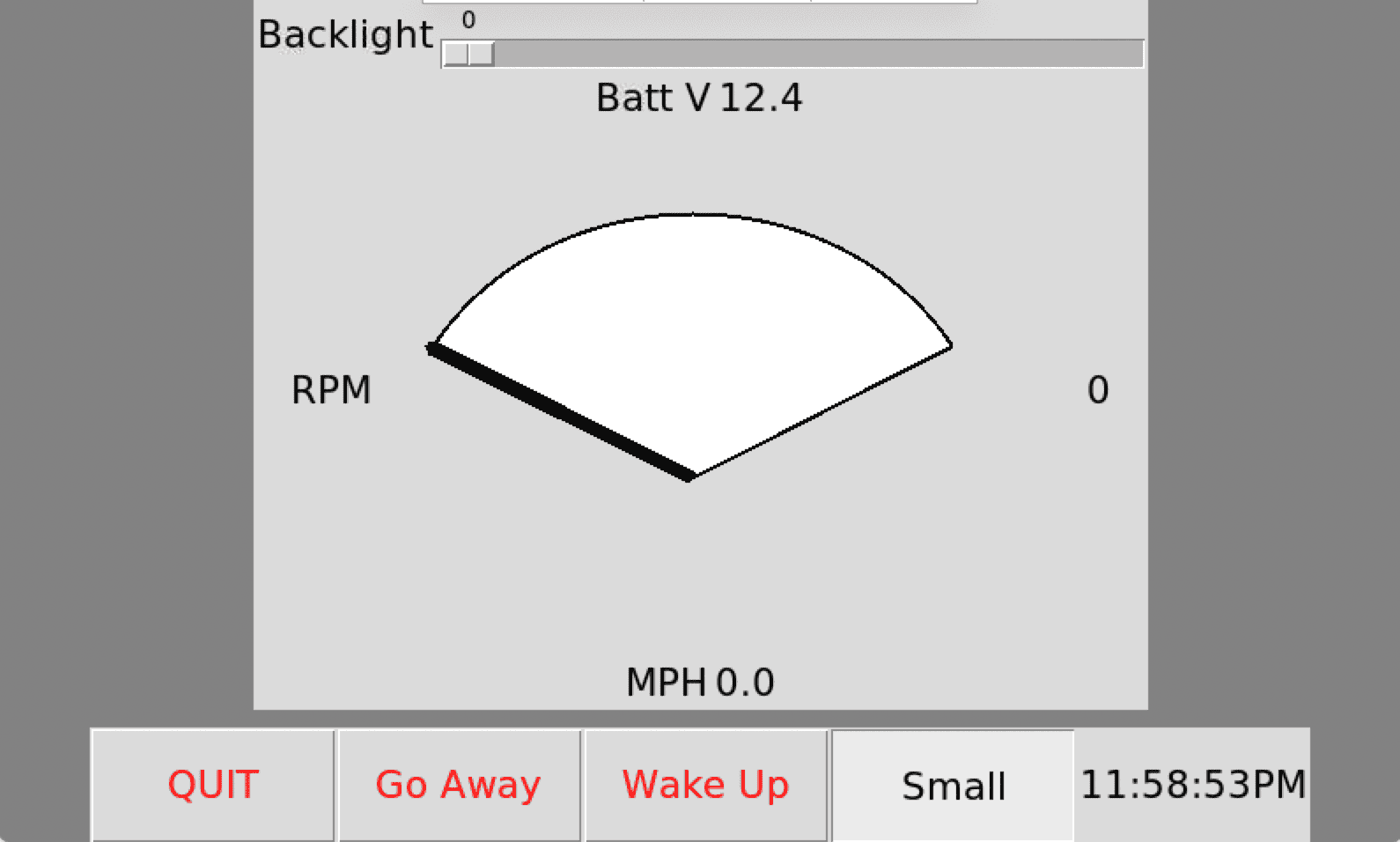
More python coding fun... This is my first attempt at making a GUI using python and tkinter. It's ugly code for sure. I will be working a lot more on this.
I have not driven with this yet, but i do get voltage updates.

This is tkcan.py -- updated, added easy can variables and tried to fix the gauge

Python:
#!/usr/bin/python3
# GUI Can data display using tkinter

from tkinter import *
import time
import can

# If using vcan for log playback, change the values in the quotes below
can0 = "can0"
can1 = "can1"

battv = None
rpm = None
mph = None
fsstate = True

def full():
        print("full screen")
        global fsstate
        fsstate = not fsstate
        root.attributes("-fullscreen", fsstate)
        if fsstate == True:
            fullbutton.config(relief=SUNKEN, text="Small")
            fullbutton.pack()
        else:
            fullbutton.config(relief=RAISED, text="Full")
            fullbutton.pack()

def blchange(bllevels):
        print("backlight changed")
        print(str(bllevels))

def tick():
        s = time.strftime('%I:%M:%S%p')
        if s != clock["text"]:
            clock["text"] = s
        clock.after(200, tick)

def goaway():
        bigbutton.config(text="Come Back", command=comeback)
        bigbutton.pack()
        frame.pack_forget()

def comeback():
        bigbutton.config(text="Go Away", command=goaway)
        bigbutton.pack()
        frame.pack(side=TOP)
        return "break"

def newrpm(rpm):
    low_r = 0 # chart low range
    hi_r = 7000 # chart hi range
    if rpm == 65535:
      rpm = 0
    if str(round(rpm)) != rpmlabel["text"]:
      rpmlabel["text"] = str(round(rpm))
      rpmlabel.pack()
      rpmangle = (120 * (hi_r - rpm) / (hi_r - low_r) + 30)
      print(str(rpmangle))
      rpmgauge.itemconfig(rpmneedle,start = rpmangle)
      rpmgauge.pack()

def newmph(mph):
    if str(round(mph)) != mphlabel["text"]:
      mphlabel["text"] = str(round(mph))
      mphlabel.pack()

def newbattv(battv):
    if str(round(battv, 1)) != battvlabel["text"]:
      battvlabel["text"] = str(round(battv, 1))
      battvlabel.pack()

def newmsg(msg):
  if msg.arbitration_id == 0x2C2 and msg.channel == can0:
    newbattv(msg.data[2] / 10)
  if msg.arbitration_id == 0x322 and msg.channel == can0:
    newrpm((msg.data[0]<<8) +  msg.data[1])
    newmph(((msg.data[2]<<8) + msg.data[3]) / 200)

def canwakeup():
  wakeup = can.Message(data=[0x07, 0, 0, 0, 0, 0, 0, 0], is_extended_id=False, arbitration_id=0x2D3, channel=can0)
  print(wakeup)
  bus.send(wakeup, timeout=1)

def callback():
    bus.shutdown()
    print(bus.state)
    print("exit")
    raise

root = Tk()
root.geometry("800x400+0+40")
root.title("This is Root")
root.protocol("WM_DELETE_WINDOW", callback)
root.attributes("-fullscreen", fsstate)
root.configure(bg='gray')

topframe=Frame(root)
topframe.pack(side=BOTTOM)

quitbutton = Button(
    topframe, text="QUIT", fg="red", font=("Helvetica", "16"), height=2, width=8, command=topframe.quit)
quitbutton.pack(side=LEFT)
bigbutton = Button(
    topframe, text="GO AWAY", fg="red", font=("Helvetica", "16"), height=2, width=8, command=goaway)
bigbutton.pack(side=LEFT)
bigbutton2 = Button(
    topframe, text="Wake Up", fg="red", font=("Helvetica", "16"), height=2, width=8, command=canwakeup)
bigbutton2.pack(side=LEFT)
fullbutton = Button(
    topframe, text="Small", relief=SUNKEN, fg="red", font=("Helvetica", "16"), height=2, width=8, command=full)
fullbutton.pack(side=LEFT)
clock = Label(topframe, font=("Helvetica", "16"))
clock.pack(side=RIGHT, fill=BOTH, expand=1)
tick()


frame = Frame(root)
frame.pack(side=TOP)

blfr = Frame(frame)
bldsc = Label(blfr, text="Backlight", font=("Helvetica", "16"))
bldsc.pack(side=LEFT)
backlight = Scale(blfr, command=blchange, orient=HORIZONTAL, length = 400, to = 100)
backlight.pack(side=RIGHT)
blfr.pack()

battfr = Frame(frame)
battvdsc = Label(battfr, text="Batt V", font=("Helvetica", "16"))
battvdsc.pack(side=LEFT)
battvlabel = Label(battfr, font=("Helvetica", "16"))
battvlabel.pack(side=RIGHT)
battfr.pack()

rpmfr = Frame(frame)
rpmdsc = Label(rpmfr, text="RPM", font=("Helvetica", "16"))
rpmdsc.pack(side=LEFT)
rpmlabel = Label(rpmfr, font=("Helvetica", "16"))
rpmlabel.pack(side=RIGHT)
rpmgauge = Canvas(rpmfr, width=400, height=300)
rpmgauge.pack()
coord = 10, 50, 350, 350 #define the size of the gauge
rpmgauge.create_arc(coord, start=30, extent=120, fill="white",  width=2)
rpmneedle = rpmgauge.create_arc(coord, start= 119, extent=1, width=7)
rpmfr.pack()

mphfr = Frame(frame)
mphdr = Label(mphfr, text="MPH", font=("Helvetica", "16"))
mphdr.pack(side=LEFT)
mphlabel = Label(mphfr, font=("Helvetica", "16"))
mphlabel.pack(side=RIGHT)
mphfr.pack()


bus = can.interface.Bus('', bustype='socketcan',filter=[{"can_id": 0x2C2, "can_mask": 0xFFF},{"can_id": 0x322, "can_mask": 0xFFF}])
Notifier = can.Notifier(bus, [newmsg], loop=None)


root.mainloop()
bus.shutdown()
Jeep Wrangler JL JEEP HACKING CAN-C / CAN-IHS / UDS ! (Reverse Engineering) Screen Shot 2022-02-17 at 11.58.54 PM
 
Last edited:

Drdyer9051

Active Member
First Name
Bradley
Joined
Feb 1, 2022
Threads
0
Messages
33
Reaction score
24
Location
East Tennessee
Vehicle(s)
4BT-Tj,Tj,4B-Comanche,2021JLUR,diesel 22JTR
tutorial for someone without an actual can device.


must have can-utils installed ........if not then sudo apt-get install can-utils
must have pip installed ....... if not then sudo apt install python3-pip
must have python-can installed ... if not then pip3 install python-can
must have tkcan.py in directory you are using copied from above
must have log file in directory you are using # i used logfile from page3 and renamed to
just 4mi-lop,log
edit tkcan.py where you see can0 change to vcan0

open terminal window

sudo ip link add dev vcan0 type vcan
sudo ip link add dev vcan1 type vcan
sudo ip link set vcan0 up
sudo ip link set vcan1 up
canplayer vcan0=can0 vcan1=can1 -I 4mi-loop.log -v

open new terminal window
python3 tkcan.py

thats about all this monkey knows. lol but its enough to see results on screen

awesome start redracer thanks
 
Last edited:
OP
OP
jmccorm

jmccorm

Well-Known Member
First Name
Josh
Joined
Sep 15, 2021
Threads
55
Messages
1,170
Reaction score
1,322
Location
Tulsa, OK
Vehicle(s)
2021 JLUR
Build Thread
Link
Occupation
Systems Engineering
tutorial for someone without an actual can device.
If you don't mind, I think I'll link to your instructions in the first post of this thread where all the general information is kept. This would be a big help for people just trying to get their feet wet before diving in.
 

Drdyer9051

Active Member
First Name
Bradley
Joined
Feb 1, 2022
Threads
0
Messages
33
Reaction score
24
Location
East Tennessee
Vehicle(s)
4BT-Tj,Tj,4B-Comanche,2021JLUR,diesel 22JTR
If you don't mind, I think I'll link to your instructions in the first post of this thread where all the general information is kept. This would be a big help for people just trying to get their feet wet before diving in.
:like:
 
OP
OP
jmccorm

jmccorm

Well-Known Member
First Name
Josh
Joined
Sep 15, 2021
Threads
55
Messages
1,170
Reaction score
1,322
Location
Tulsa, OK
Vehicle(s)
2021 JLUR
Build Thread
Link
Occupation
Systems Engineering
Connecting to the CAN Bus with the OBD-II Port

We've standardized on using the unused ports behind the glovebox for access to our vehicle's CAN networks. Mostly because those ports provide full provide read AND write access to the CAN bus, but also because it's almost certain to have a free set of ports we can use. And everything is tucked nicely out of sight. But the space behind the glovebox is an odd place to work in, and it requires unusual connectors that have to be special ordered.

For someone who's struggling with this challenge, there is a less difficult path, and that's the OBD-II port (also known as the "DLC" Data Link Connector). It's easier to gain access to, and it's easier to find a cable for. But it has two disadvantages of it's own. First, it only offers read-only access to the CAN bus (unless you've installed a Secure Gateway bypass cable or similar device). Second, many other devices want to compete to connect in that same port, so it's not always available.

If you understand the limitations of the OBD-II port and you'd like to continue, the least we can do is help you along the way. Ready to get started?

NOTE: While this information is based upon a trustworthy reference and cross-checked against another source, it has yet to be verified with a real-world connection. Use this information with care.​

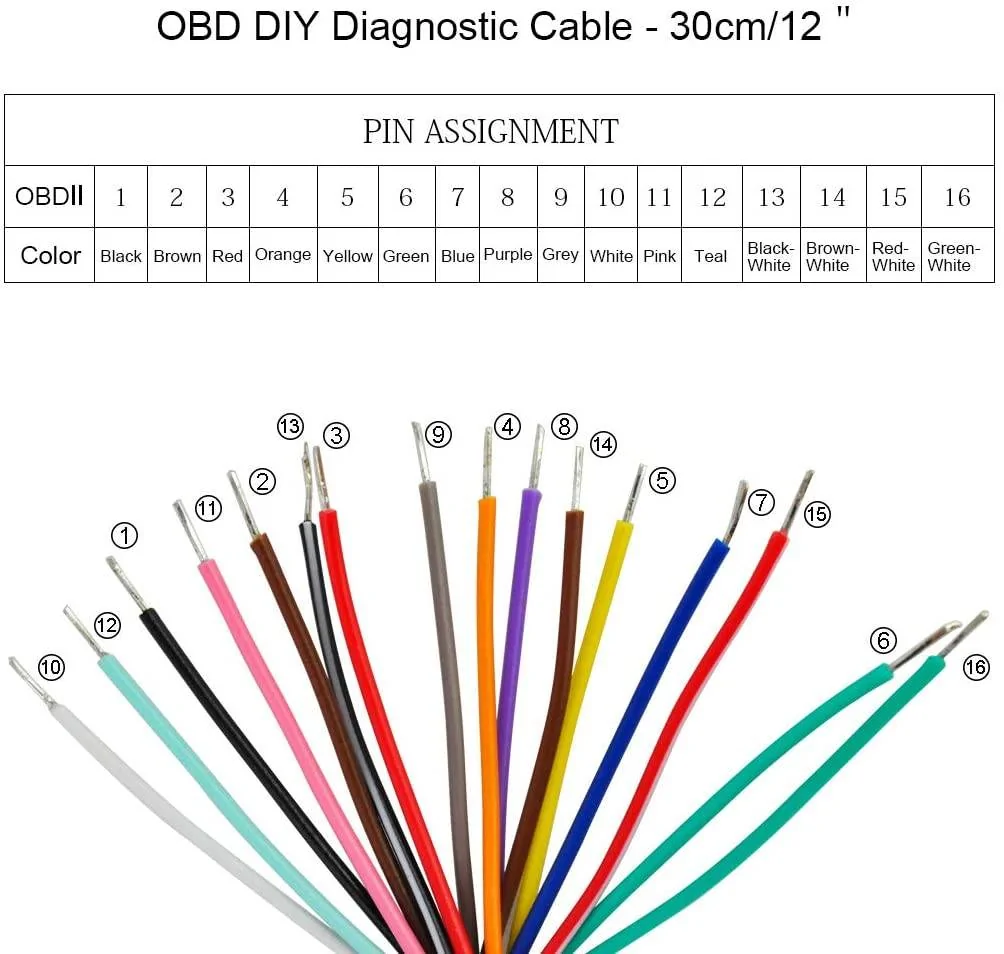
Let's start with the purchase of a new connector. That'd be a standard male OBD-II port connector with pigtails. I found the iKKEGOL OBDII J1962 Male Connector for a reasonably low price of only $7.99. Even better, it contains all 16 OBD-II pins, and the Amazon product page includes a color-coded assignment chart:

Jeep Wrangler JL JEEP HACKING CAN-C / CAN-IHS / UDS ! (Reverse Engineering) OBD-II Male Connector with Pigtails


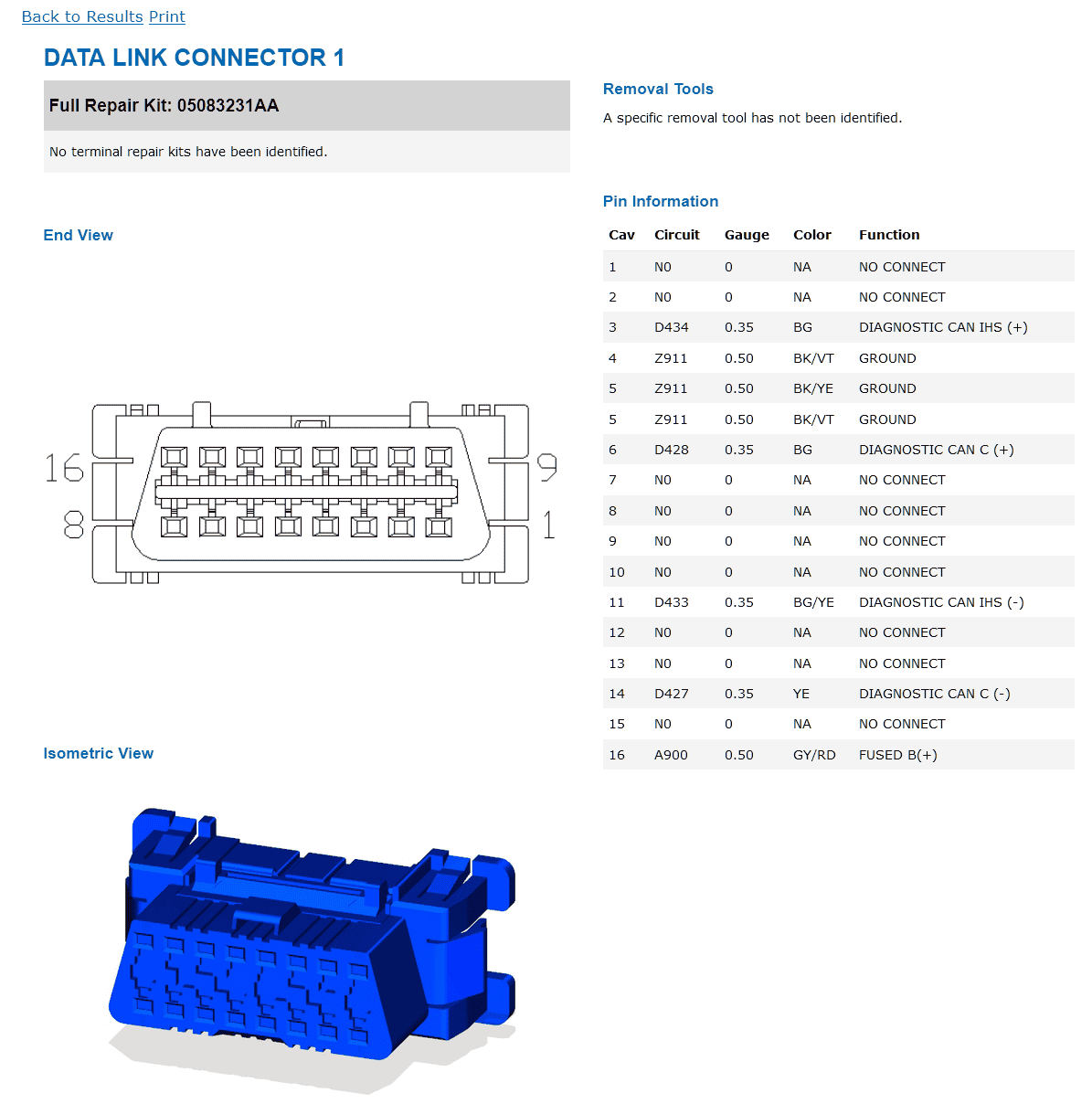
According to this information, we'd want to use pin 6 (green) for CAN-C high and pin 14 (brown-white) for CAN-C low. And then we'll want to use pin 3 (red) for CAN-IHS high and pin 11 (pink) for CAN-IHS low. I would also strongly suggest you use either pin 4 (orange), pin 5 (yellow) or pin 6 (green) for a signal ground.

Here's a diagram of the pin assignments on the vehicle side:

Jeep Wrangler JL JEEP HACKING CAN-C / CAN-IHS / UDS ! (Reverse Engineering) DLC Pinouts for 2021 Wrangler


Once you've made the connections, you're ready to start configuring your CAN adapter and begin testing. If you've made use of the information you've found here in this guide, please take a moment to let us know how well its worked for you.

We're hoping for success, but if there are problems, we'd like to help you figure things out. And we'd love to revise these instructions to make them even easier for the next person down the road.

Good luck, and welcome to the club!
 
Last edited:

Sponsored

OP
OP
jmccorm

jmccorm

Well-Known Member
First Name
Josh
Joined
Sep 15, 2021
Threads
55
Messages
1,170
Reaction score
1,322
Location
Tulsa, OK
Vehicle(s)
2021 JLUR
Build Thread
Link
Occupation
Systems Engineering
A Stacked Raspberry Pi Solution for the Wrangler
(Something you probably DON'T want to try for yourself.)


This evening I finally managed to assemble all the components I've been working on. And I have to admit, this is a ridiculously tall tower of components that has little hope of surviving in an automotive environment.

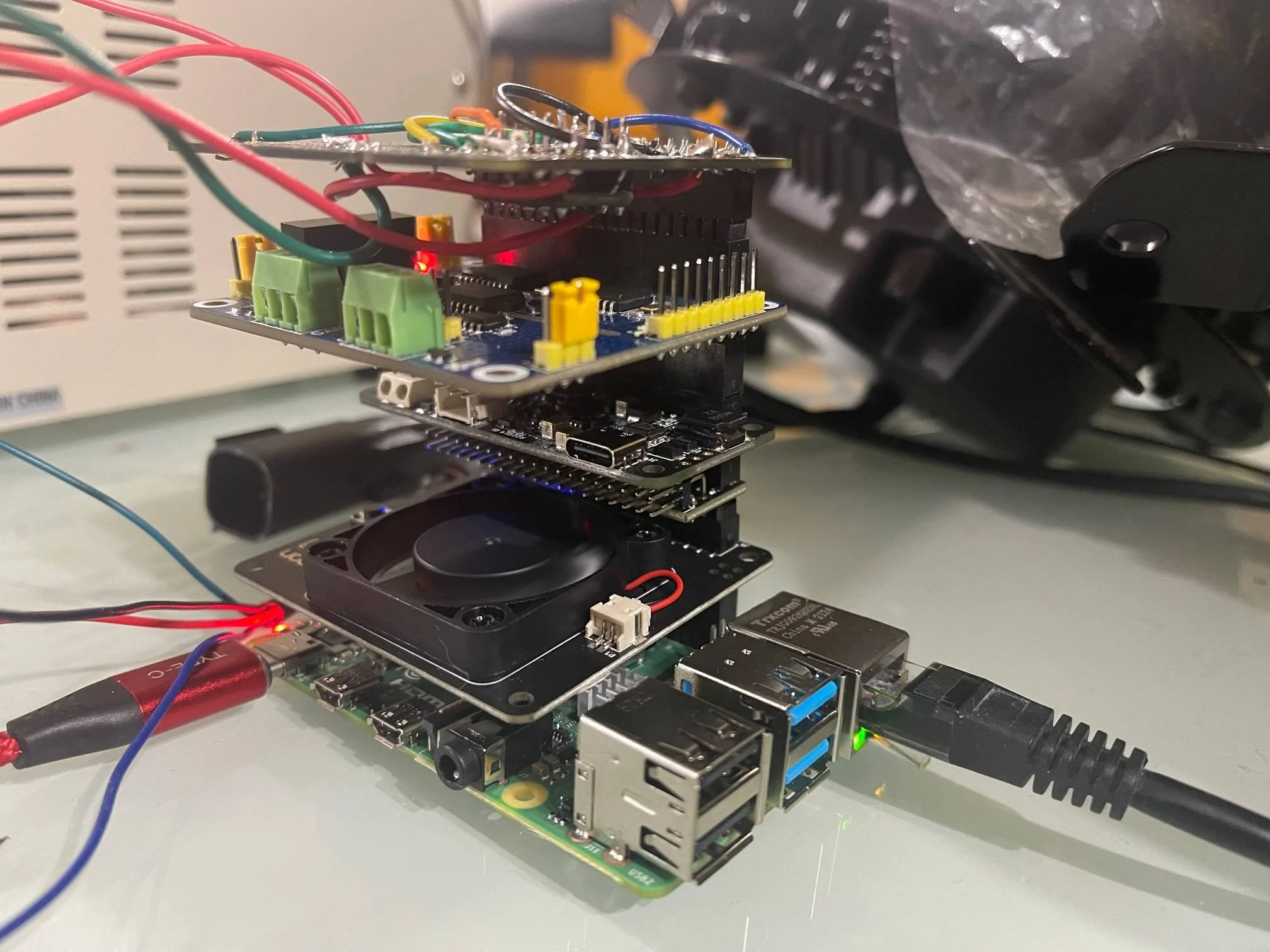
Starting at the bottom layer and working our way up, we have:

Jeep Wrangler JL JEEP HACKING CAN-C / CAN-IHS / UDS ! (Reverse Engineering) The Stacks


1. Raspberry Pi 4B (2GB) Single Board Computer
2. Software controlled Argon Fan HAT as an adjustable CPU fan
3. A horizontal GPIO connector for added airflow and spacing
4. Zero2Go Omini for enhanced sleep and power management
5. Waveshare 2 Channel CAN HAT as a dual port CAN adapter
6. Homebrew Logic Level Converter for controlling RGB halos
...and a ridiculous combination of 40 Pin Stacking Headers.

It's a bit like Tetris putting this all together in a combination that fits. Mind you, all of this actually works! (Even as I type this, it continues to spin my RGB halos with waves of color.) But even if everything was tied firmly together with bass standoffs, I'd have to call it an over-engineered hot mess.

I think I'm going to ditch the CPU fan and the spacer above it. That should reduce a significant amount of height while preserving functionality. I'm still wanting to keep my RGB controller, CAN bus adapter, and sleep/power management adapter.

I'd hate to get rid of anything more, but we'll see how that works and go from there. Without the fan, the CPU will still automatically throttle itself back to keep operating temperatures within a safe range.
 

redracer

Well-Known Member
First Name
Robert
Joined
Aug 22, 2017
Threads
20
Messages
576
Reaction score
650
Location
Manteca, CA
Vehicle(s)
2023 4xe Rubicon
A Stacked Raspberry Pi Solution for the Wrangler
(Something you probably DON'T want to try for yourself.)


This evening I finally managed to assemble all the components I've been working on. And I have to admit, this is a ridiculously tall tower of components that has little hope of surviving in an automotive environment.

Starting at the bottom layer and working our way up, we have:

The Stacks.webp


1. Raspberry Pi 4B (2GB) Single Board Computer
2. Software controlled Argon Fan HAT as an adjustable CPU fan
3. A horizontal GPIO connector for added airflow and spacing
4. Zero2Go Omini for enhanced sleep and power management
5. Waveshare 2 Channel CAN HAT as a dual port CAN adapter
6. Homebrew Logic Level Converter for controlling RGB halos
...and a ridiculous combination of 40 Pin Stacking Headers.

It's a bit like Tetris putting this all together in a combination that fits. Mind you, all of this actually works! (Even as I type this, it continues to spin my RGB halos with waves of color.) But even if everything was tied firmly together with bass standoffs, I'd have to call it an over-engineered hot mess.

I think I'm going to ditch the CPU fan and the spacer above it. That should reduce a significant amount of height while preserving functionality. I'm still wanting to keep my RGB controller, CAN bus adapter, and sleep/power management adapter.

I'd hate to get rid of anything more, but we'll see how that works and go from there. Without the fan, the CPU will still automatically throttle itself back to keep operating temperatures within a safe range.
That's awesome! Yes it's quite a tall stack.

I have a dream. A dream of combining all of this into one carrier board, where a Pi CM4 board seats on. A board where a single connector carries 12v power and both can connections. A board where the wakeup pins of the can controllers are tied into the pi wakeup pins so we could use deep sleep and wake on can traffic. A board with fan pwm drivers to run cooling fans, and switched 5v outputs to fully power on / off other accessories like screens to conserve battery power. A board that would perfectly mount on the back of the pi screen and be so slim you wouldn't know it's there.

Oh and I dream of integration of both AHD and LVD video decoder chips. For front video and rear camera tie ins

Yes, I have a dream. But not the skill.
 
OP
OP
jmccorm

jmccorm

Well-Known Member
First Name
Josh
Joined
Sep 15, 2021
Threads
55
Messages
1,170
Reaction score
1,322
Location
Tulsa, OK
Vehicle(s)
2021 JLUR
Build Thread
Link
Occupation
Systems Engineering
Yes, I have a dream. But not the skill.
Wow, you and me both! (The dream, and the skill.)
You pretty much nailed everything I'm looking for.
 

redracer

Well-Known Member
First Name
Robert
Joined
Aug 22, 2017
Threads
20
Messages
576
Reaction score
650
Location
Manteca, CA
Vehicle(s)
2023 4xe Rubicon
OP
OP
jmccorm

jmccorm

Well-Known Member
First Name
Josh
Joined
Sep 15, 2021
Threads
55
Messages
1,170
Reaction score
1,322
Location
Tulsa, OK
Vehicle(s)
2021 JLUR
Build Thread
Link
Occupation
Systems Engineering
Ooo.. FYI, i just got a notice that these ESP32 can boards are back in stock. I may jump on one just to play with.
https://www.tindie.com/products/fusion/can32-an-esp32-dev-board-with-can-bus-v21/
Earlier today I was thinking about how much trouble it'd be to try to use one of those as an RGB controller. I don't know much about this product line, so I'm wondering what makes this one better than some of the other choices? Is it because it accepts 12V, or... ?

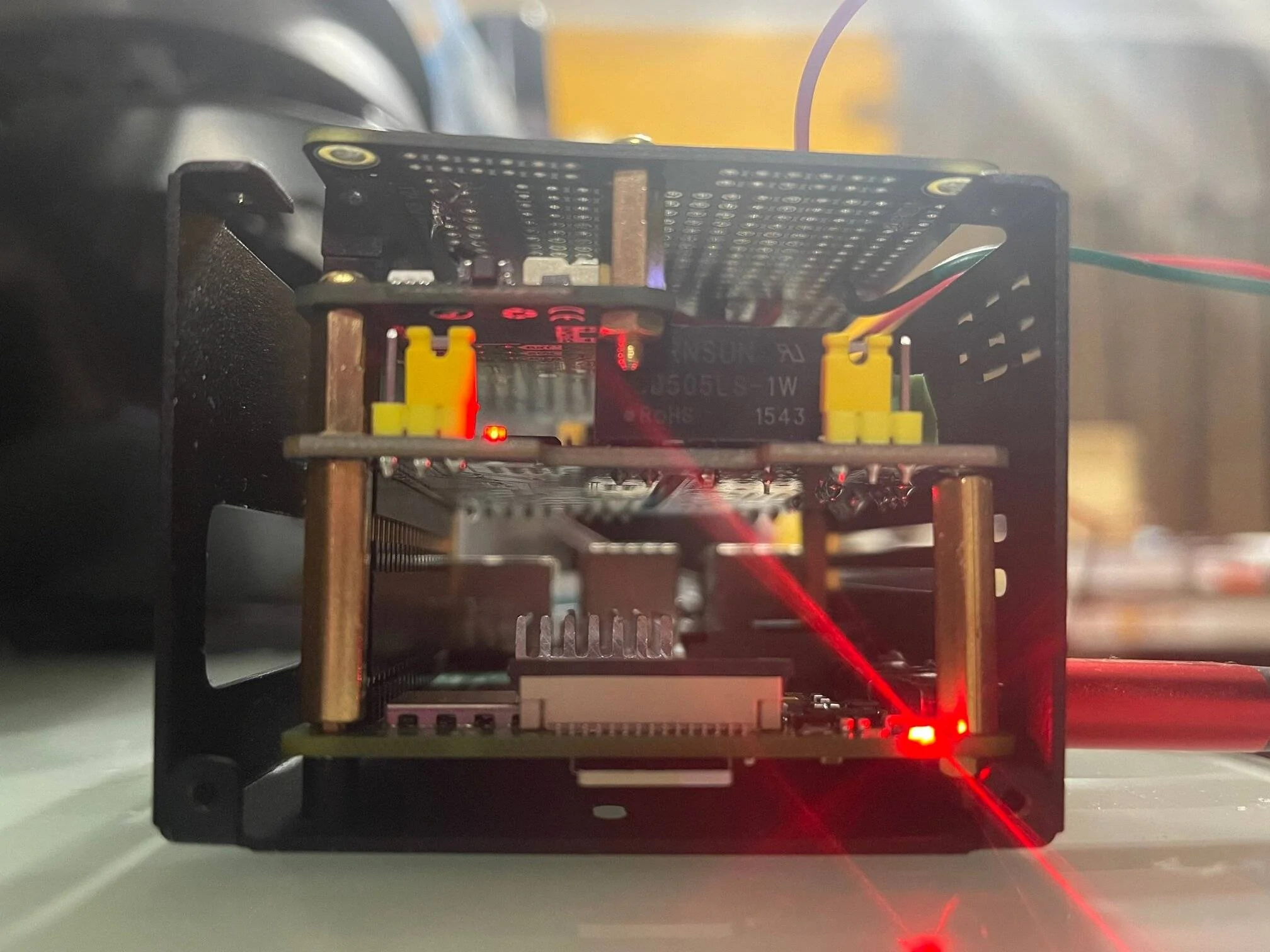
I made another attempt at stacking things together and this time I tried to integrate it into the metal case. I was just a little bit too tall when it came to height.

Jeep Wrangler JL JEEP HACKING CAN-C / CAN-IHS / UDS ! (Reverse Engineering) IMG_0180


However, some positive news, it can fit our Waveshare CAN hat and a Zero2Go Omini power/sleep controller just fine when the case is closed up. It's when I try to add in the RGB controller is where I run out of space.

There's still some room for me to shorten the stack by finding the perfect combination of stacking headers. It's a real Tetris kind of puzzle except you have to be really careful about not bending pins.

It looks like I'm going to be playing around with this just a little bit longer.

PS: I do have one other option I'm holding back on. If all else fails, I can have a 40-wire ribbon coming out of the case, but that gets messy. Really, all I need are just 2 GPIO pins to get the RGB halos to work.
Sponsored


Top