Sponsored

IanNubbit

Well-Known Member
First Name
Ian
Joined
Dec 12, 2021
Threads
2
Messages
490
Reaction score
801
Location
NJ
Vehicle(s)
2022 JT 6MT Sport & 2023 JL 2 Door 6MT Sport
Occupation
Jeep Dealer Tech
The steering angle sensor is in the steering column.
All the clock spring does is carry the connection for the buttons in your steering wheel and airbag (and I have a work around for that).

As of now I have removed the gear in the steering column for the steering wheel position so supposedly is at 0 degrees....Jeep is not happy but is better then I thought to be honest.

This winter I will get on this project, right now I do not have a free weekend to play with this or time during the week!
I guess I’ll ask the later again. Are you removing the steering column? And the SCCM includes the clock spring and Steering Angle Sensor, along with the stalks for wipers and signals. Its all 1 unit
Sponsored


Nicor

Well-Known Member
First Name
Nico
Joined
Nov 11, 2017
Threads
8
Messages
92
Reaction score
124
Location
Colorado
Vehicle(s)
JLUR
I guess I’ll ask the later again. Are you removing the steering column? And the SCCM includes the clock spring and Steering Angle Sensor, along with the stalks for wipers and signals. Its all 1 unit
Sorry.

No, I am keeping the steering column (for now).

I need the wipers, lights and turn signal switches.

If down the road I come up with, or I find, a nice setup for the switches I need, I might remove it completely.
 

IanNubbit

Well-Known Member
First Name
Ian
Joined
Dec 12, 2021
Threads
2
Messages
490
Reaction score
801
Location
NJ
Vehicle(s)
2022 JT 6MT Sport & 2023 JL 2 Door 6MT Sport
Occupation
Jeep Dealer Tech
Sorry.

No, I am keeping the steering column (for now).

I need the wipers, lights and turn signal switches.

If down the road I come up with, or I find, a nice setup for the switches I need, I might remove it completely.
Ive been toying with idea forchanging the steering wheel and in turn needing to change the the steering wheel controls. Simple quick though is just de-pin the large connector and connect from that point and locate the buttons as desired. But all controls are from the SCCM. It’s nicely simplified with just multiple connectors instead of multiple parts like the JK was
 

Nicor

Well-Known Member
First Name
Nico
Joined
Nov 11, 2017
Threads
8
Messages
92
Reaction score
124
Location
Colorado
Vehicle(s)
JLUR
Ive been toying with idea forchanging the steering wheel and in turn needing to change the the steering wheel controls. Simple quick though is just de-pin the large connector and connect from that point and locate the buttons as desired. But all controls are from the SCCM. It’s nicely simplified with just multiple connectors instead of multiple parts like the JK was
Yes, all the controls, except the horn, go trough the SCCM but is litterfall a small board that can be relocated anywhere once that module is torn apart (or anything can be used as long as it's connected in the can with the right commands).

I made up a connector for the steering wheel button and I use it when I need it.
I would love to have something else somewhere with all the controls.

The Jeep is working great for now so it is not a priority but I will figure something out with time.
 

Fullfree

Active Member
First Name
Antonio
Joined
Feb 3, 2022
Threads
7
Messages
42
Reaction score
13
Location
Spain
Vehicle(s)
Waiting Jeep Wrangler Rubicon 4xe MY22, Volvo XC60
Connecting to the CAN Bus with the OBD-II Port

We've standardized on using the unused ports behind the glovebox for access to our vehicle's CAN networks. Mostly because those ports provide full provide read AND write access to the CAN bus, but also because it's almost certain to have a free set of ports we can use. And everything is tucked nicely out of sight. But the space behind the glovebox is an odd place to work in, and it requires unusual connectors that have to be special ordered.

For someone who's struggling with this challenge, there is a less difficult path, and that's the OBD-II port (also known as the "DLC" Data Link Connector). It's easier to gain access to, and it's easier to find a cable for. But it has two disadvantages of it's own. First, it only offers read-only access to the CAN bus (unless you've installed a Secure Gateway bypass cable or similar device). Second, many other devices want to compete to connect in that same port, so it's not always available.

If you understand the limitations of the OBD-II port and you'd like to continue, the least we can do is help you along the way. Ready to get started?

NOTE: While this information is based upon a trustworthy reference and cross-checked against another source, it has yet to be verified with a real-world connection. Use this information with care.​

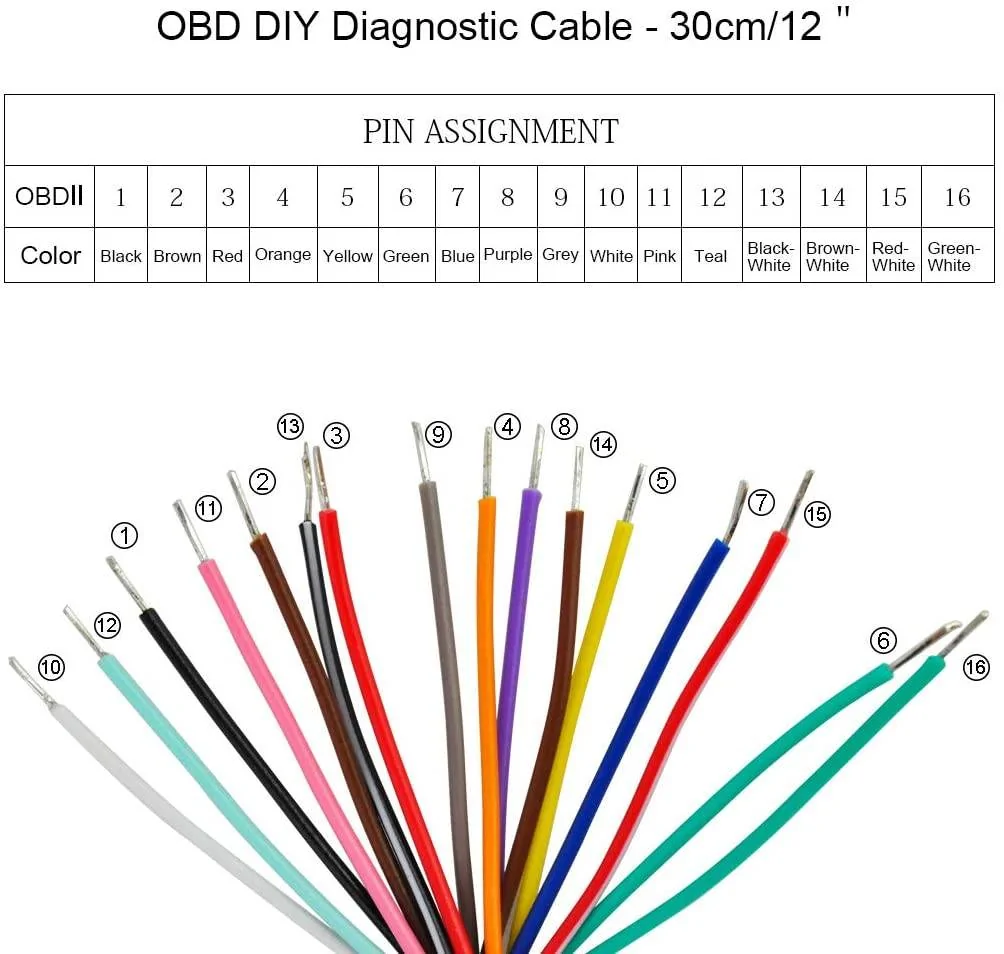
Let's start with the purchase of a new connector. That'd be a standard male OBD-II port connector with pigtails. I found the iKKEGOL OBDII J1962 Male Connector for a reasonably low price of only $7.99. Even better, it contains all 16 OBD-II pins, and the Amazon product page includes a color-coded assignment chart:

OBD-II Male Connector with Pigtails.webp


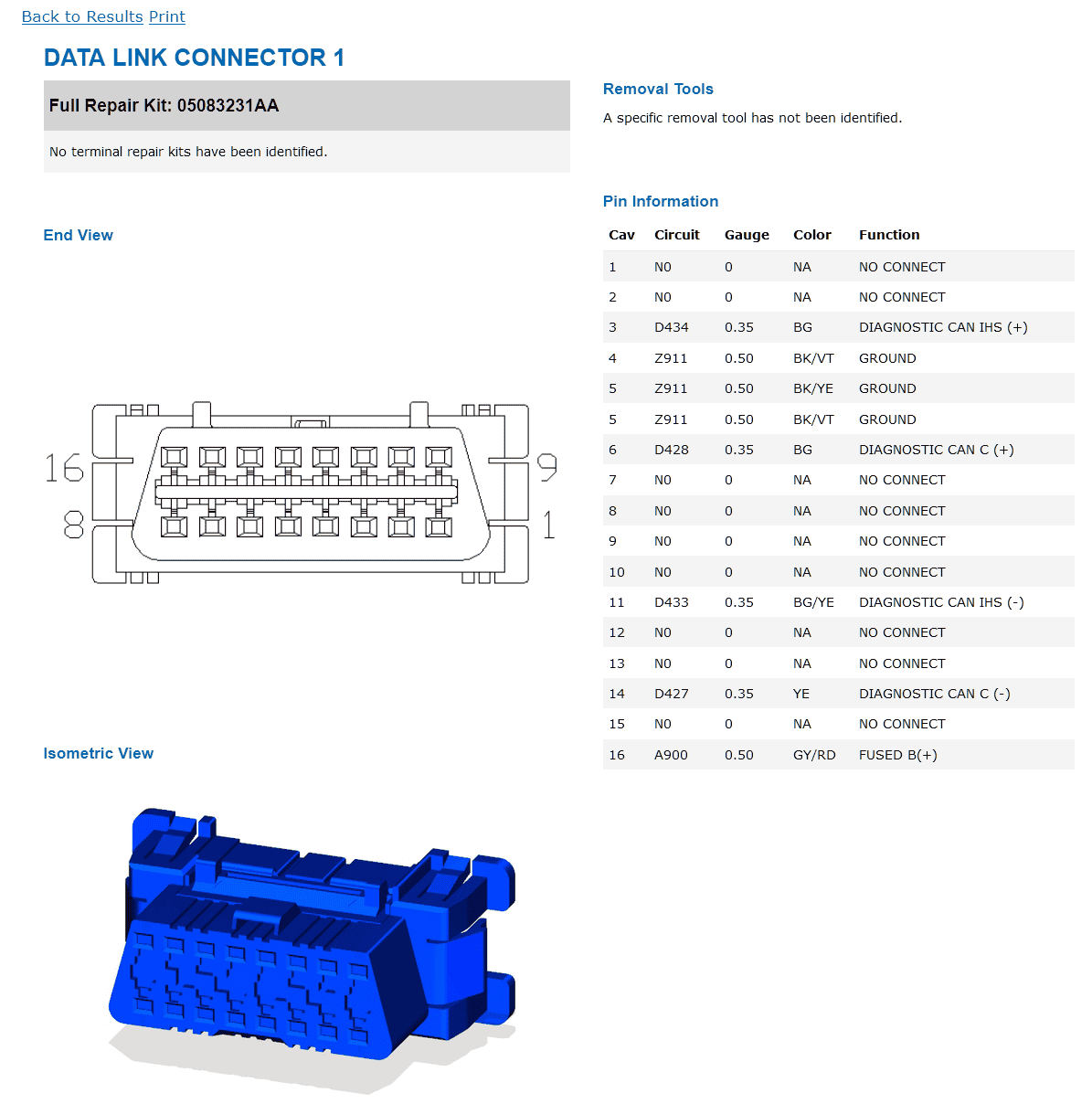
According to this information, we'd want to use pin 6 (green) for CAN-C high and pin 14 (brown-white) for CAN-C low. And then we'll want to use pin 3 (red) for CAN-IHS high and pin 11 (pink) for CAN-IHS low. I would also strongly suggest you use either pin 4 (orange), pin 5 (yellow) or pin 6 (green) for a signal ground.

Here's a diagram of the pin assignments on the vehicle side:

DLC Pinouts for 2021 Wrangler.png


Once you've made the connections, you're ready to start configuring your CAN adapter and begin testing. If you've made use of the information you've found here in this guide, please take a moment to let us know how well its worked for you.

We're hoping for success, but if there are problems, we'd like to help you figure things out. And we'd love to revise these instructions to make them even easier for the next person down the road.

Good luck, and welcome to the club!
Dear jmccorm:

Happy New Year and thank you very much for your dedication and time trying to help all the people like me here, it is an incredible job.

I was looking for information about the CAN bus on our Jeep since I want to install a mod on my car that requires using CAN information, but I don't want to give this mod the right to write anything to my car and I also want to preserve the Security Gateway to protect the integrity of the Jeep just in case, and now with this information I am very happy to continue with this mod.

I will connect this to the OBDII port on pins 6 and 14 CAN-C since this device needs to have access to throttle position, engine, RPM, speed, etc., I was very close to using one of the available slots behind the glove box but you have me saved from this mistake.

Thank you very much again for your invaluable help.
 

Sponsored

cmartin

New Member
First Name
Christian
Joined
Feb 26, 2024
Threads
0
Messages
2
Reaction score
3
Location
Canada
Vehicle(s)
Jeep Cherokee 2023
Hi,

I got a CAN HAT with Rasberry Pi. Seems like it is handling well CAN data when I send CAN data from can0 to can1.

I know that this is mostly Jeep Wrangler, but I am testing with a Jeep Cherokee 2023.

Since I am starting, I thought using ODB II port to read either CAN C or CAN IHS; It would a good thing to try.

I used a voltmeter and read pin 6 and pin 14 for (CAN C), I get in both cases about 2.5V. I would have expected a reading of ~2.6V on High and ~2.3B on Low. Is this normal ?

Also, tried to read CAN data for both C and IHS, but I got nothing coming in on the Ras PI. I made sure the speed was 125 for ISH and 50 for standard.

Any suggestions as to what I could be doing wrong ?
Any other places I can try to read the CAN data beside the ODB II port? ... Remenber, this is Cherokee 2023.
 

dstevens

Well-Known Member
Joined
Apr 13, 2023
Threads
8
Messages
949
Reaction score
1,605
Location
CA
Vehicle(s)
2024 JLURX
After going out last week I noticed that I was limiting my speed off road to 18 mph so that the sway bar did not spend all day disconnecting and reconnecting. The 18/16 mph limit is arbitrary to keep lawyers happy. It's not the most annoying thing off road (the fan is), but it is close. So today I had a look.

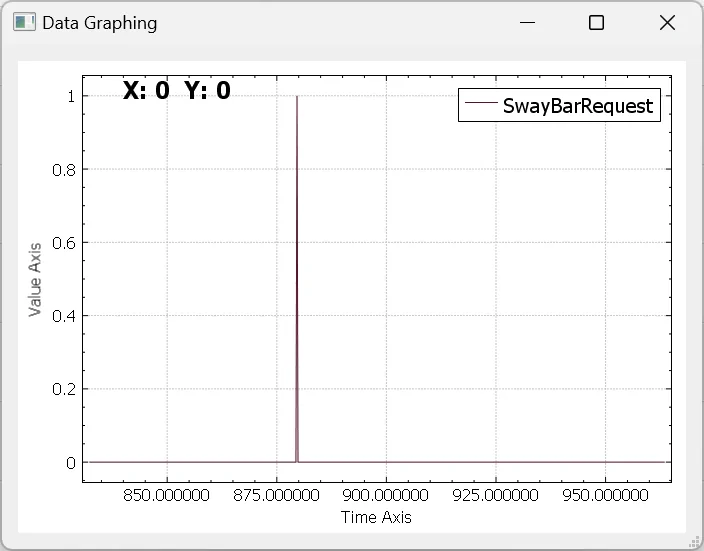
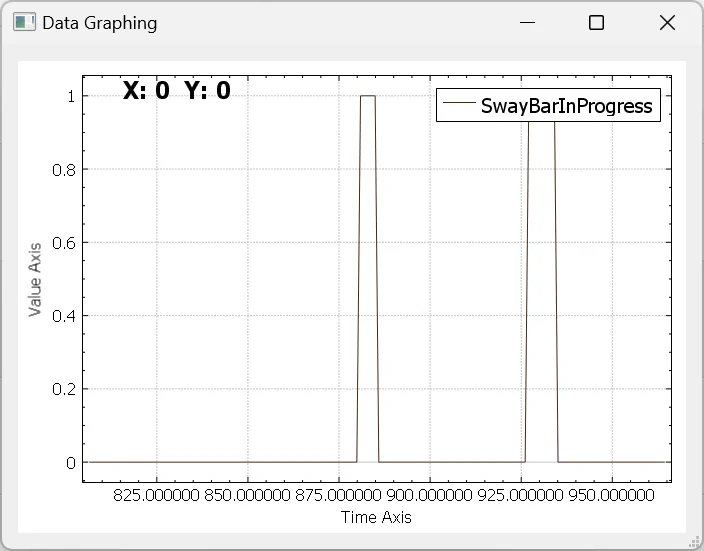
What I have seen on the CAN-C bus doing a test when I disconnected then exceeded the speed limit. First the sway bar button shows up on bit 10 of 0x26F.

Jeep Wrangler JL JEEP HACKING CAN-C / CAN-IHS / UDS ! (Reverse Engineering) 1709348909108


Then in 0x371 the sway bar starts to move. For some reason my scale is different - the two events are together.

Jeep Wrangler JL JEEP HACKING CAN-C / CAN-IHS / UDS ! (Reverse Engineering) 1709348994905


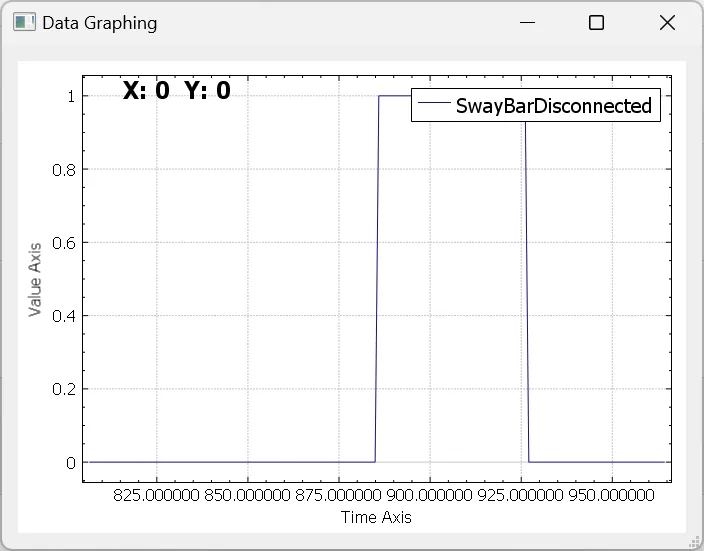
Then the sway bar shows are disconnected
Jeep Wrangler JL JEEP HACKING CAN-C / CAN-IHS / UDS ! (Reverse Engineering) 1709349051239


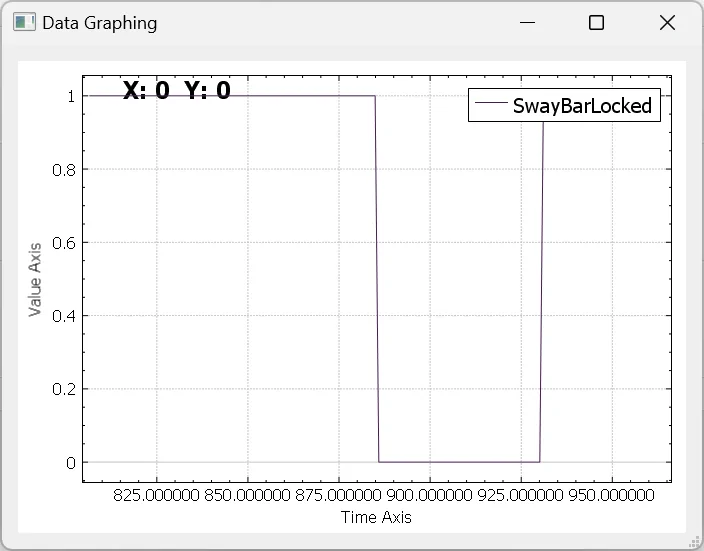
There is a bit for the collar being locked
Jeep Wrangler JL JEEP HACKING CAN-C / CAN-IHS / UDS ! (Reverse Engineering) 1709349176474


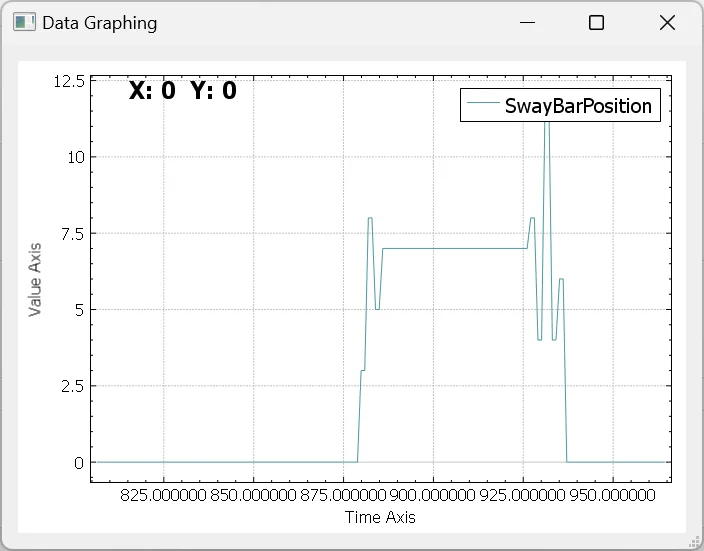
And finally something which I think is the plunger position
Jeep Wrangler JL JEEP HACKING CAN-C / CAN-IHS / UDS ! (Reverse Engineering) 1709349212961
 
Last edited:

dstevens

Well-Known Member
Joined
Apr 13, 2023
Threads
8
Messages
949
Reaction score
1,605
Location
CA
Vehicle(s)
2024 JLURX
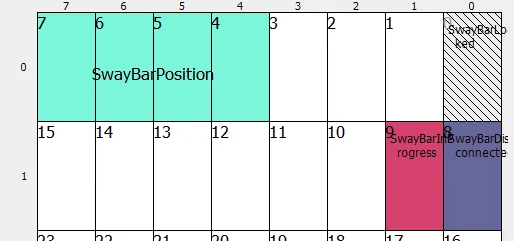
Some notes. I am using SavvyCan, which is good for this job despite crashing a lot. Also I am using DBC files, which work fairly well with bit flags etc, despite being a bit of a strange format and not being that readable. And using decimal.

BO_ 881 SwayBar: 8 Vector__XXX
SG_ SwayBarDisconnected : 8|1@0+ (1,0) [0|1] "" Vector__XXX
SG_ SwayBarInProgress : 9|1@0+ (1,0) [0|1] "" Vector__XXX
SG_ SwayBarLocked : 0|1@0+ (1,0) [0|1] "" Vector__XXX
SG_ SwayBarPosition : 7|4@0+ (1,0) [0|1] "" Vector__XXX

BO_ 623 Unknown: 8 Vector__XXX
SG_ SwayBarRequest : 14|1@0+ (1,0) [0|1] "" Vector__XXX

BTW this is on a 2024 Rubicon, so there is a chance it has changed from previous years.

Now how do we stop the sway bar disconnecting? I'm going to guess that the sway bar module is listening to one of the many speed packets eg 0x83. And when it sees 18 mph it reconnects.

So we could find what speed packet it uses, and then either use an in line hardware filter to stop or modify the speed message. Or we could try spamming the speed packet to see if we can drown out the actual speed. We would need to also look at the transfer case packet too so we could disconnect in 2WD.

Other options worth trying would be to use a UDS communication control to stop the sway bar from listening to anything at all.
 

dstevens

Well-Known Member
Joined
Apr 13, 2023
Threads
8
Messages
949
Reaction score
1,605
Location
CA
Vehicle(s)
2024 JLURX
This is the full packet dump from disconnecting the sway bar and then reconnecting. Packet 0x371

01 00 00 00 00 00 00 00 = connected
80 02 00 00 00 00 00 00
50 02 00 00 00 00 00 00
70 01 00 00 00 00 00 00 = disconnected
...
70 01 00 00 00 00 00 00 = disconnected
31 02 00 00 00 00 00 00
41 02 00 00 00 00 00 00
61 00 00 00 00 00 00 00
01 00 00 00 00 00 00 00 = connected

I'd guess my bits are not quite right. Bit 0 'locked' changes quickly when re-connecting. But it may not matter in terms of changing how the sway bar module works.

Jeep Wrangler JL JEEP HACKING CAN-C / CAN-IHS / UDS ! (Reverse Engineering) 1709350110479


'SwarBarPosition' might be servo torque. Anyhow, when I next get the chance I will try some of the options.
 

dstevens

Well-Known Member
Joined
Apr 13, 2023
Threads
8
Messages
949
Reaction score
1,605
Location
CA
Vehicle(s)
2024 JLURX
The next step is to hijack the cluster display.

As noted in this tread 0x328 will send media information to the cluster. There are three types of text to display and each text is broken into three character CAN messages.

Code:
BO_ 808 MusicInfo: 8 Vector__XXX
   SG_ MusicInfoNewLine : 14|1@0+ (1,0) [0|1] "" Vector__XXX
   SG_ MusicInfoLineNum : 7|4@0+ (1,0) [0|1] "" Vector__XXX
   SG_ MusicInfoText : 23|48@4- (1,0) [0|1] "" Vector__XXX
   SG_ MusicInfoType : 9|2@0+ (1,0) [0|1] "" Vector__XXX
Type = 2 = genre / artist (top line)
Type = 3 = song name (second line)
Type = 1 = station / media type (bottom line)

eg
0x328 10 42 00 49 00 4E 00 58 = artist 'INX'
0x328 00 02 00 53 00 0 00 00 = artist 'S'

The messages are sent on both busses every 1.5 seconds. Taking over the message, if I just send out the information at a higher rate (200 ms) then it sort of works. Transmitting on either bus works but it's hard to tell if the radio sends on both busses or if there is a gateway which does this. The real problem is that the radio will normal messages which overwrites the change, and the bigger problem is that if you interrupt the transmission of the radio message so that the message numbers are out of sequence then the cluster will show 'Updating...' on the bottom and freeze until the next valid message sequence arrives. More work to be done.
 
Last edited:

Sponsored

dstevens

Well-Known Member
Joined
Apr 13, 2023
Threads
8
Messages
949
Reaction score
1,605
Location
CA
Vehicle(s)
2024 JLURX
Another option is the turn by turn navigation instructions. The advantage of this message is that it overrides whatever page the cluster is on. The disadvantage is that it may not work on every JL.

There are three messages I have found for the turn by turn instructions. 0x35C, 0x376 and 0x3BC.

0x35C has flags. Normal flags are
0x35C 00 00 10 40 1F 00 CAN-IHS

Flags with turn by turn on
0x35C 23 28 0A 41 1F 00 CAN-IHS
Bytes 0 and 1 are the distance to the next waypoint in feet x 10


0x376 has more flags.
0x376 FF FF 04 00 00 00 00 00 CAN-IHS
0x376 FF FF 04 00 00 00 0F FF CAN-C

Flags with turn by turn on
0x376 FF FF 02 00 00 01 20 00 CAN-IHS
0x376 FF FF 02 00 00 01 2F FF CAN-C

The byte 2 value can be 4 = normal, 6 = init, 2 = turn by turn
Bytes 3 and 4 can be the distance to the next waypoint in feet x 10

0x3BC has the street information in a similar method to 0x328 media info. It can show distance, time, 'UNKNOWN' or the street name. More later.
 
Last edited:

dstevens

Well-Known Member
Joined
Apr 13, 2023
Threads
8
Messages
949
Reaction score
1,605
Location
CA
Vehicle(s)
2024 JLURX
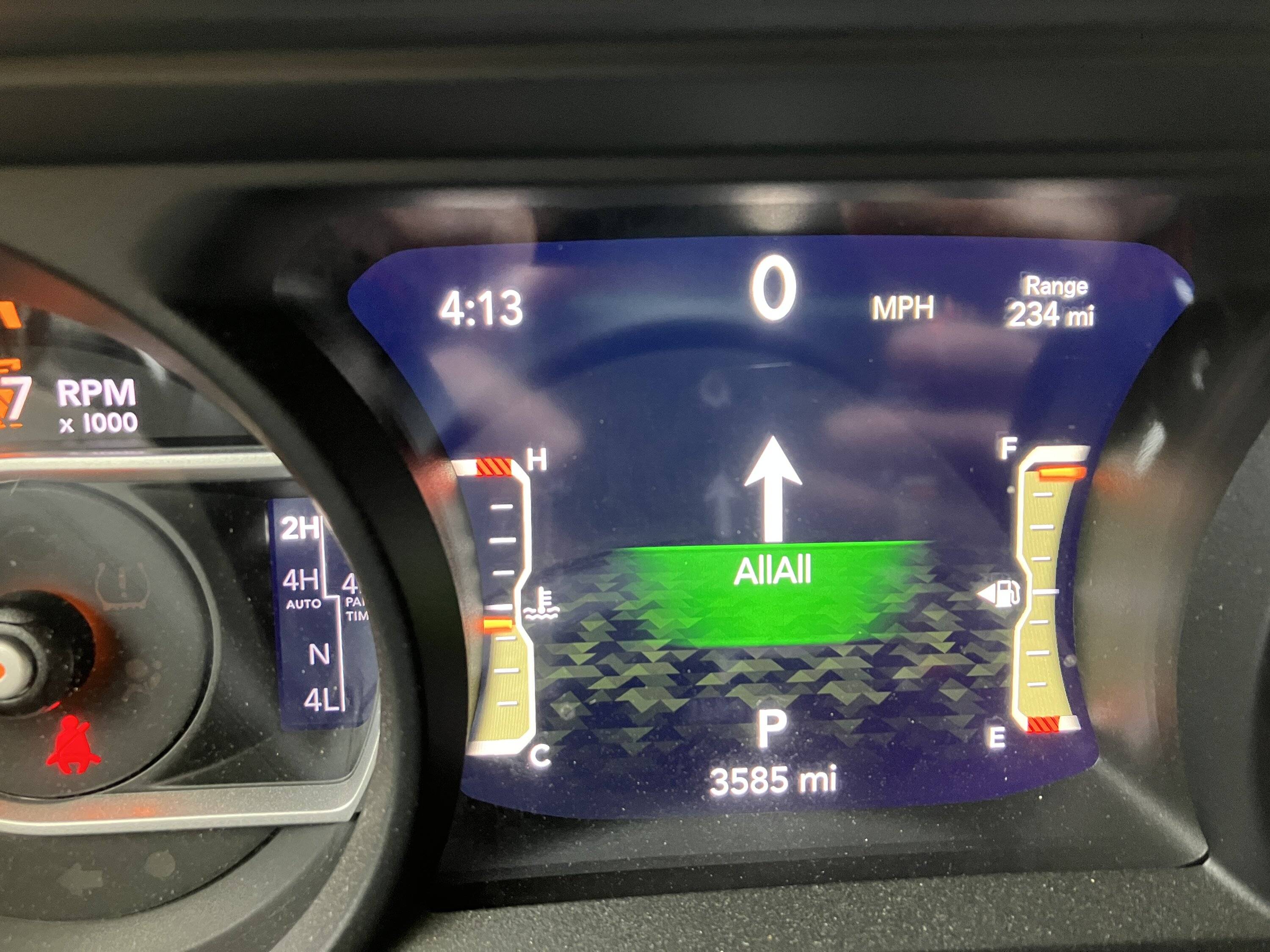
Got the navi hijack to work ... sort of. Still the conflict with the normal messages.

Jeep Wrangler JL JEEP HACKING CAN-C / CAN-IHS / UDS ! (Reverse Engineering) IMG_5248.JPG


Message 0x35C was not used.

Message 0x376 sets the arrow type (byte 5), ranging from u turn left to u turn right. Also 0x376 has a setting in byte 6 which sets the message type ranging from normal to a distance message with units in feet, miles, km, metres and yards. Bus (IHS or C) does not matter.

Message 0x3BC sets the text like the 0x328 message. Bus (IHS or C) does not matter. The message type only seemed to work as message type 1.

0x10, 0x41, 0x00, 'A', 0x00, 'l', 0x00, 'l'
0x00, 0x01, 0x00, 'A', 0x00, 'l', 0x00, 'l'

When the normal packet arrives the display shows 'destination not set driving on' until things get back in sync. I'll work on that next.
 

cmartin

New Member
First Name
Christian
Joined
Feb 26, 2024
Threads
0
Messages
2
Reaction score
3
Location
Canada
Vehicle(s)
Jeep Cherokee 2023
Hi,

I got a CAN HAT with Rasberry Pi. Seems like it is handling well CAN data when I send CAN data from can0 to can1.

I know that this is mostly Jeep Wrangler, but I am testing with a Jeep Cherokee 2023.

Since I am starting, I thought using ODB II port to read either CAN C or CAN IHS; It would a good thing to try.

I used a voltmeter and read pin 6 and pin 14 for (CAN C), I get in both cases about 2.5V. I would have expected a reading of ~2.6V on High and ~2.3B on Low. Is this normal ?

Also, tried to read CAN data for both C and IHS, but I got nothing coming in on the Ras PI. I made sure the speed was 125 for ISH and 50 for standard.

Any suggestions as to what I could be doing wrong ?
Any other places I can try to read the CAN data beside the ODB II port? ... Remenber, this is Cherokee 2023.
I worked it out. Speed on IHS was the problem
 

dstevens

Well-Known Member
Joined
Apr 13, 2023
Threads
8
Messages
949
Reaction score
1,605
Location
CA
Vehicle(s)
2024 JLURX
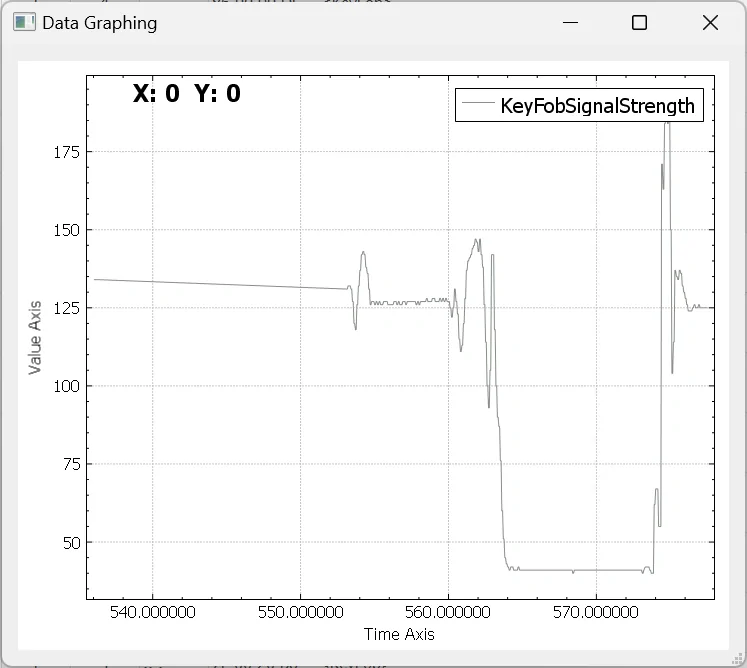
0x1CE byte 0 is key fob signal strength. Seems to be highest near the driver's door handle. This graph is from exiting the vehicle, walking down past the tailgate and then getting back in.

Jeep Wrangler JL JEEP HACKING CAN-C / CAN-IHS / UDS ! (Reverse Engineering) 1709854333852


On the 2024 0x2F3 does not work like the previous model years. Have not tracked down a driver's seat belt signal yet but it might be 0x1D0 byte 2.

0x9B seems to have flags for the driver's door being opened, but it could be some derived behavior from opening the door.
 

dstevens

Well-Known Member
Joined
Apr 13, 2023
Threads
8
Messages
949
Reaction score
1,605
Location
CA
Vehicle(s)
2024 JLURX
Away from Jeep for several weeks now, so can only look at logs. I have some basic functionality working, now I need to refine things. I found that when monitoring the ESS and TC buttons you can tell when a button is pressed but not know what the status of the system is (enabled or disabled).

I wrote a filter for the logs when weeds out the packets which do not change during the log including the packets using a counter and checksum. This dropped the number of unique packet ids from 350 down to 50. SavvyCAN has a feature which should do this but is live only and I've never had much success with it.

Then looking over old logs I immediately found for ESS there is a status bit in 0x137 which I had missed. And another in 0x340. So that should make the ESS and TC memory between driving cycles much better.
Sponsored


Top