Sponsored
OP
OP
jmccorm

jmccorm

Well-Known Member
First Name
Josh
Joined
Sep 15, 2021
Threads
55
Messages
1,170
Reaction score
1,322
Location
Tulsa, OK
Vehicle(s)
2021 JLUR
Build Thread
Link
Occupation
Systems Engineering
Another suggestion, we need to standardize the way we represent the can data fields or words. For example python treats every data hex pair uniquely and address them starting with 0. In our datasheet I've been calling them word 1, word 2, etc... What is the appropriate term or variable to represent this?
This is the age-old conflict between software people and hardware people. One of them wants to start counting at zero, and the other wants to start counting with one. I keep forgetting which is which, as I try to do both!

I'm going to continue to kick the can on how we handle that conflict until we have more people join us. In the meantime, I've been using the most neutral language I could muster, which would be to say, "the first value is..." and "the first variable contains". Referring to their relative position rather than an absolute position. If I said "Byte one contains...", then people are going to wonder where I started counting from and if there's a byte zero or not.

Actually, this topic naturally leads into two more things...

Data sizes. A word is simply defined as a number that's two bytes long. So in hex, a number like 0x1234 is going to be a word. Something smaller like 0x12 is just a byte. And something even smaller, just one hex digit like 0x3, is a nibble. Then there are going to be a few weird situations where a variable is three hex digits long. You'll see that with message ID 0x079:

$x???0??????? – Vehicle is stopped? bitmap
$?xxx0??????? – Braking pressure (see notes)
$????0xxx???? – Braking pressure (see notes)
$????0???xxxx – Vehicle speed (MPH x 200)

The first variable is one nibble long, the second variable is three nibbles long, the third variable is three nibbles long, and the fourth variable is a word. Because of the odd alignment, there can be some confusion in how the layout is described, so that leads into the other topic I wanted to cover.

We have to be careful to avoid ambiguity when discussing the layout of our findings. Take this hypothetical layout, for example:

$xxxx????0000???? – Engine RPMs
$????xxxx0000???? – Vehicle MPH
$????????0000xxxx – Turbo Turbine RPM

In looking at this, you see that the first word contains Engine RPMs, right? And the second word contains Vehicle MPH, yes?

But what about the third word? Let's look at it. Wait. There's two different ways to look at it. If you look at the digits, you have xxxx for the engine RPMs, then xxxx for the vehicle MPH, and then you have 0000 which is just a static placeholder. So you could say that 0x0000 is the third word.

But another person might say that Engine RPMs is the first word, and Vehicle MPH is the second word, and then for the third word we've got the RPMs of the turbo.

So which one gets call the third word?

I've been mostly consistent here, or at least, I thought I had been, but I've tried to avoid any ambiguity by referring to these in terms or values or variables and not by their sizes. And we've got three variables (Engine RPMs, Vehicle MPH, Turbo RPMs). I might say, "the first value contains RPMs" or "the first variable contains Engine RPMs".

Perhaps the best way to keep things sorted is to accept that Column D is going to focus on where something begins, how wide it is, and what title we give it. Then when we talk about it in Column L, we don't need to talk about data alignment or width in most cases. We'd just say the first variable (referring to Engine RPMs) or the third variable (referring to turbo RPMs). Turbo RPMs is our third variable, and we actually avoid talking about it in terms of being the third word because then we're talking about size or alignment (which is done in Column D).

There's nothing wrong with the way Python treats the data (aligning it at the byte level), but sometimes our data wasn't designed that way. Like the second variable (braking pressure) with message ID 0x079.

If this all doesn't make sense right away, don't worry too much. If we need to, we can adjust these rules. But I think you're likely to pick up on the rules and the exceptions as you continue. But if there's a better system that's minimizes ambiguity without making things too difficult, I'm willing to go another direction if everyone else is.

Hope this helps.
Sponsored

 
OP
OP
jmccorm

jmccorm

Well-Known Member
First Name
Josh
Joined
Sep 15, 2021
Threads
55
Messages
1,170
Reaction score
1,322
Location
Tulsa, OK
Vehicle(s)
2021 JLUR
Build Thread
Link
Occupation
Systems Engineering
Faster Linux Boot Times (Work in Progress)

Having some awesome code running on your Raspberry Pi isn't all that great if it takes 30 seconds to start working after the vehicle starts. So this is what I've been working on lately, and I've been able to make some healthy improvements.

ORIGINAL:
# systemd-analyze
Startup finished in 4.283s (kernel) + 16.735s (userspace) = 21.019s
multi-user.target reached after 16.620s in userspace​

CURRENT:
# systemd-analyze
Startup finished in 859ms (kernel) + 4.153s (userspace) = 5.012s
multi-user.target reached after 4.115s in userspace​

That's a big improvement! But it does take a little more time to boot the Raspberry Pi than the number shows. There's the amount of time the bootloader takes to load the kernel, and then there's a little more time required to run my startup script in /etc/rc.local. (And then a little more time to bring the network adapters online, but that doesn't stop the CAN from working.)

This improvement in boot speed is accomplished two ways:

1. Configuration Settings in /boot/config.txt

The first two settings should work everywhere. They tell the Raspberry Pi that it doesn't need to insert any additional delays for components to become ready, and that it's clear to overclock the processor for the first 60 seconds of a reboot cycle.

boot_delay=0​
initial_turbo=60​

The third setting is going to depend on the quality of your SD card. It's also going to depend on which Raspberry Pi you have.

dtoverlay=sdtweak,overclock_50=80​

This worked well on my Raspberry Pi 3B+, but it didn't adjust any timings on my Raspberry Pi 4 (which the recorded 5.012s boot time was from) You can see if it is working by comparing the clock vs the actual clock with this command:

# cat /sys/kernel/debug/mmc0/ios
clock: 50000000 Hz
actual clock: 50000000 Hz
vdd: 21 (3.3 ~ 3.4 V)​
[ ... ]​

It's worth pursuing because the benefit is significant. But if it makes the system unbootable, you can take the SD card out of the Raspberry Pi, put it into your PC, modify the config.txt to comment out or remove the line, and then stick it back into your Raspberry Pi. Be warned that too aggressive of a setting can cause filesystem corruption, so it's a matter of how high you set it and if your SD card is up to the task. (So many disclaimers!)

2. Configuring and Building a new Kernel

You don't have to stick with the kernel that's provided with Raspbian. You can make your own. The advantage of doing so is that you can remove all sorts of unnecessary features which creates a larger kernel. A smaller kernel takes less time to load (not reflected in the number provided earlier). Having less devices in your kernel causes the boot process to run faster (which is show in those numbers).

If you're not going to be using using IPV6 networking, joysticks, Asynchronous Transfer Mode devices, RAID drives, chemical sensors, magnetometers, or any number of other devices... that's plenty of unnecessary bloat that you can get rid of.

You're going to see what takes the most time during the boot process with "dmesg". It lists the components in chronological order, and each line has a timer on the left that show you how long it took to process.

I'm going to save a full kernel recompiling guide for another day.

It isn't too difficult to set up the process, and there's a great menu system for choosing what elements you do and don't want. But the choices themselves are deep and can require arcane knowledge to know what you actually need and to know what's fluff. Once you've made your choices, it takes a significant amount of time (30+ minutes) to actually create a new kernel.

The official (but slightly incomplete) instructions are in the official Raspberry Pi Documentation's chapter on The Linux Kernel. You might consult a PowerPoint presentation on Reducing Boot Time. And I found an introductory article on How to Fast Boot Raspberry Pi that's worth checking out.

When compiling your kernel, the biggest two tips I can provide are:

1. Make small changes at a time. You want to make big changes all at once because it takes 30+ minutes to compile a new kernel, but when you've changed many things and the OS doesn't boot, you won't know which one of the changes was responsible.

2. Make a backup of your original kernel so that you can recover from a new kernel that locks up. Change into your /boot directory and making a new subdirectory called BACKUP. Copy your kernel*.img files into the BACKUP directory. If a new kernel locks up, you can take your SD card back to your PC and copy the kernel*.img files from the BACKUP subdirectory into the main directory. Then put the SD card back into the Raspberry Pi and boot to your previous image.

So that's all I have for now. Know that it is possible to reduce your boot times, but it requires a significant investment of your time, and depending on how much you tune it, you can create a new kernel with mild gains can work over a large assortment of hardware, or you can create a new kernel with significant gains that are very much restricted to your current hardware configuration.

UPDATE: All of this may be a bit too much, right? If you've put something together, and one of the finishing touches would be to improve the boot time, hit me up. We should be able to build something that boots much faster while still supporting whatever additional devices you want it to support.
 
Last edited:
OP
OP
jmccorm

jmccorm

Well-Known Member
First Name
Josh
Joined
Sep 15, 2021
Threads
55
Messages
1,170
Reaction score
1,322
Location
Tulsa, OK
Vehicle(s)
2021 JLUR
Build Thread
Link
Occupation
Systems Engineering
Robert, can you do me a solid?

We've decoded enough of message ID 0x318 so that we know when the driver is using their left or right turn signal. I'm wanting to use that to activate my RGB halo lights and use them as secondary turn signals. The problem is that I need them to blink along with the existing turn signals, or they're going to clash.

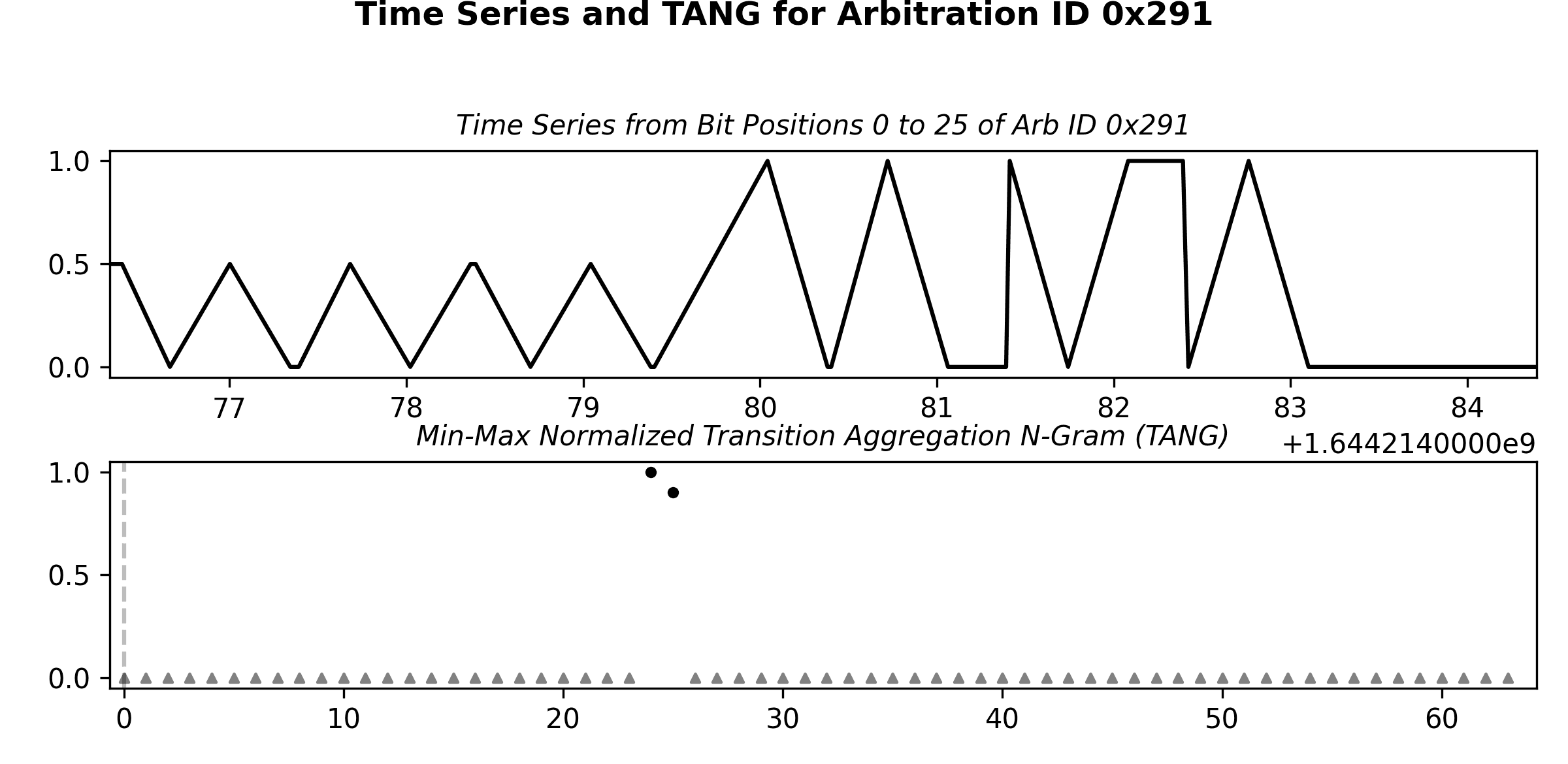
Can you hop into your vehicle and see if you can find something that turns off and on as with the flashing of the turn signals? I imagine it's going to be one of the bits of message ID 0x291, but it's going to be awfully painful for me to drag a monitor and keyboard in the vehicle to figure it out.

I've got some demo code running so far, but it's using it's own fake internal timing rather than syncing with the exact blinking of the vehicle:


Can you help me out with this one?
 

redracer

Well-Known Member
First Name
Robert
Joined
Aug 22, 2017
Threads
20
Messages
576
Reaction score
650
Location
Manteca, CA
Vehicle(s)
2023 4xe Rubicon
Robert, can you do me a solid?

We've decoded enough of message ID 0x318 so that we know when the driver is using their left or right turn signal. I'm wanting to use that to activate my RGB halo lights and use them as secondary turn signals. The problem is that I need them to blink along with the existing turn signals, or they're going to clash.

Can you hop into your vehicle and see if you can find something that turns off and on as with the flashing of the turn signals? I imagine it's going to be one of the bits of message ID 0x291, but it's going to be awfully painful for me to drag a monitor and keyboard in the vehicle to figure it out.

I've got some demo code running so far, but it's using it's own fake internal timing rather than syncing with the exact blinking of the vehicle:


Can you help me out with this one?
That's not a problem. Will do.
 

redracer

Well-Known Member
First Name
Robert
Joined
Aug 22, 2017
Threads
20
Messages
576
Reaction score
650
Location
Manteca, CA
Vehicle(s)
2023 4xe Rubicon
Robert, can you do me a solid?

We've decoded enough of message ID 0x318 so that we know when the driver is using their left or right turn signal. I'm wanting to use that to activate my RGB halo lights and use them as secondary turn signals. The problem is that I need them to blink along with the existing turn signals, or they're going to clash.

Can you hop into your vehicle and see if you can find something that turns off and on as with the flashing of the turn signals? I imagine it's going to be one of the bits of message ID 0x291, but it's going to be awfully painful for me to drag a monitor and keyboard in the vehicle to figure it out.

I've got some demo code running so far, but it's using it's own fake internal timing rather than syncing with the exact blinking of the vehicle:


Can you help me out with this one?
I believe that 0x291 on can-c is what you want.
??????x?????????
0x0=off
0x4=left
0x8=right

Jeep Wrangler JL JEEP HACKING CAN-C / CAN-IHS / UDS ! (Reverse Engineering) 0x291
 

Sponsored

OP
OP
jmccorm

jmccorm

Well-Known Member
First Name
Josh
Joined
Sep 15, 2021
Threads
55
Messages
1,170
Reaction score
1,322
Location
Tulsa, OK
Vehicle(s)
2021 JLUR
Build Thread
Link
Occupation
Systems Engineering
OP
OP
jmccorm

jmccorm

Well-Known Member
First Name
Josh
Joined
Sep 15, 2021
Threads
55
Messages
1,170
Reaction score
1,322
Location
Tulsa, OK
Vehicle(s)
2021 JLUR
Build Thread
Link
Occupation
Systems Engineering
This all sounds good. The decimal 0d will take getting used to, but it's good
I thought some more about this, and you're right, that's a bit cumbersome for too little benefit. Let's go ahead and drop the 0d1234 treatment for ordinary decimal numbers.. We should assume if no special prefix is given (0x1234, 0b0110), then we're dealing with a decimal number. ?
 

redracer

Well-Known Member
First Name
Robert
Joined
Aug 22, 2017
Threads
20
Messages
576
Reaction score
650
Location
Manteca, CA
Vehicle(s)
2023 4xe Rubicon
Hey, i need some math help. using JScan, i found the steering angle we are measuring on 0x023 is actually steering wheel angle, using this math...
(($value - 0x1000) / 2)

but, on the off road pages, it represents this as tire angle, which seems more useful. I made a small map of a few degrees in each direction. Can you come up with a simple math to get close to this?

degrees tires - degrees wheel
2L = 30
4L = 58
6L = 86
8L = 114

2R = -28
4R = -56
6R = -84
8R = -112

I also found the power steering pump temperature and have confirmed it against JScan. tho the 2nd value, i'm not sure of, it might be a few things, as JScan does not report pressure i have no direct comparison, but one thing that it does report is amps of motor draw, so it could be.... not sure yet.
 
OP
OP
jmccorm

jmccorm

Well-Known Member
First Name
Josh
Joined
Sep 15, 2021
Threads
55
Messages
1,170
Reaction score
1,322
Location
Tulsa, OK
Vehicle(s)
2021 JLUR
Build Thread
Link
Occupation
Systems Engineering
but, on the off road pages, it represents this as tire angle, which seems more useful. I made a small map of a few degrees in each direction. Can you come up with a simple math to get close to this?
The tire angle isn't reported with any decimal places, so it's difficult to be certain, but based on what you've provided, it's likely that if you divide the steering wheel angle by 15, you'll arrive at the tire angle. I think it's a simple linear relationship.

If you're going to compare a calculated wheel angle with what the you see on the Off Road Pages, you might want to print the number out to one decimal place. We don't know for sure if the Off Road Pages is going to be rounding normally, rounding up, or rounding down, so having that extra decimal precision would be handy for that purpose.

I also found the power steering pump temperature and have confirmed it against JScan. tho the 2nd value, i'm not sure of, it might be a few things, as JScan does not report pressure i have no direct comparison, but one thing that it does report is amps of motor draw, so it could be.... not sure yet.
Nice! You're becoming quite good at this!

UPDATE: I happened across a message from @Exact Center which makes mention of a 15:1 steering box ratio. It's a good bet that they're going to know this. I think we've got it!
 
Last edited:

redracer

Well-Known Member
First Name
Robert
Joined
Aug 22, 2017
Threads
20
Messages
576
Reaction score
650
Location
Manteca, CA
Vehicle(s)
2023 4xe Rubicon
I wanted to update you on my work with the python script. This is about the last iteration of the text (curses) based test script. My next goal is to move to tkinter to play with gauges, buttons, etc...

pycan.py
Code:
#!/usr/bin/python3
# jeep canbus live data display

# import libraries
import can
import curses

# start curses screen management
stdscr = curses.initscr()

# lay out our plain text
stdscr.addstr(1,1,'Batt')
stdscr.addstr(1,11,'Vdc')
stdscr.addstr(2,1,'Roll')
stdscr.addstr(2,14,'Tilt')
stdscr.addstr(2,26,'Yaw')
stdscr.addstr(4,1,'RPM')
stdscr.addstr(4,14,'MPH')
stdscr.addstr(4,27,'Gear')
stdscr.addstr(4,35,'4x4')
stdscr.addstr(6,1,'Steering Angle')
stdscr.addstr(6,25,'Turn')
stdscr.addstr(6,40,'Temp')
stdscr.addstr(6,50,'Pres')
stdscr.addstr(8,1,'Tire psi')
stdscr.addstr(10,1,'Brake Act')
stdscr.addstr(10,18,'Pedal')
stdscr.addstr(10,30,'Motion')
stdscr.addstr(12,1,'Temps IAT')
stdscr.addstr(12,20,'Coolant')
stdscr.addstr(14,1,'Lights')

# update the screen with the text
stdscr.refresh()

# startup the canbus interface and filter only the ids that we want
bus = can.interface.Bus('', bustype='socketcan',filter=[{"can_id": 0x2C2, "can_mask": 0xFFF},{"can_id": 0x02B, "can_mask": 0xFFF},{"can_id": 0x322, "can_mask": 0xFFF},{"can_id": 0x023, "can_mask": 0xFFF},{"can_id": 0x077, "can_mask": 0xFFF},{"can_id": 0x127, "can_mask": 0xFFF},{"can_id": 0x128, "can_mask": 0xFFF},{"can_id": 0x037, "can_mask": 0xFFF},{"can_id": 0x071, "can_mask": 0xFFF},{"can_id": 0x093, "can_mask": 0xFFF},{"can_id": 0x2FF, "can_mask": 0xFFF},{"can_id": 0x30A, "can_mask": 0xFFF},{"can_id": 0x277, "can_mask": 0xFFF},{"can_id": 0x128, "can_mask": 0xFFF},{"can_id": 0x291, "can_mask": 0xFFF},{"can_id": 0x079, "can_mask": 0xFFF},{"can_id": 0x296, "can_mask": 0xFFF}])

# wrap everything in a try to catch exceptions cleanly
try:
  # iterate through all messages received
  for msg in bus:
    # match a can id and can bus
    if msg.arbitration_id == 0x2C2 and msg.channel == 'can0':
      # place data using str to convert float data to a string
      # this is using the 3rd hex word, deviding by 10
      stdscr.addstr(1,6,'%-5s' % str(msg.data[2] / 10))
      # once the message has been processes, refresh the screen with the data
      stdscr.addstr(1,20,'%-6s' % str(((msg.data[0]<<8) + msg.data[1]) / 100))
      stdscr.refresh()
    # match another message
    if msg.arbitration_id == 0x02B and msg.channel == 'can1':
      # place data, multiple words each in its own spot
      stdscr.addstr(2,6,'%-6s' % str(((msg.data[0]<<8) + msg.data[1] - 2048) / 10))
      stdscr.addstr(2,20,'%-6s' % str(((msg.data[2]<<8) + msg.data[3] - 2032) / 10))
      stdscr.addstr(2,30,'%-6s' % str(((msg.data[4]<<8) + msg.data[5] - 2048) / 10))
      # once the message has been processes, refresh the screen with the data
      stdscr.refresh()
    if msg.arbitration_id == 0x322 and msg.channel == 'can0':
      rpmstr =  str(((msg.data[0]<<8) +  msg.data[1]))
      if rpmstr == "65535":
        rpmstr = str(0)
      stdscr.addstr(4,6,'%-6s' % rpmstr)
      stdscr.addstr(4,20,'%-4s' % str(((msg.data[2]<<8) + msg.data[3]) / 200))
      # once the message has been processes, refresh the screen with the data
      stdscr.refresh()
    if msg.arbitration_id == 0x023 and msg.channel == 'can1':
      stdscr.addstr(6,16,'%-6s' % str(((msg.data[0]<<8) + msg.data[1]) - 0x1000))
      stdscr.addstr(6,32,'%-6s' % str(((msg.data[2]<<8) + msg.data[3]) - 0x1000))
      stdscr.refresh()
    if msg.arbitration_id == 0x079 and msg.channel == 'can1':
      stdscr.addstr(10,12,'%-5s' % str(((msg.data[0]<<8) + msg.data[1]) & 0x0FFF))
      stdscr.addstr(10,25,'%-5s' % str((msg.data[2]<<8) + msg.data[3]))
      if (msg.data[0] & 0xF0) == 0x80:
        movingstat = 'Stopped'
      elif (msg.data[0] & 0xF0) == 0x00:
        movingstat = 'Moving'
      else:
        movingstat = str(msg.data[0] & 0xF0)
      stdscr.addstr(10,40,'%-10s' % movingstat)
      stdscr.refresh()
    if msg.arbitration_id == 0x127 and msg.channel == 'can1':
      stdscr.addstr(12,15,'%-3s' % str(round((((msg.data[0] - 40) * (9 / 5)) + 32))))
      stdscr.addstr(12,30,'%-3s' % str(round((((msg.data[1] - 40) * (9 / 5)) + 32))))
      stdscr.addstr(12,35,'%-3s' % str(msg.data[2]))
      stdscr.addstr(12,40,'%-3s' % str(msg.data[6]))
      stdscr.refresh()
    if msg.arbitration_id == 0x291 and msg.channel == 'can1':
      stdscr.addstr(14,10,'%-3s' % str(msg.data[0]))
      stdscr.addstr(14,14,'%-3s' % str(msg.data[1]))
      stdscr.addstr(14,18,'%-3s' % str(msg.data[2]))
      stdscr.addstr(14,22,'%-3s' % str(msg.data[3]))
      stdscr.addstr(14,26,'%-3s' % str(msg.data[4]))
      stdscr.addstr(14,30,'%-3s' % str(msg.data[5]))
      stdscr.addstr(14,34,'%-3s' % str(msg.data[6]))
      stdscr.addstr(14,38,'%-3s' % str(msg.data[7]))
      stdscr.refresh()
    if msg.arbitration_id == 0x037 and msg.channel == 'can1':
      stdscr.addstr(14,10,'%-6s' % str((msg.data[0]<<8) + msg.data[1]))
      stdscr.addstr(14,20,'%-6s' % str(msg.data[5]))
      stdscr.refresh()
    if msg.arbitration_id == 0x071 and msg.channel == 'can1':
      stdscr.addstr(14,10,'%-6s' % str((msg.data[0]<<8) + msg.data[1]))
      stdscr.addstr(14,20,'%-6s' % str(msg.data[4]))
      stdscr.refresh()
    if msg.arbitration_id == 0x093 and msg.channel == 'can1':
      if msg.data[2] == 0x4E:
        mtstatus = 'N'
      elif msg.data[2] == 0x52:
        mtstatus = 'R'
      elif msg.data[2] == 0x31:
        mtstatus = '1'
      elif msg.data[2] == 0x32:
        mtstatus = '2'
      elif msg.data[2] == 0x33:
        mtstatus = '3'
      elif msg.data[2] == 0x34:
        mtstatus = '4'
      elif msg.data[2] == 0x35:
        mtstatus = '5'
      elif msg.data[2] == 0x36:
        mtstatus = '6'
      else:
        mtstatus = '?'
      stdscr.addstr(4,30,'%-2s' % mtstatus)
      stdscr.refresh()
    if msg.arbitration_id == 0x277 and msg.channel == 'can1':
      if msg.data[1] == 0x02:
        mtstatus = 'N'
      elif msg.data[0] == 0x00:
        mtstatus = '2HI'
      elif msg.data[0] == 0x10:
        mtstatus = '4HI'
      elif msg.data[0] == 0x20:
        mtstatus = 'N'
      elif msg.data[0] == 0x40:
        mtstatus = '4LO'
      elif msg.data[0] == 0x80:
        mtstatus = 'SHIFT'
      else:
        mtstatus = msg.data[0]
      stdscr.addstr(4,40,'%-5s' % mtstatus)
      stdscr.refresh()
    if msg.arbitration_id == 0x277 and msg.channel == 'can1':
      stdscr.addstr(16,10,'%-6s' % str(msg.data[0]))
      stdscr.addstr(16,20,'%-6s' % str(msg.data[2]))
      stdscr.refresh()
    if msg.arbitration_id == 0x128 and msg.channel == 'can1':
      stdscr.addstr(6,45,'%-5s' % str(round((((msg.data[1]) * (9 / 5)) + 32))))
      stdscr.addstr(6,55,'%-5s' % str(msg.data[2]))
      stdscr.addstr(6,60,'%-5s' % str(msg.data[5]))
      stdscr.refresh()
    if msg.arbitration_id == 0x296 and msg.channel == 'can1':
      stdscr.addstr(8,15,'%-3s' % str(msg.data[3]))
      stdscr.addstr(8,20,'%-3s' % str(msg.data[4]))
      stdscr.addstr(8,25,'%-3s' % str(msg.data[5]))
      stdscr.addstr(8,30,'%-3s' % str(msg.data[6]))


# catch errors, display them, and exit cleanly
except:
  bus.shutdown()
  curses.nocbreak()
  stdscr.keypad(0)
  curses.echo()
  curses.endwin()
  raise
 
Last edited:

Sponsored

OP
OP
jmccorm

jmccorm

Well-Known Member
First Name
Josh
Joined
Sep 15, 2021
Threads
55
Messages
1,170
Reaction score
1,322
Location
Tulsa, OK
Vehicle(s)
2021 JLUR
Build Thread
Link
Occupation
Systems Engineering
I wanted to update you on my work with the python script. This is about the last iteration of the text (curses) based test script. My next goal is to move to tkinter to play with gauges, buttons, etc...
Well done. I'll try this out later today! I'm curious to see how you'll handle the graphical presentation (no worries about the graphics themselves, just how it's done), but I'm only set up for a text interface. I think you've given me enough motivation to use VNC. Is that what you're using or do you have a real X11 client? Or do you run the GUI from the Raspberry Pi itself? [I think I just removed those kernel modules as a trade-off for boot speed. I'm now able to execute Python code within 13 seconds of powering on a Raspberry Pi 4.]

For those playing the at-home game, I'd like to acknowledge your very recent findings on CAN-C: 4x4 and front axle disconnect status at ID 0x277, power steering pump fluid temperature and pressure at ID 0x128, more light status bits (left/right blinkers) at ID 0x291, and you've tentatively identified the mystery numbers as our individual tire pressures at ID 0x296.

Nicely done!
 

redracer

Well-Known Member
First Name
Robert
Joined
Aug 22, 2017
Threads
20
Messages
576
Reaction score
650
Location
Manteca, CA
Vehicle(s)
2023 4xe Rubicon
and pressure at ID 0x128, more light status bits (left/right blinkers) at ID 0x291, and you've tentatively identified the mystery numbers as our individual tire pressures at ID 0x296.
About that. There is a number at the first word that I don't know what it means. I've seen it closely match tire pressure, but i've also seen it over 70. not sure what to make of it.

... And, thanks! It has been fun finding all of these things hidden in the can bus. It's really your spreadsheet that I reference a lot. When I think that I've found something, I can go check to see what you have on it first, as you have most of the formatting nailed down.
 
OP
OP
jmccorm

jmccorm

Well-Known Member
First Name
Josh
Joined
Sep 15, 2021
Threads
55
Messages
1,170
Reaction score
1,322
Location
Tulsa, OK
Vehicle(s)
2021 JLUR
Build Thread
Link
Occupation
Systems Engineering
... And, thanks! It has been fun finding all of these things hidden in the can bus. It's really your spreadsheet that I reference a lot. When I think that I've found something, I can go check to see what you have on it first, as you have most of the formatting nailed down.
It's just worth saying:
This is your spreadsheet too now! ?
 
OP
OP
jmccorm

jmccorm

Well-Known Member
First Name
Josh
Joined
Sep 15, 2021
Threads
55
Messages
1,170
Reaction score
1,322
Location
Tulsa, OK
Vehicle(s)
2021 JLUR
Build Thread
Link
Occupation
Systems Engineering
Sharing Vehicle Status via Filesystem: Turn Signals

The code that controls the RGB headlights is going to have to be in Python, because it's one of the few languages that has an rpi-ws281x library. That library is used to control strands of RGB lights, including these headlights.

The problem is that the rest of the code is in Bash shell script. I want the headlights to react to changes in the vehicle's status, like when the turn signals are in use. So how do I get the two different programs in two different languages to communicate with each other?

It could be solved a number of ways like IPC semaphores or TCP/IP sockets, but for now, I'm using a much more simple method. I'm using the (memory-based) filesystem to create flags for the blinker status.

The following Bash code 'lights' reads the state of the blinkers off of the CAN bus and creates (or removes) files in the filesystem in order to represent their current status:

Bash:
#!/bin/bash

# Monitors the status of vehicle lights available at CAN-C ID 0x291
# and stores their status as flags in the $VEHICLE/lights directory.

# Base directory for vehicle status.
# NOTE: A memory based systems is HIGHLY RECOMMENDED.

VEHICLE=/run/vehicle/lights
mkdir -p $VEHICLE

# Name for the CAN-C interface (can0, can1, vcan0, etc)
CANC=can1
DEBUG=false  # Values: true,false,raw

candump -L $CANC,0291:0FFFF | while read TIME BUS DATA
do

DATA=${DATA:4}

BLINKER="${DATA:6:1}"
case "$BLINKER" in
"0") rm -f $VEHICLE/blinker-* 2>/dev/null;;
"4") touch $VEHICLE/blinker-left;;
"8") touch $VEHICLE/blinker-right;;
"C") touch $VEHICLE/blinker-hazard;;
esac


# KEEP TRACK OF WHAT THE PREVIOUS COMMAND WAS.
# THIS MAY BE USEFUL TO TRACK WHEN MONITORING OTHER CAN BUS IDs.
LASTDATA=$DATA

done
In the meantime, I've got the python code that animates the RGB headlights. Each time it sends a lighting update, it first check to see the status of the blinkers from the filesystem.

If a blinker's file is present, it overrides the normal RGB pattern that's sent to the headlights, and instead sends a solid amber circle. That circle then flashes on and off in sync with the vehicle's own turn signals.

Here's a snipped of the Python code:

Python:
# Function which updates the RGB lights. If a turn signal
# is present, it will send a bright amber circle to the
# left, right, or both headlights in order to match the blinkers.
def myshow(strip):
    # Copy pixels from our proxy headlights to the actual headlight arrays.
    for i in range (0,LED_COUNT_X):
        # Reverse the direction the headlights flip, if needed.
        if flip==1:
            stripL.setPixelColor(i,strip.getPixelColor(i))
            stripR.setPixelColor(LED_COUNT_X-1-i,strip.getPixelColor(i))
        else:
            stripL.setPixelColor(LED_COUNT_X-1-i,strip.getPixelColor(i))
            stripR.setPixelColor(i,strip.getPixelColor(i))
    # Check the left/right blinker status and match with a full
    # amber circle on the appropriate headlight(s)
    if os.path.exists('/run/vehicle/lights/blinker-left'):
        for i in range (0,LED_COUNT_X,1):
            stripL.setPixelColorRGB(i,255,0,128)
    if os.path.exists('/run/vehicle/lights/blinker-right'):
        for i in range (0,LED_COUNT_X,1):
            stripR.setPixelColorRGB(i,255,0,128)
    if os.path.exists('/run/vehicle/lights/blinker-hazard'):
        for i in range (0,LED_COUNT_X,1):
            stripL.setPixelColorRGB(i,255,0,128)
            stripR.setPixelColorRGB(i,255,0,128)
    # Send the pattern to the headlights to show them.
    stripL.show()
    stripR.show()
The Python code actually functions, but I've only got a single headlight at the moment, so it flashes just a single headlight no matter which one is called up (and it's normal pattern is temporarily overridden).

So that's what I'm working on. Again, this isn't the best code and I hesitated sharing it for that reason. But I committed to sharing as much progress as I can for others to see and use. This is where things stand at the moment.
 
Last edited:
OP
OP
jmccorm

jmccorm

Well-Known Member
First Name
Josh
Joined
Sep 15, 2021
Threads
55
Messages
1,170
Reaction score
1,322
Location
Tulsa, OK
Vehicle(s)
2021 JLUR
Build Thread
Link
Occupation
Systems Engineering
I wanted to update you on my work with the python script. This is about the last iteration of the text (curses) based test script. My next goal is to move to tkinter to play with gauges, buttons, etc...
I wasn't able to run the code while I was inside the vehicle, but remote starting it from inside the house, the numbers look good.

About the tire pressures:
Could it just be that one of the higher bits are being set and that's what's occasionally throwing off your numbers? If you can give me a normal value and then what it turns to when it is bad, I'm wondering if we subtract the low number from the high number, if we don't end up with one of the powers of two (64,128,256,512,1024,2048...) or something? If so, it's just a status bit that we can filter out.

If not, I'd have to see some of the numbers as they happen in order to try to work out a pattern.
Sponsored

 
Last edited:


Top