Sponsored

Enabling Front Trail Cam at Certain Proximity / Speed?

keg392

Well-Known Member
First Name
Brian
Joined
Jan 3, 2022
Threads
22
Messages
118
Reaction score
131
Location
Dallas, TX
Vehicle(s)
'22 JLUR 392 XR
Anyone tried to rig something up for their front trail camera where it will turn on automatically based on proximity to something or speed?

I know our US Wranglers don't have any sensors up front, but I would guess you could add one somewhere.
Sponsored

 

jmccorm

Well-Known Member
First Name
Josh
Joined
Sep 15, 2021
Threads
55
Messages
1,170
Reaction score
1,322
Location
Tulsa, OK
Vehicle(s)
2021 JLUR
Build Thread
Link
Occupation
Systems Engineering
This certainly is a long-term interest of mine (a hack I'd like to accomplish). Currently, I believe I could handle the trail cam activation side of things, but not the sensor side. My own vehicle is not equipped with proximity sensors.
 
OP
OP
keg392

keg392

Well-Known Member
First Name
Brian
Joined
Jan 3, 2022
Threads
22
Messages
118
Reaction score
131
Location
Dallas, TX
Vehicle(s)
'22 JLUR 392 XR
This certainly is a long-term interest of mine (a hack I'd like to accomplish). Currently, I believe I could handle the trail cam activation side of things, but not the sensor side. My own vehicle is not equipped with proximity sensors.
You and I think alike. Mine has sensors in the back, but that probably doesn't matter in this case.

How would you handle the activation?

I would think buying a sensor (factory or not) and mounting it up front somewhere would be easy enough, but the activation / wiring is part I'm clueless about.
 

jaymz

Well-Known Member
First Name
Jay
Joined
Aug 11, 2021
Threads
18
Messages
1,452
Reaction score
2,838
Location
Inland Empire
Vehicle(s)
2018 Rubicon Unlimited
In theory, proximity should be a piece of cake. Assuming that they actually work, there’s a bunch of add-on back up sensor kits available online for less than $50. You should be able to simply wire the warning chime output to a relay to trigger the trail cam power.

Speed activation would likely be much more complex, but probably not impossible. Maybe JScan or Tazer folks could be come up with a way to trigger an aux. switch at a particular speed? You could then use the circuit to power the trail cam.

I may be way off base because I’m not familiar with the particulars on how the entire trail cam system works, but I’m sure it can be done somehow.
 

jmccorm

Well-Known Member
First Name
Josh
Joined
Sep 15, 2021
Threads
55
Messages
1,170
Reaction score
1,322
Location
Tulsa, OK
Vehicle(s)
2021 JLUR
Build Thread
Link
Occupation
Systems Engineering
How would you handle the activation?
I already have a Raspberry Pi that's hooked into the vehicle's CAN-C and CAN-IHS networks. I'm using the Tazer aftermarket trail cam. Months ago, I've recorded and played back the traffic which allowed me to activate the aftermarket trail-cam on-screen for the 8" uConnect radio. (But no, I don't have the exact CAN message to cut-and-paste right here.)

So I got the part down which pulls up the display. At this point, I just need a nice reliable trigger on one of my GPIO lines to say, "hey, it's time to activate the camera." A minor script could look for that status line, and use it (perhaps along with other vehicle stats that I'm already pulling down, such as vehicle speed, gear shifter state, etc) to further decide when to activate or deactivate the camera view.

TL;DNR: For my own vehicle, I got everything handled but the obstacle detection itself. But my solution is overkill ($$, complexity) and does so many additional things that it doesn't make a great solution for anyone except those who would really really want this feature. It is best re-implemented inside of a dedicated microcontroller.
 

Sponsored

OP
OP
keg392

keg392

Well-Known Member
First Name
Brian
Joined
Jan 3, 2022
Threads
22
Messages
118
Reaction score
131
Location
Dallas, TX
Vehicle(s)
'22 JLUR 392 XR
I already have a Raspberry Pi that's hooked into the vehicle's CAN-C and CAN-IHS networks. I'm using the Tazer aftermarket trail cam. Months ago, I've recorded and played back the traffic which allowed me to activate the aftermarket trail-cam on-screen for the 8" uConnect radio. (But no, I don't have the exact CAN message to cut-and-paste right here.)

So I got the part down which pulls up the display. At this point, I just need a nice reliable trigger on one of my GPIO lines to say, "hey, it's time to activate the camera." A minor script could look for that status line, and use it (perhaps along with other vehicle stats that I'm already pulling down, such as vehicle speed, gear shifter state, etc) to further decide when to activate or deactivate the camera view.

TL;DNR: For my own vehicle, I got everything handled but the obstacle detection itself. But my solution is overkill ($$, complexity) and does so many additional things that it doesn't make a great solution for anyone except those who would really really want this feature. It is best re-implemented inside of a dedicated microcontroller.
This is good stuff. I'm in IT and am familiar enough with the Raspberry Pi devices and the CAN networks. I just wish there was a more simple way to accomplish this without getting code involved.
 

jmccorm

Well-Known Member
First Name
Josh
Joined
Sep 15, 2021
Threads
55
Messages
1,170
Reaction score
1,322
Location
Tulsa, OK
Vehicle(s)
2021 JLUR
Build Thread
Link
Occupation
Systems Engineering
This is good stuff. I'm in IT and am familiar enough with the Raspberry Pi devices and the CAN networks. I just wish there was a more simple way to accomplish this without getting code involved.
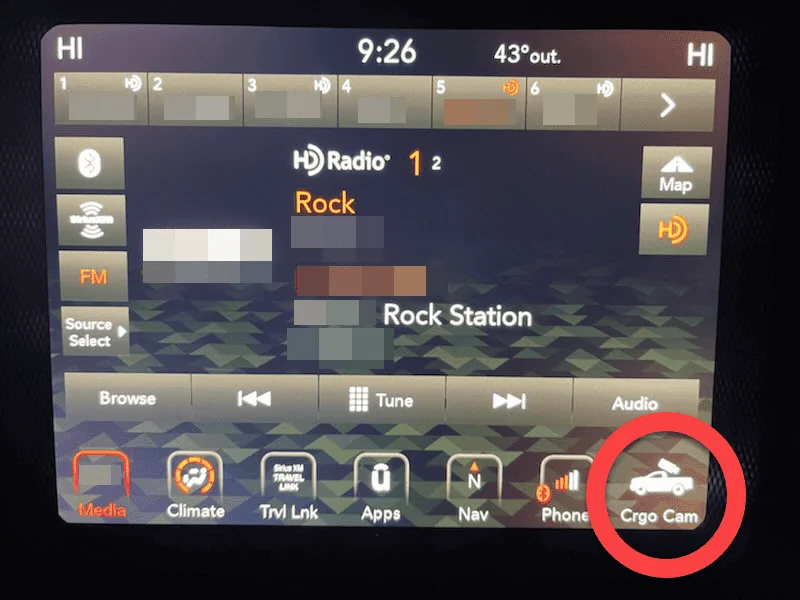
What I ended up doing is assigning the trail cam to one of the uConnect's dedicated button slots. Sure, I'd rather have a clean solution that comes up automatically. But for now, when I want to bring up that front camera view to help with my front parking, it's just a single button press away.

Jeep Wrangler JL Enabling Front Trail Cam at Certain Proximity / Speed? 1651760012512
 
OP
OP
keg392

keg392

Well-Known Member
First Name
Brian
Joined
Jan 3, 2022
Threads
22
Messages
118
Reaction score
131
Location
Dallas, TX
Vehicle(s)
'22 JLUR 392 XR
What I ended up doing is assigning the trail cam to one of the uConnect's dedicated button slots. Sure, I'd rather have a clean solution that comes up automatically. But for now, when I want to bring up that front camera view to help with my front parking, it's just a single button press away.

1651760012512.png
This is actually really smart.

Do you mind sharing what was involved in setting that up / connecting it?
 

jmccorm

Well-Known Member
First Name
Josh
Joined
Sep 15, 2021
Threads
55
Messages
1,170
Reaction score
1,322
Location
Tulsa, OK
Vehicle(s)
2021 JLUR
Build Thread
Link
Occupation
Systems Engineering
Do you mind sharing what was involved in setting that up / connecting it?
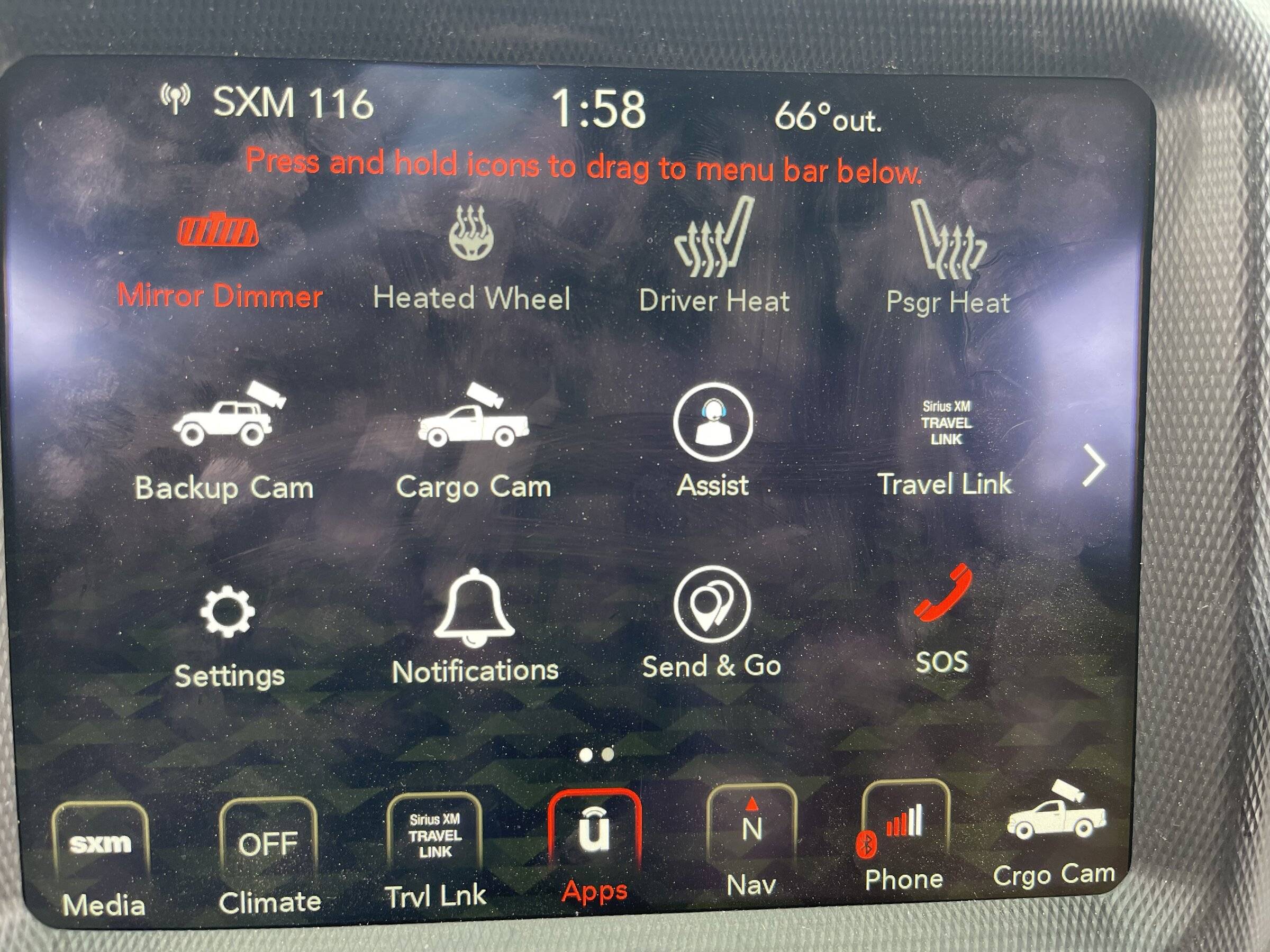
I'm surprised to say that they actually have on-screen instructions!
The only catch is you need to begin by pulling up your uConnect Radio apps screen.

Jeep Wrangler JL Enabling Front Trail Cam at Certain Proximity / Speed? 1652669764894


MOVING A uCONNECT APP INTO THE PERSISTENT MENU BAR:

1.
Go into Apps on your uConnect Radio.
2. Find the application you want to use (Cargo Cam, Backup Cam, Trail Cam, etc)..
3. Put your finger on that app icon and HOLD your finger down on it. DO NOT RELEASE.
4. Wait a second. The icon should start being kind of 'floaty' and able to move around.
5. Keep your finger on the screen and drag the icon down to whichever menu button slot you want it at.
6. Release your finger.

The application that you dragged should be available from that point forward no matter what screen your uConnect (8.4") radio is on.

Hope this helps.
Sponsored


Top