Sponsored

Android Auto Issue with Pixel 2

bmrrwolfe

Well-Known Member
First Name
Rob
Joined
Oct 17, 2018
Threads
6
Messages
55
Reaction score
25
Location
Cleveland
Vehicle(s)
2018 JLU Sahara 2005 Grand Cherokee
Does anyone else run a google phone and have an issue with their Android Auto?
I don't use it often, but last week I tried plugging it in to my Pixel 2, and the icon never showed up on the screen, tried another cable, and still no luck. It does charge the phone, with both ports. Tried forgetting the phone from the vehicle, and the forgetting the vehicle from the phone, and ever deleted and reinstalled the Android Auto App. Seems the issue started around the same time as the last phone update.
Also checked the Uconnect does not have any available updates

Any advice on the next step??

Edit: I have the Uconnect 7"
Sponsored

 

Rhinebeck01

Well-Known Member
Joined
May 9, 2018
Threads
169
Messages
12,679
Reaction score
19,168
Location
Ormond Beach, Florida
Vehicle(s)
'18 JL Rubi, '26 Cybertruck, '01 Harley FatBoy
Occupation
Retired at 55 ..
@bmrrwolfe

I'm not familiar with the Pixel 2's settings but .... do look in phone settings and be sure smart device mirroring / mirroring is turned on. Turn on and then try again.
 

InvertedLogic

Well-Known Member
Joined
Aug 2, 2018
Threads
13
Messages
598
Reaction score
551
Location
Denver, CO
Vehicle(s)
20 JTR
I had some troubles with my S8. First problem was my cable was messed up, so I got a new cable. Then I used some canned air to blow the lint out of the charging port. After that, I "forgot" all of the phone settings in uconnect, and in the android auto app on my phone. Reconnected everything, and it has worked ever since.

Side note, AA does not seem like like cables longer than 3ft.
 

ChrispyJL

Well-Known Member
First Name
chris
Joined
May 24, 2018
Threads
13
Messages
569
Reaction score
1,006
Location
Rockaway, NJ
Vehicle(s)
2018 Punk"N JLU Sport s
Occupation
Building Mechanic
My pixel xl never worked from the day I got my JL with android auto
I recently got a new phone and decided to get a Samsung s9+,(was going to go with google again) I also got a nice braided charging cord for the jeep.

From the moment I pluged the Samsung into my usb android auto has worked.

Maybe try a nice thick braided USB cord

But I really think it is the google phones that are being difficult with android auto.

I tried everything to get my pixel to work with android auto and it never did.
 

ormandj

Well-Known Member
Joined
Aug 19, 2018
Threads
32
Messages
549
Reaction score
399
Location
San Antonio, TX USA
Vehicle(s)
2024 JLUR X 4xe
Pixel 3 has been working well with Anker USB-C cable. I tried my old Pixel 2 and it works fine, as well. I'm running the March update, fwiw.
 

Sponsored

OP
OP
bmrrwolfe

bmrrwolfe

Well-Known Member
First Name
Rob
Joined
Oct 17, 2018
Threads
6
Messages
55
Reaction score
25
Location
Cleveland
Vehicle(s)
2018 JLU Sahara 2005 Grand Cherokee
Thanks for the help. I got another new cable, a nice braided 3FT and no luck. I don't think the Pixel 2 has a specific option for screen mirroring (maybe someone can correct me if I am wrong) i completely deleted the AA app and forgot the bluetooth and phone again, reconnected to the bluetooth no problem, but when plugging in, still nothing, other then starts charging the phone. When in the AA app, under settings, its set to automatically connect to the vehicle, but shows no vehicles available.
 

AnebuR

Well-Known Member
Joined
Jul 18, 2018
Threads
10
Messages
475
Reaction score
340
Location
CT
Vehicle(s)
2018 JL Rubicon + 2014 JK Sport S
Thanks for the help. I got another new cable, a nice braided 3FT and no luck. I don't think the Pixel 2 has a specific option for screen mirroring (maybe someone can correct me if I am wrong) i completely deleted the AA app and forgot the bluetooth and phone again, reconnected to the bluetooth no problem, but when plugging in, still nothing, other then starts charging the phone. When in the AA app, under settings, its set to automatically connect to the vehicle, but shows no vehicles available.
It's not about the cable braiding. It's about having a cable that has enough amperage, since most cheaper ones don't. Look for something with at least 5A. Here's one that works for my Galaxy S9+ https://www.amazon.com/gp/product/B01MDTVRDF
 

InvertedLogic

Well-Known Member
Joined
Aug 2, 2018
Threads
13
Messages
598
Reaction score
551
Location
Denver, CO
Vehicle(s)
20 JTR
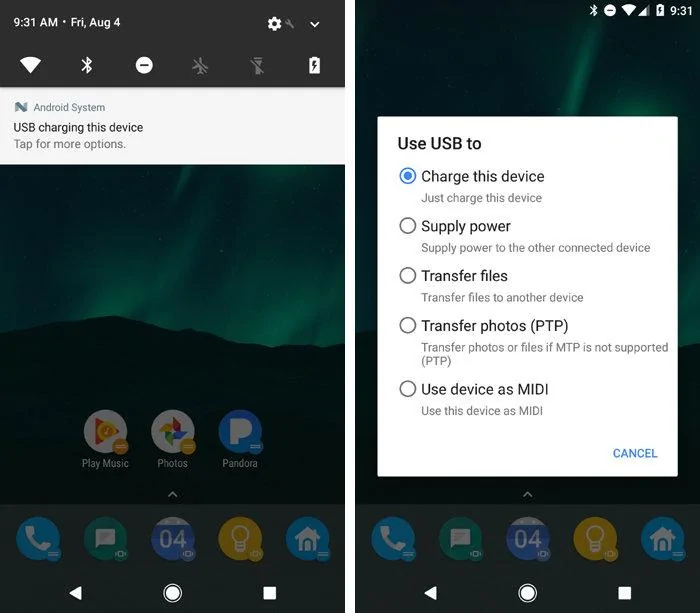
When connected,do you have a notification saying "charging" or something like that? Try tapping it and seeing if other options come up. What you're looking for is "transfer data".
 

Sponsored

OP
OP
bmrrwolfe

bmrrwolfe

Well-Known Member
First Name
Rob
Joined
Oct 17, 2018
Threads
6
Messages
55
Reaction score
25
Location
Cleveland
Vehicle(s)
2018 JLU Sahara 2005 Grand Cherokee
When connected,do you have a notification saying "charging" or something like that? Try tapping it and seeing if other options come up. What you're looking for is "transfer data".
It does start charging when plugged in, but I don't think I get any type of notification. I will check again on my way home from work tonight.

It's not about the cable braiding. It's about having a cable that has enough amperage, since most cheaper ones don't. Look for something with at least 5A. Here's one that works for my Galaxy S9+ https://www.amazon.com/gp/product/B01MDTVRDF
I looked and the last cable that I had (and worked fine for 3 months or so until this issue started) was 2.4A and the new one I got was a 3A, so I don't think its the cable.
 

JeepCares

Well-Known Member
Joined
Feb 1, 2018
Threads
16
Messages
5,423
Reaction score
2,800
Location
Auburn Hills, MI
Vehicle(s)
JL
Thanks for the help. I got another new cable, a nice braided 3FT and no luck. I don't think the Pixel 2 has a specific option for screen mirroring (maybe someone can correct me if I am wrong) i completely deleted the AA app and forgot the bluetooth and phone again, reconnected to the bluetooth no problem, but when plugging in, still nothing, other then starts charging the phone. When in the AA app, under settings, its set to automatically connect to the vehicle, but shows no vehicles available.
Hi bmrrwolfe,

If you're still having concerns with this, feel free to send us a PM and we can check for any information we can locate on our end for you.

Steph
Jeep Social Care Specialist
 
OP
OP
bmrrwolfe

bmrrwolfe

Well-Known Member
First Name
Rob
Joined
Oct 17, 2018
Threads
6
Messages
55
Reaction score
25
Location
Cleveland
Vehicle(s)
2018 JLU Sahara 2005 Grand Cherokee
Hi bmrrwolfe,

If you're still having concerns with this, feel free to send us a PM and we can check for any information we can locate on our end for you.

Steph
Jeep Social Care Specialist
Appreciate it, but appears to be a phone issue, not a Jeep issue!

Update, was able to instantly connect to my buddies Samsung Galaxy, so I can rule out any Uconnect issues, or cable issues. Anyone with a Pixel able to show me their settings?
 

mrhumble1

Well-Known Member
First Name
Jason
Joined
Feb 11, 2019
Threads
14
Messages
283
Reaction score
354
Location
Denver, CO
Vehicle(s)
JL Rubicon, 2-Door, Manual
I have a Pixel 2 XL and a brand new JLR. I've owned the Jeep for a week, and Android Auto has worked perfectly except for one time. I plugged the phone in then turned the Jeep on and my phone freaked out and rebooted. The phone took a while to come back up and then for the next few hours AA would not connect. Plug the phone in, nothing happens. I tried 3 different cables, in all of the USB ports in the Jeep. I let the Jeep sit for an hour and tried again, no luck. I reset the app in the phone, I reset the Uconnect back to default, still nothing. I then turned on the Jeep's wifi and connected the phone to it and then when I plugged the cable in the phone recognized the Jeep and it's been perfect since then.
I don't think there's any real relation to connecting the wifi and AA starting up again. I guess it was just a weird connection glitch. This happened last week and since then the phone has connected to the Jeep every time I plug it in.
Sponsored


Top