Sponsored

Uconnect update error

CT_LFC

Banned
Banned
Banned
Joined
Apr 22, 2019
Threads
27
Messages
938
Reaction score
1,553
Location
SC
Vehicle(s)
Volvo XC90 / JLUR
  • Thread starter
  • Banned
  • #1
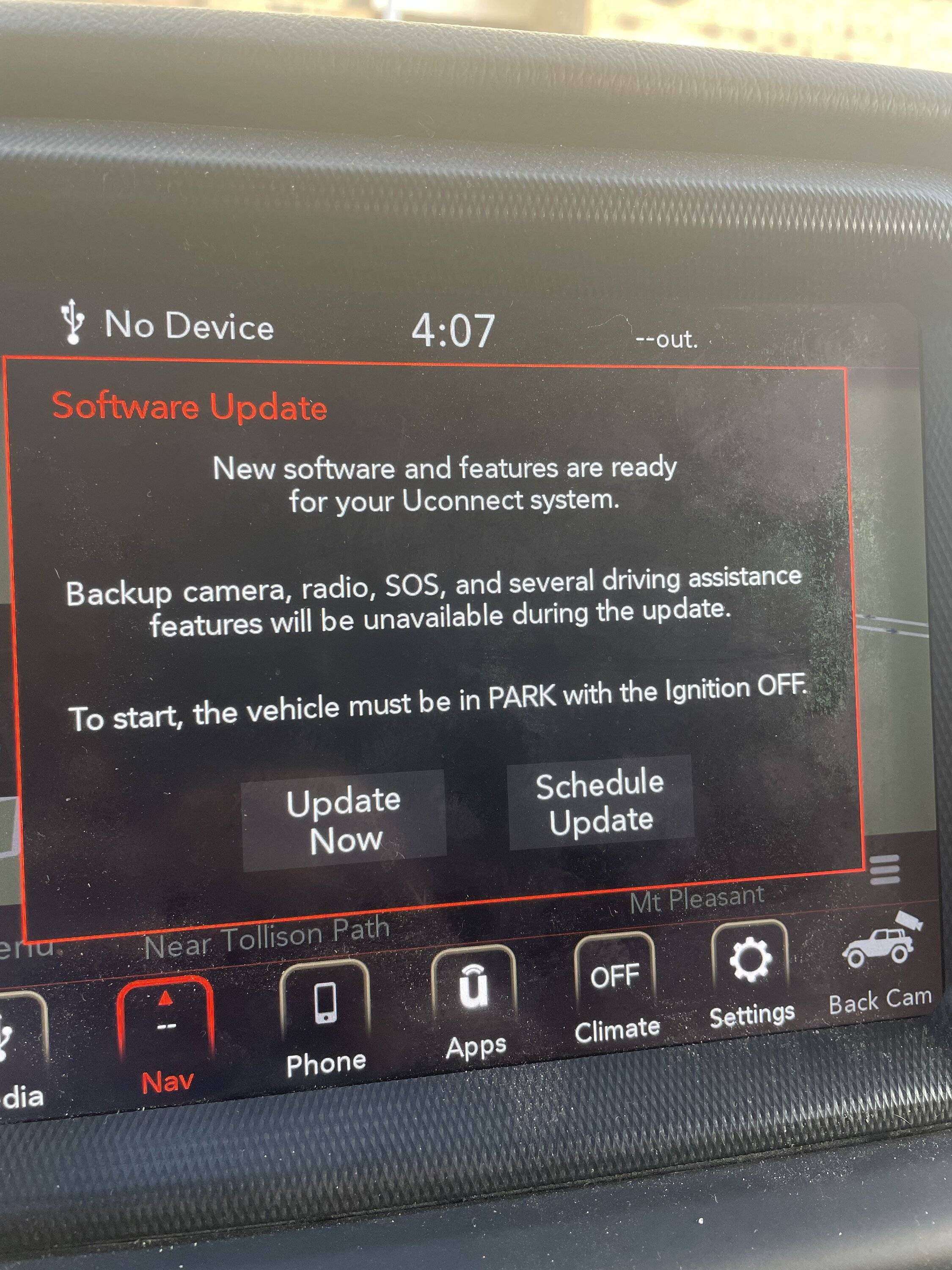
Jeep Wrangler JL Uconnect update error IMG_5333
So a couple of times after turning Jeep off i’ve gotten this software update message and i proceed to press “update now” then it goes away, but next time i start it i get a message that there was a failure and gives me error code 20.

I have had connectivity issues with CarPlay where it’s very finicky to connect and have to plug/unplug multiple times until it works instead of giving me a “device not supported” message, so I believe this update is the likely cause of my issues.

i checked the uconnect website and when i enter my vin it says no update is needed, which is odd given the Jeep itself is asking me to update.

what’s up with this inability to update? Hoping to avoid a visit to the dealer.
Sponsored

 

morph860

Well-Known Member
Joined
Aug 13, 2020
Threads
42
Messages
651
Reaction score
609
Location
NSB, FL
Vehicle(s)
'24 JLURX 4xe, '24 GC 4xe

MacombRoger

Well-Known Member
First Name
Roger
Joined
Jan 29, 2018
Threads
12
Messages
806
Reaction score
1,093
Location
SE Michigan
Vehicle(s)
2018 JLUR Ocean Blue
Occupation
Solution Architect
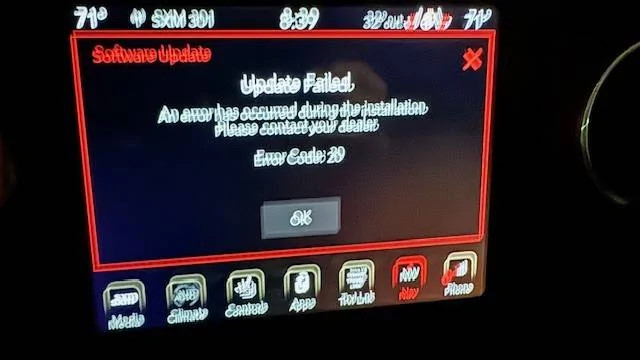
I am getting the same messages. I have done the update a few times, even watched it run, it always gets to the end, rolls back and then I get the same error. I am off warranty and really don't feel like dealing with a dealer. I was hoping to seek the resolution here. :)

Here us error message... wow, a crappy picture, my apologies. :)

Jeep Wrangler JL Uconnect update error error
 

Spank

Well-Known Member
Joined
Mar 29, 2017
Threads
27
Messages
2,690
Reaction score
4,550
Location
Colorado
Vehicle(s)
2018 Jeep Wrangler Unlimited Rubicon, 2020 Dodge Challenger RT Scat Pack
If you're getting an error code 20 and your radio doesn't take a complete dump (in other words, it goes back to the version you were running and ain't bricked), you're probably ahead enough in the update cycle to install 40.1 manually. Go to the thread posted above, download and extract the file to a USB stick, and update it yourself. It should work just fine.

If you have an OG radio from 2018 that's never been updated, it's highly recommended you get previous updates first. There are many links sprinkled throughout the forum to them, but the key is to get yourself to 22.64, then to 28.3 before making huge leaps.

Don't bother with the driveuconnect.com site. It hasn't been updated in years and is worthless.
 

Sponsored

MacombRoger

Well-Known Member
First Name
Roger
Joined
Jan 29, 2018
Threads
12
Messages
806
Reaction score
1,093
Location
SE Michigan
Vehicle(s)
2018 JLUR Ocean Blue
Occupation
Solution Architect
If you're getting an error code 20 and your radio doesn't take a complete dump (in other words, it goes back to the version you were running and ain't bricked), you're probably ahead enough in the update cycle to install 40.1 manually. Go to the thread posted above, download and extract the file to a USB stick, and update it yourself. It should work just fine.

If you have an OG radio from 2018 that's never been updated, it's highly recommended you get previous updates first. There are many links sprinkled throughout the forum to them, but the key is to get yourself to 22.64, then to 28.3 before making huge leaps.

Don't bother with the driveuconnect.com site. It hasn't been updated in years and is worthless.
Thanks. Did just that. I have had a few updates, and got a USB update with the map update a couple years ago too. Put 40.1 on a 8gb usb stick, plugged in to Jeep, saw it was installing. Came back about 15 minutes later, the radio was on, so I am guessing it completed. We'll see today, have to do some running around in the Jeep today.

Thanks for the help and the manual update file, so much easier than OTA (even though that sounds wrong).
 

thadius65

Well-Known Member
First Name
Ted
Joined
Jul 24, 2019
Threads
30
Messages
279
Reaction score
176
Location
Williamsport PA
Vehicle(s)
2020 JLU Rubicon, , 2019 Honda Pilot Elite, 2014 BMW 535i Xdrive
If you're getting an error code 20 and your radio doesn't take a complete dump (in other words, it goes back to the version you were running and ain't bricked), you're probably ahead enough in the update cycle to install 40.1 manually. Go to the thread posted above, download and extract the file to a USB stick, and update it yourself. It should work just fine.

If you have an OG radio from 2018 that's never been updated, it's highly recommended you get previous updates first. There are many links sprinkled throughout the forum to them, but the key is to get yourself to 22.64, then to 28.3 before making huge leaps.

Don't bother with the driveuconnect.com site. It hasn't been updated in years and is worthless.
@Spank - I read over your post and instructions, downloaded the 40.1 files, and put it on a fresh FAT32 USB thumb drive with nothing but the VP4R_Update folder and files within. I left the car at 19% into the update and returned to it, having started all over again, saying an update was needed. I went through the process again, but this time, I stayed and found about 15 minutes in, I got an Error Code 20, and it reverted back to the previous version (34.2) in my 2020 JLUR. Any thoughts on the root cause? Thanks!
 

thadius65

Well-Known Member
First Name
Ted
Joined
Jul 24, 2019
Threads
30
Messages
279
Reaction score
176
Location
Williamsport PA
Vehicle(s)
2020 JLU Rubicon, , 2019 Honda Pilot Elite, 2014 BMW 535i Xdrive
@Spank - Also, I have a Tazer JL if that factors into anything.
 

Spank

Well-Known Member
Joined
Mar 29, 2017
Threads
27
Messages
2,690
Reaction score
4,550
Location
Colorado
Vehicle(s)
2018 Jeep Wrangler Unlimited Rubicon, 2020 Dodge Challenger RT Scat Pack
@Spank - I read over your post and instructions, downloaded the 40.1 files, and put it on a fresh FAT32 USB thumb drive with nothing but the VP4R_Update folder and files within. I left the car at 19% into the update and returned to it, having started all over again, saying an update was needed. I went through the process again, but this time, I stayed and found about 15 minutes in, I got an Error Code 20, and it reverted back to the previous version (34.2) in my 2020 JLUR. Any thoughts on the root cause? Thanks!
Try a different USB stick.
 

Sponsored

OldGuyNewJeep

Well-Known Member
First Name
Don
Joined
Sep 21, 2017
Threads
93
Messages
3,993
Reaction score
7,107
Location
CT
Vehicle(s)
2018 Wrangler JL, 2016 Yukon XL
IMG_5333.jpeg
So a couple of times after turning Jeep off i’ve gotten this software update message and i proceed to press “update now” then it goes away, but next time i start it i get a message that there was a failure and gives me error code 20.

I have had connectivity issues with CarPlay where it’s very finicky to connect and have to plug/unplug multiple times until it works instead of giving me a “device not supported” message, so I believe this update is the likely cause of my issues.

i checked the uconnect website and when i enter my vin it says no update is needed, which is odd given the Jeep itself is asking me to update.

what’s up with this inability to update? Hoping to avoid a visit to the dealer.
Hold driver's side temperature up, temperature down and front defrost buttons simultaneously to enter dealer mode (to see version numbers).

39.6 cured all of the flakiness with my 2018 8.4” UConnect. I went on to apply 40.1 and it didn’t make things go bad, again, so I’m happy.

Note that newer iPhones were having issues with CarPlay until iOS 17.2. If you haven’t already, be sure to update your iPhone in addition to UConnect.
 

thadius65

Well-Known Member
First Name
Ted
Joined
Jul 24, 2019
Threads
30
Messages
279
Reaction score
176
Location
Williamsport PA
Vehicle(s)
2020 JLU Rubicon, , 2019 Honda Pilot Elite, 2014 BMW 535i Xdrive
I just want my Device Not Supported to go away! So annoying.
 

pfletcher229648

Well-Known Member
First Name
Patrick
Joined
Feb 1, 2022
Threads
5
Messages
306
Reaction score
804
Location
Orlando
Vehicle(s)
2022 JLUR XR w/SOT, 2024 JLUR X w/SOT(On Order)
Occupation
CIO
I was getting the "Device Not Supported" frequently for the past several months. The only thing that I know that updated was my iPhone 12 Pro Max to iOS 17.2. The error was happening so frequently that using CarPlay got to the point of not being useable. I decided to buy a new cord USB-A to Lightning port and that seemed to make the error go away. It's been a month now and I haven't had the error come up again. YMMV.
 

Maverick909

Well-Known Member
First Name
Brian
Joined
Jan 15, 2019
Threads
50
Messages
5,227
Reaction score
7,356
Location
I.E.
Website
www.instagram.com
Vehicle(s)
2018 JLU Sporticon, 1976 GMC K15, 67 Notchback Barracuda, Indian FTR
Build Thread
Link
Occupation
Electrician/ Industrial Furnace MFG
Clubs
 
@Spank - I read over your post and instructions, downloaded the 40.1 files, and put it on a fresh FAT32 USB thumb drive with nothing but the VP4R_Update folder and files within. I left the car at 19% into the update and returned to it, having started all over again, saying an update was needed. I went through the process again, but this time, I stayed and found about 15 minutes in, I got an Error Code 20, and it reverted back to the previous version (34.2) in my 2020 JLUR. Any thoughts on the root cause? Thanks!
try running a battery tender on main battery before updating. if the battery drops low it will cancel the update and revert back. seen this with many of the newer cars info centers
Sponsored


Top