Sponsored

Gaia

dragoneggs

Well-Known Member
First Name
Mark
Joined
Dec 14, 2021
Threads
73
Messages
9,277
Reaction score
40,498
Location
Seabeck, WA
Vehicle(s)
'22 Snazzberry Pearl JLR
Build Thread
Link
Clubs
 
Yeah - me too. About a year ago I could go through some sequence of starting either the phone app or the carplay app on the Jeep first and the enhanced resolution would magically appear after perhaps a few tries - recently in the past few weeks I tried the same and many other things and got nothing but a rather useless and very low detail base map.
Hmmm… might have to play with that.
Sponsored

 
OP
OP

Dg1615

Well-Known Member
First Name
Doug
Joined
Apr 28, 2022
Threads
14
Messages
117
Reaction score
63
Location
Louisville
Vehicle(s)
2022 willys
‘22 JLR here. 8.4 Uconnect. I can run Gaia on my OEM screen however I don‘t. I will get to that in a minute.

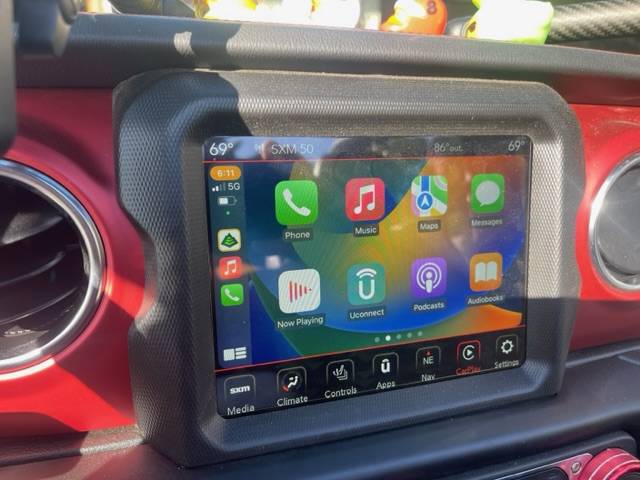
First, do you have a ‘carplay’ button along the bottom of your screen?

IMG_4633.jpeg


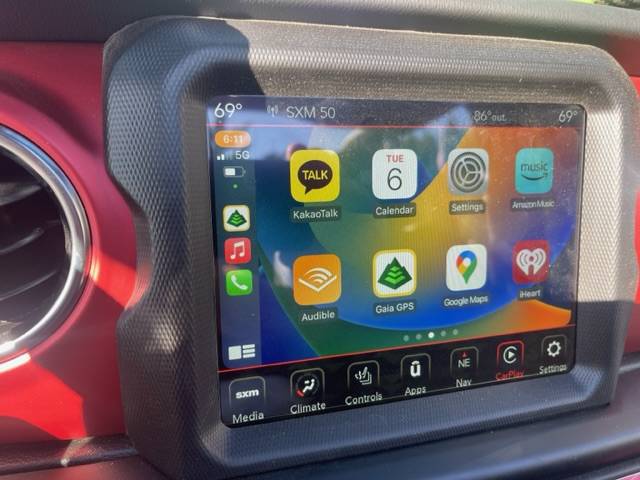
If not, you got to get there. I don’t remember if that was automatic or required a set up but you should be able to hit the CarPlay button and all of your apps that are supported will show up. Scroll until you see “Gaia”.

IMG_4634.jpeg


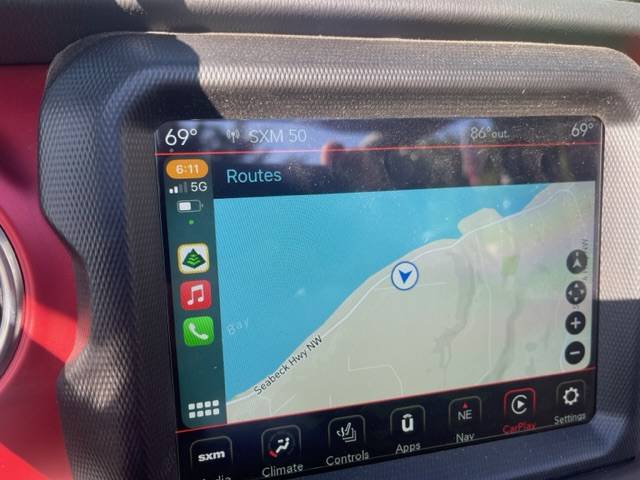
Touch the Gaia GPS icon and this should appear…

IMG_4635.jpeg


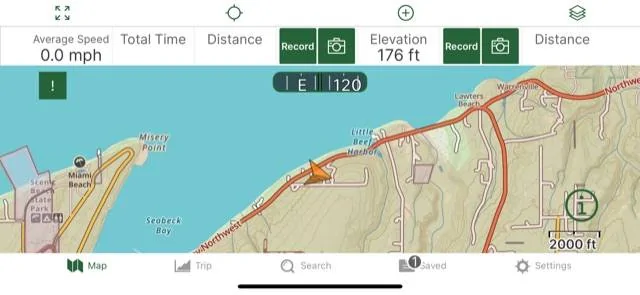
Now for the reason I don’t use Gaia on my OEM screen… I only see a rudimentary map. Not all the layers I see on my iPhone or iPad.

IMG_4637.jpg


This happens to be in landscape but I prefer portrait. Let me how else I can help!
I do have the CarPlay button and then it brings up the Gaia icon. Is your third pic your CURRENT location? As in, can you see your saved maps without actually being there? Also CarPlay says it only shows drivable roads. Soooo, black bear pass is a forest road so that a driveable road. Lol. I have questions ?
 

Maverick909

Well-Known Member
First Name
Brian
Joined
Jan 15, 2019
Threads
50
Messages
5,231
Reaction score
7,357
Location
I.E.
Website
www.instagram.com
Vehicle(s)
2018 JLU Sporticon, 1976 GMC K15, 67 Notchback Barracuda, Indian FTR
Build Thread
Link
Occupation
Electrician/ Industrial Furnace MFG
Clubs
 
Its plug in and go for me. But I don’t open it in my phone. I open it on my touch screen once my phone is plugged in
 
OP
OP

Dg1615

Well-Known Member
First Name
Doug
Joined
Apr 28, 2022
Threads
14
Messages
117
Reaction score
63
Location
Louisville
Vehicle(s)
2022 willys
Its plug in and go for me. But I don’t open it in my phone. I open it on my touch screen once my phone is plugged in
Yea I tried different sequences, deleted the app, reinstalled, restarted my phone, Jeep off, Jeep on, Jeep on acc. I’m not the brightest bulb but I feel like I’ve covered everything
 

dragoneggs

Well-Known Member
First Name
Mark
Joined
Dec 14, 2021
Threads
73
Messages
9,277
Reaction score
40,498
Location
Seabeck, WA
Vehicle(s)
'22 Snazzberry Pearl JLR
Build Thread
Link
Clubs
 
I do have the CarPlay button and then it brings up the Gaia icon. Is your third pic your CURRENT location? As in, can you see your saved maps without actually being there? Also CarPlay says it only shows drivable roads. Soooo, black bear pass is a forest road so that a driveable road. Lol. I have questions ?
Yes, third pic is my current location. I haven’t figured out if I can get more info than shown. Fourth pic is same current location. Notice the topo lines, private roads, and region boundaries.

Good question on saved maps… need to play with it but I don’t think you have the ability to play with Gaia on the OEM screen.
 

Sponsored

dragoneggs

Well-Known Member
First Name
Mark
Joined
Dec 14, 2021
Threads
73
Messages
9,277
Reaction score
40,498
Location
Seabeck, WA
Vehicle(s)
'22 Snazzberry Pearl JLR
Build Thread
Link
Clubs
 
Okay going back out to the Jeep with a glass of wine and see if there is more I can do on the OEM screen… hang on.
 
OP
OP

Dg1615

Well-Known Member
First Name
Doug
Joined
Apr 28, 2022
Threads
14
Messages
117
Reaction score
63
Location
Louisville
Vehicle(s)
2022 willys
Yes, third pic is my current location. I haven’t figured out if I can get more info than shown. Fourth pic is same current location. Notice the topo lines, private roads, and region boundaries.

Good question on saved maps… need to play with it but I don’t think you have the ability to play with Gaia on the OEM screen.
Yea we just have the 4 functions on the lower right on CarPlay. I believe everything else is generated from your phone
 
OP
OP

Dg1615

Well-Known Member
First Name
Doug
Joined
Apr 28, 2022
Threads
14
Messages
117
Reaction score
63
Location
Louisville
Vehicle(s)
2022 willys
Yea we just have the 4 functions on the lower right on CarPlay. I believe everything else is generated from your phone
I guess if you tap the screen then route comes up
 

dragoneggs

Well-Known Member
First Name
Mark
Joined
Dec 14, 2021
Threads
73
Messages
9,277
Reaction score
40,498
Location
Seabeck, WA
Vehicle(s)
'22 Snazzberry Pearl JLR
Build Thread
Link
Clubs
 
Yep I confirmed, at least to myself that there is no reason to project the Gaia Maps onto your OEM screen. No way to engage in and view all the features the app provides.

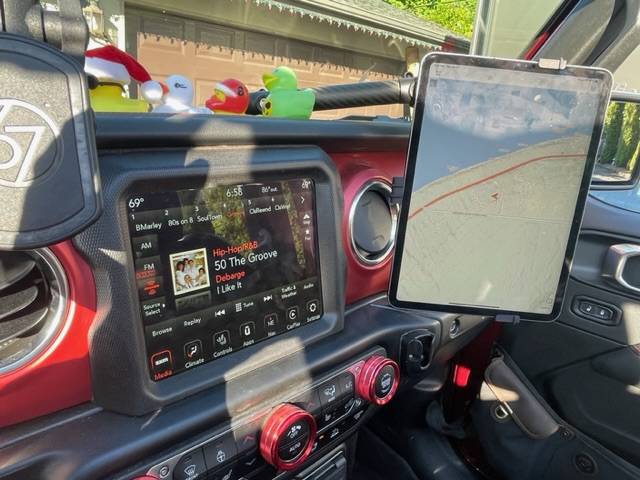
Might as well use/view it on your phone or go extreme like I did… a bit in your face I will admit (but already had the iPad and I use it for work). I think the ideal set up would be the iPad Mini but I’m not prepared to shell out for another device just for Gaia.

Jeep Wrangler JL Gaia IMG_4640
 
OP
OP

Dg1615

Well-Known Member
First Name
Doug
Joined
Apr 28, 2022
Threads
14
Messages
117
Reaction score
63
Location
Louisville
Vehicle(s)
2022 willys
Yep I confirmed, at least to myself that there is no reason to project the Gaia Maps onto your OEM screen. No way to engage in and view all the features the app provides.

Might as well use/view it on your phone or go extreme like I did… a bit in your face I will admit (but already had the iPad and I use it for work). I think the ideal set up would be the iPad Mini but I’m not prepared to shell out for another device just for Gaia.

IMG_4640.jpeg
. Ugh! That’s what I thought.
 

Sponsored

Maverick909

Well-Known Member
First Name
Brian
Joined
Jan 15, 2019
Threads
50
Messages
5,231
Reaction score
7,357
Location
I.E.
Website
www.instagram.com
Vehicle(s)
2018 JLU Sporticon, 1976 GMC K15, 67 Notchback Barracuda, Indian FTR
Build Thread
Link
Occupation
Electrician/ Industrial Furnace MFG
Clubs
 
Yea I tried different sequences, deleted the app, reinstalled, restarted my phone, Jeep off, Jeep on, Jeep on acc. I’m not the brightest bulb but I feel like I’ve covered everything
Sounds like you have it covered. Kinda weird. I do get glitches where the Jeep CarPlay doesn’t show my premarked trails from time to time but it’s all good. I tend my to just leave it on my phone and deal with it.. currently my cord is failing to connect my phone this week. Time to get a new one
 

dstevens

Well-Known Member
Joined
Apr 13, 2023
Threads
8
Messages
946
Reaction score
1,601
Location
CA
Vehicle(s)
2024 JLURX
Running the GaiaGPS app via carplay on a 2024 JL with 12" screen. Using iPhone with iso 16.6

Most of the time the Gaia on the dash will show a plain map (looks like google).

The magic sequence for me to get Gaia to show a topo map on the dash was to have Gaia running on the phone before the vehicle was switched on.

If Gaia was not running on the phone when the Jeep was switched on then there was nothing I can do to get the topo map to show - disconnecting and reconnecting the phone, switching bluetooth off/on, killing and restarting Gaia on the phone, selecting Gaia again from CarPlay etc makes no difference. The only thing that will work is to switch off the ignition and back on.
Sponsored


Top