Sponsored

Bonding (Aggregate Data) Uconnect with Data providers

OP
OP

YBABRAT

Well-Known Member
Joined
May 12, 2024
Threads
55
Messages
1,409
Reaction score
1,355
Location
VIRGINIA
Vehicle(s)
2019 2 Door Rubicon X Wannabe
Occupation
None... but it pays well.
Does that imply that some portion of your Jeep is on 24/7 to do that proxying?
As for the Uconnect power, I have yet to dive into it. Waiting for warmer weather mostly.

My plan is to find the aux power... either yellow or red wire, and remove the pin from the harness connector for swapping in a pin in its place for bypassing jeep power on / off with a remote switch. There was a nifty wireless remote car 12v power switch I saw but had no intention to use one, until now. I'll add a power cable to use a portable power source to enable the uconnect boot from sleep. It should activate hotspot. I dont watch a lot of tv so I doubt much power drainage will happen on a weekend if using jeep hotspot.

That mod will be an addition to this thread once I complete the mod.
Sponsored
 
OP
OP

YBABRAT

Well-Known Member
Joined
May 12, 2024
Threads
55
Messages
1,409
Reaction score
1,355
Location
VIRGINIA
Vehicle(s)
2019 2 Door Rubicon X Wannabe
Occupation
None... but it pays well.
An update... finally got my Jeep's original owner removed from Uconnect and AT&T services. Took 3 different customer channels as Sirus, AT&T and Guardian are all separate in the Uconnect system. Everything checks fine and is operational.

As for the easy peasy $10 RE6300 setup for an auto connection to the Uconnect hotspot... though it is a hidden feature. Just setup the RE6300 as a wireless extender. Select your hotspot AP and add your password. Name the RE6300 AP what you like and its password. The latter will not be used for lan to wan connection, but is required to complete the setup. Once setup just plug in the lan connection to the wan port on the router.

I tested the signal of the RE6300 against the T-Mobile Internet gateway and found it to be near equal on signal gain and actually better at configuration. Being just shy 1gbps on Wifi it has a good assortment of features that the bulky internet gateway doesn't have. I will be disabling the T-Mobile internet gateway AP completly, in just making it a modem so to speak to my router through the WAN port.

I obtained another ER6300 for modding into the jeep to boost the wifi hotspot if parking a little further from where I park in front of house.
 
OP
OP

YBABRAT

Well-Known Member
Joined
May 12, 2024
Threads
55
Messages
1,409
Reaction score
1,355
Location
VIRGINIA
Vehicle(s)
2019 2 Door Rubicon X Wannabe
Occupation
None... but it pays well.
Ok, here is a quick reference to setup a RE6300/RE6400 WiFi Range Extender as an automatic hotspot connection to your Jeep hotspot or phone hotspot for WAN input to your ER605 or milti WAN router.

NOTE: NOT ALL MULTI MODE AP/ RANGE EXTENDERS ARE MADE THE SAME. DON'T EXPECT THEIR LAN PORT TO FUNCTION WHEN WIRELESS RANGE BOOSTER FUNCTION IS IN OPERATION. THERE ARE A LOT OF CHINESE MADE SIGNAL BOOSTERS THAT DO NOT HAVE SHARED DATA STREAMS WITHIN THE INTERNAL HUB. NO WHERE IN THE RE6300 INSTRUCTIONS EXPLAINS THIS FUNCTION. SO THIS $10 ITEM HAS MORE TO IT THAN ITS PRICE.

Please wait a few minutes after plugging the extender to wall outlet or an extension cable. Once setup a reboot from the web interface will seem quicker for its operation than when plugging in.

As stated in quick setup instructions attach to the extender through WiFi or direct connect through laptop LAN connection. I used my cellphone and a Realtek LAN dongle.

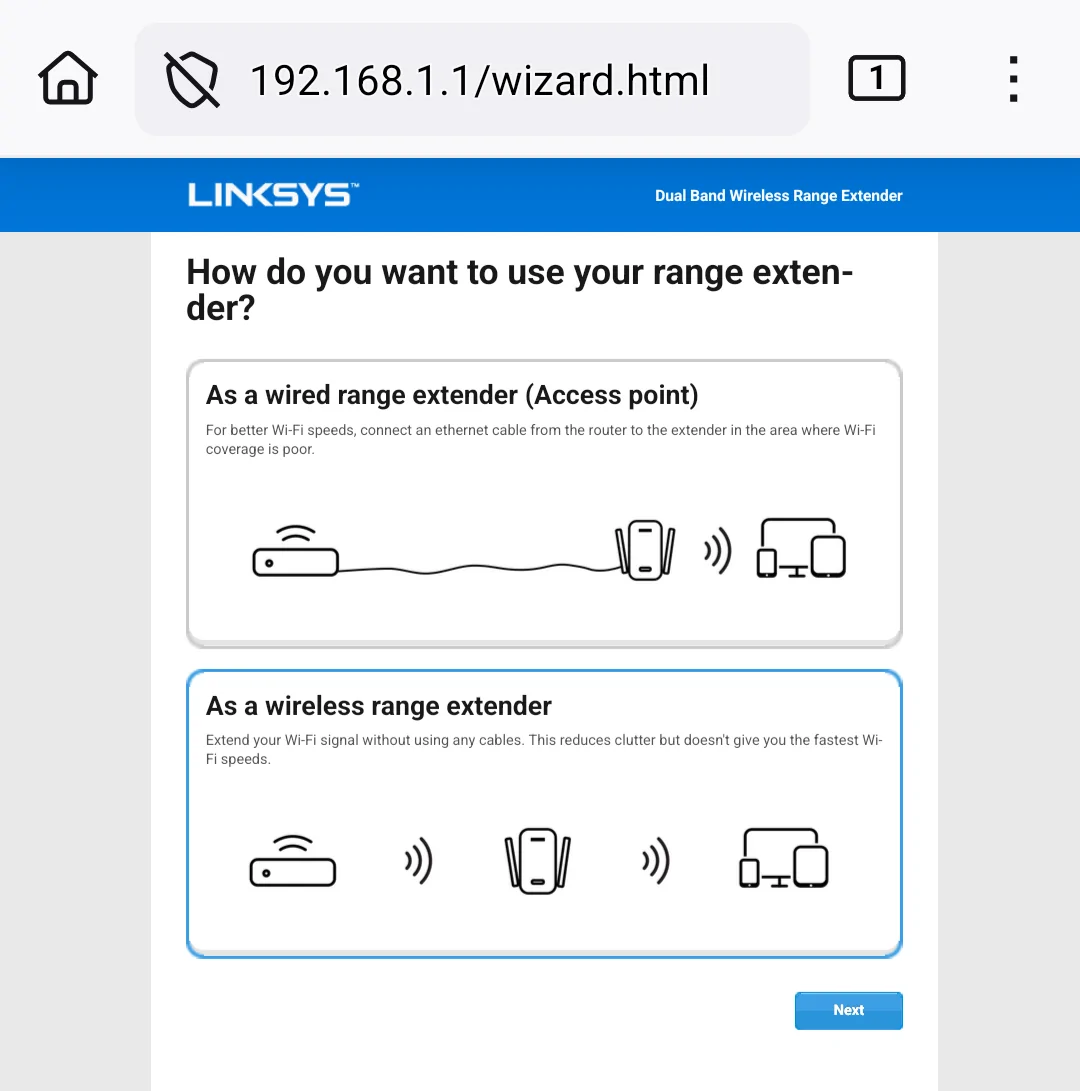
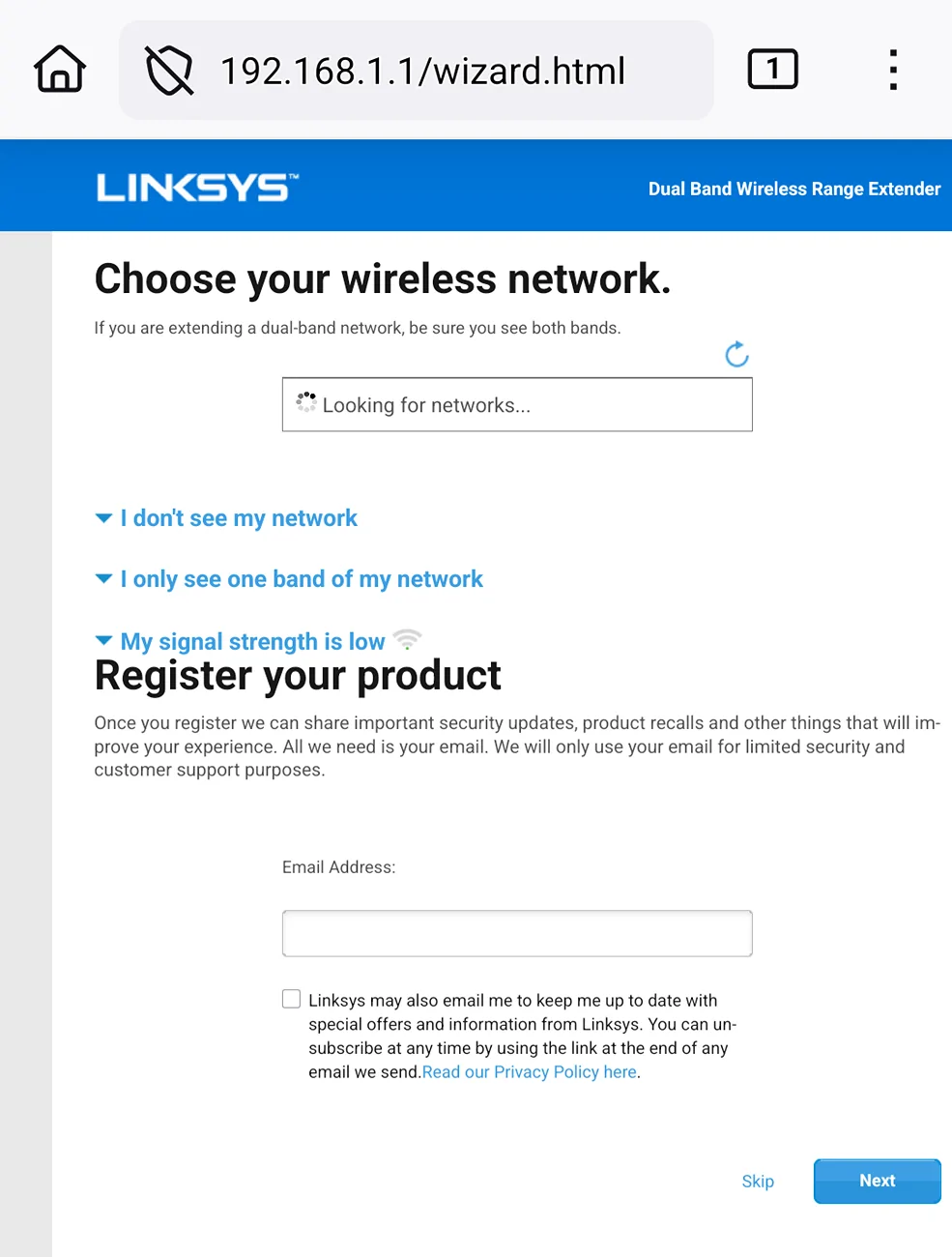
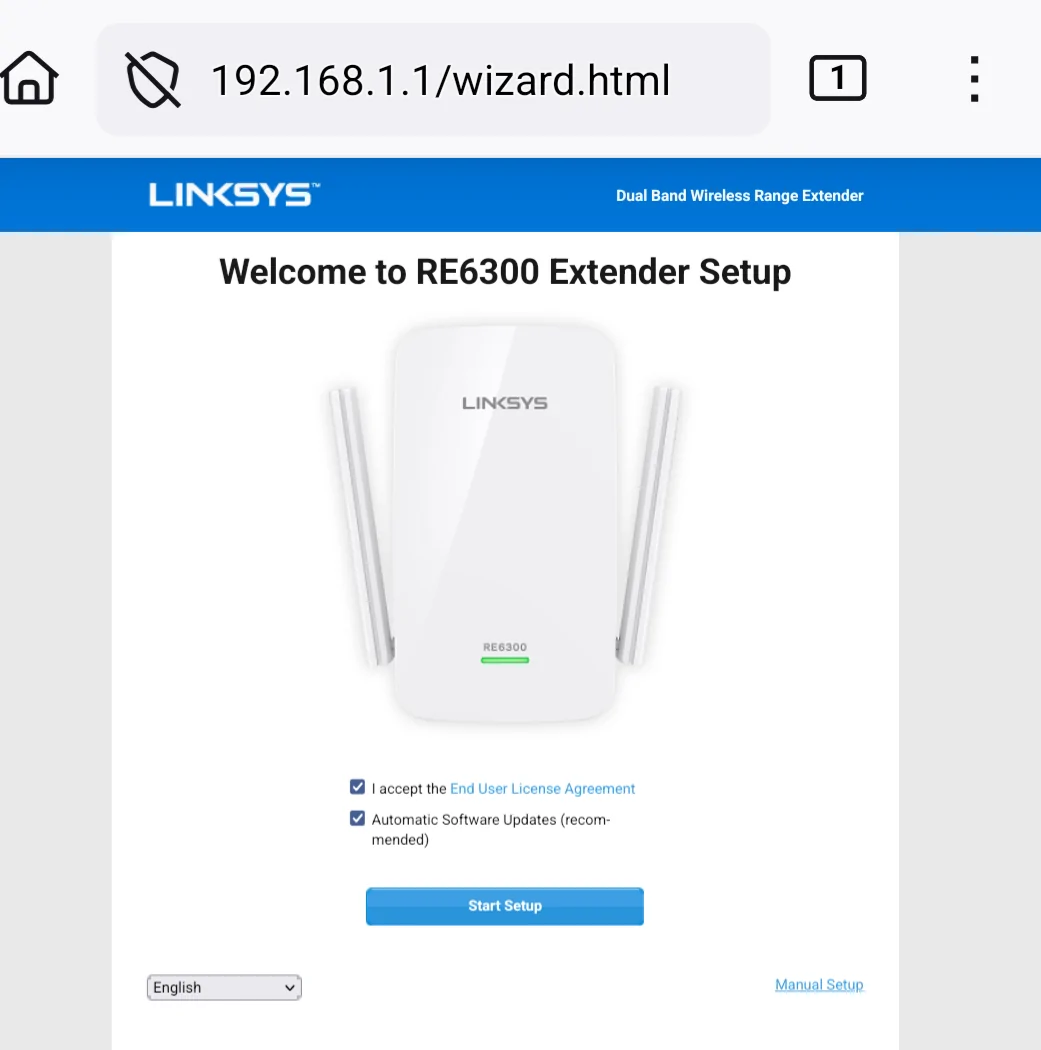
Once you enter 192.168.1.1 in a web browser you will see this quick setup interface.

Jeep Wrangler JL Bonding  (Aggregate Data) Uconnect with Data providers 1000047198


Continue after selecting the appropriate boxes.
You will have access to select how the device will be used.

Jeep Wrangler JL Bonding  (Aggregate Data) Uconnect with Data providers 1000047199


Even though you will be using this device to use its LAN connection to your ER605 WAN port, the wireless range extender option will have the LAN port stay active. Its undocumented and will function very well for auromatic connections to the hotspot you set it to for connection.

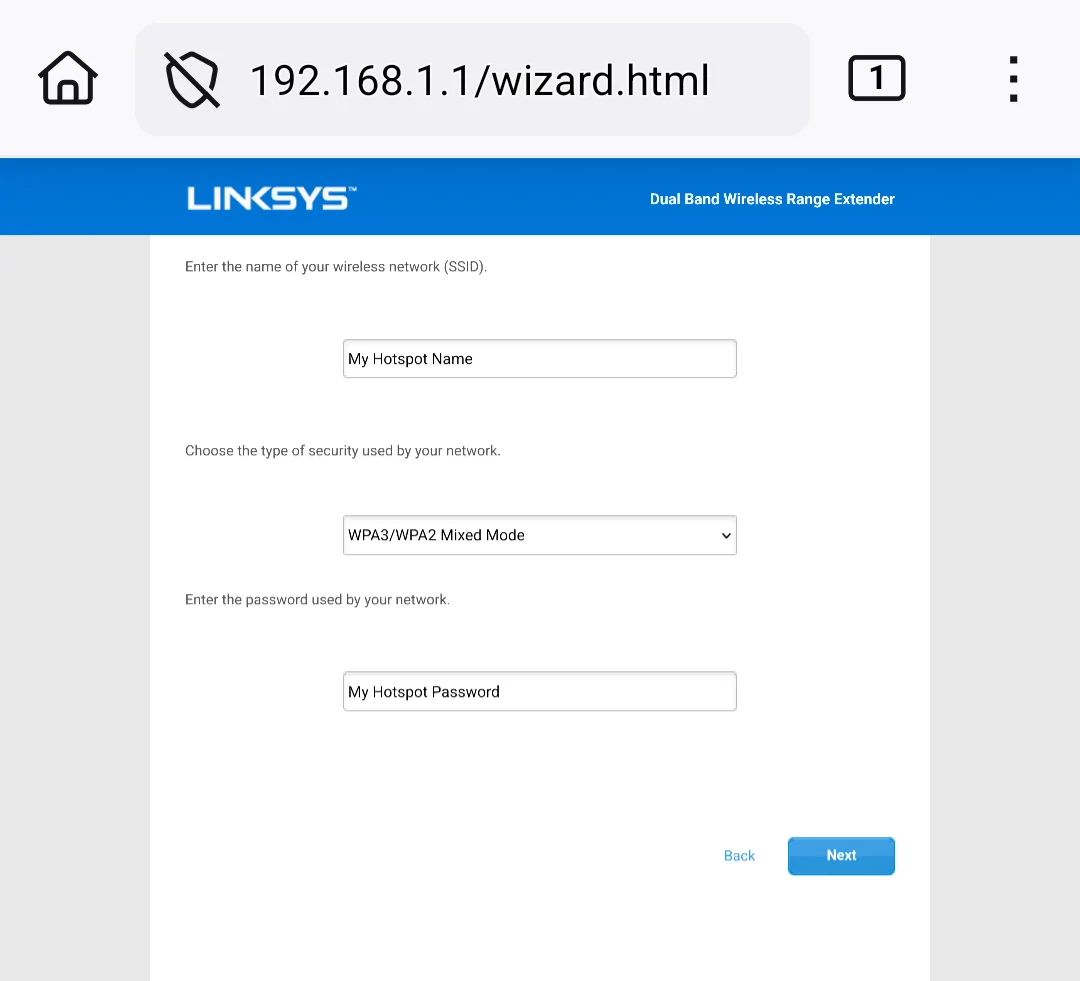
After selecting next you will be given a new page for the 5Ghz setup that will show available APN names to connect to. Some will have either 5Ghz, 2.4Ghz, or both. Make sure the hotspot is active and its name is shown. Select the name of the hotspot and continue.

You will be given login setup to the hotspot.

Jeep Wrangler JL Bonding  (Aggregate Data) Uconnect with Data providers 1000047201


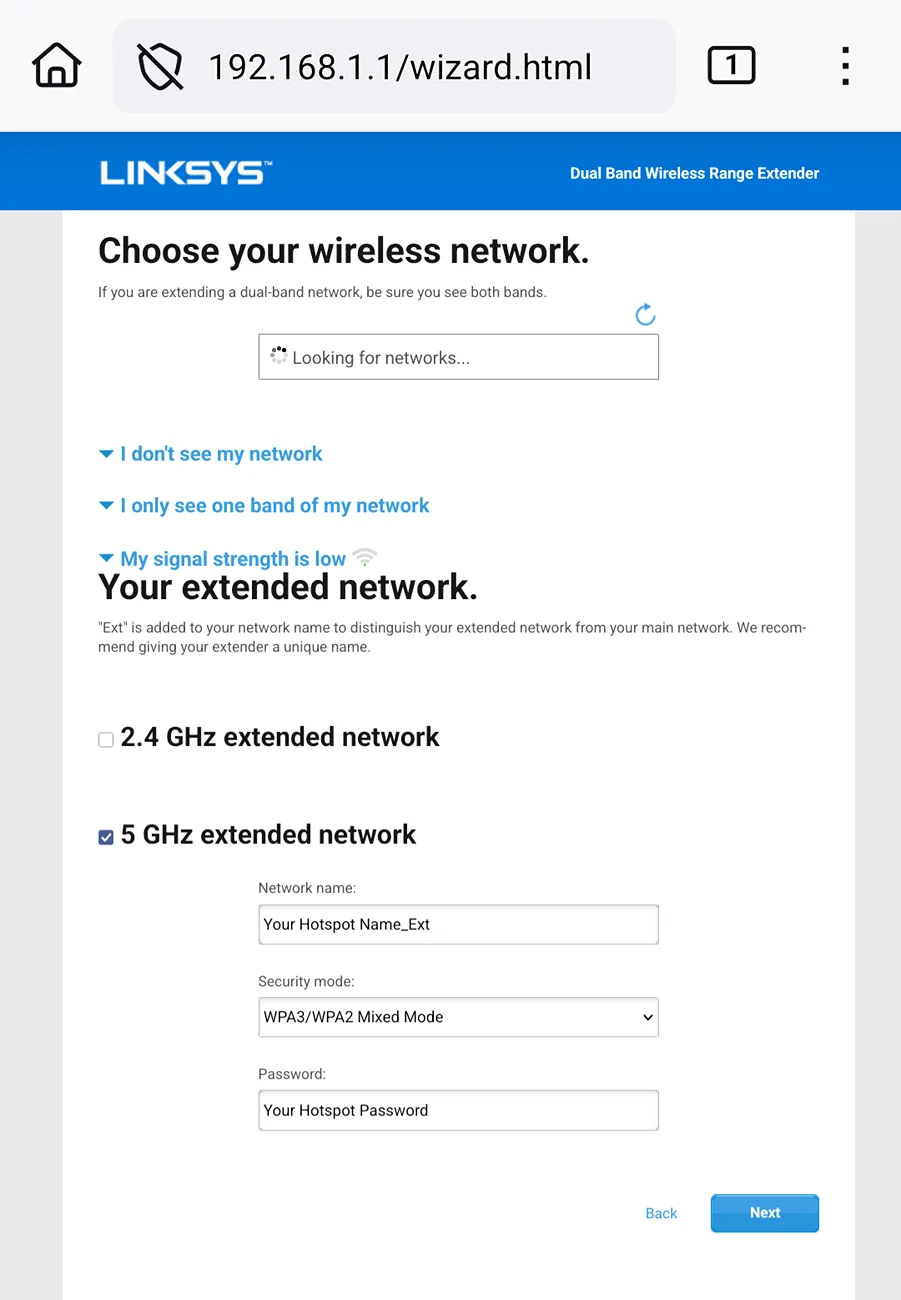
The next page is for 2.4Ghz setup. If you need older devices to connect to your 5Ghz hotspot you can make a gateway between 2.4Ghz to the 5Ghz hotspot. If not required you can select 2nd connection not needed, else continue setting up the 2.4Ghz connection.

Once the setup for connections is done you will have the option to name your extender and give it a password. It must be completed and not skipped.

Jeep Wrangler JL Bonding  (Aggregate Data) Uconnect with Data providers 1000047205


I never tried setting up disabing both connections, in fear that the repeater section will fail setting up. Also it gives a wireless means to manage the device wirelessly.

Since the device is going to be connecting to a hotspot and rarely having any wireless connections to its APN, setting to hide the network name in the administration page will keep its APN from being seen by casual scans by nearby devices.

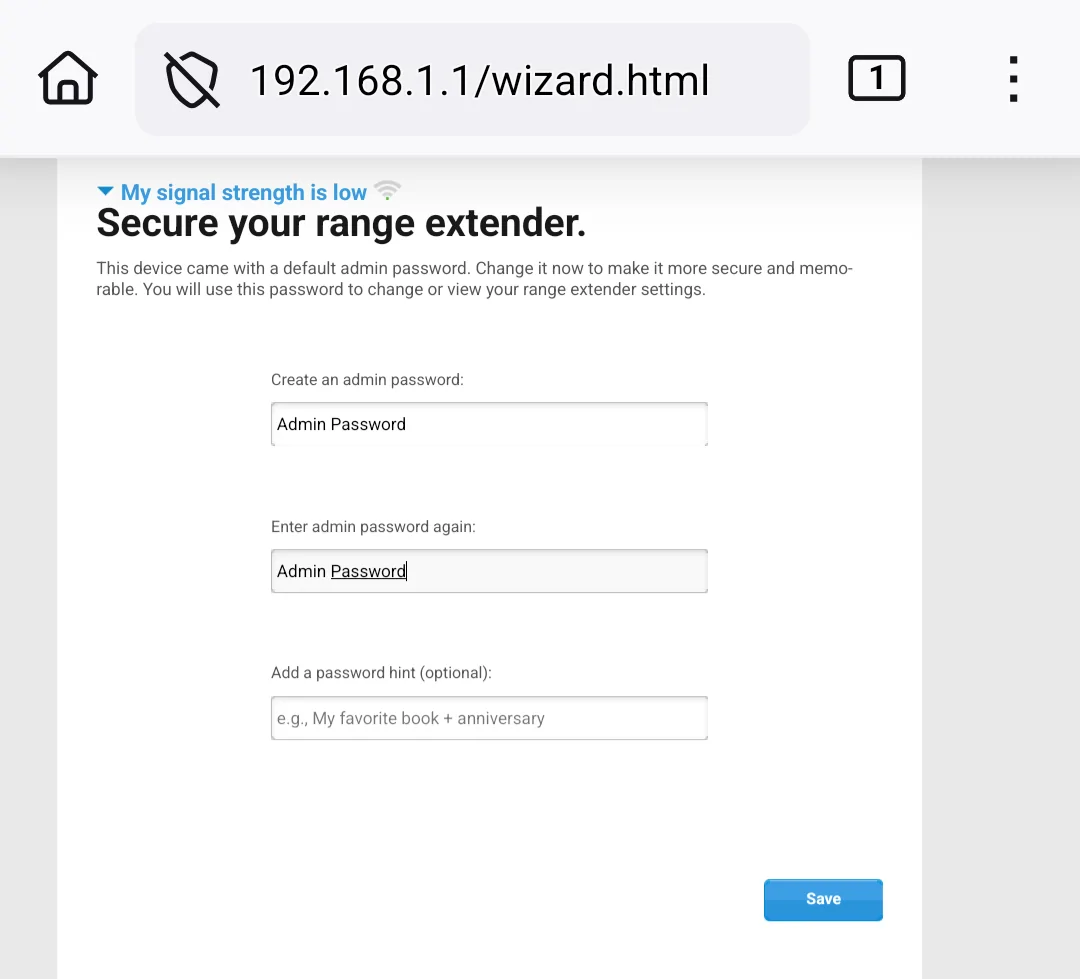
The final page is securing the Administration page for access after completing the quick setup.

Jeep Wrangler JL Bonding  (Aggregate Data) Uconnect with Data providers 1000047206


You can use the default APN the setup gives you or create one. Once you setup APN and password and save.

Optionally you can register the device. If you feel its necessary. Selecting the skip link bypasses personal data intrusion and shows a reference page to print for safe keeping.

Jeep Wrangler JL Bonding  (Aggregate Data) Uconnect with Data providers 1000047207


Beyond the quick setup, there is a management page. It is not as simple as the quick setup. More like a $150 router than a $10 signal booster. Yet is trimmed down in not having VPN options. Depending on how it is setup and your needs, its options are nice to have.

I tried the wired AP setup and was happy to find I can channel bond and set bandwidth while selecting a channel. In booster mode that part is automatic. It will channel bond to its connection. Unlike a router, you cannot adjust power output, its set to high.

Another odd bonus is its ability to show perect placement status in the administration page. I ended up buying a few more for failure backup and implementing to the Jeep Uconnect's weak output.

I took apart one to find it operates within a 12v to 13v range. The A/C power supply being simple is a switching dc converter with some fail safe features, which are not so common for small devices. Since it is low power, plugging into the Rubicon's limited A/C outlet won't be a problem or in my case disassemble and wire it directly to a dc to dc inverter to allow D/C socket or USB power to connect to the main board, free from A/C power.
 
Last edited:
OP
OP

YBABRAT

Well-Known Member
Joined
May 12, 2024
Threads
55
Messages
1,409
Reaction score
1,355
Location
VIRGINIA
Vehicle(s)
2019 2 Door Rubicon X Wannabe
Occupation
None... but it pays well.
For 3 weeks now Verizon data sucks. I Got myself a T-Mobile TCL Linkport IK511 for portable data, that is USB C connected. It was $30 from a wholesale suppier. I can add it to my ER605 router as a 4th WAN. But mostly plug it in to phone as a reliable data option. no worries about hotspot limitations, as it is a direct DATA connection to any device.

Probably will setup an $8.00 /month unlimited talk / text plan for the phone and deal with the three WAN links at home.

Cant wait for winter to end... got so many things I want to complete with my jeep.
 

fatatris

Member
First Name
Jake
Joined
Mar 27, 2023
Threads
0
Messages
18
Reaction score
3
Location
Austin
Vehicle(s)
JKU
On the JL Wrangler Forums, users are discussing the idea of bonding and aggregating data connections with Uconnect to improve speed and reliability by combining multiple carriers like AT&T, Verizon, and T-Mobile. Many explain that while true data bonding can be difficult to achieve without specialized services, using load balancing with multi-WAN routers or hotspots can still provide a more stable connection, especially in areas with weak or inconsistent signals. The conversation also touches on how people use these setups for streaming and staying connected on the road, which can sometimes make device control more complicated. In that context, some users mention tools like https://apps.apple.com/us/app/remote-control-smart-tv/id6758938639, which turns a phone into a smart TV remote. While it’s not directly related to networking, it helps simplify controlling media and navigating smart TV interfaces when dealing with more complex connectivity setups.
Sponsored

 
Last edited:


Top