Sponsored

Battery drain from taillights?

David Y.

Member
First Name
David
Joined
Jun 27, 2024
Threads
1
Messages
6
Reaction score
6
Location
Birmingham, AL
Vehicle(s)
2021 Wrangler JLU Rubicon
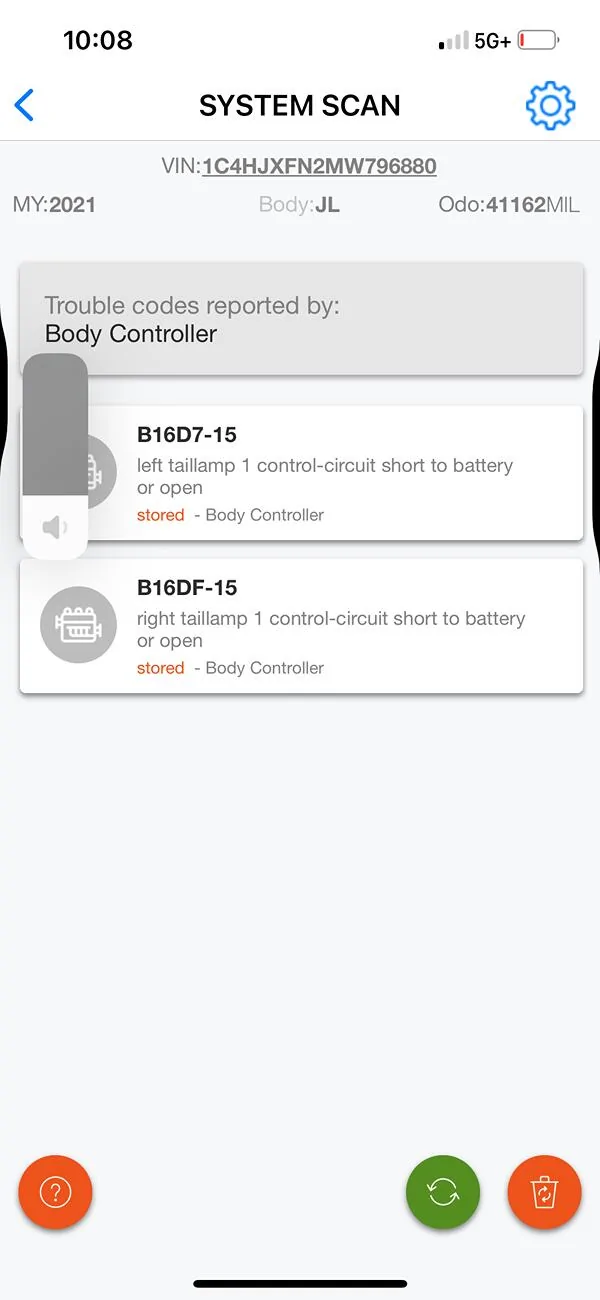
I’m hoping someone has had a similar issue and can offer some advice on this. My ’21 JLUR came with halogen lights but I replaced all of them with LEDs, and after that, I started having battery drain issues and have been through more batteries than I normally would at 43k miles.
The only diagnostic code that I keep getting is a “control-circuit short to battery or open” from both taillights. I have had 2 different sets of LED taillights and have gotten the same codes from both sets. To further confirm that the taillights are the issue, I swapped them out for a set of OEM halogens and the codes went away. I put the LEDs back in and the codes reappear.
Both sets of LEDs I’ve had are Oracle and were advertised as plug and play with no reprogramming required. Just for kicks, I tried changing the setting to LED in JScan, even though it shouldn’t be required, but the same diagnostic codes appear.
ANY help or advice is appreciated!
Jeep Wrangler JL Battery drain from taillights? IMG_4984
Sponsored


Terrymo

Well-Known Member
First Name
Terry
Joined
Jun 17, 2022
Threads
48
Messages
10,678
Reaction score
32,985
Location
SoCal
Vehicle(s)
2023 JLURXR 3.6 ET
Clubs
 
I’ve found customer service for @ORACLE Terry to be very responsive and helpful. what were their thoughts on thi?
 
OP
OP
David Y.

David Y.

Member
First Name
David
Joined
Jun 27, 2024
Threads
1
Messages
6
Reaction score
6
Location
Birmingham, AL
Vehicle(s)
2021 Wrangler JLU Rubicon
I’ve found customer service for @ORACLE Terry to be very responsive and helpful. what were their thoughts on thi?
This was the response i got, which wasn’t very helpful given the fact I’m not getting a signal out error and both sets of lights I’ve had are supposed to work without any JSCAN modifications. They did follow up and offer to replace them, which I will do, and then see if I get the same errors:
Based on what you've shared, it seems that the error could stem from the integration of aftermarket LED taillights with your Jeep's original halogen configuration. Since the error does not occur with OEM halogen lights, it might be related to the compatibility between your vehicle's system and the aftermarket LEDs.
Please consider the following troubleshooting steps:
  1. Signal Out Error: For vehicles produced before June 2022, a programmer like Tazer or JSCAN might be necessary to resolve signal out errors. These tools can adjust the system settings to accommodate aftermarket lights.
  2. Using FLUSH-TSE: If a programmer isn't available, inquire with customer service about an adapter like FLUSH-TSE, which can help address the issue.
  3. Wiring Check: Ensure that the wiring connections match the proper sequence for vehicles using aftermarket lights, as seen in installation videos or provided guides.
Given the situation, I recommend consulting a specialist to verify compatibility and investigate if the taillights can be reconfigured for your vehicle's system using the above suggestions.
I will forward your case to our technical team for further insights, and they'll do their best to assist you.
Thank you for your patience and understanding.
 

Sponsored

Terrymo

Well-Known Member
First Name
Terry
Joined
Jun 17, 2022
Threads
48
Messages
10,678
Reaction score
32,985
Location
SoCal
Vehicle(s)
2023 JLURXR 3.6 ET
Clubs
 
Yes, both sets I've had came with the resistors.
Bummer. Sounds like you’ve gone through all the steps. I installed the Oracle flush mounts and despite having factory leds I got a bulb out message. I tried several things and finally just told JSCAN to ignore it. Fingers crossed you have better luck with the replacement set. Hopefully someone smarter than me on the forum can help.
 
OP
OP
David Y.

David Y.

Member
First Name
David
Joined
Jun 27, 2024
Threads
1
Messages
6
Reaction score
6
Location
Birmingham, AL
Vehicle(s)
2021 Wrangler JLU Rubicon
Bummer. Sounds like you’ve gone through all the steps. I installed the Oracle flush mounts and despite having factory leds I got a bulb out message. I tried several things and finally just told JSCAN to ignore it. Fingers crossed you have better luck with the replacement set. Hopefully someone smarter than me on the forum can help.
Thank you for the input. I'll post an update when I get the replacements installed.
 

ORACLE Terry

Well-Known Member
Peak Sponsor (Level 2)
First Name
Terry
Joined
Aug 31, 2023
Threads
107
Messages
600
Reaction score
398
Location
New Orleans, LA
Vehicle(s)
Gladiator, Wrangler JL, Bronco, RAM TRX
DM me if you have any further questions.
 

TEAMSLO

Well-Known Member
Joined
Jul 7, 2022
Threads
23
Messages
481
Reaction score
621
Location
North Las Vegas
Vehicle(s)
23 392, gone 21 JTM & 22 JLURD
When I had my JLURD, it came with halogens, upon receiving the oracles tails, just plugged in with no issues, no need to add or splice into anything.
 
OP
OP
David Y.

David Y.

Member
First Name
David
Joined
Jun 27, 2024
Threads
1
Messages
6
Reaction score
6
Location
Birmingham, AL
Vehicle(s)
2021 Wrangler JLU Rubicon
Just wanted to post an update in case anyone else experienced similar problems…the problem seems to be solved and I actually figured it out using AI. I described my issue in detail using Google Gemini and I got a very detailed response which gave me a couple of things to consider. One was the explanation on why the resistors provided by Oracle may not actually work on some Jeeps and it suggested I use a Tazer or JSCAN to go in and make changes and it gave me the specific changes to make. I had tried using JSCAN before but always had the bulb out error afterwards. Apparently I was changing the wrong settings or not changing everything that was needed. It’s been a few weeks since I made the JSCAN changes and so far, NO diagnostic codes reported.

This was an explanation concerning the resistors:
“You've hit on a common issue, even with seemingly "compatible" LED taillights that include resistors. If you have the Oracle resistors installed and the error still persists, here's why that might be happening and what your next steps should be:
Why Resistors Might Not Be Enough:
* Imperfect Resistance Match: While resistors are designed to mimic the load of a halogen bulb, they might not precisely match the exact resistance or current draw that your 2021 Jeep Wrangler's Body Control Module (BCM) is looking for. Jeep's CAN-Bus system is incredibly sensitive. A slight deviation can still trigger an error.
* Specific Circuit Monitoring: The BCM doesn't just look at overall resistance; it might also monitor specific voltage fluctuations or signal patterns that are inherent to traditional incandescent bulbs. Some aftermarket LEDs, even with resistors, might not perfectly replicate these nuances.
* Reverse Light/Other Functions: The error code might not be exclusively about the running/brake lights. As some troubleshooting guides mention, the reverse lights, turn signals, or other integrated functions within the taillight assembly might have different wattage requirements that the supplied resistors aren't fully addressing. For example, Oracle's own troubleshooting page mentions issues with reverse light wattage differences.”

This was the explanation/instructions for using JSCAN to make changes to the BCM:
”* Navigate to "Adaptation" (or "Settings"): From the main JScan menu, you'll want to go to the "Adaptation" section. This is where all the vehicle's programmable settings are located.
* Find Lighting-Related Settings: Within "Adaptation," look for categories or groups related to "Lights," "Lighting," "LED," or "BCM." You can also use the search function (often a magnifying glass icon) within JScan and search for terms like "LED," "taillight," "rear lamp," or "diagnostic."
* Key Settings to Locate and Change:
* "LED Rear Lamps Present" / "LED Tail Lights Present" / "Rear Lighting Type":
* Purpose: This is the primary setting to tell the BCM that you have LEDs installed.
* Action: Change this setting from "Standard" or "Halogen" to "Activated," "Yes," or "LED."
* "LED Rear Turn Present" / "Rear Turn Lamp Type":
* Purpose: Specifically for the turn signal function within the taillights.
* Action: If this is a separate setting, change it to "Activated," "Yes," or "LED."
* "LED Stop Lamps Present" / "LED Brake Lamps Present":
* Purpose: For the brake light function.
* Action: If this is a separate setting, change it to "Activated," "Yes," or "LED."
* "Left/Right Rear Turn Lamp Diagnostics Present" / "Rear Lamp Diagnostics":
* Purpose: This is crucial. These settings control the diagnostic monitoring for bulb-out conditions. If the BCM is still trying to detect the high current draw of a halogen, it will flag an error.
* Action: Change these settings from "Activated" or "Yes" to "Deactivated" or "No." You might find separate settings for Left Rear and Right Rear.
* "Rear Lighting Combined On/Off" (Sometimes relevant for US to Euro conversions, but can impact):
* Purpose: In some cases, unexpected behavior or codes can arise from how the combined brake/turn signals are handled.
* Action: You might need to experiment with this, but usually for aftermarket LEDs, keeping it at "Enabled" or "On" is correct for US-spec vehicles, unless your Oracle lights are specifically Euro-spec. If you continue to have issues after the above, you could try toggling this.
* "Rear Side Marker Lamp Diagnostics Present":
* Purpose: If your Oracle lights also integrate side markers and are triggering errors.
* Action: Change to "Deactivated" or "No" if needed.
Important Considerations:
* Go through all relevant lighting sections: Don't just stop at the first "LED" setting you see. Often, JScan will have various settings for different light functions (turn, brake, reverse, marker).
* Search Function is Your Friend: If you can't easily find a setting, use the search function within the Adaptation section.
* Perform a "Restart all ECUs" (or similar): After making all your desired changes, many users find it beneficial to perform a "Restart all ECUs" or similar command within JScan to ensure the BCM fully applies the new settings.
* Clear DTCs Again: After restarting ECUs, go back to the "DTC" or "Errors" section in JScan and clear all codes.
* Test Thoroughly: Turn the ignition off, then back on, and fully test all taillight functions (running lights, brake lights, turn signals, reverse lights) to ensure everything is working correctly and no new codes appear.
By making these changes, you're essentially telling your Jeep's computer to stop looking for the high load of halogen bulbs in your taillights and to acknowledge the presence of LEDs, which should resolve your diagnostic codes and any associated parasitic drain.”
Sponsored


Top