Sponsored

Back up camera issue

OP
OP

mgrowc1

Well-Known Member
First Name
Mark
Joined
Dec 27, 2017
Threads
19
Messages
89
Reaction score
33
Location
United States
Vehicle(s)
Wrangler
Hi mgrowc1,
If you notice this happening again you can try and soft reset your radio with the instructions I've provided below. If this concern continues to persist, please feel free to send a private message with additional details.

Soft Reset Instruction
1) Put your vehicle into the accessories mode (ACC or RUN)
**For keyless start (push-button) vehicles: push the start button twice without having their foot on the gas or brake pedal**

2) Hold down the Phone and voice recognition buttons, at the same time, for thirty seconds.

3) Let go of the buttons

4) Turn vehicle off

5) Open driver’s side door for thirty seconds (or until dash illumination goes black)

6) Close door

7) Restart vehicle

8) Let the media center load up and see if concern is still present

Julie
Jeep Social Care Specialist
This is excellent info. Thank you.
Sponsored


White_Cloud

New Member
First Name
Trey
Joined
Nov 13, 2018
Threads
0
Messages
2
Reaction score
0
Location
Waxahachie, Texas
Vehicle(s)
2018 Wrangler Sahara JLU
Had the JLUR about five weeks now. Been awesome. I’ve driven it daily and my wife has driven it one time - about an hour ago to Home Depot and back. She swears she didn’t do anything but I just got in and went to back out of the driveway and the backup camera now doesn’t work. The screen is just back with the “check your surroundings” message at the top of the screen. I don’t even have the yellow/red/green lines. I went and looked at the camera and all looks ok but something is up. Any ideas?
Did you every get your camera to work? I am having the exact same problem with my 2018 JUL after 3 months of ownership.
 

jeremyjeep

Well-Known Member
First Name
Jeremy
Joined
Mar 10, 2018
Threads
55
Messages
1,951
Reaction score
1,511
Location
Jeep, USA
Vehicle(s)
JLUR
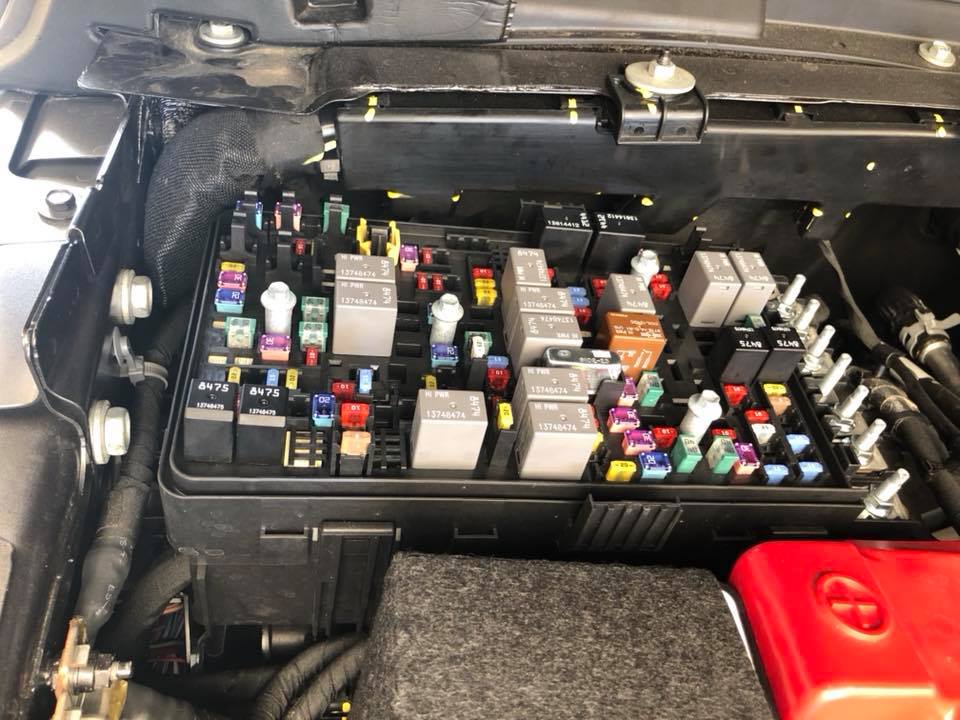
My backup camera was doing the same thing. I found several loose fuses and relays. Pushed them down, felt a slight "click" on a larger majority of them. No problems since then. Fuse box is located next to the battery near the firewall / passenger side.


Jeep Wrangler JL Back up camera issue fuse box JL
 

White_Cloud

New Member
First Name
Trey
Joined
Nov 13, 2018
Threads
0
Messages
2
Reaction score
0
Location
Waxahachie, Texas
Vehicle(s)
2018 Wrangler Sahara JLU
My backup camera was doing the same thing. I found several loose fuses and relays. Pushed them down, felt a slight "click" on a larger majority of them. No problems since then. Fuse box is located next to the battery near the firewall / passenger side.


fuse box JL.jpg
Thanks for tip. I will give this a try.
 
OP
OP

mgrowc1

Well-Known Member
First Name
Mark
Joined
Dec 27, 2017
Threads
19
Messages
89
Reaction score
33
Location
United States
Vehicle(s)
Wrangler
Did you every get your camera to work? I am having the exact same problem with my 2018 JUL after 3 months of ownership.
Sorry for the delayed response. It basically just started working again. Every now and then it stops for a bit and then starts working again. It appears to correlate to heat and being on the very hot days in summer but that could be coincidence.
 

jeremyjeep

Well-Known Member
First Name
Jeremy
Joined
Mar 10, 2018
Threads
55
Messages
1,951
Reaction score
1,511
Location
Jeep, USA
Vehicle(s)
JLUR
Sorry for the delayed response. It basically just started working again. Every now and then it stops for a bit and then starts working again. It appears to correlate to heat and being on the very hot days in summer but that could be coincidence.
Mine did the same. I pushed in the loose fuses and relays and the problem with the backup camera went away.
Sponsored


Top