Sponsored

Adding an Aftermarket Amp(s)

winchreadyAZ

Active Member
Joined
Aug 31, 2019
Threads
2
Messages
42
Reaction score
30
Location
Arizona
Vehicle(s)
2019 Wrangler JLU Sahara
You’ve got that backwards. When doing the 9v battery test on the 3.5 top dash speakers, positive is the non-capacitor side of the speaker.
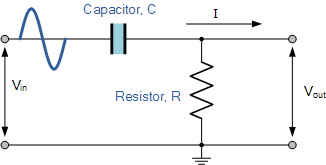
Are you sure about that? High pass filters generally have a capacitor in series on the positive side of the load (speaker), thereby only letting the high frequencies thru, Whereas low pass filters run the capacitor in parallel, thereby sending the high frequencies to ground.
Jeep Wrangler JL Adding an Aftermarket Amp(s) 44D23DC4-0BCB-4B2C-8F5E-D03694BFEE74
Sponsored


zeebo56

Well-Known Member
First Name
Zee
Joined
Mar 8, 2020
Threads
28
Messages
516
Reaction score
373
Location
los angeles
Vehicle(s)
2020 jeep wrangler unlimited sport
Vehicle Showcase
1
You’ve got that backwards. When doing the 9v battery test on the 3.5 top dash speakers, positive is the non-capacitor side of the speaker.
I can't remember the plug going into the stock tweeter but I am pretty sure the purple wire went into the capacitor side which would make it the positive side.

Not 100% sure but whatever side has the purple wire is positive.
 

sknyfats

Active Member
First Name
Fred
Joined
May 20, 2020
Threads
3
Messages
41
Reaction score
17
Location
USA
Vehicle(s)
2020 JL Wrangler Willys 2 Door
I’m just going with what I saw. Before I posted my reply I actually did the battery test once more on a stock speaker. With + on the non-capacitor side, the speaker cone pushes outward away from the coil/magnet/back plate. I can take a video to show if need be.
 
Last edited:

winchreadyAZ

Active Member
Joined
Aug 31, 2019
Threads
2
Messages
42
Reaction score
30
Location
Arizona
Vehicle(s)
2019 Wrangler JLU Sahara
I’m just going with what I saw. Before I posted my reply I actually did the battery test once more on a stock speaker. With + on the non-capacitor side, the speaker cone pushes outward away from the coil/magnet/back plate. I can take a video to show if need be.
Sknyfats - it’s completely possible that the high pass capacitor is on the negative side of the speaker. That’s not usually how HPF‘s are designed but certainly possible. Probably what’s more important is that you keep all your speakers in phase so that they don’t cancel each other or sound muddy.
Here are the wiring diagrams for the JL. More important to where the capacitor is — are the wires from the HU/AMP.
 

Attachments

sknyfats

Active Member
First Name
Fred
Joined
May 20, 2020
Threads
3
Messages
41
Reaction score
17
Location
USA
Vehicle(s)
2020 JL Wrangler Willys 2 Door
Yeah - I wasn’t even referring to wire diagram colors - but I double checked just now and the + & - are definitely backwards on the diagram, assuming the factory wired it correctly.
I’ve only swapped out the 4 3.5” speakers and verified + & - doing the battery test. Each had positive on the non-capacitor side and negative is the capacitor side.

My main reason for replying is because the statement that capacitor side is positive is incorrect & it also appears the diagram may be as well. At least based on my 2020 JL 2 door with 7” base radio. I understand about keeping things in phase. I always test/verify positive when swapping out speakers.

Battery test with factory 3.5”

https://1drv.ms/v/s!AoB7rKT5K2U8jPQHy8GgVDQLcKMT7w
 
Last edited:

Sponsored

Akbill

Well-Known Member
First Name
Bill
Joined
Aug 18, 2018
Threads
23
Messages
267
Reaction score
100
Location
Alaska
Vehicle(s)
'19 JLUR
(If you reply to this post - PLEASE do not quote the entire post! It is entirely too long to be repeated over and over. Thx!)

There was little information available (at the time of this original post) regarding audio wiring schematics for the JL. This thread was put together to serve as a single location for us to build upon. I'll update it periodically until this project is finished (FYI, it's now complete!).

Prior Needs:
  • Wiring Schematic, including specific wire colors
    • Base System (Solved - See below) - The Speaker Wiring Schematic is now provided to help identify positive/negative polarity
    • Alpine System (Solved - See below)
  • Override UConnect load sensing test (UConnect checks for the stock speaker resistance and turns individual outputs off if not "seen." (Solved - See below)
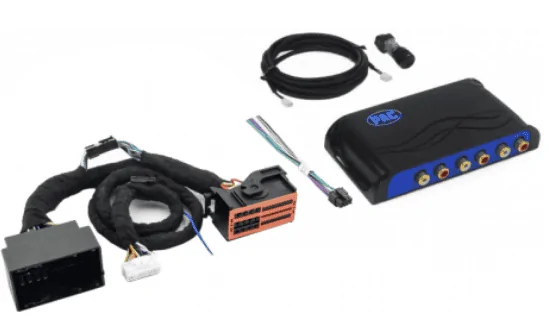
First and foremost, a line level converter process is needed. There are two primary methods to convert the uConnect signal and each is highlighted below (Adding Resistors or Adding a PAC Amp Pro).

When removing the stock speakers, the uConnect system has to be "tricked" into sending its audio signal to each speaker. In short, the Jeep's uConnect system checks for the proper resistance load introduced by our stock speakers.

If uConnect doesn't detect the proper resistance on any particular channel, the system turns that channel's signal off. I'd originally found only one option that worked (see the Resistor approach below). If you're interested in reading more about how the resistor approach works, this is a great article on the topic: Everything is hooked up but no sound is playing, just don't buy the Audio Control AC-LGD device it discusses. I'll elaborate...

I tried the AudioControl AC-LGD device, and it worked... sporadically. Evidently the resistance tolerances for the AC-LGD were too narrow causing it to work sometimes, and not others.

The JL Audio FiX-LSA-4 (a device similar to the AudioControl AC-LGD, but made by JL Audio) didn't work at all with the Jeep's load sensing issue. I spoke with a JL Audio tech, and this seems to be a known issue they'll likely address soon. The reason appears to be related to a difference in the Ohm load our stereo systems require vs. others.

This leads us to the two functional options for overriding the load sensing issue.

Option One: VERY EASY (and inexpensive) to do and requires light soldering:

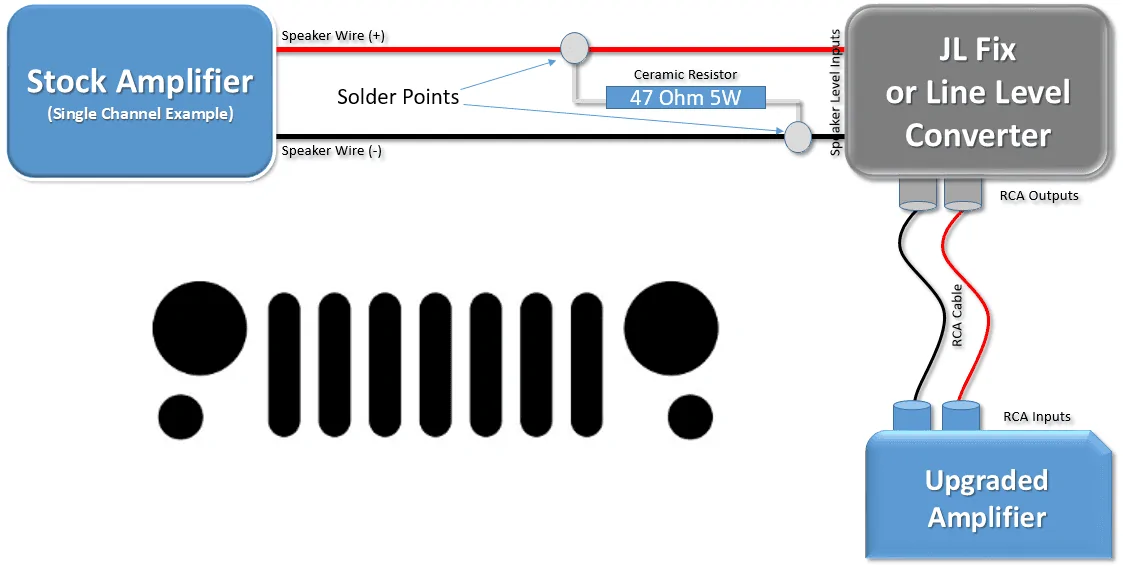
Talking with the techs at PAC, and confirming via online references, a 47 OHM, 5 Watt Ceramic Resistor can be soldered to each pair of speaker level input wires feeding a Digital Sound Processor (DSP) such as the JL Audio FiX™ 86 or equivalent. DSP's help to flatten/condition the pre-EQ'd signal sent by the uConnect system.​
I tried this process, and it does work. You can order resistors here, and you'll find that they are very inexpensive. If you go this route, I recommend buying several more than you need, just in case you break a few.​
Each resistor is soldered to the (+) and (-) stock speaker wiring pair that you'll use to feed each line level converter input. If you're running a 4 channel amp, you'll need to purchase 4 resistors.​
Once again, this tricks the uConnect system into thinking the stock speakers are still there, allowing the system to turn each channel on without having the stock speaker attached. A home-made schematic of this resistor setup is included below.​
Resistor.PNG

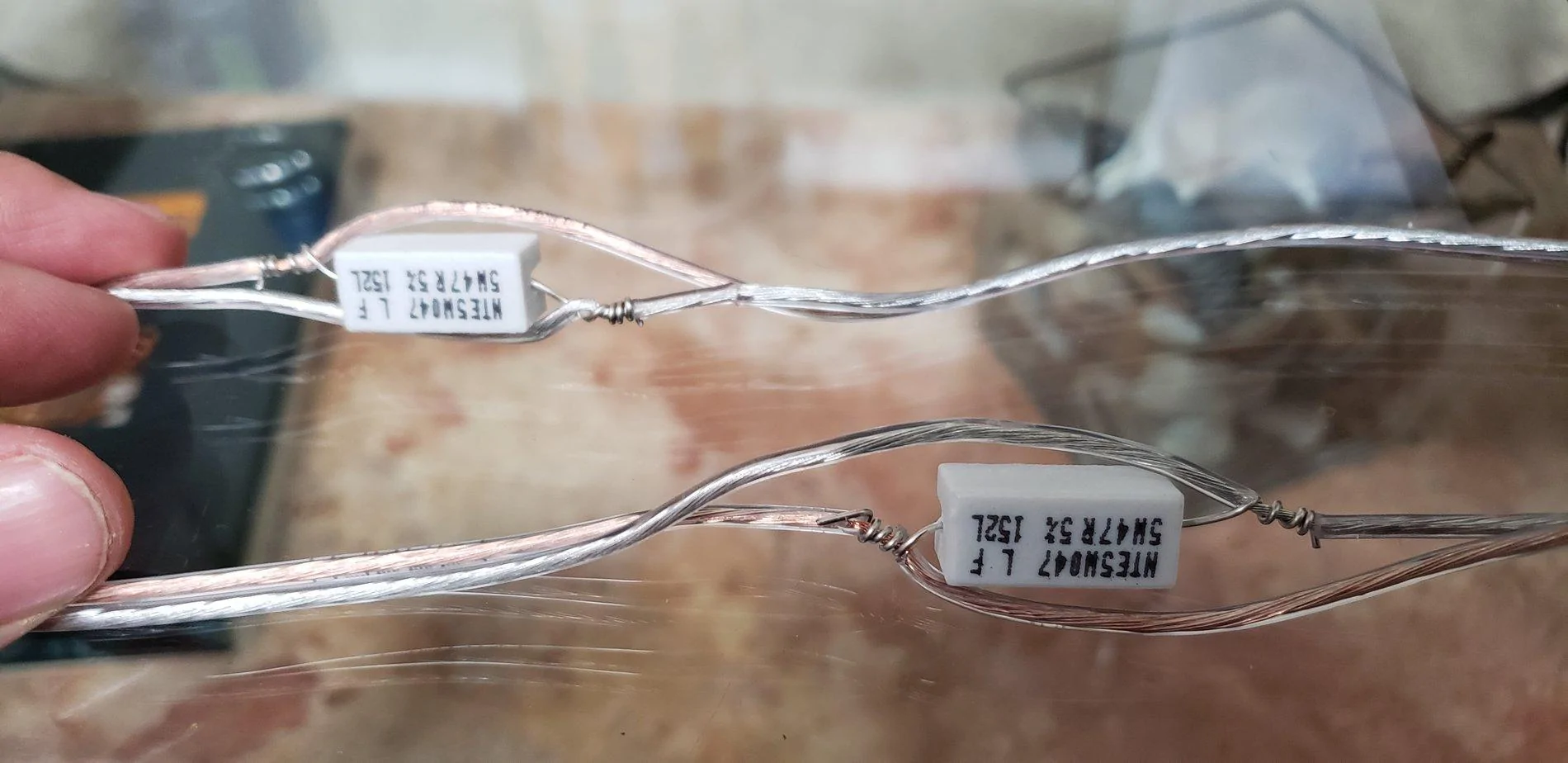
And here's a photo of the resistors installed on the speaker wire, right before they enter the JL Fix86. Note that these weren't yet soldered and wrapped.​
20180902_155220.jpg

Option Two (Recommended): PAC Audio AP4-CH41R2

I was hesitant to update the post with this device initially, as I hadn't installed one personally. PAC has now updated their website to indicate the second revision (R2 in the model number) supports the Jeep JL and JT! The catch is it's a bit pricey! MSRP is originally at $349, though it can be found cheaper online. If you go this route, just make sure it's the R2 edition!​
Since the original posting, I have had the opportunity to install and calibrate the PAC device, and it does a good job of flattening the uConnect's signal. While I still recommend using a DSP like the JL Audio FiX™ 86 or equivalent, you can now effectively use the PAC Amp Pro as the sole "LOC" to feed a clean, low-level signal to your amp(s) via RCA Cables.​
PAC.PNG
Base Radio:​

Option 1 - Resistor Approach: For the speaker level inputs of the line output converter, I tapped into the speaker level outputs directly behind the Base System's radio. Those wires were extended and run through the middle console to the back of the Jeep, to my JL Audio FiX™ 86 where my amps are. Once again, wiring colors are available below.​
Option 2 - PAC Amp Pro approach: Plug the PAC Amp Pro's harness into the back of your stock radio, plug the radio's harness into the PAC Amp Pro, Connect a 12v Remote wire to your front 12V Adapter's positive wire, set your DIP Switches per the manual and then calibrate it. RCA Cables run from the PAC Amp Pro to your amp, or to your DSP and then your amp.​

Premium Radio:

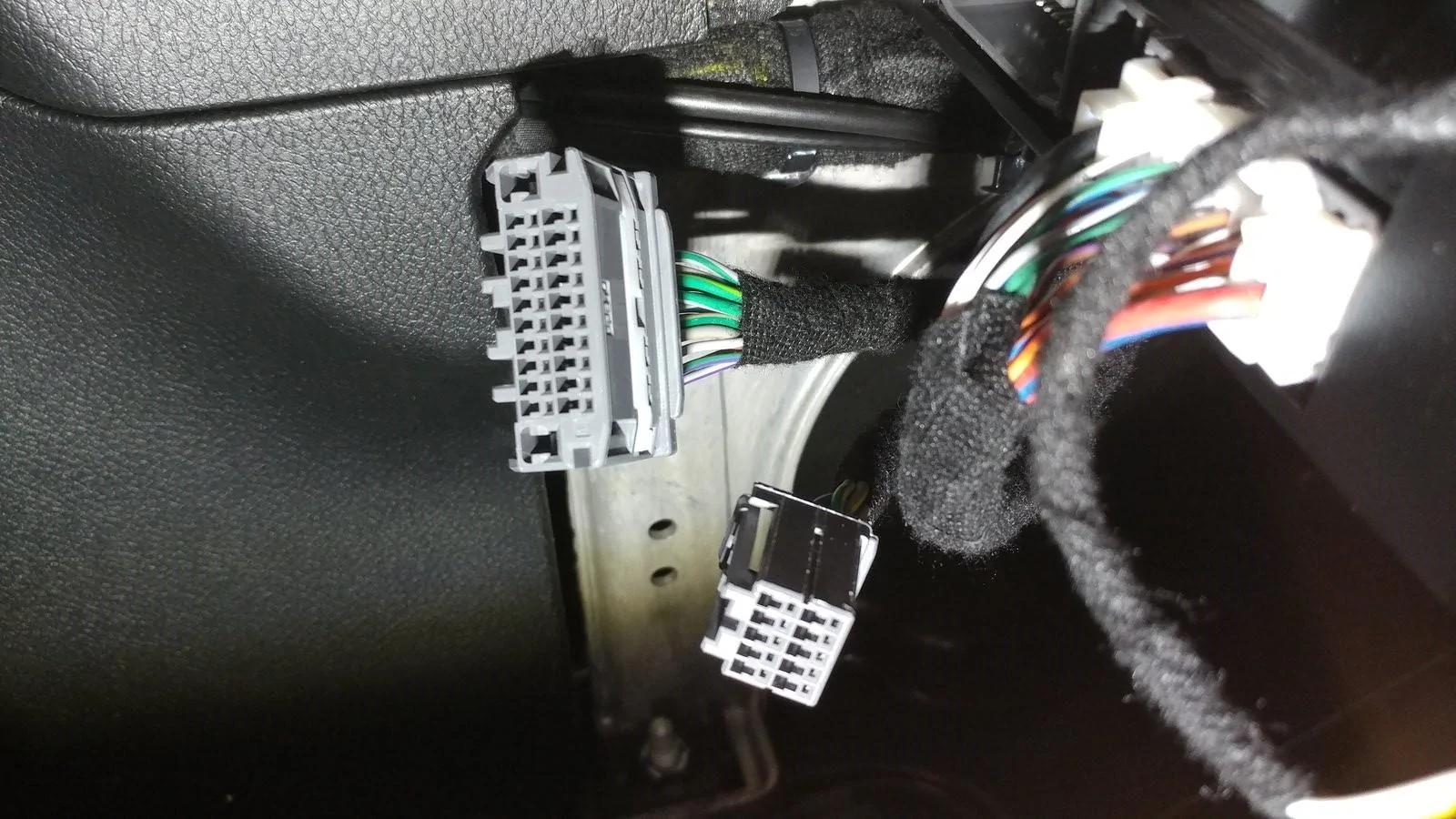
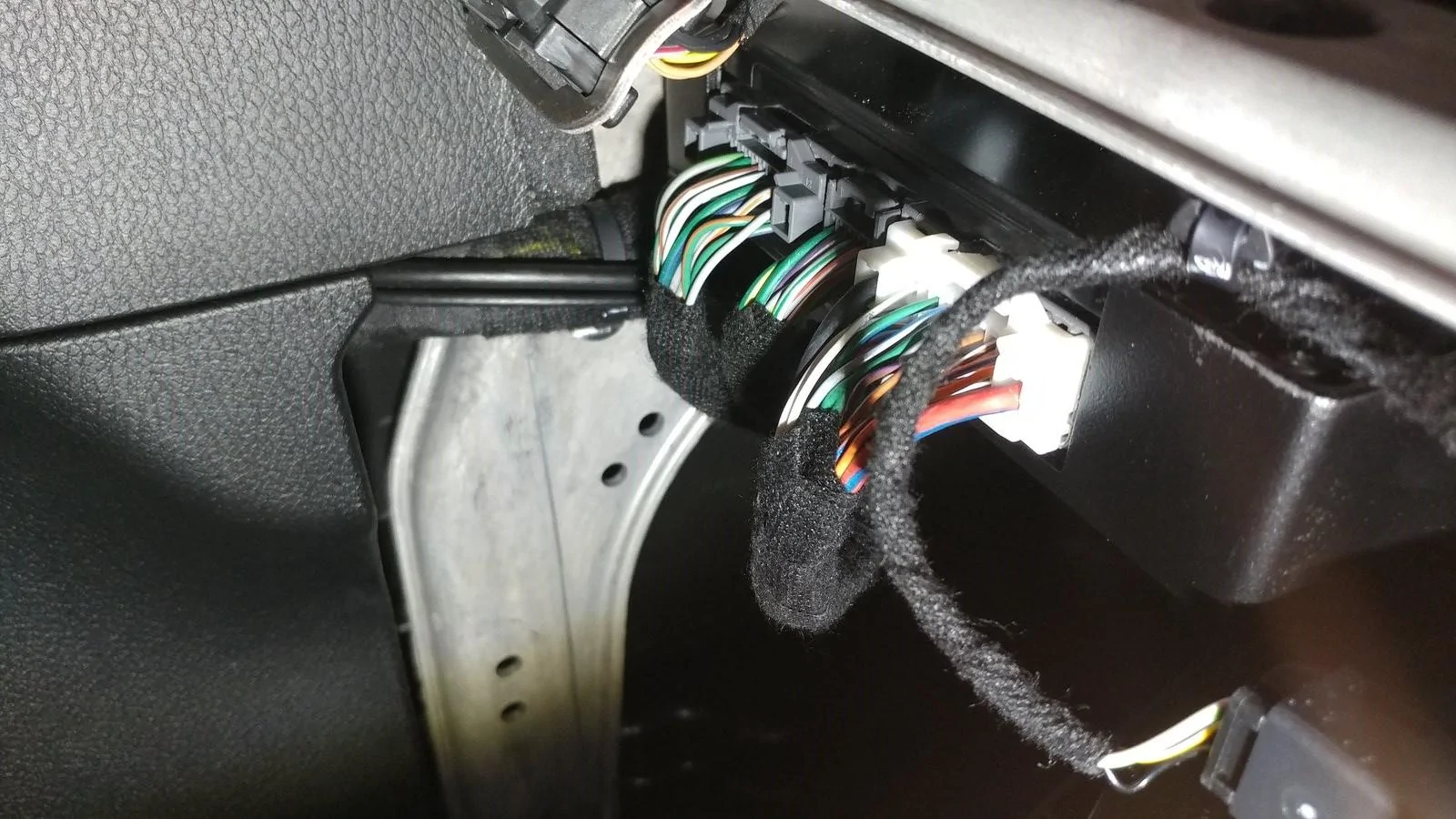
Option 1 - Resistor Approach: For the speaker level inputs of the line output converter, you'll need to tap into the speaker level signals that are coming out of the stock amp, located under the steering column.​
Option 2 - PAC Amp Pro Approach: Same Option 2 for the base radio above, but check the PAC Amp Pro's DIP Switches and set via the supplied instructions.​

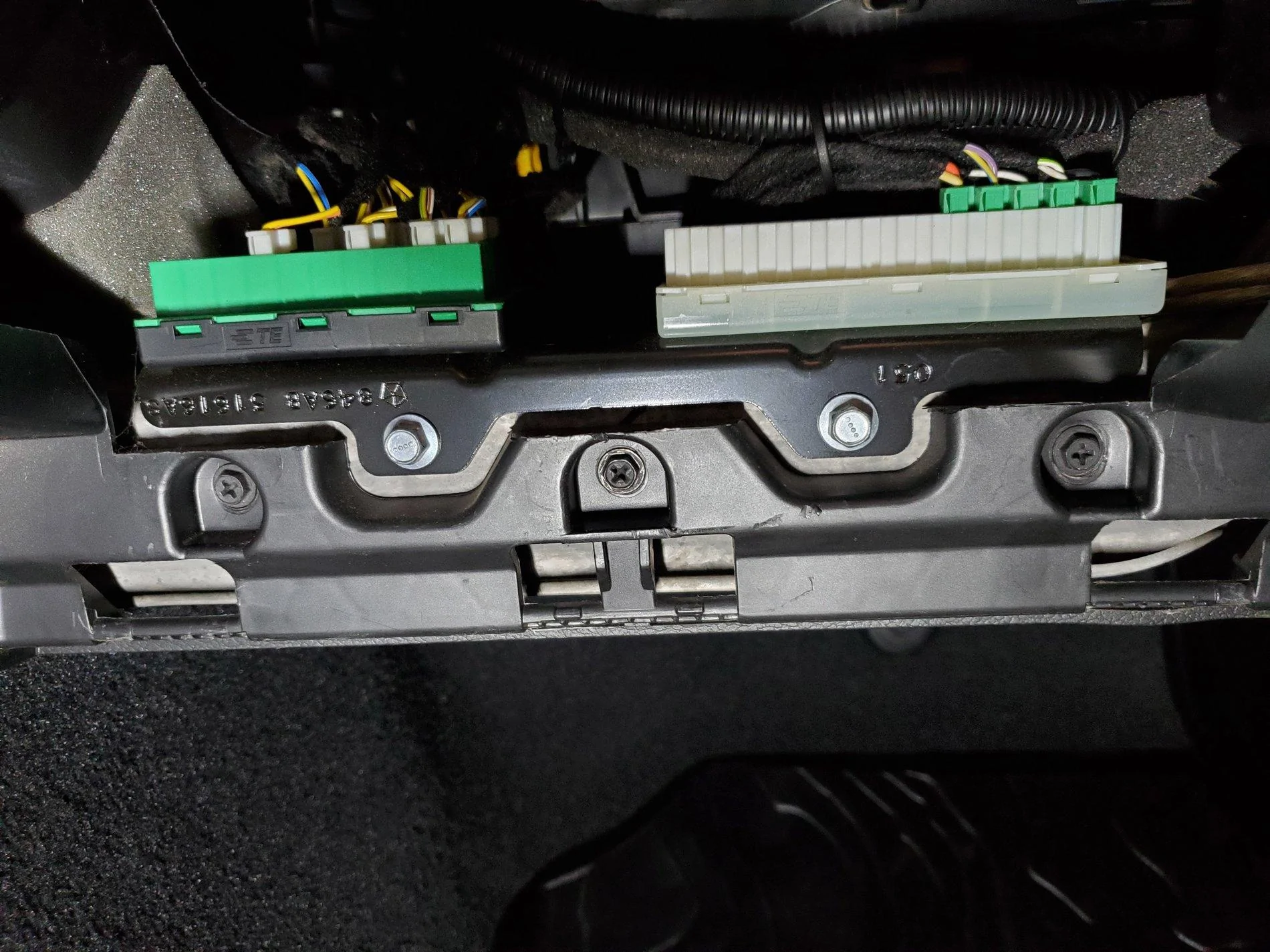
Premium Amp location (under the steering wheel) and modular plugs:

Premium Amp Wires.jpg


Premium Amp.jpg


______________________________________________________

Sub-woofer only install:
If you are simply adding a sub-woofer and plan to keep the stock speakers intact, you can skip the resistor or PAC Amp Pro processes described above. Instead, you'll simply tap your connections into the rear speaker wires housed in the B-pillar, behind the passenger seat at the floor level. The wires are easy to find after removing the plastic cover at the base of the pillar. The soundbar speaker wires are the only twisted pair wires down there, and they match the colors in the chart provided. Note, unless your amp has a line output converter built in (doubtful), you will need to add a line output converter (LOC). The AudioControl LC2i, or comparable device, works fine for a sub-only upgrade.​

______________________________________________________


Here are several additional details you may find helpful if the above hasn't scared you away yet...

On the Base System, there are four 4-inch speakers and four small tweeters. I ended up upgrading the Soundbar and the Kick Panels to 5.25-inch separates (Separate Woofer and Tweeter - also called "Components"). Now that Metra has introduced their new speaker pods, I can no longer recommend anything other than 6.5's in the kick panels, and here's why...

The Kick Panels:

The newly introduced Metra JP-1014 Speaker Pods, announced and released shortly after SEMA 2019, significantly simplify the kick panel speaker upgrade process. I have updated this post to recommend running 6.5-inch separates up front and 4-inch coax's in the soundbar if you don't want to modify the Soundbar much, or 6.5's if you run the SSV Works adapter. Going larger in the soundbar without the SSV Works adapter is possible, though it will require more cutting than I personally recommend, given the limited sound that can be achieved from the soundbar.

NEW: Installation Tip (Pictures added) - You DO NOT need to remove the entire dash to change out the Kick Panel pods!

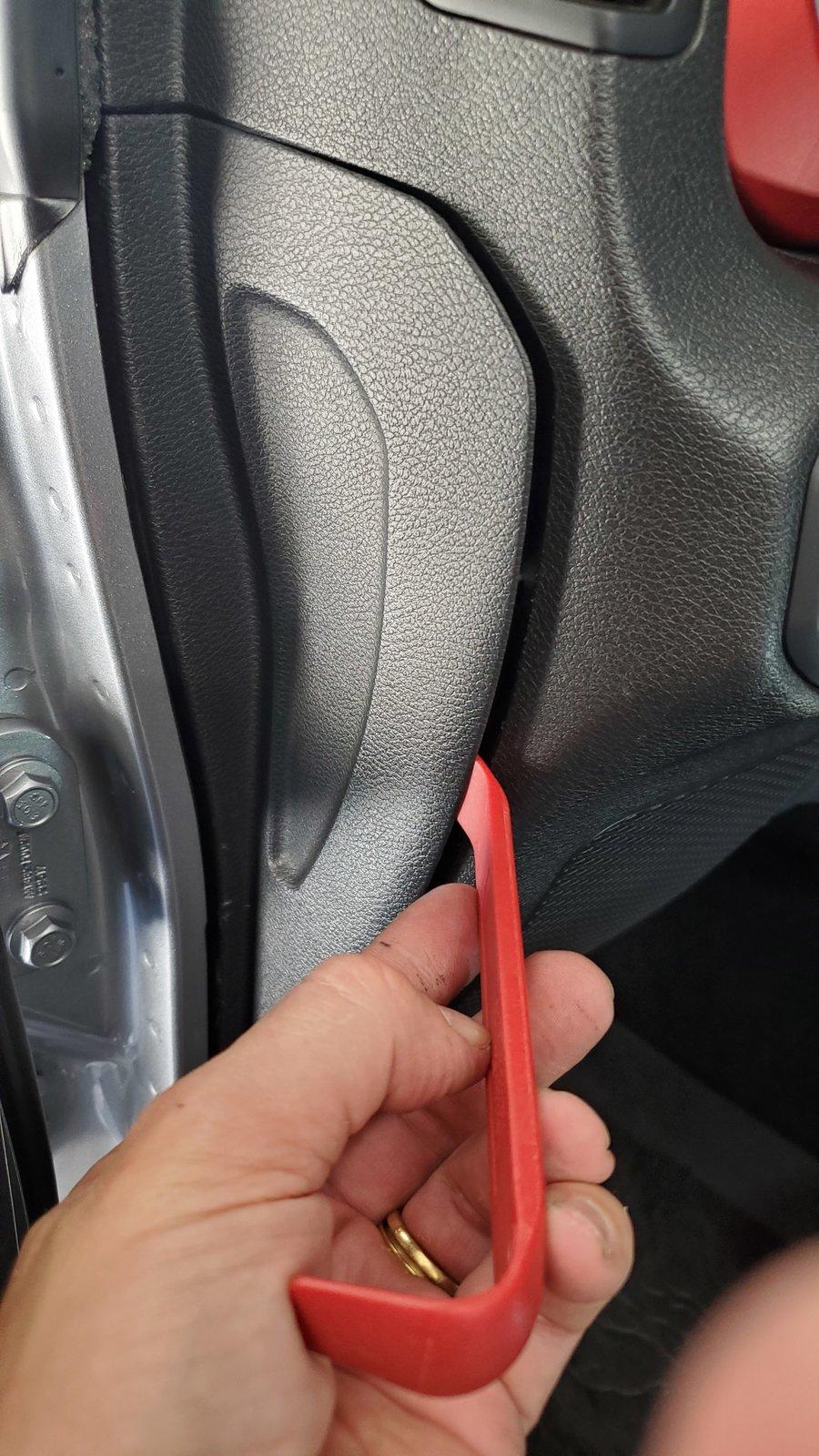
To access/remove the speakers in the kick panels, you have to remove the two side dash panels (body clips hold the driver/passenger side on - pry off carefully) to access the screws dedicated to securing the dash's sides.

20200621_110646.jpg


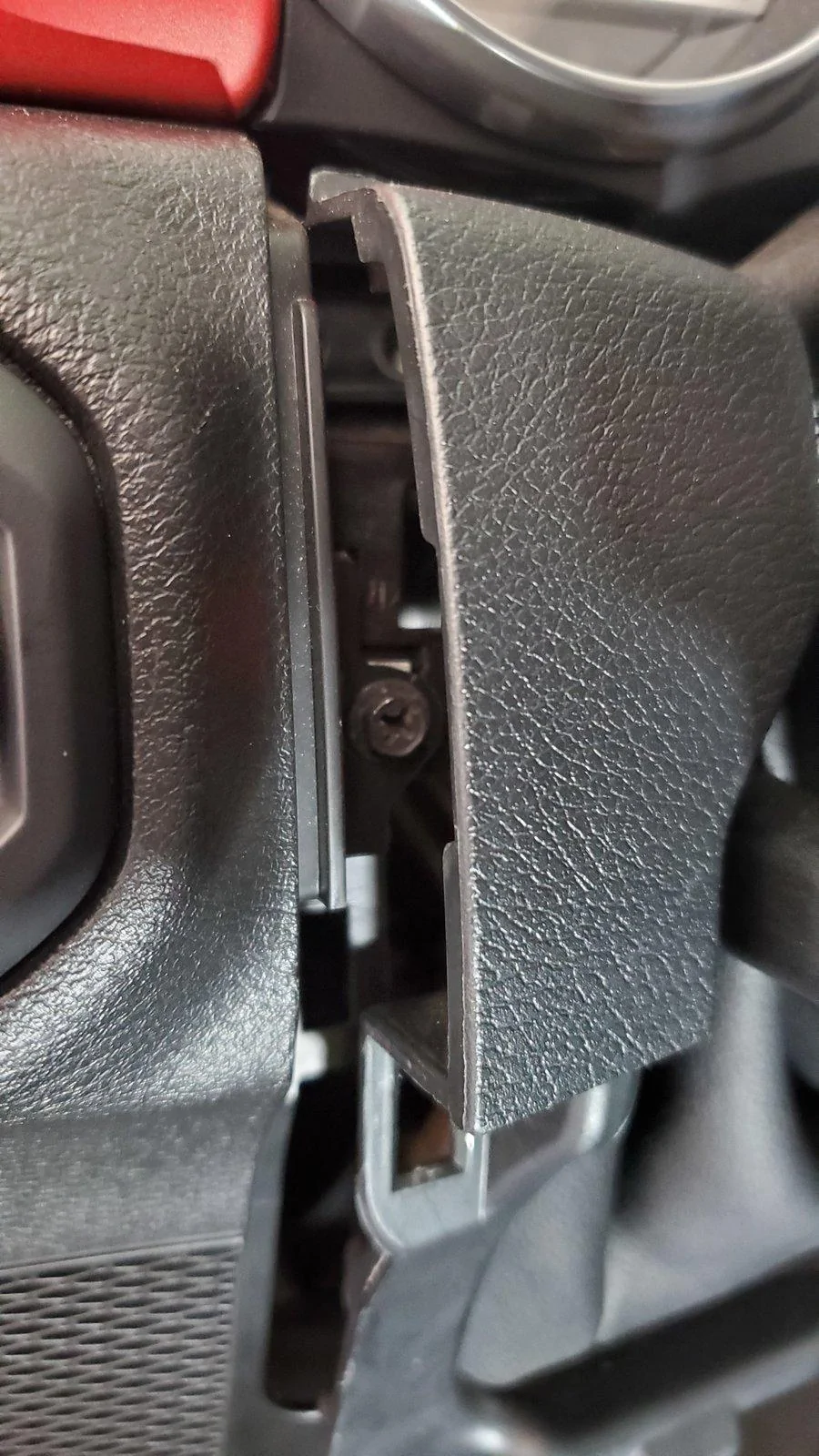
The displayed, partially removed screws below are the only screws that must come out from under these panels, except there is one hidden screw recessed in the side of each Speaker Pod. The recessed screw is accessible within one of those larger silver "holes," and you can access it with a short Phillips head screwdriver. Once again, this applies to both the passenger and driver's side panels.

20200621_110353.jpg


Then, you'll need to remove the plastic panel under the steering column (body clips - pull the panel directly towards the driver's seat).

20200621_110757.jpg


On the passenger side, remove the glove box (depress the latch at the top-inside of the glove box to pull it down and outward). Then, remove the three black dash screws under the area where the glove box was. Only the black 7mm screws need to be removed.

20200411_133531.jpg


On the driver's side, each of the black 7mm screws visible here must be removed.

20200621_105936.jpg


Oh, and don't forget to remove this screw, too. It's tucked in just to the right of the Headlight/Dimmer pod, and removing it will give you much more space when rotating the driver's side Pod out.

20200621_105729.jpg


As mentioned, each of the Kick Panel speakers have a hidden screw recessed in the side dash panel area, as well as a screw at the top and bottom of the enclosure itself. Once all 3 of each speaker enclosure's screws are removed, you may carefully pull the bottom section of the dash away from it's mounts to access the Pods. Doing so allows you to rotate the speaker enclosures out. Be careful that you don't pull the dash so far out that you crease/pinch the dash covers.

The passenger side Kick Panel Speaker Pod rotates out easily, so there's no additional feedback provided for it. Simply unplug the speaker wire plug on the back, and you're done here!

There are a few NEW tricks to getting the driver's side Pod out easily.

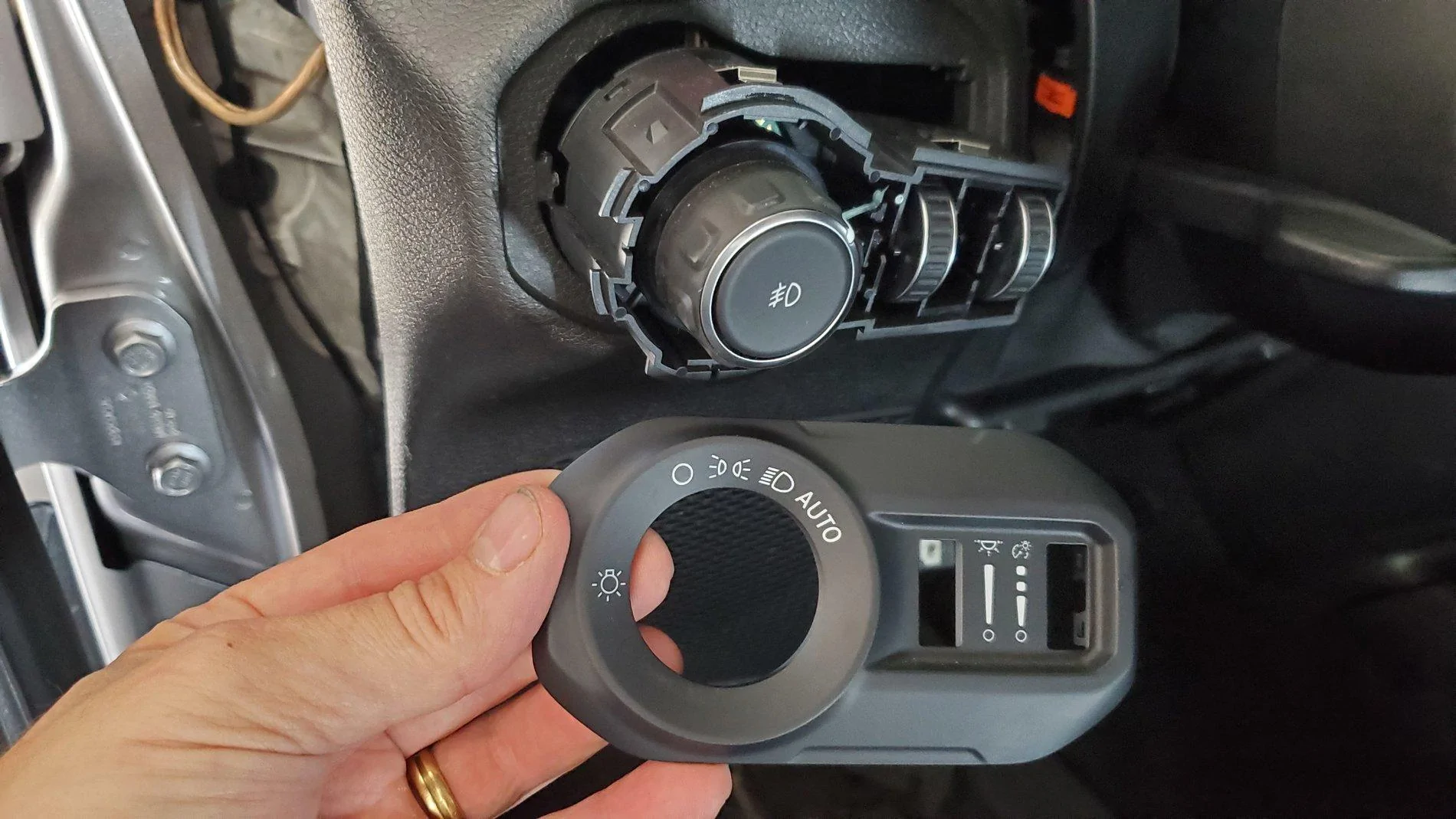
After removing the side dash panel, the panel under the steering wheel and all of the screws previously shown, pop off the cover for the Headlight knob and Dimmer wheels using a pry tool.

20200621_101343.jpg


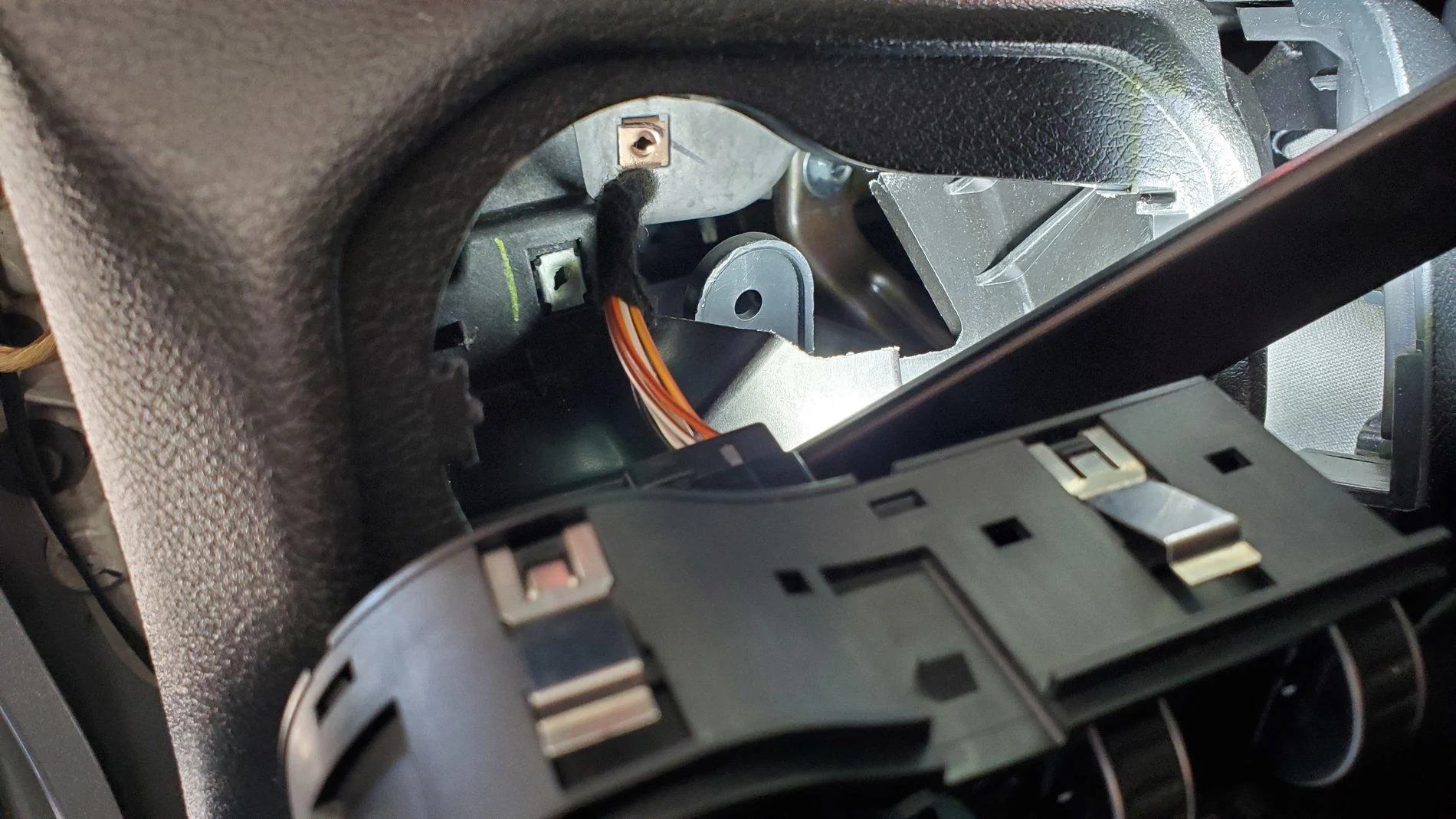
Next, from behind the dash, use your fingers to compress the silver tabs on the Headlight Knob/Dimmer plug. This will allow the assembly to easily pop out and provide access to the top Kick Panel Speaker Pod's mounting screw. Two clips on the top, and two clips on the bottom of the Headlight/Dimmer plug allow it to easily be pulled out, and there's no need to disconnect the wires.

20200621_101407.jpg


Here's the screw location for the top of the Driver's side Pod. Using a magnetic screwdriver will help in removing and re-installing this screw, as it's recessed a bit behind the Headlight/Dimmer pod. You can also use tape to temporarily hold the screw onto the screwdriver when re-installing.

20200621_101519.jpg


Once the side, top and bottom pod screws are removed, there's another trick to share regarding the removal of the driver's side Pod.

To do so, pull the dash section's you've loosened outward with your right hand, being careful not to crease any parts of the dash by bending it. Run your left hand up the inside of the dash to guide the top of the Pod. Then, with your right hand on the bottom of the Pod, lift up on the Pod, pushing it up into the dash as far as it will go, then, using your right hand, pull the bottom of the Pod towards you. It will pop over the metal dash frame that's under it, and you'll be able to rotate it out after that. You may need to rock the bottom of the Pod back and forth a few times while lifting up on it.

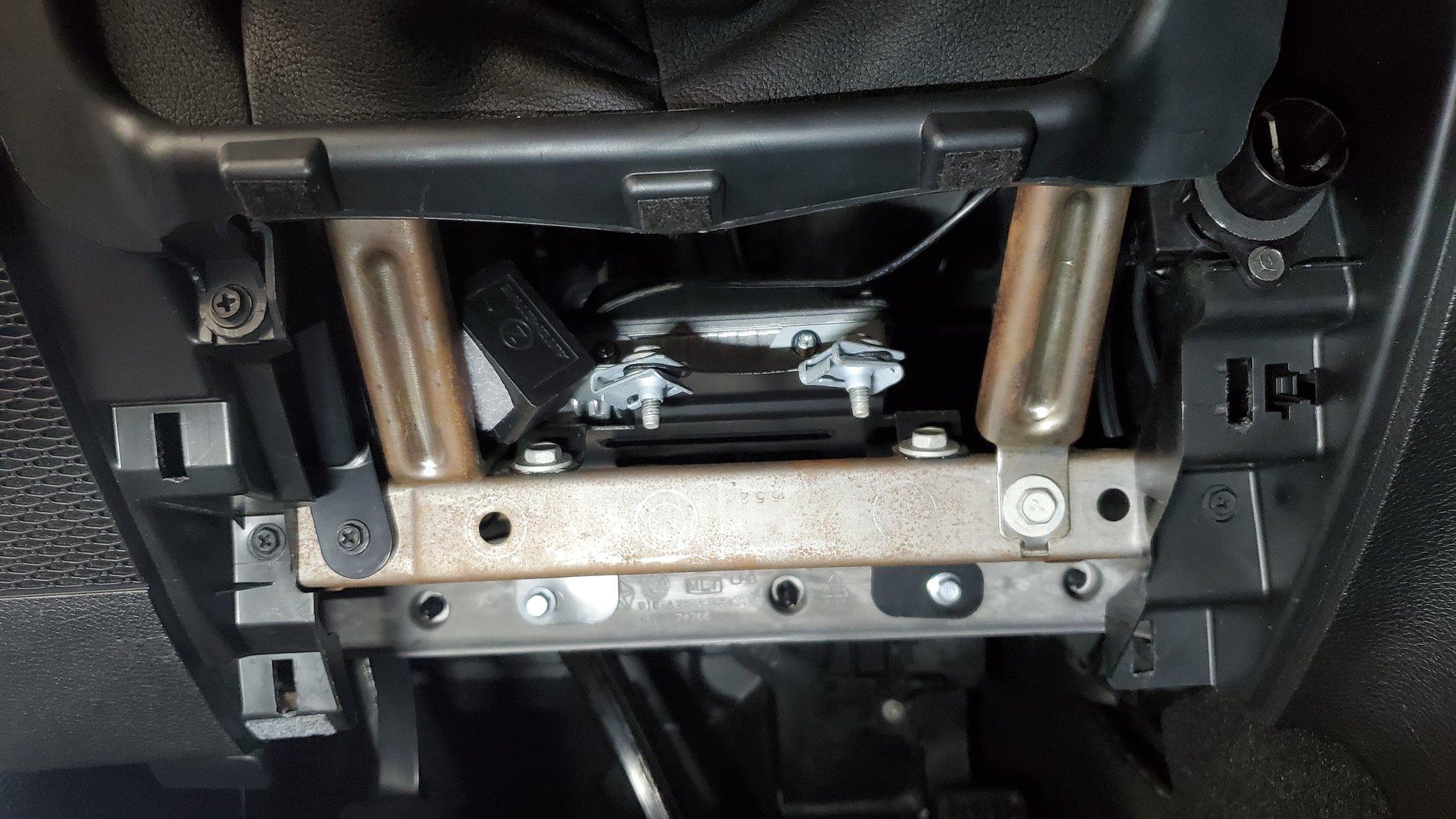
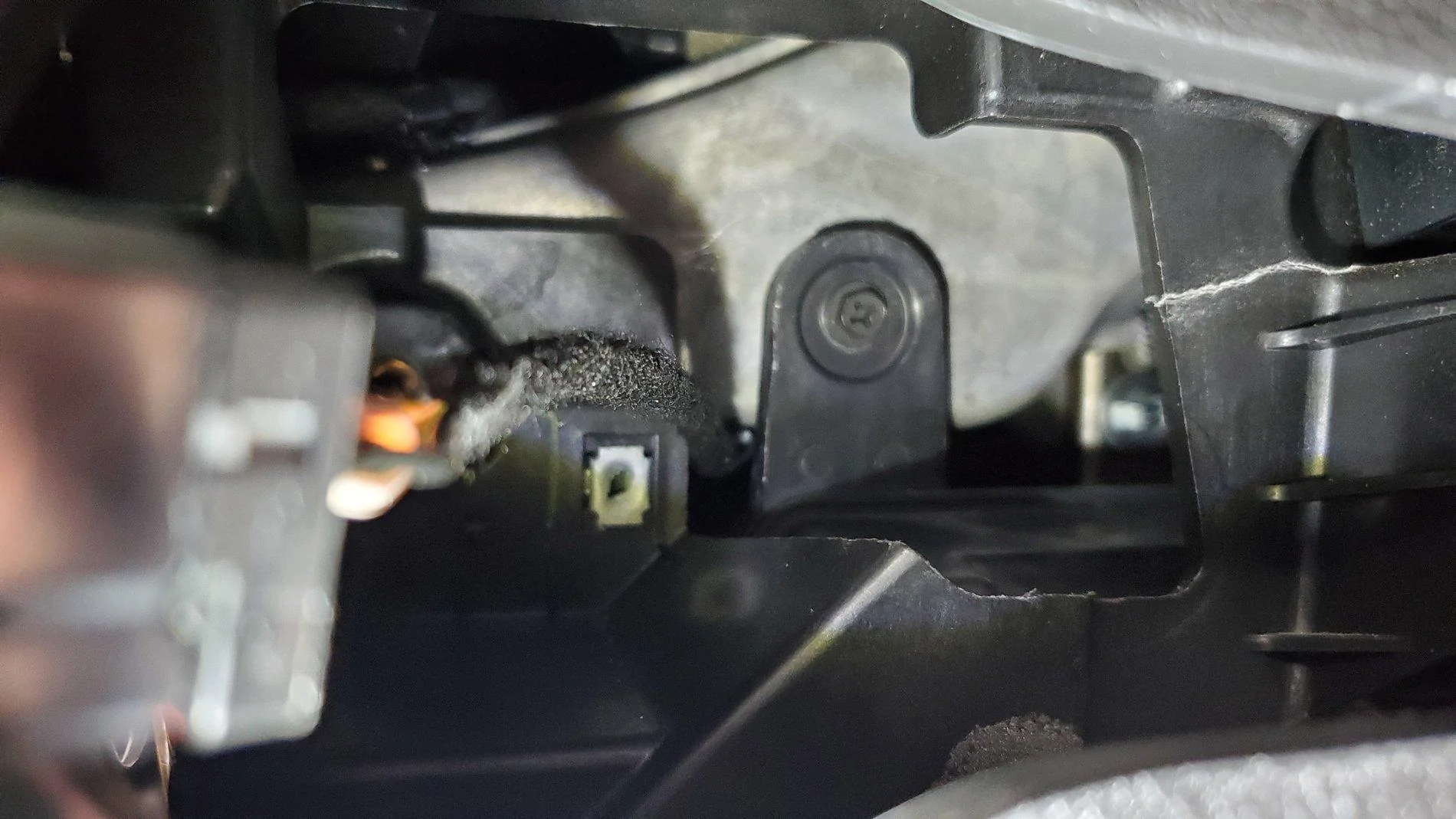
There's a black box connected to the back of the driver's side speaker with three screws. It's called a Gateway, and it's actually one of the things that makes the driver's side Pod so difficult to remove. You'll need to unplug both of its modular plugs (unless you're already running a Tazer JL) before removing the driver's side Pod.

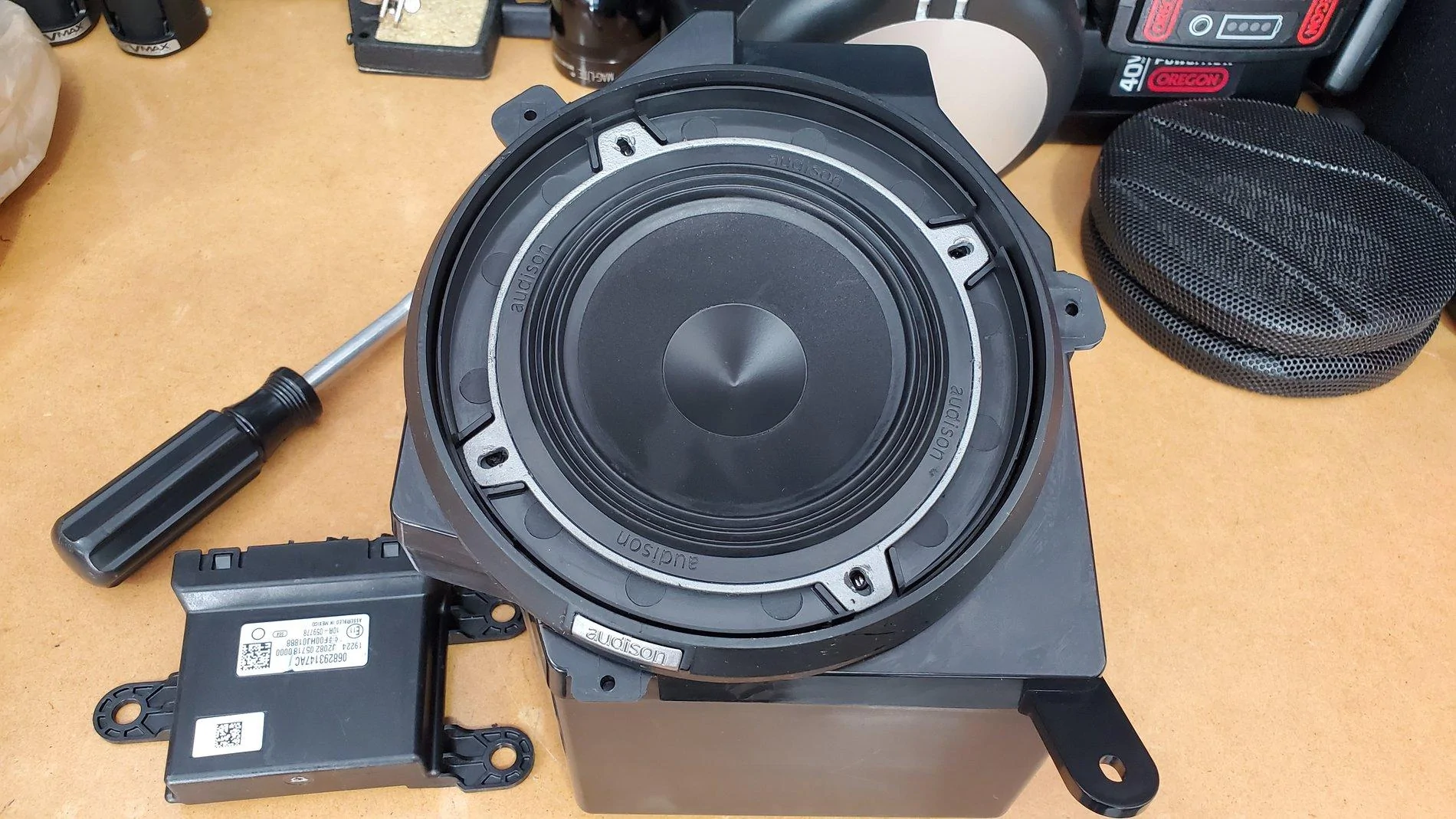
Important: If you re-install your Metra Pods and your stereo doesn't turn on, it's likely because you didn't plug the Gateway's modular plugs back in. (This is the most requested question I receive!) The Gateway is the device in the bottom left of the following picture, and the driver's side Metra Pod has a place for this to be mounted on the back.

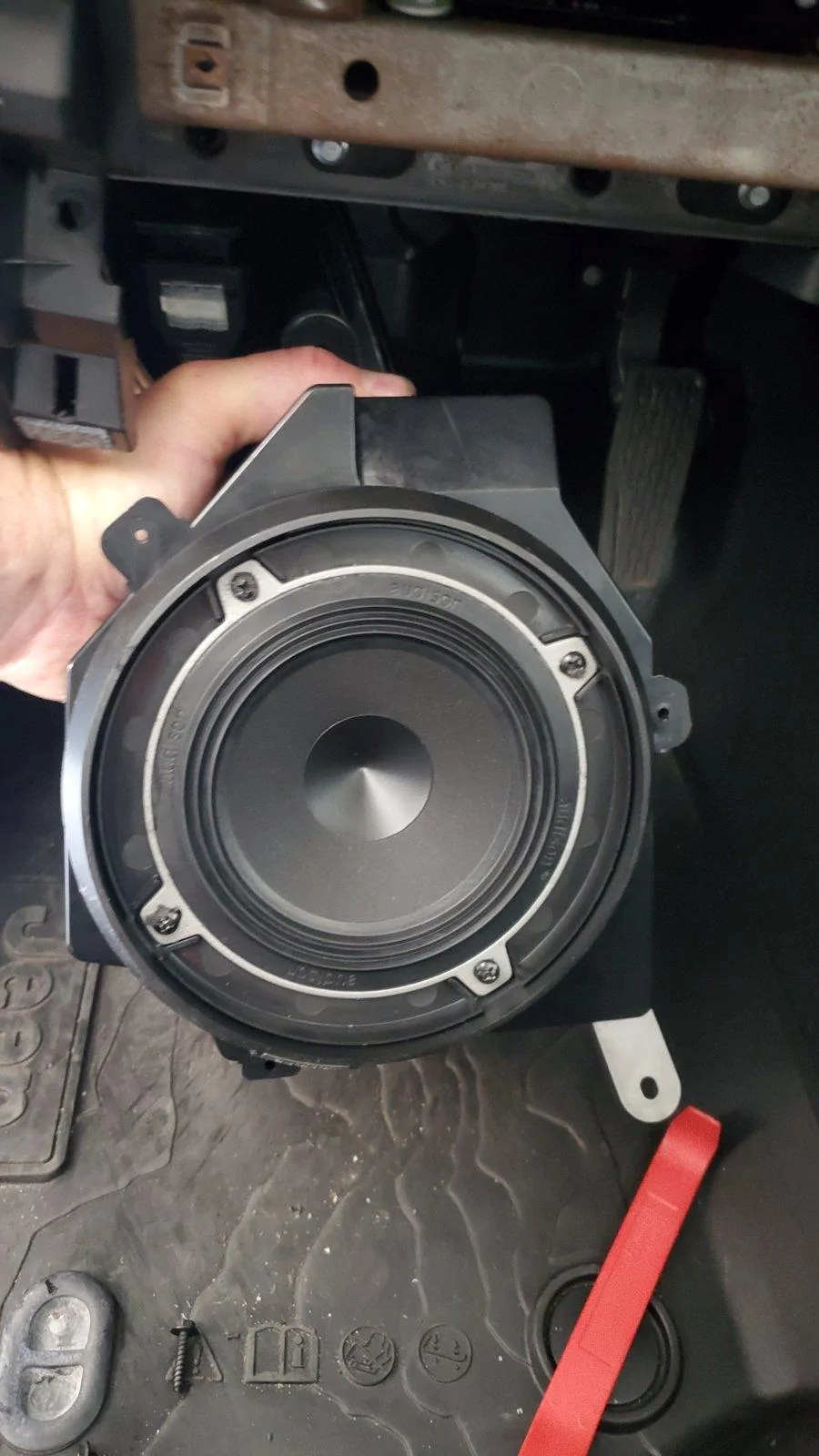
There's also a rather large hole on the back of the Metra Pod. The stock Mopar pods you removed have rubber plugs that you'll want to transfer. Just be sure to run your speaker wires through these rubber plugs before adding wire connectors and before trying to re-install the Pods.

20200621_103322.jpg


20200621_103607.jpg


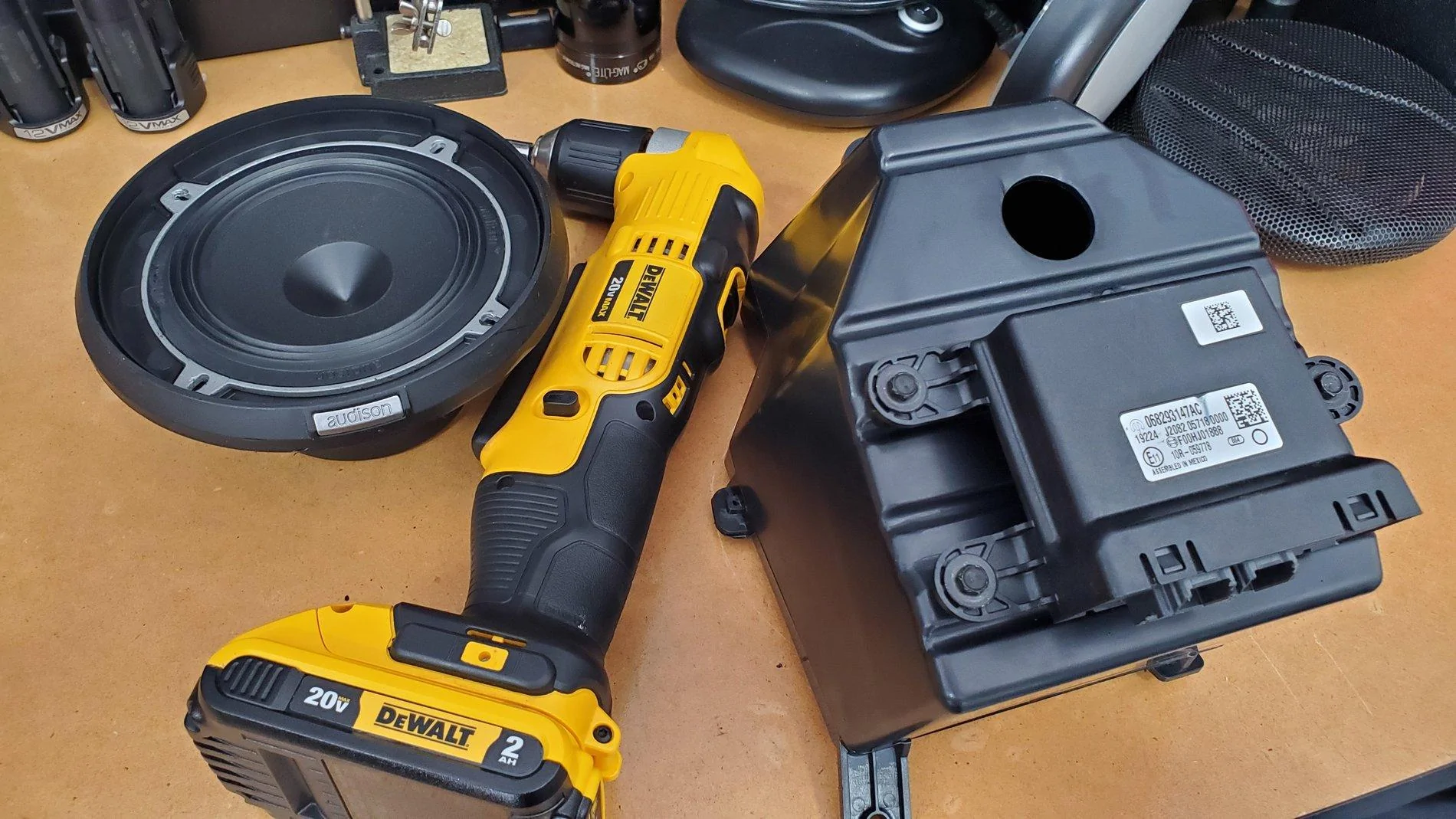
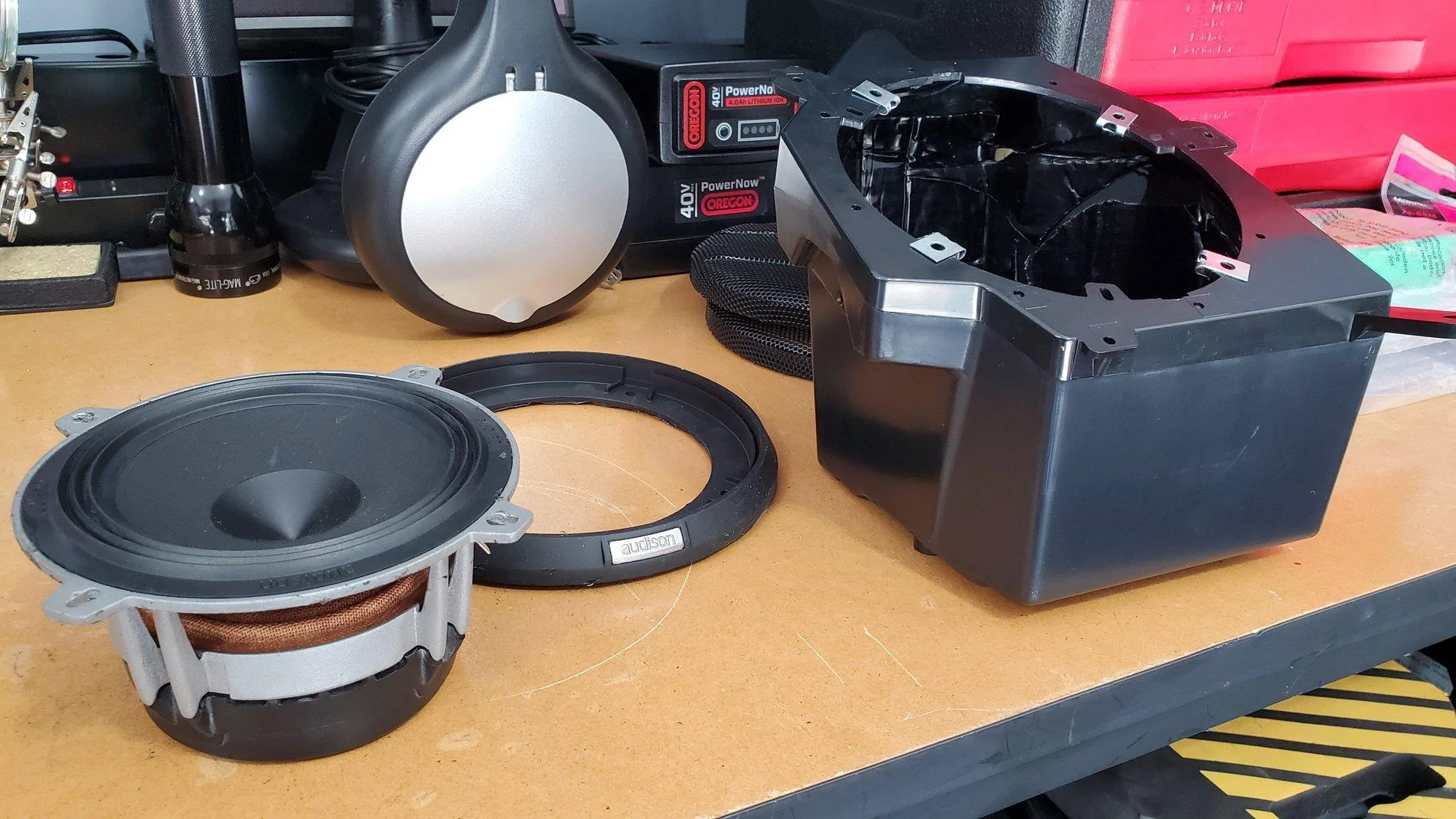
Pictured below is one of the new Metra pods before the speaker's installed and another picture before the finished Pod is ready to be installed.

Note that I'm running 5.25-inch separates, yet these Pods are made for 6.5's. By using the speaker manufacturer's (Audison in this case) provided housing, the housing sits right over the 6.5-inch holes. Also, on the passenger side pod, there will still be a few screw holes open. Make sure you seal each unused hole with silicone, and/or a small screw, or it could end up "whistling."

While not shown, I did add sound deadening material inside the box, polyfil inside the box and also cut a gasket from the sound deadening material that sits between the speaker ring and the Metra Pod. The gasket simply seals out any air from the remaining, unused screw holes under the speaker.

20200621_103005.jpg


20200621_104453.jpg


To re-install everything, simply reverse the order above, ensuring all screws, clips and plugs go back nice and easy. There's no need to force anything.

When re-installing the driver's side Pod, you'll benefit by viewing the top bracket through the Headlight/Dimmer portal, ensuring it's at the location shown below before pushing the Pod up as far as it will go. Once you verify it's in the right spot, begin wedging the bottom of the Pod inward towards the front of the car. If you don't have the top section in the right spot, you'll struggle with pushing the Pod upward enough for the bottom and Gateway to clear the metal frame bracket. It really shouldn't require much force.

20200621_105046.jpg


The Soundbar:

If you do choose to upgrade to larger speakers in the soundbar, modifying the soundbar to accommodate larger speakers is fairly straight-forward. It takes some time/skill with a Dremel tool to enlarge the speaker cavities. You can fit a decent pair of mid-range coaxial speakers up there, or you could choose speaker separates. Each of the rear channels in the sound bar has a mid-range speaker and a separate tweeter already, so separates are possible, you'd just have to wire them on your own. Meaning, the stock mid-range woofer and tweeter on each channel share the same two wires (they aren't discreet). For separates, you would use the wire going into the mid-range woofer to connect to the separates' crossover, then run a new wire from the crossover to the new woofer and new tweeter.

Note, I rate upgrading the Soundbar speakers as "beginner" level install if you stay with 4-inch speakers, and as an "intermediate" level install if you up-size your speakers to 5.25-inch or larger.

Side note: All of the speakers in this system come factory installed in ported enclosures. That's how these little stock speakers sound slightly better than they should.​

I have deleted all "concerning" commentary previously shared regarding upgrading the kick panels now that the Metra pods are available. With the Metra pods, we are now presented with such a great option that I can't recommend anything other than using them with 6.5-inch separates. Advice: Invest the majority of your sound system money in the front soundstage, and use the soundbar speakers as nothing else but "fill" speakers.

If, after that advice, you still choose the Resistor route and use the JL Audio Fix™ 86, there is a calibration process necessary that requires a little patience. When calibrating the device, you must be 100% successful in "tricking" all four channels of the uConnect system into turning themselves on. If calibration doesn't work, meaning all channels didn't come on and all 4 lights on the JL Audio Fix™ 86 aren't green during the calibration, you should check your wire connections and possibly your solder points for the resistors. I had one resistor that didn't work initially - it happens.

VERY IMPORTANT: Ensure you are using the JL Fix86's test track for the calibration. JL Audio offers the file as a download. You can't simply copy the file off of the CD. It needs to remain a high-quality source, and you should ensure that sound will play on your system before attempting the calibration process.

Note that, if the JL Audio Fix™ 86 calibration process fails, you have to power down the receiver (key off, and away from the vehicle for about five minutes) until the radio fully resets. You'll know you're successful with the reset if the radio displays the disclaimer screen and boots up as normal. This is due to the fact that once the uConnect system detects a stock speaker isn't there, and the resistor override isn't functioning (for whatever reason), it has to be completely powered down and allowed to reset before uConnect will initiate a new load sensing test. On the plus side, once everything is connected and calibrated, you'll have the cleanest and flattest signal possible from a stock radio. And, you can plug your laptop or phone into the JL Audio FiX™ 86 to tweak the settings and EQ!

As with anything aftermarket, please understand you are taking any install advice provided here into your own hands, and at your own risk. I have to recommend that any power wiring, especially when wiring directly to the battery, be fused at the battery/source. In the case of a short, this blows the fuse instead of creating a new welding source! I also recommend using basic relays for your remote connections, which reduces the risk of feeding power back into your Jeep's electrical system due to a faulty amplifier or component.

Thanks,

Mike

PS: For any jlwranglerforums.com members wanting to venture into upgrading their sound systems, I've arranged a contact that can assist you with purchasing the proper equipment. He'll be happy to advise on gear that fits your needs and budget, and he's agreed to offer discounts to our members if you mention you saw his name here. To get started, contact Travis Grim @ 704-530-2073. He's based near me in the Charlotte, NC area, is a fellow Jeep owner and has approved the sharing of his contact information. All I ask: If you use him as a resource and plan to buy, please buy from him. He's a highly knowledgeable, low pressure manager engaged with a large Charlotte audio/video outfit.
______________________________________________________

Base System Speaker Wiring

For those who may also need these color codes, the following is what the schematic provides.​
Actual schematic for the Base Radio may be viewed here: https://www.jlwranglerforums.com/JL-Wiring-Diagrams/AUDIO-SYSTEM---BASE.pdf
Left Front Windshield Grey/Violet (+) and Grey/Yellow (-)​
Left Front Kick​
Right Front Windshield Dark Green/Violet (+) and Dark Green/Yellow (-)​
Right Front Kick​
Left Rear Sound Bar Grey/Green (+) and Grey/Dark Green (-)​
Right Rear Sound Bar Dark Green/Green (+) and Dark Green/Grey (-)​

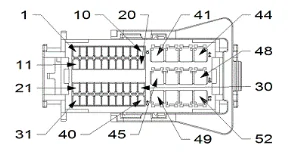
Update: In addition to the above speaker wiring, an image of the radio harness is attached below, and I've added the wiring colors from the back of the base and premium radios.​
Pinout.PNG
There is no external amplifier in the base model system. The external amp for the premium system is under the steering column (you should see the color coded wires below).​
Speaker wire colors at the radio, with pin number and polarity:​
Base Radio
PIN Wire Speaker/Polarity System
45 DG/GN RIGHT REAR SPEAKER (+) BASE RADIO​
46 DG/VT RIGHT FRONT SPEAKER (+) BASE RADIO​
47 GY/VT LEFT FRONT SPEAKER (+) BASE RADIO​
48 GY/GN LEFT REAR SPEAKER (+) BASE RADIO​
49 DG/GY RIGHT REAR SPEAKER (-) BASE RADIO​
50 DG/YE RIGHT FRONT SPEAKER (-) BASE RADIO​
51 GY/YE LEFT FRONT SPEAKER (-) BASE RADIO​
52 GY/DG LEFT REAR SPEAKER (-) BASE RADIO​
Premium Radio
Actual schematic for the Premium Radio may be viewed here here: https://www.jlwranglerforums.com/JL-Wiring-Diagrams/AUDIO-SYSTEM---PREMIUM.pdf
45 GY/DB RIGHT REAR SPEAKER (+) PREMIUM RADIO​
46 GY RADIO RIGHT FRONT AUDIO (+) PREMIUM RADIO​
47 DG RADIO LEFT FRONT AUDIO (+) PREMIUM RADIO​
48 DG/DB LEFT REAR SPEAKER (+) PREMIUM RADIO​
49 GY/OG RIGHT REAR SPEAKER (-) PREMIUM RADIO​
50 GY/BN RADIO RIGHT FRONT AUDIO (-) PREMIUM RADIO​
51 DG/BN RADIO LEFT FRONT AUDIO (-) PREMIUM RADIO​
52 DG/OG LEFT REAR SPEAKER (-) PREMIUM RADIO​
thanks
 

JohnT

Well-Known Member
First Name
John
Joined
Apr 5, 2020
Threads
1
Messages
468
Reaction score
2,622
Location
Ontario Canada
Website
4-minutemiles.weebly.com
Vehicle(s)
2020 Jeep Wrangler Rubicon 2-door
(If you reply to this post - PLEASE do not quote the entire post! It is entirely too long to be repeated over and over. Thx!)

There was little information available (at the time of this original post) regarding audio wiring schematics for the JL. This thread was put together to serve as a single location for us to build upon. I'll update it periodically until this project is finished (FYI, it's now complete!).

Prior Needs:
  • Wiring Schematic, including specific wire colors
    • Base System (Solved - See below) - The Speaker Wiring Schematic is now provided to help identify positive/negative polarity
    • Alpine System (Solved - See below)
  • Override UConnect load sensing test (UConnect checks for the stock speaker resistance and turns individual outputs off if not "seen." (Solved - See below)
First and foremost, a line level converter process is needed. There are two primary methods to convert the uConnect signal and each is highlighted below (Adding Resistors or Adding a PAC Amp Pro).

When removing the stock speakers, the uConnect system has to be "tricked" into sending its audio signal to each speaker. In short, the Jeep's uConnect system checks for the proper resistance load introduced by our stock speakers.

If uConnect doesn't detect the proper resistance on any particular channel, the system turns that channel's signal off. I'd originally found only one option that worked (see the Resistor approach below). If you're interested in reading more about how the resistor approach works, this is a great article on the topic: Everything is hooked up but no sound is playing, just don't buy the Audio Control AC-LGD device it discusses. I'll elaborate...

I tried the AudioControl AC-LGD device, and it worked... sporadically. Evidently the resistance tolerances for the AC-LGD were too narrow causing it to work sometimes, and not others.

The JL Audio FiX-LSA-4 (a device similar to the AudioControl AC-LGD, but made by JL Audio) didn't work at all with the Jeep's load sensing issue. I spoke with a JL Audio tech, and this seems to be a known issue they'll likely address soon. The reason appears to be related to a difference in the Ohm load our stereo systems require vs. others.

This leads us to the two functional options for overriding the load sensing issue.

Option One: VERY EASY (and inexpensive) to do and requires light soldering:

Talking with the techs at PAC, and confirming via online references, a 47 OHM, 5 Watt Ceramic Resistor can be soldered to each pair of speaker level input wires feeding a Digital Sound Processor (DSP) such as the JL Audio FiX™ 86 or equivalent. DSP's help to flatten/condition the pre-EQ'd signal sent by the uConnect system.​
I tried this process, and it does work. You can order resistors here, and you'll find that they are very inexpensive. If you go this route, I recommend buying several more than you need, just in case you break a few.​
Each resistor is soldered to the (+) and (-) stock speaker wiring pair that you'll use to feed each line level converter input. If you're running a 4 channel amp, you'll need to purchase 4 resistors.​
Once again, this tricks the uConnect system into thinking the stock speakers are still there, allowing the system to turn each channel on without having the stock speaker attached. A home-made schematic of this resistor setup is included below.​
Resistor.PNG

And here's a photo of the resistors installed on the speaker wire, right before they enter the JL Fix86. Note that these weren't yet soldered and wrapped.​
20180902_155220.jpg

Option Two (Recommended): PAC Audio AP4-CH41R2

I was hesitant to update the post with this device initially, as I hadn't installed one personally. PAC has now updated their website to indicate the second revision (R2 in the model number) supports the Jeep JL and JT! The catch is it's a bit pricey! MSRP is originally at $349, though it can be found cheaper online. If you go this route, just make sure it's the R2 edition!​
Since the original posting, I have had the opportunity to install and calibrate the PAC device, and it does a good job of flattening the uConnect's signal. While I still recommend using a DSP like the JL Audio FiX™ 86 or equivalent, you can now effectively use the PAC Amp Pro as the sole "LOC" to feed a clean, low-level signal to your amp(s) via RCA Cables.​
PAC.PNG
Base Radio:​

Option 1 - Resistor Approach: For the speaker level inputs of the line output converter, I tapped into the speaker level outputs directly behind the Base System's radio. Those wires were extended and run through the middle console to the back of the Jeep, to my JL Audio FiX™ 86 where my amps are. Once again, wiring colors are available below.​
Option 2 - PAC Amp Pro approach: Plug the PAC Amp Pro's harness into the back of your stock radio, plug the radio's harness into the PAC Amp Pro, Connect a 12v Remote wire to your front 12V Adapter's positive wire, set your DIP Switches per the manual and then calibrate it. RCA Cables run from the PAC Amp Pro to your amp, or to your DSP and then your amp.​

Premium Radio:

Option 1 - Resistor Approach: For the speaker level inputs of the line output converter, you'll need to tap into the speaker level signals that are coming out of the stock amp, located under the steering column.​
Option 2 - PAC Amp Pro Approach: Same Option 2 for the base radio above, but check the PAC Amp Pro's DIP Switches and set via the supplied instructions.​

Premium Amp location (under the steering wheel) and modular plugs:

Premium Amp Wires.jpg


Premium Amp.jpg


______________________________________________________

Sub-woofer only install:
If you are simply adding a sub-woofer and plan to keep the stock speakers intact, you can skip the resistor or PAC Amp Pro processes described above. Instead, you'll simply tap your connections into the rear speaker wires housed in the B-pillar, behind the passenger seat at the floor level. The wires are easy to find after removing the plastic cover at the base of the pillar. The soundbar speaker wires are the only twisted pair wires down there, and they match the colors in the chart provided. Note, unless your amp has a line output converter built in (doubtful), you will need to add a line output converter (LOC). The AudioControl LC2i, or comparable device, works fine for a sub-only upgrade.​

______________________________________________________


Here are several additional details you may find helpful if the above hasn't scared you away yet...

On the Base System, there are four 4-inch speakers and four small tweeters. I ended up upgrading the Soundbar and the Kick Panels to 5.25-inch separates (Separate Woofer and Tweeter - also called "Components"). Now that Metra has introduced their new speaker pods, I can no longer recommend anything other than 6.5's in the kick panels, and here's why...

The Kick Panels:

The newly introduced Metra JP-1014 Speaker Pods, announced and released shortly after SEMA 2019, significantly simplify the kick panel speaker upgrade process. I have updated this post to recommend running 6.5-inch separates up front and 4-inch coax's in the soundbar if you don't want to modify the Soundbar much, or 6.5's if you run the SSV Works adapter. Going larger in the soundbar without the SSV Works adapter is possible, though it will require more cutting than I personally recommend, given the limited sound that can be achieved from the soundbar.

NEW: Installation Tip (Pictures added) - You DO NOT need to remove the entire dash to change out the Kick Panel pods!

To access/remove the speakers in the kick panels, you have to remove the two side dash panels (body clips hold the driver/passenger side on - pry off carefully) to access the screws dedicated to securing the dash's sides.

20200621_110646.jpg


The displayed, partially removed screws below are the only screws that must come out from under these panels, except there is one hidden screw recessed in the side of each Speaker Pod. The recessed screw is accessible within one of those larger silver "holes," and you can access it with a short Phillips head screwdriver. Once again, this applies to both the passenger and driver's side panels.

20200621_110353.jpg


Then, you'll need to remove the plastic panel under the steering column (body clips - pull the panel directly towards the driver's seat).

20200621_110757.jpg


On the passenger side, remove the glove box (depress the latch at the top-inside of the glove box to pull it down and outward). Then, remove the three black dash screws under the area where the glove box was. Only the black 7mm screws need to be removed.

20200411_133531.jpg


On the driver's side, each of the black 7mm screws visible here must be removed.

20200621_105936.jpg


Oh, and don't forget to remove this screw, too. It's tucked in just to the right of the Headlight/Dimmer pod, and removing it will give you much more space when rotating the driver's side Pod out.

20200621_105729.jpg


As mentioned, each of the Kick Panel speakers have a hidden screw recessed in the side dash panel area, as well as a screw at the top and bottom of the enclosure itself. Once all 3 of each speaker enclosure's screws are removed, you may carefully pull the bottom section of the dash away from it's mounts to access the Pods. Doing so allows you to rotate the speaker enclosures out. Be careful that you don't pull the dash so far out that you crease/pinch the dash covers.

The passenger side Kick Panel Speaker Pod rotates out easily, so there's no additional feedback provided for it. Simply unplug the speaker wire plug on the back, and you're done here!

There are a few NEW tricks to getting the driver's side Pod out easily.

After removing the side dash panel, the panel under the steering wheel and all of the screws previously shown, pop off the cover for the Headlight knob and Dimmer wheels using a pry tool.

20200621_101343.jpg


Next, from behind the dash, use your fingers to compress the silver tabs on the Headlight Knob/Dimmer plug. This will allow the assembly to easily pop out and provide access to the top Kick Panel Speaker Pod's mounting screw. Two clips on the top, and two clips on the bottom of the Headlight/Dimmer plug allow it to easily be pulled out, and there's no need to disconnect the wires.

20200621_101407.jpg


Here's the screw location for the top of the Driver's side Pod. Using a magnetic screwdriver will help in removing and re-installing this screw, as it's recessed a bit behind the Headlight/Dimmer pod. You can also use tape to temporarily hold the screw onto the screwdriver when re-installing.

20200621_101519.jpg


Once the side, top and bottom pod screws are removed, there's another trick to share regarding the removal of the driver's side Pod.

To do so, pull the dash section's you've loosened outward with your right hand, being careful not to crease any parts of the dash by bending it. Run your left hand up the inside of the dash to guide the top of the Pod. Then, with your right hand on the bottom of the Pod, lift up on the Pod, pushing it up into the dash as far as it will go, then, using your right hand, pull the bottom of the Pod towards you. It will pop over the metal dash frame that's under it, and you'll be able to rotate it out after that. You may need to rock the bottom of the Pod back and forth a few times while lifting up on it.

There's a black box connected to the back of the driver's side speaker with three screws. It's called a Gateway, and it's actually one of the things that makes the driver's side Pod so difficult to remove. You'll need to unplug both of its modular plugs (unless you're already running a Tazer JL) before removing the driver's side Pod.

Important: If you re-install your Metra Pods and your stereo doesn't turn on, it's likely because you didn't plug the Gateway's modular plugs back in. (This is the most requested question I receive!) The Gateway is the device in the bottom left of the following picture, and the driver's side Metra Pod has a place for this to be mounted on the back.

There's also a rather large hole on the back of the Metra Pod. The stock Mopar pods you removed have rubber plugs that you'll want to transfer. Just be sure to run your speaker wires through these rubber plugs before adding wire connectors and before trying to re-install the Pods.

20200621_103322.jpg


20200621_103607.jpg


Pictured below is one of the new Metra pods before the speaker's installed and another picture before the finished Pod is ready to be installed.

Note that I'm running 5.25-inch separates, yet these Pods are made for 6.5's. By using the speaker manufacturer's (Audison in this case) provided housing, the housing sits right over the 6.5-inch holes. Also, on the passenger side pod, there will still be a few screw holes open. Make sure you seal each unused hole with silicone, and/or a small screw, or it could end up "whistling."

While not shown, I did add sound deadening material inside the box, polyfil inside the box and also cut a gasket from the sound deadening material that sits between the speaker ring and the Metra Pod. The gasket simply seals out any air from the remaining, unused screw holes under the speaker.

20200621_103005.jpg


20200621_104453.jpg


To re-install everything, simply reverse the order above, ensuring all screws, clips and plugs go back nice and easy. There's no need to force anything.

When re-installing the driver's side Pod, you'll benefit by viewing the top bracket through the Headlight/Dimmer portal, ensuring it's at the location shown below before pushing the Pod up as far as it will go. Once you verify it's in the right spot, begin wedging the bottom of the Pod inward towards the front of the car. If you don't have the top section in the right spot, you'll struggle with pushing the Pod upward enough for the bottom and Gateway to clear the metal frame bracket. It really shouldn't require much force.

20200621_105046.jpg


The Soundbar:

If you do choose to upgrade to larger speakers in the soundbar, modifying the soundbar to accommodate larger speakers is fairly straight-forward. It takes some time/skill with a Dremel tool to enlarge the speaker cavities. You can fit a decent pair of mid-range coaxial speakers up there, or you could choose speaker separates. Each of the rear channels in the sound bar has a mid-range speaker and a separate tweeter already, so separates are possible, you'd just have to wire them on your own. Meaning, the stock mid-range woofer and tweeter on each channel share the same two wires (they aren't discreet). For separates, you would use the wire going into the mid-range woofer to connect to the separates' crossover, then run a new wire from the crossover to the new woofer and new tweeter.

Note, I rate upgrading the Soundbar speakers as "beginner" level install if you stay with 4-inch speakers, and as an "intermediate" level install if you up-size your speakers to 5.25-inch or larger.

Side note: All of the speakers in this system come factory installed in ported enclosures. That's how these little stock speakers sound slightly better than they should.​

I have deleted all "concerning" commentary previously shared regarding upgrading the kick panels now that the Metra pods are available. With the Metra pods, we are now presented with such a great option that I can't recommend anything other than using them with 6.5-inch separates. Advice: Invest the majority of your sound system money in the front soundstage, and use the soundbar speakers as nothing else but "fill" speakers.

If, after that advice, you still choose the Resistor route and use the JL Audio Fix™ 86, there is a calibration process necessary that requires a little patience. When calibrating the device, you must be 100% successful in "tricking" all four channels of the uConnect system into turning themselves on. If calibration doesn't work, meaning all channels didn't come on and all 4 lights on the JL Audio Fix™ 86 aren't green during the calibration, you should check your wire connections and possibly your solder points for the resistors. I had one resistor that didn't work initially - it happens.

VERY IMPORTANT: Ensure you are using the JL Fix86's test track for the calibration. JL Audio offers the file as a download. You can't simply copy the file off of the CD. It needs to remain a high-quality source, and you should ensure that sound will play on your system before attempting the calibration process.

Note that, if the JL Audio Fix™ 86 calibration process fails, you have to power down the receiver (key off, and away from the vehicle for about five minutes) until the radio fully resets. You'll know you're successful with the reset if the radio displays the disclaimer screen and boots up as normal. This is due to the fact that once the uConnect system detects a stock speaker isn't there, and the resistor override isn't functioning (for whatever reason), it has to be completely powered down and allowed to reset before uConnect will initiate a new load sensing test. On the plus side, once everything is connected and calibrated, you'll have the cleanest and flattest signal possible from a stock radio. And, you can plug your laptop or phone into the JL Audio FiX™ 86 to tweak the settings and EQ!

As with anything aftermarket, please understand you are taking any install advice provided here into your own hands, and at your own risk. I have to recommend that any power wiring, especially when wiring directly to the battery, be fused at the battery/source. In the case of a short, this blows the fuse instead of creating a new welding source! I also recommend using basic relays for your remote connections, which reduces the risk of feeding power back into your Jeep's electrical system due to a faulty amplifier or component.

Thanks,

Mike

PS: For any jlwranglerforums.com members wanting to venture into upgrading their sound systems, I've arranged a contact that can assist you with purchasing the proper equipment. He'll be happy to advise on gear that fits your needs and budget, and he's agreed to offer discounts to our members if you mention you saw his name here. To get started, contact Travis Grim @ 704-530-2073. He's based near me in the Charlotte, NC area, is a fellow Jeep owner and has approved the sharing of his contact information. All I ask: If you use him as a resource and plan to buy, please buy from him. He's a highly knowledgeable, low pressure manager engaged with a large Charlotte audio/video outfit.
______________________________________________________

Base System Speaker Wiring

For those who may also need these color codes, the following is what the schematic provides.​
Actual schematic for the Base Radio may be viewed here: https://www.jlwranglerforums.com/JL-Wiring-Diagrams/AUDIO-SYSTEM---BASE.pdf
Left Front Windshield Grey/Violet (+) and Grey/Yellow (-)​
Left Front Kick​
Right Front Windshield Dark Green/Violet (+) and Dark Green/Yellow (-)​
Right Front Kick​
Left Rear Sound Bar Grey/Green (+) and Grey/Dark Green (-)​
Right Rear Sound Bar Dark Green/Green (+) and Dark Green/Grey (-)​

Update: In addition to the above speaker wiring, an image of the radio harness is attached below, and I've added the wiring colors from the back of the base and premium radios.​
Pinout.PNG
There is no external amplifier in the base model system. The external amp for the premium system is under the steering column (you should see the color coded wires below).​
Speaker wire colors at the radio, with pin number and polarity:​
Base Radio
PIN Wire Speaker/Polarity System
45 DG/GN RIGHT REAR SPEAKER (+) BASE RADIO​
46 DG/VT RIGHT FRONT SPEAKER (+) BASE RADIO​
47 GY/VT LEFT FRONT SPEAKER (+) BASE RADIO​
48 GY/GN LEFT REAR SPEAKER (+) BASE RADIO​
49 DG/GY RIGHT REAR SPEAKER (-) BASE RADIO​
50 DG/YE RIGHT FRONT SPEAKER (-) BASE RADIO​
51 GY/YE LEFT FRONT SPEAKER (-) BASE RADIO​
52 GY/DG LEFT REAR SPEAKER (-) BASE RADIO​
Premium Radio
Actual schematic for the Premium Radio may be viewed here here: https://www.jlwranglerforums.com/JL-Wiring-Diagrams/AUDIO-SYSTEM---PREMIUM.pdf
45 GY/DB RIGHT REAR SPEAKER (+) PREMIUM RADIO​
46 GY RADIO RIGHT FRONT AUDIO (+) PREMIUM RADIO​
47 DG RADIO LEFT FRONT AUDIO (+) PREMIUM RADIO​
48 DG/DB LEFT REAR SPEAKER (+) PREMIUM RADIO​
49 GY/OG RIGHT REAR SPEAKER (-) PREMIUM RADIO​
50 GY/BN RADIO RIGHT FRONT AUDIO (-) PREMIUM RADIO​
51 DG/BN RADIO LEFT FRONT AUDIO (-) PREMIUM RADIO​
52 DG/OG LEFT REAR SPEAKER (-) PREMIUM RADIO​
awesome description. Thank you.
 
OP
OP
Sting_NC_USA

Sting_NC_USA

Well-Known Member
First Name
Michael
Joined
Mar 25, 2018
Threads
28
Messages
1,041
Reaction score
1,031
Location
Birmingham, AL
Vehicle(s)
2018 Jeep Wrangler JL Unlimited Rubicon
Build Thread
Link
Vehicle Showcase
1
For those with the buzzing/humming PAC devices, I'm just curious if anyone has tried a device known as a "Ground Loop Isolator." Here's an example: InstallGear Ground Loop Isolator Amp Noise Filter

I've always used these as "last resort" options when chasing buzzing/whining noises that a solid ground can't overcome. It may be worth a shot if the PAC buzz on certain systems can't be overcome.

They plug in between the PAC and your amp. If you're running 4-channels (as you should be) you may need two of these.

If anyone tries it, and it works, please share your results here for others to learn from.

Best of luck...
 

tthoms

Member
First Name
Tyler
Joined
Sep 9, 2020
Threads
0
Messages
17
Reaction score
6
Location
Bakersfield, CA
Vehicle(s)
2020 Jeep Wrangler Unlimited (Willy's)
Hello, I've been here a few days admiring the detailed thread. Thanks for creating this. I am about to outfit my 2020 Jeep Wrangler (7" base stereo) with 6 new JBL speakers and a 4 channel amp with the PAC Module (R2). No plans to install a sub as of now. Thanks to this thread, I found out I needed the PAC. It will be my first time doing a system replacement, usually, I hire professionals.

-I am just curious that given I have the PAC module and I am not replacing any of the stock speaker wiring, will I still need the "Base System Speaker Wiring" info from the original post?
-Given that, how highly would you guys recommend using better wiring? Should I just invest the time/effort and do it?
-Is it still true that there is no external amp for this base system for 2020?
-Will I need capacitors still, or was this only if I wasn't going to use the PAC module?
-Also, can someone provide me with a fairly detailed insight on how to connect the remote wire from the amp to the 12v adapter?
-I am also seeing the use of a LOC, is this what the PAC is? I wont need any others right?


Thanks!
 
Last edited:
OP
OP
Sting_NC_USA

Sting_NC_USA

Well-Known Member
First Name
Michael
Joined
Mar 25, 2018
Threads
28
Messages
1,041
Reaction score
1,031
Location
Birmingham, AL
Vehicle(s)
2018 Jeep Wrangler JL Unlimited Rubicon
Build Thread
Link
Vehicle Showcase
1
Hello, I've been here a few days admiring the detailed thread. Thanks for creating this. I am about to outfit my 2020 Jeep Wrangler (7" base stereo) with 6 new JBL speakers and a 4 channel amp with the PAC Module (R2). No plans to install a sub as of now. Thanks to this thread, I found out I needed the PAC. It will be my first time doing a system replacement, usually, I hire professionals.

-I am just curious that given I have the PAC module and I am not replacing any of the stock speaker wiring, will I still need the "Base System Speaker Wiring" info from the original post?
-Given that, how highly would you guys recommend using better wiring? Should I just invest the time/effort and do it?
-Is it still true that there is no external amp for this base system for 2020?
-Will I need capacitors still, or was this only if I wasn't going to use the PAC module?
-Also, can someone provide me with a fairly detailed insight on how to connect the remote wire from the amp to the 12v adapter?
-I am also seeing the use of a LOC, is this what the PAC is? I wont need any others right?


Thanks!
Hey Tyler, glad the post is of some value, and I'll do my best to address your questions, knowing others will likely also chime in with their perspectives.

Q1 &2: If you have the PAC device, and you're planning to run your own wiring to your new speakers (recommended), then you don't need to worry about the base wiring, since the PAC will provide RCA level outputs that feed directly into your amp.

Q3: Correct, no external amp for the base system, it's integrated into the main head unit.

Q4: No capacitors needed if you use the PAC, it was designed to handle the load sensing test. That said, you will have to calibrate the PAC, which is the process it uses to configure the load sensing and adapt to your system. Read those instructions, and the part about setting your switches thoroughly.

Q5: I think there's a picture of which wire you want to tap in the 12V socket up front. Just use a standard wire tap and you're all set. If you're asking on what panels to remove, check out this video. It's easy to follow and will get you to the lower panel where the 12V socket is.

Q6: And finally, yes, the PAC is serving as an LOC, with some mild Digital Signal Processing. No need for another LOC.

Sounds like you're well on your way, though reach out if we can assist. Best of luck with your install!
 

Sponsored

tthoms

Member
First Name
Tyler
Joined
Sep 9, 2020
Threads
0
Messages
17
Reaction score
6
Location
Bakersfield, CA
Vehicle(s)
2020 Jeep Wrangler Unlimited (Willy's)
Hey Tyler, glad the post is of some value, and I'll do my best to address your questions, knowing others will likely also chime in with their perspectives.

Q1 &2: If you have the PAC device, and you're planning to run your own wiring to your new speakers (recommended), then you don't need to worry about the base wiring, since the PAC will provide RCA level outputs that feed directly into your amp.

Q3: Correct, no external amp for the base system, it's integrated into the main head unit.

Q4: No capacitors needed if you use the PAC, it was designed to handle the load sensing test. That said, you will have to calibrate the PAC, which is the process it uses to configure the load sensing and adapt to your system. Read those instructions, and the part about setting your switches thoroughly.

Q5: I think there's a picture of which wire you want to tap in the 12V socket up front. Just use a standard wire tap and you're all set. If you're asking on what panels to remove, check out this video. It's easy to follow and will get you to the lower panel where the 12V socket is.

Q6: And finally, yes, the PAC is serving as an LOC, with some mild Digital Signal Processing. No need for another LOC.

Sounds like you're well on your way, though reach out if we can assist. Best of luck with your install!
Thanks a lot! I appreciate your help and the quick reply!
 

sandor.g

Well-Known Member
First Name
Sandor
Joined
Feb 19, 2020
Threads
10
Messages
139
Reaction score
57
Location
Orlando, FL
Vehicle(s)
2019 Wrangler JLU Sport S, Gladiator Hard Rock rims, MOPAR 2" lift
Occupation
Project Manager
Thanks a lot! I appreciate your help and the quick reply!
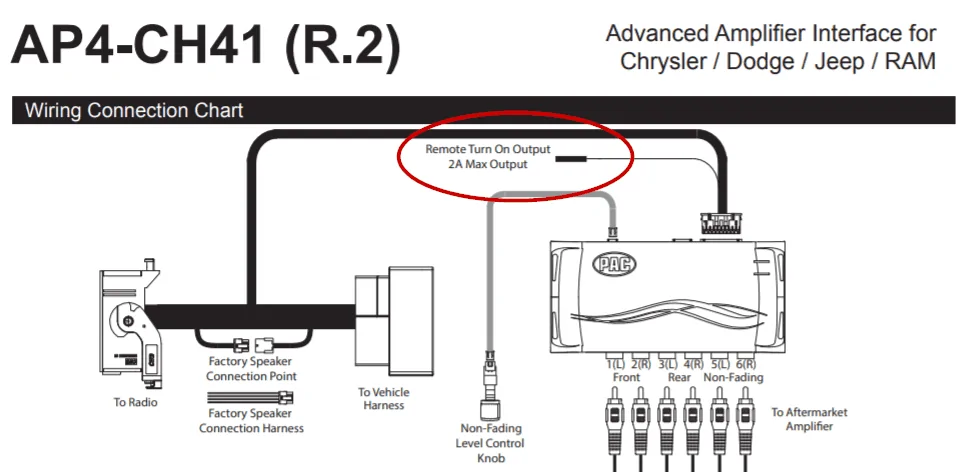
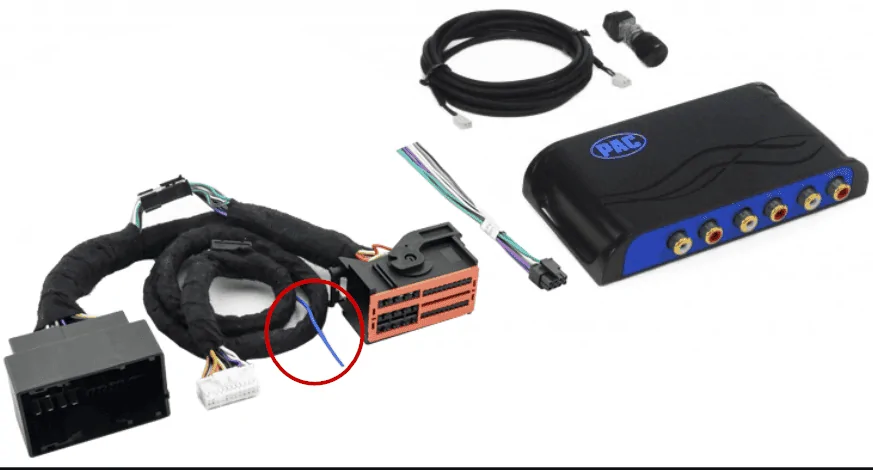
Just a little addition. I don't mean to override what Sting_NC_USA recommended, he is super knowledgeable in this, but your PAC AMP Pro T-harness actually has a remote signal lead (the blue one) you could use for your amp. That's what I have used and it works fine.
Jeep Wrangler JL Adding an Aftermarket Amp(s) 1599855821948
 

sandor.g

Well-Known Member
First Name
Sandor
Joined
Feb 19, 2020
Threads
10
Messages
139
Reaction score
57
Location
Orlando, FL
Vehicle(s)
2019 Wrangler JLU Sport S, Gladiator Hard Rock rims, MOPAR 2" lift
Occupation
Project Manager
Hey guys, I see that this thread is growing nicely.
I thought I would give you a quick update on my system.
So, after designing the 4" speaker adapters (I can send the 3D model if you need it) and putting in new alpine 4" coaxes in the sound bar I still felt like the sound, with the Alpine PSS-23WRA was a little shy.
So I pulled the trigger and got rid of the 4" speakers, got the 6.5 adapters, nice Alpine type R components and got rid of the PSS-23WRA. Installed the SSV Works sub box and an Alpine 10" sub I had laying in the garage unused.
Tried the system with an Alpine PDX-V9 amplifier (just to make a full Alpine system) and while it sounded far better than the previous setup, I was still not a 100% (more like 90%) satisfied. Then I got to try the Audiocontrol LC6.1200 and guys, this amp is a whole another league.

If you are considering the PDX-V9 you may want to check out the Audio Control as an option. I have bridged channels 5 and 6 for my dual coil 2 ohm sub speaker, fired it up and bang(!) that warmth I was missing (that 10%) is now there. I have been an Alpine person my entire life (except a quick stunt with Gladen Audio, but that's a whole different game) but AudioControl definitely has my respect now. Could not be any happier.
It's also cheaper than the PDX-V9 and a better option in my mind, unless you need a 5 channel amp, with the sub channel being 500W.
 

tthoms

Member
First Name
Tyler
Joined
Sep 9, 2020
Threads
0
Messages
17
Reaction score
6
Location
Bakersfield, CA
Vehicle(s)
2020 Jeep Wrangler Unlimited (Willy's)
Just a little addition. I don't mean to override what Sting_NC_USA recommended, he is super knowledgeable in this, but your PAC AMP Pro T-harness actually has a remote signal lead (the blue one) you could use for your amp. That's what I have used and it works fine.
1599855821948.png
Oh okay, good to know. So would this run from the PAC to the AMP, or would I simply just be using the wire to run from the amp to the 12v terminal? Because my amp wiring kit comes with a remote wire.
 

sandor.g

Well-Known Member
First Name
Sandor
Joined
Feb 19, 2020
Threads
10
Messages
139
Reaction score
57
Location
Orlando, FL
Vehicle(s)
2019 Wrangler JLU Sport S, Gladiator Hard Rock rims, MOPAR 2" lift
Occupation
Project Manager
Oh okay, good to know. So would this run from the PAC to the AMP, or would I simply just be using the wire to run from the amp to the 12v terminal? Because my amp wiring kit comes with a remote wire.
PAC to the Amp remote in. But the lead is quite short so you could use the remote wire in your wiring kit to connect the lead to your amp.
That blue lead is the one I am talking about
Jeep Wrangler JL Adding an Aftermarket Amp(s) 1599860109125
Sponsored


Top