Sponsored

Radio software version

rollerbones

Well-Known Member
First Name
Tom
Joined
Aug 14, 2020
Threads
11
Messages
69
Reaction score
25
Location
Ohio
Vehicle(s)
2022 JL 4xe
Occupation
Network Manager
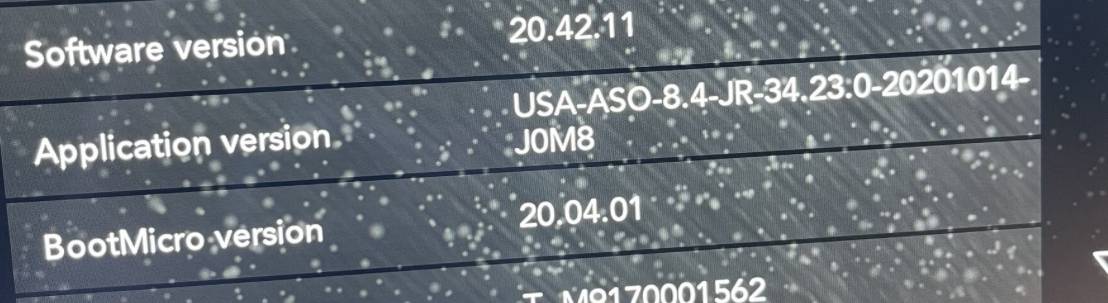
Hi, having issues with my radio freezing and rebooting in my 2020 Rubicon a few times.
Software version on my radio is 20.42.11 is there a newer update?

I have messaged JeepCares and I have yet to get a response from them.
Sponsored
 

miweber929

Well-Known Member
First Name
Michael
Joined
Aug 11, 2021
Threads
2
Messages
391
Reaction score
589
Location
Woodbury, MN
Vehicle(s)
ā€˜21 JLU Sport S, ā€˜16 Silverado
OP
OP
rollerbones

rollerbones

Well-Known Member
First Name
Tom
Joined
Aug 14, 2020
Threads
11
Messages
69
Reaction score
25
Location
Ohio
Vehicle(s)
2022 JL 4xe
Occupation
Network Manager
Thanks, I have and it says there is no update. But I also know you can't trust that (from experience on another Jeep)
 

OldGuyNewJeep

Well-Known Member
First Name
Don
Joined
Sep 21, 2017
Threads
93
Messages
3,993
Reaction score
7,108
Location
CT
Vehicle(s)
2018 Wrangler JL, 2016 Yukon XL
OP
OP
rollerbones

rollerbones

Well-Known Member
First Name
Tom
Joined
Aug 14, 2020
Threads
11
Messages
69
Reaction score
25
Location
Ohio
Vehicle(s)
2022 JL 4xe
Occupation
Network Manager
Jeep Wrangler JL Radio software version 53515894-460D-46FD-B1CD-18FEF10FB524


thanks, I will check that thread out. I am not on that version.
 

Sponsored

OldGuyNewJeep

Well-Known Member
First Name
Don
Joined
Sep 21, 2017
Threads
93
Messages
3,993
Reaction score
7,108
Location
CT
Vehicle(s)
2018 Wrangler JL, 2016 Yukon XL
53515894-460D-46FD-B1CD-18FEF10FB524.jpeg


thanks, I will check that thread out. I am not on that version.
39.6 solved all the issues I was having (finally, after 4 years!)

Good luck.
 

OldGuyNewJeep

Well-Known Member
First Name
Don
Joined
Sep 21, 2017
Threads
93
Messages
3,993
Reaction score
7,108
Location
CT
Vehicle(s)
2018 Wrangler JL, 2016 Yukon XL
What were some of the issues you had before updating?
Random reboots were the most annoying problem. Sometimes there’d be two in a row. Often, they were triggered by shifting to reverse so it would lock up the backup cam for a good two minutes. Before the reboot the screen (and most annoyingly, volume) would lock up. Hate the song that is on? Too bad. You have to listen to it for another minute or more until the reboot happens. Then, don’t touch anything for 30 seconds or it’s going to reboot, again! Made me insane.

Less annoying, but still not good:

Randomly losing backup lines

Random blue screen instead of backup camera

Random loss of volume control (switching to AM radio would fix that - odd.)

Sirius favorites not working

Funny thing is that my radio was fine when I bought new in 2018… then they started pushing updates that made things squirrelly.

Anyway, 39.6 has been rock solid. I will never accept another update.
 
Last edited:

californiajeeping

Well-Known Member
Joined
Feb 1, 2019
Threads
46
Messages
2,035
Reaction score
1,756
Location
California
Vehicle(s)
JLUR
Random reboots were the most annoying problem. Sometimes there’d be two in a row. Often, they were triggered by shifting to reverse so it would lock up the backup cam for a good two minutes. Before the reboot the screen and (most annoyingly, volume) would lock up. Hate the song that is on? Too bad. You have to listen to it for another minute or more until the reboot happens. Then, don’t touch anything for 30 seconds or it’s going to reboot, again! Made me insane.

Less annoying, but still not good:

Randomly losing backup lines

Random blue screen instead of backup camera

Random loss of volume control (switching to AM radio would fox that - odd.)

Sirius favorites not working

Funny thing is that my radio was fine when I bought new in 2018… then they started pushing updates that made things squirrelly.

Anyway, 39.6 has been rock solid. I will never accept another update.
Is there a way to force the OTA update? I read that other thread referenced earlier in this thread but didn’t see a way. I read how to update via USB, but I’d like to get it to offer an OTA update. I haven’t seen an OTA in 2+ years.

Application version is 22.64
Software version is 21.11.11
 
Last edited:

OldGuyNewJeep

Well-Known Member
First Name
Don
Joined
Sep 21, 2017
Threads
93
Messages
3,993
Reaction score
7,108
Location
CT
Vehicle(s)
2018 Wrangler JL, 2016 Yukon XL
Is there a way to force the OTA update? I read that other thread referenced earlier in this thread but didn’t see a way. I read how to update via USB, but I’d like to get it to offer an OTA update. I haven’t seen an OTA in 2+ years.

Application version is 22.64
Software version is 21.11.11
No. If under warranty just go to dealer and rattle off symptoms in TSB. If not under warranty, you have to do it yourself (or pay a ridiculous fee for very little effort).
Sponsored


Top