Sponsored

Customizaable screens - what do you go with?

outlanderbz

Well-Known Member
First Name
Bill
Joined
May 9, 2018
Threads
5
Messages
88
Reaction score
63
Location
Illinois
Vehicle(s)
2018 Jeep Wrangler Unlimited Sahara
Having a TJ, then a JK and now a JL Sahara w/ 8.4 inch screen the amount of screens and customization is welcome but also gets my type of personality going. I never had this type of customization and redundancy in a car before of where to see or interact with things. Whenever I drove my wife's car I just left hers where she had it but now that I have all these settings, look out!

That being said, I was wondering what most of you are using for your center screen. Do you go with the speedometer despite having a an analogue one right there all the time. Perhaps you leave it on fuel economy and then change the top center to speedometer. Throw the clock on the center screen?

And don't get me started on how I can interact with climate via physical buttons and/or the screen! :)
Sponsored


JayO

Active Member
First Name
Jay
Joined
May 15, 2017
Threads
3
Messages
39
Reaction score
84
Location
Boston, MA
Vehicle(s)
2020 Gladiator, 2021 JL Sport S, 2015 RR Sport
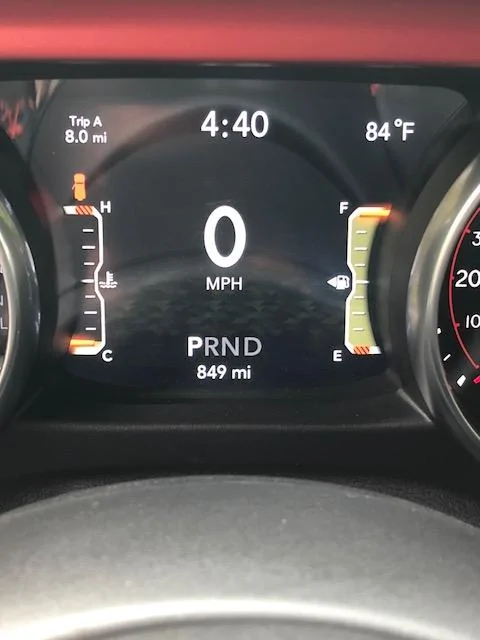
This is my set up.

But, the one question I had was, can you change the background theme on this display, like you can choose from the 17 or so on the main infotainment screen?

Jeep Wrangler JL Customizaable screens - what do you go with? IMG_1329
 

thholr

Member
First Name
Thorsten
Joined
May 14, 2018
Threads
5
Messages
22
Reaction score
8
Location
Atlanta
Vehicle(s)
2018 Jeep Wrangler Sahara
yeah would be nice for them to match . There is a lot of orange on the dials and the little screen , so the blue themes seem a little bit too much of a contrast.
 

maguro

Well-Known Member
First Name
Ken
Joined
Nov 25, 2017
Threads
8
Messages
438
Reaction score
572
Location
Canadian Rockies
Vehicle(s)
Punk'n JLUR
That being said, I was wondering what most of you are using for your center screen. Do you go with the speedometer despite having a an analogue one right there all the time. Perhaps you leave it on fuel economy and then change the top center to speedometer. Throw the clock on the center screen?
I keep it on the digital speedometer because my analog speedometer is often inaccurate.
 
OP
OP
outlanderbz

outlanderbz

Well-Known Member
First Name
Bill
Joined
May 9, 2018
Threads
5
Messages
88
Reaction score
63
Location
Illinois
Vehicle(s)
2018 Jeep Wrangler Unlimited Sahara
This is my set up.

But, the one question I had was, can you change the background theme on this display, like you can choose from the 17 or so on the main infotainment screen?

IMG_1329.webp
I couldn’t find a way so the OCD in me made the large screen match that screen. Hah.

I like the time idea in that position. I dislike how the clock moves when on Uconnect vs Apple CarPlay so that would solve that. I find myself hunting for the clock.
 

Sponsored

OP
OP
outlanderbz

outlanderbz

Well-Known Member
First Name
Bill
Joined
May 9, 2018
Threads
5
Messages
88
Reaction score
63
Location
Illinois
Vehicle(s)
2018 Jeep Wrangler Unlimited Sahara
yeah would be nice for them to match . There is a lot of orange on the dials and the little screen , so the blue themes seem a little bit too much of a contrast.
I agree. I felt the Jeep has an orange / digital camo like theme going so I kind of stayed with that on the main screen. I made the main screen match the small screen. Can’t remember what exact theme number it is right now.
 

dudemind

Well-Known Member
Joined
Feb 15, 2018
Threads
27
Messages
362
Reaction score
357
Location
Los Angeles, CA
Vehicle(s)
2018 Wrangler JL Rubicon
Outside temp in upper left.

Time in upper right. Got tired of looking over at center stack for the time (and it's not on all screens there).

Blank upper center center. In my seating position, a sliver of this field is cut off from view, and that drove me nuts.

Fuel economy as main (the second screen, showing distance to empty and current MPG).
 
Last edited:
OP
OP
outlanderbz

outlanderbz

Well-Known Member
First Name
Bill
Joined
May 9, 2018
Threads
5
Messages
88
Reaction score
63
Location
Illinois
Vehicle(s)
2018 Jeep Wrangler Unlimited Sahara
Outside temp in upper left.

Time in upper right. Got tired of looking over at center stack for the time (and it's not on all screens there).

Blank upper center center. In my seating position, a sliver of this field is cut off from view, and that drove me nuts.

Fuel economy as main (the second screen, showing distance to empty and current MPG)
Yeah, I am liking everyone's idea of putting the time on the center screen. I notice myself hunting for the time and like you mentioned, it is gone sometimes and when you go with CarPlay the time moves from top to the left and it bothers me. Not sure where it shows on Android Auto. Perhaps this would be something that I just get used to but I don't like that it moves.

I like your layout. digital MPH seems redundant and having the fuel info makes sense.
 

RajCaj

Member
First Name
Jason
Joined
May 5, 2018
Threads
1
Messages
22
Reaction score
4
Location
Louisiana
Vehicle(s)
JL Wrangler Unlimited - Sahara Trim
.....

And don't get me started on how I can interact with climate via physical buttons and/or the screen! :)
I discovered the other day that you can also change the climate settings (temp) with UConnect Voice Commands. Hit the voice activation button the steering wheel and say something to the effect of "Change temp to 70 degrees..etc"
 
OP
OP
outlanderbz

outlanderbz

Well-Known Member
First Name
Bill
Joined
May 9, 2018
Threads
5
Messages
88
Reaction score
63
Location
Illinois
Vehicle(s)
2018 Jeep Wrangler Unlimited Sahara
I discovered the other day that you can also change the climate settings (temp) with UConnect Voice Commands. Hit the voice activation button the steering wheel and say something to the effect of "Change temp to 70 degrees..etc"
oh man, too many options... ahhh. haha.

I think my wife is already annoyed at me when I say should we use carplay navigation or uconnect navigation today? hehe
 

Sponsored

dudemind

Well-Known Member
Joined
Feb 15, 2018
Threads
27
Messages
362
Reaction score
357
Location
Los Angeles, CA
Vehicle(s)
2018 Wrangler JL Rubicon
Yeah, I am liking everyone's idea of putting the time on the center screen. I notice myself hunting for the time and like you mentioned, it is gone sometimes and when you go with CarPlay the time moves from top to the left and it bothers me. Not sure where it shows on Android Auto. Perhaps this would be something that I just get used to but I don't like that it moves.

I like your layout. digital MPH seems redundant and having the fuel info makes sense.
Yup. Having fuel in the middle gives me way more data points than any other screen. Instant, average, and distance-to-empty. It also gives me the little color-coded gauge showing how the instant fuel usage is looking, which I can see without taking my eyes off the road.

I had compass instead of time initially (with time up center), but the compass kept going dead (still does, I think it's a UConnect/CarPlay issue, which I've posted about). Little things that drive me crazy......
 

wanderer

Well-Known Member
First Name
Ralph
Joined
Aug 10, 2017
Threads
256
Messages
1,974
Reaction score
1,082
Location
Carlsbad CA
Vehicle(s)
2018 jlu rubicon. Surfboard. Bare feet, moose drawn air sled, Interstellar time warp space transport fighter
Occupation
Engineering Geologist
Has anyone figured out what each of the 17themes actually do? Where can I find out?
 

liquids

Well-Known Member
First Name
Bill
Joined
Dec 18, 2017
Threads
25
Messages
451
Reaction score
405
Location
Detroit
Vehicle(s)
2018 JLU Sport S, 1968 CJ5
How about "None" in the center? It's a setup option, but it doesn't work. There's alway something in the center. I have time in the upper left and temp in the upper right, and that's all I want. Has anyone successfully gotten the between-the-circles area to be blank?
Sponsored


Top