Sponsored

TazerJL Feature Requests

Rhinebeck01

Well-Known Member
Joined
May 9, 2018
Threads
169
Messages
12,679
Reaction score
19,169
Location
Ormond Beach, Florida
Vehicle(s)
'18 JL Rubi, '26 Cybertruck, '01 Harley FatBoy
Occupation
Retired at 55 ..
I figured not a standard option due to liability on a mass produced item.

But, was hoping consideration could be made by a case by case single use with understanding of the liability issues and concerns waived.

I am deleting the side airbag regardless with the PRP seats and all the Tazer is really doing for me is turning the light and error codes off on my dash…. ?

Consider reaching out to JSCAN in Poland about this ....

Go to this FB group "JScan Lovers" and post.
https://www.facebook.com/groups/2582861995366601
Sponsored
 

Rhinebeck01

Well-Known Member
Joined
May 9, 2018
Threads
169
Messages
12,679
Reaction score
19,169
Location
Ormond Beach, Florida
Vehicle(s)
'18 JL Rubi, '26 Cybertruck, '01 Harley FatBoy
Occupation
Retired at 55 ..
Awesome, just posted on the group on Facebook.
@Extremneon

Piotr Bialic, the Polish guy that brings us JSCAN is also the Administrator of that FB Group.

Give Piotr, a few hours and he will undoubtedly reply to you.

Remember Poland is not on the same time zone as you so it may take 12+ hours before you get a reply to your FB post for him or from Grzesiek Wilku Wilczek (Polish) who also fields JSCAN questions there.
 

JeepinJason33

Well-Known Member
Joined
Oct 3, 2020
Threads
43
Messages
1,308
Reaction score
1,553
Location
Denver
Vehicle(s)
2021 JLUR, 2021 GCL, 1997 TJ, 1983 Chief FSJ
Clubs
 
I have not heard if Tazer was able to figure out the dash gear indicator yet for swapped 392 steering wheels. I made the request along with a few others early last year. What I am referring to is that once you swap in a 392 steering wheel and make the adjustments for the paddle shifter, Tazer enables it to work (thank you), but the gear indicator on the dash does not change as it does in the 392. You have to shift over the gear selector (stick) over to the +/- and then make changes with the paddle to see the different gears on the dash.
 

TROYXTROY

Well-Known Member
Joined
Nov 16, 2019
Threads
22
Messages
90
Reaction score
38
Location
New England
Vehicle(s)
2020 Rubi
I have not heard if Tazer was able to figure out the dash gear indicator yet for swapped 392 steering wheels. I made the request along with a few others early last year. What I am referring to is that once you swap in a 392 steering wheel and make the adjustments for the paddle shifter, Tazer enables it to work (thank you), but the gear indicator on the dash does not change as it does in the 392. You have to shift over the gear selector (stick) over to the +/- and then make changes with the paddle to see the different gears on the dash.
Hoping this can be figured out some day as well....
 

Sponsored

zouch

Well-Known Member
Joined
Sep 17, 2020
Threads
39
Messages
3,725
Reaction score
3,811
Location
Berkeley, CA
Vehicle(s)
XJ, JLUWD
how about a slower CHMSL flash?

seems like the 3rd brake light flash function is too fast, even on the slowest setting.
 

BIGW0RM

Well-Known Member
Joined
Sep 26, 2022
Threads
8
Messages
178
Reaction score
266
Location
Orange County, CA
Vehicle(s)
23 Raptor // 22 M3 Comp X // 20 RRS
Auto brake hold... rather than flash ABS and brake light. Can you just put brake light on and keep it on until you move. The flashing lights are a bit much.

Also keeping auto brake hold activated when a door opens would be much safer too.
 

dpike

Well-Known Member
Joined
May 28, 2020
Threads
42
Messages
829
Reaction score
1,171
Location
New Jersey
Vehicle(s)
'20 JLUR 3.6
is there a feature that will turn the volume WAY down for the blind spot detection. i try to use my blinkers in advance of what im doing which means occasionally there's still a car or cars i'm either passing or passing me and it bugs the shit out of me that instead of blinker advanced warning, i have wait until the last car is past, flick on my blinker and go in order to not scare the shit out of myself or the passenger. that boop bwOOP is a very irritating and stressful sound to me, does its job, but bleh..
 

jludave

Well-Known Member
First Name
Dave
Joined
Feb 13, 2020
Threads
13
Messages
4,158
Reaction score
4,287
Location
The Isle of Long
Vehicle(s)
2020 Wrangler Unlimited Sport Altitude
Occupation
IT Manager
Vehicle Showcase
1
Clubs
 
is there a feature that will turn the volume WAY down for the blind spot detection
Isn't there a setting for that in UConnect? I'm pretty sure my wife's Grand Cherokee had a setting somewhere.
 

Sponsored

wrang_stang

Well-Known Member
Joined
Jan 21, 2023
Threads
2
Messages
279
Reaction score
291
Location
TX
Vehicle(s)
24
I would love to have a physical "pause" button for the radio.
Sometimes I want to pause a song/podcast so that I can talk to someone in the car without having to scream, but it's not always easy to take one hand off the wheel, look at the screen, and try to tap the small pause button.
The two round buttons between the volume up/down buttons and between the next/previous buttons on the back of the steering wheel would be great candidates.
Additionally, if the front passenger wanted to pause, it would be great to have a second option in the HVAC control, like the Mute, Screen off, or Browse button.
It’s wild that this hasn’t been done. Which extra terrestrial at stellntis thought it’s an absolute must to be able to have a button for MUTE, a button to turn the screen OFF, and a THIRD button to do them both at the same time.

But play/pause, no one does that??

Edit: Oh and don’t forget the left buttons behind the steering wheel that do absolutely nothing. I hope it’s just a bug I really do.
 

JeepinJason33

Well-Known Member
Joined
Oct 3, 2020
Threads
43
Messages
1,308
Reaction score
1,553
Location
Denver
Vehicle(s)
2021 JLUR, 2021 GCL, 1997 TJ, 1983 Chief FSJ
Clubs
 
It’s wild that this hasn’t been done. Which extra terrestrial at stellntis thought it’s an absolute must to be able to have a button for MUTE, a button to turn the screen OFF, and a THIRD button to do them both at the same time.

But play/pause, no one does that??

Edit: Oh and don’t forget the left buttons behind the steering wheel that do absolutely nothing. I hope it’s just a bug I really do.
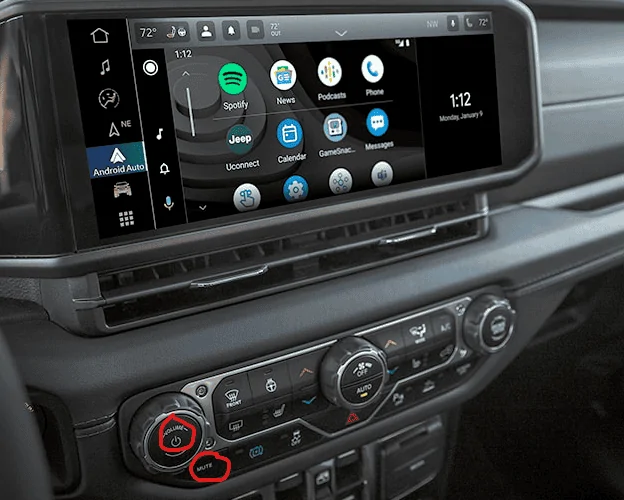
Confused on this one... Pressing the Volume knob turns the screen off and right below that is a mute button on both the older JL's and the new 24's... The buttons on the back of the steering wheel all have different functions, read the manual and if they don't work, you need to take it back to the dealer.

Jeep Wrangler JL TazerJL Feature Requests 1704420013164
 

wrang_stang

Well-Known Member
Joined
Jan 21, 2023
Threads
2
Messages
279
Reaction score
291
Location
TX
Vehicle(s)
24
Confused on this one... Pressing the Volume knob turns the screen off and right below that is a mute button on both the older JL's and the new 24's... The buttons on the back of the steering wheel all have different functions, read the manual and if they don't work, you need to take it back to the dealer.

1704420013164.png
Is there any way to simply pause music without touching the screen? The following is true when playing *media*, radio has different functions.

Like I said, radio power button turns off the screen (which no one uses). And you have yet another button to turn off the screen, so it’s great we have two of the largest buttons that both turn off the screen.
- The mute button keeps your music playing at zero volume, also not sure what the benefit is there. 100.0% of the time I want to pause, if I wanted to mute I could turn down the volume.
- The center rocker on the right switches media inputs (which is pretty rare to need).
- The center rocker on the left does nothing at all. If it’s supposed to pause I will absolutely take it to the dealer though.
 

JeepinJason33

Well-Known Member
Joined
Oct 3, 2020
Threads
43
Messages
1,308
Reaction score
1,553
Location
Denver
Vehicle(s)
2021 JLUR, 2021 GCL, 1997 TJ, 1983 Chief FSJ
Clubs
 
Only pause button I know of to stop the music is on the pandora/spotify and XM apps. If they are pulled up on the screen, you can pause them that way.

As far as the steering wheel controls, from your owners manual:

STEERING WHEEL AUDIO CONTROLS The remote sound system controls are located on the rear surface of the steering wheel at the three and nine o’clock positions. The right-hand control is a rocker-type switch with a push button in the center and controls the volume and mode of the sound system. Pushing the top of the rocker switch will increase the volume, and pushing the bottom of the rocker switch will decrease the volume. Pushing the center button will make the radio switch between the various modes available (AM/FM/SXM or Media, etc.). The left-hand control is a rocker-type switch with a push button in the center. The function of the left-hand control is different depending on which mode you are in. The following describes the left-hand control operation in each mode: Radio Operation Pushing the top of the switch will Seek Up for the next available station and pushing the bottom of the switch will Seek Down for the next available station. The button located in the center of the left-hand control will tune to the next preset station that you have programmed in the radio presets. Media Mode Pushing the top of the switch skips to the next track on the selected media (AUX/USB/Bluetooth®). Pushing the switch up twice will go forward two tracks. Pushing the bottom switch goes to the beginning of the current track, or the beginning of the previous track if it is within eight seconds after the current track begins to play. Double pressing the bottom button switch will skip to the previous track if it is after eight seconds into the current track.
 

Ratbert

Well-Known Member
First Name
John
Joined
Jun 20, 2020
Threads
159
Messages
16,025
Reaction score
24,974
Location
PNW
Vehicle(s)
2022 AEV JL370 JLURD
Build Thread
Link
Occupation
Software Engineer
Clubs
 
Only pause button I know of to stop the music is on the pandora/spotify and XM apps. If they are pulled up on the screen, you can pause them that way.

As far as the steering wheel controls, from your owners manual:

STEERING WHEEL AUDIO CONTROLS The remote sound system controls are located on the rear surface of the steering wheel at the three and nine o’clock positions. The right-hand control is a rocker-type switch with a push button in the center and controls the volume and mode of the sound system. Pushing the top of the rocker switch will increase the volume, and pushing the bottom of the rocker switch will decrease the volume. Pushing the center button will make the radio switch between the various modes available (AM/FM/SXM or Media, etc.). The left-hand control is a rocker-type switch with a push button in the center. The function of the left-hand control is different depending on which mode you are in. The following describes the left-hand control operation in each mode: Radio Operation Pushing the top of the switch will Seek Up for the next available station and pushing the bottom of the switch will Seek Down for the next available station. The button located in the center of the left-hand control will tune to the next preset station that you have programmed in the radio presets. Media Mode Pushing the top of the switch skips to the next track on the selected media (AUX/USB/Bluetooth®). Pushing the switch up twice will go forward two tracks. Pushing the bottom switch goes to the beginning of the current track, or the beginning of the previous track if it is within eight seconds after the current track begins to play. Double pressing the bottom button switch will skip to the previous track if it is after eight seconds into the current track.
Maybe those buttons don't work on @wrang_stang's rig?
Sponsored


Top