Sponsored

How is Android auto / apple play supposed to work?

Scratch

Well-Known Member
First Name
Robert
Joined
Nov 23, 2021
Threads
10
Messages
65
Reaction score
27
Location
Fish Camp ca
Vehicle(s)
2011 JK 2019 JL MOAB 2020 JTR
Is my android (pixel) screen supposed to show up on the unconnect screen? Basically I'm getting a different screen on my phone but the uconnect is just a Bluetooth device.
Thanks
Sponsored


JeepGeezer

Well-Known Member
First Name
Michael
Joined
Apr 1, 2022
Threads
13
Messages
155
Reaction score
91
Location
Southern Arizona
Vehicle(s)
2022 Wrangler Sport S
Occupation
Happily retired
I use Apple CarPlay so I am not sure how much help I can be, but I have used Android Auto in the past so perhaps I can at least ask some questions and maybe provide some answers.

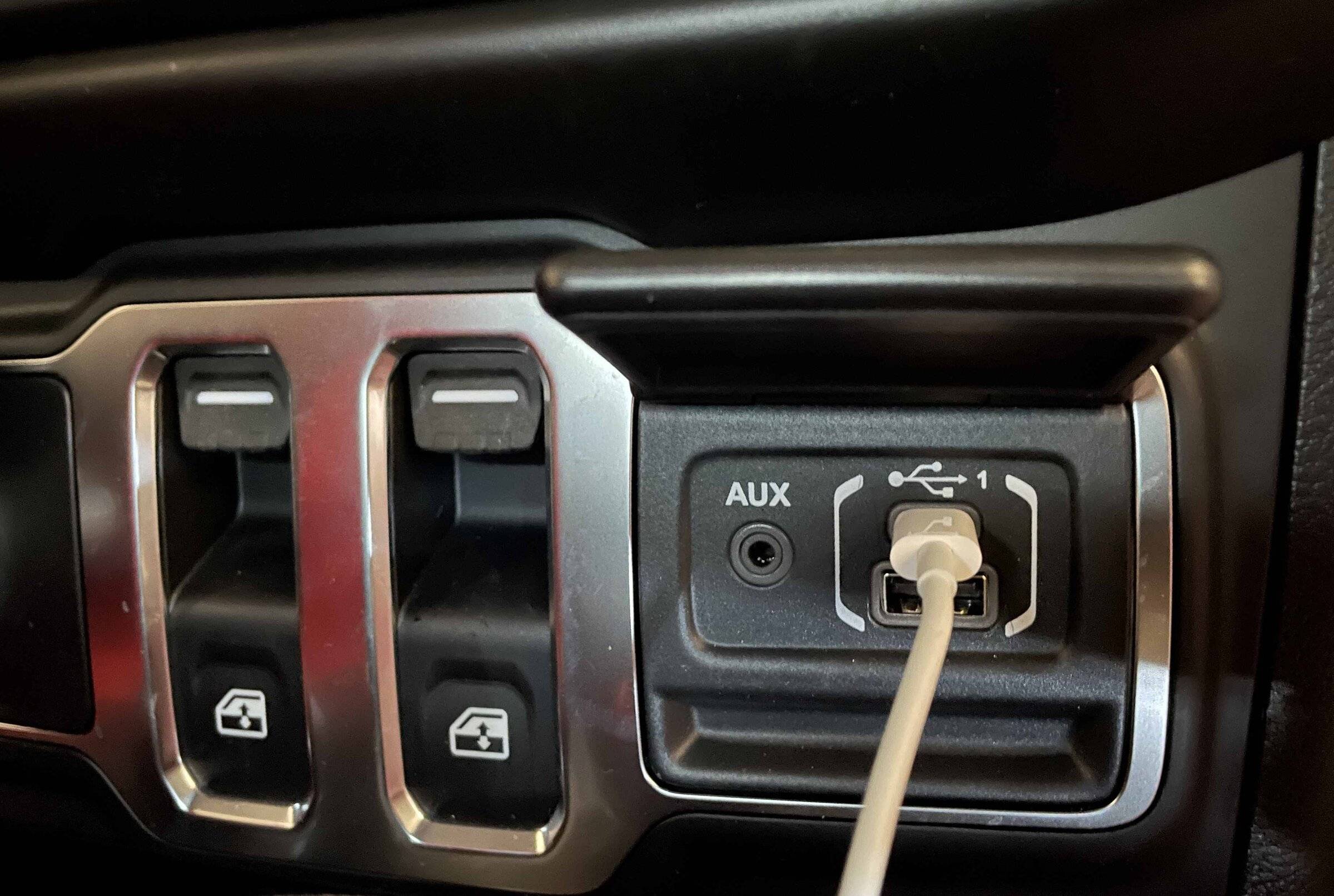
First, your Android phone almost certainly has to be connected to the display via a cable. I don't know how old your phone is, so here there is some guesswork, but I believe that most newer Android phones use a usb-c connector. And the wired connection has to be to the proper usb connection in the Jeep. Again, I don't know what year or model of Jeep you have, but on my 2022 Wrangler Sport S the connection is on the passenger side of the dash. See the photo below.

Next, once connected, you have to be sure that the Android Auto app is running on your phone so that it can talk to the Jeep software. Once that is done your Jeep should connect to the phone and the display should show up on the screen. Note that on some phones Android Auto will automatically start when the phone talks to the Jeep software, but on others you may have to start the phone app itself.

Next, your phone screen is not supposed to show up on the display. What should show up is a multi-page Android Auto display with icons showing the different AA compatible apps. You use the app you want by scrolling to the proper icon and pressing it. Then you should get a display that looks like your phone screen. Perhaps not identical since some apps don't display the exact screen as shown on the phone, but it usually is something similar.

Although I use Apple CarPlay I do have an Android phone that I have successfully connected to the Jeep and if it will help I can connect that again and try to fill in some details. Let me know if you need that.

Jeep Wrangler JL How is Android auto / apple play supposed to work? Proper connection
 

JeepGeezer

Well-Known Member
First Name
Michael
Joined
Apr 1, 2022
Threads
13
Messages
155
Reaction score
91
Location
Southern Arizona
Vehicle(s)
2022 Wrangler Sport S
Occupation
Happily retired
Oh, and by the way, what version of UConnect do you have? I don't believe that UConnect 3 supports either Android Auto or Apple CarPlay. Our new Jeep has UConnect 4, so we are OK, but our previous Jeep had UConnect 3 so we could not use either AA or CP.

I am told that there is now a UConnect 5, but our Jeep is the latest model (2022) and it only has 4, and that required an upgrade from the base model that I believe had only 3.
 

hsracer

Well-Known Member
Joined
Aug 1, 2020
Threads
7
Messages
58
Reaction score
67
Location
California
Vehicle(s)
2020 2DR JL Sport (Sold); 2022 JLU Sport S ordered
Jeepgeezer pretty much nailed it. It should auto connect once you plug it in. The jeep screen will then clearly change to something that looks a lot more like an android phone, although it won't be the same as your phone screen. I have found that you need to use a fairly high quality cable or the jeep will not realize that the phone is plugged in (but your phone might recognize that it is plugged in), just as you are experiencing. Also, make sure you have the android auto app downloaded on your phone and set up prior to plugging it in.
 

JeepGeezer

Well-Known Member
First Name
Michael
Joined
Apr 1, 2022
Threads
13
Messages
155
Reaction score
91
Location
Southern Arizona
Vehicle(s)
2022 Wrangler Sport S
Occupation
Happily retired
I have found that you need to use a fairly high quality cable or the jeep will not realize that the phone is plugged in (but your phone might recognize that it is plugged in), just as you are experiencing.
Yes. Thank you for adding that.

Unfortunately there are plenty of usb cables that are only for charging. They will allow you to charge your phone but will not pass data and without the data you can not run Android Auto or Apple CarPlay.

You need to make sure you have a cable that supports data transfer as well as charging. You should be able to tell if your cable supports data transfer by connecting it to a computer and seeing if it can talk to the computer.
 

Sponsored

Trini

Well-Known Member
Joined
Sep 15, 2018
Threads
4
Messages
280
Reaction score
418
Location
Cali
Vehicle(s)
2022 Jeep Wrangler Sahara 4xe
Clubs
 
Also, the screen won't change until you choose the Android Auto button, which is by default the second the last button in the 'taskbar' menu. All the other menu options are jeep default UI.
 
OP
OP

Scratch

Well-Known Member
First Name
Robert
Joined
Nov 23, 2021
Threads
10
Messages
65
Reaction score
27
Location
Fish Camp ca
Vehicle(s)
2011 JK 2019 JL MOAB 2020 JTR
Ok off to the garage with a handful of cables. This is how I suspect the system should work. I have a 19 JLU , 20 Gladiator and 21 JLU. It will be interesting to see what one works and what doesn't.
I will report back.
Thanks
 

JeepGeezer

Well-Known Member
First Name
Michael
Joined
Apr 1, 2022
Threads
13
Messages
155
Reaction score
91
Location
Southern Arizona
Vehicle(s)
2022 Wrangler Sport S
Occupation
Happily retired
Also, the screen won't change until you choose the Android Auto button, which is by default the second the last button in the 'taskbar' menu. All the other menu options are jeep default UI.
Right. It is exactly the same with Apple CarPlay. The taskbar menu is at the bottom of the screen on our Jeep and CarPlay does not show up until the phone is connected.
 

JeepGeezer

Well-Known Member
First Name
Michael
Joined
Apr 1, 2022
Threads
13
Messages
155
Reaction score
91
Location
Southern Arizona
Vehicle(s)
2022 Wrangler Sport S
Occupation
Happily retired
Ok off to the garage with a handful of cables. This is how I suspect the system should work. I have a 19 JLU , 20 Gladiator and 21 JLU. It will be interesting to see what one works and what doesn't.
I will report back.
Thanks
Make sure you check your UConnect version if you have issues.
 
OP
OP

Scratch

Well-Known Member
First Name
Robert
Joined
Nov 23, 2021
Threads
10
Messages
65
Reaction score
27
Location
Fish Camp ca
Vehicle(s)
2011 JK 2019 JL MOAB 2020 JTR
Super cool thanks!
I can report that Android Auto works on all 3 Jeeps. The 19 JLU, 20 JT, and 21 JLU. All 3 vehicles have the 8.4 uconnect. I didn't check the versions.
One interesting point the Android auto button doesn't show up on the uconnect until the phone is connected.
For reference my phone is a Pixel 6.
 

JeepGeezer

Well-Known Member
First Name
Michael
Joined
Apr 1, 2022
Threads
13
Messages
155
Reaction score
91
Location
Southern Arizona
Vehicle(s)
2022 Wrangler Sport S
Occupation
Happily retired
I can report that Android Auto works on all 3 Jeeps. The 19 JLU, 20 JT, and 21 JLU. All 3 vehicles have the 8.4 uconnect. I didn't check the versions.
Great. Glad to hear that you got it working.

One interesting point the Android auto button doesn't show up on the uconnect until the phone is connected.
Yes. And it is exactly the same with Apple CarPlay. The button does not show up until the phone is connected.

I have read that CarPlay, and perhaps Android Auto, may soon work with a bluetooth connection but as of now they don't, at least on my Jeep.
Sponsored


Top